Our readers keep the lights on and my smoothie glass nicely filled. As an Amazon Associate, I earn from qualifying purchases.
Specs are compiled from manufacturer listings and verified buyer reviews and can change over time — please confirm the key details on the product page before buying.
A digital camera for seniors needs to solve one thing above all else: frustration. If the buttons are tiny, the menus are endless, or the screen is hard to see in sunlight, that camera will end up in a drawer. The right pick makes taking a great photo feel as simple as pointing and pressing — no manual required.
I’m Mohammad Maruf — the founder and writer behind WellFizz. This guide is built by comparing the manufacturers’ published specifications and the patterns across verified customer reviews, so you get each pick’s real strengths and trade-offs instead of marketing spin.
The list below focuses on the five models that real owners say are the easiest to handle, with the clearest screens and the most forgiving controls, to help you find the best digital camera for seniors that fits your lifestyle and budget.
Our Picks at a Glance
How To Choose The Best Digital Camera For Seniors
Not all point-and-shoot cameras are created equal when your hands or eyes aren’t as sharp as they used to be. The wrong button layout or a dim screen can make a good camera feel impossible to use. Here is what to look for.
Optical Zoom vs. Digital Zoom
Optical zoom uses the lens to bring subjects closer without losing quality — that is what you want for a clear shot of a grandkid on stage or a bird at the feeder. Digital zoom simply crops and enlarges the image, which often turns it into a blurry mess. Look for a camera that lists its optical zoom in the specs (4X, 5X, or 12X) and ignore the digital zoom number entirely.
Battery Simplicity
Some cameras use standard AA batteries, which means you can buy replacements at any corner store if you forget to charge. Others use a rechargeable lithium-ion pack that you plug in like a phone. Neither is better — it depends on whether you prefer lower ongoing cost (rechargeable) or the ability to swap in fresh batteries instantly (AA).
Screen Size and Visibility
A larger LCD screen makes it easier to frame a shot and review your photos without reaching for reading glasses. Look for at least a 2.7-inch screen, and check whether the display is bright enough to see outdoors on a sunny day. A flip screen is a bonus if you plan to take selfies or group shots.
Quick Comparison
| Model | Best For | Megapixels | Optical Zoom | Screen Size | Amazon |
|---|---|---|---|---|---|
| KODAK PIXPRO FZ55★ Best Overall | Best Overall | 16MP | 5X | 2.7″ | Amazon |
| Canon PowerShot ELPH 360 HSPremium Pick | Premium Choice | 20.2MP | 12X | 3.0″ | Amazon |
| 4K 64MP WiFi Camera | Feature-Packed | 64MP | 16X (digital) | 3.0″ Flip | Amazon |
| Minolta MND23 | Budget-Friendly | 48MP | 16X (digital) | 2.8″ | Amazon |
| KODAK PIXPRO FZ45 | AA Battery Convenience | 16MP | 4X | 2.7″ | Amazon |
In‑Depth Reviews
1. KODAK PIXPRO FZ55 16MP Digital Point & Shoot Camera
Our pick — over 4.5★ from 200+ verified ratings; the strongest balance of quality and price.
The point-and-shoot that owners say produces sharp results year after year with zero fuss.
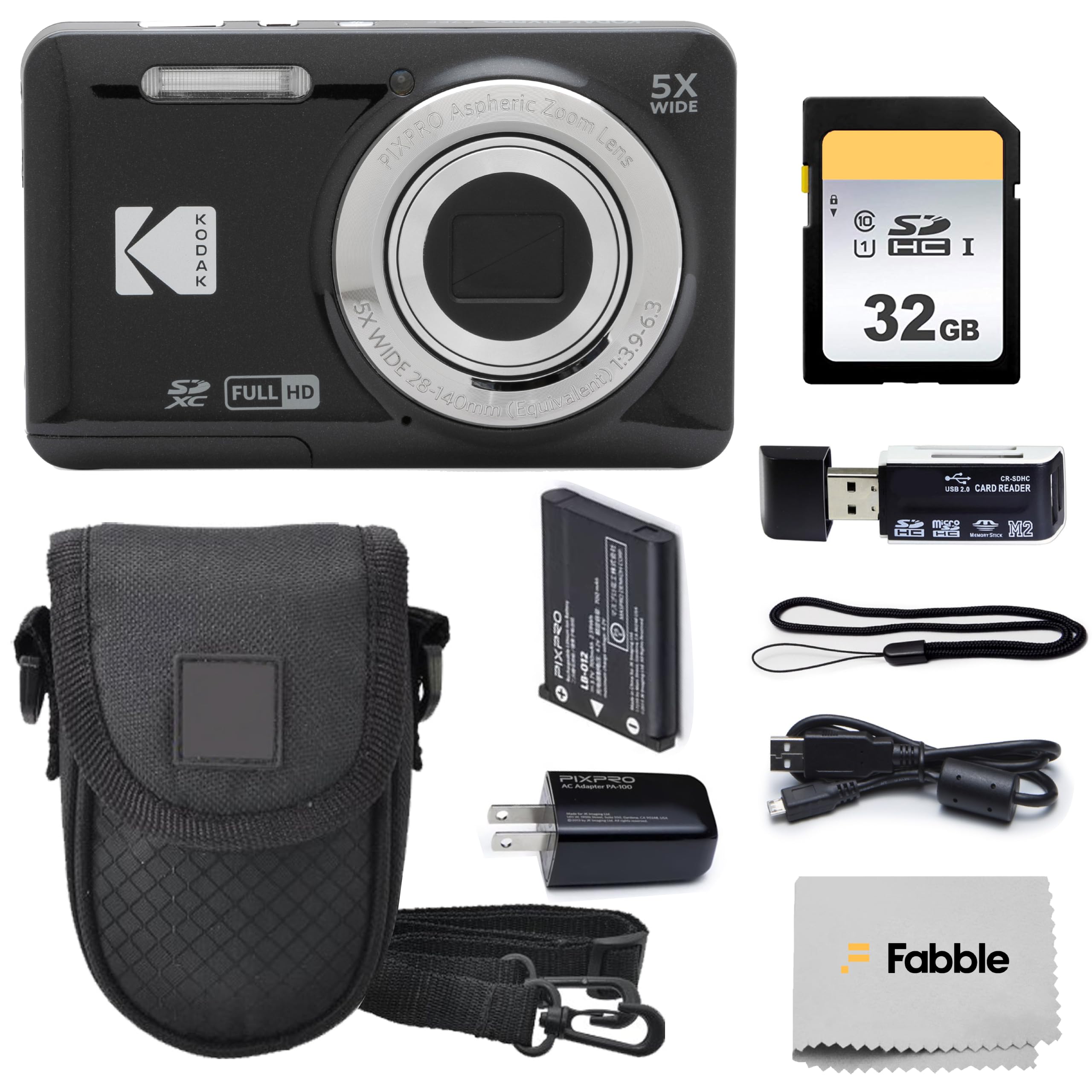
What wins people over here is the picture quality — it earns the most praise by a wide margin, with owners calling the photos vibrant and detailed straight out of the camera. The 16MP sensor captures enough resolution for good-looking prints, and the 5X optical zoom means you can fill the frame with a grandchild across the yard without the image turning grainy. Buyers report: “Sharp pictures, great autofocus, works like new after a year.” That kind of longevity matters when you want a camera you can pick up and trust without checking the charge or the settings.
The 2.7-inch LCD screen is big enough to compose shots comfortably, and the contrast-detection autofocus with 179 autofocus points keeps things locked on quickly — no hunting for the focus button mid-shot. It also records 1080p Full HD video, so a birthday toast or a walk through the garden comes out clear. The bundled 32GB SD card, protective case, and card reader mean you have everything you need in one box, which takes the guesswork out of buying extras.
Vivid color point-and-shoot
- Consistently sharp, vibrant photos with straightforward operation.
- Small enough to slip into a pocket or small bag; truly portable.
- Fully automatic mode means no manual settings to stumble through.
Limited zoom range
- Small body may feel cramped in larger hands; the grip is minimal.
- Flash has five settings that require some experimentation to get right.
color lovers: you want a no-learning-curve camera that delivers beautiful prints and video, comes complete with accessories, and has proven it lasts.
telephoto needs: your hands are on the larger side and you prefer a chunkier grip, or if you need a camera with a viewfinder instead of just the rear screen.
2. Canon PowerShot ELPH 360 HS
The compact Canon that brings a 12X optical zoom and proven image quality into a pocket-sized body.
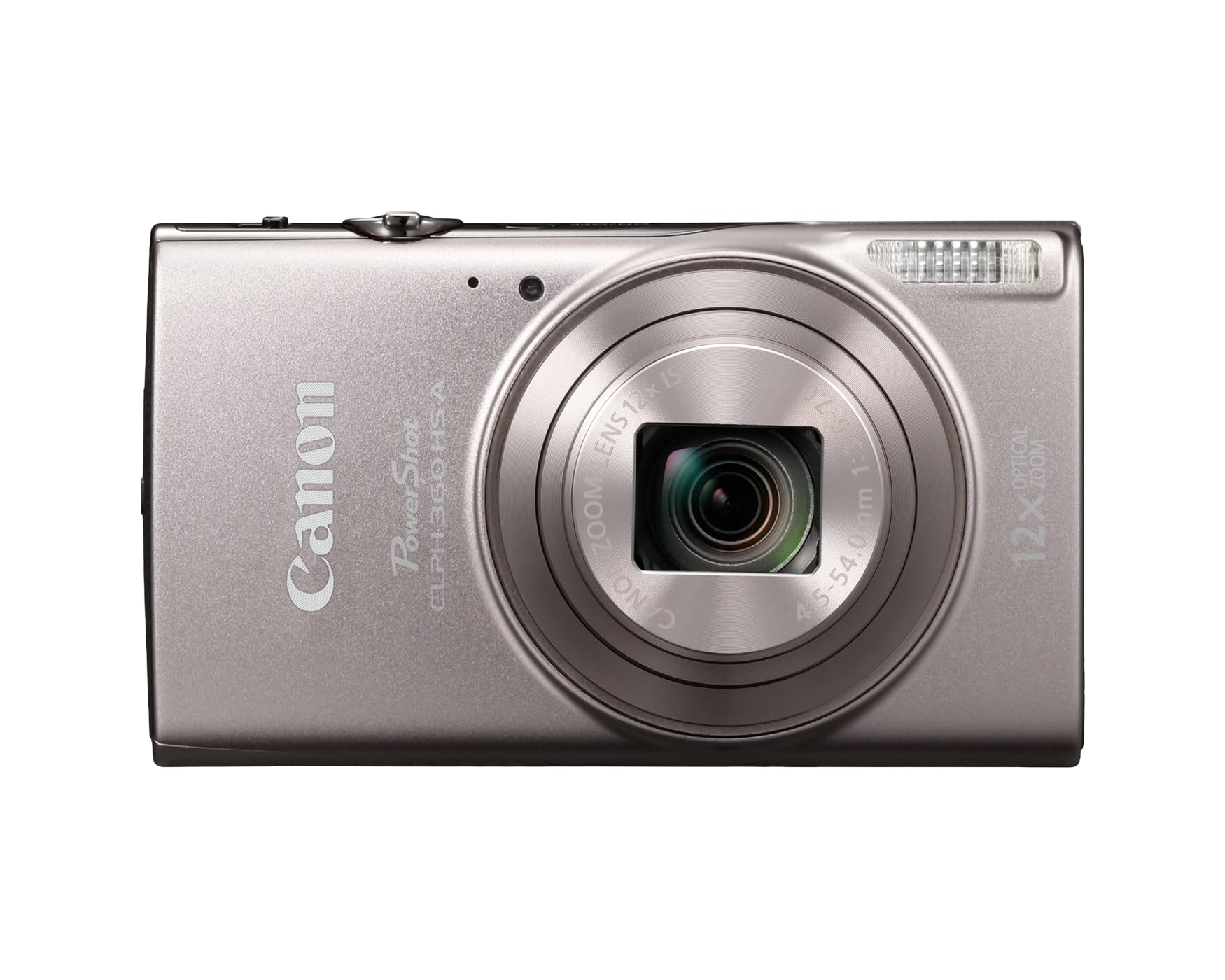
This is the camera for seniors who want a serious zoom without the weight and complexity of a DSLR. The 20.2MP CMOS sensor paired with the DIGIC 4+ Image Processor delivers crisp photos even when the light dips, and the 12X optical zoom blows past the competition — with its 12X optical zoom compared to the KODAK FZ55’s 5X optical zoom, which means you can capture a stage performance or a deer at the edge of the woods without moving from your seat. The Optical Image Stabilizer (a built-in system that steadies the lens) helps keep those long shots from turning into a blurry mess.
The 3.0-inch LCD is the largest screen on this list, making it the easiest on older eyes for framing and reviewing shots. Built-in Wi-Fi and NFC let you send photos straight to a smartphone, so sharing with family is as simple as tapping your phone to the camera. The Hybrid Auto mode is a clever addition — it records a few seconds of video before each still photo and stitches them into a highlight reel of your day, a feature owners find genuinely fun and easy.
travelers: anyone who needs a long zoom for distant subjects, wants the biggest screen for easy viewing, and values the Canon brand’s reputation for reliability.
video creators: you prefer the simplicity of AA batteries (this uses a rechargeable lithium-ion pack) or if Wi-Fi setup feels intimidating — though owners say the USB transfer works perfectly if you skip the wireless part.
3. 4K 64MP WiFi Vlog Camera with Flip Screen

The camera that packs 4K video, a selfie screen, and WiFi sharing into a lightweight travel-friendly body.
Where this camera stands out is the sheer feature density for the money. You get 4K video recording and a 64MP resolution for photos — at 64MP compared to the 16MP KODAK FZ55 — which gives you plenty of room to crop without losing detail. The 3.0-inch IPS screen flips 180 degrees, so you can see yourself while framing a selfie or a video call, a feature that seniors who enjoy video chatting or recording family greetings will appreciate. The built-in WiFi transfers images to a smartphone instantly, and owners say the setup is straightforward.
The camera comes with two rechargeable batteries, two wrist straps, a 32GB memory card, and a carrying bag, so nothing is left to buy. At a 16X digital zoom, you can pull distant subjects closer, though keep in mind this is digital zoom — the image quality drops as you push past the optical zoom range. The autofocus uses 9 points and contrast detection, which handles most everyday scenes well, and the built-in fill light helps with low-light shots. Reviewers consistently praise the picture quality and ease of use, calling it a great value for beginners and seniors wanting a modern, connected camera.
vloggers: seniors who want to shoot both photos and 4K video, share pictures wirelessly with family, and take selfies using the flip screen.
long shoots: you prefer true optical zoom over digital zoom for long-distance shots, or if you want a simple point-and-shoot without WiFi setup — this one rewards a little tech curiosity.
4. Minolta MND23 48MP Camera with Rear Selfie Lens

An affordable Minolta that throws in a dedicated rear selfie lens and 4K video at a rock-bottom entry price.
This one is for seniors on a strict budget who still want modern features. The 48MP resolution is overkill for most uses — you will likely never need that many pixels — but it does mean you can crop aggressively and still have a usable image. The rear selfie lens is a unique touch: a small secondary lens on the back lets you frame self-portraits without guessing, which is handy for seniors who enjoy taking their own photos. The 4K video recording captures smooth footage for family events, and the digital image stabilization helps keep it steady.
The catch is that image quality and responsiveness are where you feel the lower cost. Several owners found the shutter lag noticeable (the delay between pressing the button and the photo being taken), and image quality gets mixed reviews — some call it excellent, others find it lacking. The battery is rated for roughly 140 images at the highest quality setting, which is enough for a day out but not for an all-day event without recharging. It comes with a 32GB memory card, rechargeable battery, and pouch, so it is a true all-in-one starter kit.
selfie fans: you need the lowest possible entry cost, want 4K video and a selfie lens, and are happy with decent daytime photos that don’t require ultra-fast response.
night photography: you are easily frustrated by a slow shutter or need a camera that feels snappy — the Canon or KODAK options above will feel much more responsive.
5. KODAK PIXPRO FZ45 16MP Compact Digital Camera

The KODAK that runs on standard AA batteries — perfect for seniors who hate dealing with charging cables.
This is the camera to reach for when you want the ultimate in power simplicity. It uses two AA batteries, which you can swap in seconds from a pack you bought at the grocery store. No hunting for a wall outlet, no waiting for a battery to charge. The 16MP sensor captures detailed everyday photos, and the 4X optical zoom with a 27mm wide-angle lens is enough for most family and travel situations — though its 4X optical zoom compared to the FZ55’s 5X optical zoom. The 2.7-inch LCD screen is standard for the price range and works well for reviewing shots.
The honest trade-off is that the included AA alkaline batteries are very low quality and will die after about two hours of use. Owners strongly recommend buying a set of rechargeable AA NiMH batteries and a charger right away — that turns this camera into a much more cost-effective long-term option. A small number of owners reported units that stopped working, so check the return policy when purchasing. When it works, the photos compare favorably to much more expensive cameras, with owners noting crisp, vibrant images in good light.
casual users: seniors who want to use AA batteries for instant replacement anywhere, and who are comfortable buying a set of rechargeable AA cells to avoid ongoing battery costs.
versatile needs: you want the longest optical zoom available or prefer a lithium-ion battery that charges inside the camera — the Canon ELPH 360 HS and KODAK FZ55 are better fits.
Understanding the Specs
Optical Zoom
This is the spec that makes or breaks a camera for seniors. Optical zoom uses the lens glass to bring a subject closer without losing image quality — it is what you need for a clear photo of a bird or a performer on stage. Ignore the digital zoom number on the box; that is just electronic cropping that makes photos look grainy. A camera like the Canon ELPH 360 HS has a 12X optical zoom, while the KODAK FZ45 has a 4X optical zoom, which matters for distant subjects.
Megapixels and Sensors
More megapixels (MP) means you can crop a photo or print it at a larger size without it looking blocky. For sharing online or printing 4×6 snapshots, anything above 16MP is plenty of resolution. The 64MP camera in this list gives you much more cropping room than a 16MP camera, but the trade-off is that very high megapixel counts on small sensors can sometimes produce noisier images in low light. For everyday use, a 16MP to 20MP sensor in a well-known brand like Kodak or Canon delivers the best balance of quality and simplicity.
FAQ
Which digital camera is easiest for a senior with no tech experience?
Are AA battery cameras better for seniors than rechargeable ones?
What screen size should I look for if my eyesight isn’t great?
Will a 64MP camera take better photos than a 16MP camera?
How important is optical image stabilization for a senior?
Can I transfer photos from the camera to my smartphone?
What does “point and shoot” mean exactly?
How long does a fully charged battery last in these cameras?
Is a digital camera better than a smartphone for seniors?
What SD card do I need for these cameras?
Final Thoughts: The Verdict
For most seniors, the digital camera for seniors that hits the sweetest spot is the KODAK PIXPRO FZ55 because it delivers consistently sharp photos, true 5X optical zoom, and a complete accessory bundle — all with fully automatic operation that requires zero learning. If you want the longest zoom range and the biggest screen for your eyes, go with the Canon PowerShot ELPH 360 HS. And for the sheer convenience of AA batteries that you can swap anywhere, the KODAK PIXPRO FZ45 is the simplest power solution on the list.
How We Picked
We do not accept paid placement. Every pick is matched to a real buyer and a real use-case; we do not hands-on test units.
Sources & Methodology
Specifications: manufacturer listings and product documentation. Review insights: verified customer reviews, as of July 2026. Pricing: not shown on this page (it changes often); check the current price via the retailer link.
As an Amazon Associate, WellFizz earns from qualifying purchases. This does not affect which products we feature.
Related Guides

Mo Maruf
I created WellFizz to bridge the gap between vague wellness advice and actionable solutions. My mission is simple: to decode the research and give you practical tools you can actually use.
Beyond the data, I am a passionate traveler. I believe that stepping away from the screen to explore new environments is essential for mental clarity and physical vitality.