Our readers keep the lights on and my smoothie glass nicely filled. As an Amazon Associate, I earn from qualifying purchases.
The joy of a crisp 4K picture dissolves fast when the remote lags, the menu stutters, and the app takes ten seconds to load. Choosing the right streaming hardware is the single most impactful upgrade you can make to your home entertainment setup — and the wrong pick means living with that lag every single night.
I’m Mohammad Maruf — the founder and writer behind WellFizz. I’ve spent hundreds of hours cross-referencing processor benchmarks, storage specs, Wi-Fi standards, and real owner feedback across dozens of streaming sticks and boxes to separate the responsive contenders from the sluggish ones.
This guide walks you through the fastest, best-value, and most feature-rich players on the market so you can find the ideal best device for streaming tv that matches your ecosystem, your Wi-Fi setup, and your tolerance for waiting.
How To Choose The Best Device For Streaming TV
A streaming device is a long-term commitment — you will interact with its interface every single day. Picking the wrong one means tolerating a slow, ad-heavy, or app-limited experience for years. Focus on these three pillars to get it right the first time.
Processor and RAM
The brain of the device determines everything from app launch speed to multitasking between Netflix and a live channel. A quad-core or octa-core processor paired with at least 2 GB of RAM ensures the interface stays snappy even after months of app updates. Budget sticks with 1 GB or less RAM often feel sluggish out of the box and degrade over time.
Video and Audio Standards
Dolby Vision and HDR10+ are the two dominant HDR formats. Not every device supports both — some do only one. For the widest compatibility with modern TVs, look for a player that handles Dolby Vision, HDR10+, and HLG. Dolby Atmos is equally important if you have a soundbar or home theater system. Without it, you lose the height-channel immersion of 3D object-based audio.
Network Connectivity
For consistent 4K streaming, Wi-Fi 5 is the bare minimum, Wi-Fi 6 is comfortable, and Wi-Fi 6E provides the cleanest 6 GHz band for interference-heavy homes. An Ethernet port on a box-style player offers the absolute lowest latency and most stable connection for gaming or high-bitrate content. Stick-style devices rarely include Ethernet, so rely on strong Wi-Fi or a USB adapter.
Quick Comparison
On smaller screens, swipe sideways to see the full table.
| Model | Category | Best For | Key Spec | Amazon |
|---|---|---|---|---|
| NVIDIA Shield TV Pro | Premium Box | Home theater & gaming | 3 GB RAM, Tegra X1+ | Amazon |
| Amazon Fire TV Cube | Premium Box | Hands-free Alexa control | Octa-core, Wi-Fi 6E | Amazon |
| Roku Ultra | Premium Box | Ease of use & Ethernet | Wi-Fi 6, Dolby Vision | Amazon |
| Google TV Streamer 4K | Mid-Range Box | Google ecosystem integration | 32 GB storage, 22% faster CPU | Amazon |
| Xiaomi TV Stick 4K (2nd Gen) | Mid-Range Stick | Portable travel companion | 2.5 GHz quad-core A55 CPU | Amazon |
| Amazon Fire TV Stick 4K Max | Mid-Range Stick | Value 4K with Alexa | 16 GB storage, Wi-Fi 6E | Amazon |
In‑Depth Reviews
1. NVIDIA Shield TV Pro

The Shield TV Pro remains the benchmark for raw performance in the streaming category. Its Tegra X1+ chipset, backed by 3 GB of RAM, handles 4K HDR playback with Dolby Vision and Dolby Atmos without a hint of stutter. The machine-learning AI upscaling enhances HD content to near-4K sharpness — a genuine benefit for anyone still watching a large library of 1080p material. Dual USB 3.0 ports allow direct connection of external drives, making it an excellent Plex Media Server host that runs independently of a PC.
Owner reviews consistently praise the instantaneous app loading and the smooth, clean Android TV interface free of heavy advertising. The advanced remote with backlit, motion-activated buttons and a locator feature solves two common pain points: finding the remote in the dark and finding it after it slips between cushions. Gigabit Ethernet provides rock-solid network stability for high-bitrate remux files, and Bluetooth 5.0 ensures reliable controller pairing for game streaming via GeForce NOW.
Storage capacity sits at 16 GB onboard, which is modest for large game installs but expandable via USB. The premium price reflects the unmatched processor power, Dolby Vision and Atmos certification, and the server-grade feature set. For users who value zero compromise on speed, format support, and long-term usability, the Shield TV Pro is the only player that genuinely delivers on all fronts.
Why it’s great
- Best-in-class AI upscaling for HD content
- Full Dolby Vision and Dolby Atmos support
- Dual USB 3.0 for storage and peripherals
- Plex Media Server built into a streaming box
- Gigabit Ethernet for lag-free streaming
Good to know
- Premium price — a major investment
- Only 16 GB internal storage
- Requires HDMI cable for full 4K HDR
2. Amazon Fire TV Cube

The Fire TV Cube is Amazon’s fastest streaming media player, powered by an octa-core processor rated at double the performance of the Fire TV Stick 4K Max. The built-in far-field microphone array enables hands-free Alexa control — you can launch apps, search by plot line, adjust volume, and control compatible smart home devices without touching a remote. The square-box form factor includes an HDMI input port for passthrough of a cable box or game console, eliminating the need for a separate HDMI switch.
Wi-Fi 6E support opens the 6 GHz band for streaming in congested multi-device households, and the Ethernet port provides a wired fallback for the highest reliability. Dolby Vision and Dolby Atmos are both supported, delivering the full cinematic HDR and object-based audio experience. Owners report that app loading is instant and navigation is completely lag-free — a noticeable jump from even the best Fire TV Stick models.
Some users report audio passthrough quirks, including the device defaulting to PCM instead of bitstreaming Dolby Digital Plus. A firmware update may eventually fix this, but it is worth noting for purists. The home screen contains sponsored content and ads, which is consistent across the Fire TV ecosystem. For anyone already deep in Alexa-controlled lighting, cameras, and routines, the Fire TV Cube integrates in a way no other box can match.
Why it’s great
- Hands-free Alexa with built-in microphones
- Wi-Fi 6E and Ethernet for network flexibility
- HDMI input for cable box passthrough
- Octa-core processor, 2x faster than 4K Max
Good to know
- Cluttered home screen with ads
- No HDMI cable included in box
- Audio passthrough may require manual tweaking
3. Roku Ultra

Roku’s flagship Ultra player is 30 percent faster than the company’s previous-generation models, delivering a truly snappy interface that prioritizes simplicity over complexity. It supports Dolby Vision, HDR10+, and Dolby Atmos, covering all major HDR and audio formats. The included Voice Remote Pro is rechargeable — no more hunting for AAA batteries — and features backlit buttons plus a lost-remote finder. Pairing Bluetooth headphones directly to the Ultra lets you enjoy late-night viewing without disturbing anyone.
Roku’s operating system remains the most platform-agnostic interface available. It does not favor one streaming service over another, and it keeps advertising to a manageable level compared to the Fire TV ecosystem. The Ultra includes both Wi-Fi 6 and a built-in Ethernet port, ensuring you have a wired fallback for maximum stability. Owners highlight the ease of setup and the consistent performance across a wide range of apps, from Netflix to niche free ad-supported TV channels.
Occasional bugs with closed captioning and resume playback have been reported, though Roku has acknowledged them in firmware updates. The interface lacks deep customization options — you cannot rearrange the app grid as freely as on Android TV. For households with older or less tech-savvy users, the Roku Ultra’s dead-simple menu structure often makes it the best-fit streaming device.
Why it’s great
- Rechargeable backlit remote with finder
- Bluetooth headphone mode for private listening
- Wi-Fi 6 plus Ethernet port
- Platform-agnostic, clean interface
Good to know
- Limited home screen customization
- Occasional closed captioning bugs
- No Dolby Vision HDR gaming support
4. Google TV Streamer 4K

The Google TV Streamer 4K is a significant generational leap over previous Chromecast models. A 22 percent faster processor and double the memory of the prior generation deliver smooth app switching and responsive navigation. The 32 GB of onboard storage is a standout spec — enough to keep a full app library plus games without running out of space. Dolby Vision, HDR10+, and Dolby Atmos are all supported, ensuring full format compatibility with modern displays and sound systems.
Google TV’s home screen aggregates content recommendations from all your subscribed services, including Netflix, Prime Video, Disney+, and free ad-supported channels. The redesigned remote adds a customizable shortcut button and a lost-remote locator that rings the remote via voice command. Smart home integration is seamless — the home panel lets you check security camera feeds or dim lights without leaving the show you are watching.
Owners switching from Fire TV sticks consistently comment on the cleaner interface with fewer ads and the faster responsiveness. The device requires an HDMI 2.1 cable for full 4K output, which is sold separately. The box form factor sits neatly in an entertainment center rather than dangling behind the TV. For anyone in the Google ecosystem, this is the most cohesive streaming experience available at a mid-range price.
Why it’s great
- Generous 32 GB storage for apps and games
- Fast processor and doubled memory
- Clean Google TV interface with cross-service search
- Built-in smart home control panel
Good to know
- HDMI 2.1 cable not included
- No Ethernet port on the device itself
- Remote lacks backlit buttons
5. Xiaomi TV Stick 4K (2nd Gen)
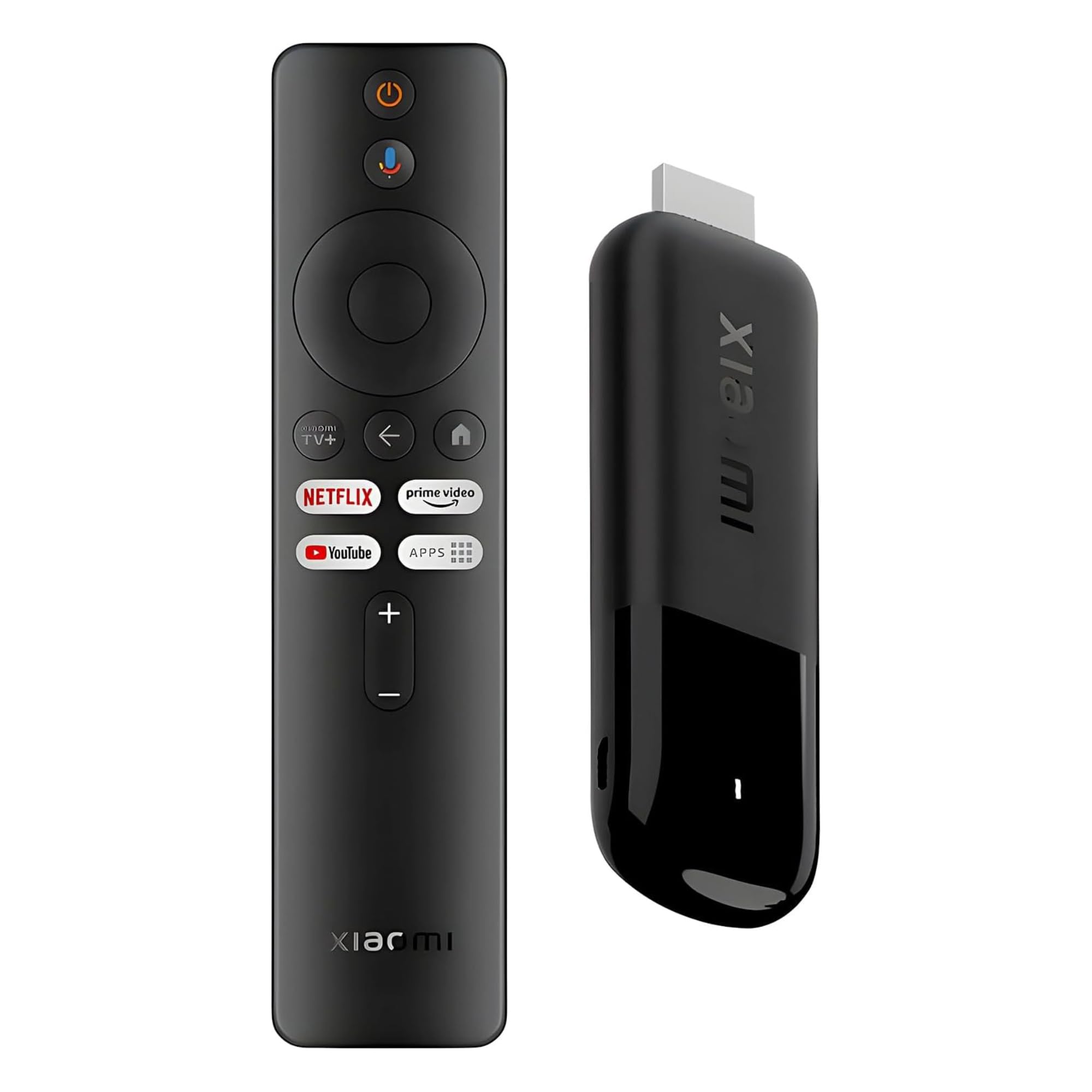
Xiaomi’s second-generation TV Stick 4K is a compact powerhouse built around a 6nm quad-core A55 processor clocked at 2.5 GHz. This chipset delivers noticeably faster app launches and smoother UI scrolling than the first generation. Dolby Vision, HDR10+, and Dolby Atmos are all supported, making it one of the most format-complete streaming sticks on the market. The dual-band Wi-Fi 6 radio ensures a stable connection for 4K streaming even in homes with multiple competing devices.
Google TV is the operating system, providing a personalized home screen that aggregates content from all your subscriptions. The voice remote includes Google Assistant for hands-free search, smart home control, and quick answers — all over Bluetooth 360-degree connectivity so you do not need to point the remote at the stick. The stick itself weighs only 28 grams, making it ideal for travel: plug it into a hotel TV or projector and your full app library is available instantly.
Storage capacity is not advertised in the listing, but reports indicate around 8 GB of usable space — enough for the core streaming apps but tight for large game downloads. The Micro USB power input can be finicky with some third-party cables. For the price, it offers an impressive feature set with the only real downsides being the limited storage and the lack of an Ethernet option, which is standard for stick form factors.
Why it’s great
- Compact and ultra-lightweight for travel
- Full Dolby Vision, HDR10+, and Atmos support
- Wi-Fi 6 for reliable 4K streaming
- Google TV interface with voice control
Good to know
- Limited internal storage for games
- Micro USB power input can be sensitive
- No Ethernet or USB ports
6. Amazon Fire TV Stick 4K Max
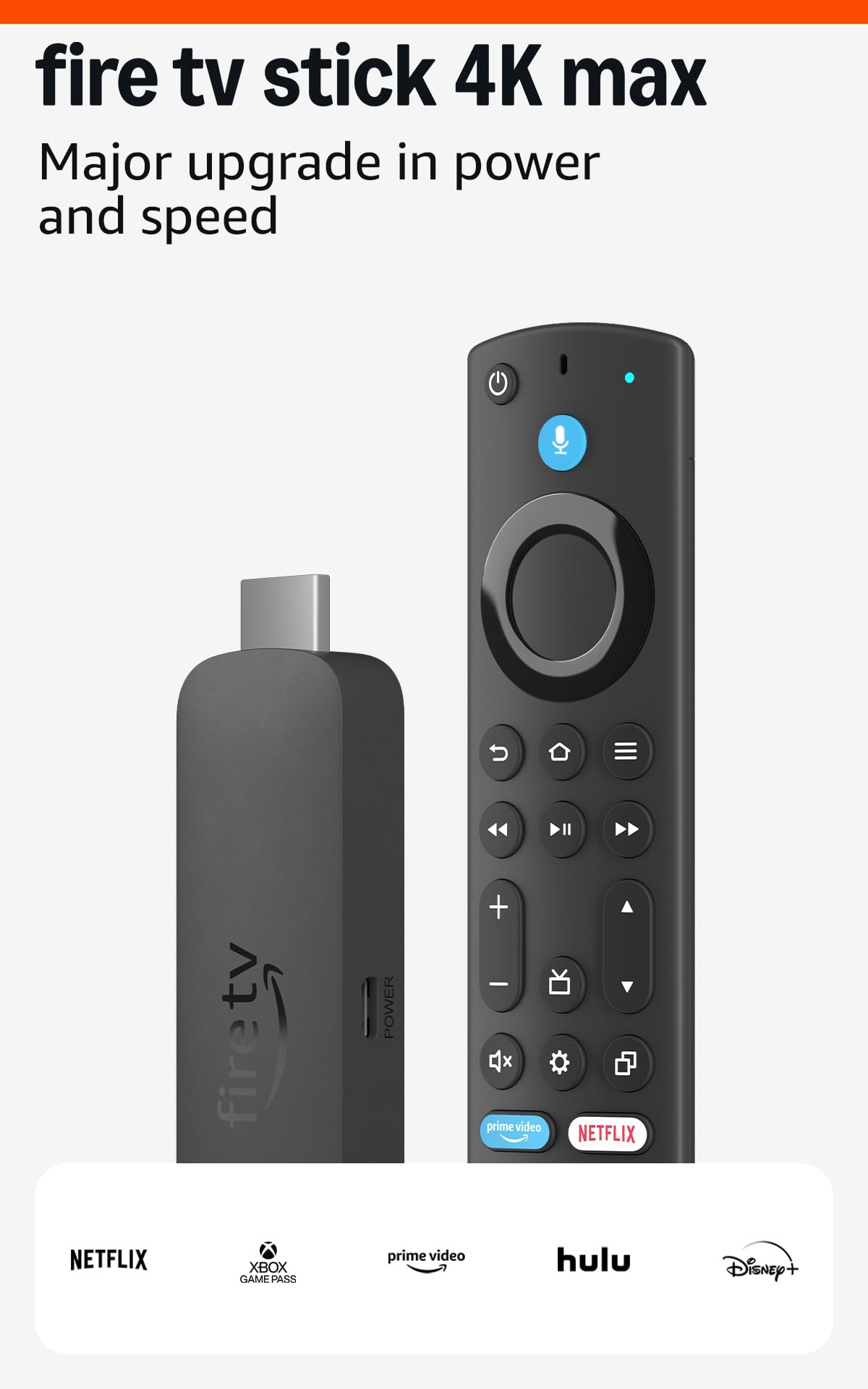
The Fire TV Stick 4K Max is the fastest stick Amazon produces, offering Wi-Fi 6E support that unlocks the 6 GHz band for interference-free streaming. Its 16 GB of storage is double that of the standard 4K model, giving you room for a larger app library and game downloads. Dolby Vision, HDR10+, and Dolby Atmos are fully supported, ensuring compatibility with the latest HDR and audio standards. The included Alexa voice remote lets you search by actor, plot, and even specific quotes.
Owners report that after a year of heavy use, the device remains fast and continues to receive firmware updates — a strong indicator of long-term support. The Ambient Experience feature turns the TV into an art display when idle, showing over 2,000 pieces of museum-quality artwork. Cloud gaming via Xbox Game Pass or Amazon Luna is surprisingly smooth, thanks to the lightweight Android gaming engine and Wi-Fi 6E throughput.
The Like-New refurbished option offers significant savings with the same warranty as a new unit, and buyers consistently note that the packaging and cosmetic condition are indistinguishable from retail. The main drawback is Amazon’s advertising-heavy interface, which promotes sponsored content on the home screen. For budget-conscious shoppers who want the fastest Fire TV experience without moving to the Cube, this is the stick to pick.
Why it’s great
- 16 GB storage — double the standard 4K stick
- Wi-Fi 6E for clean, high-speed streaming
- Full Dolby Vision, HDR10+, and Atmos
- Affordable, especially as refurbished
Good to know
- Home screen features heavy Amazon ads
- No Ethernet port
- Requires 4K TV and high-speed internet
FAQ
What is the difference between a streaming stick and a streaming box?
Do I need a 4K streaming device if I don’t have a 4K TV yet?
Can I use Bluetooth headphones with any streaming device?
How much internet speed do I need for smooth 4K streaming?
Will a streaming device improve the speed of my smart TV?
Final Thoughts: The Verdict
For most users, the best device for streaming tv winner is the NVIDIA Shield TV Pro because it combines unmatched processor power, AI upscaling, full Dolby Vision and Atmos support, and Plex Media Server capability into a single box that stays fast for years. If you want hands-free voice control and deep Alexa smart home integration, grab the Amazon Fire TV Cube. And for a balanced mid-range pick with a clean, ad-light interface, the Google TV Streamer 4K delivers exceptional value with its 32 GB of storage and fast processor.

Mo Maruf
I created WellFizz to bridge the gap between vague wellness advice and actionable solutions. My mission is simple: to decode the research and give you practical tools you can actually use.
Beyond the data, I am a passionate traveler. I believe that stepping away from the screen to explore new environments is essential for mental clarity and physical vitality.