Our readers keep the lights on and my smoothie glass nicely filled. As an Amazon Associate, I earn from qualifying purchases.
The moment you hit play on a 4K stream and the picture stutters, pixelates, or drops to a blurry 480p, it’s not your internet—it’s your hardware. The processor in many built-in “smart” TVs simply can’t keep up with modern streaming apps, forcing you into buffering limbo or a frustrating user interface that freezes mid-scroll. A dedicated aftermarket dongle or box bypasses the TV’s weak brain entirely and hands the work to purpose-built silicon designed solely for smooth, high-bit-rate video delivery.
I’m Mohammad Maruf — the founder and writer behind WellFizz. My research for this guide involved mapping the real-world performance trade-offs between the major streaming ecosystems, from Wi-Fi 6 throughput to Dolby Vision implementation, to find which models actually solve the buffering problem instead of just papering over it with marketing jargon.
Every option here plugs directly into your TV’s HDMI port and brings a dedicated operating system, a snappy remote, and the app support that keeps your entertainment choices open. Whether you are cutting the cord or just tired of your TV’s slow menu, this guide to the best device for streaming 4k will help you find the perfect dedicated player.
How To Choose The Best Device For Streaming 4K
The streaming dongle market has narrowed to three main ecosystems: Roku’s neutral platform, Amazon’s Alexa-integrated Fire TV, and Google TV’s recommendation engine on Chromecast. Each has a slightly different philosophy on how you interact with your apps. Your choice starts by deciding which remote interface you want to live with.
Video Format Support: The HDR Alphabet
Not all 4K is created equal. Dolby Vision and HDR10+ are the two competing dynamic HDR formats that adjust brightness and color scene-by-scene. A device that supports both ensures you get the best picture from any disc or streaming service. Entry-level models often support only static HDR10, which applies a single tone map to the entire movie, leaving shadow detail flat. If your TV supports Dolby Vision, prioritize a device with that logo on the box.
Processor Power and Refresh Rate
The chip inside the dongle determines how fast apps launch and how smoothly the interface scrolls. Premium models like the Fire TV Cube use an octa-core processor that is roughly twice as fast as the chip in a standard stick. If you plan to switch between Netflix, Hulu, and a gaming service in one session, a faster SoC eliminates the lag between presses and on-screen response.
Quick Comparison
On smaller screens, swipe sideways to see the full table.
| Model | Category | Best For | Key Spec | Amazon |
|---|---|---|---|---|
| Fire TV Cube 3rd Gen | Premium | Hands-free voice control and fastest app launches | Octa-core processor | Amazon |
| Google Chromecast with Google TV | Premium | Unified home screen across all subscriptions | 4K HDR Dolby Vision | Amazon |
| Fire TV Stick 4K (Like-New) | Mid-Range | Wi-Fi 6 streaming with Alexa voice search | Wi-Fi 6 support | Amazon |
| Roku Express 4K+ (2024 Model) | Budget | Simple, platform-neutral interface on a budget | Premium HDMI cable included | Amazon |
| Roku Express 4K+ (Previous Gen) | Budget | Ultra-low cost entry to 4K streaming | Voice remote with TV controls | Amazon |
In‑Depth Reviews
1. Fire TV Cube 3rd Gen with Alexa Voice Remote Pro
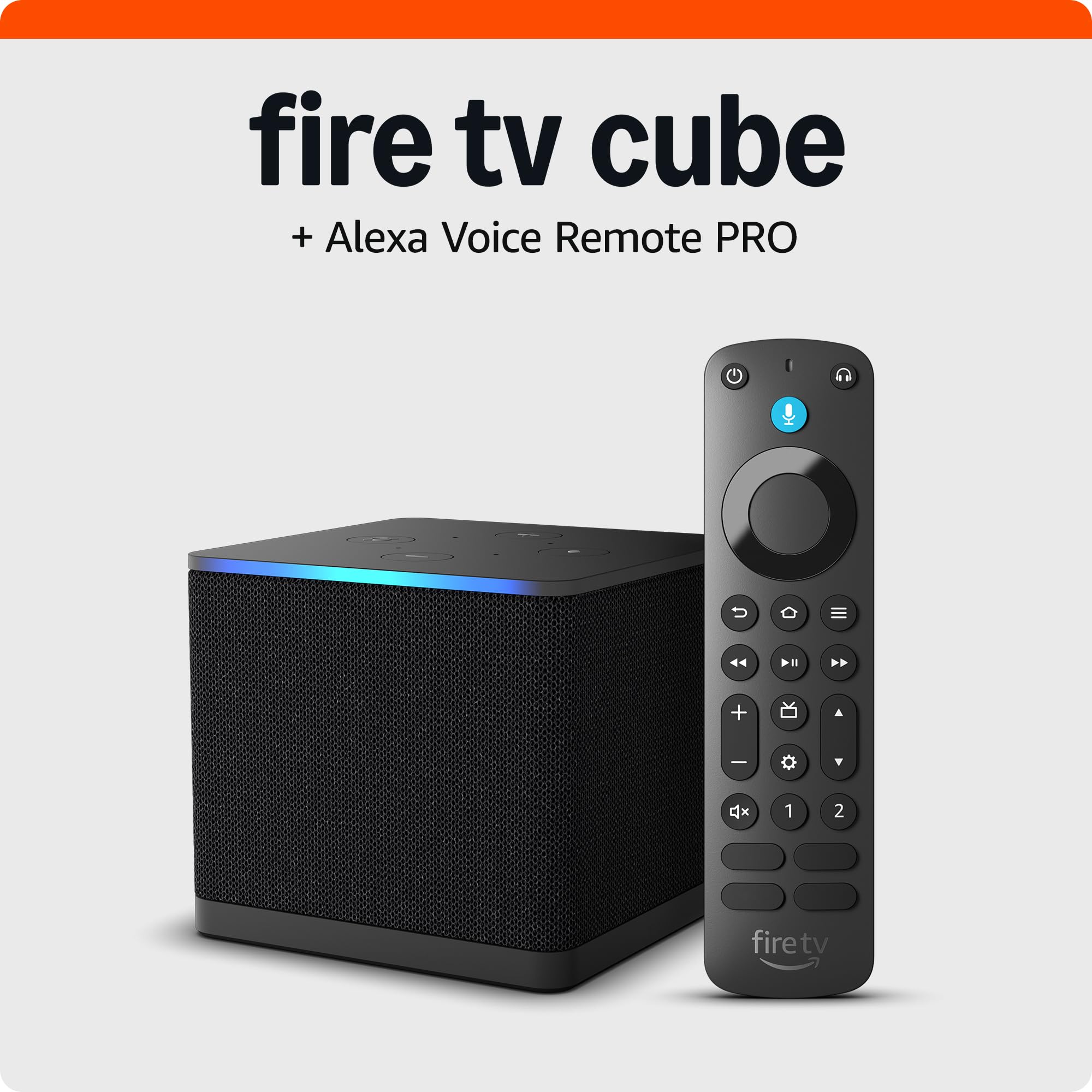
The Fire TV Cube sits at the top of Amazon’s streaming line for a reason: the octa-core processor inside it launches apps nearly instantly and handles 4K HDR content without a single stutter. This is the only device in the lineup with built-in far-field microphones and speakers, so you can yell “Alexa, play The Boys” from across the room without touching a remote. The bundle includes the Alexa Voice Remote Pro, which features motion-activated backlit buttons and a lost-remote finder that makes the remote emit a ring tone—a surprisingly practical upgrade after the third time you lose it in the couch cushions.
The Cube is also the most versatile connection hub here. It has an HDMI input that lets you pass through a cable box or game console, plus IR blasters that can control your TV, soundbar, and AV receiver directly. Reviewers consistently note that it pairs especially well with LG OLED panels and Echo Studio speakers for a full Dolby Vision and Dolby Atmos experience. The box is compact enough to sit on a media shelf without dominating the space.
The only real downside is the Amazon home screen itself, which pushes ads and sponsored recommendations that cannot be fully turned off. If you are deep in the Amazon ecosystem—Prime Video, Music, and smart home devices—the Cube is the fastest, most integrated player available. For users who want a clean, ad-free interface, a different ecosystem might feel less cluttered.
Why it’s great
- Octa-core processor is the fastest streaming chip available
- Hands-free Alexa works from across the room without a remote
- Backlit remote with lost-remote finder solves a genuine daily frustration
- HDMI input and IR blasters allow it to control an entire entertainment setup
Good to know
- Home screen displays ads and recommendations that cannot be removed
- Premium pricing compared to stick form factors
- Volume control occasionally switches from home theater to TV speakers
2. Google Chromecast with Google TV (4K)

The Chromecast with Google TV takes a completely different approach to content discovery. Instead of a grid of app icons, the home screen aggregates movies and shows from every service you subscribe to—Netflix, Hulu, Disney+, HBO Max—and serves personalized recommendations based on your watch history. This unified “For You” row means you spend less time digging through individual apps and more time watching. The remote has a dedicated Google Assistant button that can search by mood, genre, or even a specific quote from a movie.
Picture quality is handled well here: the device supports both Dolby Vision and HDR10, so it works with the widest range of modern 4K TVs. The inclusion of a cleaning cloth and a soft pouch in the box is a nice touch for people who travel with the dongle—an increasingly common use case as hotel TV operating systems remain notoriously locked down and slow. This bundle specifically includes accessories that protect the device during transit.
Reviewers consistently praise the straightforward setup and the responsive Google TV interface, though the remote is not backlit, which is a small miss for dark-room viewing. The Chromecast does not support Dolby Atmos natively through its HDMI output, so audiophiles with dedicated Atmos soundbars should verify their setup compatibility. For anyone who already uses Android or Google services, this is the most natural streaming companion available.
Why it’s great
- Google TV home screen aggregates content across all subscriptions into one feed
- Supports both Dolby Vision and HDR10 for broad TV compatibility
- Includes pouch and cleaning cloth for easy travel and maintenance
- Google Assistant voice search works by mood, actor, or quote
Good to know
- Remote lacks backlit keys, making it harder to use in a dark room
- Dolby Atmos support is not native through the HDMI output
- Interface can feel slower than the Fire TV Cube’s octa-core performance
3. Fire TV Stick 4K (Like-New, Newest Model)

This Like-New Fire TV Stick 4K delivers the exact same hardware as the brand-new retail version—Wi-Fi 6 support, AI-powered Alexa search, and full 4K with Dolby Vision and HDR10+—at a noticeably lower entry point. The Wi-Fi 6 chip makes a real difference in households where multiple devices compete for bandwidth: it maintains a smooth 4K stream even when the kids are on Zoom and someone else is gaming on the same router. The stick form factor plugs directly into the HDMI port and hides behind the TV, leaving no visible hardware clutter.
Alexa search has been upgraded with generative AI that can find movies by plot, actor, or even iconic quotes—try “Alexa, show me action movies with car chases.” The remote includes dedicated preset buttons for popular streaming apps, plus power and volume controls that eliminate the need for a separate TV remote. Xbox Game Pass via cloud gaming is also supported on this stick, letting you stream games like Call of Duty without a console.
The Like-New certification means the device has been tested and comes with the same limited warranty as a new unit, though it may ship in a plain Amazon-branded box. One reviewer noted that subscriptions did not automatically transfer from their previous Fire Stick, which required a manual re-login. If you are already in the Amazon ecosystem and want Wi-Fi 6 at the best possible price, this refurb stick is the smartest play.
Why it’s great
- Wi-Fi 6 support maintains smooth 4K streaming on congested home networks
- AI-powered Alexa search can find movies by plot details and quotes
- Supports Xbox Game Pass cloud gaming without a console
- Certified Like-New with full warranty at a budget-friendly price
Good to know
- Subscriptions may not auto-transfer from a previous Fire Stick
- Interface includes ads and promoted content on the home screen
- Stick form factor can block adjacent HDMI ports on closely spaced TVs
4. Roku Express 4K+ (2024 Model)

Roku’s Express 4K+ is the most straightforward entry point into dedicated 4K streaming. The hardware is a simple black box that sits next to your TV (not dangling from the HDMI port), and a Premium HDMI cable is included in the box so you do not need to buy one separately. Setup takes about 20 minutes: plug in, connect to Wi-Fi, and the home screen presents a clean grid of app channels without any algorithm-driven recommendations or ads taking over the screen. This simplicity is Roku’s enduring advantage—the interface never changes dramatically with software updates.
The included voice remote handles power and volume for your TV, so you can stash the original TV remote in a drawer. Roku also offers private listening through its mobile app: plug headphones into your phone and the audio routes through the Roku app, which is a lifesaver for late-night watching without disturbing the household. The device supports 4K and HDR10, though it lacks Dolby Vision, so HDR performance will be static rather than scene-by-scene dynamic. For most users on a budget, that trade-off is invisible in normal viewing.
The remote is not backlit, and the Roku Channel Store offers fewer niche apps than the Fire TV ecosystem, but for a neutral, no-nonsense streaming experience, this Express model is hard to beat.
Why it’s great
- Clean, uncluttered interface without algorithm-driven ads dominating the screen
- Premium HDMI cable is included, saving an extra purchase
- Private listening through the Roku mobile app works with any headphones
- Extremely easy setup that converts any HDMI-equipped TV into a smart 4K TV
Good to know
- Does not support Dolby Vision, only static HDR10
- Remote lacks backlit keys for dark-room use
- Roku Channel Store offers fewer niche or international apps than competitors
5. Roku Express 4K+ (Previous Generation)

The previous-generation Roku Express 4K+ delivers essentially the same core streaming experience as the newer model at an even lower entry point. It handles HD, 4K, and HDR content with the same reliable Roku OS that auto-adapts resolution based on your network speed, and it includes a voice remote that controls TV power and volume. The trade-off for the lower price is a slightly older Wi-Fi chip, so if your router is in another room, you might see longer buffering times on high-bit-rate 4K streams compared to the newer model.
The interface is the same clean Roku grid, and setup is equally simple. One practical advantage of the previous generation is that the remote works with Siri, Alexa, and Hey Google, giving you voice assistant flexibility that the newer model also matches. The box is incredibly compact at 3 inches wide, making it easy to pack for travel or move between TVs in different rooms.
Reviewers note that the remote is reliable and the picture quality is stellar on both 1080p and 4K TVs, but the remote lacks backlit keys, which is a consistent complaint in dark viewing environments. Some users also mention that the Roku Channel Store has limited free content compared to the Fire TV platform. If saving the maximum amount of money and keeping access to Roku’s neutral ecosystem are your priorities, this previous-gen Express is a fantastic value.
Why it’s great
- Lowest-cost entry to Roku’s reliable and neutral 4K streaming platform
- Works with Siri, Alexa, and Hey Google for flexible voice control
- Ultra-compact size is easy to move between rooms or pack for travel
- Auto-adapts resolution to your network for consistent playback
Good to know
- Older Wi-Fi chip may struggle with high-bit-rate 4K in distant rooms
- Remote is not backlit, hard to use in a dark room
- Roku Channel Store offers fewer free channels than Fire TV
FAQ
Will a streaming stick work on a hotel or dormitory TV with a captive login portal?
What is the difference between a streaming stick and a streaming box?
Final Thoughts: The Verdict
For most users, the best device for streaming 4k winner is the Fire TV Cube 3rd Gen because its octa-core processor delivers the fastest app launches and the hands-free Alexa controls make multi-tasking effortless. If you want a unified home screen that aggregates content from all your subscriptions, grab the Google Chromecast with Google TV. And for an ultra-reliable, simple budget entry that converts any HDMI TV into a smart 4K streamer, nothing beats the Roku Express 4K+.

Mo Maruf
I created WellFizz to bridge the gap between vague wellness advice and actionable solutions. My mission is simple: to decode the research and give you practical tools you can actually use.
Beyond the data, I am a passionate traveler. I believe that stepping away from the screen to explore new environments is essential for mental clarity and physical vitality.