Our readers keep the lights on and my smoothie glass nicely filled. As an Amazon Associate, I earn from qualifying purchases.
Manga reading is a marathon, not a sprint, and the wrong screen will wreck that experience with washed-out blacks, dead batteries, and eyestrain after a single volume. The choice between a color E Ink display and a backlit LCD tablet defines your entire reading ritual, from the texture of the page to how long you can binge before reaching for a charger.
I’m Mohammad Maruf — the founder and writer behind WellFizz. I’ve spent countless hours cross-referencing screen technologies, battery benchmarks, and app ecosystems to find exactly which hardware serves manga best, because the resolution and panel type matter more here than any other spec sheet number.
This guide breaks down the critical differences between E Ink readers and standard tablets so you can confidently pick the best device for reading manga and never second-guess your purchase again.
How To Choose The Best Device For Reading Manga
The perfect manga reader balances screen clarity, physical weight, and battery stamina. Unlike a standard e-reader, a manga device needs to handle double-page spreads, fine line art, and often color sections without turning every page into a ghostly mess.
Screen Technology: E Ink Kaleido vs LCD
Color E Ink screens like the Kaleido 3 reproduce 4096 colors and offer a paper-like, glare-free experience that is unmatched for eye comfort under direct sun. However, they are dimmer and slower to refresh, which can feel sluggish when flipping through action-heavy panels. LCD tablets deliver vibrant colors, faster refresh, and support for apps like Shonen Jump and Tachiyomi right out of the box, but they cause more eye fatigue during long sessions.
Resolution and Pixel Density
Manga art is defined by fine linework and halftone screentones. A resolution of 300 PPI (pixels per inch) on an E Ink reader renders text and ink lines with satisfying sharpness, while a 1280×800 LCD panel on a budget tablet may look grainy when scrutinized up close. Always check the native resolution — a higher PPI directly translates to cleaner text bubbles and crisper cross-hatching.
App Ecosystem and File Support
If you rely on subscription services like Kindle Unlimited, Shonen Jump, or Kobo Plus, make sure the device runs an operating system that supports those apps. Android-based E Ink readers (like Boox and Musnap) offer the best flexibility, while locked ecosystems (Kindle, Kobo) limit you to their own stores unless you side-load files. For raw manga files in CBR or CBZ format, an Android reader with a good file manager is essential.
Battery Life and Charging Speed
An E Ink reader can last multiple weeks on a single charge because it only consumes power during page turns. An LCD tablet will demand a charge every one or two days of heavy use. If you travel frequently or read for hours each day, the long endurance of E Ink becomes a decisive advantage.
Quick Comparison
On smaller screens, swipe sideways to see the full table.
| Model | Category | Best For | Key Spec | Amazon |
|---|---|---|---|---|
| BOOX Go Color 7 Gen II | E Ink | App flexibility + readability | 7″ Kaleido 3 / 300 PPI | Amazon |
| Kobo Libra Colour | E Ink | Library borrowing + ergonomics | 7″ Kaleido 3 / 300 PPI | Amazon |
| Musnap Ocean C | E Ink | Note-taking + manga | 7″ Kaleido 3 / 300 PPI | Amazon |
| Musnap Neo C | E Ink | Budget color E Ink | 6″ Kaleido 3 / 300 PPI | Amazon |
| Kobo Elipsa 2E | E Ink | Large PDFs + note-taking | 10.3″ Carta 1200 / 227 PPI | Amazon |
| Lenovo Tab One | LCD | Compact Android tablet | 8.7″ HD / 1340×800 | Amazon |
| TCL NXTPAPER 14 | LCD | Large manga + sheet music | 14.3″ 2.4K / 2400×1600 | Amazon |
| Jeazans Android 16 Tablet | LCD | Entry-level bundle | 10.1″ LCD / 1280×800 | Amazon |
| URAO Android 16 Tablet | LCD | Budget Android media | 10.1″ IPS / 1280×800 | Amazon |
In‑Depth Reviews
1. BOOX Go Color 7 Gen II

The BOOX Go Color 7 Gen II is the strongest all-rounder for manga precisely because it runs Android 13 with access to every reading app available — Kindle, Shonen Jump, Kobo, Tachiyomi — while the 7-inch Kaleido 3 screen delivers 300 PPI for crisp line art and 4096 colors for covers and color spreads. The octa-core processor and 4GB of RAM keep page turns snappy even when flipping through high-resolution CBR files.
Physically, it is remarkably light at just under 7 ounces and features both a power button and physical page-turn buttons, which let you advance panels without shifting your hand grip. The front light offers warm and cold temperature adjustment, and the built-in microphone and dual speakers add utility for audiobooks. The microSD card slot means you can expand the 64GB storage to hold thousands of manga volumes.
Ghosting is present on color pages, but the E Ink Center lets you set refresh modes — HD, Balanced, Fast, and Regal — to minimize artifacts. The glass screen with flat cover-lens feels premium, though it is more reflective than a recessed display. Battery life ranges from one to three weeks depending on Wi-Fi and front-light usage, and the USB-C port supports OTG accessories.
Why it’s great
- Full Android app ecosystem for any manga service
- High 300 PPI resolution for sharp screentones and text
- Physical page-turn buttons for one-handed reading
- Expandable storage via microSD card
Good to know
- Color reproduction is muted compared to LCD
- Battery drains faster with constant Wi-Fi and front light
- Some ghosting visible without manual refresh
2. Kobo Libra Colour

The Kobo Libra Colour uses the same 7-inch Kaleido 3 panel as the BOOX but packages it in a form factor built for extended one-handed reading. Its asymmetrical design with dedicated physical page-turn buttons and an auto-rotate sensor means you can comfortably switch between left and right hand grip without ever touching the screen. The 1264×1680 resolution delivers the same 300 PPI for text and line art.
Where the Libra Colour truly shines is integration with your local library: the built-in OverDrive support lets you borrow manga directly without needing a computer or a separate app. The 32GB internal storage holds thousands of volumes, and the device is IPX8 waterproof, so you can read in the bath or by the pool without worry. The battery life reaches up to four weeks on a single charge.
Color saturation is noticeably lower than tablet LCDs — covers look muted, and some users find the color layer makes the background slightly darker than a monochrome E Ink screen. The operating system is locked to the Kobo ecosystem, so you cannot install third-party apps like Shonen Jump or Tachiyomi. Side-loading via Calibre or Adobe Digital Editions works for DRM-free files.
Why it’s great
- Ergonomic grip with physical page-turn buttons
- Direct library borrowing via OverDrive
- IPX8 waterproof for reading anywhere
- Excellent multi-week battery life
Good to know
- No support for third-party manga subscription apps
- Color screen is darker and less vibrant than LCD
- No expandable storage
3. Musnap Ocean C
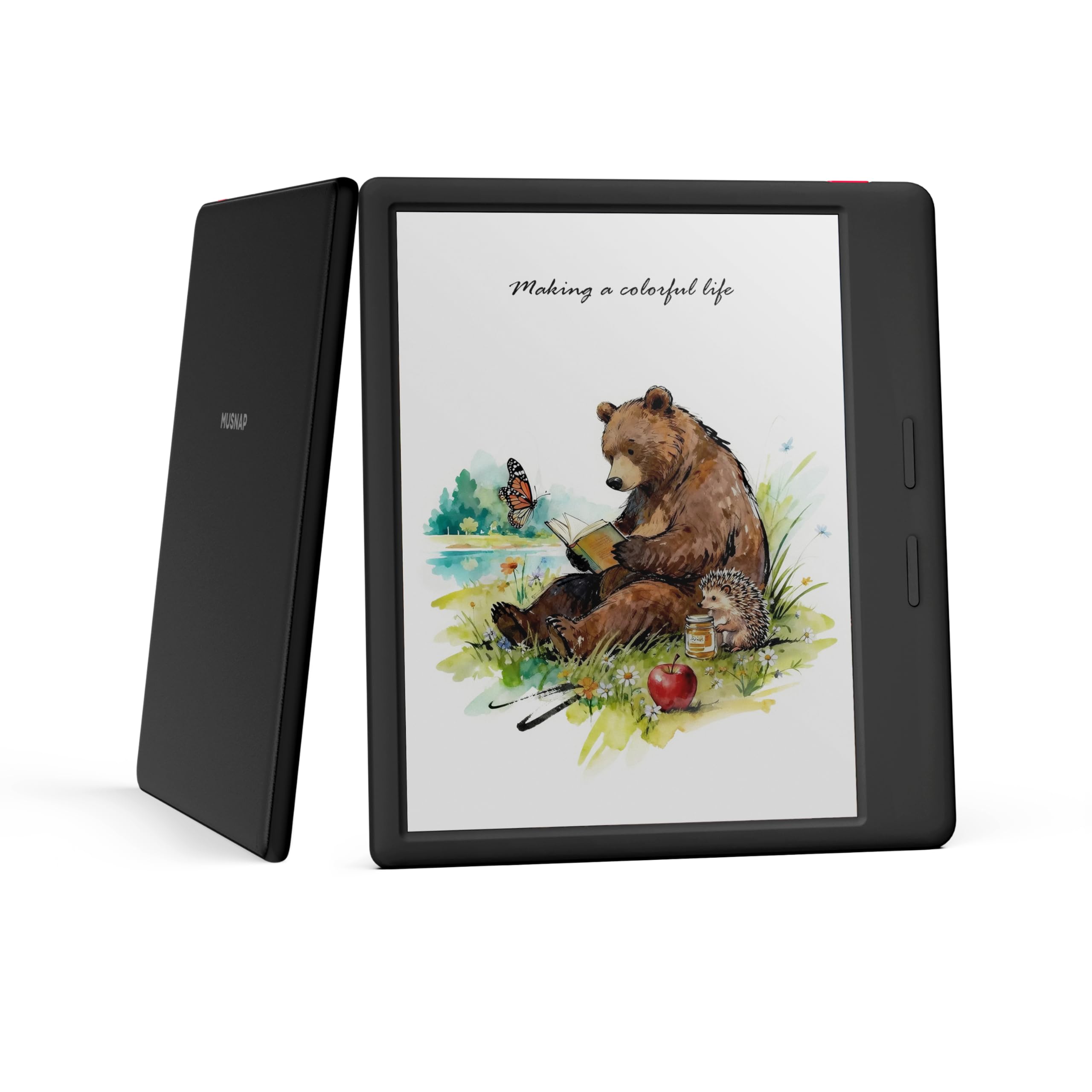
The Musnap Ocean C is a 7-inch color E Ink reader built for both reading and handwriting, making it a great companion for manga readers who also annotate or take notes. The octa-core 2.2GHz processor and 4GB of RAM make it one of the fastest E Ink devices on the market, with negligible latency when turning pages and launching apps. The Kaleido 3 display offers 4096 colors at 300 PPI for black-and-white content.
Unlike the Kobo Libra, the Ocean C runs on a customized Android OS that includes a toggle for Google Play Store access. This lets you install Kindle, Tachiyomi, Shonen Jump, or any manga app you prefer. The device also supports Bluetooth for connecting page-turn pedals or wireless headphones. The physical page-turn buttons are remappable, and the leatherette back cover feels premium in the hand.
The included stylus support is a bonus — you can mark up PDFs or take handwritten notes during deep reading sessions. However, the stylus is not magnetically attached to the device and must be carried separately. Battery life is solid when using airplane mode but drops noticeably with Wi-Fi and front light enabled. There is no microSD card slot, so the 64GB internal storage is your only option.
Why it’s great
- Fast octa-core processor for smooth page turns
- Google Play access for any manga reading app
- Handwriting and annotation functionality
- Remappable physical buttons and premium build
Good to know
- Stylus does not magnetically attach to the device
- No expandable storage
- Color screen is less clear than dedicated B&W E Ink
4. Musnap Neo C
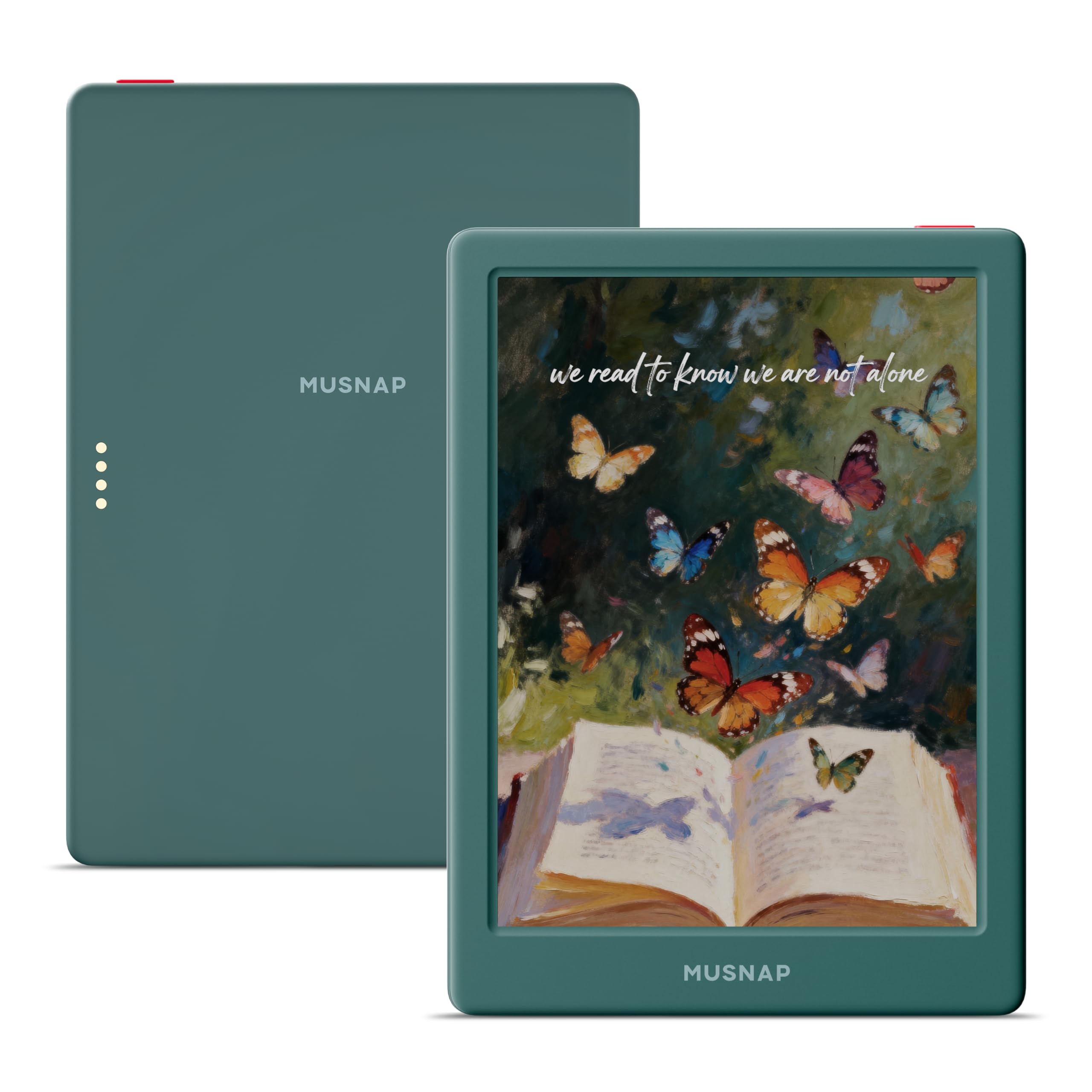
The Musnap Neo C brings color E Ink to a smaller, more pocket-friendly 6-inch form factor. The Kaleido 3 panel offers the same 4096-color capability as larger devices, and the 1072×1448 native resolution results in dense text and clean lines. The quad-core 2.0GHz processor and 4GB of RAM ensure the Android OS responds well for an E Ink device, and the 64GB internal storage is generous for manga libraries.
Because it runs Android, you have access to the Google Play Store, meaning you can load Kindle, Kobo, Libby, or Tachiyomi directly. The auto-adjusting front light and glare-free touchscreen make it comfortable to read in both direct sunlight and dim rooms. The device supports a wide range of file formats including EPUB, MOBI, PDF, and image formats like JPG and PNG — essential for manga in CBR or CBZ wrappers.
The smaller screen size means some double-page manga spreads require pinching and zooming, which is less fluid on E Ink than on an LCD tablet. Occasional ghosting is present, especially when switching between color and black-and-white content. Some customer units have reported locking up after a reboot, so a strong return policy is recommended. The battery life is excellent when offline, lasting several days of heavy reading.
Why it’s great
- Compact and lightweight for portability
- Google Play access for any manga app
- Auto-adjusting front light for any environment
- Broad file format compatibility
Good to know
- Small screen may require zooming for double-page spreads
- Ghosting visible on color content
- Reliability reports of bricking after reboot
5. Kobo Elipsa 2E

The Kobo Elipsa 2E is built for manga readers who want a true print-size canvas. The 10.3-inch E Ink Carta 1200 touchscreen displays manga pages at nearly original tankōbon size, making small text bubbles and fine linework readable without any zooming. The 227 PPI resolution is lower than the 300 PPI of smaller readers, but the larger physical area means each page element is bigger, which compensates for the pixel density drop.
The included Kobo Stylus 2 lets you annotate PDFs and write directly on the page, which is useful for marking up manga guides or reading academic manga-related content. The ComfortLight PRO front light offers adjustable brightness and color temperature, reducing blue light exposure during late-night reading. The 32GB storage can hold tens of thousands of ebooks, and the battery lasts weeks with typical use.
This device is heavy compared to smaller readers — about 13.6 ounces with the stylus — and it will not fit in a small bag or purse. The Kobo ecosystem lacks direct third-party manga app support, so you must either purchase from the Kobo Store or side-load files via Calibre. A few user reviews mention that the stylus can be confused by palm contact during note-taking.
Why it’s great
- Nearly full-size manga page display with no zooming needed
- Handwriting and PDF markup with included stylus
- Multi-week battery life with minimal charging
- Adjustable front light for eye comfort
Good to know
- Heavy and bulky compared to smaller readers
- No third-party manga app support
- Lower PPI than 7-inch E Ink alternatives
6. TCL NXTPAPER 14

The TCL NXTPAPER 14 is the closest an LCD tablet gets to an E Ink experience. Its 14.3-inch 2.4K display uses NXTPAPER 3.0 technology with an anti-glare coating, blue light reduction, and DC dimming to minimize eye strain during long manga sessions. The dedicated NXTPAPER Key lets you switch between Regular Mode for vibrant colors and Ink Paper Mode that mimics the muted, matte look of actual paper.
At this size, manga double-page spreads display at full width without any scaling or scrolling, and the 2400×1600 resolution ensures every line and screentone is razor-sharp. The MediaTek Helio G99 processor and 8GB of RAM (plus 8GB of expandable virtual RAM) handle multitasking effortlessly, and the tablet supports split-screen for reading while taking notes. The included 4096-level T-PEN stylus is excellent for marking up digital manga where annotation is supported.
The NXTPAPER 14 is not an E Ink reader — it is a full Android tablet with a paper-textured screen. It weighs 1.67 pounds and has a 10,000mAh battery that lasts through a full day of mixed use. There is no microSD card slot, so the 256GB internal storage is your only space. The quad speakers deliver loud, clear audio for anime and video content.
Why it’s great
- Huge 14.3-inch anti-glare display for true page-size manga
- Paper-like texture reduces eye strain vs standard LCD
- Full Android tablet with wide app compatibility
- Excellent stylus support for creative work
Good to know
- Heavy and large — not for one-handed reading
- No microSD card slot for storage expansion
- Battery life is measured in hours, not weeks
7. Lenovo Tab One

The Lenovo Tab One is a well-built 8.7-inch LCD tablet that strikes a practical balance for manga readers who want a light, affordable device. The 1340×800 HD display offers 480 nits of brightness, making it usable in moderately bright environments, and the 60Hz refresh rate ensures smooth page scrolling and panel transitions. The MediaTek Helio G85 processor handles manga apps like Tachiyomi and Kindle without stutter.
The dual Dolby Atmos speakers deliver impressive sound, and the battery lasts up to 12.5 hours of continuous YouTube streaming, which translates to even longer for static reading. The tablet runs Android 14 with two years of security patches promised.
The included folio case doubles as a stand for hands-free viewing, and the microSD card slot supports up to 512GB expansion — more than enough for an entire manga collection. The cameras are weak and the Lenovo software includes some bloatware, but a quick debloat removes most of it. The 8.7-inch 16:9 screen is slightly taller than a standard manga page, so you get letterbox bars on some content.
Why it’s great
- Lightweight and compact for portability
- Excellent battery life for an LCD tablet
- Expandable storage via microSD card
- Includes a folio case with built-in stand
Good to know
- LCD screen causes eye strain over long sessions
- Some pre-installed bloatware
- Screen is standard LCD, not E Ink
8. Jeazans Android 16 Tablet
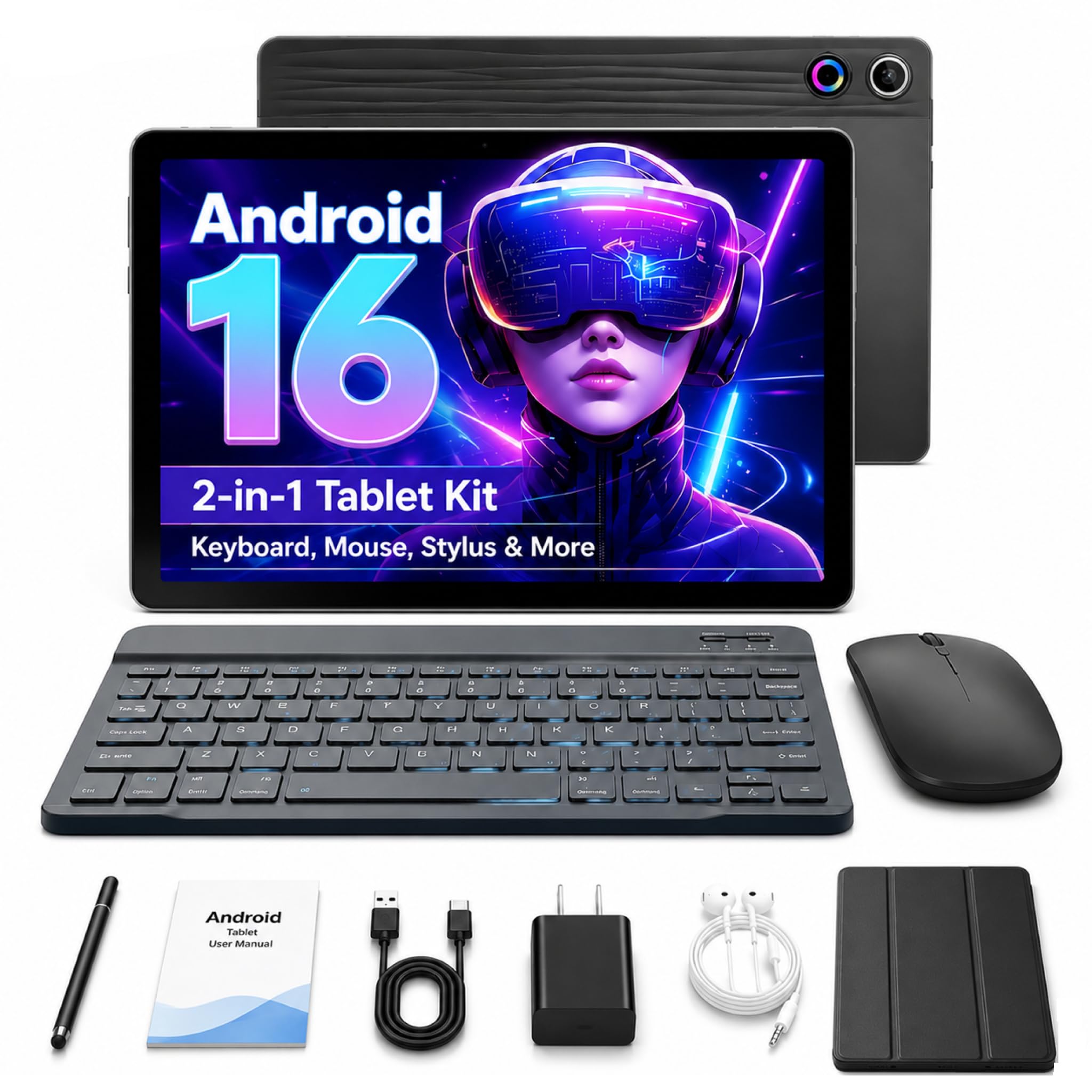
The Jeazans Android 16 Tablet is an entry-level 10.1-inch LCD tablet that bundles a keyboard, mouse, stylus, and protective case at a very low price point. It runs the latest Android 16 operating system with 24GB of advertised RAM (3GB physical plus 21GB virtual expansion) and 64GB of internal storage expandable up to 1TB via microSD. The 1280×800 resolution LCD is adequate for standard manga viewing but lacks the sharpness and contrast of higher-end panels or E Ink.
The tablet comes with Wi-Fi 6 and Bluetooth 5.4 for fast connectivity, and the 5G cellular support is a rare feature at this price tier. The included Bluetooth keyboard and wireless mouse transform it into a basic laptop for productivity tasks. For manga reading, the large 10.1-inch screen displays pages with minimal scrolling, and the Android OS lets you install any manga app from the Google Play Store.
Performance is mixed — some users report smooth operation for browsing and video, while others describe severe lag, terrible Wi-Fi signal, and touch responsiveness issues. The quality control appears inconsistent, and the camera quality is poor. This tablet is best suited as a very low-cost secondary device for casual manga reading, not as a primary reading tool. Make sure to purchase with a solid return policy.
Why it’s great
- Very low entry price for a complete bundle
- Android 16 with Google Play for all manga apps
- 10.1-inch screen with expandable storage
- Includes keyboard, mouse, stylus, and case
Good to know
- Inconsistent quality control reports
- 1280×800 LCD is basic and causes eye strain
- Performance lag reported under load
9. URAO Android 16 Tablet
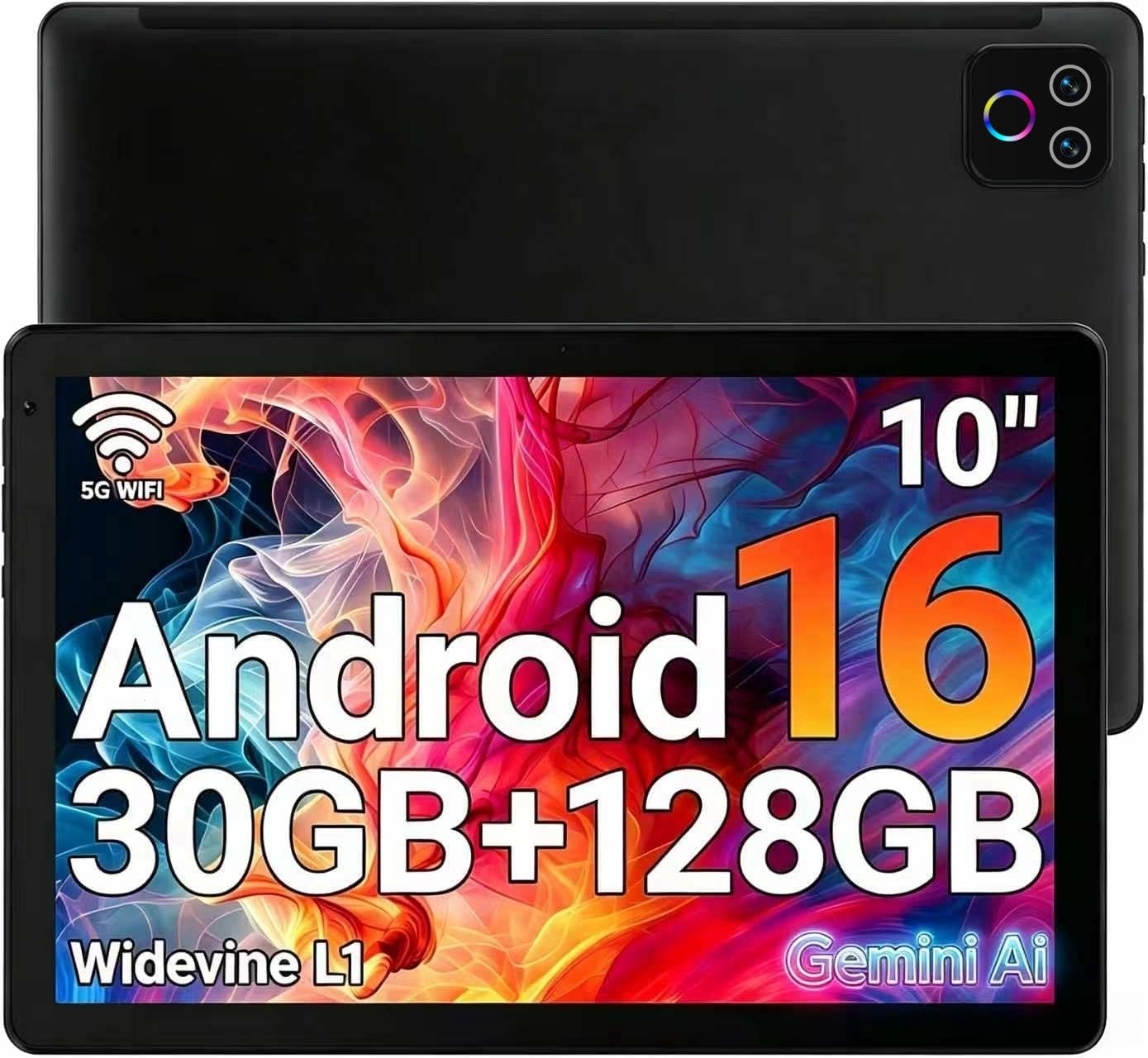
The URAO Android 16 Tablet offers a 10.1-inch IPS LCD with 1280×800 resolution and low blue light technology, which helps reduce eye strain compared to standard LCDs. It runs Android 16 on a 2.0 GHz octa-core processor with 30GB of advertised RAM (6GB physical plus 24GB virtual) and 128GB of internal storage, expandable up to 1TB via microSD. The front 5MP and rear 8MP cameras are adequate for video calls.
For manga reading, the large IPS panel provides decent viewing angles and color reproduction, and the Android OS gives you access to the full Google Play Store for apps like Tachiyomi, Kindle, and Crunchyroll. The battery is rated for up to 8 hours of mixed use, which is typical for budget LCD tablets. Wi-Fi 6 and Bluetooth 5.4 keep connectivity modern and fast.
Quality control is a serious concern — several customers report units that stopped charging or turned on after the first battery drain, with no customer support available. The advertised RAM figures include virtual expansion, which inflates the spec sheet but does not deliver the real performance of 30GB of physical RAM. This is a risk-tolerant purchase for readers on a tight budget who need a large Android screen for manga apps.
Why it’s great
- Large 10.1-inch IPS screen for manga viewing
- Android 16 with modern Wi-Fi 6 and Bluetooth 5.4
- Expandable storage up to 1TB
- Low blue light technology for reduced eye strain
Good to know
- Inconsistent quality and no customer support
- Virtual RAM marketing is misleading
- Battery life is average for LCD tablets
FAQ
Is a color E Ink screen good enough for modern manga with color pages?
Can I use Tachiyomi on a Kobo or Kindle device?
Does anti-glare coating actually help for outdoor manga reading?
Final Thoughts: The Verdict
For most users, the best device for reading manga winner is the BOOX Go Color 7 Gen II because it combines a crisp 300 PPI E Ink screen with full Android app support, letting you read from Kindle, Tachiyomi, or Kobo on one lightweight device with physical page-turn buttons. If you want the most comfortable ergonomics and waterproof build plus direct library borrowing, grab the Kobo Libra Colour. And for readers who want an immense anti-glare LCD canvas that handles double-page spreads at full size without scrolling, nothing beats the TCL NXTPAPER 14.

Mo Maruf
I created WellFizz to bridge the gap between vague wellness advice and actionable solutions. My mission is simple: to decode the research and give you practical tools you can actually use.
Beyond the data, I am a passionate traveler. I believe that stepping away from the screen to explore new environments is essential for mental clarity and physical vitality.