Our readers keep the lights on and my smoothie glass nicely filled. As an Amazon Associate, I earn from qualifying purchases.
The gap between editing confidently and second-guessing every exposure comes down to the panel sitting in front of you. A mediocre screen crushes shadow detail, shifts skin tones, and leaves you exporting files that look wrong on every other display — forcing costly rework you never planned for. The right hardware eliminates that headache at the source by delivering consistent, reference-grade color from the moment you open your first RAW file.
I’m Mohammad Maruf — the founder and writer behind WellFizz. After hundreds of hours analyzing panel technologies, color gamut coverage, contrast ratios, and the subtle engineering that separates professional monitors from everyday screens, this guide reflects the clearest path to a reliable workflow.
Whether you are retouching portraits, grading video, or designing assets for print, the device for photo editing you choose must balance resolution, color fidelity, and GPU power against the real-world demands of your creative pipeline — no compromises tolerated.
How To Choose The Best Device For Photo Editing
The right editing machine balances three pillars: a panel that shows true colors, a GPU that renders adjustments instantly, and ergonomics that let you work for hours without strain. Ignore any one of these, and the entire workflow suffers — from import to final export.
Color Gamut and Delta E Accuracy
Look for coverage of at least 99% sRGB for general editing and 95% or higher DCI-P3 for video or wide-gamut work. The Delta E rating should sit below 2 — the lower the number, the less your screen shifts hues from the source file. Factory calibration saves setup time, but hardware calibration support lets you re-zero the panel as it ages.
Panel Technology: IPS, OLED, or QD-OLED
IPS remains the safe choice for consistent brightness across the screen and minimal color shift at wide viewing angles. OLED and QD-OLED deliver true blacks and infinite contrast, making shadows look more dimensional, but some panels use subpixel layouts that cause faint color fringing on small text — a trade-off worth testing if you also read long documents.
GPU and RAM Requirements
Photo editing software relies heavily on GPU acceleration for filters, masks, and real-time previews. A dedicated GPU with at least 8GB of VRAM handles high-res layer stacks smoothly. Pair that with 32GB of RAM — 16GB can choke on multi-layer PSD files or large stitched panoramas. Storage speed matters too: a PCIe 4.0 SSD loads assets and saves exports in seconds rather than minutes.
Quick Comparison
On smaller screens, swipe sideways to see the full table.
| Model | Category | Best For | Key Spec | Amazon |
|---|---|---|---|---|
| BenQ PD2730S | Monitor | Color-critical grading | 5K / 98% P3 / 2000:1 | Amazon |
| LG 45GX950A-B | Monitor | Immersive editing suite | 5K2K OLED / 165Hz | Amazon |
| ViewSonic VP3881A | Monitor | Ultrawide color work | 38″ / 100% sRGB / Delta E<2 | Amazon |
| ASUS ROG Swift PG32UCDM | Monitor | High-refresh hybrid use | 32″ 4K QD-OLED / 240Hz | Amazon |
| Dell UltraSharp U4025QW | Monitor | Productivity & precision | 40″ 5K2K IPS Black / 120Hz | Amazon |
| Dell UltraSharp U4924DW | Monitor | Massive multi-window | 49″ DQHD / 2000:1 | Amazon |
| Dell U3219Q | Monitor | Entry 4K accuracy | 32″ 4K / 99% sRGB | Amazon |
| Alienware Aurora ACT1250 | Desktop | Heavy rendering tasks | RTX 5070 / 32GB DDR5 | Amazon |
| CyberPowerPC GXiVR8060A40 | Desktop | Mid-range editing rig | RTX 5060 / 1TB PCIe 4.0 | Amazon |
| HP OmniBook 7 | Laptop | Mobile editing on the go | Core Ultra 7 / 2TB SSD | Amazon |
| NIMO N158 | Laptop | Budget portable workstation | Radeon 780M / 32GB DDR5 | Amazon |
| Dell Tower ECT1250 | Desktop | Expandable business tower | Intel Core Ultra 7 / 1TB SSD | Amazon |
| Dell Inspiron 15.6″ | Laptop | Light everyday editing | Ryzen 7 / 32GB RAM | Amazon |
In‑Depth Reviews
1. BenQ PD2730S

The BenQ PD2730S delivers a 27-inch 5K panel with 218 PPI, which means text sharpness and gradient smoothness that rival Apple Retina displays. The 98% DCI-P3 coverage and 2000:1 contrast ratio give deep blacks and vivid color separation — exactly what you need for VFX compositing or grading LOG footage.
The Nano Matte panel diffuses ambient light effectively, reducing reflections without adding noticeable grain to the image. Thunderbolt 4 provides 90W power delivery to a connected laptop, plus 40Gbps data speeds, and the built-in KVM switch lets you control two systems with a single keyboard and mouse — a huge convenience in a hybrid editing setup.
Color uniformity is excellent out of the box, with one reviewer measuring an average Delta E of 0.4982 — well below the threshold for professional work. The included Hotkey Puck makes switching between color modes fast, and the 5K resolution provides a clear advantage over 4K when working with high-res RAW files.
Why it’s great
- 5K resolution at 218 PPI renders text and fine details with laboratory precision.
- Thunderbolt 4 with 90W PD and KVM simplifies desk cable management.
- Factory calibration delivers sub-1 Delta E right out of the box.
Good to know
- Lacks built-in speakers and webcam — you’ll need external peripherals.
- A small number of units have reported loose Thunderbolt ports upon arrival.
2. LG 45GX950A-B

The LG 45GX950A-B is a 45-inch 5K2K OLED monitor with a steep 800R curve that surrounds your peripheral vision. The 1.5M:1 contrast ratio and true black levels make shadow detail pop in a way IPS panels simply cannot match — ideal for cinematic grading where every stop of underexposure needs to be visible.
Dual-mode capability lets you switch between 5K2K at 165Hz for smooth timeline scrubbing and WFHD at 330Hz for fast-paced work. The 0.03ms GTG response time eliminates ghosting during rapid adjustments, and DisplayPort 2.1 ensures enough bandwidth for uncompressed 10-bit color at the full resolution.
Users consistently praise the immersive nature of the 800R curve, though some note a sleep wake quirk that requires disabling deep sleep in the OSD. The anti-glare coating is UL-certified and works well in brighter rooms, keeping color integrity intact while minimizing reflections.
Why it’s great
- True OLED blacks and 1.5M:1 contrast ratio reveal shadow detail IPS panels hide.
- Dual-mode refresh rate adapts between precision editing and fast preview.
- 800R curvature creates a uniquely immersive editing environment.
Good to know
- USB-A ports function only when the USB-C input is active.
- The input switching joystick can feel awkward to navigate during active work.
3. ViewSonic VP3881A

The ViewSonic VP3881A offers a 38-inch 21:9 WQHD+ ultrawide panel with Pantone Validation and 100% sRGB coverage. The 2300R curve wraps gently around your field of view, reducing head movement when you have timelines and toolbars spread across the full width of the screen.
Delta E accuracy sits below 2 right out of the box, and the monitor includes dedicated presets for sRGB, EBU, SMPTE-C, Rec. 709, DCI-P3, and even DICOM-SIM — a rare range that makes it useful for both creative and medical imaging work. The 90W USB-C port handles data, video, and laptop charging through a single cable.
Users who pair this with a MacBook Pro or Mac Mini report flawless plug-and-play performance, with the USB hub supporting cameras, headsets, and Ethernet without extra dongles. The ergonomic stand offers tilt, swivel, and height adjustment for all-day comfort, and the flicker-free backlight reduces eye strain during long grading sessions.
Why it’s great
- Pantone Validation and sub-2 Delta E ensure consistent color across industry standards.
- Ultrawide 21:9 ratio lets you keep preview, timeline, and tool palettes visible simultaneously.
- 90W USB-C with Ethernet passthrough simplifies desk cabling to one wire.
Good to know
- Refresh rate is limited to 60Hz — not ideal for high-FPS gaming.
- Built-in speakers are basic; external monitors are recommended for critical audio.
4. ASUS ROG Swift PG32UCDM

The ASUS ROG Swift PG32UCDM packs a 32-inch 4K QD-OLED panel with a 240Hz refresh rate and 0.03ms response time. While built with gaming in mind, its 99% DCI-P3 gamut, true 10-bit color, and VESA DisplayHDR 400 True Black compliance make it a strong contender for photo editing workflows that also demand high refresh rates for video preview or casual gaming.
The custom heatsink and graphene film reduce the risk of burn-in on static UI elements, which is a legitimate concern for editors who keep toolbars visible for hours. The uniform brightness setting prevents OLED luminance roll-off during long editing sessions — a feature that matters when judging exposure consistency across a series of images.
Buyers consistently describe the colors as stunning and the black levels as zero-nit deep. Text fringing is minimal but noticeable up close on the QD-OLED subpixel layout, so it is worth viewing in person if you read a lot of text. The 3-year warranty includes burn-in coverage, which adds peace of mind for daily professional use.
Why it’s great
- QD-OLED panel delivers 99% DCI-P3 and true black levels for uncompromised color work.
- 240Hz refresh rate makes timeline scrubbing and media playback feel fluid.
- Burn-in coverage and custom heatsink protect long-term panel health.
Good to know
- Text fringing from the QD-OLED layout can be slightly visible at close viewing distances.
- Glossy finish enhances clarity but reflects strong overhead lights more than matte panels.
5. Dell UltraSharp U4025QW

The Dell UltraSharp U4025QW is a 40-inch 5K2K ultrawide monitor using IPS Black technology, offering a 2000:1 contrast ratio that brings blacks deeper than traditional IPS while maintaining wide viewing angles and color consistency. The 120Hz refresh rate is a meaningful upgrade over 60Hz for smooth panning across high-res images.
Out of the box color accuracy is stellar, with a 99% DCI-P3 gamut and factory calibration reported by users to require no tweaking. The built-in KVM hub includes Ethernet, multiple USB-A/C ports, and Thunderbolt connectivity, letting you switch between a Mac and PC workstation from a single desk setup.
Users note that sharpness benefits from being lowered to around 40 in the OSD — at default 50, some text appears slightly oversharpened. The 2500R curvature is gentle enough to prevent geometric distortion while wide enough to reduce head panning. It is an expensive investment, but the build quality and feature set make it a long-term desk anchor.
Why it’s great
- IPS Black technology delivers 2000:1 contrast without IPS glow issues.
- 120Hz refresh rate keeps high-res image navigation smooth and responsive.
- Integrated Thunderbolt hub with KVM supports dual-computer workflows seamlessly.
Good to know
- Sharpness setting needs manual reduction from default 50 to avoid artificial edge enhancement.
- The plastic chassis feels less premium than the price point would suggest.
6. Dell UltraSharp U4924DW
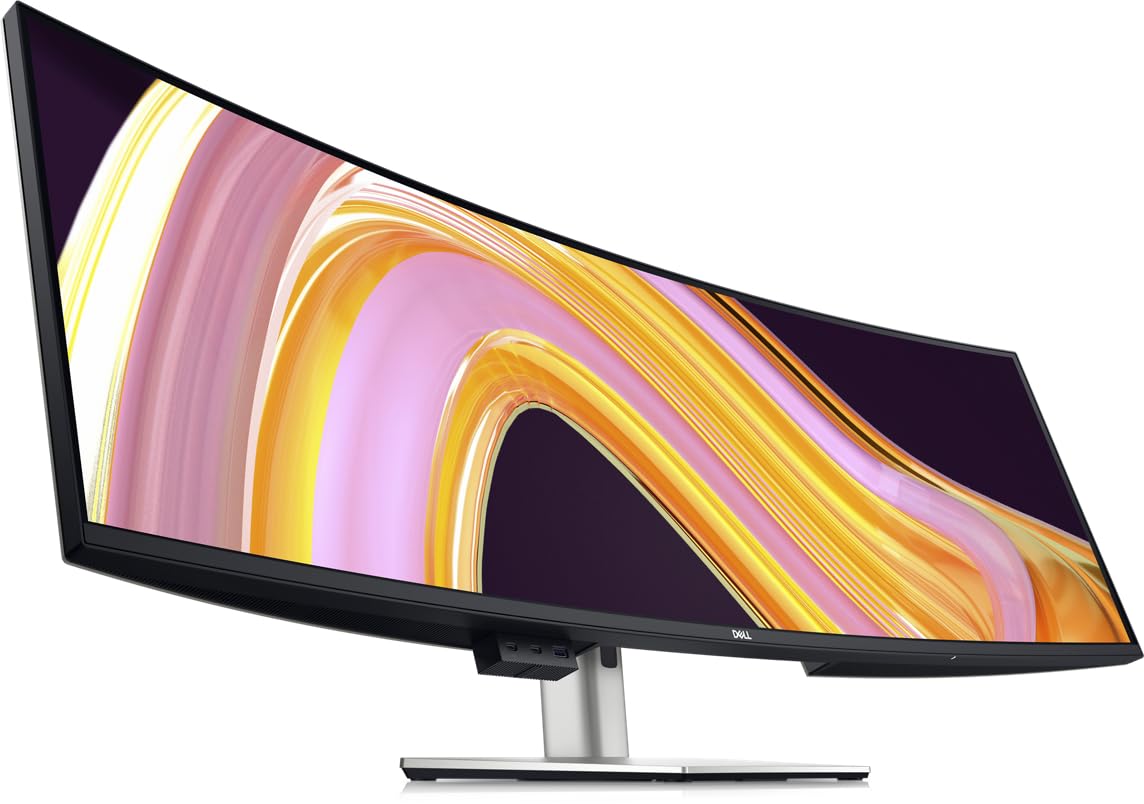
The Dell UltraSharp U4924DW spans 49 inches with a Dual QHD resolution of 5120×1440 in a 32:9 aspect ratio — essentially two 27-inch 1440p monitors side-by-side without a bezel gap. This layout is ideal for photo editors who keep a full-screen preview on one half and tools, layers, and references on the other.
The 2000:1 contrast ratio and 350-nit brightness deliver consistent luminance across the wide panel, and built-in Picture-by-Picture mode lets you view input from two sources simultaneously. The 3800R curvature is subtle — some users prefer it, while others find it insufficient to wrap the wide screen comfortably into peripheral view.
Reviewers highlight strong build quality and reliable Dell reliability, but note that the KVM takes about five seconds to switch between inputs, which can interrupt workflow. The 60Hz refresh is fine for still-image editing but not suited for video work requiring smooth timeline playback.
Why it’s great
- 32:9 ratio replaces dual monitors with seamless continuous workspace.
- Picture-by-Picture mode allows two independent editing sessions on one screen.
- Dell build quality and multi-port USB hub keep the desk clean.
Good to know
- 3800R curve may not feel immersive enough for the full 49-inch width.
- KVM switching latency around five seconds can be disruptive during fast-paced work.
7. Dell U3219Q

The Dell U3219Q is a 32-inch 4K UHD monitor factory calibrated to 99% sRGB with VESA DisplayHDR 400 support. The 3840×2160 resolution at this screen size gives a comfortable 140 PPI — sharp enough for fine detail work without scaling text to unusable levels.
USB-C connectivity with 65W power delivery makes it a solid pairing for laptops, while the fully adjustable stand (height, tilt, swivel, pivot) accommodates various desk ergonomics. Reviewers consistently report excellent out-of-box color accuracy for editing in Premiere and Lightroom, with only minor IPS glow noticeable on dark backgrounds.
The 60Hz refresh and lack of FreeSync or G-Sync make this a pure productivity display — not suited for gaming or high-framerate video work. Some users note that the retail packaging can be fragile, so inspect carefully on delivery. Still, for a dedicated color-aware editing monitor at a mid-range price point, this is a proven workhorse.
Why it’s great
- Factory-calibrated 99% sRGB with solid out-of-box color accuracy for editing.
- USB-C with 65W PD charges connected laptops while passing video signal.
- Fully ergonomic stand with height, pivot, and swivel for comfortable all-day positioning.
Good to know
- 60Hz refresh rate and no adaptive sync — not designed for gaming or fast video work.
- Some units arrive with damaged boxes due to insufficient retail packaging protection.
8. Alienware Aurora ACT1250

The Alienware Aurora ACT1250 pairs an Intel Core Ultra 7 265F with an NVIDIA GeForce RTX 5070 and 32GB of DDR5 RAM, delivering the kind of GPU compute power that accelerates AI denoising, complex layer compositing, and batch exports dramatically. The 1000W Platinum-rated PSU ensures stable power under sustained load during overnight rendering.
The chassis features customizable AlienFX lighting and a clear side panel, but more importantly, the thermal design keeps the RTX 5070 cool enough to maintain boost clocks during extended editing sessions. Dell includes 1-year onsite service, which means a technician will come to your location if hardware issues arise — useful for a professional workstation.
Users report strong performance in software like DaVinci Resolve and Blender, while noting that the LED lights can be fully disabled through the Alienware Command Center if you prefer a distraction-free editing environment. A few units have experienced boot delays or USB-C alignment issues, but overall build quality receives high marks for a pre-built desktop.
Why it’s great
- RTX 5070 with 12GB VRAM handles heavy GPU-accelerated filters and noise reduction.
- 32GB DDR5 RAM and 1TB SSD prevent bottlenecks during multi-layer PSD exports.
- Dell onsite service provides repair at your location for covered hardware issues.
Good to know
- Some units exhibit long boot times or require full power discharge to restart cleanly.
- Alienware Command Center feels bloated if you only need the system for editing.
9. CyberPowerPC GXiVR8060A40

The CyberPowerPC Gamer Xtreme offers an Intel Core i5-13400F paired with an RTX 5060 8GB and 16GB of DDR5 RAM, making it a capable mid-range editing rig for photographers who work primarily in Lightroom and Photoshop. The RTX 5060 accelerates GPU-based masking and neural filters effectively at 1080p and 1440p resolutions.
The 1TB PCIe 4.0 NVMe SSD loads large catalogs and export batches quickly, and the 16GB DDR5 is adequate for moderate multi-layer files — though upgrading to 32GB later is straightforward with three free DIMM slots. The tempered glass side panel and customizable RGB add a polished aesthetic for a desktop that sits on or under the desk.
Users highlight excellent value compared to building a similar system yourself, with clean cable management and quiet operation under load. The included keyboard and mouse are basic, and the Wi-Fi card can be weak — a USB adapter solves that cheaply. For the price, this is a strong entry point into dedicated editing desktop performance.
Why it’s great
- RTX 5060 provides solid GPU acceleration for AI masks and filter previews.
- PCIe 4.0 SSD ensures fast catalog loads and speedy file exports.
- Good upgrade potential with available RAM slots and easy interior access.
Good to know
- Only 16GB of RAM — heavy compositing or large panoramas may require an upgrade.
- Stock Wi-Fi card performance is inconsistent; a USB adapter is a cheap improvement.
10. HP OmniBook 7
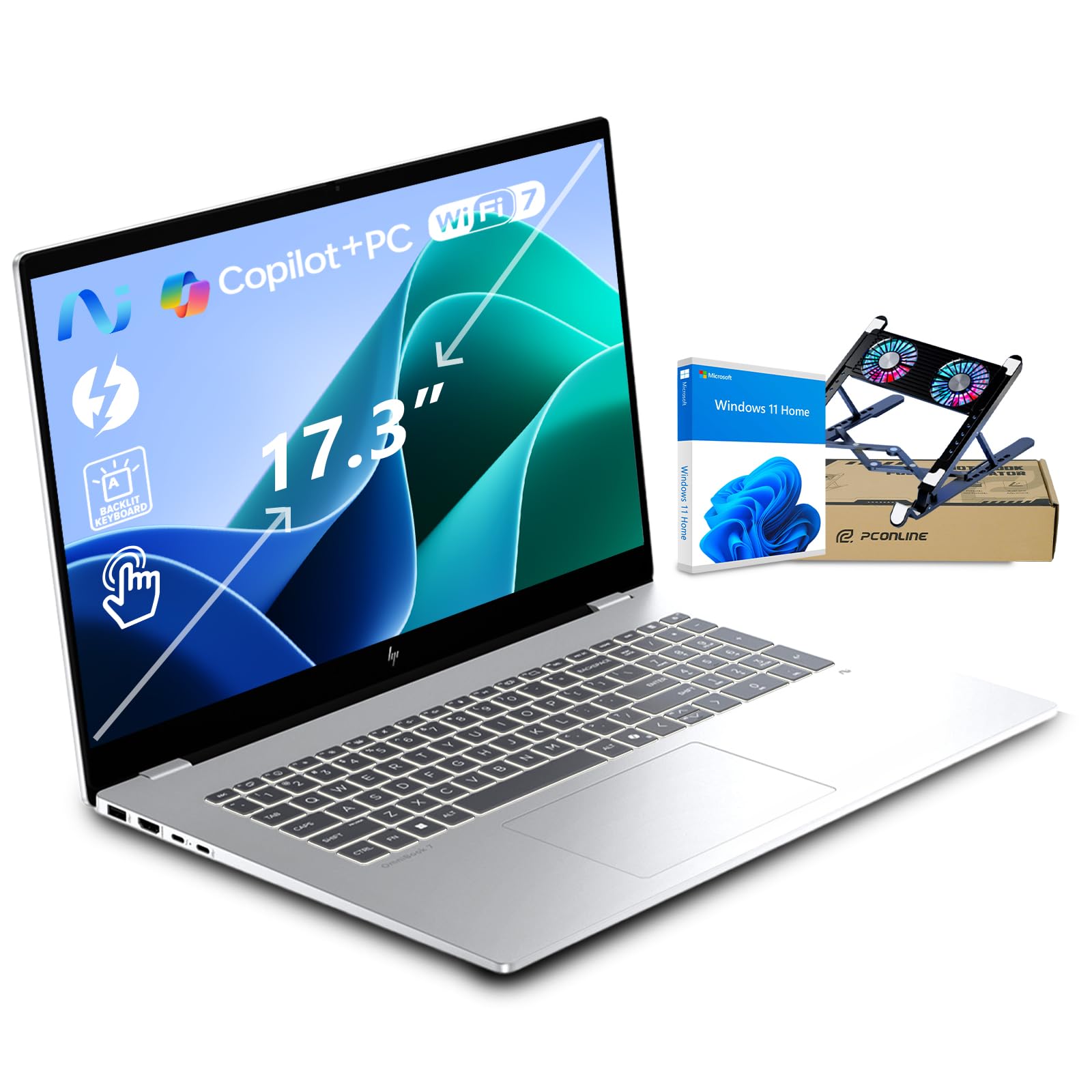
The HP OmniBook 7 is a 17.3-inch AI laptop driven by an Intel Core Ultra 7 258V with a 47 TOPS NPU, 32GB of RAM, and a 2TB SSD. The 1080p IPS touchscreen covers 100% sRGB at 400 nits brightness, making it suitable for on-location editing where a reference-grade external monitor isn’t available.
The NPU provides local AI acceleration for features like background removal and real-time filters without taxing the main GPU. Thunderbolt 4 and Wi-Fi 7 ensure fast transfers from external drives and cloud storage, while the 5MP IR camera with Poly Studio tuning keeps video calls presentable.
Users praise the slim and lightweight chassis for a 17-inch machine, plus the long battery life that reaches up to 12 hours for light editing. The military-grade durability testing adds reassurance for travel. Some reviewers note that the touchscreen is responsive and the display gets bright enough for outdoor use, though the 1080p resolution means less desktop real estate for tool-heavy layouts.
Why it’s great
- 47 TOPS NPU accelerates AI-powered editing features without GPU strain.
- 2TB PCIe SSD offers massive onboard storage for high-res photo libraries.
- MIL-STD-810H durability and 12-hour battery support mobile editing workflows.
Good to know
- 1080p resolution limits workspace compared to 4K or QHD panels.
- The onboard Intel Arc graphics cannot match a dedicated GPU for heavy render tasks.
11. NIMO N158
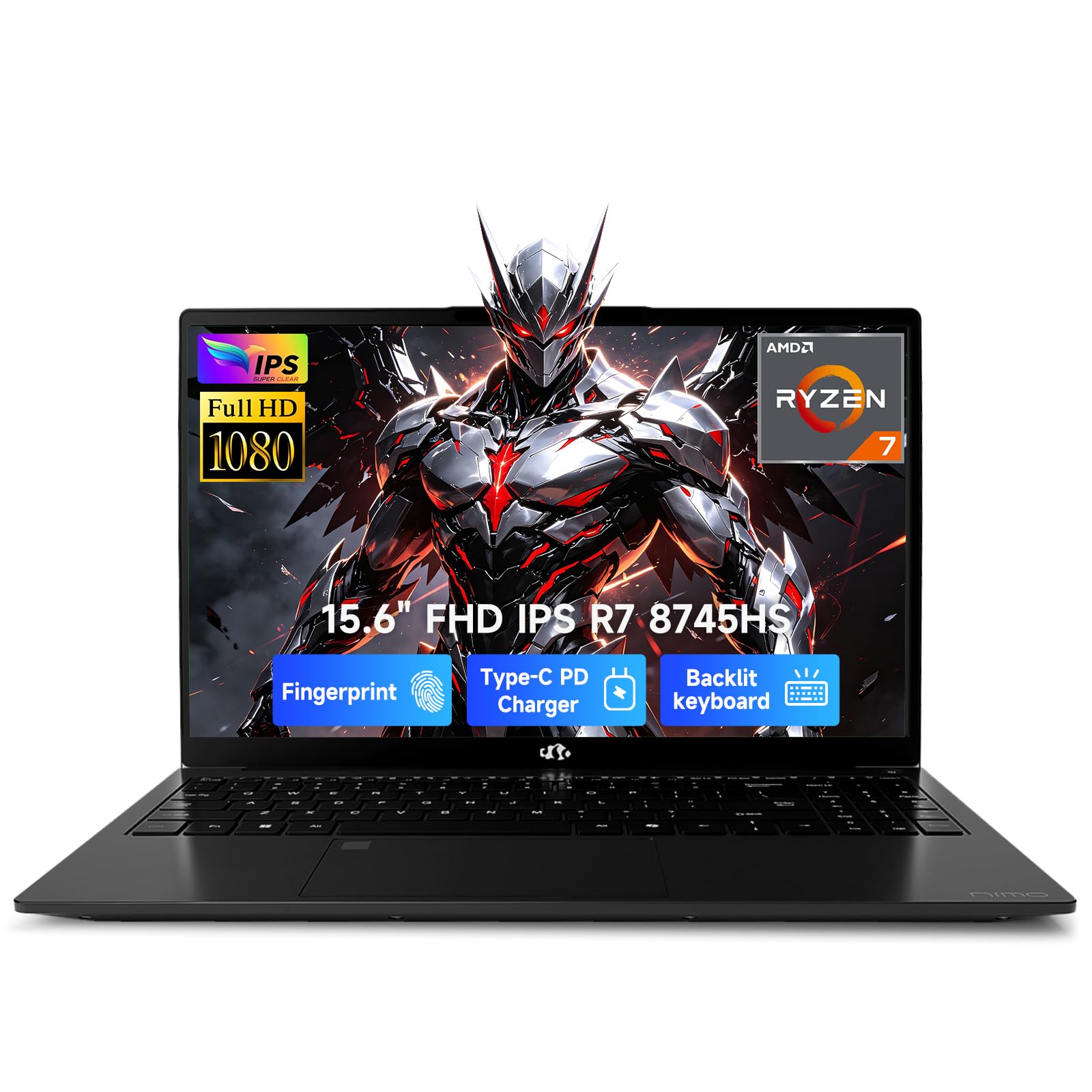
The NIMO N158 packs an AMD Ryzen 7 8745HS with Radeon 780M integrated graphics, 32GB of DDR5 RAM, and a 1TB SSD into a lightweight 1.7kg chassis. The 15.6-inch FHD IPS display is adequate for color work, though the 100W USB-C PD charging and expandable dual SSD slots make it a flexible budget editing laptop.
The Radeon 780M based on RDNA 3 architecture provides competent GPU performance for Lightroom masking and Photoshop filters, though it will struggle with heavy 3D rendering or intensive video effects. The dual DDR5 SO-DIMM slots support up to 64GB, and the two M.2 PCIe 4.0 slots mean storage expansion is simple and fast.
Users appreciate the lightweight design and quiet thermal performance, with one buyer noting it handles schoolwork and creative software without overheating. The 180-degree hinge is useful for collaborative reviews, and the fingerprint sensor adds convenience. This is a capable entry-level machine, but serious editors should budget for an external calibrator.
Why it’s great
- 32GB DDR5 RAM handles multi-layer edits and background exports smoothly.
- Dual M.2 SSD slots and dual DDR5 SO-DIMM slots for easy future upgrades.
- Lightweight 1.7kg chassis with 100W PD charging ideal for portable use.
Good to know
- Integrated Radeon 780M lacks dedicated VRAM for complex 3D or video effects.
- FHD display is not factory-calibrated — an external calibrator is recommended for color work.
12. Dell Tower ECT1250

The Dell Tower ECT1250 runs an Intel Core Ultra 7-265 processor with 16GB of RAM and integrated UHD graphics, making it more of a business-class foundation than a dedicated editing workstation. The tool-less entry and removable side panel simplify upgrades, so you can add a dedicated GPU and more RAM as your editing needs grow.
Connectivity supports up to four FHD monitors or two 4K displays via HDMI 2.1 and DisplayPort — useful for building a multi-screen editing setup over time. The 1TB M.2 SSD provides fast boot and application loading, and the 3.0 SD card reader is convenient for direct camera imports.
Users running Linux report excellent compatibility and smooth firmware updates, while Windows buyers note the system is quiet and stable out of the box. The lack of a dedicated GPU means this tower is not ready for heavy photo editing immediately — plan to budget for a discrete graphics card if this is your primary editing machine.
Why it’s great
- Tool-less chassis design makes upgrading RAM, storage, and GPU straightforward.
- Supports up to four monitors for a comprehensive editing workspace.
- Quiet operation and reliable Dell build quality for long-term use.
Good to know
- Integrated UHD graphics cannot run modern editing software at full performance.
- Additional HDD mounting requires sourcing separate cables and brackets.
13. Dell Inspiron 15.6″

The Dell Inspiron 15.6-inch touchscreen laptop combines an AMD Ryzen 7 (8 cores, 4.5GHz boost) with 32GB of RAM and a 1TB SSD plus bundled 512GB SD card. The FHD anti-glare touch display is fine for basic browsing and light editing, but the integrated Radeon Graphics lack the power needed for serious photo editing with large RAW files or complex layers.
The storage configuration is worth noting: the 1TB is a traditional HDD, not an SSD, and the 512GB is a flash drive inserted via the SD card slot — not internal storage. This setup can lead to slower load times and potential data loss if the flash drive is dislodged or corrupted.
User reviews paint a concerning picture: frequent blue screens, overheating, and hardware failures within months of purchase. Multiple buyers report devices that stop turning on or require remote support for basic functionality. This machine may suffice for occasional casual editing, but reliability issues make it a risky choice for professional or consistent color work.
Why it’s great
- 32GB RAM provides enough memory for multi-tab browsing and moderate editing tasks.
- Touchscreen and 180-degree hinge offer flexible viewing angles for client reviews.
Good to know
- Primary storage is an HDD, not SSD — much slower load times for software and files.
- Numerous reports of blue screens, overheating, and hardware failure within months.
FAQ
How much RAM do I need for editing large RAW files?
Is a dedicated GPU necessary for photo editing?
Should I choose an OLED or IPS monitor for color-critical work?
Final Thoughts: The Verdict
For most users, the device for photo editing winner is the BenQ PD2730S because it combines 5K resolution, factory-calibrated color at sub-1 Delta E, and a Nano Matte panel that handles ambient light without glare. If you want the immersive contrast and editing real estate of OLED, grab the LG 45GX950A-B. And for a desktop that powers through heavy GPU-accelerated filters and batch exports, nothing beats the Alienware Aurora ACT1250.

Mo Maruf
I created WellFizz to bridge the gap between vague wellness advice and actionable solutions. My mission is simple: to decode the research and give you practical tools you can actually use.
Beyond the data, I am a passionate traveler. I believe that stepping away from the screen to explore new environments is essential for mental clarity and physical vitality.