Our readers keep the lights on and my smoothie glass nicely filled. As an Amazon Associate, I earn from qualifying purchases.
Kodi is a powerful, open-source media center, but its performance depends entirely on the hardware you run it on. A slow processor, insufficient RAM, or poor Wi-Fi can turn a seamless movie night into a frustrating slideshow of buffering wheels and menu lag. Choosing the right hardware isn’t just about compatibility; it’s about ensuring your local library and streaming sources play back without a hitch.
I’m Mohammad Maruf — the founder and writer behind WellFizz. My approach to this guide is built on weeks of cross-referencing processor benchmarks, RAM specifications, storage sizes, codec support lists, and real-world user feedback from the Kodi community to find the devices that actually handle the software’s demands.
After deep analysis, these are the top performers that handle everything from lightweight add-ons to full HD audio passthrough, making this the definitive device for kodi users who refuse to compromise on playback quality.
How To Choose The Best Device For Kodi
Selecting a Kodi box goes beyond picking the cheapest Android stick. You need to prioritize raw processing power, enough RAM to keep the interface snappy, and sufficient internal storage for add-ons, thumbnails, and local app data. A device that struggles with Kodi will make even navigating your movie library feel sluggish.
Processor and RAM: The Core Engine
The CPU and RAM are the most critical components. A quad-core processor with a clock speed above 1.8 GHz is the baseline for smooth 4K playback. For RAM, 2GB is the absolute minimum for a tolerable experience, but 3GB or 4GB is highly recommended to prevent Kodi from reloading every time you switch apps. More RAM also helps with memory-intensive add-ons and large library scans.
Storage Capacity for Your Media Center
Kodi stores database files, fan art, and add-on data directly on the device’s internal storage. A device with 8GB of storage will feel cramped after you install a few add-ons and build up your library cache. Look for models with 16GB or more internal storage, or at the very least, a USB port that allows you to expand storage. This ensures smooth database operations and room for your media metadata.
Codec and Audio Passthrough Support
For the best playback, your device must support the video codecs your library uses. Look for support for H.265 (HEVC) for 4K files, and newer codecs like AV1 for future-proofing. For audio, you need a device that can pass through high-definition audio formats like Dolby TrueHD and DTS-HD Master Audio directly to your AV receiver or soundbar via HDMI. This is often listed as “HD Audio passthrough”.
Quick Comparison
On smaller screens, swipe sideways to see the full table.
| Model | Category | Best For | Key Spec | Amazon |
|---|---|---|---|---|
| NVIDIA Shield TV Pro | TV Box | AI Upscaling & HD Audio | 3 GB RAM, 16 GB Storage | Amazon |
| Dune HD Pro Vision 4K | Media Player | VS10 Processor & HD Audio | 4 GB RAM, 64 GB Storage | Amazon |
| MINIX U8K-Ultra | TV Box | 8K Playback & AI Upscaling | 8 GB RAM, 128 GB Storage | Amazon |
| onn 4K Pro Streaming Device | TV Box | Budget Premium Performance | 3 GB RAM, 32 GB Storage | Amazon |
| Google TV Streamer 4K | TV Box | Clean Android TV Interface | 32 GB Storage | Amazon |
| onn 4K Plus | TV Box | Mid-Range Android TV | 2 GB RAM, 16 GB Storage | Amazon |
| Xiaomi TV Stick 4K (2nd Gen) | TV Stick | Entry-Level Kodi Stick | 8 GB Storage | Amazon |
In‑Depth Reviews
1. NVIDIA Shield TV Pro

The NVIDIA Shield TV Pro remains the gold standard for Kodi enthusiasts who demand uncompromised performance. Powered by the Tegra X1+ chip, this box handles Kodi’s most demanding skins and large libraries with zero lag. Its real standout feature is the AI upscaling, which takes 720p and 1080p content and intelligently sharpens it to near-4K quality, breathing new life into older TV rips.
For audiophiles, the Shield TV Pro is a dream. It offers full passthrough of Dolby Atmos and DTS-HD Master Audio, ensuring your home theater system decodes the highest quality soundtracks. The two USB 3.0 ports allow you to connect a massive external hard drive or a USB DAC for superior audio output, making it incredibly versatile for local media playback.
While the 16GB of internal storage is limited for Kodi’s metadata and add-ons, the ability to adopt external USB storage as internal memory solves this problem. The clean Android TV interface receives consistent updates, and the included remote with a find-my-remote feature is a thoughtful touch. It is a premium investment, but for serious Kodi users, it is the most reliable and powerful option available.
Why it’s great
- Industry-leading AI upscaling transforms lower-resolution content.
- Full Dolby Atmos and DTS-HD audio passthrough for high-fidelity home theaters.
- Dual USB 3.0 ports for easy external storage expansion and peripherals.
Good to know
- Higher upfront cost compared to other streaming devices.
- Internal storage is tight at 16GB without adopting external storage.
2. Dune HD Pro Vision 4K

The Dune HD Pro Vision 4K is a specialized media player built for the purist who prioritizes pristine image quality and flawless local file playback. It is powered by the S905X4-J chipset and features the advanced VS10 video processor, which handles HDR to SDR conversion incredibly well, a critical feature for users with projectors or older TVs that lack HDR support.
This device is a powerhouse for file format support. It decodes all HD audio formats, including Dolby TrueHD and DTS-HD MA, and outputs them as multichannel PCM or via bitstream passthrough. With 4GB of RAM and 64GB of internal storage, it has more than enough resources to cache Kodi’s massive library and store tons of add-on data without ever feeling bogged down.
The all-metal chassis acts as a giant heatsink, providing silent passive cooling—a huge benefit for media centers where fan noise is unacceptable. It also supports the AV1 codec, future-proofing it for newer video sources. While the Dune HD interface has its own learning curve, once configured, it offers arguably the most stable and high-fidelity Kodi experience outside of the Shield.
Why it’s great
- Fanless all-metal chassis provides silent and efficient passive cooling.
- Excellent HDR to SDR tone mapping for projectors.
- AV1 codec support for next-generation video playback.
Good to know
- The proprietary interface may require an initial setup period.
- No Dolby Vision FEL support using the native player.
3. MINIX U8K-Ultra

The MINIX U8K-Ultra is a spec-sheet monster that targets users who want the absolute peak of hardware performance. With a whopping 8GB of RAM and 128GB of eMMC storage, it completely removes any concerns about Kodi’s memory footprint or storage limitations. This device runs a full Android AOSP 11 operating system, not Android TV, providing a more open environment for sideloading any APK.
Future-proofing is the name of the game here. The U8K-Ultra is capable of decoding 8K video at 60fps using the Amlogic S928X-K chipset. It features both AI Resolution Upscaling (AI-SR) and AI Picture Quality (AI-PQ) engines that analyze scenes in real-time to optimize sharpness and color. For users with a growing 4K library, this headroom ensures the device will feel relevant for years.
Its dual-band Wi-Fi 6 and Gigabit Ethernet ensure network-heavy streams are never a bottleneck. The included Bluetooth air mouse remote is a unique tool for navigating Kodi in unconventional setups. However, being a full Android OS means it lacks the lean-back, curated interface of Android TV. It requires a more hands-on approach to setup and optimization, but the hardware payoff is immense for those willing to configure it.
Why it’s great
- 8GB RAM and 128GB storage eliminate all Kodi speed and space issues.
- 8K video decoding with advanced AI picture enhancement.
- Open Android OS provides maximum sideloading flexibility.
Good to know
- Runs a full Android OS, not the more intuitive Android TV interface.
- Requires manual optimization and Kodi caching tweaks for best performance.
4. onn 4K Pro Streaming Device
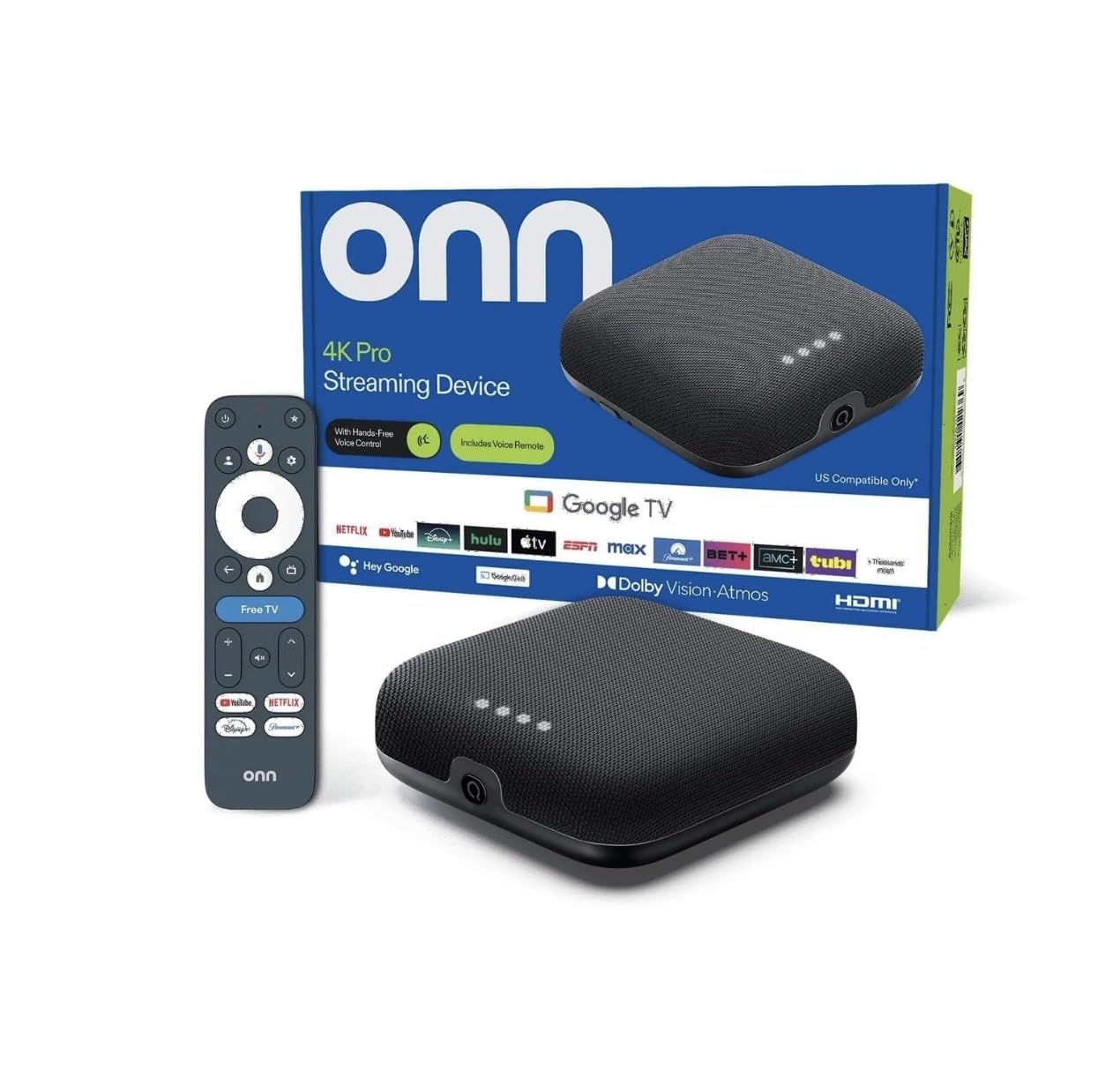
The onn 4K Pro Streaming Device is a compelling mid-range option that punches well above its weight class for Kodi users. It features 3GB of RAM and 32GB of internal storage, which is a massive leap over budget sticks. This configuration ensures Kodi launches quickly, add-ons load instantly, and navigating large libraries remains buttery smooth.
Connectivity is a strong point on this box. It supports Wi-Fi 6 for faster and more stable wireless streaming, but it also includes a physical Ethernet port for users who prefer the most reliable wired connection for their local network. The included remote comes with a backlight and a “find my remote” feature, solving two common annoyances of streaming in a dark room.
It runs the Google TV interface with Gemini support, which is a clean, modern upgrade over standard Android TV. For the price, the value proposition is undeniable. It offers Shield-like RAM and storage for a fraction of the cost. The only downside is that it lacks the advanced audio passthrough support of premium boxes, but for 95% of Kodi users, this is a fantastic and powerful choice.
Why it’s great
- Excellent 3GB RAM and 32GB storage combo for snappy Kodi performance.
- Includes both Wi-Fi 6 and a dedicated Ethernet port for network flexibility.
- Backlit remote with a finder function is a practical and premium touch.
Good to know
- Lacks high-end HD audio passthrough for dedicated home theater setups.
- Some features may be limited to the US market.
5. Google TV Streamer 4K

The Google TV Streamer 4K is a refined evolution of the Chromecast, now a proper box with 32GB of storage. Google claims a 22% faster processor and double the memory of the previous generation, resulting in significantly improved app navigation and switching. For Kodi, this translates to a cleaner, more responsive experience than its stick predecessor.
Its best quality is the software integration. The Google TV interface organizes content from Kodi alongside other streaming services, creating a unified watchlist. The redesigned remote is comfortable, with a customizable button and a “ring” feature to locate it. The inclusion of an Ethernet port is a welcome upgrade, providing a stable wired connection for streaming high-bitrate 4K files.
While it supports Dolby Vision and Dolby Atmos, it does so more for the streaming apps than for full local passthrough of lossless audio formats like TrueHD. It’s a fantastic all-around streaming device that handles Kodi well, but its audio capabilities are more tailored to the streaming service user than the hardcore local media enthusiast. It is a top-tier choice for a balanced experience.
Why it’s great
- Smooth, fast interface with a clean and organized Google TV layout.
- Ethernet port and Wi-Fi 6 provide excellent network stability.
- Remote has a customizable button and a locator feature.
Good to know
- HDMI 2.1 cable is sold separately and is required for best resolution.
- Audio passthrough is limited, not supporting lossless HD audio formats.
6. onn 4K Plus

The onn 4K Plus is a solid, no-nonsense Android TV box that offers a significant upgrade over budget sticks for Kodi users. It doubles the RAM to 2GB and offers 16GB of storage, which is the sweet spot for a functional Kodi installation. This allows for a reasonable number of add-ons and a library cache that won’t immediately fill up, leading to a much more fluid navigation experience than the 1GB/8GB alternatives.
It supports all the modern necessities: 4K UHD with Dolby Vision for vibrant colors, and Dolby Atmos for immersive surround sound. The inclusion of Wi-Fi 6 ensures that streaming large 4K files wirelessly is stable and fast. The setup process is straightforward, and users have reported it to be a simple and reliable replacement for more restrictive or slower platforms.
The main limitation remains the 2GB of RAM. While fine for casual Kodi use, power users running heavy skins or multiple active add-ons may occasionally encounter a slight reload when switching back to Kodi from another app. It’s a fantastic choice for someone who wants a dependable Kodi experience without spending a premium, but it does have a ceiling on its multitasking prowess.
Why it’s great
- 16GB of storage provides ample space for Kodi add-ons and metadata.
- Wi-Fi 6 ensures fast and stable wireless streaming of 4K content.
- Simple setup and a clean, intuitive user interface.
Good to know
- 2GB of RAM is serviceable but can be a bottleneck for heavy Kodi skins.
- Some features are optimized for the US market only.
7. Xiaomi TV Stick 4K (2nd Gen)

The Xiaomi TV Stick 4K (2nd Gen) is the most budget-conscious entry point into Kodi streaming. It’s an ultra-portable stick that turns any hotel TV into a smart media center. The 2nd Gen model brings a much-needed upgrade to Wi-Fi 6, which is critical for a stick, as a stable wireless connection is its only option for streaming content to Kodi.
Despite its compact size, it supports Dolby Vision and Dolby Atmos, offering good picture and sound quality for its class. The Google TV interface is smooth for a stick, and the included voice remote is functional. It’s easy to side-load Kodi onto this device, making it a very accessible option for dipping your toes into Kodi without a large financial commitment.
The hard limitation here is the 8GB of storage. After the system firmware, you’re left with just a few gigabytes for Kodi. You can install Kodi and a couple of lightweight add-ons, but you cannot build a large library or install heavy skins. It is best used for streaming simple add-ons or playing media from a network share. It is a functional entry-level device, not a high-performance Kodi powerhouse.
Why it’s great
- Extremely portable and easy to take on the go.
- Dolby Vision and Atmos support for good picture and sound.
- Excellent price point for getting started with Kodi.
Good to know
- 8GB of storage is very limiting for Kodi’s database and add-ons.
- Limited RAM means performance stutters with complex add-ons.
FAQ
How much RAM do I really need for Kodi?
Is it better to run Kodi on Android TV or full Android?
Will a device with 8GB of storage be enough for Kodi?
Final Thoughts: The Verdict
For most users, the device for kodi winner is the NVIDIA Shield TV Pro because it delivers unmatched performance, critical audio passthrough, and game-changing AI upscaling that other boxes simply cannot match. If you want a massive storage and RAM advantage for a similar premium price, grab the MINIX U8K-Ultra. And for the best balance of price, performance, and storage, nothing beats the value of the onn 4K Pro Streaming Device.

Mo Maruf
I created WellFizz to bridge the gap between vague wellness advice and actionable solutions. My mission is simple: to decode the research and give you practical tools you can actually use.
Beyond the data, I am a passionate traveler. I believe that stepping away from the screen to explore new environments is essential for mental clarity and physical vitality.