Our readers keep the lights on and my smoothie glass nicely filled. As an Amazon Associate, I earn from qualifying purchases.
A desktop PC is a long-term commitment. Unlike a laptop you swap every few years, a tower you build or buy today should still feel fast for half a decade. The catch is that the right specs depend entirely on whether you’re editing 4K timelines, battling in low-latency shooters, or just balancing spreadsheets across three monitors. A processor that crushes rendering workloads will sit idle during web browsing, while a budget office machine will choke on the first ray-traced frame you throw at it. The key is matching the internal hardware to your actual daily workflow — not the marketing hype.
I’m Mohammad Maruf — the founder and writer behind WellFizz. I’ve spent hundreds of hours analyzing benchmark data, motherboard platforms, GPU memory bandwidths, and cooling solutions to separate real-world performance from spec-sheet fluff in the desktop PC space.
This guide covers eleven distinct builds to help you find the right balance of CPU, GPU, RAM, and storage for your workload. Whether you need a compact workstation, a business-class tower, or a high-refresh gaming rig, these are the best desktop pcs available right now across every meaningful use case.
How To Choose The Best Desktop PCs
The first decision isn’t brand — it’s form factor. A mini PC saves desk space but offers limited expansion for a dedicated GPU. A full-size tower gives you room for multiple drives and a high-power graphics card but takes up significant floor space. An all-in-one like the iMac combines the display and computer into one clean unit but makes future upgrades nearly impossible. Choose the chassis that fits your workspace before you fall in love with a spec sheet.
CPU Architecture: Single-Core Speed vs. Core Count
Intel’s Core Ultra series and AMD’s Ryzen 8000/9000-series processors both deliver excellent performance, but they excel in different areas. Tasks like video encoding and 3D rendering scale with core count, making high-core-count Ryzen chips a strong choice. Gaming and general responsiveness benefit more from single-core turbo speeds, where Intel’s 14th-gen and Ultra chips often hold a slight edge. Integrated NPUs in newer chips add AI acceleration for supported apps, but that’s a secondary bonus — not a primary buying reason.
Memory and Storage: The Bottleneck You Can’t Ignore
16GB of RAM is the minimum for a comfortable Windows experience today. Upgrading to 32GB lets you keep dozens of browser tabs open alongside demanding creative apps without slowdown. Storage speed matters just as much: a PCIe Gen4 NVMe SSD delivers boot times under ten seconds and near-instant file transfers, while a SATA SSD or hard drive in the same price tier will feel sluggish. Always prioritize a fast primary drive over raw capacity; you can add a secondary HDD for bulk storage later.
Graphics: Integrated vs. Dedicated vs. Discrete
Integrated graphics (inside the CPU) are fine for office work, 4K video playback, and light photo editing. The AMD Radeon 780M in the Ryzen 7 8745HS is the most powerful iGPU available, capable of running esports titles at 60 FPS. For AAA gaming, 3D modeling, or GPU-accelerated rendering, you need a dedicated card. The NVIDIA RTX 5060 delivers strong 1080p/1440p performance, while the RTX 5070 and RTX 5070 Ti target high-refresh 1440p and entry-level 4K gaming. An 8GB VRAM card is adequate for current titles; 12GB or 16GB offers more headroom for future releases and higher texture resolutions.
Quick Comparison
On smaller screens, swipe sideways to see the full table.
| Model | Category | Best For | Key Spec | Amazon |
|---|---|---|---|---|
| GEEKOM A8 | Mini PC | Creative Workstation | Ryzen 7 8745HS / 16GB DDR5 / 1TB NVMe | Amazon |
| Dell Slim ECS1250 | Slim Tower | Home Office | Intel Ultra 5 / 16GB DDR5 / 512GB SSD | Amazon |
| HP OmniDesk | Mid-Tower | Versatile Media PC | Ryzen 7 8700G / 32GB DDR5 / 1TB NVMe | Amazon |
| HP Pro Tower 290 G9 | Business Tower | Multi-Monitor Office | i5-12500 / 16GB DDR4 / 512GB SSD | Amazon |
| Thermaltake Quartz i1460 | Gaming Tower | Entry-Level 1080p Gaming | i5-14400F / RTX 5060 / 16GB DDR4 | Amazon |
| Apple iMac M4 | All-in-One | Creative & Daily macOS | M4 8-Core / 16GB Unified / 256GB SSD | Amazon |
| Dell Pro Tower Plus | Pro Tower | Business Productivity | Ultra 5 235 / 32GB DDR5 / 1TB SSD | Amazon |
| CyberPowerPC Gamer Master | Gaming Tower | Mid-Range 1440p Gaming | Ryzen 7 8700F / RTX 5060 Ti / 16GB DDR5 | Amazon |
| MSI Codex Z2 | Gaming Tower | High-End 1440p Gaming | Ryzen 7 8700F / RTX 5070 / 32GB DDR5 | Amazon |
| Alienware Aurora ACT1250 | Gaming Tower | Marathon Gaming Sessions | Ultra 7 265F / RTX 5070 / 32GB DDR5 | Amazon |
| Skytech O11 Vision | Gaming Tower | Ultra 1440p/4K Gaming | Ryzen 7 9850X3D / RTX 5070 Ti / 32GB DDR5 | Amazon |
In‑Depth Reviews
1. GEEKOM A8 Mini PC
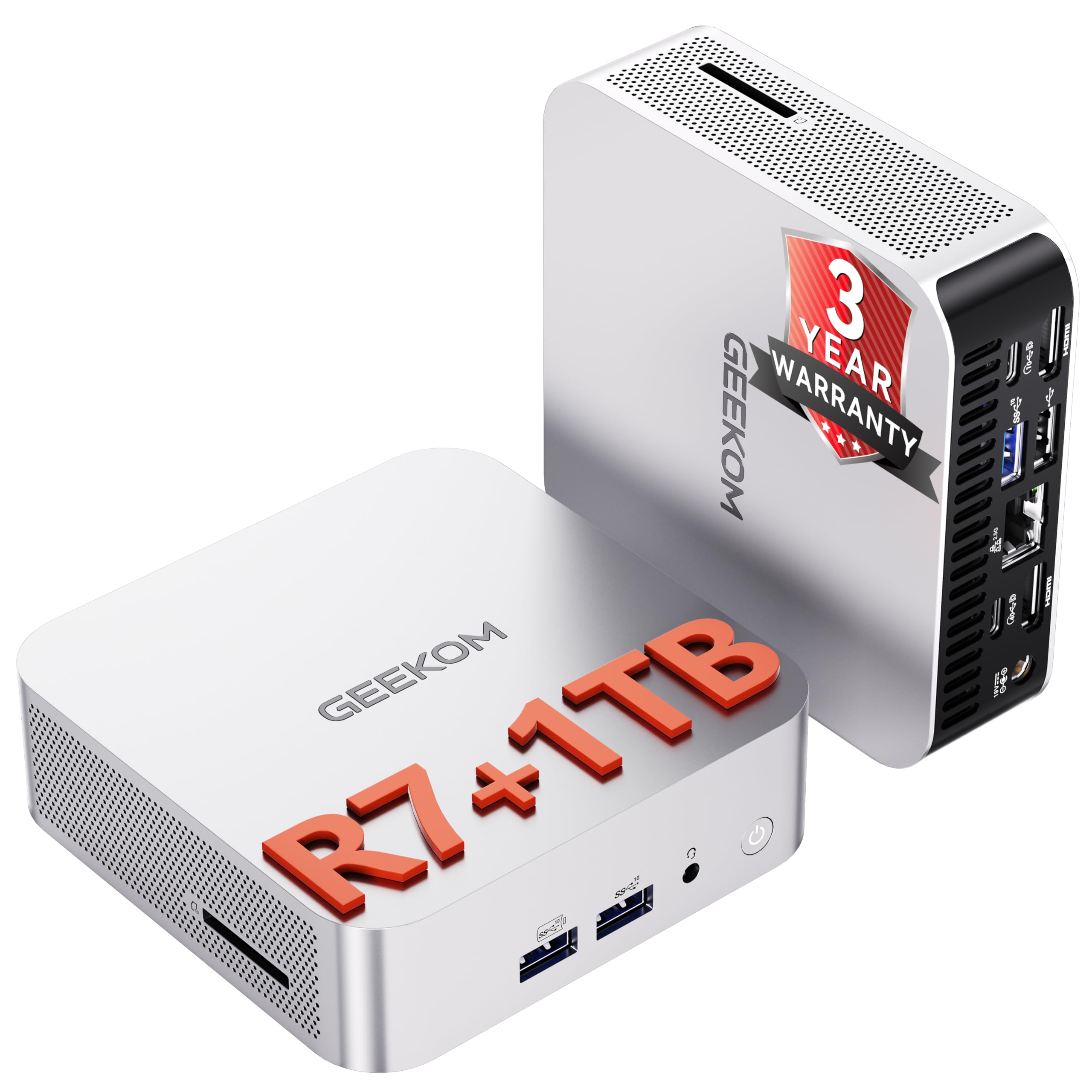
The GEEKOM A8 packs a desktop-class AMD Ryzen 7 8745HS with 8 cores boosting to 4.9GHz into a compact 0.5-liter chassis. The Radeon 780M integrated graphics, based on RDNA 3 architecture, handles 4K video editing, graphic design, and even casual gaming at respectable frame rates — a rare capability in the mini PC segment. With 16GB of dual-channel DDR5 RAM that’s upgradable to 128GB and a 1TB PCIe 4.0 NVMe SSD, this system delivers genuine workstation-level responsiveness in a form factor that mounts behind your monitor.
Connectivity is where the A8 truly shines: a full-function USB4 port at 40Gbps, dual HDMI 2.0, and USB-C support let you drive up to four 4K displays or a single 8K monitor simultaneously. The inclusion of Wi-Fi 6E and 2.5GbE LAN ensures future-proof networking for cloud collaboration and large file transfers. Advanced thermal engineering with dual heat pipes keeps the system whisper-quiet even under sustained rendering loads, avoiding the thermal throttling that plagues lesser compact designs.
The only real compromise is internal storage expansion: there’s a single M.2 NVMe slot with no second slot for additional drives, meaning bulk storage requires an external USB-C SSD. The unit ships with Windows 11 Pro and includes a 3-year limited warranty, which adds significant long-term value. For creative professionals and power users who need desktop performance in a space-saving package, the A8 is an exceptional choice.
Why it’s great
- Radeon 780M iGPU handles 4K editing and casual gaming
- USB4 40Gbps supports quad 4K display output
- Whisper-quiet thermal design prevents throttling
- 32GB DDR5 available with 128GB upgrade ceiling
Good to know
- Single NVMe slot limits internal storage expansion
- Fan is audible in a completely silent room
- Lacks NPU for AI acceleration tasks
2. Dell Slim Desktop ECS1250

The Dell Slim Desktop ECS1250 is built around Intel’s new Core Ultra 5-225 processor, which includes an integrated NPU for AI acceleration in supported applications. With 16GB of DDR5 memory and a 512GB M.2 SSD, it handles standard home office tasks — spreadsheets, web browsing, document editing — with complete smoothness. The slim tower design uses recycled materials and refined corners, making it a clean addition to any desk without the bulk of a traditional mid-tower.
What makes this desktop especially practical is the tool-less side panel access. You can pop open the case and upgrade components without any screwdrivers, which is a rarity in pre-built office machines. The system supports up to four FHD monitors via DisplayPort 1.4a daisy chaining or two 4K displays through the HDMI 2.1 and DisplayPort combination. Built-in TPM 2.0 security and a lock slot add business-grade protection for sensitive data.
Customer reviews consistently note the near-silent operation and reliable performance for daily use. The included 1-year onsite Dell service and 6-month Dell Migrate tool make the transition from an older PC straightforward. This machine won’t satisfy gamers or video editors, but for anyone replacing an aging office PC, it delivers outstanding reliability and a very quiet experience out of the box.
Why it’s great
- Tool-less side panel for easy upgrades
- Integrated NPU for AI-assisted workflows
- Supports up to four monitors via daisy chaining
- Virtually silent under normal office loads
Good to know
- Integrated graphics only — no dedicated GPU option
- 512GB storage fills quickly with large media files
- No optical drive or card reader included
3. HP OmniDesk Desktop PC

The HP OmniDesk leverages the AMD Ryzen 7 8700G, a processor with integrated Radeon 780M graphics that rivals entry-level dedicated GPUs. This makes it an excellent choice for a living room media PC or a starter gaming rig that can run esports titles at decent settings without a separate graphics card. The 32GB of DDR5-5200 memory is generous and ensures smooth multitasking even with multiple creative applications open simultaneously.
The 1TB PCIe Gen4 NVMe SSD provides ample fast storage for game libraries and media collections. The system includes a Wi-Fi 6 and Bluetooth 5.4 wireless card, plus a wired gigabit Ethernet port for stable network connections. The black tower design is compact at 12.4 inches deep, fitting easily into entertainment centers or under-desk setups. HP includes a wired keyboard and mouse combo, which customers note are basic but functional.
Some buyers found the bundled keyboard and mouse lacking in quality, which is a minor complaint given the core system’s strong value. The 780M iGPU is capable enough for 1080p gaming at medium settings in many titles, but power users seeking higher frame rates will want a dedicated GPU. The integrated NPU provides 16 TOPS of AI acceleration for supported creative software. For a versatile all-in-one home system that doesn’t compromise on memory, this desktop represents excellent spec-per-dollar value.
Why it’s great
- Radeon 780M iGPU outperforms most integrated graphics
- 32GB DDR5-5200 handles heavy multitasking easily
- 1TB NVMe SSD provides quick boot and load times
- Integrated NPU for future AI workloads
Good to know
- Bundled keyboard and mouse feel cheap
- Requires BIOS update for Linux installation
- Limited upgrade path for dedicated GPU
4. HP Pro Tower 290 G9

The HP Pro Tower 290 G9 is a no-nonsense business desktop built around the 12th-gen Intel Core i5-12500, a 6-core processor with 18MB of cache and a 4.6GHz turbo boost. Paired with 16GB of DDR4 RAM and a 512GB PCIe NVMe SSD, this system is optimized for productivity tasks like data analysis, remote work, and multi-monitor setups. The front panel includes four USB 3.0 ports running at 5Gbps, plus a headphone/mic combo, making peripheral connections quick and convenient.
The integrated Intel UHD Graphics 770 supports dual displays via HDMI and VGA, making it ideal for office environments where multiple monitors boost efficiency. The compact tower measures 11.92 by 6.1 by 13.27 inches, fitting easily on a desk or in a small cabinet. HP includes a wired keyboard and mouse, and the system ships with Windows 11 Pro with TPM 2.0 security. The power supply is rated 80 Plus Gold at 180W, ensuring efficient operation.
Customer reviews highlight the fast boot times and virtually silent operation for daily use. Some users experienced Bluetooth connectivity quirks and noted the system struggles with heavy browser multitasking beyond 20 or more tabs. The storage is adequate for office documents but may feel tight for large media collections. For a dependable work computer with a trusted brand name and solid build quality, this HP tower is hard to beat at this price level.
Why it’s great
- i5-12500 delivers snappy business application performance
- 4x front USB 3.0 ports for peripheral access
- Dual monitor support via HDMI and VGA
- Compact tower fits in tight spaces
Good to know
- DDR4 RAM limits upgrade to slower standard
- Integrated graphics unsuitable for gaming
- Some Bluetooth pairing issues reported
5. Thermaltake LCGS Quartz i1460

The Thermaltake LCGS Quartz i1460 pairs an Intel Core i5-14400F processor with an NVIDIA GeForce RTX 5060 8GB GPU, making it a solid entry-level gaming desktop capable of running modern titles at 1080p with high settings. The 16GB of DDR4 3600MHz RGB memory adds a visual flair through the tempered glass side panel. The 1TB NVMe M.2 SSD provides fast game loading, and the pre-built system includes Windows 11 Home pre-installed for a quick out-of-box experience.
The chassis features an ARGB tower air cooler and a full-length PSU power cover that hides cables for a clean, professional look. The white color scheme with customizable RGB lighting makes it stand out on any desk. Setup is straightforward, with Windows initialization taking roughly 30 minutes. The system handles AAA games like Fallout 76 at around 60 FPS on highest settings, and the RTX 5060 supports ray tracing and DLSS for enhanced visuals in supported titles.
A few customers reported DOA units or faulty Wi-Fi modules on the ASRock motherboard, though Thermaltake support addressed these issues. The motherboard uses non-proprietary parts, so future upgrades to the GPU, RAM, or storage are possible without compatibility headaches. The system runs quietly under normal loads but the air cooler becomes audible during extended gaming sessions. For budget-conscious gamers who want a clean, ready-to-play rig with upgrade potential, this is a compelling option.
Why it’s great
- RTX 5060 delivers strong 1080p gaming performance
- Clean cable management with PSU power cover
- Non-proprietary motherboard allows easy future upgrades
- RGB lighting with tempered glass side panel
Good to know
- Some units arrive with DOA motherboards or Wi-Fi issues
- 16GB DDR4 is adequate but not ideal for future titles
- Fans become audible under sustained gaming load
6. Apple 2024 iMac M4

The Apple 2024 iMac with the M4 chip represents a generational leap in all-in-one computing. The 8-core CPU and 8-core GPU deliver snappy performance across creative apps like Adobe Creative Cloud and Microsoft 365, while the 16GB of unified memory ensures smooth multitasking. The 24-inch 4.5K Retina display with 500 nits of brightness and support for one billion colors makes photo editing, video playback, and general productivity look stunningly vivid.
The design is remarkably thin at just over 11 millimeters, available in seven vibrant colors that add personality to any workspace. The 12MP Center Stage camera keeps you perfectly framed during video calls, and the six-speaker system with Spatial Audio provides immersive sound without external speakers. The M4 chip includes Apple’s neural engine for AI tasks, powering features like real-time photo enhancement and voice typing with exceptional accuracy.
The iMac’s all-in-one nature means there’s no separate tower to hide, but it also means upgrades are effectively impossible — you’re locked into the original SSD and memory configuration. The base 256GB SSD fills quickly for users with large media libraries, and external storage is the only expansion path. For users already within the Apple ecosystem who value a gorgeous display, seamless handoff with iPhone and iPad, and whisper-quiet operation, this iMac delivers an unmatched integrated experience.
Why it’s great
- Stunning 24-inch 4.5K Retina display with one billion colors
- M4 chip delivers fast performance for creative and office work
- 12MP Center Stage camera with Spatial Audio speakers
- Seamless integration with iPhone, iPad, and Apple services
Good to know
- Base 256GB SSD fills quickly with media projects
- No internal upgrade path for RAM or storage
- Limited to macOS ecosystem — no Windows dual-boot without emulation
7. Dell Pro Tower Plus Desktop

The Dell Pro Tower Plus is a serious business workstation built around the Intel 14-core Core Ultra 5 235 processor, which combines performance cores, efficient cores, and an integrated NPU for AI acceleration. With 32GB of DDR5 RAM and a 1TB PCIe SSD, this machine is designed for demanding business applications, data analysis, and light content creation. The Windows 11 Pro operating system adds enterprise-level security features like BitLocker and remote desktop capabilities.
The tower design includes a DVD-RW optical drive — a rare inclusion in modern PCs that benefits users with legacy media. The chassis has room for additional internal storage, and one reviewer successfully added an 8TB HDD for bulk archival. The system supports up to three displays via the motherboard’s integrated Intel Graphics outputs, though the USB-C port is data-only and does not support video output. Rear connectivity includes multiple USB-A ports and a gigabit Ethernet jack.
Customer feedback is positive overall, with emphasis on its reliable performance for converting from older Windows 10 workstations. The integrated graphics handle basic video editing and presentations but won’t support gaming or GPU-accelerated rendering. The system runs cool and quiet, suitable for open-office environments. For a business-ready machine with generous memory and storage at this tier, the Dell Pro Tower Plus offers strong long-term value.
Why it’s great
- 14-core Ultra 5 235 with integrated NPU for AI tasks
- 32GB DDR5 RAM handles heavy multitasking
- Includes DVD-RW drive for legacy media
- Room for additional internal hard drive
Good to know
- USB-C port is data-only, does not support video out
- Integrated graphics limit gaming and GPU workflows
- Limited to two internal expansion cards
8. CyberPowerPC Gamer Master

The CyberPowerPC Gamer Master GMA2900A3 combines an AMD Ryzen 7 8700F processor with an NVIDIA GeForce RTX 5060 Ti 8GB GPU on an AMD B850 chipset motherboard. The RTX 5060 Ti uses next-generation GDDR7 memory for higher bandwidth, making it well-suited for 1440p gaming at high settings in titles like Call of Duty and Baldur’s Gate 3. The 16GB of DDR5 memory and 1TB PCIe 4.0 NVMe SSD provide fast load times and smooth system responsiveness.
The case features a tempered glass side panel with custom RGB lighting, and includes a keyboard and mouse in the box. The AMD B850 chipset supports PCIe 5.0 for future graphics card upgrades, making this a somewhat future-proof platform. Connectivity includes 2x USB-C 3.2, 4x USB-A 3.2, and 2x USB-A 2.0 ports, plus Wi-Fi 6 and Bluetooth 5.3. The 1-year parts and labor warranty with free lifetime tech support adds peace of mind.
Early adopters reported some BIOS-related stability issues, including random restarts and USB power problems, though subsequent updates resolved most of these. One user noted a fan wire broke after nine months, but CyberPowerPC sent free replacements. The system runs remarkably quiet under load thanks to efficient RGB fans. For gamers who want a polished mid-range rig with upgrade-friendly components and strong 1440p performance, this desktop delivers impressive value.
Why it’s great
- RTX 5060 Ti with GDDR7 memory for 1440p gaming
- AMD B850 chipset supports PCIe 5.0 for future upgrades
- Quiet operation under gaming load
- Free lifetime tech support included
Good to know
- Some early BIOS stability issues reported
- 16GB RAM is adequate but tight for heavy multitasking
- Fan wire durability concerns from some users
9. MSI Codex Z2 Gaming Desktop

The MSI Codex Z2 is a performance-oriented gaming desktop built around the AMD Ryzen 7 8700F, an 8-core, 16-thread processor boosting to 5.0GHz. Paired with the NVIDIA GeForce RTX 5070 featuring 12GB of GDDR7 memory — based on the Blackwell architecture — this system targets high-refresh 1440p gaming and entry-level 4K. The 32GB of DDR5 memory and 2TB NVMe SSD provide ample capacity for large game libraries and heavy multitasking.
Cooling is handled by four ARGB fans — three front intake and one rear exhaust — working with an air cooler to maintain stable temperatures during extended sessions. The MSI Center software allows you to customize the RGB lighting to match your setup. The case includes a USB-C port for modern peripherals, and the system is VR-ready for immersive gaming. The chassis is compact for a performance tower, fitting under most desks without dominating the space.
Some customers experienced issues with Bluetooth performance and reported one case of SSD failure requiring an RMA. The fans become noticeable under load, which is expected for a high-power gaming rig. MSI support received praise for responsive service. The 2TB SSD eliminates the need for immediate storage upgrades. For gamers who want a robust, ready-to-play system with Blackwell architecture and strong ray tracing performance, the Codex Z2 is a compelling option.
Why it’s great
- RTX 5070 with 12GB GDDR7 for high-refresh 1440p
- 32GB DDR5 RAM and 2TB NVMe SSD — generous out of box
- Four ARGB fans maintain stable thermals
- Compact chassis with USB-C support
Good to know
- Some Bluetooth and SSD reliability issues reported
- Fans become audible under gaming load
- Requires BIOS update for optimal stability
10. Alienware Aurora ACT1250

The Alienware Aurora ACT1250 is a premium gaming and creation desktop powered by an Intel Core Ultra 7 265F with 14 cores and boosting up to 5.3GHz. The NVIDIA GeForce RTX 5070 graphics card, based on Blackwell architecture, delivers excellent performance in ray-traced titles and creative applications. The 32GB of DDR5 RAM and 1TB SSD provide fast system responsiveness, while the 1000W 80 Plus Platinum rated power supply ensures clean, consistent power delivery during marathon gaming sessions.
The chassis features a matte basalt black finish with customizable AlienFX stadium lighting that can be controlled via the Alienware Command Center software. The software also allows you to monitor performance modes and create custom gaming profiles. The system includes 1-year Dell Onsite Service, meaning a technician will come to your location if hardware issues cannot be resolved remotely. The case runs cool under load thanks to efficient airflow design.
Some users reported occasional startup issues requiring a full power discharge, and one noted a misaligned front USB-C port. The boot time is around 2 minutes, which is slower than some competitors. Linux users noted the bright cyan lights cannot be dimmed on non-Windows systems. For Windows gamers who value the Alienware ecosystem, premium build quality, and a powerful 1000W PSU that leaves headroom for future upgrades, this desktop is a strong investment.
Why it’s great
- 1000W Platinum PSU provides clean power for sustained gaming
- RTX 5070 handles ray tracing at high settings
- 1-year Dell Onsite Service for hassle-free support
- Customizable AlienFX lighting with Command Center profiles
Good to know
- Occasional startup issues requiring full discharge
- Some reports of misaligned front USB-C ports
- Boot time around 2 minutes is slower than expected
11. Skytech Gaming O11 Vision

The Skytech Gaming O11 Vision is a flagship-tier desktop centered around the AMD Ryzen 7 9850X3D, a processor with 3D V-Cache technology that delivers exceptional gaming performance by reducing latency in memory-intensive titles. Paired with the NVIDIA GeForce RTX 5070 Ti featuring 16GB of GDDR7 VRAM, this system is built for ultra settings at 1440p and high-refresh 4K gaming. The 32GB of DDR5 RAM at 5600MHz and 2TB Gen4 NVMe SSD ensure minimal load times and smooth multitasking.
The cooling solution is a 360mm AIO liquid cooler with ARGB fans, mounted in the Lian Li PC-O11 Vision case in a striking white finish. Liquid cooling keeps the 9850X3D running at optimal temperatures even during extended gaming sessions, preventing thermal throttling that would limit performance in air-cooled systems. The 850W 80 Plus Gold ATX 3 PSU provides stable power delivery for the high-end components. The system includes a free gaming keyboard and mouse, and comes assembled in the USA with a 1-year warranty.
Customer reviews consistently praise the build quality and performance, with one streamer reporting zero lag at 1080p 60fps while broadcasting. The system runs the most demanding titles — Cyberpunk 2077, Hogwarts Legacy, Elden Ring — at ultra settings with smooth frame rates. The white Lian Li case is a showpiece, though its larger footprint may not fit smaller desks. For enthusiasts who want the absolute best gaming performance available in a pre-built system, the Skytech O11 Vision delivers uncompromising power.
Why it’s great
- Ryzen 7 9850X3D with 3D V-Cache for elite gaming performance
- RTX 5070 Ti 16GB handles ultra 1440p and 4K gaming
- 360mm AIO liquid cooling prevents thermal throttling
- 2TB Gen4 SSD provides massive, fast storage
Good to know
- Large case requires significant desk space
- Premium price point targets serious enthusiasts only
- Wi-Fi 5 standard is outdated for modern networks
FAQ
How much RAM do I need for a desktop PC in 2025?
Is integrated graphics enough for video editing or gaming?
What is the advantage of 3D V-Cache in the Ryzen 7 9850X3D?
Should I choose a mini PC or a full tower desktop?
Why do some desktop PCs ship with Windows 11 Pro instead of Home?
Final Thoughts: The Verdict
For most users, the best desktop pcs winner is the GEEKOM A8 because it combines genuine creative workstation performance with an ultra-compact footprint and USB4 connectivity — all at a price that undercuts similarly specced towers. If you want a dedicated gaming machine ready for 1440p high-refresh play, grab the MSI Codex Z2 with its RTX 5070 and 32GB of DDR5. And for pure gaming supremacy with the best available processor technology, nothing beats the Skytech O11 Vision with its Ryzen 7 9850X3D and RTX 5070 Ti.

Mo Maruf
I created WellFizz to bridge the gap between vague wellness advice and actionable solutions. My mission is simple: to decode the research and give you practical tools you can actually use.
Beyond the data, I am a passionate traveler. I believe that stepping away from the screen to explore new environments is essential for mental clarity and physical vitality.