Our readers keep the lights on and my smoothie glass nicely filled. As an Amazon Associate, I earn from qualifying purchases.
A desktop for working from home has to vanish into your workflow — no fan noise, no lag during conference calls, no hesitation when you flip between a dozen browser tabs and a spreadsheet. The days of a bulky tower dominating your home office are over; the modern home workstation is either compact enough to hide behind a monitor or slim enough to look like furniture. The real challenge is filtering through processor generations, RAM speeds, and storage types to find the machine that actually matches how you work, not just what looks good on a spec sheet.
I’m Mohammad Maruf — the founder and writer behind WellFizz. I’ve spent countless hours analyzing desktop specifications, reading through thousands of verified buyer experiences, and cross-referencing real-world performance claims to separate the machines that genuinely deliver from those that just promise it.
Whether you need silent operation for video calls, multi-monitor support for complex workflows, or the raw horsepower for data processing, this guide breaks down the best options on the market. Your search for the ultimate desktop computer for working from home ends with a clear, confident choice.
How To Choose The Best Desktop Computer For Working From Home
Choosing a work-from-home desktop isn’t about picking the fastest processor on paper — it’s about finding the configuration that eliminates friction from your daily workflow. The wrong machine forces you to wait for apps to load, suffer through choppy video calls, or listen to a fan that sounds like a vacuum cleaner. Here’s what actually matters.
Processor Generation Over Clock Speed
A 12th-gen Intel Core i5 often outperforms a 10th-gen i7 in real-world multitasking because newer architectures handle background processes and power management more efficiently. For remote work, look for processors with at least 8 threads — four performance cores and four efficiency cores — so your video conferencing app doesn’t stutter when you have a dozen browser tabs open. AMD Ryzen 7 and Intel Core Ultra 7 are sweet spots for productivity without overspending.
RAM: 16GB Is the Floor, 32GB Is the Comfort Zone
Windows 11 alone eats about 4GB of RAM before you open a single application. Add a browser with ten tabs, Slack, Teams or Zoom, and a productivity suite, and you’re quickly pushing past 12GB. A 16GB machine works for light workflows, but 32GB ensures you never have to close apps to keep things snappy. DDR5 RAM offers slightly better bandwidth than DDR4, though the real-world difference in office tasks is small — prioritize capacity over speed.
Storage Speed Shapes Your Day
A PCIe Gen4 NVMe SSD loads applications in seconds and makes file searches instant. A SATA SSD is slower, and a traditional hard drive will make you regret your purchase within the first week. For a work-from-home desktop, 512GB is the minimum, but 1TB gives you breathing room for project files, cached data, and software updates. Avoid any machine that still ships with a 5400 RPM hard drive — even as secondary storage, it creates system-wide drag.
Connectivity and Multi-Monitor Support
Most remote workers benefit from at least two monitors. Check that the desktop has native HDMI and DisplayPort outputs — don’t rely on USB-C adapters for primary displays. A minimum of four USB-A ports (two front, two rear) saves you from constantly swapping peripherals. Wi-Fi 6 or 6E ensures stable video calls without ethernet, though a wired connection is still superior for teleconferencing consistency.
Quick Comparison
On smaller screens, swipe sideways to see the full table.
| Model | Category | Best For | Key Spec | Amazon |
|---|---|---|---|---|
| GEEKOM IT13 MAX | Mini PC | AI & creative workloads | Ultra 9 185H, 16GB DDR5 | Amazon |
| Dell Pro Tower (i7-14700) | Tower | Professional multitasking | i7-14700, 20 cores | Amazon |
| Dell Tower ECT1250 | Tower | Stock trading & analysis | Ultra 7 265, 32GB DDR5 | Amazon |
| HP OmniDesk | Tower | AI-assisted productivity | Ultra 7 265, 2TB SSD | Amazon |
| HP Tower (i5-12500, 32GB) | Tower | Heavy multitasking | i5-12500, 32GB DDR4 | Amazon |
| ACEMAGIC M5 Mini PC | Mini PC | Compact productivity | i5-14450HX, 32GB DDR4 | Amazon |
| Dell Slim ECS1250 | Slim Tower | Basic home office tasks | Ultra 5 225, 16GB DDR5 | Amazon |
| HP Pro Tower 290 G9 | Tower | Remote work & learning | i5-12500, 16GB DDR4 | Amazon |
| HP 27 All-in-One | All-in-One | Space-saving integrated PC | Ryzen 7 7730U, 32GB DDR4 | Amazon |
| Dell 27 All-in-One | All-in-One | Clutter-free home office | Core 7 150U, 16GB DDR5 | Amazon |
In‑Depth Reviews
1. GEEKOM IT13 MAX Mini PC
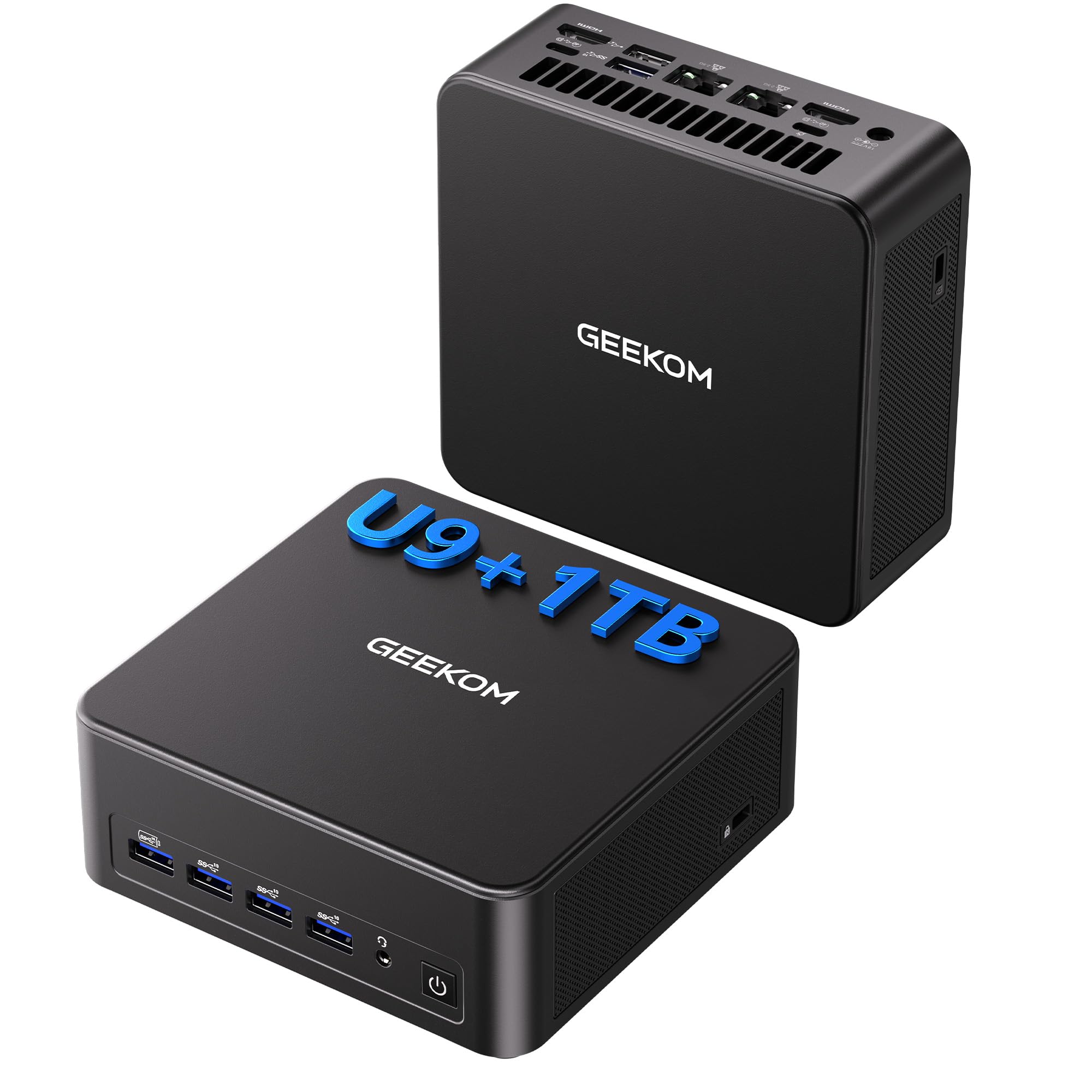
The GEEKOM IT13 MAX is a serious contender for the home office crown, packing Intel’s Core Ultra 9 185H with a 65W TDP that delivers 2x faster graphics and 3x higher AI inference performance compared to previous i9 generations. With 16GB of DDR5 RAM and a 1TB NVMe SSD, this mini PC runs local LLMs, handles 4K video editing in DaVinci Resolve, and manages intensive data analysis without breaking a sweat. The IceBlast 3.0 cooling system keeps fan noise 40 percent quieter than typical mini PCs, making it a welcome presence in any shared workspace.
Connectivity is exceptional: dual 2.5GbE LAN ports for stable wired networking, Wi-Fi 7, and support for up to four displays — including 8K output via USB-C. The compact navy blue chassis fits seamlessly into any desk setup, and the 3-year warranty provides peace of mind for long-term use. Developers will appreciate the full Linux compatibility and lack of bloatware, while power users benefit from the quad-display capability for multi-window workflows.
Some users report that the default fan curve needs a BIOS tweak to achieve its quietest operation, and the picky HDMI cable requirement can be frustrating during initial setup. Once configured, though, this machine delivers desktop-class performance in a footprint smaller than a hardcover book. It’s the most future-proof mini PC on this list for professionals who need AI-ready power today.
Why it’s great
- Dual 2.5GbE LAN for reliable wired networking
- Supports 8K display output via USB-C
- 3-year warranty and Linux compatibility
Good to know
- Fan curve may require BIOS adjustment for silent operation
- HDMI cable selection can be picky
2. Dell Pro Tower Desktop (i7-14700)
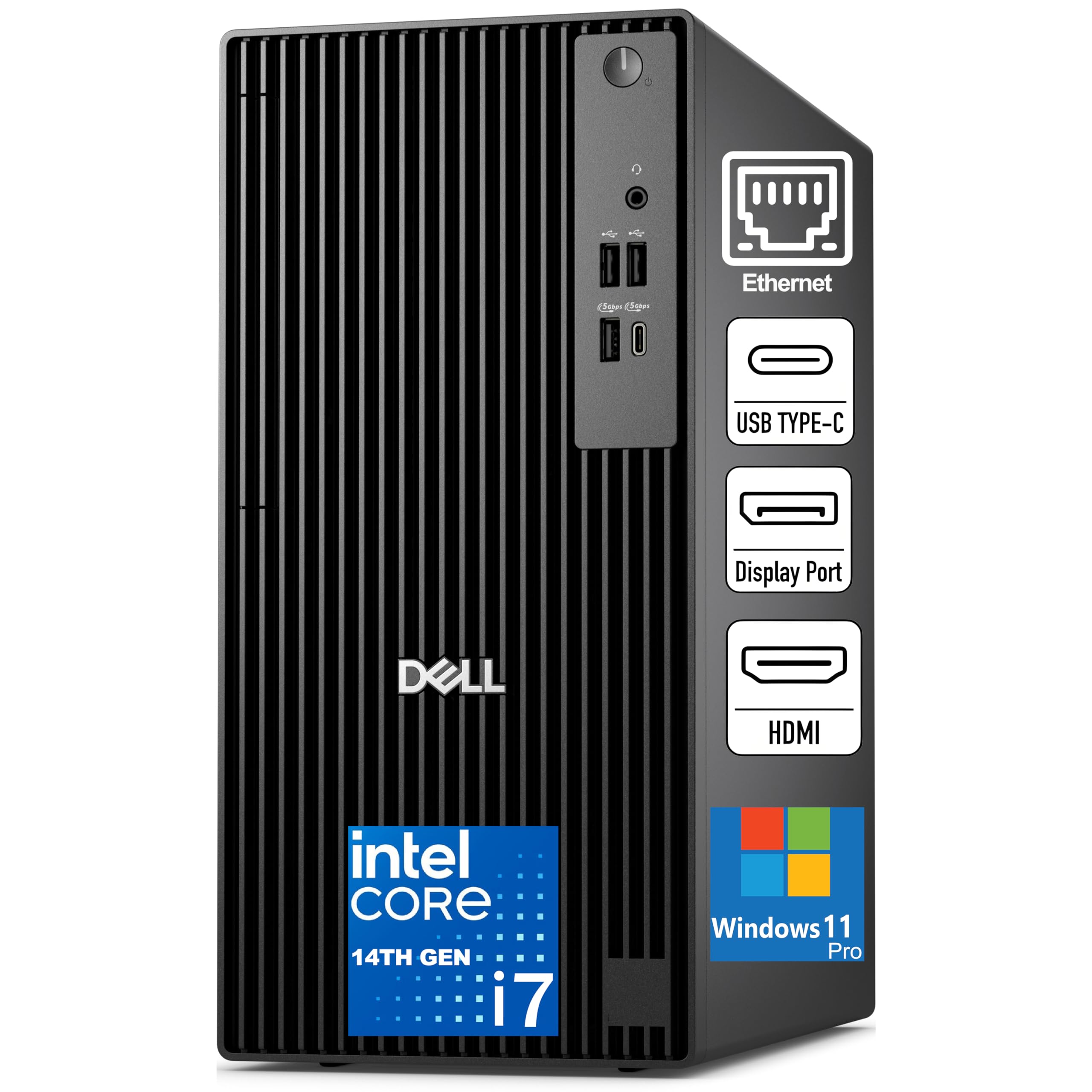
Dell’s Pro Tower steps up with an Intel Core i7-14700 processor featuring 20 cores (8 performance + 12 efficiency) and a turbo speed up to 5.4GHz, making it a workstation-class machine for coding, video editing, and heavy data processing. The 16GB of DDR5 5600 MHz RAM and 512GB SSD TLC deliver responsive performance, though professionals who routinely handle large datasets may want to budget for a RAM upgrade. The tower runs Windows 11 Pro, which includes BitLocker encryption and remote desktop features essential for security-conscious home offices.
Connectivity includes HDMI 2.1, DisplayPort 1.4a, USB 3.2 Gen 1 Type-C, and multiple USB-A ports, along with Gigabit Ethernet for stable wired connections. The discrete TPM 2.0 chip and chassis intrusion switch add an extra layer of security for business use. At 180W Bronze PSU, the system is energy-efficient enough to run all day without significant power draw.
Several buyers noted that the pre-installed McAfee software is difficult to remove, and the WiFi adapter may need attention for optimal performance. The compact black tower design with an internal speaker is practical, but the lack of an optical drive reflects the modern shift toward cloud storage. Overall, this Dell delivers reliable professional-grade performance at a mid-range investment.
Why it’s great
- 20-core CPU handles heavy multitasking easily
- DDR5 5600MHz RAM for fast data access
- TPM 2.0 and chassis intrusion switch for security
Good to know
- McAfee pre-installed and tricky to uninstall
- WiFi adapter may need replacement for best signal
3. Dell Tower Desktop ECT1250

The Dell Tower ECT1250 is a performance-focused machine built around the Intel Core Ultra 7 265 processor, which offers 20 cores and a 5.3GHz turbo speed. With 32GB of DDR5 RAM and a 1TB M.2 SSD, this configuration handles stock trading platforms with real-time charts, virtual machines for development, and large spreadsheet models without hesitation. The tool-less side panel makes upgrading RAM or storage straightforward — a feature that extends the machine’s useful life.
Display support includes up to four FHD monitors via DisplayPort daisy chaining, or two 4K displays through HDMI 2.1 and DisplayPort. The AI-ready processor integrates neural processing unit (NPU) acceleration for Windows Studio Effects and Copilot, which improves video call backgrounds and voice clarity without taxing the CPU. The 180W power supply is efficient but limits future GPU upgrades for anyone considering light gaming.
Some users flagged that the single 32GB RAM stick occupies one slot, leaving the second slot free but requiring matched modules for dual-channel performance. There is no extra M.2 slot, so storage expansion is limited to external drives. The front audio jack also lacks recording support, which may disappoint podcasters or content creators. For pure productivity and stock analysis, however, this Dell is a strong performer.
Why it’s great
- 32GB DDR5 RAM handles heavy productivity
- Tool-less side panel for easy upgrades
- AI acceleration for video calls and voice clarity
Good to know
- Only one M.2 slot, no extra internal storage
- Front audio jack lacks recording support
4. HP OmniDesk Desktop PC

The HP OmniDesk breaks away from the standard black box with a dark wood finish that actually looks intentional in a living room or home office. Underneath the stylish exterior lies an Intel Core Ultra 7 265 processor with 30MB cache, 32GB DDR5 RAM, and a massive 2TB PCIe Gen4 NVMe SSD. This configuration eliminates the need for external storage for years, and the DDR5 bandwidth keeps multitasking snappy even with dozens of browser tabs, Slack, and Zoom running simultaneously.
HP markets this as a Copilot-ready machine, and the integrated NPU handles AI tasks like real-time captioning and Windows Studio Effects efficiently. The quad-display support via USB-C and HDMI is a genuine productivity boost for financial analysts, software developers, and content managers. Wi-Fi 6 and Bluetooth 5.4 provide fast, stable connections, and the inclusion of three months of PC Game Pass adds a small entertainment bonus.
A few buyers reported issues with the system not waking from sleep properly, requiring a hard reset, and at least one user found the quad-display promise did not work out of the box. The unique wood design is polarizing — some love it, others find it clashes with modern decor. For professionals who value aesthetics as much as performance and need 2TB of fast storage, the OmniDesk is a compelling option.
Why it’s great
- 2TB NVMe SSD for massive local storage
- Stylish dark wood design fits home decor
- NPU accelerates AI features in Windows
Good to know
- Sleep/wake issues reported by some users
- Quad-monitor support may require specific configuration
5. HP Tower Desktop (i5-12500, 32GB)

This HP tower strikes an excellent balance between cost and capability, pairing a 12th-gen Intel Core i5-12500 (6-core, 12-thread, up to 4.6GHz) with 32GB of DDR4 RAM and a 1TB PCIe SSD. The 32GB memory capacity is the standout feature here — it ensures you can keep 20+ browser tabs, Microsoft Teams, Slack, and a full Office suite running without ever hitting swap. The UHD Graphics 770 handles dual-monitor setups via HDMI and VGA, supporting both modern and legacy displays.
The Intel H670 chipset provides stable, reliable performance for business applications, and the 180W 80 Plus Gold power supply keeps energy costs low during all-day operation. The wired keyboard and mouse included out of the box make setup immediate. The compact tower form factor (roughly 12 by 6 by 13 inches) fits on a desk or in a media shelf without dominating the space.
The VGA port is a welcome inclusion for users with older monitors, though the lack of a USB-C port limits modern accessory compatibility. Some buyers noted Bluetooth isn’t built in — you’ll need a USB dongle for wireless peripherals. For the person who needs reliable, no-fuss performance with generous RAM at a sensible investment, this HP tower delivers.
Why it’s great
- 32GB RAM handles heavy multitasking with ease
- 1TB PCIe SSD for fast boot and ample storage
- VGA port supports older monitors
Good to know
- No built-in Bluetooth
- Lacks USB-C ports
6. ACEMAGIC M5 Mini PC

The ACEMAGIC M5 is a tiny powerhouse that punches far above its footprint. Powered by the 14th-gen Intel Core i5-14450HX (10 cores, 16 threads, 4.8GHz turbo), it rivals or beats desktop-class i9-11900H processors in multi-threaded tasks. The 32GB of dual-channel DDR4 RAM and 1TB NVMe PCIe 4.0 SSD provide ample headroom for coding, data analysis, and running local AI models like DeepSeek R1 8B — something buyers have verified works smoothly. The system measures just 5.03 x 5.03 x 1.62 inches, small enough to mount behind a monitor with the included VESA bracket.
Port selection is generous for its size: six USB 3.2 Type-A ports, a USB-C port with DP 1.4 and 15W PD output, HDMI 2.0, DisplayPort 1.4b, and Gigabit Ethernet. Triple 4K display support via HDMI, DP, and USB-C lets you build a multi-monitor command center. The vapor chamber cooling system keeps fan noise around 35 dB during daily use — whisper-quiet for a device this powerful.
The blue chassis is a bold design choice that may not suit all workspaces, and the integrated Intel UHD Graphics is not suitable for modern gaming or GPU-accelerated rendering. The 55W TDP processor runs warm under full load, though the cooling system manages it well. For anyone seeking a desktop-replacement mini PC that fits in a backpack, the M5 is an exceptional value.
Why it’s great
- 32GB RAM and 1TB NVMe SSD included
- Triple 4K display support
- Vapor chamber cooling keeps noise at 35dB
Good to know
- Integrated graphics not for gaming
- Bold blue design may not fit all decor
7. Dell Slim Desktop ECS1250

The Dell Slim ECS1250 is a well-rounded entry-level machine for home office basics: word processing, spreadsheets, web browsing, and video calls. The Intel Core Ultra 5 225 processor with built-in AI acceleration handles background tasks efficiently, and the 16GB DDR5 memory is sufficient for light multitasking. The 512GB M.2 SSD boots Windows 11 Home quickly, and the integrated UHD Graphics supports four FHD monitors or dual 4K displays via HDMI 2.1 and DisplayPort 1.4a.
Dell’s tool-less chassis design allows easy access for future upgrades — swapping RAM or storage takes seconds. The inclusion of a 3.0 SD card reader is a thoughtful touch for photographers and content creators. The 1-year onsite service and 6-month Dell Migrate tool simplify the transition from an old PC, making this a stress-free upgrade for less tech-savvy users.
The build quality is solid, and the slim profile (roughly 3 inches wide) fits into tight spaces. Buyers consistently praise its whisper-quiet operation and reliable performance for everyday tasks. The integrated graphics limit gaming capabilities, and the 512GB SSD may fill quickly if you store large media files locally. For a straightforward, dependable home office desktop, the Dell Slim delivers exactly what it promises.
Why it’s great
- Tool-less chassis for easy upgrades
- Supports four FHD monitors
- Includes SD card reader
Good to know
- 512GB storage may be tight for media hoarders
- Integrated graphics not for gaming
8. HP Pro Tower 290 G9

The HP Pro Tower 290 G9 is a no-nonsense business desktop built around the Intel Core i5-12500, a 6-core processor with 18MB cache that handles office applications, video conferencing, and data entry without complaint. The 16GB DDR4 RAM and 512GB PCIe NVMe SSD provide a responsive foundation for daily productivity, and the 80 Plus Gold 180W power supply keeps electricity costs low during extended use. The compact tower measures roughly 12 by 6 by 13 inches, fitting neatly beside or under a desk.
Intel UHD Graphics 770 powers dual-monitor setups through HDMI and VGA ports, supporting both modern and legacy displays. The front panel includes four USB 3.0 ports for quick peripheral access, and the rear offers four USB 2.0 ports plus Gigabit Ethernet. TPM 2.0 security is standard, and the system runs Windows 11 Pro out of the box with a wired keyboard and mouse included.
Some buyers reported Bluetooth connectivity quirks and noted that the 512GB SSD fills up quickly for power users. The system handles basic multitasking well but can feel constrained with more than 15 browser tabs open simultaneously. For remote workers and students whose workload stays within office productivity realms, this HP is a reliable, cost-effective choice.
Why it’s great
- Reliable i5-12500 for office tasks
- Dual monitor support via HDMI and VGA
- Compact tower fits small spaces
Good to know
- 16GB RAM limits heavy multitasking
- Bluetooth may have intermittent issues
9. HP 27 All-in-One Desktop PC

The HP 27 All-in-One eliminates the tower entirely, integrating a Ryzen 7 7730U processor, 32GB DDR4 RAM, and a 1TB SSD into a clean 27-inch FHD display. The ultra-slim micro-edge bezel offers a 90 percent screen-to-body ratio, making the display feel expansive without dominating a desk. The tiltable pop-up privacy camera, dual-array microphones, and advanced noise reduction technology are purpose-built for video conferencing — your voice comes through clearly even in a noisy home environment.
The Ryzen 7 7730U handles everyday productivity, media streaming, and light creative work with ease, and the 32GB RAM ensures smooth multitasking. AMD Radeon Graphics provide adequate performance for 1080p video playback and casual photo editing. The included wireless keyboard and mouse keep the workspace clutter-free, and the single power cable approach simplifies setup immensely.
User reports of the system randomly shutting down and requiring a power cycle to restart are concerning, and the FHD resolution (1920×1080) feels dated compared to 4K alternatives in the same investment tier. The integrated design means no easy upgrades for RAM or storage — you’re locked into the configuration you buy. For buyers who prioritize desktop simplicity and have modest performance needs, the HP 27 All-in-One offers a tidy package worth considering.
Why it’s great
- 32GB RAM and 1TB storage for smooth multitasking
- Integrated privacy camera with noise reduction
- Single-cable setup reduces desk clutter
Good to know
- FHD resolution, not 4K
- Random shutdowns reported by some users
- No upgrade path for RAM or storage
10. Dell 27 All-in-One Desktop ec27250

Dell’s 27-inch All-in-One ec27250 integrates an Intel Core 7 Processor 150U with 16GB DDR5 RAM and a 1TB SSD behind a 1920×1080 FHD IPS display. The 99 percent sRGB color gamut and 50 percent higher contrast than standard IPS panels make text crisp and images vivid — a genuine benefit for reading-heavy workflows. Dell ComfortView Plus reduces harmful blue light, and the higher refresh rate makes cursor movement feel smoother during prolonged use.
The 5MP IR camera with HDR technology adjusts exposure in challenging lighting, ensuring you look professional on video calls whether you’re near a window or in a dim corner. Dual Bluetooth speakers with Dolby Atmos spatial sound deliver clear, room-filling audio for music and conference calls without an external speaker. The innovative stand includes space to store the keyboard underneath, keeping the desktop surface clean.
The included Dell Migrate tool simplifies data transfer from an old PC, and the 1-year onsite service means help comes to your home if something fails. The white finish is stylish but shows dust and smudges more readily than darker colors. The 16GB RAM is adequate for most office work but may feel limiting for heavy multitaskers. For professionals who want a complete, cable-free solution with excellent audio and camera quality, this Dell All-in-One is a polished choice.
Why it’s great
- Dolby Atmos speakers provide rich audio
- 5MP IR camera with HDR for clear video calls
- Keyboard nests under the monitor stand
Good to know
- 16GB RAM limits heavy multitasking
- Office suite requires subscription after 30 days
- White finish shows dust quickly
FAQ
How much RAM do I need for video conferencing plus heavy browser use?
Can a mini PC really replace a full tower for work-from-home tasks?
Is Wi-Fi 6 essential for reliable video calls, or is ethernet still better?
Do I need a dedicated graphics card for a home office desktop?
Final Thoughts: The Verdict
For most users, the desktop computer for working from home winner is the GEEKOM IT13 MAX because it packs an Intel Ultra 9 processor, dual 2.5GbE LAN, 8K display output, and a compact silent chassis — everything a professional needs in a future-proof mini PC. If you want 32GB of RAM and the ability to hot-swap monitors for stock trading or data analysis, grab the Dell Tower ECT1250. And for a clutter-free, all-in-one solution with excellent audio and a privacy camera, nothing beats the Dell 27 All-in-One ec27250.

Mo Maruf
I created WellFizz to bridge the gap between vague wellness advice and actionable solutions. My mission is simple: to decode the research and give you practical tools you can actually use.
Beyond the data, I am a passionate traveler. I believe that stepping away from the screen to explore new environments is essential for mental clarity and physical vitality.