Our readers keep the lights on and my smoothie glass nicely filled. As an Amazon Associate, I earn from qualifying purchases.
A video call reveals every shadow cast by poor overhead lighting—dark circles under your eyes, a sickly blue tint across your skin, and that unprofessional glare from a backlit screen. The fix isn’t a new camera or a brighter room; it’s a dedicated desk light placed directly in your line of sight that paints your face with soft, even, color-accurate illumination.
I’m Mohammad Maruf — the founder and writer behind WellFizz. I’ve spent countless hours analyzing the specifications that separate a usable office lamp from a true video-conferencing tool: color rendering index (CRI) values, edge-lit versus direct-LED diffusion, stepless brightness curves, and the precise color temperature ranges that cancel out monitor backwash.
The result of that deep research is this guide to the best desk light for video calls, built to save you from wasting money on lamps that cast harsh shadows or make you look washed out on Zoom.
How To Choose The Best Desk Light For Video Calls
Not every bright lamp is a good video-call lamp. The wrong choice broadcasts harsh shadows across your face, creates a distracting hot spot on your forehead, or produces a color cast that makes you look unwell. Here are the three specifications that actually determine whether a desk light will make you look professional on camera.
Color Rendering Index (CRI) — The Skin-Tone Decoder
CRI measures how accurately a light source reveals the true colors of objects compared to natural sunlight. A lamp with a CRI below 90 will flatten skin tones and make reds look muddy; a CRI above 95 (ideally 97+) renders your complexion with the same subtle variation you have in daylight. Every lamp in this guide meets the 95 threshold, with several exceeding 97.8—meaning your face retains its natural warmth and texture on every call.
Diffusion Technology — Edge-Lit vs. Direct LED
Direct LED lamps place the bulbs behind a single diffuser, which often creates a bright central dot that reflects off your nose and glasses. Edge-lit technology (also called side-emitting) positions LEDs along the rim and scatters light through an optical panel, producing a wide, even field with no harsh focal point. For video calls, edge-lit is the clear winner: it eliminates the “spotlight” look and bathes your entire face in soft, shadow-free illumination.
Color Temperature Range — Fighting Monitor Backwash
Computer screens emit a cool blue-white light that makes human skin look sallow or greenish on camera. A desk light that can dial down to warm 2700K–3000K (candle-like amber) lets you counteract that blue cast, while a shift to 5000K–6500K provides crisp daylight for tasks like reading documents. A lamp with stepless adjustment across at least 2700K–6500K gives you total control over the color balance of your face on screen.
Quick Comparison
On smaller screens, swipe sideways to see the full table.
| Model | Category | Best For | Key Spec | Amazon |
|---|---|---|---|---|
| LitONES Prem. Desk Lamp | Premium | Precision remote control | 50 modes, knob remote | Amazon |
| LitONES 40″ Tall Lamp | Premium | Dual/triple monitor setups | 40″ height, CRI >97.8 | Amazon |
| Logitech Litra Beam | Premium | Software-controlled studio light | TrueSoft tech, Logi Options+ | Amazon |
| LitONES Single Swing-Arm | Mid-Range | Flexible swing-arm positioning | 26.7″ reach, 84 LEDs | Amazon |
| LitONES 2-Pack Desktop | Mid-Range | Dual-sided video lighting | CRI 97.8, phone holder | Amazon |
| LitONES 2-Pack Ring | Mid-Range | Studio-grade square panel | 7″x7″ head, 30 modes | Amazon |
| Honeywell H6 Sunturalux | Budget | Compact reading & Zoom light | 108 LEDs, ambient sensor | Amazon |
In‑Depth Reviews
1. LitONES Premium LED Desk Lamp (Knob Remote)
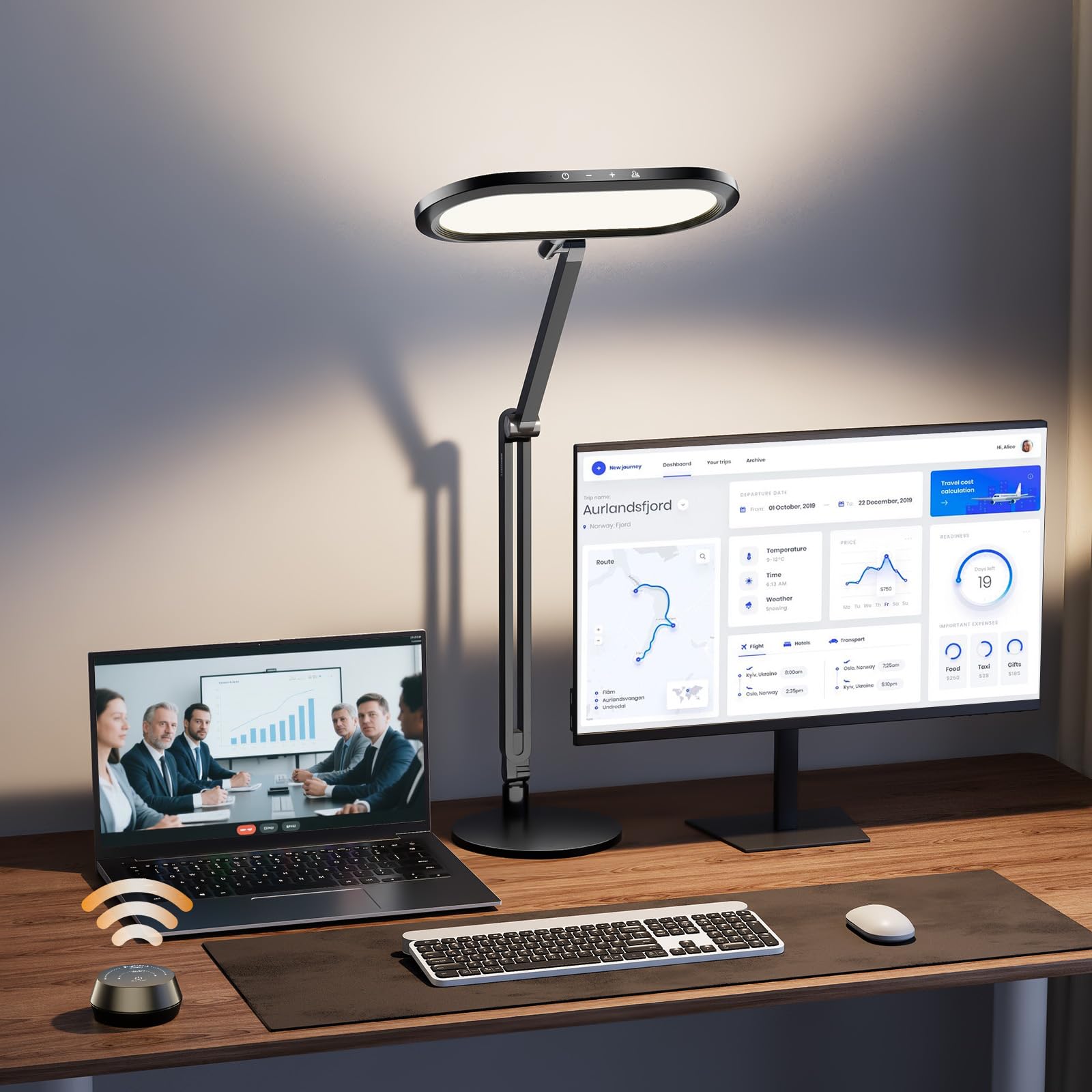
This LitONES model takes the top spot because it solves the two main video-call lighting problems—glare and color accuracy—with a single, elegant swing-arm design. The 3D ambient light uses a diffused edge-lit panel to spread soft illumination across your face without a harsh central hotspot, while the 126 high-CRI (≥95) LEDs render skin tones accurately at any of the 50 adjustable modes. The dual-sided light panel also emits ambient backlight, reducing the contrast between your face and the dark background behind you.
The standout feature is the included knob remote, which lets you dial brightness from 1% to 100% and shift color temperature between warm amber (2700K) and cool daylight (6500K) without reaching for the lamp. Four premium damping joints in the swing arm allow you to position the light head precisely over your monitor or to the side, and the 3.3-pound metal base keeps everything stable even when the arm is fully extended. Users specifically praise the memory function that recalls your last setting every time you turn the lamp on.
At this tier, you’re paying for a near-professional lighting tool that matches the flexibility of much more expensive studio kits. The build quality—aluminum-zinc alloy body, stable 12V adapter, and 100,000-hour LED lifespan—makes it a long-term investment in your on-camera presence. The only caveat is the separate remote requires two AAA batteries (not included), and some users note the knob remote’s battery cover loosens over time, though customer service is consistently rated as responsive.
Why it’s great
- Wireless knob remote allows stepless brightness/color tuning without lifting your hand
- Dual-sided diffusion eliminates monitor backwash and softens forehead shadows
- Four damping joints reach 33 inches for flexible positioning around dual monitors
Good to know
- Knob remote uses batteries and the battery cover can shift over time
- Heavy base (5.7 lbs) is stable but takes up a 7-inch desk footprint
2. LitONES 40-Inch Tall Desk Lamp
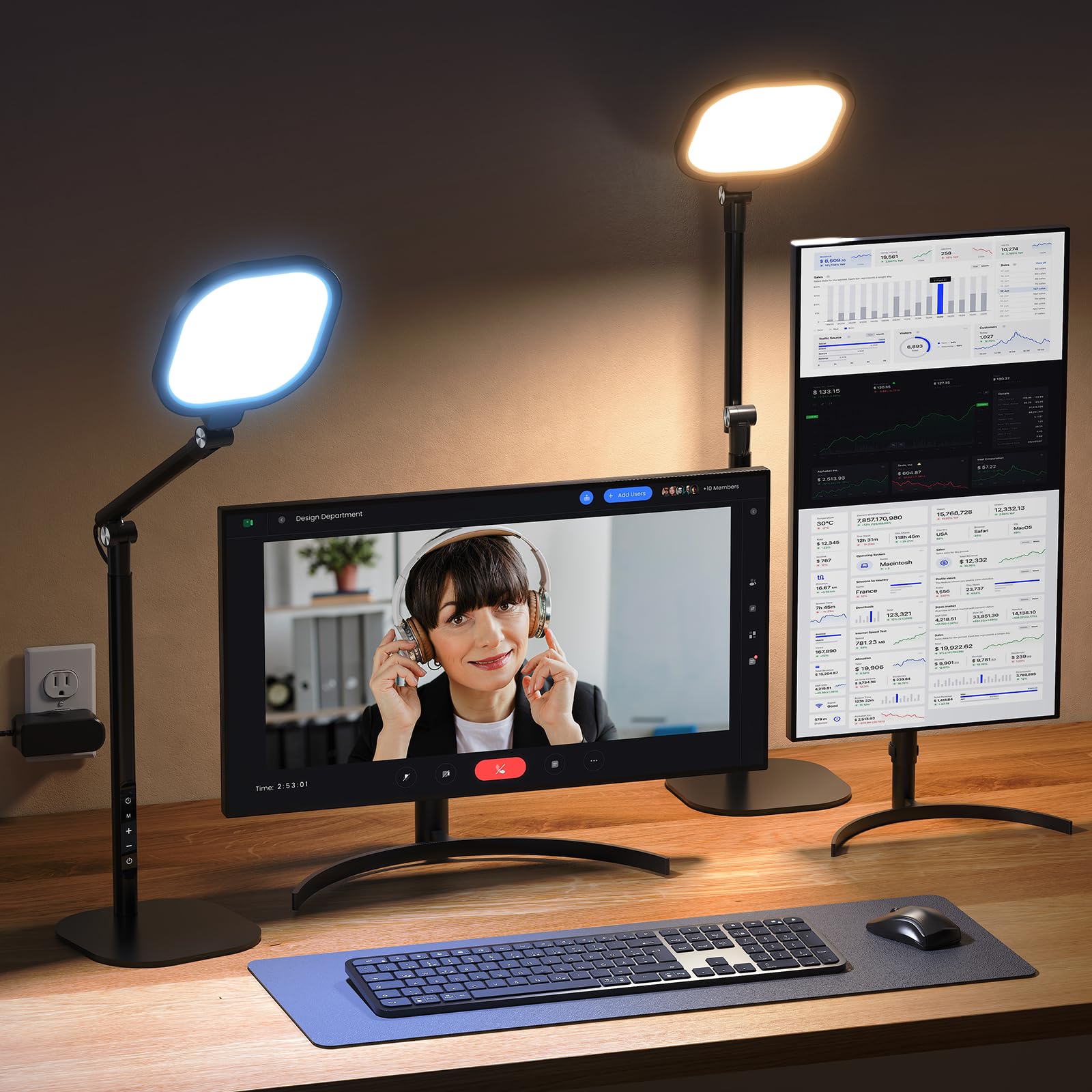
If your desk supports two or three monitors, or if you use a standing desk, a standard desk lamp simply won’t get high enough to light your face without casting a shadow across your keyboard. This LitONES lamp towers to 40 inches—low enough to sit behind a 32-inch monitor yet tall enough to clear a dual-stack setup—making it the only lamp in this guide designed specifically for large, multi-display workstations. Its 4-layer optical soft panel uses edge-lit diffusion to scatter light evenly across your full face and torso, so you look naturally lit even when you lean back.
The lamp offers 50 lighting combinations: 5 color temperatures from 2700K to 6500K and 10 brightness levels from 3% to 100%, all adjustable via touch controls on the pole. The high CRI (>97.8) LEDs restore skin tones with studio-grade fidelity, which matters for video calls where your face is the focal point. Three damping joints allow the light head to tilt, swivel, and rotate 90 degrees, directing light exactly where you need it. The sturdy aluminum base weighs enough to stay put but includes rubber pads to avoid scratching your desk.
Users consistently mention how the tall profile solves the “dark shadow” problem on calls without taking up desk space—the slender pole tucks between a monitor and a wall. The 45-minute auto-off timer is a thoughtful eye-care addition for long work sessions. Note that the touch controls are located on the stem rather than the base, which takes a day to get used to, and the minimum height of 14 inches still requires the lamp to sit behind rather than on top of a low-profile laptop.
Why it’s great
- 40-inch max height clears dual and triple monitor setups without obstruction
- CRI >97.8 delivers near-sunlight color accuracy for natural skin rendering
- Memory function recalls your last brightness and color setting automatically
Good to know
- Touch controls on the pole require slight reaching behind monitors
- Minimum height of 14 inches may be too tall for laptop-only desks
3. Logitech Litra Beam Premium LED Key Light

Logitech’s Litra Beam brings software-grade control to desktop lighting—a feature no other lamp in this list offers. Through Logi Options+ (compatible with Windows 10/11 and macOS 10.15+), you can adjust brightness and color temperature from your keyboard and mouse, or set the light to activate automatically when your webcam turns on. This seamless integration means you never have to reach for a physical dial in the middle of a call: the light just appears at your preferred setting the moment you join a meeting.
The beam-shaped panel uses TrueSoft full-spectrum LED technology to produce balanced, natural skin tones with a CRI that approaches daylight quality. Five brightness levels and five color temperature presets (2700K to 6500K) are available via hardware buttons, or you can hold for stepless adjustment. The slim 17.8-inch design fits behind a monitor without protruding, and the 3-way adjustable stand lets you mount the light on the desktop, clamp it to the edge, or attach it to a tripod via the three mount points.
Reviewers—including telehealth therapists—praise the Litra Beam for eliminating the sickly purple-green cast that standard room lighting introduces on video. The main trade-off is the price, which sits at the top of the mid-range tier. The stand is stable but the arm can wobble when fully extended, and the USB-C input requires a 5V 1.4A adapter (not included for MacBook users). Once you’ve set up the software integration, this becomes the most hands-free option for daily Zoom calls.
Why it’s great
- Logi Options+ desktop app auto-activates light when webcam turns on
- TrueSoft full-spectrum LEDs mimic natural daylight for accurate skin tones
- Three mount points and a slim profile fit into tight desk arrangements
Good to know
- Requires USB 3.1 gen 2 or 5V 1.4A adapter for full brightness (not always included)
- Wobble reported when arm is extended to maximum reach
4. LitONES Single Swing-Arm LED Desk Lamp

This LitONES lamp proves that a traditional swing-arm design works beautifully for video calls when it’s built around the right light engine. The 84 edge-lit LED beads produce a diffused, evenly distributed beam with a CRI of at least 95, so your face appears naturally lit without a singular hot spot. Five pivot joints in the swing arm give you 26.7 inches of reach and a rotating 7.09-inch head, allowing you to position the light directly in front of your webcam or at a 45-degree angle for more dramatic contouring.
Three color temperatures (warm, natural, cool) and 10 brightness levels deliver 30 combinations, all adjustable via touch controls on the base. The metal base is heavy enough (4.83 pounds) to stay stable even with the arm fully extended, and its 0.27-inch thickness means it slides easily under a monitor stand. The lamp also includes a memory function and a timer—convenience features that make it feel more premium than its mid-range positioning suggests.
Users consistently highlight how the diffused light eliminates the harsh shadows their old desk lamp created, making them look “more professional” on Zoom. The lamp’s 28.55-inch height works well behind a single monitor but may be too short for dual-stack setups. The base is not fixed, so it’s easy to move between desk locations, though the touch controls can be accidentally triggered if you brush the panel while adjusting papers. Customer support is strong, with reports of units replaced free of charge even after the two-year mark.
Why it’s great
- Five pivot joints provide 26.7 inches of adjustable reach for precise face lighting
- 84 edge-lit LEDs diffuse light evenly, eliminating the spotlight effect on your nose
- Sturdy metal base stays put under extended arm without requiring a clamp
Good to know
- Swing arm may wobble if bumped; base is not anchored to the desk
- Touch controls on base can be accidentally engaged during desk work
5. LitONES 2-Pack Desktop Video Conference Light

This two-pack from LitONES is designed for users who need dual-sided key lighting—one light on each side of the monitor—to fill facial shadows from both angles. Each unit uses edge-lit side-emitting technology to create a soft, glare-free field (CRI >95) that doesn’t strain your eyes during long calls. The metal stand adjusts from 20.5 to 28.5 inches tall, and a universal phone holder built into the base lets you mount a smartphone for recording or streaming without taking extra desktop space.
Each light offers 3 color temperatures (3000K–6500K) and 10 brightness levels, controlled via a switch on the USB cord. The 10W power draw runs on a standard 5V 2A USB adapter, making it simple to plug into a laptop, power bank, or wall adapter. The metal base is heavy enough to prevent tipping, and the foam rubber underside protects your desk from scratches. The light head rotates 360 degrees, so you can direct illumination upward for a soft bounce or forward for direct face lighting.
Users appreciate that the two-pack covers the entire face evenly, eliminating the single-side shadow that one lamp creates. The USB cord switch is convenient for quick adjustments, though some wish for a wireless remote at this tier. One reviewer noted the light is “no better than an LED desk lamp” in terms of sheer output, but the two-light setup provides more even coverage than any single fixture can achieve. The stand can feel short for large monitors; positioning each light behind the screen rather than beside it works best.
Why it’s great
- Two lights eliminate single-side shadow, creating balanced, professional face illumination
- Built-in phone holder supports smartphones up to 3.35 inches wide for recording
- USB-powered and portable—easy to pack for travel or move between workstations
Good to know
- Control is on the cord rather than a wireless remote; less convenient mid-call
- Maximum height of 28.5 inches may feel short behind large ultrawide monitors
6. LitONES 2-Pack Square Panel Ring Light
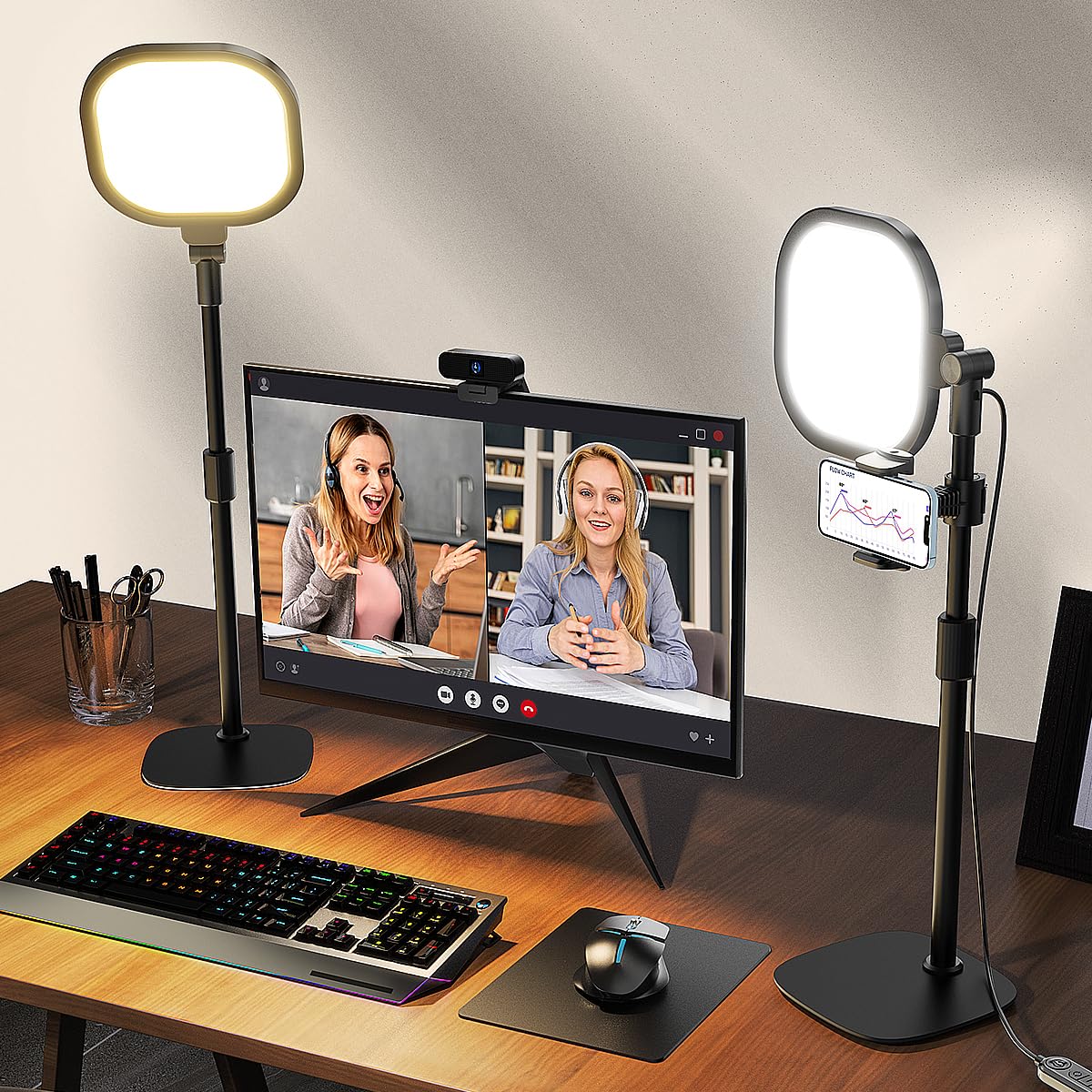
While most ring lights use a circular bulb array that creates a visible ring reflection in glasses, this LitONES two-pack uses a 7×7-inch square panel that distributes light across a wider area—producing a more natural, wrap-around effect on your face. The head is larger than typical ring lights, providing better fill lighting for the shoulders and chest, which matters if you tend to gesture on camera or present slidedecks. The CRI rating of 97.8+ ensures that colors appear true to life, not washed out.
Each unit offers 3 color temperatures and 10 brightness levels (30 total modes), with a memory function that holds your preferred setting. The adjustable stand extends from 20.5 to 28.5 inches, and the light head rotates 360 degrees. The square panel also includes a universal phone holder on the stand, making this a practical choice for TikTok or Instagram content creators who occasionally shoot vertical video from the same desk they use for Zoom. The metal base weighs 2.27 kilograms and includes foam pads to prevent sliding.
Users who previously used circular ring lights note that the square panel eliminates the donut-shaped catchlight in their glasses—a subtle but meaningful upgrade for video calls. The 2-pack setup is easy to position one on each side of the monitor for three-point lighting (two lights plus the monitor glow). Some users found the minimum height of 20.5 inches too tall for low-profile laptop desks; the light works best behind a raised monitor stand. Customer service is rated highly, with a 36-month warranty backing the purchase.
Why it’s great
- Square 7-inch panel provides wider face-and-shoulders coverage than circular ring lights
- CRI >97.8 produces studio-level color accuracy for natural skin tones on camera
- Memory function holds your brightness and temperature setting between uses
Good to know
- Minimum height of 20.5 inches is too tall for laptop-only desks without a stand
- Wired USB power; no battery option for portable use
7. Honeywell H6 Sunturalux Desk Lamp
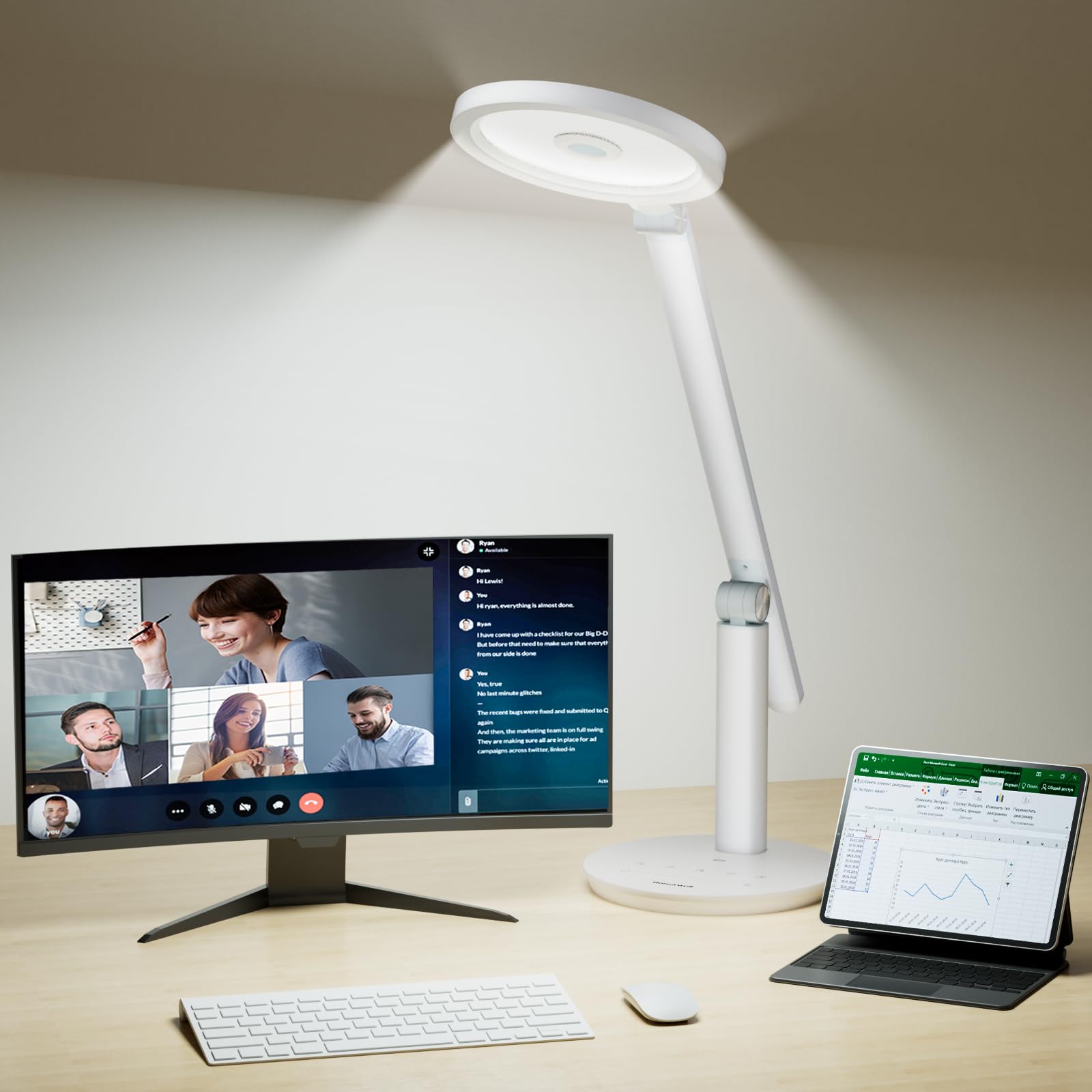
Honeywell brings its Sunturalux full-spectrum LED technology to the desk lamp category with the H6, a compact adjustable-arm lamp that prioritizes eye comfort alongside video-call readiness. The 108 Sunturalux LED beads achieve a CRI of at least 97, ensuring your face appears in true-to-life color rather than the sickly cast of standard office lighting. The lamp also carries RG0 certification, meaning it emits zero blue-light hazard—a rare feature that makes this lamp suitable for long reading sessions as well as Zoom calls.
The H6 offers three color temperatures (3000K, 4000K, 5000K) with seven brightness steps each (15% to 100%), controlled via touch buttons and a sliding dimmer on the lamp head. A built-in ambient light sensor automatically adjusts the brightness based on the room’s existing light level—a useful feature if you move between a bright window and a dark corner during the day. The foldable head and arm adjust 180 degrees both vertically and horizontally, with a circular diffuser that casts even illumination across your face without a visible hot spot.
Users describe the H6 as “solid” and “well-priced,” noting that the muted light side is ideal for video conferencing because it doesn’t overwhelm the camera sensor. The lamp’s compact build fits easily on small desks, but the 19-centimeter base diameter limits its footprint. The touch controls are intuitive, though the sliding brightness adjuster can feel less precise than a knob. The lack of a memory function means you’ll reset brightness each time you turn it on—a small annoyance for daily use. The 30,000-hour LED lifespan still offers years of reliable service at this entry-level price.
Why it’s great
- RG0 certified—zero blue-light hazard for all-day use without eye strain
- Ambient light sensor automatically adjusts brightness to match room conditions
- Compact foldable design stores flat and fits on crowded desks
Good to know
- No memory function; resets to default brightness each time you turn it on
- Sliding touch dimmer is less precise than a knob or remote control
FAQ
What is the minimum CRI I should accept for video calls?
Should I place the light behind or in front of my monitor?
Does a ring light or a panel light work better for Zoom meetings?
Final Thoughts: The Verdict
For most users, the best desk light for video calls winner is the LitONES Premium LED Desk Lamp because its knob remote, 50-mode customization, and dual-sided diffusion make it the most versatile tool for daily Zoom calls without requiring software integration. If you want a tall lamp that clears dual monitors and provides studio-grade color accuracy, grab the LitONES 40-Inch Tall Desk Lamp. And for a hands-free software-controlled experience that auto-activates when your webcam turns on, nothing beats the Logitech Litra Beam.

Mo Maruf
I created WellFizz to bridge the gap between vague wellness advice and actionable solutions. My mission is simple: to decode the research and give you practical tools you can actually use.
Beyond the data, I am a passionate traveler. I believe that stepping away from the screen to explore new environments is essential for mental clarity and physical vitality.