Our readers keep the lights on and my smoothie glass nicely filled. As an Amazon Associate, I earn from qualifying purchases.
Staring at a bright screen in a dark room forces your pupils to constantly adjust, leading to headaches, dry eyes, and mental fatigue by midday. The right task light eliminates this conflict by balancing ambient and direct illumination across your entire desk surface.
I’m Mohammad Maruf — the founder and writer behind WellFizz. I’ve spent hundreds of hours cross-referencing lumen outputs, color rendering indexes, and flicker rates to identify which models genuinely reduce eye strain during prolonged computer work.
After analyzing 50+ models across price tiers, I’ve narrowed the field to the seven most effective options. This guide delivers my complete findings on the best desk lamp for computer work, with detailed breakdowns of specs that actually matter for screen-based tasks.
How To Choose The Best Desk Lamp For Computer Work
Not every lamp marketed as “eye-care” actually reduces strain during screen work. The wrong specs can create screen glare or introduce flicker your eyes perceive even if you can’t see it. Focus on these four factors and you’ll avoid the common pitfalls.
Color Temperature Range Is Your Primary Control
Warm light around 3000K mimics sunset and feels relaxing, but it’s terrible for reading documents. Cooler light around 5000K boosts alertness but can feel harsh late at night. The ideal computer lamp offers adjustable color temperature spanning at least 3000K to 5000K, letting you shift from focus mode to wind-down mode seamlessly.
Flicker-Free Driver And Diffused Optics
Even premium LED bulbs can produce invisible flicker that your nervous system still detects, causing eye fatigue after two hours. Look for lamps that explicitly advertise flicker-free drivers. Beyond the driver, the lamp’s lens or diffuser matters just as much — a bare or poorly diffused LED array creates sharp reflections on glossy monitors. Models with an edge-lit panel or a frosted lens cast softer shadows and eliminate the mirror effect on your screen.
CRI Rating Defines Visual Clarity
Color Rendering Index measures how accurately a light source reveals the true color of objects. Standard office lighting sits around 80 CRI. For computer work where you’re reading text, distinguishing spreadsheet cells, or reviewing design proofs, aim for 90 CRI or higher. The difference is not aesthetic — higher CRI reduces the effort your eyes need to interpret what they see.
Reach And Adjustability For Dual-Monitor Setups
A lamp that only covers one corner of your desk forces you to work in a dim pool while the rest of the surface stays shadowed. For computer work, especially with dual monitors, you want either a long overhead light bar (at least 30 inches wide) or a swing-arm lamp that extends 30+ inches and rotates the head 180 degrees. The lamp head should tilt freely to avoid projecting light directly into your eyes while still illuminating the keyboard and documents.
Quick Comparison
On smaller screens, swipe sideways to see the full table.
| Model | Category | Best For | Key Spec | Amazon |
|---|---|---|---|---|
| OTUS LED Desk Lamp | Premium | Gesture control & wide coverage | 1500 Lux, 29-inch swing arm | Amazon |
| LitONES Premium LED Desk Lamp | Premium | Double-sided edge-lit panel | CRI ≥ 95, 33-inch arm | Amazon |
| Honeywell H4 Sunturalux | Premium | Auto-dimming & high CRI | CRI ≥ 97, RG0 blue-light free | Amazon |
| Verilux HappyLight Duo | Mid-Range | 2-in-1 therapy + task light | 10,000 Lux, full-spectrum | Amazon |
| OttLite Prevention LED Desk Lamp | Mid-Range | Wireless charging & eye health | 95+ CRI, reduces eyestrain 51% | Amazon |
| Omorepa 36W Architect Desk Lamp | Mid-Range | Ultra-wide 47-inch coverage | 3000LM, RA>90 | Amazon |
| Honeywell HJ1 Clamp Desk Lamp | Mid-Range | Clamp mount for space-saving | 1200LM, CRI 97 | Amazon |
In-Depth Reviews
1. OTUS LED Desk Lamp
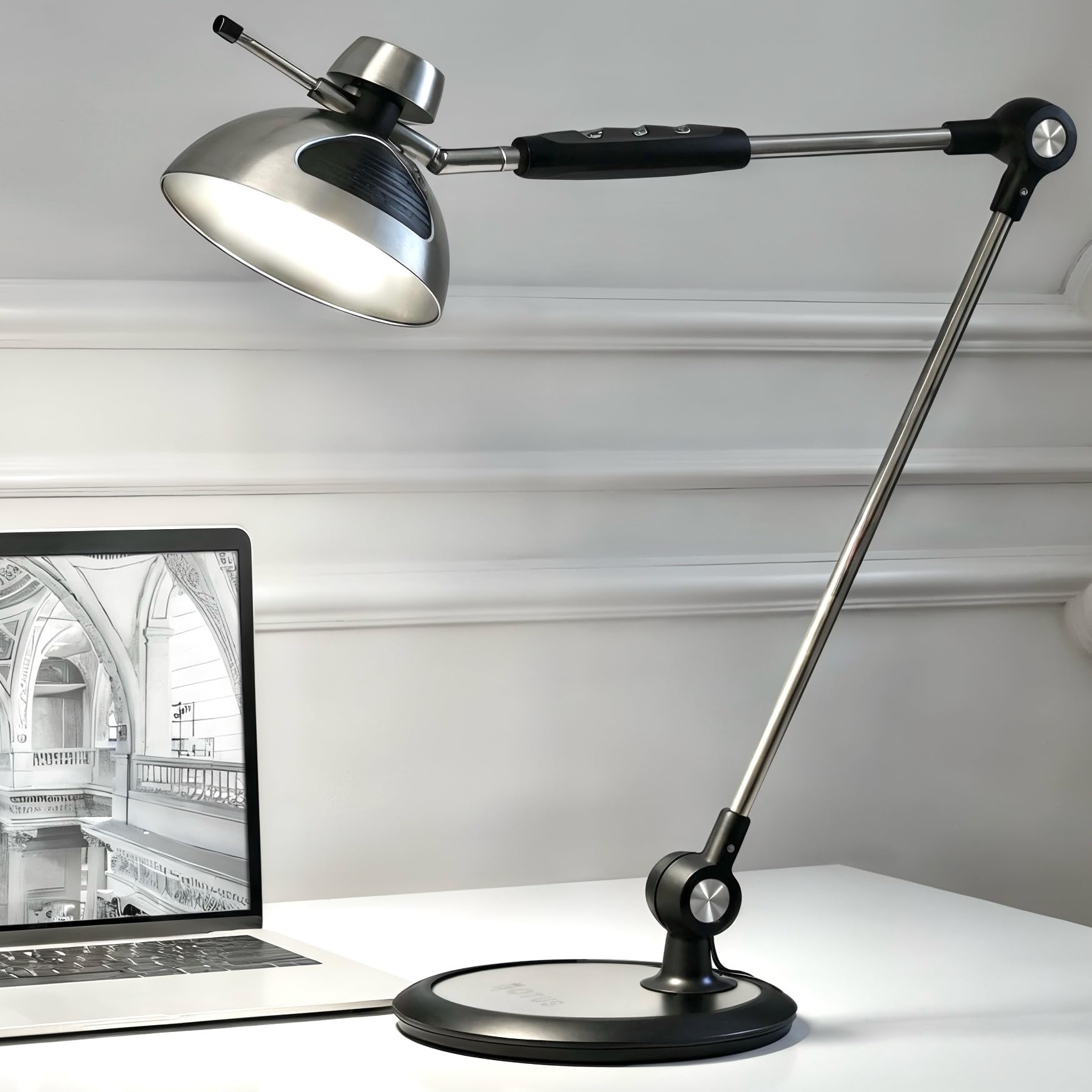
The OTUS delivers 1500 lux at full power, which is roughly 2.5 times brighter than a standard desk lamp — and crucially, it spreads that output evenly across a full-size desktop using a wide, diffused head. The 29-inch swing arm reaches across dual-monitor setups without requiring a clamp, and the weighted metal base holds firm even when the arm is fully extended. Users report using it for five years without dimming, which points to a properly heat-sinked LED that won’t degrade quickly.
Gesture control is the standout feature for computer work: waving your hand over the lamp head toggles power without touching a potentially smudged surface, then you adjust brightness and color temperature via touch sensors on the arm. This keeps the lamp head clean during Zoom calls and eliminates fumbling for buttons when your hands are on the keyboard. The three color temperatures (3000K, 4000K, 6500K) cover warm reading, neutral work, and cool daylight focus.
One smart detail is memory recall — the lamp remembers your last brightness and color setting after being turned off and back on, so you don’t have to re-dial your preferred setup every morning. The included 63-inch AC adapter cord offers flexible placement on large workstations, and the lamp works with smart plugs for automated scheduling.
Why it’s great
- Wide 1500 lux output covers entire desk evenly
- Gesture control keeps lamp head smudge-free for video calls
- Stable weighted base supports full arm extension
- Memory function recalls your last setting after power cycle
Good to know
- Color temperature uses two LED banks without continuous warm/cool mix
- Warmest setting may have a slight green tint for some users
2. LitONES Premium LED Desk Lamp
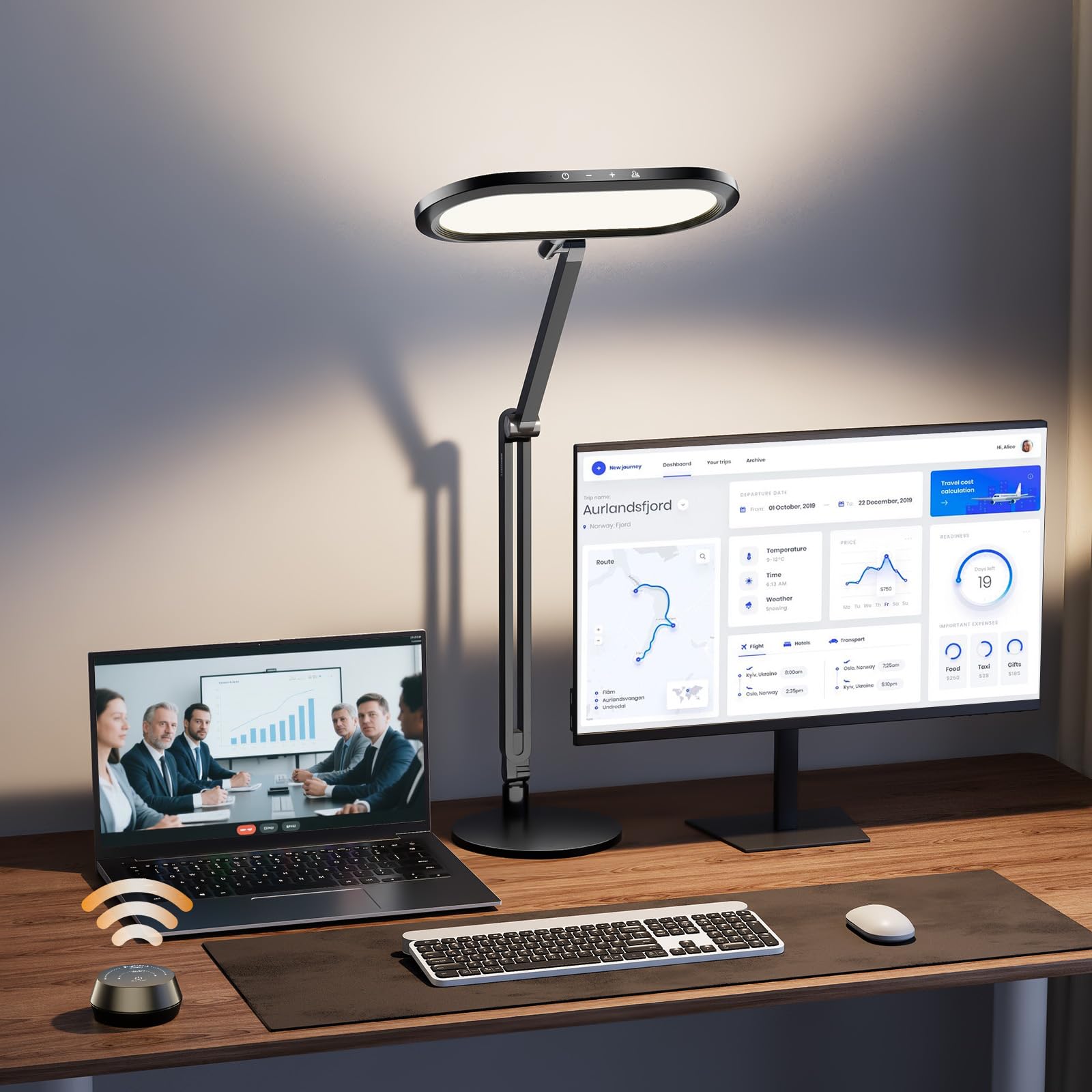
The LitONES uses an edge-lit panel design with 126 high-CRI LED beads (CRI ≥ 95) that produce extremely soft, diffused light across an 11-inch wide head. For computer work, this edge-lit approach is a major advantage — the light panel eliminates harsh shadows and reduces reflections on glossy monitors far better than a bulb-based lamp. The double-sided design also throws ambient light upward, balancing the brightness ratio between your screen and the surrounding room.
Control comes via a wireless knob remote that sits on your desk, offering stepless dimming from 1% to 100% and 5 color temperatures from 2700K to 6500K. The remote means you never reach up to touch the lamp head, which is convenient mid-typing. The four damping joints on the swing arm extend up to 33.3 inches and hold position exactly where you set them, making it easy to aim light precisely at documents while avoiding direct glare on your monitor.
The metal base weighs 3.3 pounds and uses an aluminum-zinc alloy body that feels solid on the desk. Power comes from a 12V 1.5A adapter, and the lamp is rated for 100,000 hours of use, backed by a 36-month warranty. Customers report using it as both a desk lamp and webcam lighting, which speaks to its versatility in a home office environment.
Why it’s great
- Edge-lit panel eliminates glare on glossy monitors
- Wireless knob remote enables stepless control without reaching up
- Four damping joints hold position precisely at any angle
- 100,000-hour lifespan with 36-month warranty
Good to know
- Remote battery cover can loosen over time
- Assembly requires screwing base to arm
3. Honeywell H4 Sunturalux Desk Lamp

The Honeywell H4 uses 108 full-spectrum Sunturalux LED beads at a CRI of ≥ 97, which is exceptionally high — most office lamps hover around 80-85 CRI. This high fidelity means printed text appears sharper, spreadsheet cells remain distinct, and your eyes don’t strain to interpret subtle color differences. The lamp is also RG0 certified for zero blue-light hazard, a meaningful spec for anyone working eight-hour days under artificial light.
The auto-dimming sensor is the H4’s secret weapon for computer work. It measures ambient room light and adjusts the lamp’s brightness automatically, maintaining consistent illumination across your desk as daylight fades. This prevents the common problem where users set brightness once and then suffer through hours of mismatched lighting. The 60-minute timer also helps enforce screen breaks, a small but useful productivity hack.
The four-axis flexible head and arm offer 180-degree tilt and 135-degree rotation, making it easy to direct light away from your screen while still illuminating your keyboard and notepad. The head itself is collapsible, and the metal base keeps the lamp stable during adjustments without wobbling. Customers report immediate and dramatic reduction in eye strain, with one user noting they could work 300-400% longer without fatigue after switching from a standard bulb.
Why it’s great
- CRI ≥ 97 delivers near-sunlight color accuracy for reduced eye fatigue
- Auto-dimming sensor adjusts brightness as ambient light changes
- RG0 blue-light free certification for prolonged use
- Four-axis arm provides precise light direction without glare
Good to know
- Audible clicking when adjusting the arm or touching the body
- Brightness could go slightly lower for late-night use
4. Verilux HappyLight Duo

The Verilux HappyLight Duo splits the difference between a light therapy device and a task lamp, delivering up to 10,000 lux of UV-free full-spectrum light from a flexible gooseneck design. The output is flicker-free and uses an Optix lens to control glare, which means it won’t project harsh reflections onto your monitor. For computer workers who also suffer from seasonal mood shifts or afternoon energy dips, this lamp serves dual duty — bright morning exposure for circadian rhythm regulation and focused task light for actual work.
Control is handled via touch-sensitive buttons on the lamp head, with 3 color temperatures and 7 brightness levels that allow fine-tuning from a warm 3000K glow to a cool daylight setting. The gooseneck bends into any position, though it’s shorter than the swing-arm models — better suited for single-monitor setups or as a secondary light source. The integrated USB charging port adds convenience for keeping a phone or wireless earbuds charged at your desk.
Verilux backs the HappyLight Duo with a 3-year manufacturer warranty, and customer reviews consistently highlight how the lamp improved sleep patterns and reduced eye strain during long reading sessions. Users with aging eyes particularly appreciated the natural light quality that made reading small documents and numbers dramatically easier.
Why it’s great
- 10,000 lux output with therapy-grade full-spectrum light
- Glare-reducing Optix lens prevents monitor reflections
- USB charging port adds desk convenience
- 3-year warranty from a 60-year lighting brand
Good to know
- Gooseneck is shorter than swing-arm models for large desks
- Touch controls can be sensitive to accidental activation
5. OttLite Prevention LED Desk Lamp
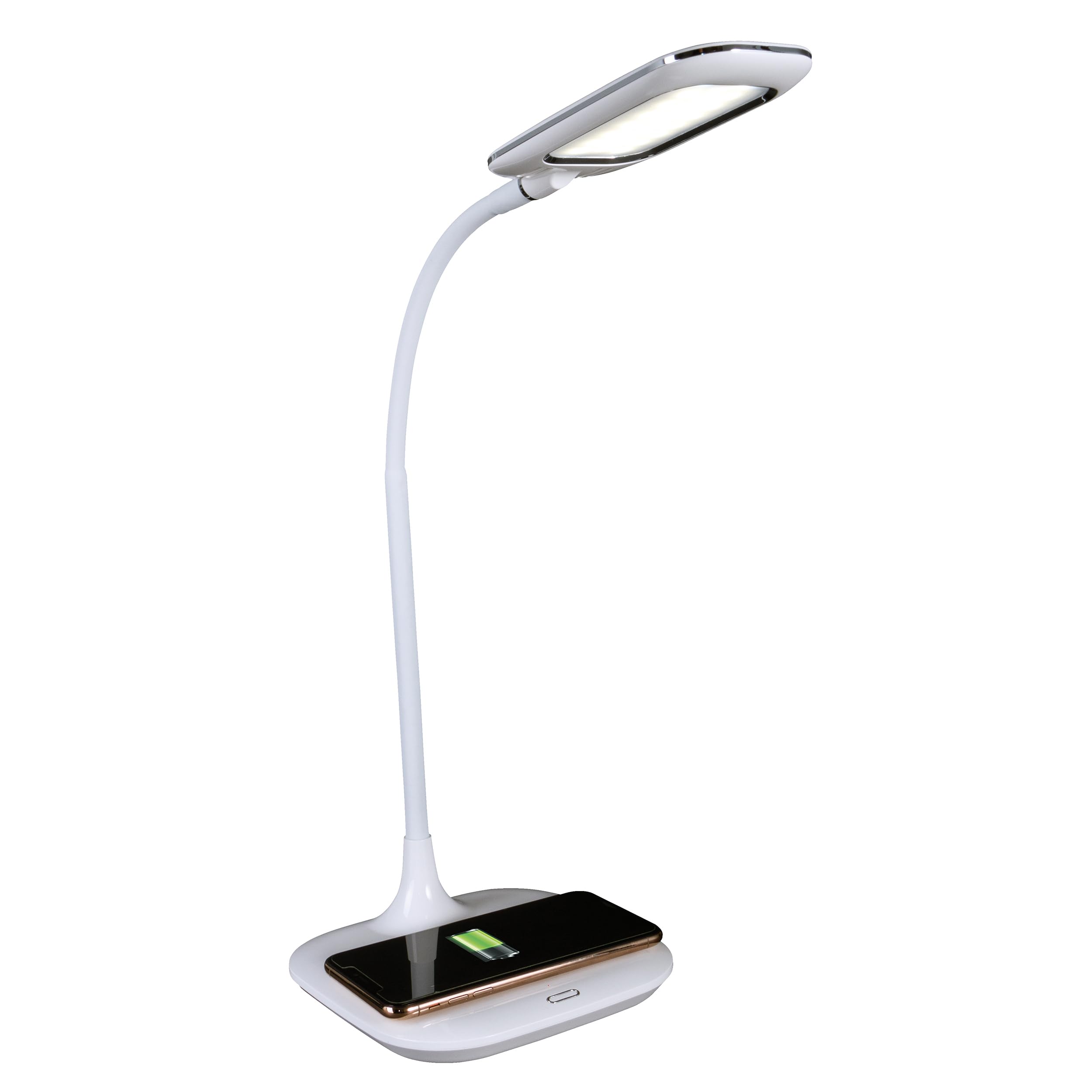
OttLite’s Prevention desk lamp comes backed by the Good Housekeeping Seal and uses ClearSun LED technology with a 95+ CRI that’s designed to match the spectrum of natural sunlight. The company claims this reduces eyestrain by up to 51%, and the high CRI certainly helps — text on paper looks crisper and screen glare is noticeably reduced compared to a standard 80 CRI lamp. The flexible rubberized neck adjusts height from 8.5 to 19 inches, making it suitable for desks of varying thicknesses.
The integrated wireless charging pad on the base supports Qi-compatible devices, and there’s a 5V 2.1A USB port for a second device. For computer workers who keep their phone on the desk, this eliminates cable clutter and keeps the charging point centered where you’re already working. The touch-sensitive controls let you toggle between 3 brightness levels and 3 color modes: warm white, bright white, and ClearSun natural daylight.
One important spec note: the bulb is not replaceable, so the lamp’s lifespan is determined by the LED itself. That said, OttLite’s reputation for reliable drivers means most units will last years before noticeable dimming. Customers doing fiber crafts and detailed handwork particularly praised how well the ClearSun mode revealed fine details and true colors.
Why it’s great
- ClearSun 95+ CRI closely matches natural daylight spectrum
- Built-in wireless charging pad reduces desk clutter
- Good Housekeeping Seal adds third-party validation
- Three distinct color modes for task flexibility
Good to know
- Bulb is non-replaceable — entire lamp must be replaced if LED fails
- On/off button is very sensitive and can be accidentally triggered by fabric
6. Omorepa 36W Architect Desk Lamp
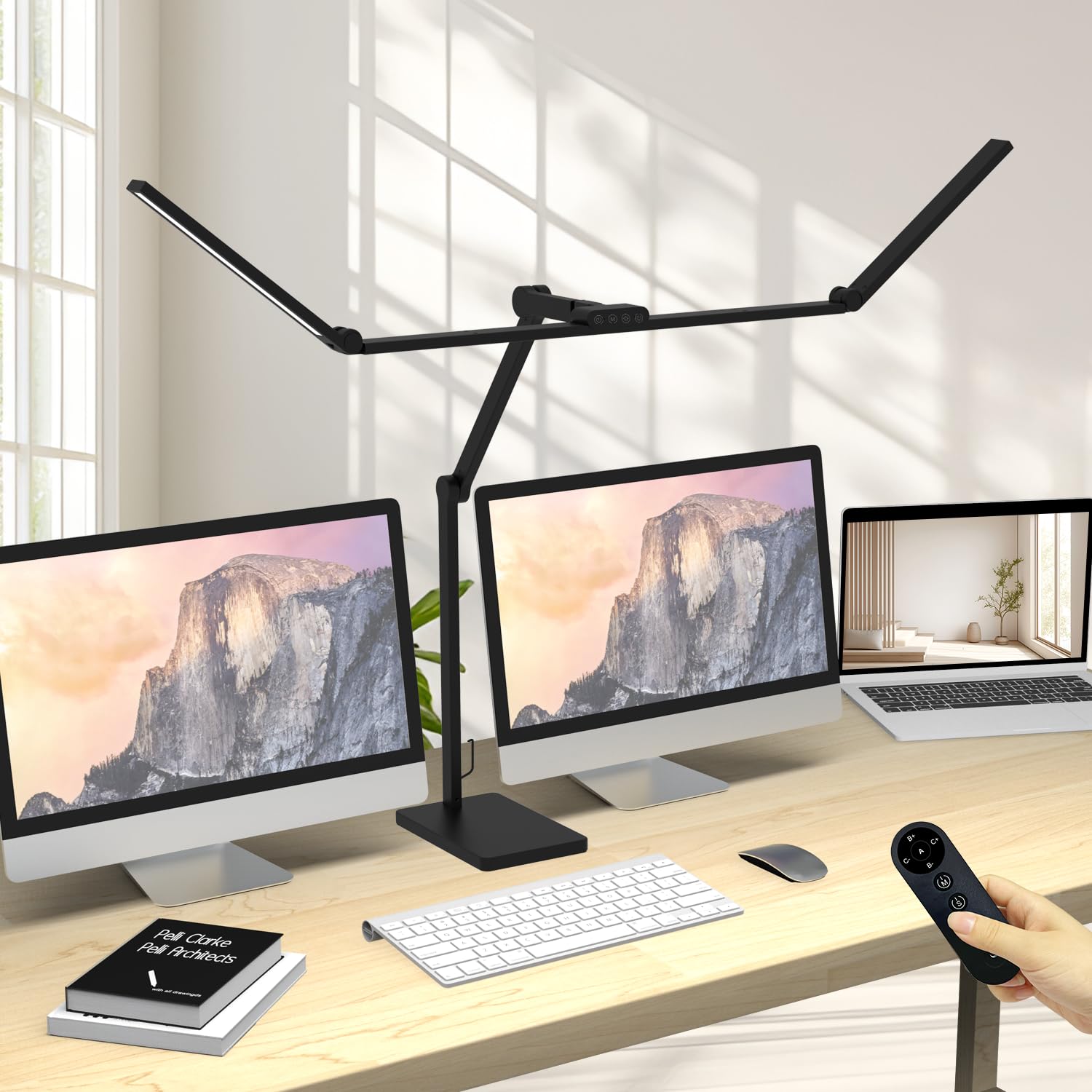
The Omorepa is an ultra-wide overhead-style lamp with a 47.4-inch adjustable three-section light bar that eliminates dark zones across the entire desk. At 3000 lumens and 36 watts, it’s significantly brighter than most task lights, but the high lumen count is paired with a RA > 90 color rendering index to ensure the brightness doesn’t wash out colors. The ambient light sensor automatically adjusts brightness based on room conditions, which is particularly useful for desks near windows where daylight fluctuates throughout the day.
The design uses 5 smooth joints reaching 38.2 inches tall, with the main lamp head rotating 180 degrees. For computer work, the wide bar sits above the monitor without projecting light into your eyes, while still fully illuminating the keyboard and work surface below. The solid metal base measures 9.1 by 5.9 inches with anti-slip pads, so the lamp stays put even when you reposition the arm.
Control options include both a touch panel on the lamp and a remote control with a ribbon hanger. The memory function retains your preferred brightness and color temperature after power-off, so you don’t reset settings each morning. Omorepa offers a 3-year warranty and lifetime support, and customers report the lamp works well positioned above 43-inch curved monitors without causing face glare.
Why it’s great
- 47.4-inch light bar covers entire desk with uniform illumination
- 3000LM output reduces shadows across dual-monitor setups
- Ambient light sensor auto-adjusts to changing room light
- Stable metal base with anti-slip pads prevents tipping
Good to know
- Joints can loosen if handled roughly — requires gentle adjustment
- Assembly required for the multi-section light bar
7. Honeywell HJ1 Clamp Desk Lamp

The Honeywell HJ1 uses a clamp mount instead of a weighted base, freeing up valuable desk space while still delivering 1200 lumens across a 31.5-inch pluggable dual-section head. The 156 full-spectrum Sunturalux chips produce a CRI of 97, matching the H4 model’s color accuracy, and the clamp secures to any desktop edge up to 2.35 inches thick without tools. For computer workers with limited surface space, this clamp design means the lamp overhangs the desk rather than occupying precious square inches near the keyboard.
The touch panel controls offer stepless dimming from 10% to 100% across 4 color modes spanning 3000K to 5700K, plus a dedicated work mode preset at 4000K. The memory function stores your preferred setting, and the 1-hour timer automatically shuts the lamp off to prevent overuse. The horizontal pivot axis and two vertical movable axes allow positioning the dual heads independently, directing one side over your keyboard and the other over a document or drawing surface.
Customers highlight the lamp’s ability to cover large workbenches and drafting tables, with the dual-head design minimizing shadows that single-head lamps can’t eliminate. The all-aluminum build feels sturdy without being overly heavy, and the clamp’s grip pad protects the desk edge from scuffs. One caveat: the power plug is bulky, so test your power strip spacing before committing the lamp to a corner location.
Why it’s great
- Clamp mount saves desk space without sacrificing stability
- CRI 97 dual-head design provides shadow-free illumination
- Stepless dimming and 4 color modes cover full work spectrum
- Dedicated 4000K work mode preset for immediate use
Good to know
- Plug is physically large and may block adjacent outlets on a power strip
- Clamp mechanism requires a flat desk edge at least 2.35 inches thick
FAQ
Is 5000K too cool for all-day computer work?
Why does my current lamp flicker when I move my head?
Should I get a clamp or a weighted base lamp for my computer desk?
Can a desk lamp double as a webcam light for video calls?
Final Thoughts: The Verdict
For most users, the best desk lamp for computer work is the OTUS LED Desk Lamp because it combines 1500 lux of even illumination, a weighted base, gestures control for smudge-free video calls, and a long swing arm that reaches across dual monitors. If you want the highest possible color accuracy with zero blue-light hazard, grab the Honeywell H4 Sunturalux. And for the widest coverage on a large desk with an ambient light sensor, nothing beats the Omorepa 36W Architect Desk Lamp.

Mo Maruf
I created WellFizz to bridge the gap between vague wellness advice and actionable solutions. My mission is simple: to decode the research and give you practical tools you can actually use.
Beyond the data, I am a passionate traveler. I believe that stepping away from the screen to explore new environments is essential for mental clarity and physical vitality.