Our readers keep the lights on and my smoothie glass nicely filled. As an Amazon Associate, I earn from qualifying purchases.
The average desk computer still uses a noisy fan that drowns out your focus, yet most buyers assume that’s just the price of having power. That assumption is wrong. A new generation of efficient, compact, and genuinely quiet desktop computers delivers all the performance you need without the constant whirring — and without the bulky tower eating up your workspace.
I’m Mohammad Maruf — the founder and writer behind WellFizz. I’ve spent hundreds of hours analyzing the thermal designs, processor architectures, and real-world noise profiles of modern desktop computers to find the ones that balance quiet operation with genuine horsepower.
From compact mini PCs that hide behind your monitor to all-in-one units that replace both tower and display, these machines prove that silence and speed can coexist. This guide breaks down the best desk computers for anyone who values a calm, productive workspace.
How To Choose The Best Desk Computers
Choosing a desk computer today is less about raw clock speed and more about finding the right balance of thermal efficiency, memory capacity, and physical footprint. A machine that runs hot will run loud, and a loud computer is a distraction you don’t need. Focus on three key areas to get it right.
Processor TDP and Cooling Design
The processor’s thermal design power (TDP) directly dictates how much heat must be moved away from the chip. A high-TDP processor (65W or more) often requires a larger, faster-spinning fan that produces audible noise under load. Mid-range and premium mini PCs now use vapor chamber cooling or large-diameter silent fans to keep noise levels around 35 dB — quieter than a library. Look for units that advertise noise specs under 40 dB for a truly silent desk experience.
Memory and Storage Configurations
For a modern desk computer, 16GB of RAM is the baseline for smooth multitasking across browser tabs, office suites, and video calls. Professionals working with large datasets, virtual machines, or creative software should target 32GB. Storage matters just as much: a fast NVMe PCIe 4.0 SSD dramatically reduces boot times and file transfers. Avoid models with only a single RAM slot — dual-channel configuration (two sticks) delivers noticeably better performance for integrated graphics.
Form Factor and Connectivity
Mini PCs (often under 2 liters in volume) save desk space but limit internal upgrades. All-in-one units integrate the display and computer into one panel, reducing cable clutter but making future repairs more complex. Slim towers offer a middle ground with tool-less access for adding storage or RAM. Regardless of form factor, check for at least one USB-C port with DisplayPort support and Wi-Fi 6 or better for fast, stable connections.
Quick Comparison
On smaller screens, swipe sideways to see the full table.
| Model | Category | Best For | Key Spec | Amazon |
|---|---|---|---|---|
| ACEMAGICIAN M1 | Mini PC | Quiet office & media center | 24GB LPDDR5 RAM | Amazon |
| HP 22″ All-in-One | All-in-One | Everyday home & family use | 21.5″ FHD display | Amazon |
| ACEMAGIC M5 | Mini PC | AI dev & local model testing | 32GB DDR4 + 1TB SSD | Amazon |
| GEEKOM GT13 MAX | Mini PC | Content creation & AAA gaming | Intel Arc Graphics w/ ray tracing | Amazon |
| Dell Slim ECS1250 | Slim Tower | Home office & multi-monitor | Intel Core Ultra 5 processor | Amazon |
| HP Pro Tower 290 G9 | Tower | Business productivity & upgrades | Intel i5-12500 6-core | Amazon |
| HP 27″ All-in-One | All-in-One | Family & collaborative work | 32GB RAM + 1TB SSD | Amazon |
| Apple 2024 iMac M4 | All-in-One | Creative pros & Apple ecosystem | 24″ 4.5K Retina display | Amazon |
| GEEKOM A9 Max | Mini PC | AI workflows & 8K video | AMD Ryzen AI 9 HX 370 | Amazon |
| Dell 27″ Touch All-in-One | All-in-One | Touch-enabled creative work | NVIDIA MX570A 2GB graphics | Amazon |
| MSI Codex Z2 | Gaming Tower | AAA gaming & VR | RTX 5070 12GB graphics | Amazon |
In‑Depth Reviews
1. ACEMAGICIAN M1 Mini PC

At the top of our list sits the ACEMAGICIAN M1, a compact machine that proves you don’t need a tower to get serious work done. The AMD Ryzen 7 7735HS processor (8 cores, 16 threads, up to 4.75 GHz) delivers desktop-class performance while drawing only 35W of power, which keeps the cooling fan nearly silent during office tasks and media playback. The integrated Radeon 680M GPU is a surprising beast — it handles 4K video and light 1080p gaming with ease, and it supports triple display output via HDMI, DisplayPort, and Type-C at 4K resolution.
The 24GB of LPDDR5 dual-channel memory is a rare find at this performance tier. It allows you to run dozens of browser tabs, a virtual machine, and creative software simultaneously without hitting swap. Storage comes as a 512GB PCIe SSD, but the M.2 slot supports expansion up to 4TB, so you can add a second drive later. The 2.5G Ethernet port and Wi-Fi 6 ensure your network never bottlenecks your work, and the five USB 3.2 ports provide plenty of connectivity for peripherals.
In real-world use, the M1 boots Windows 11 Pro in about 15 seconds and runs completely silent during web browsing and document editing. Even under sustained load from 4K video playback, the fan spins up only to a low whoosh — not the distracting whine of older mini PCs. If you want a desk computer that disappears into your workflow, this is the one.
Why it’s great
- Nearly silent operation in typical office use
- Triple 4K display support from integrated graphics
- 24GB LPDDR5 RAM handles heavy multitasking
Good to know
- Not suitable for AAA gaming at high settings
- Lacks internal 2.5-inch drive bay for old hard drives
2. HP 2025 22″ All-in-One Desktop

The HP 22-inch All-in-One is the ultimate clutter-free solution for families or non-tech users who just need a computer that works. The entire system lives behind the 21.5-inch Full HD anti-glare display — no tower, no extra cables, no separate power brick. The 13th Gen Intel N100 quad-core processor is an efficient chip designed for everyday tasks: web browsing, email, streaming video, and office documents. It draws so little power that the fan rarely spins up audibly, making this a true whisper-quiet desk companion.
The 8GB of DDR5 RAM and 128GB SSD are modest by today’s standards, but they are perfectly adequate for a secondary machine or a first computer for kids or grandparents. The SSD ensures fast boot times, and the pre-installed Windows 11 Pro offers advanced security and remote desktop features. Port selection includes USB-C (data only), HDMI-out, and Wi-Fi 6, so you can connect to a second monitor or peripherals without dongles.
Buyers consistently note how easy this machine is to set up — you basically plug it in, connect the included wireless keyboard and mouse, and start working. The built-in HD webcam with privacy shutter and dual stereo speakers make it ready for video calls right out of the box. If your computing needs are straightforward and you value a clean desk above all, this all-in-one delivers without complication.
Why it’s great
- Zero tower clutter — everything is inside the display
- Pre-installed Windows 11 Pro for business features
- Privacy shutter on the webcam for video calls
Good to know
- 8GB RAM limits heavy multitasking
- 128GB storage fills quickly with large files
3. ACEMAGIC M5 Mini PC
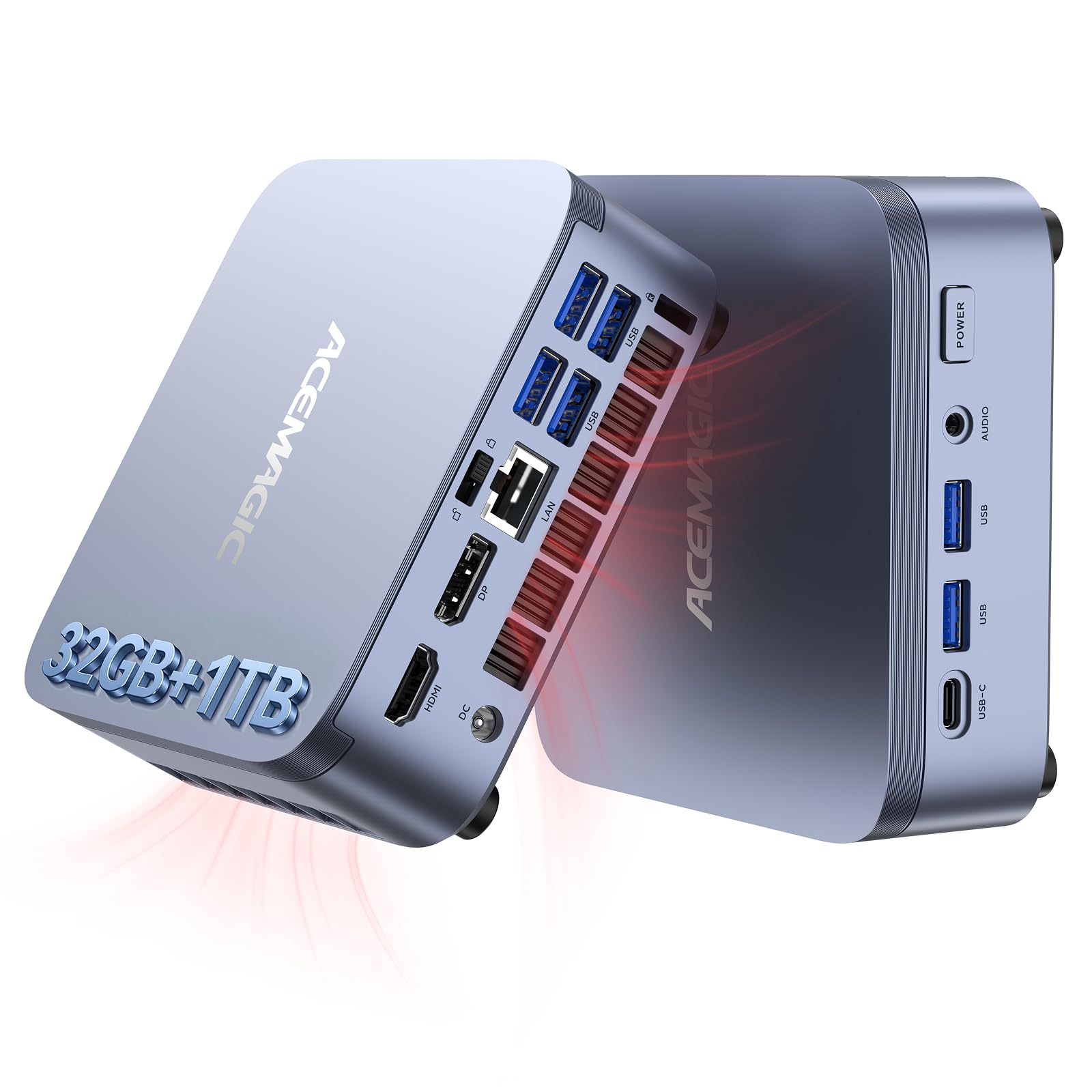
The ACEMAGIC M5 packs a serious punch in a truly tiny frame — just 5 inches square and 1.6 inches tall. The Intel Core i5-14450HX processor is a 55W HX-series chip that outperforms many desktop i7s from just two generations ago. With 10 cores (6 Performance + 4 Efficient) and a turbo boost up to 4.8 GHz, this machine handles coding, virtual machines, and even local AI model inference (like running DeepSeek or Qwen via Ollama) without breaking a sweat. The 32GB of DDR4 dual-channel RAM is enough to run multiple containers and IDEs simultaneously.
Storage is handled by a 1TB NVMe PCIe 4.0 SSD that delivers read speeds up to 7,000 MB/s — 10 times faster than a traditional SATA drive. The M.2 slot can be expanded up to 4TB, and the system supports dual-channel memory up to 64GB. The advanced cooling system, which uses vapor chamber technology paired with a silent fan, keeps operational noise around 35 dB during daily use. That’s quieter than a library whisper.
Connectivity is generous: six USB 3.2 Type-A ports, a Type-C port with DP1.4 and 15W PD output, HDMI 2.0, and DisplayPort 1.4b. You can run three 4K displays simultaneously, making this an excellent choice for financial trading, software development, or content creation. The pre-installed Windows 11 Pro supports Linux dual-boot out of the box, giving developers and programmers maximum flexibility.
Why it’s great
- Desktop-class HX-series CPU in a palm-sized chassis
- 32GB RAM + 1TB PCIe 4.0 SSD for demanding workflows
- Triple 4K display output with 6x USB 3.2 ports
Good to know
- Fan is audible under sustained CPU load
- No dedicated GPU for heavy 3D rendering
4. GEEKOM GT13 MAX Mini PC
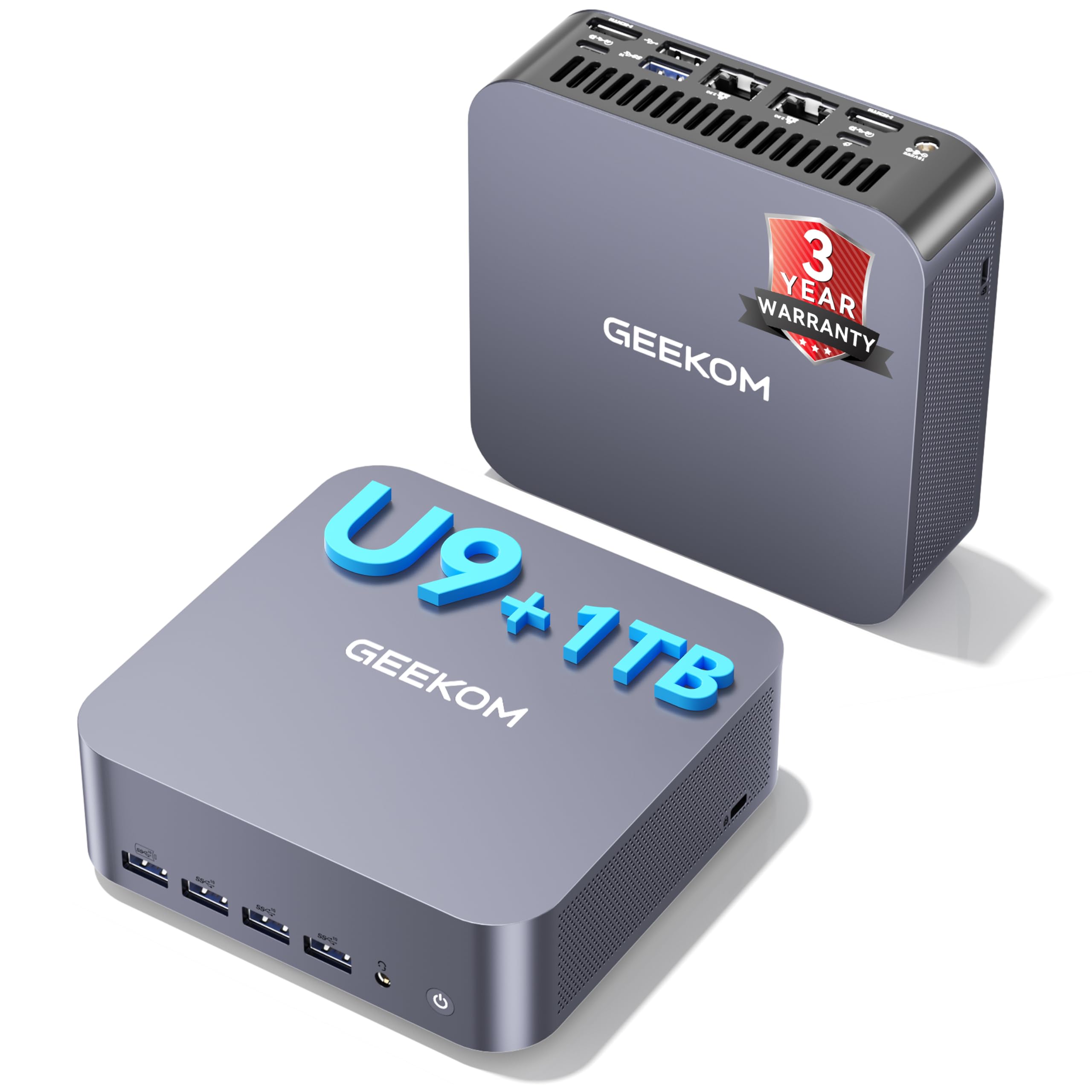
The GEEKOM GT13 MAX represents a new class of mini PC that can genuinely replace a full-sized desktop for creative professionals. The Intel Core Ultra 9 185H packs 16 cores and 22 threads, plus an integrated NPU that delivers up to 13 TOPS for local AI acceleration — think real-time noise reduction, auto-subtitling, and faster image processing in photo editing software. The Intel Arc Graphics with 8 Xe cores and ray tracing support is the first integrated GPU capable of handling AAA titles at reasonable settings.
The configuration includes 16GB of dual-channel DDR5 RAM and a 1TB SSD, both upgradeable up to 128GB and 6TB respectively. The IceBlast 2.0 cooling system uses a large-diameter silent fan and a full-copper heatsink to keep temperatures in check, though some users report the fan is audible under heavy loads. Connectivity is where this machine truly shines: dual USB4 ports, dual HDMI 2.0, Mini DP 1.4, dual 2.5G LAN, and Wi-Fi 7 with Bluetooth 5.4. You can drive four displays simultaneously — two at 8K and two at 4K.
The reinforced ABS housing feels solid, but the real draw here is the 3-year warranty, which is significantly longer than the industry standard of one year. For video editors, 3D modelers, or anyone who needs to run heavy creative software without a dedicated GPU tower, the GT13 MAX provides genuine desktop-replacement capability in a package that fits in the palm of your hand.
Why it’s great
- 12 TOPS NPU for local AI acceleration
- Supports two 8K displays simultaneously
- 3-year warranty for long-term peace of mind
Good to know
- Fan can be noisy under sustained load
- Requires 16GB RAM upgrade for AI workflows
5. Dell Slim Desktop ECS1250

The Dell Slim Desktop ECS1250 takes a different approach from the mini PCs above: it’s a traditional tower, but designed to be as small and quiet as possible. The Intel Core Ultra 5-225 processor includes a built-in NPU for basic AI acceleration — think background blur in video calls or smart search in documents — making this a subtle upgrade for office workers who don’t need flashy specs but do want modern efficiency. The 16GB of DDR5 memory and 512GB M.2 SSD are well-balanced for professional multitasking.
What sets this Dell apart is its tool-less chassis. You can pop off the side panel and upgrade the RAM or storage without any screws, making this a future-proof option for home offices and small businesses. The slim profile (just over 3 inches wide) fits neatly next to a monitor without dominating your desk. The included 1-year onsite service and 6-month Dell Migrate tool are nice touches for less technical users transitioning from an old PC.
Connectivity includes HDMI 2.1 and DisplayPort 1.4a for 4K displays, plus a 3.0 SD card reader for photographers. Users consistently report the machine runs “whisper-quiet” — so quiet they can’t hear the fan even during sustained use. If you want the upgradeability of a tower without the noise footprint of a gaming rig, this slim Dell is the smartest compromise on the market.
Why it’s great
- Tool-less access for easy RAM and storage upgrades
- Inaudible fan in typical office workloads
- Includes 1-year onsite service and data migration
Good to know
- Integrated UHD Graphics not for gaming
- No dedicated GPU option for creative work
6. HP Pro Tower 290 G9

For businesses and power users who need a traditional tower with room to grow, the HP Pro Tower 290 G9 is a rock-solid choice. The Intel Core i5-12500 is a 12th-gen 6-core processor that still competes well with newer chips in single-threaded tasks, and it runs efficiently enough to stay quiet under normal office loads. The 16GB of DDR4 RAM and 512GB PCIe SSD provide responsive performance for spreadsheets, database work, and video conferencing.
The tower design offers serious upgradeability: four USB 3.0 ports on the front, four USB 2.0 on the rear, HDMI, VGA, and RJ-45 Ethernet. The Intel UHD Graphics 770 supports dual displays natively, so you can run two monitors for expanded productivity without adding a graphics card. The 180W 80 Plus Gold power supply is efficient and produces minimal heat, which helps the cooling fan stay quiet. Users consistently report this machine is “very quiet” even during extended use.
One minor annoyance reported by some users involves initial driver tweaks — specifically, the HP printer driver and Microsoft Edge hardware acceleration need manual adjustment for best performance. But these are one-time fixes. The overall build quality and reliability of the HP Pro Tower line are well-established, and with 18 MB of cache and turbo speeds up to 4.8 GHz, this machine handles professional workloads with ease.
Why it’s great
- 6-core processor with hyper-threading for professional apps
- Dual monitor support via integrated HDMI and VGA
- Efficient 80 Plus Gold power supply runs cool
Good to know
- Initial driver tweaks may be needed for printers
- No USB-C port on the front panel
7. HP 27-inch All-in-One Desktop

The HP 27-inch All-in-One offers a generous 27-inch FHD display with a 90% screen-to-body ratio, making it the most immersive desk computer for shared family use. The AMD Ryzen 7 7730U is a power-efficient processor with 8 cores and 16 threads, capable of handling everything from school projects to video streaming to light photo editing. The 32GB of RAM is a standout at this price tier — more than enough to keep the machine feeling fresh for years without slowdowns.
The 1TB SSD provides fast storage for family photos, music libraries, and documents. The tiltable pop-up privacy webcam with a 5MP sensor and dual-array microphones with advanced noise reduction make video calls look and sound great. The three-sided micro-edge display reduces bezel clutter and makes the screen feel larger than its 27-inch diagonal suggests. Connectivity includes Wi-Fi 6 and Bluetooth 5.2, plus a full array of USB ports.
Some users have reported random shutdowns that require the machine to be unplugged and reset. This appears to be related to overheating prevention or a potential component issue, and it’s worth noting that HP’s support experience has been described as “a total joke” by some reviewers. Nonetheless, the majority of buyers are satisfied with the performance and screen quality, making this a strong contender for a family’s main desk computer.
Why it’s great
- Large 27-inch FHD display with thin bezels
- 32GB RAM provides excellent multitasking headroom
- Pop-up privacy webcam with noise-canceling mics
Good to know
- Some units may experience random shutdowns
- HP support quality is inconsistent according to users
8. Apple 2024 iMac M4

The Apple iMac with the M4 chip remains the gold standard for all-in-one desk computers, and for good reason. The 24-inch 4.5K Retina display (4480×2520) offers 500 nits of brightness and supports one billion colors, making it ideal for photographers, designers, and video editors who need accurate color reproduction. The M4 chip with its 8-core CPU and 8-core GPU delivers blazing fast performance across creative apps like Adobe Creative Cloud, Final Cut Pro, and Blender, all while running completely silent — the M4 has no fan under normal workloads.
The 16GB of unified memory and 256GB SSD are the entry-level configuration, so you’ll want to budget for an upgrade if you work with large media files. The 12MP Center Stage camera keeps you perfectly framed during video calls, and the six-speaker system with Spatial Audio is genuinely impressive for a desktop machine. The iMac supports up to two external 6K displays via Thunderbolt 4, giving you a vast canvas for multitasking.
The design is strikingly thin — just 5.79 inches at its deepest point — and the seven vibrant colors (including the pink model shown) bring personality to any desk. The trade-off is the lack of internal upgradeability: you’re locked into whatever RAM and storage you choose at purchase. But for users who prioritize a flawless out-of-box experience, silent operation, and seamless integration with the Apple ecosystem, the iMac M4 remains unrivaled.
Why it’s great
- Completely silent fanless operation for most tasks
- Stunning 4.5K Retina display with one billion colors
- Seamless integration with iPhone, iPad, and other Apple devices
Good to know
- No internal upgrade options — buy what you need upfront
- 256GB base storage fills quickly for media work
9. GEEKOM A9 Max Mini PC

The GEEKOM A9 Max is a desktop-class mini PC built for the AI era. The AMD Ryzen AI 9 HX 370 processor delivers an astonishing 80 TOPS of AI performance, with a dedicated XDNA 2 NPU that provides 50 TOPS for local AI tasks. This machine can run large language models (like Llama and ChatGPT), image generation tools (Stable Diffusion), and machine learning workflows entirely on-device, with no cloud dependency. The 32GB of DDR5 RAM and 1TB NVMe SSD provide the memory bandwidth and storage speed these workloads demand.
The Radeon 890M Graphics with 16 RDNA 3.5 Compute Units is a powerhouse for its size — it handles 4K video editing in DaVinci Resolve, 3D rendering in Blender, and even AAA gaming titles like Cyberpunk 2077 at playable frame rates. The all-metal chassis and IceBlast 2.0 cooling system keep temperatures manageable, though the fan does become audible under sustained load. Connectivity is next-gen: Wi-Fi 7, Bluetooth 5.4, dual 2.5GbE LAN ports, dual USB4, and dual HDMI 2.1 ports capable of driving four 8K displays simultaneously.
One caveat: some users have reported high temperatures out of the box due to poor thermal paste application, which required a manual reapplication to bring temps down from near 100°C to a safer 85°C under load. This is an easy fix but worth noting. With a 3-year warranty and genuine Windows 11 Pro pre-installed, the A9 Max is the most powerful mini PC on this list and a legitimate desktop replacement for AI developers and content creators.
Why it’s great
- 80 TOPS AI performance with dedicated NPU
- Radeon 890M handles AAA gaming and 4K editing
- Four 8K display support with Wi-Fi 7 connectivity
Good to know
- May require thermal paste reapplication for optimal temps
- Premium price for the top-tier AI hardware
10. Dell 27 Touch All-in-One

The Dell 27 Touch All-in-One is a premium solution for users who want a large touchscreen display integrated with powerful hardware. The 27-inch FHD IPS touch panel features 99% sRGB color coverage and 50% higher contrast than typical displays, making it excellent for graphic design, photo editing, and interactive presentations. The NVIDIA GeForce MX570A with 2GB of GDDR6 memory provides dedicated graphics performance for hardware-accelerated creative work, unlike the integrated graphics found in most all-in-ones.
The Intel Core 7 Processor 150U belongs to the latest generation of efficient mobile-class CPUs, paired with 32GB of DDR5 RAM and a 1TB SSD. The innovative stand allows you to slide the keyboard underneath the display when not in use, keeping your desk tidy. The 5MP infrared camera with HDR technology and a pop-up privacy shutter ensures you look great on video calls even in challenging lighting. The dual Bluetooth speakers with Dolby Atmos deliver surprisingly full sound for a desktop machine.
The touchscreen functionality is genuinely useful for creative workflows — you can zoom, rotate, and annotate directly on the canvas. The downside is the cost, which puts it in premium territory. Some users have noted a lack of USB ports and difficulty reaching support for missing accessories. However, the combination of a large touchscreen, dedicated graphics, and 1-year onsite Dell service makes this a compelling choice for designers and professionals who value direct interaction with their work.
Why it’s great
- Responsive 27-inch touchscreen with 99% sRGB color
- Dedicated NVIDIA graphics for creative acceleration
- Innovative keyboard storage design saves desk space
Good to know
- Limited USB ports for peripheral-heavy setups
- High price for the touch and graphics features
11. MSI Codex Z2 Gaming Desktop

The MSI Codex Z2 is a dedicated gaming desktop that brings real horsepower for AAA gaming and VR. The NVIDIA GeForce RTX 5070 with 12GB of GDDR7 memory is built on the Blackwell architecture, delivering a massive generational leap in ray tracing and rasterization performance. Paired with the AMD Ryzen 7 8700F 8-core processor (boosting up to 5.0 GHz), this machine handles Cyberpunk 2077, Elden Ring, and Baldur’s Gate 3 at high settings with smooth frame rates. The 32GB of DDR5 RAM ensures you can keep multiple apps and game launchers open without stutter.
Storage is a generous 2TB M.2 NVMe SSD, giving you room for an extensive game library without immediate need for expansion. The tower design features four ARGB cooling fans (three front intake, one rear exhaust) that keep the system cool under load. However, buyers should be aware that the fans become audible during extended gaming sessions — this is not a silent desk computer. The built-in RGB lighting can be customized via MSI Center software or cycled with a button on the case.
The machine is VR-ready by specification and supports triple 4K monitors via its multiple display outputs. However, some users have reported reliability issues: one review noted Blue Screen of Death errors after the first month, and another experienced SSD failure requiring an RMA. MSI support is generally helpful but the return process took over two weeks. If you prioritize raw gaming performance over silence and desk footprint, the Codex Z2 delivers unbeatable value for its hardware specs.
Why it’s great
- RTX 5070 delivers top-tier ray tracing performance
- 2TB NVMe SSD provides massive game storage
- 32GB DDR5 RAM for smooth multitasking
Good to know
- Fans are loud under gaming load
- Some users report BSOD and reliability issues
FAQ
How quiet should a desk computer be for a shared office space?
Can a mini PC really replace a traditional desktop tower for work?
What is the difference between an all-in-one and a mini PC plus monitor setup?
How much RAM do I need for running virtual machines and containers?
Final Thoughts: The Verdict
For most users, the best desk computers winner is the ACEMAGICIAN M1 because it combines nearly silent operation, a powerful Ryzen 7 processor, 24GB of dual-channel memory, and triple 4K display support in a compact form factor that disappears on your desk. If you want dedicated graphics for creative work or gaming, grab the MSI Codex Z2 with its RTX 5070 and 2TB of storage. And for a zero-compromise, fanless all-in-one experience with the best display and ecosystem integration, nothing beats the Apple 2024 iMac M4.

Mo Maruf
I created WellFizz to bridge the gap between vague wellness advice and actionable solutions. My mission is simple: to decode the research and give you practical tools you can actually use.
Beyond the data, I am a passionate traveler. I believe that stepping away from the screen to explore new environments is essential for mental clarity and physical vitality.