Our readers keep the lights on and my smoothie glass nicely filled. As an Amazon Associate, I earn from qualifying purchases.
Deep learning is a VRAM war. You can have a thousand CUDA cores, but if your model exceeds your memory buffer, training stalls, inference halts, and your experiment fails. The right GPU determines how large a batch size you can load, how fast your matrix multiplications execute, and whether your local LLM fits in a single card. This is not about gaming frames—it is about tensor throughput, memory bandwidth, and precision support.
I’m Mohammad Maruf — the founder and writer behind WellFizz. My research workflow compares memory bus widths, VRAM capacities, tensor core generations, and PCIe bandwidth across workstation and consumer cards to identify which GPUs actually serve the deep learning pipeline without bottlenecking.
best deep learning gpu selections demand more than raw specs—they require matching card architecture to your framework’s memory footprint and data precision requirements.
How To Choose The Best Deep Learning GPU
Deep learning GPUs are not luxury gaming cards. They are compute accelerators that must sustain high utilization for hours or days. The wrong choice leaves you swapping out cards or renting cloud instances. You need to weigh memory capacity, memory bandwidth, tensor core count, precision support, and form factor against your specific workload size and budget.
VRAM Capacity Dictates Model Size
Your batch size and model parameters are directly limited by VRAM. A 12GB card can fine-tune small BERT or ResNet models. A 24GB card opens LLaMA 7B territory. 48GB cards allow 13B and 30B models. 96GB cards run 70B parameter LLMs locally. Without enough VRAM, gradient checkpointing and CPU offloading kill throughput. Always estimate your peak memory usage before selecting a card.
Tensor Core Generations and Mixed Precision
Tensor cores accelerate matrix math for training and inference. Blackwell (RTX 50 series) introduces FP4 precision, which cuts memory usage nearly in half compared to FP8 while preserving model accuracy. Ada Lovelace (RTX 40 series) supports FP8. Ampere (RTX 30 series) supports FP16 and TF32. Each generation advances throughput for the same power envelope. If you train with mixed precision, newer tensor cores matter significantly.
Memory Bandwidth and Bus Width
Memory bandwidth determines how fast data moves between VRAM and compute units. GDDR7 offers higher bandwidth per pin than GDDR6. Bus width—128-bit versus 192-bit versus 256-bit versus 384-bit—scales bandwidth proportionally. A 256-bit bus with 20 Gbps GDDR6 yields 640 GB/s. A 256-bit bus with 28 Gbps GDDR7 yields 896 GB/s. Bandwidth starves large models even if VRAM capacity is sufficient.
PCIe Generation and Multi-GPU Topology
PCIe 5.0 doubles bandwidth compared to PCIe 4.0, which matters when training across multiple GPUs or loading large models from system RAM. SFF-ready cards simplify multi-GPU workstation builds. Professional cards often include ECC memory for mission-critical inference where bit flips corrupt results. Consumer cards skip ECC but offer higher clock speeds and lower cost per teraflop.
Quick Comparison
On smaller screens, swipe sideways to see the full table.
| Model | Category | Best For | Key Spec | Amazon |
|---|---|---|---|---|
| NVD RTX PRO 6000 Blackwell | Professional | 70B+ LLM local inference | 96GB GDDR7 ECC | Amazon |
| PNY VCNRTXA6000-PB | Professional | 30B model fine-tuning | 48GB GDDR6 | Amazon |
| ASRock Radeon AI PRO R9700 | Professional | AI dev on Linux with ROCm | 32GB GDDR6 | Amazon |
| ASUS RTX 5080 Noctua | Consumer | Silent AI workstation | 16GB GDDR7 | Amazon |
| GIGABYTE AORUS RTX 5060 Ti AI Box | External | Laptop eGPU for DL | 16GB GDDR7 | Amazon |
| PNY NVIDIA RTX 2000 Ada | Professional | Low-profile AI inference | 16GB GDDR6 ECC | Amazon |
| PNY RTX 5070 Epic-X ARGB | Consumer | Entry-level DL training | 12GB GDDR7 | Amazon |
| ASUS Prime RTX 5070 | Consumer | SFF deep learning rig | 12GB GDDR7 | Amazon |
| GIGABYTE RTX 5070 Eagle OC | Consumer | Budget DL batch work | 12GB GDDR7 | Amazon |
In‑Depth Reviews
1. NVD RTX PRO 6000 Blackwell

The RTX PRO 6000 Blackwell packs 96GB of GDDR7 ECC memory with 1.8 TB/s bandwidth, making it the only single-slot solution that can load a full 70B parameter LLM without sharding. Its 5th Gen Tensor Cores support FP4 precision, which halves memory usage compared to FP8 while maintaining model quality. For anyone training or running inference on large models locally, the capacity is unmatched.
The double-flow-through cooling design keeps the card under 600W load without throttling, and PCIe Gen 5 bandwidth eliminates data-transfer bottlenecks from system memory. The card supports Universal MIG, allowing you to partition it into isolated GPU instances for multi-tenant workflows. This is workstation-grade hardware built for sustained compute loads, not bursty gaming sessions.
Bulk OEM packaging means no retail box, and the reseller experience can be uneven—some units ship with issues or third-party bloatware. The card also exhausts hot air into the chassis interior rather than the rear, so you need a strong case airflow plan. For deep learning teams that need maximum VRAM in a single slot, this is the ultimate pick.
Why it’s great
- 96GB VRAM fits 70B models without sharding
- FP4 support halves memory footprint at equivalent accuracy
- PCIe 5.0 and MIG partitioning for multi-tenant work
Good to know
- Exhausts heat into case interior—requires strong airflow
- OEM packaging and inconsistent reseller quality
- Premium cost requires justifiable workload
2. PNY VCNRTXA6000-PB (RTX A6000)

The RTX A6000 packs 48GB of GDDR6 memory on a 384-bit bus, delivering 768 GB/s bandwidth. Built on the Ampere architecture, it offers 10,752 CUDA cores and 336 Tensor Cores of third-generation design. While not as fast as Blackwell for FP8 or FP4 workloads, the raw VRAM capacity makes it a workhorse for fine-tuning 13B and 30B models on a single card without trading PCIe slots or power connectors.
Professional driver support includes ECC memory, which is critical for long-duration inference runs where bit-level errors degrade results. The card draws about 300W peak, which is 150W less than two RTX 3090s combined, saving power and cooling complexity. It includes four DisplayPort outputs and ships with DP-to-HDMI adapters for multi-monitor debugging.
The A6000 is slower than a 3090 Ti for pure rendering speed, but for AI workload memory capacity, it wins decisively. Some users report that the included low-profile bracket doesn’t fit properly, and the card requires careful case selection due to its dual-slot blower design. For deep learning engineers who need 48GB without a second card, this is the pragmatic professional choice.
Why it’s great
- 48GB VRAM loads 30B models without sharding
- ECC memory for mission-critical inference
- Lower power draw than dual 3090 setup
Good to know
- Ampere tensor cores lack FP8 support
- Bracket fitment issues reported
- Premium priced for professional ecosystem
3. ASRock Radeon AI PRO R9700 Creator

The Radeon AI PRO R9700 brings 32GB of GDDR6 memory on a 256-bit bus with 20 Gbps memory speed, delivering 640 GB/s bandwidth. Its RDNA 4 architecture includes 64 Compute Units with dedicated 2nd Gen AI Accelerators. For developers working in the ROCm ecosystem—especially Linux-based LLM servers and ComfyUI pipelines—this card provides a compelling alternative to NVIDIA’s premium pricing.
The blower-style cooler with vapor chamber and Honeywell PTM7950 thermal interface material keeps the card cool under sustained compute loads, and the two-slot design fits densely packed workstations. PCIe 5.0 support ensures compatibility with the latest server platforms. Users report solid LLM inference performance with 32GB VRAM at lower temperatures than comparable 3090 cards, though the blower fan is noticeably louder under full load.
ROCm support for newer cards still requires some troubleshooting, and users have reported coil whine and missing fan screws on certain units. The ecosystem is maturing but not as polished as CUDA. For cost-conscious AI developers who prefer AMD hardware or need 32GB VRAM without paying NVIDIA’s professional markup, this card delivers real value.
Why it’s great
- 32GB VRAM at competitive price point
- ROCm Linux compatibility for AI workflows
- Vapor chamber cooling maintains sustained loads
Good to know
- ROCm still requires tinkering on newer hardware
- Blower fan louder than conventional designs
- Inconsistent QA on some units
4. ASUS NVIDIA GeForce RTX 5080 Noctua OC

The RTX 5080 Noctua Edition combines the Blackwell architecture with three NF-A12x25 G2 PWM fans, creating a card that pushes 1858 AI TOPS while staying nearly silent. With 16GB of GDDR7 memory on a 256-bit bus, the card achieves 2730 MHz boost clock speeds in OC mode. For deep learning researchers who work in shared office spaces or quiet home labs, the acoustic profile is transformative.
The optimized vapor chamber and phase-change GPU thermal pad keep temperatures around 46°C stock and 48°C overclocked, even under sustained training loads. Blackwell’s DLSS 4 and fifth-gen tensor cores with FP4 support are included, making this card efficient for mixed-precision training despite its 16GB VRAM limitation. Performance is demonstrated in Cyberpunk 2077 benchmarks at 180+ FPS on ultra settings at 3440×1440, but more importantly, the card handles medium-sized transformer models without fan noise distraction.
The cooler is massive—15.2 inches long and nearly 6 inches wide—barely fitting in mid-tower cases. It requires a GPU support bracket to prevent sagging and demands a 1000W PSU. The card is listed at a premium due to the Noctuna collaboration, and some sellers ship refurbished units marked up significantly. For AI builders who prioritize silence alongside compute, this is the premium noise-free option.
Why it’s great
- Near-silent operation under full load
- Excellent thermals with vapor chamber cooling
- Blackwell FP4 tensor cores for efficient training
Good to know
- Huge physical footprint—barely fits mid-tower cases
- 16GB VRAM limits large model capacity
- Premium price over standard 5080 models
5. GIGABYTE AORUS RTX 5060 Ti AI Box
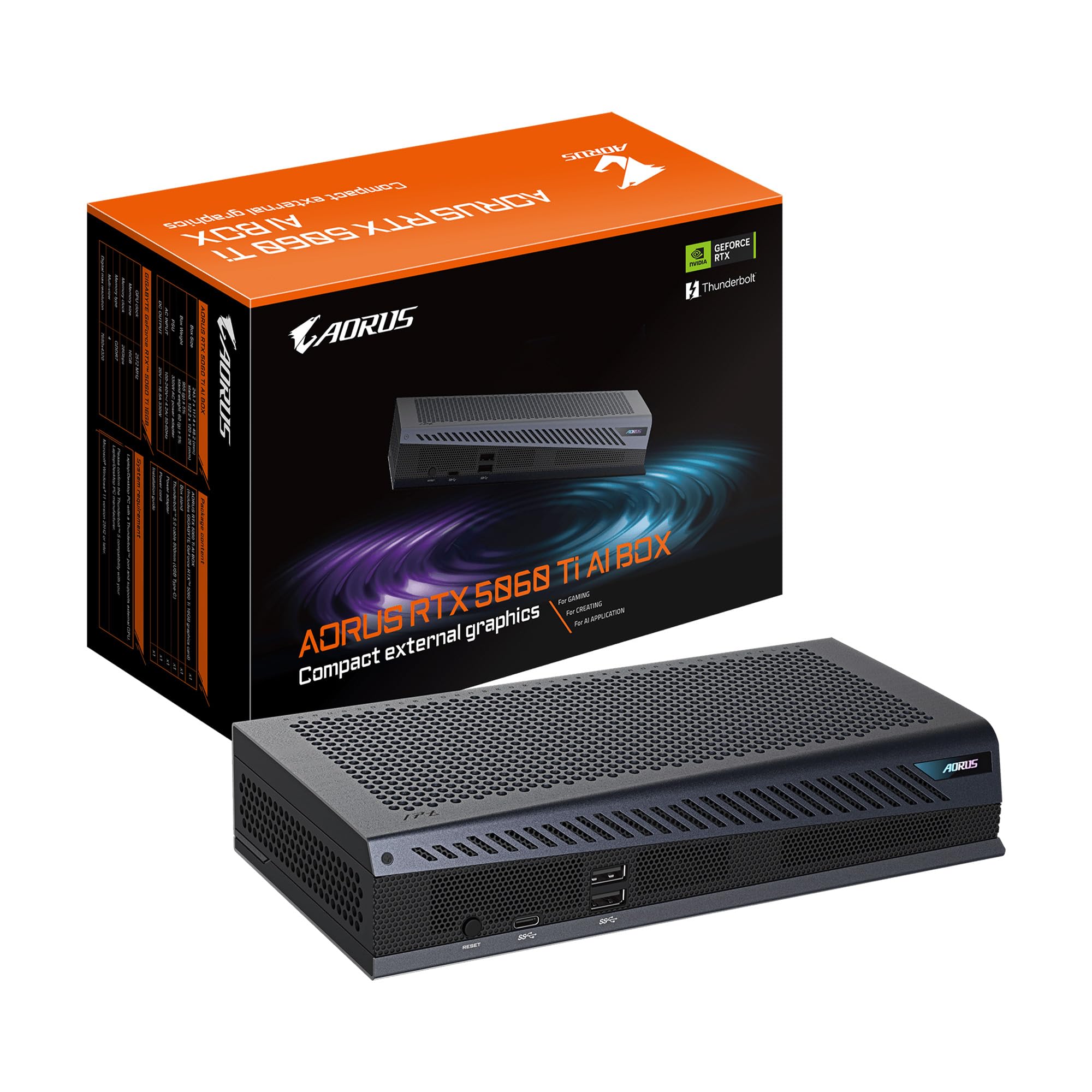
The AORUS RTX 5060 Ti AI Box is an external GPU enclosure housing a desktop-class 16GB GDDR7 GPU with Blackwell architecture, connected via Thunderbolt 5 providing up to 80 Gbps bidirectional bandwidth. This is a unique solution for laptop users who need deep learning compute without building a separate desktop. The compact form factor supports both horizontal and vertical placement via a magnetic stand.
The WINDFORCE cooling system with server-grade thermal gel and Hawk fans keeps the card running cool, though the heat exhaust is warm to the touch under sustained inference. Setup requires downloading NVIDIA drivers and, on Windows, is relatively painless. Linux support is more challenging, with some users reporting freezes and requiring manual driver configuration. The eGPU also includes an Ethernet port for low-latency network connections and a Thunderbolt daisy-chain port.
The included power brick is large but fits in a standard backpack, making this a travel-friendly option. Users have reported DOA units and occasional bugs where the game screen goes white, requiring driver reinstallation. For best performance, an external monitor is recommended to avoid USB4 bandwidth bottlenecks. For deep learning on the go with a Thunderbolt-equipped laptop, this is the most portable Blackwell option.
Why it’s great
- Portable eGPU for Thunderbolt laptops
- 16GB GDDR7 with Blackwell FP4 support
- Compact magnetic stand for flexible placement
Good to know
- Linux driver setup is problematic
- External monitor needed for full bandwidth
- DOA units reported occasionally
6. PNY NVIDIA RTX 2000 Ada Generation

The RTX 2000 Ada packs 16GB of GDDR6 ECC memory into a low-profile dual-slot form factor that requires no external power cables—it draws all its power from the PCIe slot, maxing out at 70W. With 2,816 CUDA cores, 88 Tensor cores, and 22 RT cores on the Ada Lovelace architecture, this card is purpose-built for inference on edge servers, compact workstations, and Proxmox passthrough environments where space and power efficiency are paramount.
The card supports Ubuntu out of the box with standard NVIDIA drivers, making it easy to deploy for AI inference on Linux. Despite its low power envelope, it achieves performance comparable to an RTX 4060 or 4060 Ti, handling Cyberpunk 2077 at 1440p with decent frame rates. For deep learning, the ECC memory ensures bit-level error correction for critical inference workloads, and the 16GB capacity can run small to medium transformer models without swapping.
Some users report that the included low-profile bracket does not fit the card correctly, and the full-height bracket may bend the plastic housing. The card is priced at a premium relative to its compute performance because of its power efficiency and compact size. For AI makers building headless inference servers in small chassis or needing GPU passthrough for Plex and cloud gaming, this is a quiet, efficient workhorse.
Why it’s great
- PCIe-powered with no external cables needed
- ECC memory for reliable inference workloads
- Low-profile form factor fits compact chassis
Good to know
- Bracket fitment issues reported
- Premium price relative to consumer alternatives
- Limited to smaller model inference
7. PNY NVIDIA GeForce RTX 5070 Epic-X ARGB

The PNY RTX 5070 Epic-X is a Blackwell-based card with 12GB of GDDR7 memory on a 192-bit bus, delivering up to 672 GB/s memory bandwidth. It features 6,144 CUDA cores and fifth-gen Tensor cores supporting FP4 precision. For deep learning beginners or those working with smaller models and datasets, this card offers modern architecture at an approachable price point without sacrificing tensor core efficiency.
The triple-fan Epic-X cooler keeps the card quiet and cool under load, with users reporting temperatures well under 70°C during extended gaming and training sessions. The card includes DLSS 4 support for neural rendering and Reflex technologies for low-latency pipeline response. The 12GB VRAM is sufficient for fine-tuning BERT, ResNet, or small diffusion models, though larger LLMs will require gradient checkpointing or CPU offloading.
The card includes a dual 8-pin to 12-pin power adapter and fits in standard mid-tower cases. Users have confirmed it works with B650 motherboards and 750W PSUs, making upgrades straightforward. The 192-bit bus and 12GB capacity do limit batch sizes for larger models, but for entry-level deep learning experimentation, the Blackwell tensor cores provide a substantial upgrade over previous-generation cards.
Why it’s great
- Modern Blackwell tensor cores at entry-level price
- Excellent thermals and quiet operation
- Low power draw compared to previous generations
Good to know
- 12GB VRAM limits larger model training
- 192-bit bus constrains memory bandwidth
- Not suitable for 30B+ parameter LLMs
8. ASUS SFF-Ready Prime RTX 5070

The ASUS Prime RTX 5070 is specifically designed for small-form-factor builds with its SFF-Ready certification, featuring a 2.5-slot design and Axial-tech fans with a smaller hub for longer blades and increased downward air pressure. It packs 12GB of GDDR7 memory on the Blackwell architecture with a boost clock of 2542 MHz. For deep learning enthusiasts who need a compact workstation, this card delivers modern tensor performance in a space-efficient package.
The phase-change GPU thermal pad ensures optimal heat transfer, and the Dual BIOS allows switching between Performance and Quiet modes. Users report temperatures around 60-65°C under gaming and training loads with minimal fan noise in Performance mode. The card handles 1440p gaming effortlessly and provides solid compute performance for small batch training. The 12GB VRAM is adequate for medium-scale models but may require optimization for larger workloads.
The card is one of the largest MSRP models for the RTX 5070, so verify case dimensions before purchase. It requires a PSU with two 8-pin connectors and uses a special adapter. For researchers building compact deep learning rigs or ITX systems for inference at the edge, the ASUS Prime is the SFF-optimized Blackwell choice.
Why it’s great
- SFF-Ready for compact deep learning builds
- Dual BIOS for silent or performance modes
- Excellent thermals with phase-change thermal pad
Good to know
- 12GB VRAM limits large model training
- Large for an SFF card—verify case fit
- Requires adapter for PSU connection
9. GIGABYTE RTX 5070 Eagle OC ICE SFF

The GIGABYTE RTX 5070 Eagle OC ICE SFF is a budget-friendly Blackwell card with 12GB of GDDR7 memory, a 192-bit interface, and PCIe 5.0 support. The WINDFORCE cooling system with three fans keeps the card near-silent even under load, and the included sag bracket provides structural support. For deep learning newcomers who need the latest tensor core architecture without spending on premium models, this card delivers genuine performance per dollar.
Users report the card handling 1440p gaming at 300Hz in competitive titles with low power draw and heat output, idling at 35°C and maxing at 60°C during extended sessions. The 12GB VRAM is sufficient for fine-tuning smaller transformer models, and the Blackwell architecture’s FP4 precision halves the effective memory requirement for mixed-precision training. The card is SFF-Ready and fits most standard cases without issue.
The white “ICE” aesthetic suits all-white builds, and the four-year warranty provides peace of mind. The 2600 MHz boost clock offers solid out-of-the-box performance. The 192-bit bus and 12GB capacity are the main constraints—large model training will require optimization. For the best price-to-performance ratio in the Blackwell lineup, this Eagle OC is the entry-level winner.
Why it’s great
- Best price-to-performance in Blackwell lineup
- Near-silent triple-fan cooling
- Four-year warranty for long-term use
Good to know
- 12GB VRAM limits large model training
- 192-bit bus constrains memory bandwidth
- White aesthetic limits color scheme flexibility
FAQ
Can I use a consumer RTX card for professional deep learning?
Is 12GB VRAM enough for training modern LLMs?
What is the advantage of ECC memory on professional GPUs?
Do I need an external eGPU for deep learning on a laptop?
Should I buy a current-generation Blackwell card or a previous-generation card for deep learning?
Final Thoughts: The Verdict
For most users, the best deep learning gpu winner is the NVD RTX PRO 6000 Blackwell because 96GB VRAM and FP4 tensor cores unlock local training and inference on 70B models without sharding. If you need massive VRAM at a more practical price for fine-tuning 30B models, grab the PNY VCNRTXA6000-PB. And for an entry-level Blackwell card with modern tensor core support that doesn’t break the bank, nothing beats the GIGABYTE RTX 5070 Eagle OC ICE SFF.

Mo Maruf
I created WellFizz to bridge the gap between vague wellness advice and actionable solutions. My mission is simple: to decode the research and give you practical tools you can actually use.
Beyond the data, I am a passionate traveler. I believe that stepping away from the screen to explore new environments is essential for mental clarity and physical vitality.