Our readers keep the lights on and my smoothie glass nicely filled. As an Amazon Associate, I earn from qualifying purchases.
The moment a 3D print finishes, the real work begins. That rough edge where the brim met the build plate, the stubborn nub from a support structure, the sharp burr inside a tiny hole — all of them demand a tool that removes material cleanly without gouging the model or dulling after a few passes. A dedicated deburring tool turns a frustrating scraping session into a quick, consistent finishing step.
I’m Mohammad Maruf — the founder and writer behind WellFizz. I’ve spent countless hours researching post-processing hardware, comparing blade geometries, handle ergonomics, and the real-world performance of dozens of finishing tool kits across resin, PLA, and PETG prints to build this guide on solid spec analysis rather than marketing claims.
Whether you are cleaning supports off a detailed miniature or smoothing a functional part, the deburring tool for 3d printing you choose determines how much clean-up time you spend versus how quickly you get to your next print.
How To Choose The Best Deburring Tool For 3D Printing
A deburring tool for 3D printing looks simple, but small differences in blade material, handle ergonomics, and head rotation dramatically change how well it cleans a print. Focus on four factors to avoid buying a tool that catches, digs in, or dulls after cleaning a single model.
Blade Hardness and Material
The HRC (Rockwell Hardness) rating of a blade is the single most important spec. Blades with HRC 62–67 hold an edge through hundreds of passes on PLA and PETG, while softer blades begin to skid and tear rather than shear cleanly after a few dozen strokes. Look for M2 high-speed steel or BS1010/BS1018 blades in that hardness range — they stay sharp through an entire multi-part build session without requiring frequent replacement.
Swivel Versus Fixed Head
A fixed-blade deburrer works fine for straight edges and open surfaces, but internal holes, tight curves, and overhanging features demand a 360-degree rotating head that follows the contour without forcing the blade into the print at the wrong angle. Rotating heads also reduce the risk of the blade catching and chipping the edge of a delicate resin part.
Handle Ergonomics and Grip
Post-processing a single large print can take twenty to thirty minutes of continuous scraping and cutting. A handle with a textured, non-slip surface — machined aluminum with a knurled finish or rubberized over-molding — reduces grip fatigue and gives you precise control over blade pressure. Tools with slim barrels can cause cramping after extended use, while thicker handles distribute force more evenly across the palm.
Kit Completeness Versus Standalone Tool
Some kits include only the deburring handle and a few blades. Others bundle needle files, side cutters, scrapers, and even digital calipers. If you are setting up a first workstation, a complete kit with multiple blade shapes (straight, curved, and angled) and a set of precision files lets you handle everything from support removal to final surface sanding without reaching for a second tool. Advanced users with dedicated tools for each step may prefer a standalone deburring handle for its lighter weight and lower cost.
Quick Comparison
On smaller screens, swipe sideways to see the full table.
| Model | Category | Best For | Key Spec | Amazon |
|---|---|---|---|---|
| 42‑Piece Rustark Kit | Premium Kit | All‑in‑one workshop starter | 42 pieces incl. caliper, scraper, 6x BS1010 blades | Amazon |
| 32‑Piece Tool Kit | Mid‑Range Kit | Hobbyist needing variety | 32 pieces incl. 10x needle files, NB1100 handle | Amazon |
| WORKPRO Deburring Tool | Standalone Tool | Precision edge trimming | M2 HSS blades, HRC 62‑67, 360° swivel head | Amazon |
| VASTOOLS 18‑Piece Kit | Mid‑Range Kit | Budget‑conscious beginners | 18 pieces, 10 blades with HRC 64‑67, micro wire cutter | Amazon |
| CCTREE 23‑Piece Kit | Entry‑Level Kit | Complete starter set | 23 pieces, art knife set, needle files, double‑sided polisher | Amazon |
In‑Depth Reviews
1. 42‑Piece 3D Print Tool Kit (Rustark)
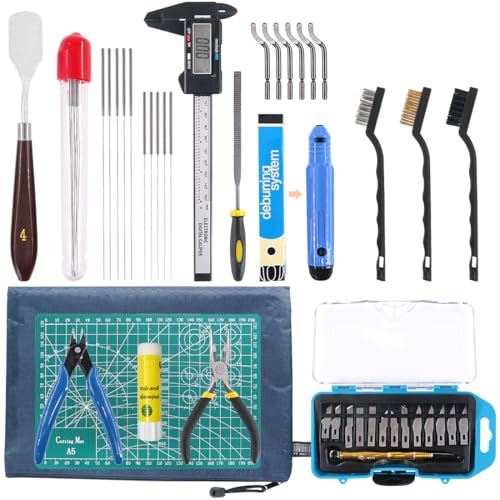
The Rustark 42‑piece kit is the closest thing to a complete post-processing station in a single zippered bag. It includes an NB1100 deburring handle with six BS1010 blades, a 13‑blade knife cleanup set, a flat file, two pliers, a removable scraper, a glue stick, ten cleaning needles, mini brushes, an electronic digital caliper, and a cutting mat. For someone setting up a workshop from scratch, this eliminates the need to buy separate hand tools — the caliper alone saves a second purchase.
The deburring tool itself performs well across PLA and PETG, though some users note that the flat file is a bit rough for fine finish work and the caliper feels plasticky. The scraper is a standout — it lifts thin brim layers off the build plate without scratching the surface. The included cutting mat protects the work table, and the zippered bag keeps every piece organized during transport or storage. For those who own a dedicated caliper and files, the 32‑piece kit may offer a tighter selection, but the Rustark delivers the highest piece‑to‑value ratio in this lineup.
Users consistently describe it as a perfect starter companion and a great gift for budding creators. The tools are durable enough for regular hobbyist use, and the kit covers every step from support removal to measurement to final cleaning. The only consistent critique is that the caliper and the deburring handle’s build quality feel a tier below the rest of the set — functional but not premium.
Why it’s great
- Includes digital caliper, cutting mat, scraper, and pliers — a full workshop in one bag
- Six BS1010 blades provide consistent edge quality across multiple materials
- Zippered bag keeps all 42 pieces organized and portable
Good to know
- Digital caliper feels less robust than standalone models
- Flat file is a bit coarse for fine finishing
2. 32‑Piece 3D Print Tool Kit

The 32‑piece kit takes a sensible middle path. It pairs the same NB1100 deburring handle found in the Rustark kit with five BS1010 blades and a ten‑piece needle file set that covers flat, warding, square, triangular, round, and half‑round profiles. That file variety is the kit’s strongest selling point — you can switch from deburring an internal hole to shaping a curved contour without grabbing a different tool entirely. The double‑sided polished bar is a nice addition for smoothing rough surfaces after deburring.
The knife cleanup set includes three handles and ten blades, which is generous for a kit in this range. Users who print detailed miniatures or small functional parts will find the tweezers and pliers useful for removing small supports in tight spaces. The storage case holds everything in dedicated slots, so tools stay organized between sessions. Some users report that the deburring handle’s build quality is acceptable rather than premium, and the included pliers feel adequate rather than excellent, but the overall value remains strong.
Several hobbyists describe this kit as a durable, high‑quality set that covers all the basics without extra clutter. The ten‑piece file set is the differentiator here — most competitive kits include only six files. If you regularly need to reach into narrow gaps to file down support nubs, this kit gives you the right shapes without an additional purchase.
Why it’s great
- Ten‑piece needle file set covers more shapes than typical six‑file kits
- NB1100 deburring handle with five BS1010 blades handles PLA, PETG, and resin well
- Dedicated storage keeps all pieces organized and accessible
Good to know
- Deburring handle finish is functional rather than premium
- Some users experienced rust on blades after extended storage
3. WORKPRO Deburring Tool
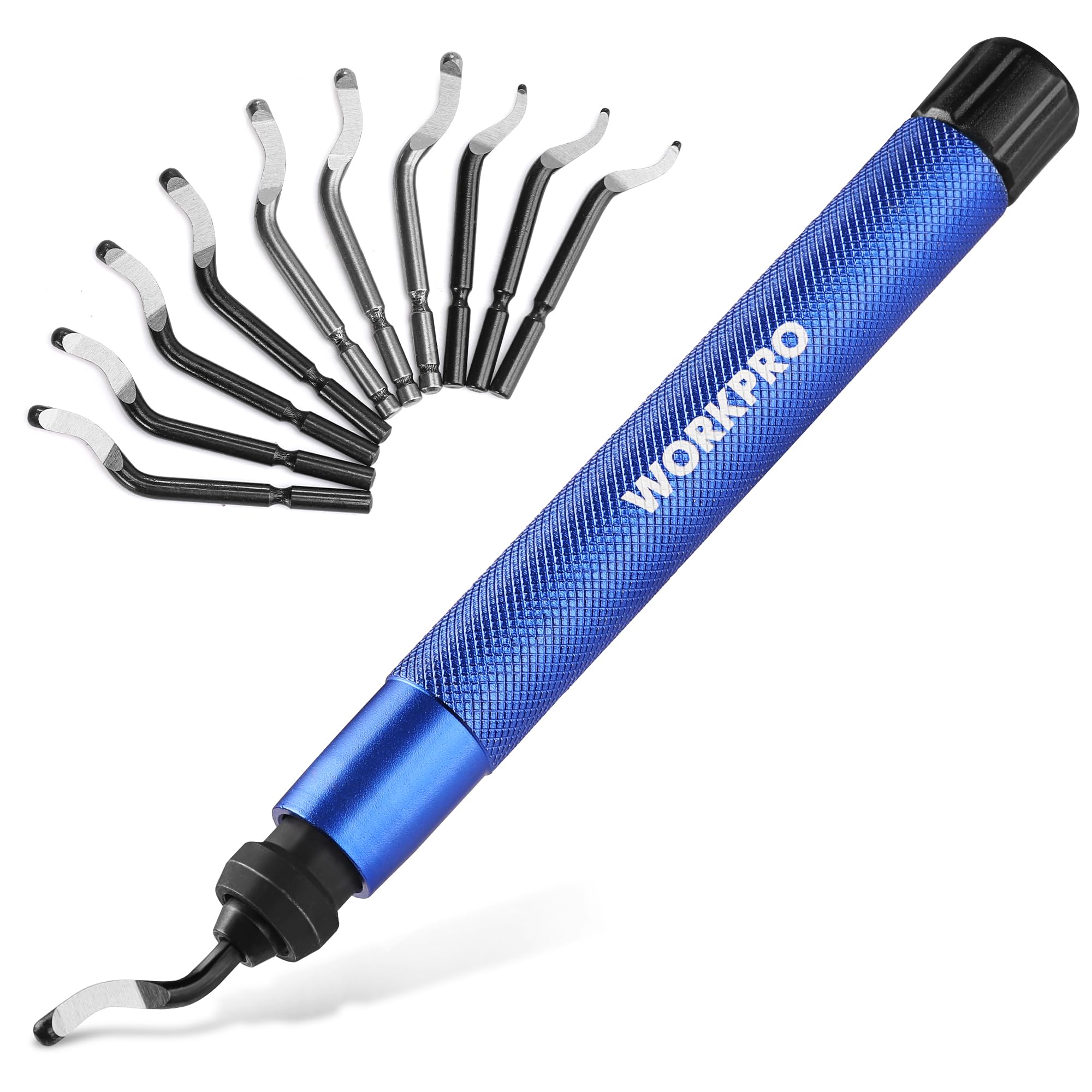
The WORKPRO is a standalone deburring tool designed for users who already own files, pliers, and a scraper but want a dedicated finishing tool with a superior blade. Its M2 high‑speed steel blades are hardened to HRC 62–67, which puts them at the top end of hardness among the tools tested. These blades shear through PLA, ABS, PETG, and resin with minimal resistance, and the 360‑degree rotating head lets you follow curved edges, internal holes, and tight corners without repositioning the tool.
The handle is machined from lightweight aluminum with a textured knurled grip that provides secure control even when your hands are slightly sweaty or dusty from sanding. The quick‑release chuck makes blade changes fast, and the storage base holds all eleven blades neatly. Users working with hardened epoxy resin or metal‑filled filaments will especially appreciate the HRC 67 capability — softer blades would dull rapidly on those materials. The rotating head does require a short learning curve to avoid catching, but once you match the rotation speed to your pass, the cut is clean and smooth.
Reviewers consistently highlight the substantial feel of the handle compared to cheaper plastic options. The tool is comfortable for extended sessions, and the included blade variety covers everything from heavy burr removal on sawed tubes to fine edge trimming on delicate resin prints. The only downside is that this is a pure deburring tool — no files, no scraper, no extras — so it is best paired with a modest collection of existing finishing tools.
Why it’s great
- M2 HSS blades hardened to HRC 62–67 deliver long‑lasting sharpness on PLA, PETG, and resin
- Lightweight aluminum handle with knurled grip reduces hand fatigue
- 360° rotating head follows curves and internal edges without repositioning
Good to know
- Standalone tool — no files or scrapers included
- Rotating head has a brief learning curve to avoid catching on the print
4. VASTOOLS 18‑Piece Deburring Tool Kit

The VASTOOLS 18‑piece kit packs a surprising amount of utility into a compact case. It includes a deburring handle with ten interchangeable blades across three profiles — five BS1010 blades (HRC 64) for steel, aluminum, and plastic; three BS1018 blades (HRC 67) for stainless steel; and three BK3010 blades for resin, copper, and wood. The 360‑degree rotating head works well in tight spots, and the micro wire cutter with its 21‑degree angled jaw handles filament and small sprues cleanly.
The six‑piece needle file set (flat, warding, square, triangular, round, half‑round) covers standard shaping needs, and the textured knurled grip on the deburring handle provides comfortable control for sustained use. Users with smaller hands particularly appreciate the handle size — it is easy to maneuver without feeling bulky. The kit is organized inside a slim storage sleeve, though some users note that a pouch or a more structured case would help keep everything from shifting during transport.
Feedback from real users is largely positive: the deburring tool feels solid, the snips provide excellent flush cuts, and the value for the included components is strong. The one area where users hold back a star is blade sharpness — the deburring tool works well but can occasionally catch and dig into prints if the angle is not perfectly matched. With a bit of practice, it becomes a reliable finishing tool for regular cleanup jobs on PLA and PETG models.
Why it’s great
- Ten blades across three profiles cover plastic, resin, and light metal finishing
- Micro wire cutter with angled jaw handles filament and sprues cleanly
- Compact size and textured grip suit users with smaller hands
Good to know
- Storage sleeve lacks a structured pouch — tools can shift during travel
- Deburring blade can catch and dig in if approach angle is not dialed in
5. CCTREE 23‑Piece 3D Print Tool Kit
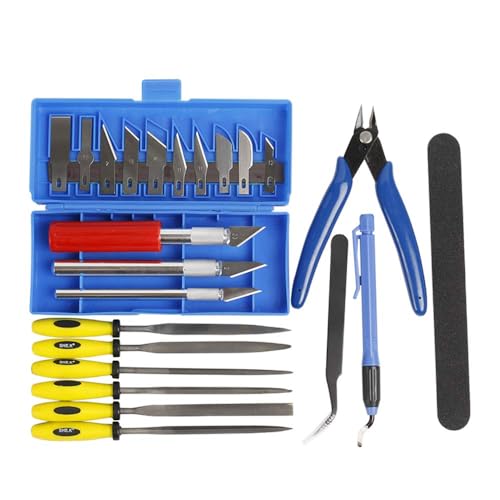
The CCTREE 23‑piece kit is a complete entry‑level solution that combines a deburring tool handle with an art knife set (three handles and ten blades), six needle files, a double‑sided polished bar, pliers, and tweezers. It is designed to be the single purchase that gets a new 3D printing enthusiast from support removal to final finishing without needing to shop for individual tools. The art knife set is particularly useful for cutting away thin support structures and scraping off stringing before deburring.
The deburring tool itself is simple and functional — no swivel head, but it cleans straight edges and open surfaces effectively. The six needle files cover the essential shapes, and the polished bar helps smooth rough patches after deburring. The included pliers and tweezers are handy for grasping small removed pieces. Users find the kit easy to handle and well‑suited for occasional use, though some report that the blades can rust if stored without drying after use, especially in humid environments.
Several reviewers note that the packaging could be improved — the foam layout does not always keep every tool in place during shipping — but none of the tools arrived damaged. The rubber handles on the files feel secure, and the pliers perform well for light cutting. For a beginner who wants to keep costs low while getting a tool for every step of finishing, this kit delivers a practical, no‑frills set that covers the basics.
Why it’s great
- Art knife set with three handles and ten blades handles support removal and stringing cleanly
- Six needle files and a polished bar cover basic shaping and smoothing
- Beginners get every essential tool in one affordable package
Good to know
- Blades can rust if stored without drying after use
- Foam packaging may shift during shipping, requiring manual re‑organization
FAQ
Can I use a metal deburring tool on 3D printed resin parts?
How often do the blades need to be replaced for regular PLA printing?
What is the difference between BS1010 and BK3010 blades?
Final Thoughts: The Verdict
For most users, the deburring tool for 3d printing winner is the 42‑Piece Rustark Kit because it provides a full post-processing workstation in one organized zippered bag. If you want a dedicated standalone tool with top‑tier blade hardness, grab the WORKPRO Deburring Tool. And for a budget‑friendly entry point that still covers all the basics, nothing beats the VASTOOLS 18‑Piece Kit.

Mo Maruf
I created WellFizz to bridge the gap between vague wellness advice and actionable solutions. My mission is simple: to decode the research and give you practical tools you can actually use.
Beyond the data, I am a passionate traveler. I believe that stepping away from the screen to explore new environments is essential for mental clarity and physical vitality.