Our readers keep the lights on and my smoothie glass nicely filled. As an Amazon Associate, I earn from qualifying purchases.
Upgrading to a new DDR5 platform unlocks raw bandwidth figures that dwarf previous generations, but raw speed alone won’t prevent the stutter that breaks immersion in a firefight. The true measure of gaming memory lies in how tightly that speed is paired with latency and stability under sustained load.
I’m Mohammad Maruf — the founder and writer behind WellFizz. I’ve spent hundreds of hours analyzing memory chip binning, comparing Subtiming profiles, and studying motherboard Qualified Vendor Lists to separate the kits that actually deliver on their rated speeds from those that force endless BIOS troubleshooting.
This guide focuses on the kits that balance frequency, CL timing, and die quality for real-world gaming performance — the best ddr5 ram for gaming you can trust for a seamless, high-frame-rate experience.
How To Choose The Best DDR5 RAM For Gaming
DDR5 memory is not a one-size-fits-all upgrade. The wrong combination of speed, latency, and die type can leave performance on the table or introduce system instability. Understanding a few core specs helps you pick a kit that actually works with your CPU and motherboard.
Frequency vs. Latency: The Real Gaming Metric
DDR5-6000 is widely considered the sweet spot for Ryzen 7000 and 9000 series processors when running in 1:1 Infinity Fabric mode, while Intel 13th and 14th Gen chips can benefit from 6400MT/s and beyond. However, frequency alone is misleading — CL30 at 6000MT/s delivers noticeably better frame pacing than CL38 or CL40 at the same speed. The lower the CAS latency number, the fewer clocks the memory spends retrieving data, which directly reduces stutter in CPU-bound scenes.
Die Quality: Hynix vs. Samsung vs. Micron
Not all DDR5 ICs are created equal. SK Hynix A-die is the current gold standard for overclocking headroom and tight subtimings, often capable of running 6000MT/s at CL26 or 8000MT/s with careful tuning. Hynix M-die is a solid budget-friendly alternative. Samsung and Micron dies tend to have less headroom and may struggle above 6000MT/s, especially on AMD AM5 platforms. Checking whether a kit uses Hynix dies can save hours of BIOS troubleshooting.
XMP 3.0 and AMD EXPO: One-Click Overclocking Profiles
DDR5 kits ship at a conservative JEDEC speed (usually 4800MT/s) and require an overclock profile to reach their advertised performance. Intel-based systems use XMP 3.0, while AMD AM5 boards use EXPO. Many kits support both, but ensuring compatibility with your specific motherboard’s Qualified Vendor List (QVL) is critical. A kit not listed on the QVL may still work, but it increases the chance of failed memory training or instability at rated speeds.
Quick Comparison
On smaller screens, swipe sideways to see the full table.
| Model | Category | Best For | Key Spec | Amazon |
|---|---|---|---|---|
| Lexar ARES Gen2 RGB | Premium | High-FPS Gaming + Overclocking | 6400MT/s CL30 Hynix A-die | Amazon |
| KLEVV CRAS V RGB | Premium | Enthusiast / 64GB Capacity | 6400MT/s CL32 Hynix A-die | Amazon |
| G.SKILL Trident Z5 Neo RGB | Mid-Range | AMD AM5 Builds | 6000MT/s CL36 EXPO | Amazon |
| CORSAIR Vengeance DDR5 | Mid-Range | Intel High-Frequency Builds | 6400MT/s CL36 iCUE Control | Amazon |
| Acer Predator Pallas II | Mid-Range | Balanced Performance / Dual-Platform | 6000MT/s CL30 | Amazon |
| Patriot Viper Venom RGB | Mid-Range | Budget-Friendly Low Latency | 6000MT/s CL30 XMP/EXPO | Amazon |
| TEAMGROUP T-Force Delta Alpha RGB | Mid-Range | AM5 RGB Builds | 6000MT/s CL38 EXPO | Amazon |
| TEAMGROUP T-Force Vulcan | Entry-Level | Budget 32GB Upgrade | 6000MT/s CL38 | Amazon |
| Crucial 32GB DDR5 Kit | Entry-Level | Basic Stability / Pre-built Upgrades | 5600MT/s CL46 | Amazon |
In‑Depth Reviews
1. Lexar ARES Gen2 RGB DDR5 RAM 32GB Kit 6400MHz CL30

This kit combines 6400MT/s speed with a tight CL30 timing, making it one of the fastest off-the-shelf 32GB kits for both Intel and AMD platforms. The 1.88mm premium aluminum heat spreader keeps temperatures in check during extended gaming sessions, and users have reported successful manual tuning down to CL26 on AMD 9950X3D systems using the SK Hynix A-die ICs.
Integrated Power Management IC (PMIC) and on-die ECC help maintain stability even when pushing past the rated XMP or EXPO profile. The RGB lighting syncs with motherboard software through Lexar RGB Sync, so you are not locked into a proprietary ecosystem like some competitors require.
The only consistent concern is that early batches may arrive with opened or refurbished packaging, though Lexar’s customer service has been responsive with compensation. For a 32GB kit delivering 6400MT/s at CL30, the performance-to-latency ratio is exceptional.
Why it’s great
- SK Hynix A-die capable of 6000 CL26 or 8000 CL34 with manual tuning
- Premium 1.88mm aluminum heatsink for sustained load cooling
- Supports both XMP 3.0 and AMD EXPO out of the box
Good to know
- Some units may arrive with damaged retail packaging
- RGB requires Lexar software, not universal motherboard control
2. KLEVV CRAS V RGB DDR5 64GB Kit 6400MHz CL32

For gamers who also stream, edit video, or run virtual machines, the CRAS V RGB offers a full 64GB of SK Hynix A-die at 6400MT/s with a CL32 rating. That is a rare combination — most high-capacity kits sacrifice latency, but KLEVV keeps it tight enough to avoid compromising game frame rates.
The heatsink stands just 44mm tall, which means clearance issues with large air coolers are minimal. The RGB lighting uses a unique hollow linear design that diffuses color from the top and both sides, and it works with mainstream motherboard RGB software rather than requiring a proprietary app.
Keep in mind that populating four sticks on an AM5 board may cause instability at 6400MT/s — two sticks in the recommended slots run rock solid. The kit’s overclocking headroom has been praised by enthusiasts, with some users hitting 7200MT/s at CL34 on Intel Z790 boards.
Why it’s great
- 64GB capacity with CL32 latency — rare balance for multitasking gamers
- 44mm low-profile heatsink avoids cooler conflicts
- SK Hynix A-die offers significant manual OC headroom
Good to know
- Four-stick configs on AM5 may not reach full speed
- Price can fluctuate significantly based on DRAM market
3. G.SKILL Trident Z5 Neo RGB DDR5 32GB 6000MT/s CL36

The Trident Z5 Neo RGB is specifically built for AMD EXPO, making it a natural fit for Ryzen 7000 and 9000 builds. At 6000MT/s with CL36-36-36-96 timings, it sits at the frequency most AMD users consider the 1:1 Infinity Fabric sweet spot, and the EXPO profile enables one-click overclocking without manual tuning.
Users report stable operation across X670, B650, and even the newer X870 platforms. The heatsink design is robust and the RGB lighting is bright, fully customizable through G.SKILL’s own software or motherboard apps like Gigabyte Control Center. Some buyers have noted that initial boot can take up to seven minutes while the system performs memory training — this is normal DDR5 behavior, not a defect.
While CL36 is slightly looser than CL30 kits, the difference in real-world gaming frames is marginal at 6000MT/s, and the mature QVL support on AM5 boards means fewer compatibility headaches than faster or tighter kits.
Why it’s great
- EXPO profile works seamlessly with Ryzen 7000/9000 chips
- Solid build quality with consistent QVL listings across AM5 boards
- RGB syncs with motherboard software, no bloatware required
Good to know
- CL36 is not the tightest latency available at this speed
- Initial memory training may take several minutes
4. CORSAIR Vengeance DDR5 32GB 6400MHz CL36
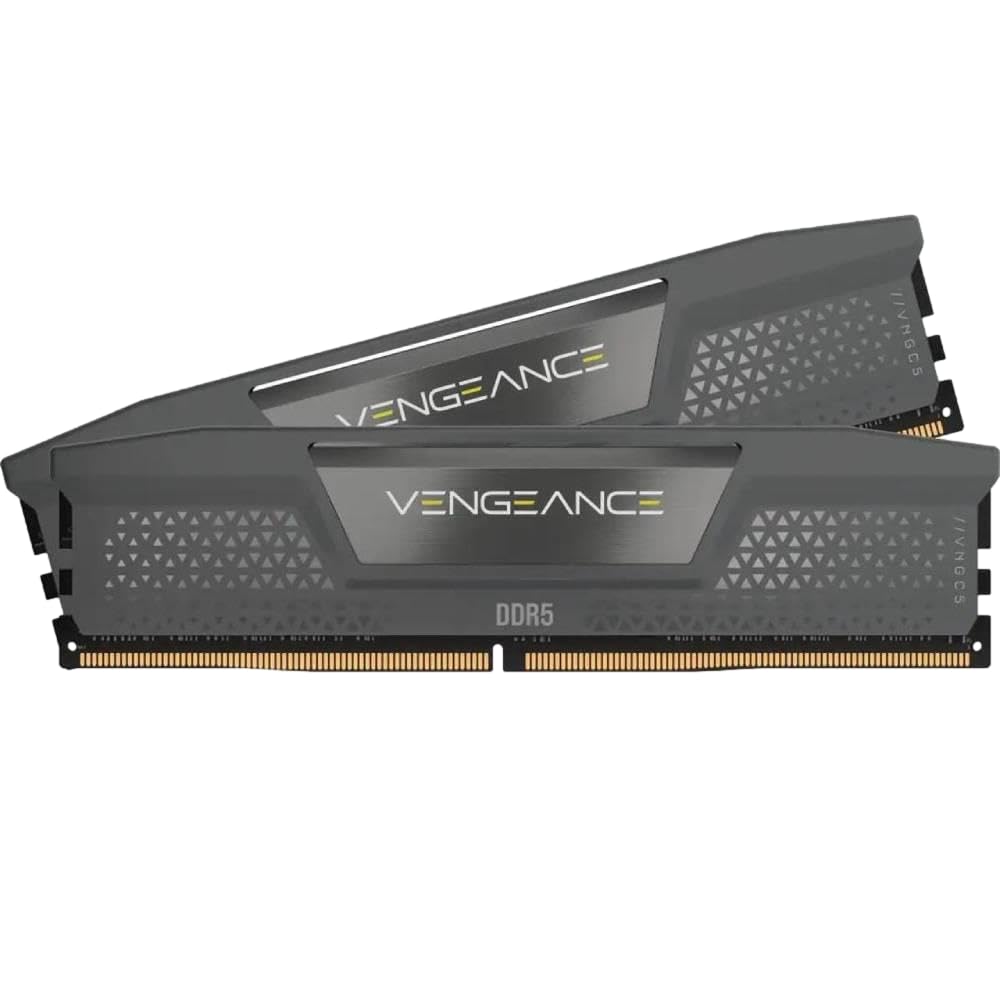
Corsair’s Vengeance line has long been a reliable choice for Intel builders, and this DDR5-6400 CL36 kit continues that tradition. The onboard voltage regulation allows fine-grained control through iCUE, giving enthusiasts the ability to tweak voltages for higher overclocks without relying solely on motherboard BIOS limits.
Tested and stable on Intel 700-series chipsets, users with ASUS ROG and MSI boards report hitting 6400MT/s without issue after selecting the XMP profile. The gray heat spreader has a low-profile, understated look that appeals to builders who prefer function over flashy RGB.
Note that CL36 at 6400MT/s is a moderate latency for the speed — tight-tuning enthusiasts may want to manually reduce subtimings. Also, the included iCUE software, while powerful, can be resource-heavy in the background if left running during gaming sessions.
Why it’s great
- Onboard PMIC enables voltage control via iCUE
- Low-profile design fits under large air coolers
- Consistent XMP stability on Intel Z690/Z790 boards
Good to know
- iCUE software can consume system resources
- CL36 is not the tightest latency for 6400 MT/s
5. Acer Predator Pallas II DDR5 32GB 6000MHz CL30

Acer’s Predator Pallas II delivers the ideal 6000MT/s CL30 combination that both Intel and AMD platforms can take advantage of. The hand-selected, quality-prioritized ICs from original manufacturers aim for consistency, and the on-die ECC plus PMIC provide the voltage regulation needed for reliable EXPO and XMP operation.
User feedback indicates excellent stability with Intel 14th Gen processors and Ryzen 7000 series, with most reporting flawless performance after enabling the correct BIOS profile. The matte black heatsink is substantial and gives the kit a premium feel without excessive size.
Some users have encountered units that refuse to run at the rated 6000MT/s with XMP enabled, though this often traces back to motherboard QVL compatibility rather than defective hardware. Checking your specific board model against Acer’s compatibility list before purchase is recommended.
Why it’s great
- 6000 CL30 hits the performance sweet spot for AMD 1:1 mode
- Hand-selected ICs for overclocking consistency
- Supports both XMP 3.0 and AMD EXPO profiles
Good to know
- Some units may not hit rated speed on all motherboards
- Limited RGB implementation — no lighting on this kit
6. Patriot Memory Viper Venom RGB DDR5 16GB 6000MHz CL30

This single-stick 16GB module offers 6000MT/s at CL30 for the lowest possible entry cost into fast DDR5 gaming memory. The SK Hynix dies and tight timings make it a solid option for budget builds or for users who want to start with one stick and add a second later.
Users praise the raw speed and reliability — the RGB lighting uses SignalRGB, which is free but may not sync with other RGB ecosystems like Corsair iCUE or Razer Chroma. The main drawback reported by buyers is the heatsink adhesive quality, with a few cases of the heat spreader detaching during installation or use.
Compatibility with Intel Z890 and newer platforms has been inconsistent, with some users experiencing clock conflicts due to aggressive die timings. Confirm your motherboard’s QVL before purchasing this kit for a new build.
Why it’s great
- CL30 at 6000 MHz provides great latency for minimal investment
- SK Hynix dies offer potential overclocking headroom
- RGB adds visual flair without a significant price premium
Good to know
- Single stick means no dual-channel bandwidth out of the box
- Heatsink adhesive may fail over time
7. TEAMGROUP T-Force Delta Alpha RGB DDR5 32GB 6000MHz CL38

The Delta Alpha is TEAMGROUP’s AMD-optimized DDR5 kit with EXPO support and a focus on aesthetic appeal. The 120-degree ultra-wide RGB lighting provides vivid, diffused illumination across the top of the module, and the integrated smart RGB IC controller ensures compatibility with most motherboard lighting software.
The CL38 latency is on the looser side, but for users who prioritize visual uniformity in an AM5 build and do not plan to manually overclock, this kit delivers stable EXPO operation at 6000MT/s. On-die ECC and a strengthened PMIC cooling design help maintain reliability during extended gaming sessions.
Buyers should note that mixing two of these kits for a 64GB total may require BIOS adjustments, and the QVL support is strongest on X670 and B650 boards with Ryzen 7000 series CPUs.
Why it’s great
- Vivid 120-degree RGB with broad software support
- PMIC cooling design improves voltage regulation stability
- One-click AMD EXPO overclock for easy setup
Good to know
- CL38 latency reduces gaming performance versus tighter kits
- QVL support strongest on X670, less consistent on older chipsets
8. TEAMGROUP T-Force Vulcan DDR5 32GB 6000MHz CL38

The T-Force Vulcan is the no-frills 32GB kit that focuses on getting the job done at a budget-friendly price point. At 6000MT/s with CL38 timings, it is not the fastest kit on the market, but the dual-channel configuration and XMP 3.0 support provide a noticeable uplift over standard JEDEC speeds for gaming and multitasking.
The reinforced structure and equipped PMICs ensure stable power usage, and the heat spreaders keep temperatures under control without requiring active airflow. Users upgrading from DDR4 have reported smooth transitions, with the kit being recognized immediately on both Intel and AMD platforms.
The lack of RGB keeps the price down, and the CL38 timing means it generally runs stable on a wider range of motherboards without the memory training issues that tighter CL30 kits sometimes encounter.
Why it’s great
- Affordable 32GB dual-channel upgrade from DDR4
- Wide XMP 3.0 compatibility across chipsets
- Reinforced PMIC for stable power delivery
Good to know
- CL38 latency is one of the looser timings at this speed
- No RGB or aesthetic features
9. Crucial 32GB DDR5 RAM Kit 5600MHz CL46
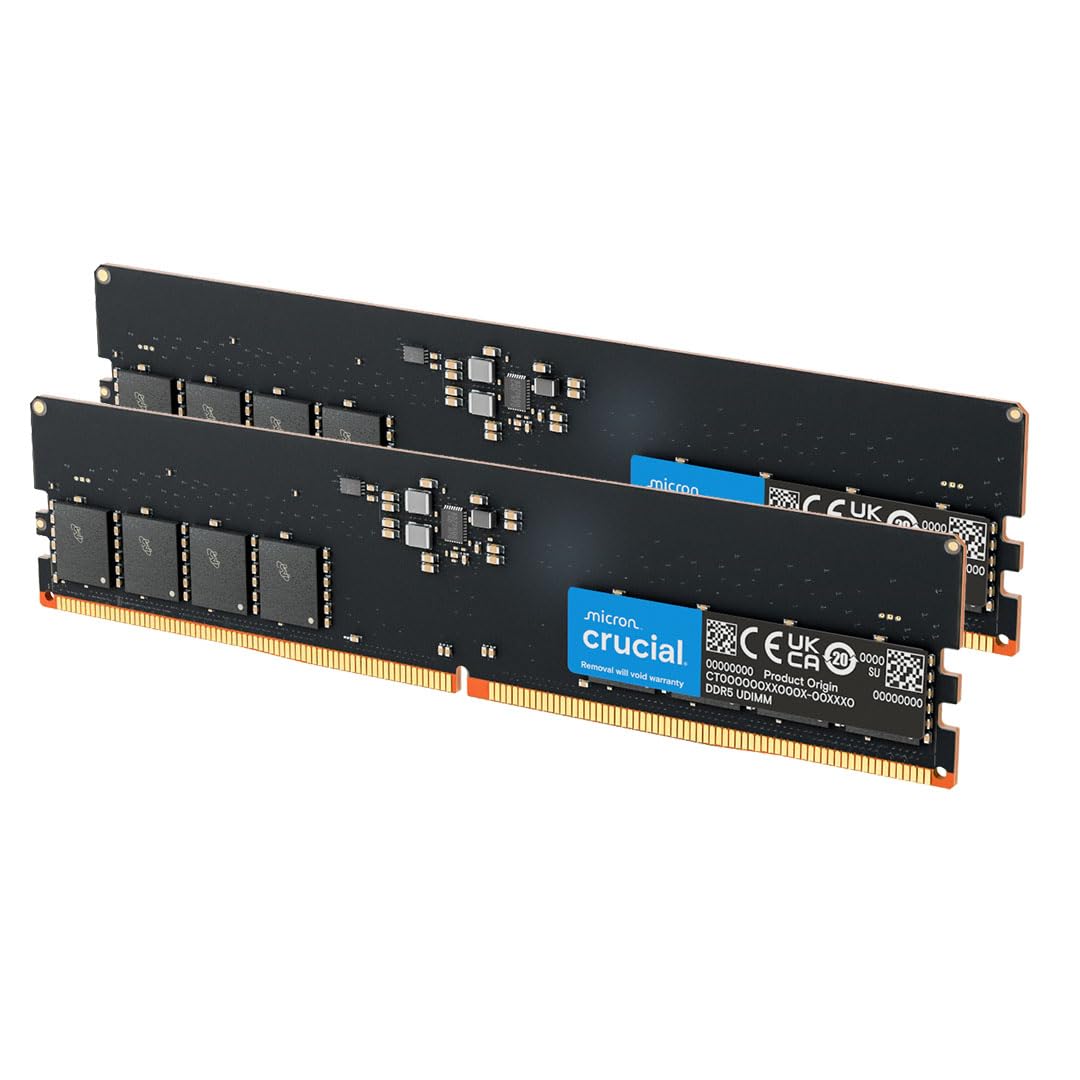
Crucial’s 32GB DDR5 kit operates at 5600MT/s with CL46 timings, which places it at the slowest end of the DDR5 spectrum among these picks. It is best suited for upgrading pre-built systems or office PCs where maximum gaming frame rates are not the primary concern, but where the bandwidth improvement over DDR4 is still valuable.
Built on Micron dies with a 1.1V operating voltage, this kit runs cool and stable right out of the box without needing XMP or EXPO enabled to reach its rated speed. Users upgrading Dell XPS or similar pre-built machines report perfect compatibility with factory BIOS settings.
The loose CL46 timing and 5600MT/s cap limit its gaming performance — in CPU-bound titles, the difference versus a 6000 CL30 kit can be significant. For a dedicated gaming rig, the extra investment in a faster kit pays off in smoother frame delivery.
Why it’s great
- Runs at full rated speed without enabling XMP/EXPO
- Low 1.1V voltage keeps thermals minimal
- Excellent compatibility with pre-built and office systems
Good to know
- 5600 MT/s CL46 is the slowest speed and highest latency in this guide
- Micron dies offer limited overclocking headroom
FAQ
Is 6000MHz CL30 the best DDR5 spec for gaming?
How do I enable XMP or EXPO on my DDR5 kit?
Does DDR5 RAM speed affect FPS in games?
Can I mix two different kits of DDR5 RAM for more capacity?
What does on-die ECC mean for gaming memory?
Final Thoughts: The Verdict
For most users, the best ddr5 ram for gaming winner is the Lexar ARES Gen2 RGB 32GB 6400MHz CL30 because it combines SK Hynix A-die quality, tight CL30 timings, and dual-platform XMP/EXPO support in a well-cooled package. If you need 64GB of capacity without sacrificing latency, grab the KLEVV CRAS V RGB 6400MHz CL32. And for a budget-conscious AM5 build that just works out of the box, nothing beats the G.SKILL Trident Z5 Neo RGB 6000MHz CL36.

Mo Maruf
I created WellFizz to bridge the gap between vague wellness advice and actionable solutions. My mission is simple: to decode the research and give you practical tools you can actually use.
Beyond the data, I am a passionate traveler. I believe that stepping away from the screen to explore new environments is essential for mental clarity and physical vitality.