Our readers keep the lights on and my smoothie glass nicely filled. As an Amazon Associate, I earn from qualifying purchases.
Nothing kills a hard-fought firefight in-game like a sudden frame-time hitch. You feel it as a micro-stutter, a half-second freeze, and it often traces back to memory that can’t feed the CPU data fast enough. Picking the right frequency and latency for your build is one of the cheapest ways to tighten those response times and push average FPS higher without touching your CPU cooler or GPU clock.
I’m Mohammad Maruf — the founder and writer behind WellFizz. I’ve spent hundreds of hours combing through silicon binning reports, motherboard Qualified Vendor Lists (QVLs), and user overclocking logs to separate actual performance gains from marketing claims in the DDR4 gaming market.
Whether you are building a fresh budget rig or maxing out an older Z490 platform, finding the undisputed best ddr4 ram for gaming requires balancing frequency, latency, and capacity against platform-specific sweet spots like Ryzen’s Infinity Fabric clock.
How To Choose The Best DDR4 RAM For Gaming
DDR4 is a mature standard, so raw compatibility is less of a worry than it was in 2017. The variables that actually shift gaming performance are frequency (measured in Mega transfers per second or MT/s), CAS latency (CL), and capacity. Match these to your CPU’s “sweet spot” — usually 3600 MT/s on Ryzen 5000 and 3200 MT/s on older Intel platforms — and you will extract the most FPS per dollar without instability.
Frequency vs. Latency: Which Matters More?
In highly CPU-bound games like Valorant, Counter-Strike 2, and Rainbow Six Siege, lower CAS latency at a given frequency reduces memory access time more than raw bandwidth. A 3600MT/s CL16 kit often beats a 3600MT/s CL22 kit by 3-5% in 1% low frame rates. For GPU-bound AAA titles, the difference is minimal, and capacity becomes the bottleneck first. Unless you are chasing every tenth of a millisecond, prioritize a moderate frequency with tight timings over the fastest rated speed.
Dual-Channel vs. Single-Stick
A single 16GB stick runs in single-channel mode, cutting memory bandwidth in half compared to a 2x8GB kit. In gaming, this can cost 10-20% of your FPS depending on the title. Always buy a matched dual-channel kit. The motherboard’s memory controller handles two sticks as one wider pipeline, which is exactly what game engines expect. Filling only two of four slots also leaves room for a future 32GB upgrade without replacing the whole kit.
Quick Comparison
On smaller screens, swipe sideways to see the full table.
| Model | Category | Best For | Key Spec | Amazon |
|---|---|---|---|---|
| G.SKILL Trident Z RGB 16GB | Premium RGB | Showcase builds wanting bling and tight 3600MT/s | 3600 MT/s CL18-22-22-42 | Amazon |
| CORSAIR Vengeance LPX 32GB | Premium Low-Profile | High-capacity builds with massive air coolers | 3200 MT/s CL16-20-20-38 | Amazon |
| KLEVV Bolt X 16GB | Mid-Range | Ryzen 5000 builds needing low-profile 3600MT/s | 3600 MT/s CL18 | Amazon |
| Patriot Viper Elite II 16GB | Mid-Range | Budget overclockers wanting 3600MT/s at CL20 | 3600 MT/s CL20 | Amazon |
| TEAMGROUP T-Force Vulcan Z 16GB | Value | Reliable daily driver with no frills and great price | 3200 MT/s CL16 | Amazon |
| Timetec Pinnacle Konduit 16GB | Value | White-themed builds on a tight budget | 3200 MT/s CL16-18-18-38 | Amazon |
| GIGASTONE Game PRO 32GB | High-Capacity | Streamers needing 32GB at 3200 MT/s | 3200 MT/s CL16-18-18-40 | Amazon |
In‑Depth Reviews
1. G.SKILL Trident Z RGB 16GB
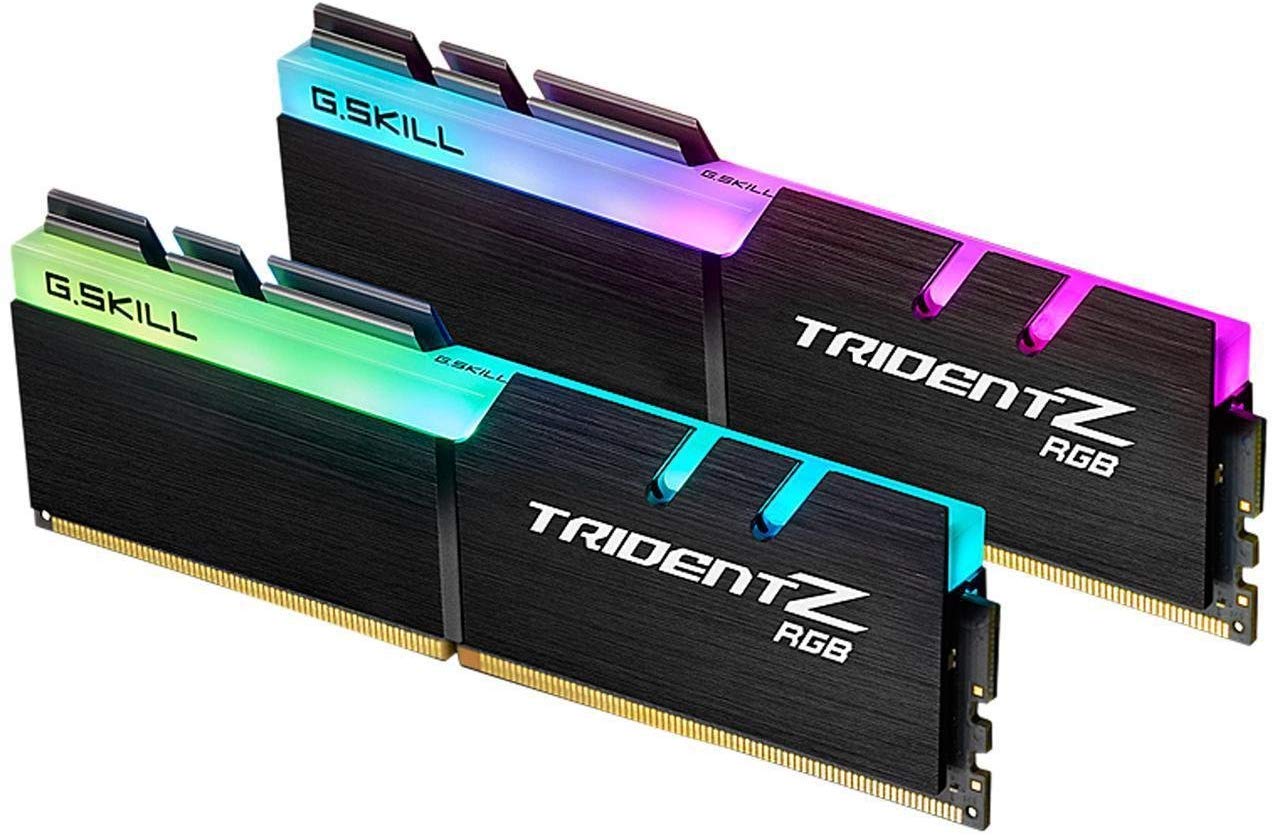
The Trident Z RGB remains a default recommendation for good reason: G.SKILL bins its ICs tightly, and this kit reliably hits its XMP-rated 3600 MT/s on both Intel and AMD platforms. The 18-22-22-42 timing profile is standard for 3600 MT/s RGB kits, but what sets this apart is the build quality of the aluminum heat spreader and the vibrant customizable RGB lighting that syncs with most motherboard ecosystems.
At 16GB (2x8GB), this kit hits the ideal sweet spot for pure gaming where 32GB rarely improves frame rates. The taller heat spreader adds about 44mm of height, so check your CPU cooler clearance — large twin-tower air coolers may overhang the first slot. Users on X570 and B550 boards with Ryzen 5000 series report stable one-click operation with DOCP enabled.
After two years of daily use in multiple builds, the LEDs remain consistent without dead zones, and the memory controller on modern CPUs treats 3600 MT/s as a gentle overclock rather than a stretch. For a gamer who wants both aesthetic appeal and proven performance without manual tuning, this is the complete package.
Why it’s great
- Reliable XMP 2.0 profile at 3600 MT/s
- Excellent RGB diffusion and motherboard sync
- Strong heat dissipation for daily driver use
Good to know
- Tall heat spreader interferes with some large air coolers
- CL18 timings are not the tightest available at this speed
2. CORSAIR Vengeance LPX 32GB

The Vengeance LPX is the go-to for builders who need 32GB of reliable DDR4 without any lighting or oversized heat sinks. At only 34mm tall, it fits under virtually any CPU cooler on the market, including the massive Noctua NH-D15 and be quiet! Dark Rock Pro. Corsair hand-sorts the memory ICs, which gives this kit a reputation for stable overclocking headroom beyond the rated 3200 MT/s.
In gaming, 32GB delivers no FPS advantage over 16GB in most current titles, but it eliminates page-file usage in heavily modded games like Cities: Skylines or when running a game alongside Discord and a browser with dozens of tabs. The XMP 2.0 profile dials in 3200 MT/s at CL16-20-20-38 at 1.35V, and most user reports confirm it boots first try on both Intel 12th-gen and AMD AM4 boards.
Long-term owners praise the aluminum heat spreader for staying cool to the touch even under extended gaming sessions. If your priority is maximum capacity with zero clearance issues and a proven track record of customer support when sticks fail, this kit is difficult to beat.
Why it’s great
- Ultra-low 34mm profile fits any air cooler
- Hand-sorted ICs offer solid overclocking margin
- Reliable XMP on Intel and AMD platforms
Good to know
- No RGB or aesthetic lighting
- 3200 MT/s is below the ideal 3600 MT/s sweet spot for Ryzen
3. KLEVV Bolt X 16GB

KLEVV, backed by Essencore and sourcing ICs directly from SK Hynix, punches above its price tier with the Bolt X. This kit runs at 3600 MT/s at CL18 with a 1.35V XMP profile, placing it in the same frequency league as kits costing significantly more. The low-profile black aluminum heat spreader stays under 32mm, making it one of the few 3600 MT/s kits that fits under the Noctua NH-D15 without moving the front fan upward.
Ryzen owners on B550 and X570 boards particularly benefit, as 3600 MT/s matches the Infinity Fabric clock 1:1, minimizing latency. Users report stable operation at rated speed on Gigabyte B550M and ASUS ROG Strix boards with Ryzen 5 3600 and Ryzen 7 5700X3D processors. The kit also overclocks surprisingly well — many owners push to 3733 MT/s or tighten subtimings to CL16 with extra voltage.
At 16GB, this is a pure gaming kit where capacity is sufficient for all but the most memory-intensive workloads. The minimalist aesthetic and excellent thermal performance make it an easy recommendation for builders who value substance over flash.
Why it’s great
- 3600 MT/s at a value-tier price point
- Low-profile design fits massive air coolers
- SK Hynix ICs offer good overclocking headroom
Good to know
- Limited availability outside online retailers
- No RGB for showcase builds
4. Patriot Viper Elite II 16GB

The Viper Elite II offers an entry point into 3600 MT/s gaming memory with a relaxed CL20 timing that keeps voltage at a safe 1.35V. Patriot tests these across latest Intel and AMD platforms for basic compatibility, and the black PCB with a subtle red accent stripe fits cleanly in neutral-themed builds.
Where this kit shines is for beginners who want to learn manual overclocking without risking expensive hardware. The loose stock timings leave room to tighten subtimings or push frequency higher. Several users have successfully run this kit at 3733 MT/s CL18 with slight voltage bumps. The aluminum heat spreader is adhesive-attached and may detach during handling — a known quirk reported by a few buyers.
For a gamer on a strict budget who wants the 3600 MT/s frequency for Ryzen without paying the premium for low-latency bins, this is a functional choice. The performance gap between CL20 and CL16 at the same frequency is measurable but small in real-world gaming scenarios.
Why it’s great
- Affordable 3600 MT/s kit for Ryzen builds
- Loose timings create manual overclocking headroom
- Tested across latest Intel and AMD platforms
Good to know
- CL20 timings are looser than competing kits at this speed
- Heat spreader adhesive may fail during shipping
5. TEAMGROUP T-Force Vulcan Z 16GB

The T-Force Vulcan Z has become a staple in budget-conscious gaming builds because it simply works. Rated at 3200 MT/s with CL16-18-18-38 timings, it hits the JEDEC and XMP 2.0 profiles reliably across Intel B660, Z690, and AMD B450, B550 motherboards without needing voltage tweaks. The gray aluminum heat spreader is low-profile and lightweight at just 0.21 pounds, making it easy to handle during installation.
User feedback over years of use shows near-zero DOA rates and consistent XMP boot. The lifetime warranty from TEAMGROUP provides peace of mind that budget kits from lesser-known brands cannot match. While 3200 MT/s is below the 3600 MT/s sweet spot for modern Ryzen, the tight CL16 timings keep effective latency competitive. For Intel 12th-gen and older builds, 3200 MT/s is the maximum official supported speed, making this kit an ideal match.
If you need a no-frills kit that will outlast your motherboard upgrade cycle, the Vulcan Z delivers exactly what it promises. It lacks RGB, it lacks a premium heat spreader design, but it refuses to cause the random crashes that plague poorly binned memory.
Why it’s great
- Excellent compatibility with Intel and AMD boards
- Lifetime warranty for long-term peace of mind
- Tight CL16 timings at 3200 MT/s
Good to know
- 3200 MT/s is below the Ryzen golden frequency
- No RGB or distinctive aesthetic
6. GIGASTONE Game PRO 32GB

The Game PRO from GIGASTONE targets a specific niche: builders who want 32GB of DDR4 in a white color scheme without paying a premium. Running at 3200 MT/s with CL16-18-18-40 timings, this kit offers the same raw specs as the Corsair Vengeance LPX but in a white anodized aluminum heat spreader that blends seamlessly into all-white builds. The XMP 2.0 and AMD Ryzen compatibility means it works on both camps out of the box.
Users upgrading from 16GB to 32GB report noticeable improvements in multitasking scenarios and games that consume more than 12GB of RAM. The kit requires enabling XMP in BIOS to reach its full 3200 MT/s speed — default JEDEC runs at 2400 MT/s. Some buyers were initially skeptical of the brand, but real-world use shows stable performance at rated speed with no crashes during extended gaming sessions.
The heat spreader design is clean and minimalist, lacking the aggressive fins of gaming-focused kits. For a streamer or content creator who plays games while running encoding software in the background, the extra 16GB of capacity at a competitive price makes this a smart choice.
Why it’s great
- White heat spreader matches all-white builds
- 32GB capacity for multitasking and streaming
- Reliable XMP 2.0 performance at 3200 MT/s
Good to know
- Brand recognition is lower than major competitors
- Requires manual XMP enabling in BIOS for rated speed
7. Timetec Pinnacle Konduit 16GB

The Pinnacle Konduit from Timetec is one of the few budget-tier kits that offers a white aluminum heat spreader at no extra cost. Rated at 3200 MT/s with CL16-18-18-38 timings and 1.35V operation, it matches the spec sheet of far more expensive kits. The XMP 2.0 one-click overclocking works reliably on both Intel and AMD DDR4 motherboards, and the single-rank 1Rx8 configuration keeps compatibility high across different board topologies.
Real-world gaming performance is indistinguishable from name-brand 3200 MT/s CL16 kits in blind testing. Users report successful builds for children’s gaming PCs and secondary rigs where budget is the primary concern. The only caveat is the seating mechanism — the card edge connector can feel partially engaged when it is not fully seated, so double-check the latch clicks on both sides before powering on.
At this price point, the Timetec avoids the cheap PCB and loose timings that plague bottom-tier DDR4. It is a competent kit for a Core i5 or Ryzen 5 build that does not need 3600 MT/s speeds. The white heat spreader is a bonus for themed systems on a shoestring budget.
Why it’s great
- White heat spreader at a budget price point
- CL16 timings at 3200 MT/s are competitive
- XMP 2.0 works reliably on Intel and AMD
Good to know
- Requires careful seating to ensure full insertion
- Not ideal for high-frequency overclocking beyond 3200 MT/s
FAQ
Can I mix two different 16GB DDR4 kits for a total of 32GB?
Does 3600 MT/s RAM actually improve FPS over 3200 MT/s on Ryzen?
Why does my RAM show 2133 MT/s in BIOS when I bought a 3200 MT/s kit?
Final Thoughts: The Verdict
For most users, the best ddr4 ram for gaming winner is the G.SKILL Trident Z RGB because it delivers 3600 MT/s performance with excellent build quality and vibrant RGB for a reasonable premium. If you want maximum capacity for streaming without cooler clearance worries, grab the CORSAIR Vengeance LPX 32GB. And for the best bang-for-your-buck on a Ryzen build, nothing beats the KLEVV Bolt X 16GB.

Mo Maruf
I created WellFizz to bridge the gap between vague wellness advice and actionable solutions. My mission is simple: to decode the research and give you practical tools you can actually use.
Beyond the data, I am a passionate traveler. I believe that stepping away from the screen to explore new environments is essential for mental clarity and physical vitality.