Our readers keep the lights on and my smoothie glass nicely filled. As an Amazon Associate, I earn from qualifying purchases.
A standard console controller’s analog thumbstick is a liability in the ring. The slightest off-angle input can turn a perfectly timed Super Art into a whiffed jab or a slow poke. For serious players of Street Fighter, Tekken, or Guilty Gear, the directional pad is the primary tool for combos, movement, and special move execution—and a mushy or imprecise D-pad is the fastest way to lose a round.
I’m Mohammad Maruf — the founder and writer behind WellFizz. My research for this guide involved cross-referencing hundreds of verified customer reports and technical spec sheets to isolate the controllers that deliver consistent directional inputs for fighting games, not just general-purpose gaming.
To cut through the noise, I evaluated each model on D-pad geometry, button responsiveness, platform compatibility, and build quality. The result is this curated list of the best d-pad controller for fighting games, built for players who demand reliable quarter-circles, clean 360 motions, and zero dropped inputs.
How To Choose The Best D-Pad Controller For Fighting Games
Not every D-pad is built for the precise, rapid inputs that fighting games demand. A standard controller’s D-pad might be fine for menu navigation or platformers, but when you need to execute a perfect 360-degree motion for a Zangief SPD or a clean half-circle for a Raging Demon, D-pad geometry and responsiveness become critical. Here are the factors that separate a competitive tool from a casual pad.
D-Pad Design and Motion Fidelity
The most important spec is how the D-pad registers diagonal inputs. An 8-way floating D-pad, like the one found on the classic Mad Catz FightPad, uses a circular disc that rotates on a central pivot, giving each of the eight directions a distinct tactile gate. This prevents accidental diagonals or missed quarter-circle inputs. Cheaper membrane-style pads often have a mushy center pivot that fails to distinguish between down-forward and pure forward, leading to dropped combos.
Button Layout and Size
Fighting games rely on six primary attack buttons (light, medium, heavy punch and kick). A dedicated six-button layout, separated from the shoulder buttons, lets you rest your fingers on all six attacks simultaneously. Controllers with only four face buttons force you to use triggers for heavy punches or kicks, which slows reaction time. Look for large, clicky microswitch buttons that provide tactile feedback—mushy rubber dome buttons will cause missed inputs during fast exchanges.
Platform Compatibility and Connection Type
Modern fighting game players often cross-platform train on PC, PS5, or Switch. A wired USB connection offers the lowest latency and is tournament-safe, as wireless interference or battery dropouts can disqualify you mid-match. Some older fight pads, like those for the Xbox 360, require a USB adapter for modern consoles, which can introduce input lag. For competitive play, choose a controller natively supported by your main platform.
Quick Comparison
On smaller screens, swipe sideways to see the full table.
| Model | Category | Best For | Key Spec | Amazon |
|---|---|---|---|---|
| 8Bitdo Retro Arcade Fight Stick | Arcade Stick | Customizable wireless play | Sanwa JLF-compatible mounting plate | Amazon |
| Street Fighter FightPad – Ryu | Fight Pad | Classic 6-button layout | 8-way floating D-pad | Amazon |
| Xbox 360 WWE All Stars Brawl Pad | Fight Pad | Budget-friendly 6-button pad | Enlarged circular 8-way D-pad | Amazon |
| HORI Fighting Stick Mini | Arcade Stick | Portable PS5/PS4 use | Compact 8-button layout | Amazon |
| PXN 0082 Arcade Stick | Arcade Stick | Entry-level multi-platform stick | Turbo and Macro functions | Amazon |
In‑Depth Reviews
1. 8Bitdo Retro Arcade Fight Stick
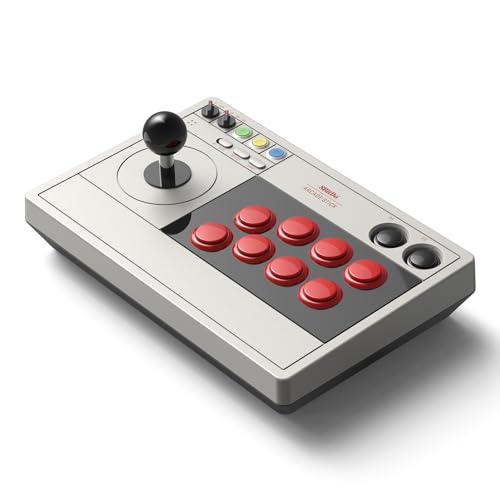
The 8Bitdo Retro Arcade Fight Stick is a standout for players who want arcade-precision without being tethered to a desk. Its universal joystick mounting plate supports virtually every aftermarket stick, including the Sanwa JLF, meaning you can upgrade to pro-level parts over time. The 8-way joystick delivers clean tactical clicks at each direction gate, which helps you feel exactly when you hit a diagonal—critical for consistent quarter-circle and half-circle motions in Street Fighter 6 or Guilty Gear Strive.
Wireless versatility is another strong point: Bluetooth, 2.4G, and wired USB-C options mean you can use it on Switch or PC with zero compromise in latency when playing wired. The two dedicated macro buttons (P1/P2) are programmable via the 8BitDo Ultimate Software, letting you assign complex button sequences to a single press. The 40-hour battery life on 2.4G mode is generous enough for tournament weekends without constant charging.
Some users note that the stock buttons feel slightly less crisp than premium Sanwa buttons, but because the mounting plate accepts 30mm and 24mm arcade buttons, upgrades are straightforward. The frame is also noticeably lighter than high-end aluminum sticks, so it may slide on a glossy desk surface during intense play. A non-slip mat or slightly heavier internal weight would solve this, but for the price, the 8Bitdo delivers remarkable value and upgradeability.
Why it’s great
- Universal joystick plate accepts Sanwa JLF and other pro sticks
- Three connection modes (Bluetooth, 2.4G, wired USB-C) with long battery life
- Two dedicated macro buttons for custom combo assignments
Good to know
- Stock buttons may feel less responsive than high-end replacements
- Lightweight frame can slide on smooth surfaces during heavy inputs
2. Street Fighter FightPad – Ryu (Mad Catz)

The Mad Catz Street Fighter FightPad is the pad that defined competitive D-pad play for a generation of fighting game enthusiasts. Its enlarged circular 8-way floating D-pad sits on a central pivot, giving each direction a distinct tactile gate that prevents accidental diagonals. This design allows for clean quarter-circle forward motions and reliable 360-degree spins—essential for grapplers like Zangief or Hakan. The large, clicky arcade-style buttons are spaced perfectly for resting your thumb on light, medium, and heavy punches while your index finger handles the corresponding kicks.
A 3-way switch lets the D-pad function as a left or right analog stick, which is useful for games that require analog movement, but the real value here is the D-pad mode. The integrated headset port and 9.8-foot cable make it tournament-ready for Xbox 360 and PC use. Many players report that the FightPad improves their execution by a noticeable margin compared to a standard Xbox 360 controller, especially for EX moves and Focus Attack Dashes (FADCs) in Street Fighter IV.
Build quality is mixed: some units develop stiff shoulder buttons over time, and the D-pad’s diagonal precision can degrade after extended use. The pad is also lightweight, which some players prefer and others find too insubstantial. For players who want a dedicated six-button pad with a proven D-pad design and are comfortable on Xbox 360 or PC (via USB adapter), this remains a classic, effective choice.
Why it’s great
- Enlarged 8-way floating D-pad provides reliable diagonal registration
- Dedicated six-button layout with clicky arcade-style buttons
- 3-way switch adds analog stick functionality for non-fighting games
Good to know
- D-pad diagonal precision can degrade with heavy long-term use
- Lightweight build may feel insubstantial for some players
3. Xbox 360 WWE All Stars Brawl Pad (Mad Catz)

This Mad Catz Brawl Pad shares the same underlying hardware as the Street Fighter FightPad but at a lower entry point, making it a solid budget-friendly option for fighting game players. The enlarged circular 8-way floating D-pad is identical in design to the Ryu pad, offering the same tactile gate feel for clean diagonal inputs. The six-button layout includes additional multi-speed Turbo functionality, which can be useful for players who want to spam rapid-fire normals or set up auto-fire for charge moves.
The rubberized grips on the handles provide extra stability during long sessions, and the 9.8-foot cable gives you plenty of reach. A 3-way switch lets the D-pad function as a left or right analog stick, which is handy for navigating menus or playing other genres. Many users report that this pad works well with a Wingman converter for modern consoles, allowing you to use a proven 360-era fight pad on PS4, PS5, or PC without significant added latency.
The rubber coating on the back is known to flake off over time, which can be annoying and leave residue on your hands. Some users also report inconsistent diagonal registration, particularly when trying to execute uppercut motions repeatedly. The pad is also very lightweight, which may not suit everyone. For players on a strict budget who already own a 360 or are willing to use a converter, this is a functional, no-frills fight pad.
Why it’s great
- Identical 8-way floating D-pad hardware as the premium Street Fighter FightPad
- Rubberized grips for improved handling during long sessions
- Turbo function adds rapid-fire capability for charge characters
Good to know
- Rubber coating on the back can flake off over time
- Diagonal registration can be inconsistent for repetitive special moves
4. HORI Fighting Stick Mini for PS5, PS4, and PC

The HORI Fighting Stick Mini is a compact arcade stick designed for players who need a portable solution for PS5, PS4, and PC. Its small form factor—just under 6 inches wide—makes it easy to throw in a backpack for local tournaments or travel. The 8-button layout includes six face buttons and two auxiliary buttons, giving you enough real estate for most fighting games. The joystick uses HORI’s original V-cut housing, which provides a square gate feel that helps with clean diagonal inputs.
Build quality is respectable for its size: the buttons and joystick are responsive and plug-and-play on PS5 without any driver setup. The 8-foot cable offers sufficient reach for most setups. This stick is particularly well-suited for players with smaller hands or for children, as the compact layout prevents hand strain. Many users report that it works well for indie games, shoot-em-ups, and platformers alongside its fighting game duties.
The mini size is a double-edged sword. The lightweight frame lacks a wrist rest and tends to slide on a lap, making it difficult to use without a desk or table. For 2D fighters, the stick can tip over during aggressive inputs, which is frustrating. It also lacks a touchpad button, forcing you to keep a standard controller nearby for PS5 menu navigation. If you primarily play on a desk and need a portable stick for modern consoles, this is a capable choice, but competitive players will want a heavier, larger option.
Why it’s great
- Highly portable, easy to carry for travel or local events
- Responsive square-gate joystick with clean diagonal registration
- Officially licensed by Sony, plug-and-play on PS5/PS4/PC
Good to know
- Lightweight frame slides on lap and can tip during intense inputs
- No touchpad button—requires standard controller for PS5 menus
5. PXN 0082 Arcade Stick with Turbo & Macro
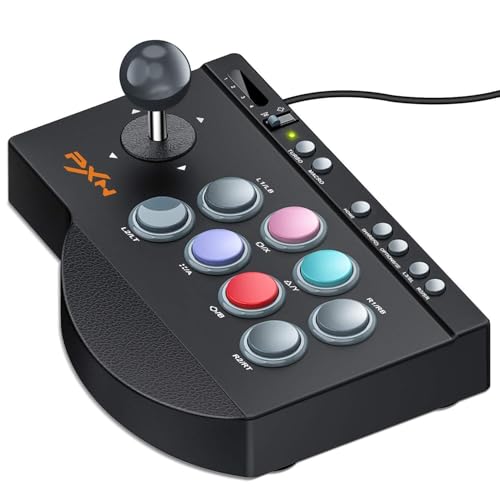
The PXN 0082 is an entry-level arcade stick that covers all the basics for players new to fighting games. It supports PC (Windows 7-11), Xbox One, Xbox Series X|S, PS4, PS3, and Switch, making it one of the most platform-agnostic options in this list. The 8-way joystick has a joystick/D-pad mode switch, letting you toggle between control schemes to match game requirements. The 16 mechanical action buttons include large arcade-style buttons that are clicky and responsive for basic combos and special moves.
Built-in Turbo and Macro functions are designed to help beginners execute repeated inputs and basic combo recordings. The Macro feature records button sequences but not joystick movement, which limits its usefulness for complex combos that require directional inputs. The four non-slip suction cups keep the stick stable on a desk during play, and the heavy base provides decent resistance against sliding.
Input lag and dropped joystick inputs are the primary concerns. Multiple users report that the joystick fails to register diagonal directions consistently, leading to missed quarter-circle and DP motions—critical failures for fighting games. The Macro feature documentation is poor, leaving many users unable to program it effectively. This stick is best suited for casual arcade games, retro collections, or as a project shell for modding, rather than competitive fighting game play.
Why it’s great
- Broad platform support: PC, Xbox One/Series X|S, PS4/PS3, Switch
- Suction cups and heavy base provide stable desk placement
- Turbo and Macro functions help beginners learn basic inputs
Good to know
- Joystick may fail to register diagonal inputs reliably
- Macro function records only buttons, not joystick movements
FAQ
Can I use an Xbox 360 fight pad on a modern PS5 or Xbox Series X?
What is the difference between a fight pad and an arcade stick for fighting games?
Does a wireless fight pad add noticeable input lag for fighting games?
Final Thoughts: The Verdict
For most users, the d-pad controller for fighting games winner is the 8Bitdo Retro Arcade Fight Stick because it combines a Sanwa-compatible mounting plate, versatile wireless options, and macro customization at a mid-range price point. If you want a classic six-button fight pad with a proven 8-way floating D-pad, grab the Street Fighter FightPad – Ryu. And for players who need a portable arcade stick for PS5 gaming on the go, nothing beats the compact HORI Fighting Stick Mini.

Mo Maruf
I created WellFizz to bridge the gap between vague wellness advice and actionable solutions. My mission is simple: to decode the research and give you practical tools you can actually use.
Beyond the data, I am a passionate traveler. I believe that stepping away from the screen to explore new environments is essential for mental clarity and physical vitality.