Our readers keep the lights on and my smoothie glass nicely filled. As an Amazon Associate, I earn from qualifying purchases.
A Cyber Monday gaming PC purchase is a high-stakes bet on component quality, cooling adequacy, and long-term reliability, not just a discount. The real challenge is separating the genuine performance upgrades from the dressed-up surplus inventory that floods the market during the shopping window. You need a machine that delivers consistent frame rates at your target resolution without thermal throttling after sixty minutes of play.
I’m Mohammad Maruf — the founder and writer behind WellFizz. I’ve spent hundreds of hours dissecting prebuilt specifications, benchmarking GPU-CPU pairings, and analyzing buyer feedback to identify which configurations actually hold up under sustained gaming loads.
This guide breaks down thirteen distinct gaming desktops across mid-range and premium tiers, comparing GPU architecture, RAM speeds, storage configurations, and cooling solutions to help you find the right cyber monday gaming pc for your specific performance targets and budget.
How To Choose The Best Cyber Monday Gaming PC
The most common mistake is chasing a single high-profile component—like an i9 CPU—while ignoring the RAM speed, PSU wattage, and motherboard chipset that determine whether that chip can actually stretch its legs. A balanced build with a mid-tier CPU and a strong GPU will outgame a lopsided rig every time. Focus on the GPU tier first, because it dictates your resolution ceiling, then verify that the rest of the system can feed it without bottlenecks.
GPU Generation and VRAM Capacity
The RTX 50-series cards (5060 through 5080) represent a meaningful generational leap in ray tracing efficiency and DLSS support compared to the 40-series. For 1080p high-refresh gaming, an RTX 5060 or 5060 Ti with 8GB GDDR7 is sufficient. For 1440p Ultra or 4K, step up to a 5070 (12GB) or 5070 Ti (16GB). The VRAM buffer is non-negotiable for texture-heavy titles—8GB is the floor, 12GB is the comfort zone, and 16GB is future-proofing.
CPU Platform and Upgrade Path
AMD’s AM5 socket supports Ryzen 7000, 8000, and 9000 series processors on the same motherboard, which means you can swap in a faster CPU years later without replacing the board. Intel’s current LGA1700 and LGA1851 sockets offer a more limited upgrade path for the Core Ultra series. For pure gaming throughput, the Ryzen 7 7800X3D and 9700X often edge out comparable Intel chips due to the 3D V-Cache advantage in simulation and strategy games.
Cooling Solution and Noise Profile
High-end CPUs like the i9-14900KF or Ryzen 9 7900X generate significant heat that a stock air cooler cannot handle under sustained load. Look for 240mm or 360mm liquid cooling (AIO) on these chips. For mid-range builds like the Ryzen 7 8700F or i5-13400F, a quality air cooler with a large heatsink is adequate and quieter at idle. Check customer reviews specifically for noise complaints—some prebuilt cases lack acoustic dampening and produce a noticeable fan whine under load.
PSU Quality and Headroom
A 650-watt PSU is the baseline for systems with an RTX 5060 or 5060 Ti. RTX 5070 builds need 750 watts minimum, and RTX 5080 configurations require an 850-watt unit with 80 PLUS Gold certification or higher. Bronze-rated PSUs can work, but Gold and Platinum units deliver cleaner power and better efficiency over years of use. Avoid prebuilts that list a generic “600W” PSU without a brand or certification—those are the first components to fail under peak load.
Memory Configuration and Speed
DDR5 is now the standard at this price tier, and 32GB is the sweet spot for modern AAA gaming. Avoid builds with a single stick of RAM (single-channel kills gaming performance)—look for dual-channel configurations like 2x16GB. RAM speed matters: 6000MHz CL30 is the ideal sweet spot for AMD Ryzen 7000/9000 processors, while Intel chips benefit from higher frequency kits up to 6400MHz. A system with 16GB DDR4 may still handle today’s games but will feel constrained within two years.
Quick Comparison
On smaller screens, swipe sideways to see the full table.
| Model | Category | Best For | Key Spec | Amazon |
|---|---|---|---|---|
| KOTIN G60B | Premium | 1440p/4K with smart display | RTX 5070 + 360mm AIO | Amazon |
| Lenovo Legion Tower 5i | Premium | Reliable 1440p Ultra gaming | RTX 5070 Ti + Core Ultra 7 | Amazon |
| Alienware Aurora ACT1250 | Enthusiast | 4K max settings with RTX 5080 | RTX 5080 + 1000W Platinum PSU | Amazon |
| Panorama Empowered PC | Enthusiast | Content creation + 4K gaming | RTX 5080 + i9-14900KF | Amazon |
| Horizon Autherium Dragon | Mid-Range | VR and AI workloads | 64GB RAM + 10TB total storage | Amazon |
| iBUYPOWER Element | Premium | Streaming + AAA gaming | Ryzen 9 7900X + RTX 5070 | Amazon |
| Thermaltake LCGS View i570 | Premium | High-FPS 1440p gaming | i9-14900KF + 240mm AIO | Amazon |
| MSI Codex Z2 | Mid-Range | Balanced AAA + streaming | RTX 5070 + AMD R7-8700F | Amazon |
| Suevery i9 14900HX | Mid-Range | CPU-heavy productivity + gaming | i9-14900HX + RTX 5060 Ti | Amazon |
| Skytech Archangel 5 | Mid-Range | 1080p Ultra + streaming | Ryzen 7 7700 + RTX 5060 | Amazon |
| CyberPowerPC Gamer Master | Mid-Range | AM5 future-proofing | RTX 5060 Ti + 16GB DDR5 | Amazon |
| YAWYORE R7 5700X | Budget-Friendly | 1080p competitive gaming | RTX 5060 + 32GB DDR4 | Amazon |
| GEEKOM A8 MAX | Compact | Small footprint + light gaming | Ryzen 9 8945HS + 32GB DDR5 | Amazon |
In‑Depth Reviews
1. KOTIN G60B

The KOTIN G60B delivers the most complete package in this lineup by pairing a Ryzen 7 9700X with an RTX 5070 12GB and 32GB of DDR5 6000MHz RAM. The 360mm liquid cooling system with a digital temperature display keeps the CPU well within safe thermal limits during extended sessions, and the 850W Gold PSU provides ample headroom for future upgrades. The integrated 11.3-inch smart display shows real-time system telemetry—a genuinely useful feature for monitoring temps without overlays.
Gaming benchmarks indicate this configuration handles 1440p Ultra at 90-120 FPS in demanding titles like Cyberpunk 2077 with DLSS 4 enabled, and it can push 4K at playable frame rates with some settings adjustments. The ARGB fans sync with the motherboard, and the case layout allows easy access to M.2 slots and RAM slots for future expansion. Build quality is solid, with tempered glass panels and a clean cable management layout inside.
Some units have arrived with a finicky side display that may require firmware updates, and a few buyers reported boot loop issues that were resolved after BIOS updates. The warranty covers one year on parts and labor with lifetime technical support, but customer service response times have been inconsistent based on user feedback. Overall, this is the strongest value for a 1440p-centric build with premium cooling.
Why it’s great
- 360mm AIO cooler handles 9700X heat output effortlessly
- Smart display provides at-a-glance hardware monitoring
- 850W Gold PSU leaves room for GPU upgrades
Good to know
- Side display may have early software quirks
- Customer support responsiveness varies
- Some units required BIOS update out of box
2. Lenovo Legion Tower 5i

The Legion Tower 5i is engineered for long-term reliability, combining an Intel Core Ultra 7 265F with the RTX 5070 Ti 16GB—the most capable GPU in this list for 1440p Ultra and entry-level 4K. The 32GB of DDR5 5600MHz RAM runs in dual-channel, and the vapor-chamber cooling solution keeps GPU temps in the mid-60s Celsius under load. The tool-less transparent side panel makes upgrading storage or RAM a five-minute job.
Performance numbers are impressive: Forza Horizon 5 hits approximately 180 FPS at 1440p maxed out without DLSS, and Monster Hunter Wilds stays around 97 FPS at the same settings. The 2.5G Ethernet port and Wi-Fi 6E provide rock-solid connectivity for online play and streaming. The system includes three months of PC Game Pass, which adds immediate value for new buyers who want to test their rig right away.
The single point of friction is that the GPU logo lighting lacks RGB synchronization with the rest of the chassis, which may bother aesthetic purists. The PSU is 850W Gold-rated, leaving minimal headroom for a future CPU upgrade but sufficient for the current configuration. Lenovo’s standard warranty is one year, but the build quality and thermal design suggest this machine will outlast that period without issues based on user reports.
Why it’s great
- RTX 5070 Ti 16GB dominates 1440p and handles 4K
- Tool-less panel and clear cable routing simplify upgrades
- Thermal performance stays cool and quiet under load
Good to know
- GPU logo RGB cannot sync with chassis lights
- PSU capacity is adequate but not generous for future GPUs
- Standard warranty is only one year
3. Alienware Aurora ACT1250

The Alienware Aurora ACT1250 is a statement piece: Intel Core Ultra 9 285 paired with an RTX 5080 16GB GDDR7, 32GB DDR5, and a 1000W Platinum-rated PSU. This is the only system in the lineup that can consistently push 4K Ultra at 100+ FPS in modern titles without compromise. The redesigned basalt-black chassis with stadium-style AlienFX lighting zones gives it a distinct, premium identity on any desk.
The 240mm liquid cooler keeps the Core Ultra 9 processor within safe thermal limits even during extended stress tests, and the 1000W PSU provides ample overhead for overclocking or future component swaps. The Alienware Command Center software allows granular control over performance modes and lighting profiles. One user report indicated a world-record 3D Mark score after upgrading to 64GB DDR5 XMP 6400 memory, proving the motherboard and PSU can handle enthusiast-level tuning.
The primary concern is reliability: a portion of units experience motherboard failure within the first month, requiring Dell onsite service or depot repair. The locked-down BIOS limits some manual tuning options, and the proprietary motherboard form factor makes standard ATX replacements impossible. Dell’s 1-year onsite service is a safety net, but the failure rate at this price point is higher than expected.
Why it’s great
- RTX 5080 delivers class-leading 4K gaming performance
- 1000W Platinum PSU offers exceptional power headroom
- Distinctive design with customizable RGB zones
Good to know
- Motherboard failures reported within first month
- Proprietary form factor limits DIY repairs
- BIOS is locked down for manual tuning
4. Panorama Empowered PC

The Panorama Empowered PC packs an Intel Core i9-14900KF with a 6.0GHz boost clock and an RTX 5080 16GB, making it the most flexible system for users who both game and produce content. The 2TB Gen4 NVMe SSD provides ample high-speed storage for a large game library plus project files, and the 32GB of DDR5 RAM is sufficient for most creative workloads. The 9 ARGB PWM fans ensure strong airflow through the panoramic tempered glass case.
In gaming, this rig handles Star Citizen at high settings without stuttering—a test that many systems fail—and DCS World runs smoothly with VR headsets. The 3-year limited hardware warranty and lifetime technical support from Empowered PC are significant advantages over competitors who offer only one year. The absence of bloatware means you get a clean Windows 11 Pro installation right out of the box.
Build quality issues have been noted: one unit had a GPU power cable touching a lower fan, requiring the user to reposition it, and another received 9 fans instead of the advertised 10. The included RGB keyboard and mouse are functional but basic—most users will replace them. The 1080p resolution claim on the spec sheet undersells what this machine can actually drive at 4K.
Why it’s great
- i9-14900KF + RTX 5080 excels at both gaming and rendering
- 3-year warranty with lifetime tech support
- 2TB Gen4 SSD provides generous fast storage
Good to know
- Occasional cable routing issues in the case
- Fan count may not match advertised specifications
- Included peripherals are entry-level quality
5. Horizon Autherium Dragon RGB

The Horizon Autherium Dragon distinguishes itself with a massive 64GB of RAM and 10TB of combined storage (2TB NVMe + 8TB HDD), making it the best option for users who hoard game libraries, edit large video files, or run multiple virtual machines. The Core i9 unlocked processor and RTX 5070 OC 12GB provide strong gaming performance at 1440p, and the 360mm AIO cooler keeps noise levels impressively low even during extended sessions.
Real-world performance includes smooth VR gaming on Meta Quest 3 with Microsoft Flight Simulator at Ultra settings, and video rendering times that are roughly 60% faster than a comparable 32GB system. The 850W Gold PSU with six extra SATA connectors allows easy expansion of storage. The dragon-front panel design is polarizing, but the RGB lighting is fully customizable via software.
The sheer number of fans (11 total) creates a positive pressure environment that minimizes dust buildup, but also adds points of potential noise over time. Some users reported that the Windows 11 Pro license key was missing from the packaging, though customer support resolved this quickly. The 3-year parts and 5-year labor warranty is the best in this roundup.
Why it’s great
- 64GB RAM handles heavy multitasking and VMs
- 10TB storage eliminates capacity anxiety
- Best warranty terms: 5-year labor + 3-year parts
Good to know
- Dragon front panel design is not for everyone
- 11 fans create potential for cumulative noise
- Windows license key occasionally missing from box
6. iBUYPOWER Element

The iBUYPOWER Element combines a Ryzen 9 7900X 12-core CPU with an RTX 5070 12GB, making it a strong choice for streamers who need CPU headroom for encoding while gaming. The 32GB of DDR5 5200MHz RAM is sufficient for simultaneous game, stream, and chat applications. The white tempered glass RGB case is visually striking and includes a free gaming keyboard and mouse.
Gaming performance at 1440p is solid—Call of Duty and Battlefield V run at well over 100 FPS on high settings. The Ryzen 9’s 12 cores handle Handbrake encoding and OBS streaming without frame drops. The system ships with no bloatware, which is a refreshing change from many prebuilts. The Wi-Fi 6 and Bluetooth connectivity are reliable for wireless peripherals and network connections.
The primary trade-off is the RAM speed: 5200MHz is slower than the 6000MHz sweet spot for Ryzen processors, which can leave 5-8% gaming performance on the table in CPU-bound scenarios. The 750W PSU is Gold-rated but has no headroom for a major GPU upgrade. Customer support has been reported as slow to respond to RGB lighting issues and technical inquiries.
Why it’s great
- 12-core Ryzen 9 provides excellent streaming overhead
- Clean no-bloatware Windows installation
- Attractive white chassis with full ARGB lighting
Good to know
- DDR5 5200MHz is slower than optimal for Ryzen
- PSU lacks headroom for future high-end GPUs
- Customer support response times are slow
7. Thermaltake LCGS View i570

The Thermaltake LCGS View i570 focuses on raw gaming throughput with an Intel Core i9-14900KF and RTX 5070 12GB, paired with 32GB of DDR5 6000MT/s RGB memory. This configuration is optimized for high-FPS 1440p competitive gaming—think 240Hz displays in Valorant, Overwatch 2, and Rainbow Six Siege. The 240mm closed-loop liquid cooler handles the i9’s thermal output adequately for gaming loads, though sustained all-core workloads may push temps higher.
Build quality is solid: the Thermaltake chassis features a filtered ventilated side panel and vertical mount radiator support, ensuring clean airflow. The system arrived with no bloatware according to multiple buyers, and setup was straightforward. The RGB memory and case fans can be controlled through the motherboard software for unified lighting effects.
Fan noise is the most common criticism—the 240mm AIO and case fans produce a noticeable hum under load that may bother users in quiet rooms. The included keyboard and mouse are functional but not premium. The B760 chipset motherboard limits CPU overclocking compared to a Z790 board, though the i9-14900KF is already near its boost ceiling out of the box.
Why it’s great
- i9-14900KF + RTX 5070 excels at high-FPS competitive titles
- Clean build with no bloatware preinstalled
- Quality Thermaltake chassis with good airflow design
Good to know
- Fan noise is noticeable under gaming load
- B760 chipset limits overclocking potential
- Included peripherals are basic
8. MSI Codex Z2

The MSI Codex Z2 offers a well-balanced mid-range configuration with an AMD Ryzen 7 8700F, RTX 5070 12GB, 32GB DDR5, and a generous 2TB NVMe SSD. The 2TB of Gen4 storage is a standout feature at this level—many competitors stop at 1TB. The four system fans (three front intake, one rear exhaust) create positive air pressure that keeps components cool during extended gaming sessions.
Gaming performance is smooth across modern titles: Frostpunk 2 runs without the stuttering seen on console, and the system can drive three 4K monitors for productivity work. The MSI Center software allows granular RGB control and performance monitoring. The compact case design saves desk space while still accommodating full-size GPU upgrades in the future.
The most frequent issue reported is Bluetooth connectivity—several users found the built-in module unreliable and upgraded to a PCIe Wi-Fi/BT card, which is an additional expense. A small number of units experienced SSD failure or Windows Event Log errors, though MSI support was responsive in resolving these under warranty. The fans become audible under heavy load, though this is typical for air-cooled configurations.
Why it’s great
- 2TB NVMe SSD doubles storage compared to rivals
- Balanced R7-8700F and RTX 5070 pair for 1440p
- Compact case design with good airflow
Good to know
- Bluetooth module often requires upgrade
- Fans are audible under gaming load
- Small risk of SSD failure early in ownership
9. Suevery i9 14900HX
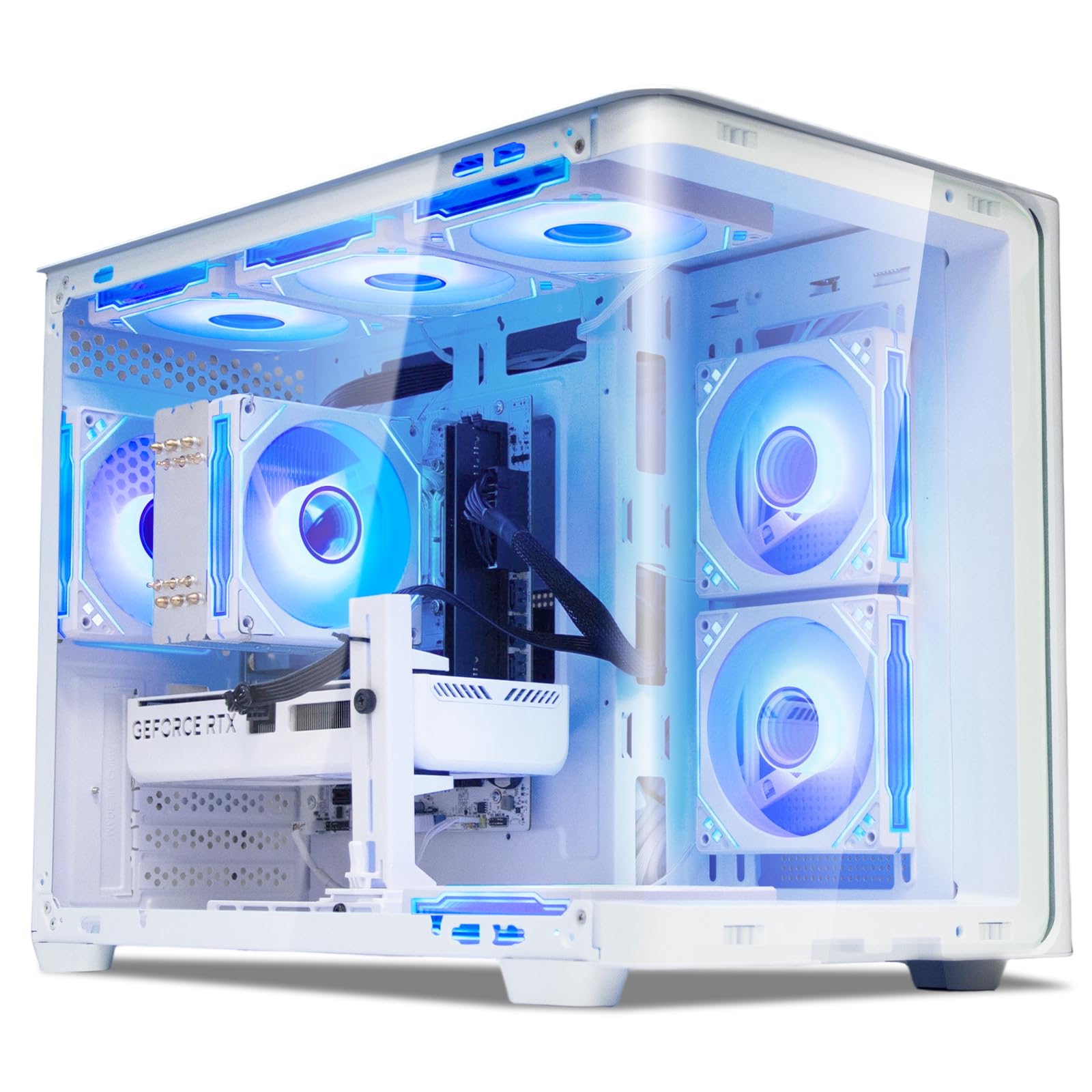
The Suevery i9 14900HX is an unusual configuration: a mobile-class i9 processor (typically found in laptops) paired with an RTX 5060 Ti 8GB in a desktop tower. The 24-core, 32-thread CPU offers incredible multi-threaded performance for video editing, 3D rendering, and software compilation, but the RTX 5060 Ti becomes the bottleneck in pure gaming scenarios. This makes the system ideal for users who prioritize CPU-heavy productivity tasks first and gaming second.
The 16GB of DDR5 RAM is the minimum viable amount—users will likely need to upgrade to 32GB for modern gaming and productivity. The 1TB NVMe SSD provides adequate boot and load speeds. The white curved tempered glass case with RGB fans is aesthetically pleasing, and the stand-up tower design saves desk depth.
Driver issues have been reported after initial setup, particularly with audio drivers for the GALAX motherboard. The 16GB single-channel RAM configuration (likely 1x16GB) leaves gaming performance on the table compared to a dual-channel setup. The PSU specification is not explicitly detailed, which raises questions about future upgrade capacity.
Why it’s great
- i9-14900HX provides exceptional CPU multi-threaded power
- Attractive white curved glass design
- WiFi 6 and Bluetooth 5.3 support
Good to know
- 16GB RAM is below ideal for this CPU tier
- GPU bottleneck limits gaming to 1080p high
- Driver setup may require extra work
10. Skytech Archangel 5

The Skytech Archangel 5 is a 1080p Ultra machine that punches above its spec sheet thanks to a Ryzen 7 7700 paired with 32GB of DDR5 6000MHz—the optimal RAM speed for AMD processors. The RTX 5060 8GB handles modern titles at 1080p with ease, delivering over 60 FPS in Cyberpunk 2077 with ray tracing enabled. The 750W Gold PSU provides a solid foundation for stability.
The white Archangel case features tempered glass and ARGB fans, and Skytech prides itself on assembling units in the USA. The included gaming keyboard and mouse are functional for immediate use. The system runs whisper-quiet, with several users noting that the fans remain inaudible even after six-hour gaming sessions. The 1TB NVMe SSD provides adequate storage speed and capacity for a standard library.
The RTX 5060’s 8GB VRAM may become a limitation for 1440p gaming with high texture packs in the next two years. The 750W PSU is sufficient for this build but offers limited headroom for a significant GPU upgrade. Some units have arrived with a loose RAM stick or a disconnected fan cable, requiring minor user intervention before first boot.
Why it’s great
- 32GB DDR5 6000MHz is the perfect speed for Ryzen
- Exceptionally quiet cooling under normal load
- Assembled in the USA with clean cable management
Good to know
- 8GB VRAM may limit future 1440p gaming
- PSU lacks headroom for major GPU upgrades
- Intermittent loose component reports on arrival
11. CyberPowerPC Gamer Master

The CyberPowerPC Gamer Master offers the most accessible path onto the AM5 platform with a Ryzen 7 8700F and RTX 5060 Ti 8GB. The AMD B850 chipset supports future CPU upgrades to Ryzen 9000-series chips, making this a smart long-term investment. The 16GB of DDR5 RAM is entry-level but runs at fast speeds, and the 1TB PCIe 4.0 SSD provides quick load times.
Gaming performance at 1080p Ultra is strong—Call of Duty runs at approximately 60 FPS with max settings, and beamng.drive with AI traffic remains smooth. The system includes a free keyboard and mouse, plus a one-year parts and labor warranty with lifetime technical support. The tempered glass side panel showcases the custom RGB lighting.
The 16GB RAM is the biggest limitation—modern games increasingly recommend 32GB, and the single 16GB stick (if configured as such) would cripple gaming performance. Several users reported initial issues with random restarts and USB power dropouts, which were resolved by disabling Deep Sleep in the BIOS. CyberPowerPC’s customer support has mixed reviews, with some users facing delayed responses.
Why it’s great
- AM5 B850 chipset allows future CPU upgrades
- Whisper-quiet cooling with attractive RGB
- Lifetime technical support included
Good to know
- 16GB RAM is the minimum for modern gaming
- BIOS tweaks needed to fix USB/restart issues
- Customer support response times vary
12. YAWYORE R7 5700X

The YAWYORE R7 5700X delivers strong 1080p competitive gaming performance at a budget-friendly price point, pairing an AMD Ryzen 7 5700X with an RTX 5060 8GB. The 32GB of DDR4 RAM is generous for this tier and ensures smooth multitasking during gaming sessions. The MSI B550M-A PRO motherboard provides a reliable foundation with room for future storage upgrades.
Gaming benchmarks show the system running CSGO, Valorant, and Rainbow Six Siege at well over 144 FPS on high settings, and more demanding titles like Red Dead Redemption 2 and Forza Horizon 6 run smoothly at high details. The aquarium-style case design with crystal-clear glass and remote-controlled ARGB fans and lighting is visually impressive. The 650W Bronze PSU is adequate for the current configuration.
The DDR4 platform is a dead end—there is no upgrade path to DDR5 without replacing the motherboard, CPU, and RAM simultaneously. The 650W PSU is Bronze-rated and lacks the efficiency and headroom for a significant GPU upgrade. Being a less established brand, warranty and support experiences vary, though user reports have been largely positive.
Why it’s great
- 32GB DDR4 RAM is generous for budget gaming
- Remote-controlled ARGB fans and lighting
- Strong 1080p performance for competitive titles
Good to know
- DDR4 platform has no future upgrade path
- 650W Bronze PSU limits upgrade flexibility
- Less established brand with variable support
13. GEEKOM A8 MAX
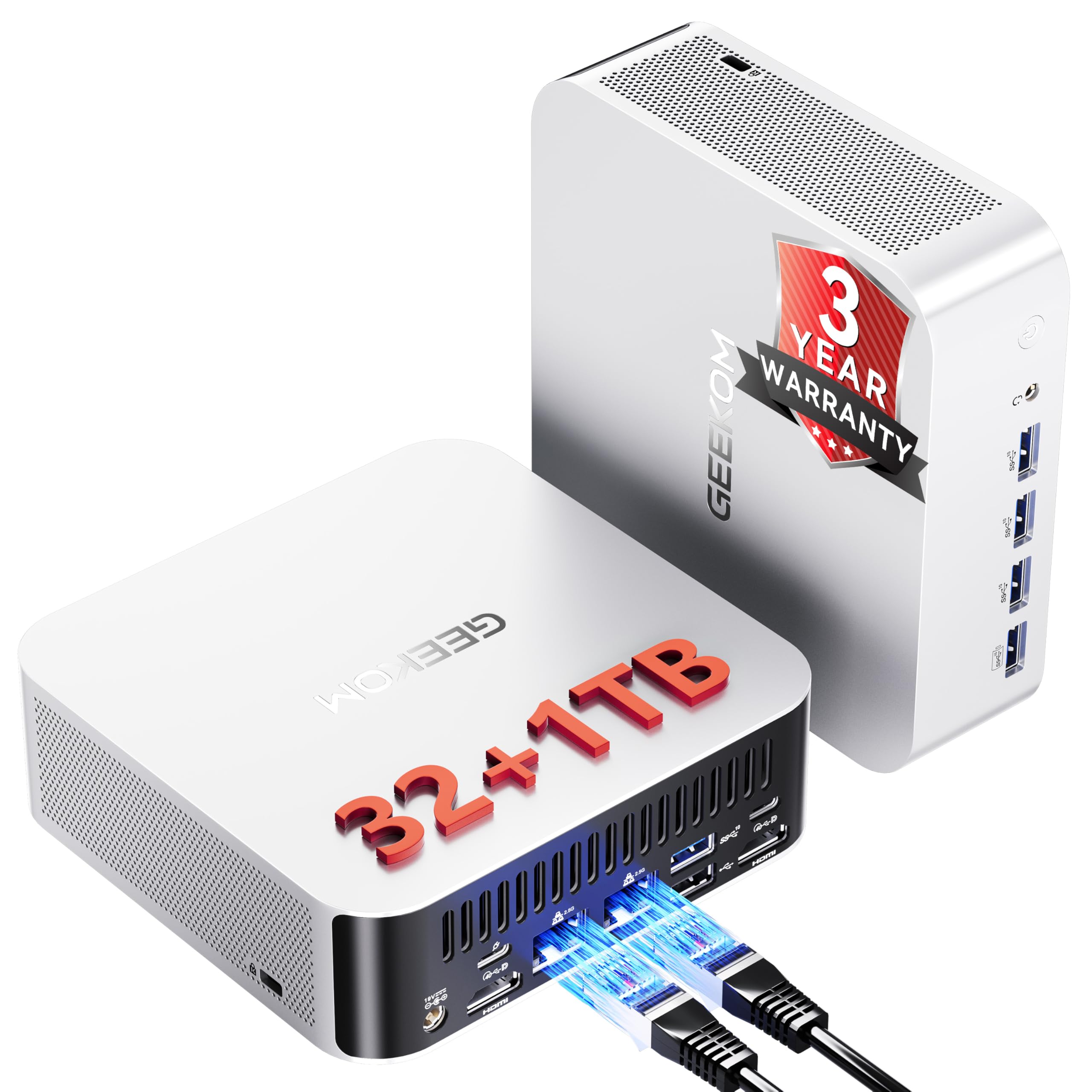
The GEEKOM A8 MAX is not a traditional gaming tower—it’s a mini PC powered by an AMD Ryzen 9 8945HS (a high-performance laptop chip) with 32GB of DDR5 and 1TB NVMe storage. It’s designed for users who need a compact desktop that can handle light gaming, CAD design, video editing, and AI tools without dominating desk space. The IceBlast 2.0 cooling system keeps noise below 36dB even under load.
For casual gaming, the integrated Radeon 780M graphics (part of the 8945HS) handles esports titles like Valorant and League of Legends at 1080p medium settings, and older AAA games at playable frame rates. The dual 2.5G Ethernet ports make it an excellent choice for a network-attached workstation or home server. The USB4 port supports 40Gbps transfer speeds and 8K display output.
This is not a machine for high-end 1440p or 4K gaming—the integrated GPU lacks the raw power of a discrete RTX card. Some units have arrived with boot failures or keyboard recognition issues, though replacements have generally resolved these. The 3-year warranty is good, but tech support can be difficult to reach during peak hours.
Why it’s great
- Ultra-compact form factor fits anywhere
- Dedicated dual 2.5G Ethernet for networking
- Very quiet operation at just 36dB under load
Good to know
- Integrated GPU cannot compete with RTX discrete cards
- Intermittent boot and keyboard recognition issues
- Tech support availability can be inconsistent
FAQ
Should I prioritize a better GPU or more RAM in a gaming PC?
Is a Ryzen 7 8700F enough for an RTX 5070 without bottlenecking?
How do I verify a prebuilt gaming PC has no proprietary parts before buying?
What does DLSS 4 Multi Frame Generation actually do for gaming?
Will a 650-watt power supply run an RTX 5070 without issues?
Final Thoughts: The Verdict
For most users, the cyber monday gaming pc winner is the KOTIN G60B because it delivers the best balance of RTX 5070 performance, DDR5-6000 memory, 360mm liquid cooling, and a premium smart display at a mid-range price point that outperforms its cost. If you want guaranteed reliability and the strongest 1440p GPU on the market, grab the Lenovo Legion Tower 5i. And for uncompromising 4K gaming or content creation with the longest warranty, nothing beats the Panorama Empowered PC with its i9-14900KF and RTX 5080 combo.

Mo Maruf
I created WellFizz to bridge the gap between vague wellness advice and actionable solutions. My mission is simple: to decode the research and give you practical tools you can actually use.
Beyond the data, I am a passionate traveler. I believe that stepping away from the screen to explore new environments is essential for mental clarity and physical vitality.