Our readers keep the lights on and my smoothie glass nicely filled. As an Amazon Associate, I earn from qualifying purchases.
Getting crisp, consistent sticker cuts without jagged edges or wasted material requires more than just loading a blade and hitting start. The difference between a clean kiss-cut and a ruined sheet of vinyl often comes down to the machine’s pressure system, software registration, and material-handling tolerance—three specs most buyers gloss over until they’ve already ruined a project.
I’m Mohammad Maruf — the founder and writer behind WellFizz. After weeks of cross-referencing blade depth tolerances, cutting force ratings, registration mark accuracy, and software ecosystem limits across nine machines, this guide isolates the specific hardware and digital features that actually determine sticker-making success.
What follows is a strict feature-to-feature breakdown that separates beginner-friendly plug-and-play units from precision tools built for repeat batch work, all to help you find the absolute best cutting machine for stickers that matches your actual project volume and design complexity.
How To Choose The Best Cutting Machine For Stickers
Sticker-making success depends on a machine’s ability to hold registration marks steady, apply consistent blade pressure, and keep a clean cutting path across repeated cycles. General-purpose die-cutting features like deep scoring or foil printing are secondary. Focus on the specs that matter when the design is microscopic and the deadline is tight.
Cutting Force & Blade System
A sticker machine needs enough downward force to slice through vinyl laminate and adhesive backing without tearing the paper liner. Look for adjustable pressure settings or an AutoBlade that self-adjusts depth. Fixed-pressure units often fail on thicker sticker paper or require manual blade swaps. The ideal range for sticker work is 250 to 350 grams of force in machines that measure it directly.
Print-Then-Cut Registration Accuracy
This is the single most common point of failure. The machine reads printed black registration marks around your design to align the blade. A weak optical sensor or slow registration system leads to misaligned cuts, ruining whole sheets. Machines with a dedicated scan feature or 4-point registration system consistently outperform those that rely on a single-pass optical read.
Material Width & Mat Compatibility
Standard sticker sheets are 8.5 inches wide, but many compact machines cut a maximum width of 4.5 or 5.5 inches. That forces you to trim sheets or use smaller layouts. If you plan to sell stickers or produce full-page labels, ensure the machine accepts at least a 12-inch mat or supports matless feeding for vinyl rolls.
Software Subscription vs Free Access
The machine’s design software is where you will spend most of your time. Free apps with a large built-in design library reduce recurring costs, but some lock advanced features like print-then-cut or SVG import behind a monthly subscription. Verify whether the machine’s companion app charges for basic sticker creation features before committing to an ecosystem.
Quick Comparison
On smaller screens, swipe sideways to see the full table.
| Model | Category | Best For | Key Spec | Amazon |
|---|---|---|---|---|
| Cricut Maker 4 | Premium | High-volume sticker production | Cuts 300+ materials | Amazon |
| Siser Juliet | Premium | Fine-detail precision cutting | High-definition 0.05″ detail | Amazon |
| Brother ScanNCut SDX125EGY | Premium | Scanning hand-drawn designs | Built-in scanner | Amazon |
| Silhouette Cameo 5 Alpha | Premium | Whisper-quiet batch cutting | 4-point registration system | Amazon |
| Cricut Joy Xtra Sticker Bundle | Mid-Range | Sticker-specific beginner bundle | Inkjet print-then-cut | Amazon |
| LOKLiK Cutting Machine 2 | Mid-Range | Matless wide-format cutting | 13″ matless vinyl width | Amazon |
| Cricut Joy 2 Essential Bundle | Mid-Range | Ultra-portable everyday stickers | 4.5″ cutting width | Amazon |
| Cricut Joy Xtra | Mid-Range | Small-batch sticker projects | Full-color print-then-cut | Amazon |
| Likcut Vinyl Cutter S501 | Budget | Budget-first sticker beginners | AI voice-to-design | Amazon |
In‑Depth Reviews
1. Cricut Maker 4

The Cricut Maker 4 handles 300-plus materials including sticker vinyl, cardstock, and printable adhesive sheets, making it the most versatile single machine in this lineup. Its adaptive tool system swaps between cutting, scoring, engraving, and foiling without manual calibration, and the Print-Then-Cut feature reads registration marks from any inkjet printer with consistent sub-millimeter accuracy.
The included Seashell bundle adds a Fine-Point Blade, Light Grip Mat, and materials sampler so you can start cutting sticker sheets immediately. The Design Space software provides 3,000 free images and 100 fonts, though advanced SVG import and commercial licensing require the paid Cricut Access subscription. The machine cuts at noticeably faster speeds than the Maker 3, which translates to shorter batch production times for small businesses.
Real buyers report that the Maker 4 feels built to last—durable construction, stable Bluetooth connection, and a significantly quieter motor than earlier generations. The 12-by-12-inch mat accommodates full-page sticker layouts, and the adjustable pinch rollers allow precise material alignment. The trade-off is a premium upfront cost and a software ecosystem that nudges you toward monthly spending for the full design library.
Why it’s great
- Fast, precise cuts on 300+ materials including thick sticker stock
- Adaptive Tool System swaps blades without manual adjustment
- Full 12×12 inch mat for standard sticker sheets
Good to know
- Design Space requires subscription for svg imports and full library
- Heavier build reduces portability
2. Siser Juliet

The Siser Juliet is built for micro-detail sticker cutting where standard hobby machines fail. Its high-definition blade system cuts at .05-inch tolerance, making it the best choice for intricate designs with fine lines, small text, and tight curves. The advanced motor delivers cuts up to 60 percent faster than typical desktop cutters while remaining noticeably quieter—no grinding or rattling during prolonged use.
Juliet supports both mat-based and matless cutting, with a 12-by-12-inch High Tack Cutting Mat included for standard sheets and a matless feed that handles vinyl rolls up to 12 inches wide. The touch-screen interface simplifies job selection and blade calibration, and the Leonardo Design Studio software provides professional control over cut settings, though it requires more time to learn than beginner-focused apps. WiFi connectivity eliminates cable clutter during long cutting sessions.
Owners consistently mention the machine’s commercial-grade build quality and the fact that it rarely miscuts even during heavy batch work. Some report a learning curve with Leonardo software when importing layered SVG files, but once the settings are dialed in, the repeatability exceeds most competitors in this price range. The higher initial cost returns value for users who prioritize cut precision over all else.
Why it’s great
- .05-inch detail cuts for intricate sticker designs
- 60 percent faster and quieter than typical hobby cutters
- Matless and mat-based feeding for flexible material use
Good to know
- Leonardo software has a steeper learning curve
- Higher upfront investment than mid-range options
3. Brother ScanNCut SDX125EGY
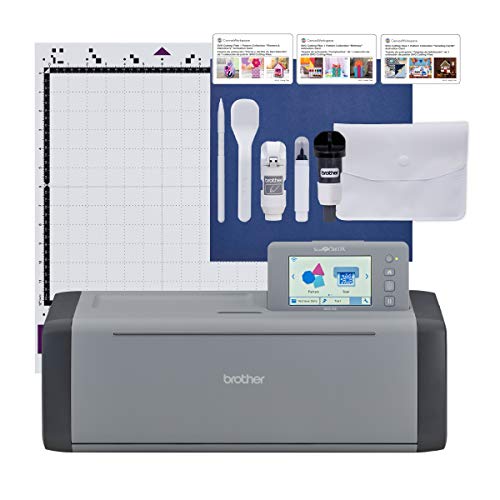
The Brother ScanNCut SDX125EGY is the only machine in this roundup with a built-in scanner, which is a game-changer for anyone drawing custom sticker designs by hand. You sketch on paper, scan it directly into the machine, and the auto blade sensor reads material thickness to set the correct depth without manual input. That eliminates the registration mark setup required by standard print-then-cut workflows.
The machine includes 682 built-in designs and 9 fonts, plus a 5-inch touchscreen that lets you edit and combine projects offline without a computer. It cuts materials up to 3 millimeters thick, including vinyl, cardstock, fabric, and even thin balsa wood, giving you sticker-making flexibility that extends into home decor and quilting. The included auto blade holder removes the guesswork from blade depth adjustment.
Real users love the scanning capability for rapid iteration, but some note that the standard tack mat is extremely sticky and can damage thin paper if not used with care. The Canvas Workspace software is functional but less polished than Cricut Design Space, and the print-and-cut area is slightly smaller than the full 12-by-12-inch mat surface for registration reasons. This machine shines brightest for original artists who draw first and cut second.
Why it’s great
- Built-in scanner cuts hand-drawn designs directly
- Auto blade sensor sets depth without manual adjustment
- Cuts materials up to 3mm thick for diverse projects
Good to know
- Sticky mat can damage thin sticker paper if pressed too hard
- Software less intuitive than Cricut or Silhouette alternatives
4. Silhouette Cameo 5 Alpha
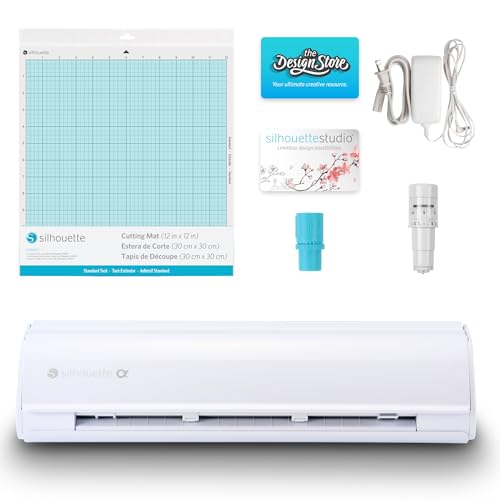
The Silhouette Cameo 5 Alpha introduces a 4-point registration system that dramatically improves cut alignment for printed stickers. Unlike older single-sensor designs, the four-point system corrects for both horizontal and vertical skew, producing accurate kiss-cuts and die-cuts even when the printed sheet isn’t perfectly square in the mat. The motor runs at 400mm per second while staying whisper-quiet, making it a solid choice for shared workspaces or late-night crafting sessions.
The machine includes the AutoBlade which self-adjusts depth based on material thickness, and the included Studio software gives you free access to 100 built-in designs. Silhouette Studio offers a tiered upgrade system—Business Edition unlocks SVG import and advanced print-then-cut features—at a one-time fee rather than a recurring subscription. That cost structure appeals to users who want to avoid monthly charges.
Buyers report excellent cut quality on vinyl and sticker paper, with the Fast Sketch Mode providing quick drawing outlines for custom designs. Some early owners experienced Bluetooth connectivity issues that required a firmware update via USB printer cable, so a wired setup is recommended during initial configuration. The solid metal-and-plastic build feels durable, and the 12-by-24-inch active surface area handles large sticker sheets comfortably.
Why it’s great
- 4-point registration corrects skew for perfect sticker alignment
- Whisper-quiet motor at 400mm/s for distraction-free cutting
- One-time software upgrade vs monthly subscription
Good to know
- Bluetooth may need firmware update via USB cable
- Software upgrade to Business Edition required for full features
5. Cricut Joy Xtra Ultimate Sticker Making Bundle
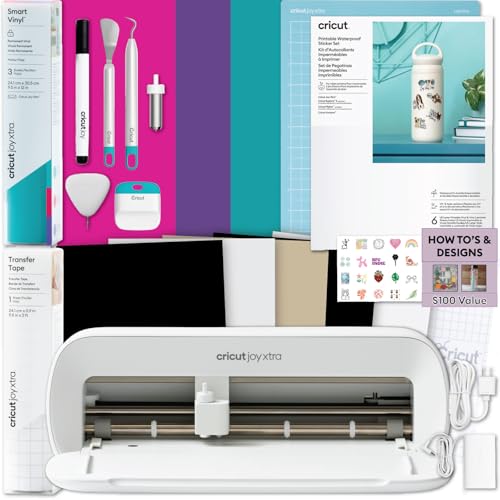
The Cricut Joy Xtra Ultimate Sticker Making Bundle packages the machine with printable sticker paper, Smart Vinyl, transfer tape, and crafting tools specifically chosen for sticker creation. The Print-Then-Cut workflow works with any home inkjet printer: you print the full-color design onto the included sticker paper, then load it into the Joy Xtra, which reads the printed registration marks and cuts around each sticker with consistent precision.
The machine itself cuts 50-plus materials, writes, draws, and foils, but the bundle focuses the experience on sticker-specific use cases. The 8.5-inch cutting width handles standard letter-size sheets, though the printable area within the registration marks is slightly smaller. The Design Space app offers step-by-step project flows and AI image generation, removing the guesswork for first-time users.
Owner feedback highlights the bundle as a complete solution for starting a small sticker shop or organizing planners and labels. Some buyers note that the Bluetooth connection can be intermittent with older computers, and the 8.5-inch width limit prevents cutting full-page designs larger than standard paper. For dedicated sticker makers who want everything in one box, this bundle saves the hassle of sourcing compatible materials separately.
Why it’s great
- All-in-one bundle with sticker paper, vinyl, and tools
- Full-color print-then-cut with standard inkjet printers
- Step-by-step Design Space flows for beginner sticker makers
Good to know
- 8.5-inch width limits to letter-sized sticker sheets
- Bluetooth reliability varies with older computers
6. LOKLiK Cutting Machine 2

The LOKLiK Cutting Machine 2 by HTVRONT brings several premium features into the mid-range price zone, starting with a 13-inch matless cutting width that handles vinyl rolls up to 21 feet long. That’s wider than most compact Cricut Joy models and competitive with full-size machines. The 5x cutting force upgrade over the previous generation means it slices through thicker sticker materials like glitter cardstock and faux leather without multiple passes.
The LOKLiK IdeaStudio software includes over 60,000 built-in designs and an AI painting feature that generates cut-ready graphics from text prompts—similar to the premium AI tools in higher-priced machines. The print-then-cut accuracy is rated at 0.5 mm, and the step-motor with noise reduction runs quieter than many competitors in this bracket. The removable storage cup on the side keeps tools organized without cluttering the cutting surface.
Users report that the machine is easy to set up and that the software provides a lower learning curve than Silhouette Studio. A few owners experienced frustration with the internet connection requirement for the cloud-based design features, and the deep-cut blade tool is sold separately and harder to source in the US. For the price, the combination of wide matless format and AI-assisted design makes this a strong value pick for intermediate crafters.
Why it’s great
- 13-inch matless cut width for oversized vinyl projects
- 60,000+ designs and AI text-to-design in included software
- 5x cutting force handles thick sticker materials
Good to know
- Requires internet for cloud-based software features
- Deep cut blade tool is sold separately and harder to find
7. Cricut Joy 2 Essential Bundle
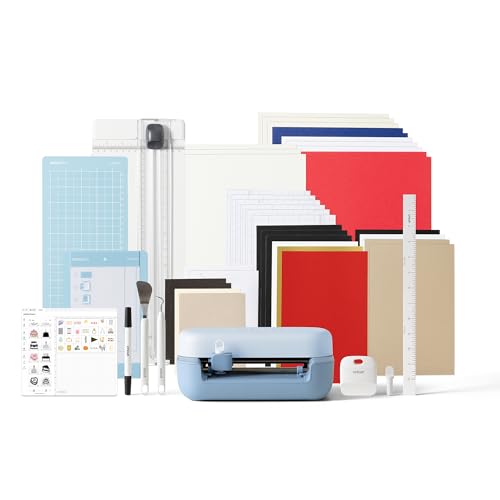
The Cricut Joy 2 is the most portable machine in this guide, weighing just over two pounds with a 4.5-inch cutting width. It’s designed for quick, everyday sticker projects—labels, decals, card accents—and works with Smart Materials that don’t require a cutting mat, so you can feed vinyl or sticker paper directly into the machine. The Essential Bundle includes Smart Vinyl, Insert Card Sets, and Printable Vinyl with enough material for 35 starter projects.
The Print-Then-Cut feature pairs with any home inkjet printer to create full-color stickers, and the Design Space app guides you through the process with step-by-step flows. The included 25 bonus images and one font add immediate design options without opening your wallet.
Users consistently praise the Joy 2’s simplicity and small storage profile, though the 4.5-inch width limitation becomes apparent when you want full-page sticker sheets or large decals. Some buyers report Bluetooth connection issues during initial setup, and the lack of a USB cable option means connectivity depends on a stable wireless signal. Perfect for low-volume, portable sticker making, but not a production machine.
Why it’s great
- Ultra-portable at 2 lbs for on-the-go crafting
- Matless Smart Vinyl feed for quick sticker runs
- Bundle includes materials for 35 starter projects
Good to know
- 4.5-inch width limits to small sticker and label sizes
- Bluetooth-only connection; no USB cable backup
8. Cricut Joy Xtra

The Cricut Joy Xtra bridges the gap between the ultra-compact Joy 2 and the full-size Maker 4. It features a wider base that accommodates standard 8.5-by-11-inch paper, making it the first Joy-series machine capable of full-page print-then-cut sticker sheets without trimming. It works with 50-plus materials including vinyl, cardstock, and iron-on, and supports drawing, foiling, and scoring in addition to cutting.
Included in the box are the Fine-Point Blade, Fine Point Pen, Mini Weeder, and a free Cricut Access trial for new subscribers. The Design Space app provides 3,000 free images and 100 fonts, and the machine connects via Bluetooth to smartphones, tablets, and computers. The 30 bonus images in the bundle add variety to your first projects without extra spending.
Reviewers appreciate the size upgrade from the original Joy, noting that the wider cutting area significantly expands project possibilities. Some mention that the Bluetooth connection to desktop computers can be unreliable, requiring multiple connection attempts. The machine also lacks an adaptive tool system, so swapping between cutting and scoring functions requires manually changing the blade. A solid step up for Joy users who outgrew the 4.5-inch limit.
Why it’s great
- Wider base fits full 8.5×11 inch sticker sheets
- Full-color print-then-cut with home inkjet printers
- Compact footprint larger than Joy but smaller than Maker
Good to know
- Bluetooth to desktop can be unreliable
- No adaptive tool system; manual blade swap required
9. Likcut Vinyl Cutter Machine S501
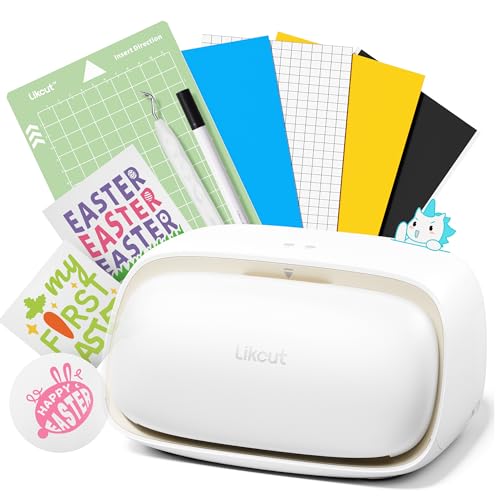
The Likcut S501 is the most accessible entry point for sticker making, with an AI voice-to-design feature that converts spoken prompts into cut-ready graphics. You say “a cute retro cat eating ice cream” and the software generates a digital design you can cut immediately. That removes the entire design learning curve for complete beginners who want to make stickers without mastering vector software.
The machine cuts at 3.2 inches per second and includes a blade rated for over 4,610 meters of cutting. It supports Bluetooth 5.0 and USB 2.0 connectivity, with a connection time under three seconds. The built-in front cover doubles as storage for tools and materials, keeping your workspace organized. Over one million designs and 1,200 fonts are available through the Likcut Design Store.
First-time buyers appreciate the compact size and low cost of entry, though experienced users note that complex multi-layer designs can overwhelm the software and that some premium design assets require per-purchase fees. One reviewer reported a system crash after connecting the device, likely related to third-party driver conflicts. For anyone curious about sticker cutting without a big financial commitment, the S501 provides a functional gateway.
Why it’s great
- AI voice-to-design creates stickers from spoken prompts
- Extremely low entry price for new hobbyists
- Blade rated for 4,610+ meters of cutting
Good to know
- Design store uses per-purchase fees for premium assets
- Complex designs may overwhelm the software
FAQ
What is the difference between kiss-cut and die-cut for stickers?
Can I use any inkjet printer for print-then-cut stickers?
Do I need a monthly subscription to make stickers with these machines?
Final Thoughts: The Verdict
For most users, the cutting machine for stickers winner is the Cricut Maker 4 because it combines the fastest cut speeds, 300-plus material compatibility, and the most polished print-then-cut software ecosystem. If you want whisper-quiet operation with sub-millimeter precision, grab the Siser Juliet. And for hand-drawn designs without dealing with registration marks, nothing beats the Brother ScanNCut SDX125EGY.

Mo Maruf
I created WellFizz to bridge the gap between vague wellness advice and actionable solutions. My mission is simple: to decode the research and give you practical tools you can actually use.
Beyond the data, I am a passionate traveler. I believe that stepping away from the screen to explore new environments is essential for mental clarity and physical vitality.