Our readers keep the lights on and my smoothie glass nicely filled. As an Amazon Associate, I earn from qualifying purchases.
A cutter for vinyl that binds during weeding or misses small details turns a creative session into a material-wasting chore. Whether you are making custom decals, heat-transfer shirts, or intricate stickers, the machine’s cutting force, blade system, and software compatibility determine whether your final product looks professional or like a rough draft. The right unit handles fine lines down to half a millimeter and keeps noise low enough for a shared workspace.
I’m Mohammad Maruf — the founder and writer behind WellFizz. I’ve spent hundreds of hours analyzing market data, customer reviews, and technical specifications of desktop cutting machines to identify what actually defines long-term reliability and precision for this narrow category.
Real crafters need a machine that cuts consistently across dozens of material types without jamming or tearing thin vinyl. After cross-referencing real user experiences with build specs, I’ve curated the definitive list of what makes up the best cutter for vinyl today.
How To Choose The Best Cutter For Vinyl
Selecting a vinyl cutter involves more than looking at the price tag. You need to match the machine’s physical capabilities to the materials you intend to cut most often. A unit that excels at paper may struggle with thick adhesive vinyl, while a pro-level plotter designed for 3mm material might be overkill for simple sticker projects.
Cutting Force and Blade System
Cutting force determines how deeply the blade penetrates the material and its backing. Entry-level machines rely on manual blade-depth adjustment, which requires trial and error. Premium units use an automatic blade that self-adjusts for different media, reducing waste from improper pressure. Look for a machine that offers at least 500 grams of cutting force if you plan to work with thicker craft vinyl or heat transfer material.
Software Ecosystem and Subscription Costs
The companion software controls every cut path, font selection, and print-then-cast alignment. Some brands lock advanced features — such as SVG import or vectorizing — behind a paid subscription. A machine with a generous free library and affordable upgrade path saves money over time. Check whether the software works offline and supports your operating system, especially if you are on a Mac.
Cutting Width and Matless Capability
Standard desktop cutters handle widths between 8.5 and 15 inches. Larger machines (24 to 53 inches) are for signage work but require substantial desk space. Matless cutting is a convenience feature that lets you load a long roll of vinyl directly into the machine, but it only works with materials that are stiff enough to feed without a sticky mat. If you create long banners or wall decals, prioritize a model with reliable matless feeding.
Noise Level and Build Quality
Older machines produce a loud grinding noise that makes extended crafting sessions unpleasant. Newer stepper-motor designs with noise-dampening components operate at a whisper-quiet volume that suits a home office or shared living area. A metal chassis and aluminum roller bars add weight but reduce vibration during long cuts, improving registration accuracy.
Quick Comparison
On smaller screens, swipe sideways to see the full table.
| Model | Category | Best For | Key Spec | Amazon |
|---|---|---|---|---|
| Siser Juliet | Professional | High-precision small business runs | 12″ matless, WiFi, commercial blade | Amazon |
| Cricut Maker 4 | Premium | Versatile home crafting with 300+ materials | 22.1″ device, 300+ material support | Amazon |
| Silhouette Cameo 5 Alpha Plus | Premium | Wide-format sticker and decal runs | 15″ cut width, electrostatic mat | Amazon |
| Silhouette Cameo 5 Alpha | Premium | Quiet print-and-cut accuracy | 12×24″ cut area, 4-point registration | Amazon |
| LOKLiK Cutting Machine 2 | Mid-Range | Smart matless cutting with AI design | 13″ matless, 5x cutting force | Amazon |
| Cricut Joy Xtra | Mid-Range | Portable and beginner-friendly sticker making | 8.5×11″ print-then-cut, 50+ materials | Amazon |
| Likcut S501 | Entry-Level | AI-assisted sticker creation for beginners | Bluetooth 5.0, 1M+ design library | Amazon |
| VEVOR 28-Inch | Professional | Large-format signage and decals | 24.8″ cut width, LCD screen | Amazon |
| VEVOR 53-Inch | Industrial | High-volume sign making and vehicle wraps | 49.6″ cut width, 500g cutting pressure | Amazon |
In‑Depth Reviews
1. Siser Juliet

The Siser Juliet uses a commercial-grade blade system that cuts fine details — down to 0.05-inch edges — without needing multiple passes. Its advanced motor runs up to 60 percent faster than typical desktop cutters while producing far less noise, making it ideal for home-business environments shared with family or roommates. The built-in WiFi connection frees you from USB cables, and the intuitive touchscreen lets you adjust cut settings directly on the device.
Matless cutting works seamlessly with both Siser HTV and standard cardstock, and the included 12×12-inch high-tack mat provides extra stability when needed. The Leonardo Design Studio software offers a basic free tier that handles most tasks, though the Pro version unlocks advanced vectorizing and SVG import. Users report zero miscuts even after months of heavy production, and the all-metal roller system keeps material feed straight on long runs.
Weeding small letters and intricate shapes remains straightforward because the blade’s penetration is consistent across the entire cutting area. The only real trade-off is the learning curve of the Leonardo software, but crafters who invest the time find it more powerful than most subscription-locked competitors. For a small business or serious hobbyist who values accuracy over raw width, this machine sets a new standard.
Why it’s great
- Commercial-quality blade cuts fine details without extra passes
- Higher cutting speed and quieter operation than most competitors
- Reliable WiFi connection with no cable clutter
Good to know
- Leonardo software has a moderate learning curve for beginners
- Pro subscription required for SVG import and advanced features
2. Cricut Maker 4

The Cricut Maker 4 handles over 300 materials — from standard vinyl and cardstock to leather, wood, and fabric — making it the most versatile home cutting machine on the market. Its adaptive tool system lets you switch between cutting, drawing, foiling, scoring, engraving, debossing, and perforating with separate tool housings. The machine ships with a fine-point blade, a light-grip mat, and a materials sampler that includes smart vinyl and iron-on sheets for immediate test cuts.
Print-Then-Cut works with any standard inkjet printer, enabling full-color sticker designs that the Maker 4 then registers and cuts with impressive accuracy. The Design Space app includes over 3,000 free images and 100 free fonts, with the option to unlock 1.5 million+ images through a paid subscription. Users consistently note that the machine’s cutting speed feels noticeably faster than the previous Maker 3 generation, and the larger 22-inch chassis provides stability for longer materials.
One recurring positive theme is the machine’s ability to handle thick materials like chipboard and matboard without stalling or stripping gears. The downside is that Cricut’s ecosystem is partially subscription-gated: advanced features and a large share of the design library require an ongoing Cricut Access fee. For crafters who plan to design their own SVG files outside the app, this limitation is minor, but anyone who relies on pre-made designs should factor the subscription cost into their budget.
Why it’s great
- 300+ material compatibility includes leather, wood, and fabric
- Fast, smooth cuts with the upgraded Maker 4 motor
- Print-Then-Cut handles full-color sticker production
Good to know
- Advanced design library and features require Cricut Access subscription
- Large footprint requires dedicated desk space
3. Silhouette Cameo 5 Alpha Plus
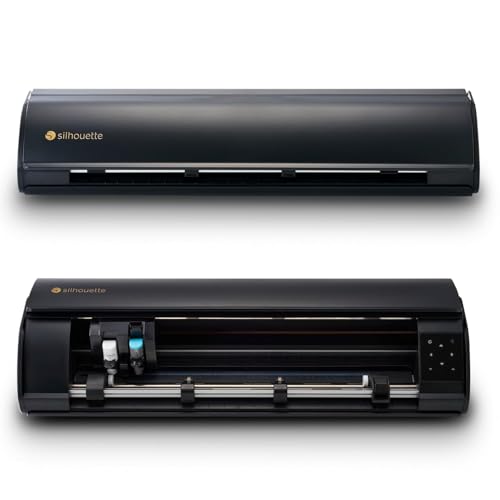
The Silhouette Cameo 5 Alpha Plus expands the standard 12-inch cutting width to a full 15 inches, giving you extra room for larger decals, wide-format stickers, and multi-up production without manual tiling. Its electrostatic mat holds material flat without adhesive residue, supporting stock up to 0.5mm thick. The AutoBlade adjusts depth automatically based on the material profile you select in Studio software, eliminating guesswork and wasted vinyl.
Fast Sketch Mode accelerates pen work for detailed drawings, and the 4-point registration system improves print-then-cut accuracy on glossy and textured media. The power-slide lid opens automatically, which adds a touch of convenience to workspace organization. One-click job repeat is a small but welcome feature for batch production, letting you reload material and restart without diving back into the software menu.
The machine ships with 100 exclusive designs and a one-month Silhouette Design Store subscription. Studio software is robust but has a steeper learning curve than Design Space, and some users find the printed manual lacking — most support resources are online. The 15-inch width is a genuine advantage for anyone making larger stickers or signage, but the machine is noticeably heavier than the standard Cameo 5.
Why it’s great
- 15-inch cutting width accommodates larger projects
- Electrostatic mat holds material flat without sticky residue
- AutoBlade eliminates manual depth guessing
Good to know
- Studio software requires time to master
- Heavier construction may be harder to move between workspaces
4. Silhouette Cameo 5 Alpha
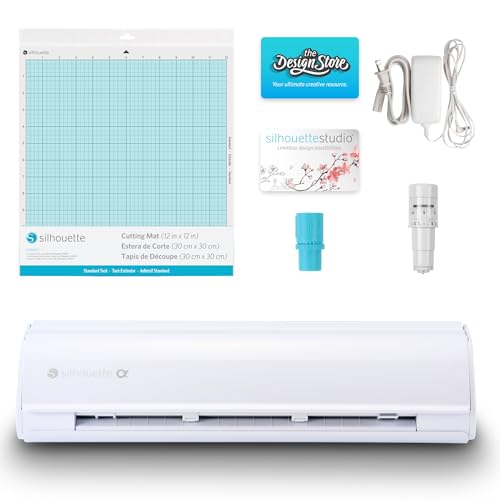
The Silhouette Cameo 5 Alpha uses a new motor that cuts at speeds up to 400mm/s with extremely low noise, making it a strong candidate for anyone who crafts in a shared or quiet space. Its Intelligent Path Technology (IPT) optimizes the order in which the blade moves through a design, reducing stress on the material and producing cleaner cuts with less tearing. The 4-point registration system adds vertical and horizontal corrections that keep print-then-cut accuracy high even with glossy sticker paper.
The included AutoBlade handles depth settings automatically, and the machine supports materials up to 3mm thick — enough for chipboard, felt, and thin leather. The bundled Studio software includes 100 designs for getting started immediately. Users praise the soft-close lid and the general build quality, noting that the aluminum roller bars keep long vinyl sheets feeding straight without skew.
The main consideration is connectivity: the Alpha’s Bluetooth can be temperamental out of the box, and several buyers needed a USB printer cable to perform a firmware update before the wireless function stabilized. The machine also ships with a very sticky mat that some users find difficult to clean. For anyone willing to spend a few minutes on initial setup, the cutting quality and quiet operation deliver professional-grade results.
Why it’s great
- Whisper-quiet motor suitable for shared workspaces
- 4-point registration improves print-then-cut precision
- Intelligent Path Technology reduces material stress
Good to know
- Bluetooth may require a firmware update via USB cable
- Included mat is extremely sticky and hard to clean
5. LOKLiK Cutting Machine 2

The LOKLiK Cutting Machine 2 generates five times the cutting force of many entry-level desktop cutters, letting it slice through materials as thick as 2mm — including faux leather and glitter cardstock — without hesitation. Its smart matless feed accommodates vinyl rolls up to 21 feet long and 13 inches wide, which is particularly helpful for banners and wall decals. The machine includes a removable storage cup for organizing tools directly on the device, reducing clutter on your work surface.
The companion LOKLiK IdeaStudio software integrates an AI painting tool that converts text prompts into ready-to-cut designs, which saves significant time for users who struggle with traditional vector software. The library contains over 60,000 built-in designs and regularly updates with new content. Print-then-cut accuracy sits at 0.5mm, and the upgraded step-motor system runs quieter and faster than the previous generation.
The machine’s biggest limitation is its reliance on an internet connection — it cannot be used fully offline, and the software forces a sign-in at launch. Some users report a bug where simple designs are repeated incorrectly, and the refund process can take over 30 days. For crafters who primarily work within the LOKLiK ecosystem and want AI-assisted design, the machine offers exceptional value for its mid-range price.
Why it’s great
- 5x cutting force handles thick and specialty materials
- AI painting tool generates designs from text prompts
- Matless cutting supports vinyl rolls up to 21 feet long
Good to know
- Requires internet connection and software sign-in
- Some users report design repetition bugs
6. Cricut Joy Xtra

The Cricut Joy Xtra fills the gap between a basic portable cutter and a full-size machine by offering a wider 8.5×11-inch base for print-then-cut projects while remaining compact enough to store in a drawer. It works with over 50 materials, including vinyl, iron-on HTV, and cardstock, and supports drawing, foiling, and scoring through interchangeable tool adapters. The bundle includes a fine-point blade, pen, mini weeder, and materials for a practice cut right out of the box.
Setup is straightforward: the Design Space app guides you through connecting via Bluetooth, and the free content library includes 3,000+ images and 100+ fonts. Users report that the machine cuts edible image prep time by roughly 75 percent compared to manual cutting methods, making it popular for small-batch bakery stickers and party favors. The Joy Xtra also works with an inkjet printer for full-color sticker production, though the print-then-cut registration accuracy is slightly less consistent than the larger Cricut Maker series.
The machine’s lightweight construction (under a pound) makes it the most portable option on this list, but the plastic body does not dampen sound as well as metal-framed alternatives — it produces a noticeable buzz during operation. Advanced users may quickly outgrow the 50-material limit and the narrower software feature set, but for someone just entering the vinyl craft space, the Joy Xtra offers an accessible, low-risk starting point.
Why it’s great
- Compact and lightweight for easy storage and portability
- Works with an inkjet printer for full-color sticker production
- Included starter materials let you cut immediately
Good to know
- Limited to 50+ materials, not suitable for thick media
- Print-then-cut registration is less precise than larger Cricut models
7. Likcut Vinyl Cutter S501
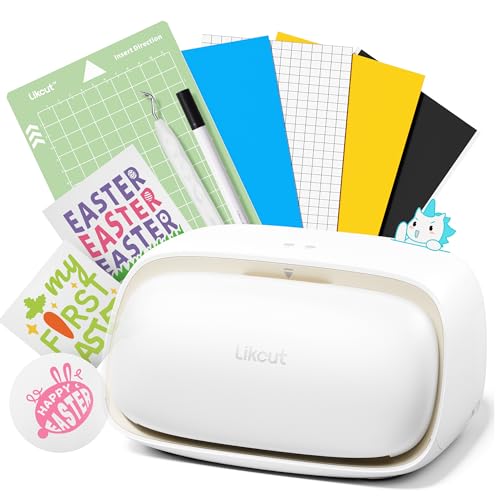
The Likcut S501 is an entry-level machine that stands out for its AI-powered design generator — you can speak or type a phrase like “a cute retro cat eating ice cream” and the app converts it into a ready-to-cut vector. It connects via Bluetooth 5.0 in about three seconds, and the USB-C option provides a wired fallback for stable data transfer. The blade is rated for over 4,610 meters of cutting, and the machine runs at speeds up to 3.2 inches per second.
The built-in front cover doubles as storage for tools and small vinyl scraps, which helps keep a compact workspace tidy. The Likcut Design Store offers over one million designs and 1,200 fonts, with both free and paid options available. Dual-mode operation supports cutting and drawing, and the adjustable pressure settings work with more than 50 material types including card stock, glossy film, and labels. Most users report clean, precise cuts that meet beginner expectations.
Several owners note that complex designs with very fine detail can be challenging for this machine, and one review flagged a computer virus concern after connecting the device — though this was not replicated by other users. The small 180-square-inch active surface area limits you to smaller projects, and the included vinyl bundle is basic. For a budget-friendly introduction to vinyl cutting with AI-assisted design, the Likcut S501 offers unusual value, but it is not a production tool for high-volume work.
Why it’s great
- AI design generator creates ready-to-cut vectors from voice or text
- Bluetooth 5.0 provides fast and stable wireless connection
- Front-cover storage keeps small tools organized
Good to know
- Small active surface area limits project size
- Struggles with very intricate or highly detailed designs
8. VEVOR 28-Inch Vinyl Cutter
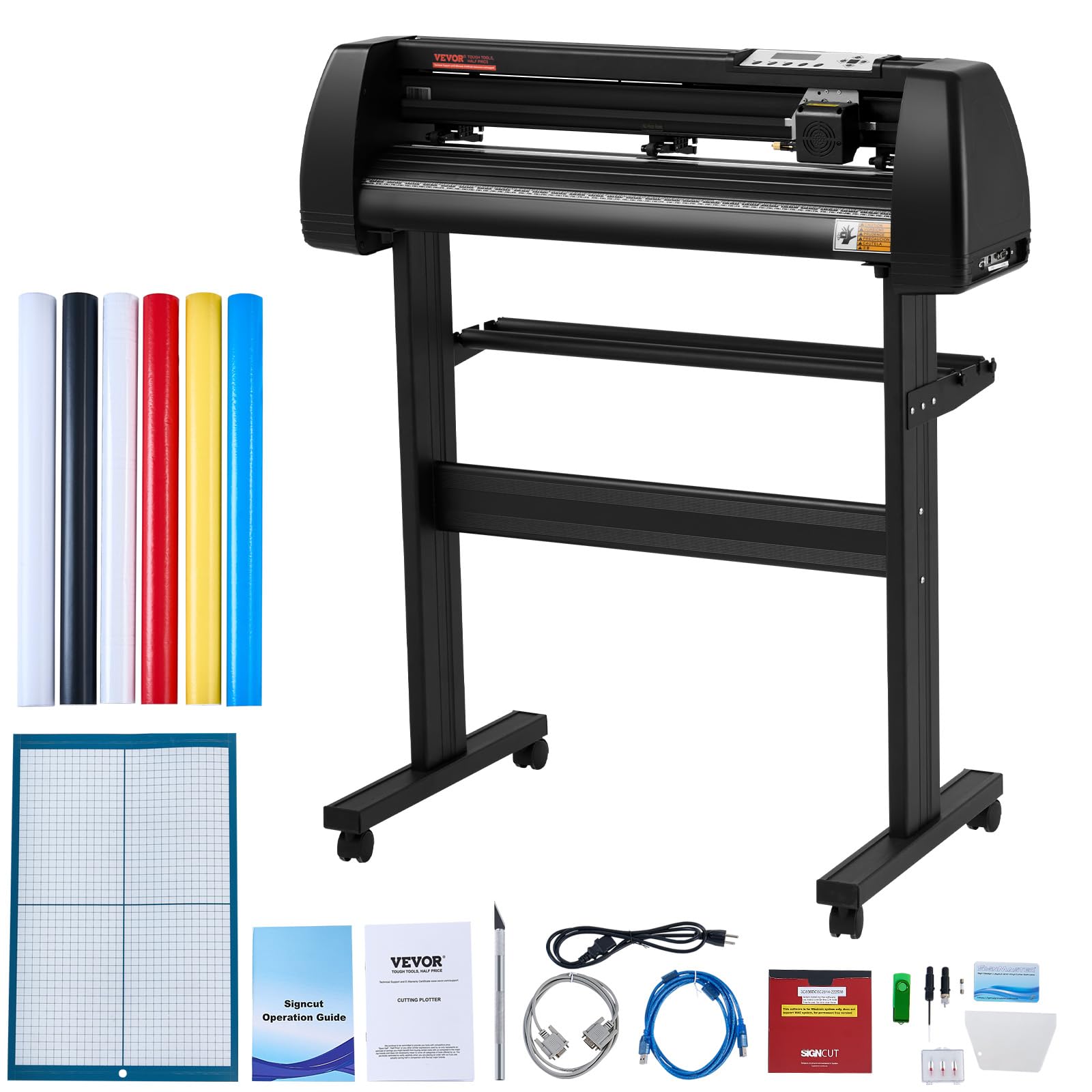
The VEVOR 28-inch vinyl cutter gives you a 24.8-inch cutting width with an LCD screen for adjusting speed and force without touching a computer. It uses three adjustable double-spring pinch rollers and aluminum knurled rods to feed paper smoothly without jams. The cutting precision is rated at ±0.01mm, and the included Signmaster software works with Windows via USB or serial port. The machine also supports third-party packages like SignCut and Flexi.
The included stand features an aluminum frame and paper rod assembly with caster wheels, making it easy to move around a workshop. The unit ships with five 3-meter sample vinyl rolls in different colors, a crepe paper roll, and soft tape. Real users consistently note that the free sample vinyl is thin and poor in quality — expect to buy aftermarket materials like Oracal or 3M for professional results. The plotter also functions as a pen plotter when you swap the blade holder for a marker adapter.
Initial setup requires calibrating blade depth and cutting force, and the learning curve is moderate for anyone new to large-format plotters. The Signmaster software’s basic version lacks some features — registration marks are not supported, and vectorizing requires a paid upgrade. The VEVOR 28-inch is a solid choice for sign shops and crafters who need a wide cutting bed without spending industrial-tier money, but beginners may find the setup involved.
Why it’s great
- 24.8-inch cutting width accommodates large signage and banners
- LCD control panel for on-the-fly speed and force adjustments
- Built-in stand with caster wheels for easy positioning
Good to know
- Included sample vinyl is thin and not suitable for finished projects
- Signmaster basic software lacks registration mark support
9. VEVOR 53-Inch Vinyl Cutter

The VEVOR 53-inch vinyl cutter is an industrial-scale plotter with a 49.6-inch cutting width and a maximum cutting pressure of 500 grams, making it suitable for automotive tint, boat wrap, and large-format signage. Its D-type motherboard and 2MB high-speed cache memory support long offline cutting runs, and the stepper motor operates with relatively low noise for its size. The LCD control panel provides real-time adjustments for speed (up to 800mm/s) and pressure, and an emergency stop button adds a layer of safety during operation.
The machine uses four double-spring pinch rollers with an aluminum knurled stick to keep paper feeding straight over long distances. It supports both USB and serial connections and works with Signmaster, but is not compatible with Mac OS — Windows users only. The Roland-compatible blade holder gives you access to inexpensive replacement blades. The package includes the cutting plotter, stand, software CD, USB cable, power adapter, and sample vinyl rolls.
Long-term reliability is a mixed bag in user reports: while many owners praise the machine’s accuracy and speed for the price, there are reports of the power button requiring multiple presses and one incident of circuit board failure after six months. The included Signmaster basic software lacks vectorizing (requires paid upgrade) and the stand assembly diagram has inaccuracies. For commercial users who need extreme width on a lean budget, the VEVOR performs well if you are comfortable troubleshooting the occasional hardware quirk.
Why it’s great
- 49.6-inch cutting width handles large wraps and signage
- 500g cutting pressure works with thick and automotive-grade materials
- LCD control panel with emergency stop and start functions
Good to know
- Not compatible with Mac OS; requires Windows
- Software documentation and stand assembly instructions have reported inaccuracies
FAQ
What kind of vinyl cutter do I need for making custom stickers?
Is it worth paying more for an automatic blade system?
Can a vinyl cutter also draw or score paper?
Why does my vinyl cutter fail to register print-then-cut marks on glossy paper?
Final Thoughts: The Verdict
For most users, the best cutter for vinyl winner is the Siser Juliet because it combines commercial-grade blade precision with quiet, fast operation and WiFi convenience — a package that suits both small businesses and serious hobbyists. If you want extreme material versatility with over 300 supported media, grab the Cricut Maker 4. And for wide-format signage work on a tight industrial budget, nothing beats the cutting width and pressure of the VEVOR 53-Inch.

Mo Maruf
I created WellFizz to bridge the gap between vague wellness advice and actionable solutions. My mission is simple: to decode the research and give you practical tools you can actually use.
Beyond the data, I am a passionate traveler. I believe that stepping away from the screen to explore new environments is essential for mental clarity and physical vitality.