Our readers keep the lights on and my smoothie glass nicely filled. As an Amazon Associate, I earn from qualifying purchases.
Choosing a new chassis is the single most consequential decision you make for your PC build. It determines your component clearance, your thermal ceiling, and the very look of your finished machine. You need a case that handles cable management efficiently, delivers real airflow to keep high-wattage parts cool, and looks the part on your desk — all without wasting budget on flashy gimmicks you won’t use.
I’m Mohammad Maruf — the founder and writer behind WellFizz. I’ve spent hundreds of hours analyzing the internal layouts, thermal performance data, and cable routing systems of the most popular chassis on the market to produce this guide.
Whether you are after a panoramic dual-chamber showcase or a compact mid-tower with brute-force cooling, the right choice comes down to specs and build quality. This guide to the best custom pc cases breaks down nine top contenders across mid-range and premium price tiers, covering everything from fan support to radiator clearance and back-connect motherboard compatibility.
How To Choose The Best Custom PC Cases
Picking the right chassis means more than just finding one that fits your motherboard. You need to think about cooling capacity, cable management depth, and future upgrade room. Here are the three most important factors to evaluate before you buy.
Airflow and Fan Support
A mesh front panel is now standard on quality cases, but fan configuration matters just as much. Look at how many 140mm fans the case can mount — they move more air at lower noise than 120mm fans. Check if the case supports a bottom intake near the GPU, as that provides a direct cold air path to your graphics card. Pre-installed fans vary widely in quality; a chassis that ships with solid PWM fans saves you a separate purchase.
Motherboard Size and Back-Connector Compatibility
Standard ATX is the most common form factor, but E-ATX boards need a wider chassis to avoid blocking cable routing holes. Back-connect motherboards (ASUS BTF, MSI Project Zero, Gigabyte Project Stealth) route all cables behind the tray for a truly clean front view. If you plan to use one, make sure the case explicitly lists support — not every chassis has the cutouts and standoff positions needed.
Cable Management Depth and Layout
The space behind the motherboard tray determines how easily you can route and hide cables. Dual-chamber designs separate the PSU and drives entirely, giving you a clutter-free main compartment. Cases with Velcro straps, wide routing channels, and adjustable grommets make the build process far smoother. Also consider PSU mounting flexibility — a sideways or front-facing PSU bracket can free up cable space significantly.
Quick Comparison
On smaller screens, swipe sideways to see the full table.
| Model | Category | Best For | Key Spec | Amazon |
|---|---|---|---|---|
| Lian Li O11D EVO RGB | Premium Dual Chamber | High-end showcase builds | 455mm GPU clearance, reversible chassis | Amazon |
| be quiet! Light Base 900 FX | Premium Tower | Large custom loops and E-ATX | Supports dual 420mm radiators | Amazon |
| HAVN HS 420 | Premium Dual Chamber | Ultimate airflow and build quality | 11x 140mm fan slots, 420mm rad support | Amazon |
| be quiet! Light Base 900 DX | Premium Tower | Customizable layout without fans | Invertible and horizontal orientation | Amazon |
| Antec Performance 1 FT | Full Tower | First-time builders and large GPUs | Temp display, 370mm GPU support | Amazon |
| NZXT H9 Flow (2025) | Mid Tower Dual Chamber | Clean panoramic builds with stock fans | 4 pre-installed fans, 420mm rad support | Amazon |
| Lian Li LANCOOL 217 | Mid Tower | Best out-of-box airflow value | 5 fans included, 2x 170mm front | Amazon |
| CORSAIR 4000D RS Frame | Mid Tower | Modular fan mounting and quiet operation | InfiniRail fan system, 3 RS fans included | Amazon |
| CORSAIR 3500X | Mid Tower | Budget-friendly panoramic glass build | Reverse connection mobo compatible | Amazon |
In‑Depth Reviews
1. Lian Li O11D EVO RGB

The O11D EVO RGB is the gold standard for dual-chamber chassis design. Its wide main compartment offers 455.7mm of GPU clearance, enough for virtually any modern graphics card, and the seven expansion slots allow triple-slot or vertical mounting with a 90-degree riser. The reversible chassis feature lets you flip the layout entirely, depending on which side of your desk you want the glass panel.
Two integrated 1.5mm L-shaped ARGB strips sit at the top and bottom of the tempered glass panels, providing built-in lighting without needing separate strips. Cable management benefits from Velcro straps and dual-layered clips behind the tray, while the PSU bracket protrudes 15mm outward to create extra space for routing thick 24-pin cables. The bottom dust filter slides out from the front for easy cleaning without moving the case.
Cooling potential is enormous — up to nine fans or multiple thick radiators fit inside, and the dual-chamber design keeps the front compartment free of drives and PSU clutter. The metal mesh side panels do reduce airflow somewhat if you keep them on, so high static pressure fans are recommended for restricted areas. At this price point, the included accessories like the GPU sag support and ARGB controller add real value.
Why it’s great
- Reversible chassis for left or right side display
- Integrated ARGB strips with motherboard sync
- Spacious dual-chamber layout simplifies cable routing
Good to know
- No fans included in the box
- Mesh side panels restrict airflow; static pressure fans recommended
2. be quiet! Light Base 900 FX White
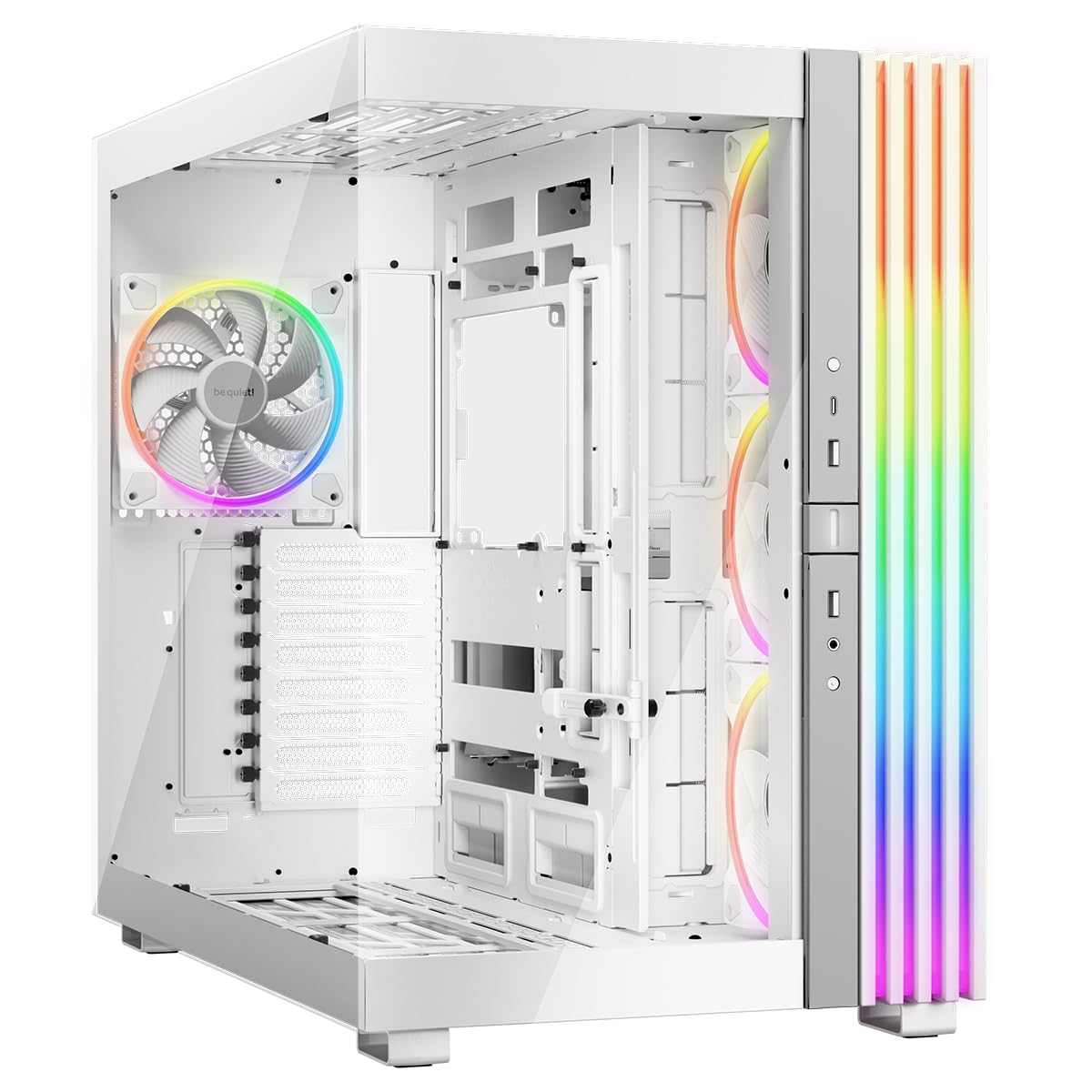
The Light Base 900 FX White redefines layout flexibility for a premium tower. You can invert the chassis in seconds by swapping the feet, or lay it horizontally for a unique desk setup — both configurations work without tools. The massive ARGB LED strip wraps around the front and side panels, viewable from every angle and synchronizable with your motherboard.
It ships with four Light Wings 140mm PWM fans — three inverted-blade side intakes and one rear exhaust — all designed for quiet operation and minimal air turbulence. The dual-chamber layout hides the PSU and drives at the rear, leaving the main compartment completely open for clean aesthetics and strong airflow. Two ARGB and PWM hubs with a total of 12 ports sit at the top and bottom of the case for easy fan and light connections.
Radiator support is best-in-class: up to two 420mm radiators (top and bottom) plus a 360mm on the side for triple-radiator custom loops. The removable radiator and fan holders in the lid and base make installation much easier than fixed brackets. The flexible GPU holder works in both horizontal and vertical orientations, supporting even the heaviest cards without sagging. Back-connect motherboard support covers ASUS BTF, MSI Project Zero, and Gigabyte Project Stealth.
Why it’s great
- Invertible and horizontal layout options
- Quad 140mm Light Wings fans pre-installed
- Dual 420mm radiator support with removable brackets
Good to know
- Large footprint requires significant desk space
- Bottom filter requires tilting the heavy case to remove
3. HAVN HS 420

The HAVN HS 420 is a showcase-grade chassis that prioritizes build quality and thermal performance above everything else. Its Hybrid Structure uses a dual-chamber design with a traditional case size ratio, directing cool air from the bottom intake directly onto the centrally positioned GPU — a layout that keeps graphics cards under 61 degrees even with an RTX 5090 under load. The heat-formed UniSheet glass panel achieves the smallest possible curve radius, providing a nearly distortion-free panoramic view of your components.
Cable management is handled by the SimpliCable system, featuring top-to-bottom grooved guides that route cables cleanly behind the motherboard tray. The rubber-lined screw holes on every bracket isolate vibrations and prevent resonance buildup, a detail most cases at this tier overlook. The 3-way adjustable GPU support bracket fits cards of all shapes and sizes while maintaining a clean integrated appearance. All fan brackets have flexible rubber pads for vibration isolation from the chassis.
Fan and radiator support is extraordinary — eleven 140mm fan slots with support for three 420mm radiators (top, right, and bottom). The custom panel ventilation is designed for high static pressure fans, ensuring efficient cooling in restricted mesh areas. The PWM fan hub is pre-installed, reducing cable clutter. While the top panel can be tricky to seat initially and the front panel cables run long, the overall build experience is among the easiest available at this size. The chassis weighs 17.83 kilograms, so plan your workspace accordingly.
Why it’s great
- Eleven 140mm fan slots for extreme cooling capacity
- Hybrid dual-chamber design optimizes GPU thermals
- Curved UniSheet glass provides a clear panoramic view
Good to know
- Very heavy at nearly 18 kg
- Top panel seats with some resistance; long front panel cables
4. be quiet! Light Base 900 DX White
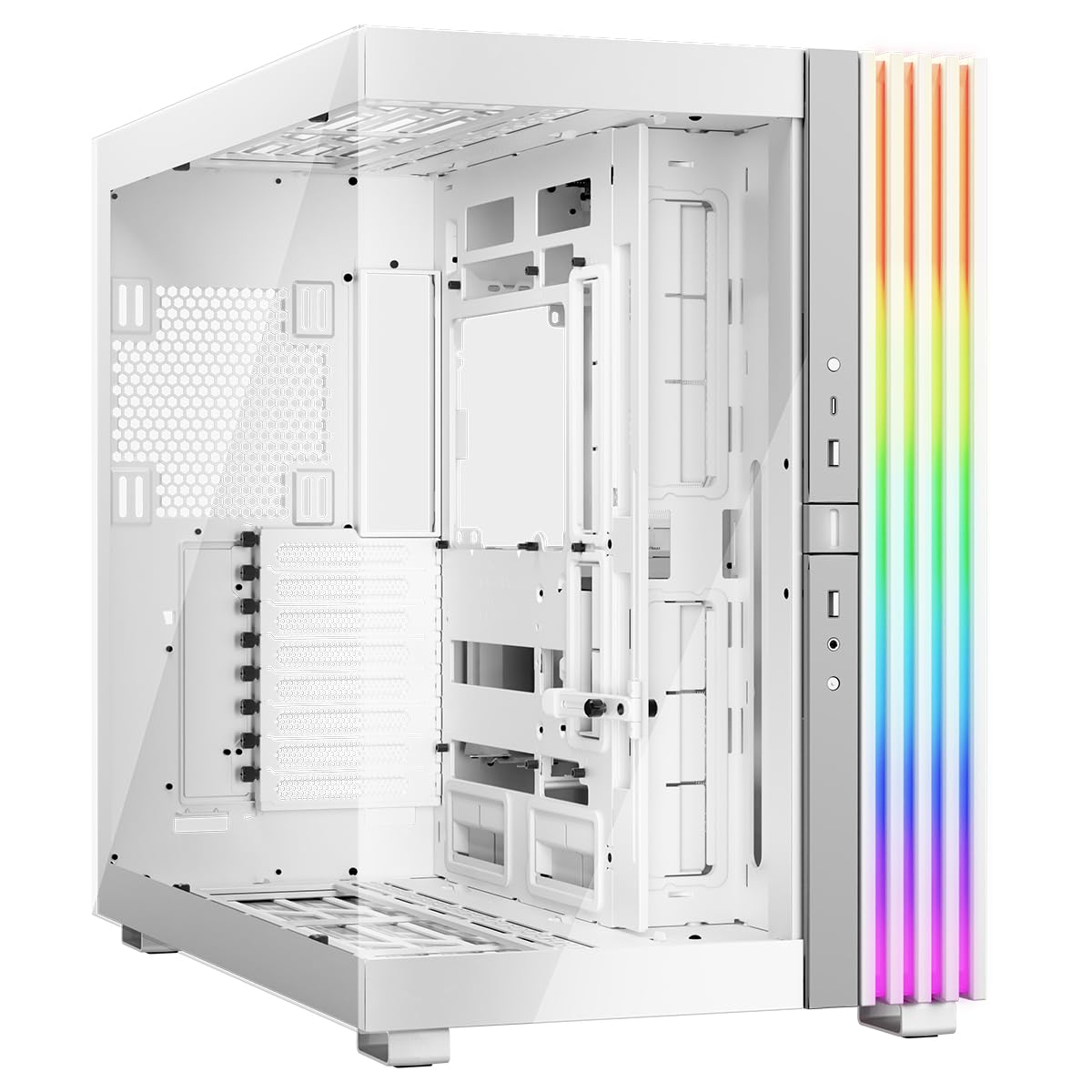
The Light Base 900 DX White is identical to the FX version in chassis structure but ships without pre-installed fans, giving you complete freedom to choose your own cooling components. This is the ideal choice for builders who already own a specific set of fans or plan a custom loop from scratch. The DX still includes the massive ARGB LED strip, dual ARGB and PWM hubs with 12 ports total, and the same invertible and horizontal layout options.
The spacious dual-chamber design accommodates up to ten fans and two 420mm radiators simultaneously, plus a third 360mm radiator on the side for extreme cooling setups. The removable radiator and fan holders in the lid and base simplify installation compared to fixed brackets. E-ATX motherboard support means you can build with high-end workstation or server boards without clearance issues. The flexible GPU holder works in all orientations, both horizontal and vertical.
Back-connect motherboard compatibility covers ASUS BTF, MSI Project Zero, and Gigabyte Project Stealth, enabling a truly cable-free front appearance. The massive 24.8-inch height does take up considerable desk space, but the ability to invert the case in seconds offers placement flexibility that standard towers cannot match. Builders report excellent cable management channels and easy access to all mounting points, making this a favorite for elaborate custom loop projects. The price reflects the fanless design, making it a better value if you already own fans.
Why it’s great
- Full flexibility to choose your own fans
- Invertible and horizontal layout in seconds
- Dual 420mm radiator support with removable brackets
Good to know
- No fans included in the box
- Large footprint needs significant desk space
5. Antec Performance 1 FT

The Antec Performance 1 FT is a full-tower chassis that targets first-time builders with its user-friendly design. The built-in temperature display on the front panel lets you monitor system status at a glance, powered by the Antec iUnity software for PC specs data. Two 4mm tempered glass side panels showcase your build from both sides, and the high airflow mesh front panel ensures unobstructed intake.
It includes four Storm T3 PWM fans pre-installed, delivering solid out-of-the-box cooling without needing an immediate fan upgrade. Cable management is beginner-friendly with rubber-grommeted routing holes and two included cable covers that hide the main power cables behind a clean plate. GPU clearance reaches 370mm, fitting even large RTX 40-series cards with room to spare, and CPU cooler clearance is 165mm for most high-end air towers. The removable top bracket makes radiator installation easy, supporting up to a 360mm AIO in the roof.
Storage capacity is robust at four 2.5-inch SSD mounts and two 3.5-inch HDD bays, though the HDD cages are not tool-free. The brushed aluminum front panel gives a premium look above its tier, and the magnetic dust filters on the front and bottom are easy to remove for cleaning. The front I/O includes a USB-C 10Gbps port alongside two USB-A ports. Builders note that the magnetic front grill can feel slightly loose, but the overall build quality is sturdy and the interior layout accommodates standard builds without complication.
Why it’s great
- Built-in temperature display for system monitoring
- Four PWM fans included for solid stock cooling
- Cable covers and rubber grommets simplify first builds
Good to know
- Magnetic front grill feels slightly loose
- LED panel software is Windows-only
6. NZXT H9 Flow (2025)

The NZXT H9 Flow (2025) brings a dual-chamber layout to the mid-tower market with a seamless wraparound tempered glass design. The dual-chamber architecture isolates the PSU and drives in the rear compartment, leaving the main chamber completely clean for components and cable management. Four fans are pre-installed — three F140Q 140mm fans in the front-right for intake and one F120Q 120mm fan in the rear for exhaust — giving you functional cooling right out of the box.
Fan capacity reaches ten total, with support for up to nine 140mm fans across the top, front-right, and bottom, plus the rear 120mm. Radiator support is impressive for a mid-tower, fitting up to a 420mm radiator in the top and front-right positions simultaneously. Bottom fan mounts provide direct intake for GPU cooling, a feature often missing in standard mid-towers. Cable management is straightforward with extra-wide channels, built-in Velcro straps, and tie-down points that make routing clean even for beginners.
Back-connect motherboard compatibility covers ASUS BTF and MSI Project Zero for a cable-free front appearance. The perforated steel panels on the right side and top provide good airflow without the restriction of solid panels. The main downside is the front panel connector placement — the power button and I/O ports sit at the very bottom of the case, requiring you to crouch down to access them. Stock fans are audibly louder than premium aftermarket options, but the case rewards replacement with Noctua or similar quiet fans. Overall, it is one of the best values for dual-chamber panoramic builds.
Why it’s great
- Dual-chamber layout for clean cable management
- Four fans included for immediate cooling
- Supports up to 420mm radiators in top and front
Good to know
- Front panel I/O located at case bottom
- Stock fans are louder than premium alternatives
7. Lian Li LANCOOL 217

Lian Li’s LANCOOL 217 stands out with real walnut wood accents integrated into a mid-tower steel chassis, offering a blend of natural aesthetics and pure cooling performance. It ships with five fans — two massive 170x30mm front intakes, two 120mm reversed-blade fans on the bottom, and a 140mm rear exhaust. This fan configuration delivers exceptional out-of-the-box airflow without needing any immediate upgrades. The two 170mm front fans can be raised or lowered on the tool-less mounting slide: raise them for CPU-focused cooling or lower them for balanced GPU and CPU air delivery.
The dual PSU mounting options set this case apart from typical mid-towers. You can install the PSU facing front for a traditional layout, or rotate it sideways for easier cable routing and a cleaner main chamber. Back-connect motherboard support is included for ASUS BTF and MSI Project Zero designs, keeping all cables hidden behind the tray. The side-mounted PSU orientation frees up space in the bottom area, allowing the large 170mm front fans to pull air directly across the entire motherboard and GPU area.
Cable management is straightforward with Velcro straps and adjustable rubber grommets that accommodate thick cable bundles. The tempered glass side panel uses secure snap-on attachments rather than thumbscrews, making access tool-free. Two power buttons are included — one on the top and one on the front — giving you flexibility depending on desk placement. The 18.97-inch depth keeps the case compact enough for most desks while still supporting ATX motherboards and large GPUs. Builders consistently praise the build quality, quiet fan operation, and the unique wood-accented design that stands apart from typical metal-and-glass boxes.
Why it’s great
- Five fans included including dual 170mm front intakes
- Real walnut wood accents for a premium look
- Dual PSU mounting options improve cable routing
Good to know
- Fan hub requires SATA power connection
- No GPU support bracket included
8. CORSAIR 4000D RS Frame

The CORSAIR 4000D RS Frame introduces the FRAME modular chassis system, which allows you to swap out the motherboard tray for billet aluminum or upgrade the front I/O panel for more ports — a genuinely future-proofing approach. The InfiniRail fan mounting system uses a steel multi-point rail that lets you slide fans up to 200mm in the front and 140mm in the roof to any position, enabling targeted airflow without fixed mounting holes. Three RS PWM fans come pre-installed in the front, supporting daisy-chainable 4-pin PWM connections and zero RPM mode for silent operation at low loads.
The internal side panel near the motherboard tray is reversible: use it as a cable cover for a clean look, or remove it entirely to mount fans on the side for extra cooling. The 3D Y-pattern airflow front panel uses a perforated steel design that provides a low-restriction path for cool air while maintaining structural rigidity. Radiator support accommodates 360mm in the front and roof, plus a 280mm in the side position, giving you plenty of options for AIO or custom loop setups. Reverse connector motherboard compatibility covers ASUS BTF, Gigabyte Project Stealth, and MSI Project Zero.
Build quality is solid, with a sturdy frame and high-quality panels that resist flex. Cable management benefits from Velcro straps and routing channels, and a GPU leveler is included to prevent sag. The front USB-C port is a known weak point — it can arrive pinched or broken on some units, though Corsair support promptly replaces it under warranty. The 4000D RS Frame represents an evolution over the original 4000D Airflow, fixing many of its predecessor’s limitations while maintaining the same excellent airflow footprint. The matte black finish resists fingerprints well, and magnetic dust filters on the top and front make cleaning straightforward.
Why it’s great
- FRAME modular system allows future I/O and tray upgrades
- InfiniRail mounting for flexible fan positioning
- Includes three RS PWM fans and GPU leveler
Good to know
- Front USB-C cable can arrive damaged on some units
- Tempered glass panel requires careful handling during removal
9. CORSAIR 3500X

The CORSAIR 3500X delivers a wraparound tempered glass aesthetic without the high price tag typically associated with panoramic cases. The front and side glass panels are both removable, giving you easy access to your components without fighting screws or hinges. It supports motherboard form factors from Mini-ITX up to E-ATX, and is fully validated for reverse connection motherboards like ASUS BTF and MSI Project Zero, allowing a cable-free front view at a very accessible cost.
Cooling capacity is substantial despite the glass front panel: up to ten 120mm fans can be mounted across the side, roof, and PSU shroud positions. Radiator support includes 360mm in both the roof and side, plus a 280mm in the side for additional liquid cooling options. The interior is spacious enough for large graphics cards and tall CPU coolers, and the PSU shroud has ample room for cable storage. Builders report that the rigid frame provides good structural stability and that the toolless panel removal is genuinely convenient.
The main trade-off is storage — the 3500X lacks dedicated 3.5-inch drive bays entirely, offering only two SSD slots behind the motherboard tray. This makes it a poor choice for users who need HDD storage, but perfectly adequate for systems relying solely on NVMe and SSD storage. The lack of included fans also means you need to budget for your own cooling solution. Some reviewers note that the blank PSU cover is an aesthetic miss, but the crystal-clear glass and clean interior layout make this a strong entry point for builders who prioritize looks and reverse-connector compatibility over storage expandability.
Why it’s great
- Panoramic tempered glass at an accessible price point
- Reverse connection motherboard validated
- Supports up to 10 fans and dual 360mm radiators
Good to know
- No fans included in the box
- No 3.5-inch HDD support, SSD-only storage
FAQ
What is the advantage of a dual-chamber case over a standard mid-tower?
How do I know if a case supports back-connect motherboards?
Should I buy a case with pre-installed fans or add my own?
What size case do I need for a 360mm AIO cooler?
How important is tempered glass thickness?
Final Thoughts: The Verdict
For most users, the best custom pc cases winner is the Lian Li O11D EVO RGB because it offers unmatched layout flexibility, integrated ARGB lighting, and big cooling support at a price that undercuts many competitors. If you want panoramic glass and value pre-installed fans, grab the NZXT H9 Flow (2025). And for the ultimate thermal-focused build with high build quality and eleven fan slots, nothing beats the HAVN HS 420.

Mo Maruf
I created WellFizz to bridge the gap between vague wellness advice and actionable solutions. My mission is simple: to decode the research and give you practical tools you can actually use.
Beyond the data, I am a passionate traveler. I believe that stepping away from the screen to explore new environments is essential for mental clarity and physical vitality.