Our readers keep the lights on and my smoothie glass nicely filled. As an Amazon Associate, I earn from qualifying purchases.
The leap from a standard pre-built keyboard to a custom gaming keyboard is like trading a rental car for a vehicle you hand-assembled in your garage. Every switch, keycap, and layer of foam directly alters the sound, the feel, and the speed of your response. But the market is flooded with boards that claim “custom” while delivering a fixed, hollow experience. The real test is whether the board rewards your tinkering or just fights you.
I’m Mohammad Maruf — the founder and writer behind WellFizz. I’ve spent countless hours dissecting the switch compatibility, gasket structures, stabilizer quality, and firmware flexibility that separate a true custom platform from a dressed-up pre-built.
This guide isolates the boards that justify the investment in time and money — the best custom gaming keyboards for builders who value acoustic tuning, programmable layers, and hot-swap freedom.
How To Choose The Best Custom Gaming Keyboards
Building a custom gaming keyboard is about selecting a platform that aligns with your priorities — speed, acoustics, layout, or programmability. Before you compare specific models, understand the three pillars that define whether a board will serve you well or frustrate you within a week.
Switch Ecosystem: Hot-Swap vs. Soldered vs. Hall Effect
Hot-swap sockets let you test different switches without soldering. A board that only supports 3-pin switches limits your options compared to one that accepts both 3-pin and 5-pin. Hall Effect magnetic switches (like Gateron Double-Rail or Logitech’s analog switches) offer adjustable actuation from 0.2mm to 3.8mm and rapid trigger mode — a real advantage in competitive FPS titles. If you plan to experiment, prioritize boards with 5-pin hot-swap PCB support.
Acoustic Architecture: Gasket Mount and Foam Layers
The sound of your keyboard (thock, clack, cream, or hollow) is engineered by the internal structure. A gasket mount suspends the plate, creating a softer bounce and deeper sound. Multiple foam layers — Poron, IXPE, PET, EPDM, and silicone bottom pads — absorb ping and reverb. Boards with only bottom silicone will sound hollow compared to those with five-layer sound treatments. Listen to typing test videos and look for explicit foam layer counts in the specifications.
Firmware and Programmability: VIA/QMK vs. Proprietary Software
Open-source firmware like QMK and VIA allows you to remap any key, create multiple layers, and program complex macros through a web-based configurator — no bloatware installation required. Proprietary software (Logitech G HUB, ASUS Armoury Crate) often delivers more polished RGB control but may require account creation and background processes. For pure customization depth, boards with native VIA/QMK support are the gold standard.
Quick Comparison
On smaller screens, swipe sideways to see the full table.
| Model | Category | Best For | Key Spec | Amazon |
|---|---|---|---|---|
| AULA F108 PRO | Mid-Range | Budget-conscious custom with screen | 8000mAh battery, 5-layer foam | Amazon |
| EPOMAKER TH108 PRO | Mid-Range | Full-size with creamy gasket sound | 10000mAh battery, 5-layer padding | Amazon |
| YUNZII C98 | Mid-Range | Aesthetic 96% layout with numpad | 10000mAh battery, MOA keycaps | Amazon |
| Keychron V6 | Mid-Range | Wired full-size VIA/QMK platform | QMK/VIA, hot-swap, silicone pad | Amazon |
| MechLands Feker Alice98 | Mid-Range | Ergonomic Alice layout with numpad | VIA programmable, split spacebar | Amazon |
| Keychron K2 HE | Premium | Magnetic rapid trigger + wood frame | Hall Effect, 0.1mm actuation steps | Amazon |
| Logitech G PRO X TKL Rapid | Premium | Competitive esports rapid trigger | Hall Effect, 35g actuation force | Amazon |
| GravaStar Mercury K1 Pro | Premium | Sci-fi design + aluminum chassis | Aluminum frame, 8000mAh battery | Amazon |
| ASUS ROG Azoth Extreme | Premium | Luxury 75% with OLED + 8K polling | Carbon fiber plate, 1600hr battery | Amazon |
In‑Depth Reviews
1. AULA F108 PRO

The AULA F108 PRO delivers a rare combination for the entry-level custom tier: a full-size layout with an integrated TFT screen, a multifunction knob, and a five-layer foam structure that produces a satisfying creamy thock. The pre-lubed switches and stabilizers mean zero rattling out of the box — a problem common on boards at this price point. The 8000mAh battery supports days of use even with RGB active, and the hot-swap base accepts both 3-pin and 5-pin switches for easy experimentation.
Side-printed PBT keycaps prevent legend wear over time, and the south-facing LEDs eliminate interference when you swap to Cherry-profile caps. The software is Windows-only for screen GIF uploads and macro editing, and some early units had a slightly confusing default screen in Chinese. The wired polling rate hits 1000Hz, while 2.4GHz wireless stays competitive for casual to mid-level gaming.
For a board that costs less than many standalone switch collections, the F108 PRO offers an incredibly complete custom foundation. The side light bars are not individually customizable, and the knob defaults to screen navigation rather than volume — but both are adjustable through the driver. If you want a full-size board that sounds premium without spending premium money, this is the starting point.
Why it’s great
- Five-layer foam padding delivers creamy, hollow-free acoustics
- 8000mAh battery provides extended wireless runtime
- Hot-swap PCB supports 3-pin and 5-pin switches
Good to know
- Software driver is Windows-only for screen/GIF upload
- Side RGB light bars are not individually addressable
- Default screen interface may display Chinese text
2. EPOMAKER TH108 PRO
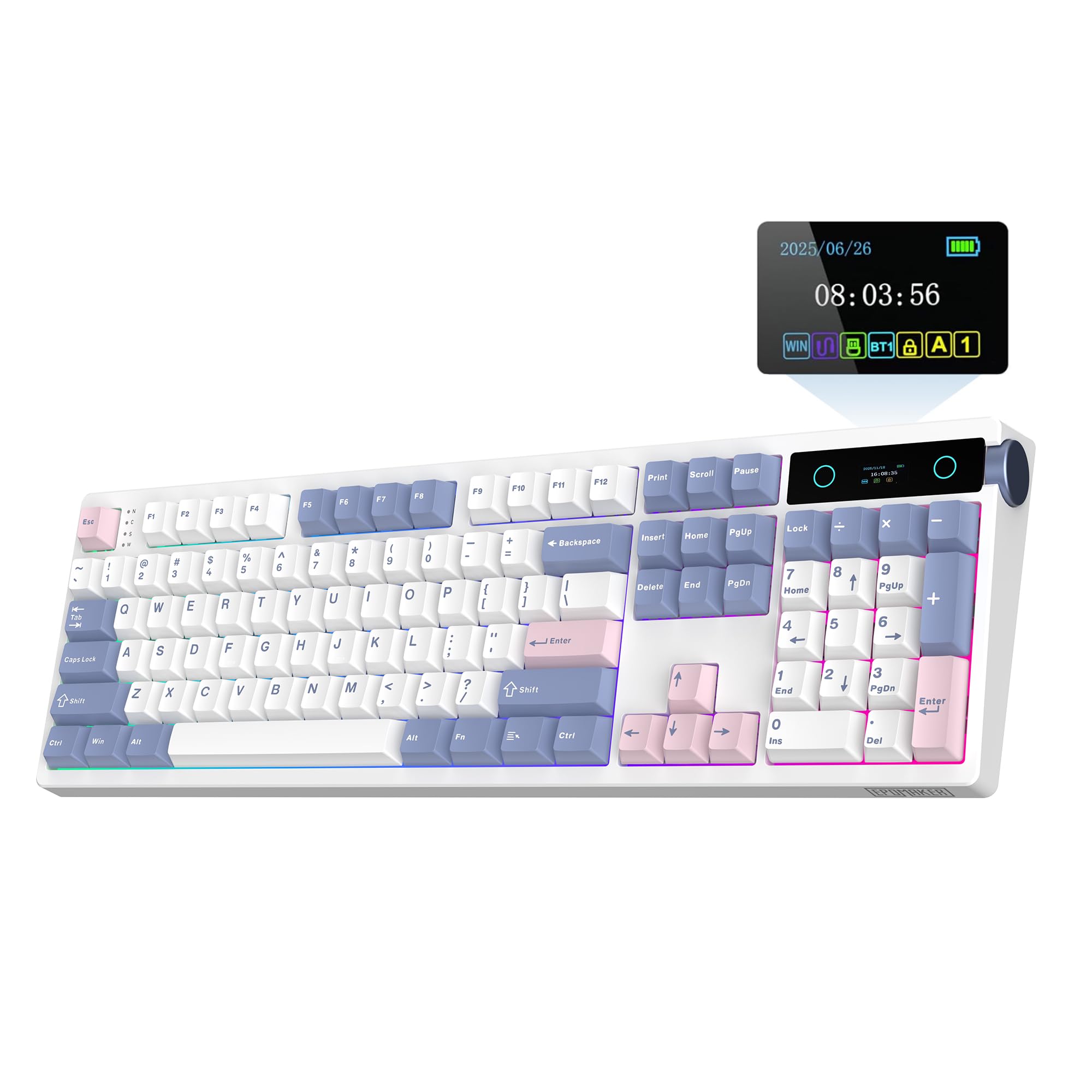
The EPOMAKER TH108 PRO refines the full-size custom formula with a massive 10000mAh battery and a five-layer gasket structure that pushes the acoustic profile toward a deep marbly thock. The Creamy Jade switches come factory-lubed, and the stabilizers are well-greased — large keys sound stable without rattle. The smart screen shows time, battery status, and custom GIFs, and the volume knob functions as a screen controller when combined with the FN key.
The 104-key layout includes double-shot PBT keycaps that resist shine, and the south-facing RGB is bright enough to illuminate dark rooms. The board weighs over 1.1kg, providing a planted, non-slip typing experience. The web-based driver works on both Mac and Windows, allowing key remapping, macro creation, and lighting adjustments. The 2.4GHz wireless mode achieves 1K polling with 2ms latency in wired mode, suitable for most gaming scenarios.
Some users find the volume knob position on the right side awkward depending on desk setup, and the screen remains more of a novelty than a functional necessity. The ABS plastic case, while thick, doesn’t match the premium feel of aluminum boards at higher price tiers. For a full-size board that sounds and feels like it belongs in a much higher bracket, the TH108 PRO is hard to beat.
Why it’s great
- Five-layer gasket padding delivers deep marbly acoustics
- 10000mAh battery offers exceptional wireless endurance
- Web-based driver supports Mac and Windows customization
Good to know
- Volume knob position may feel awkward for some layouts
- ABS plastic case lacks aluminum-level rigidity
- Smart screen is more cosmetic than functional
3. YUNZII C98
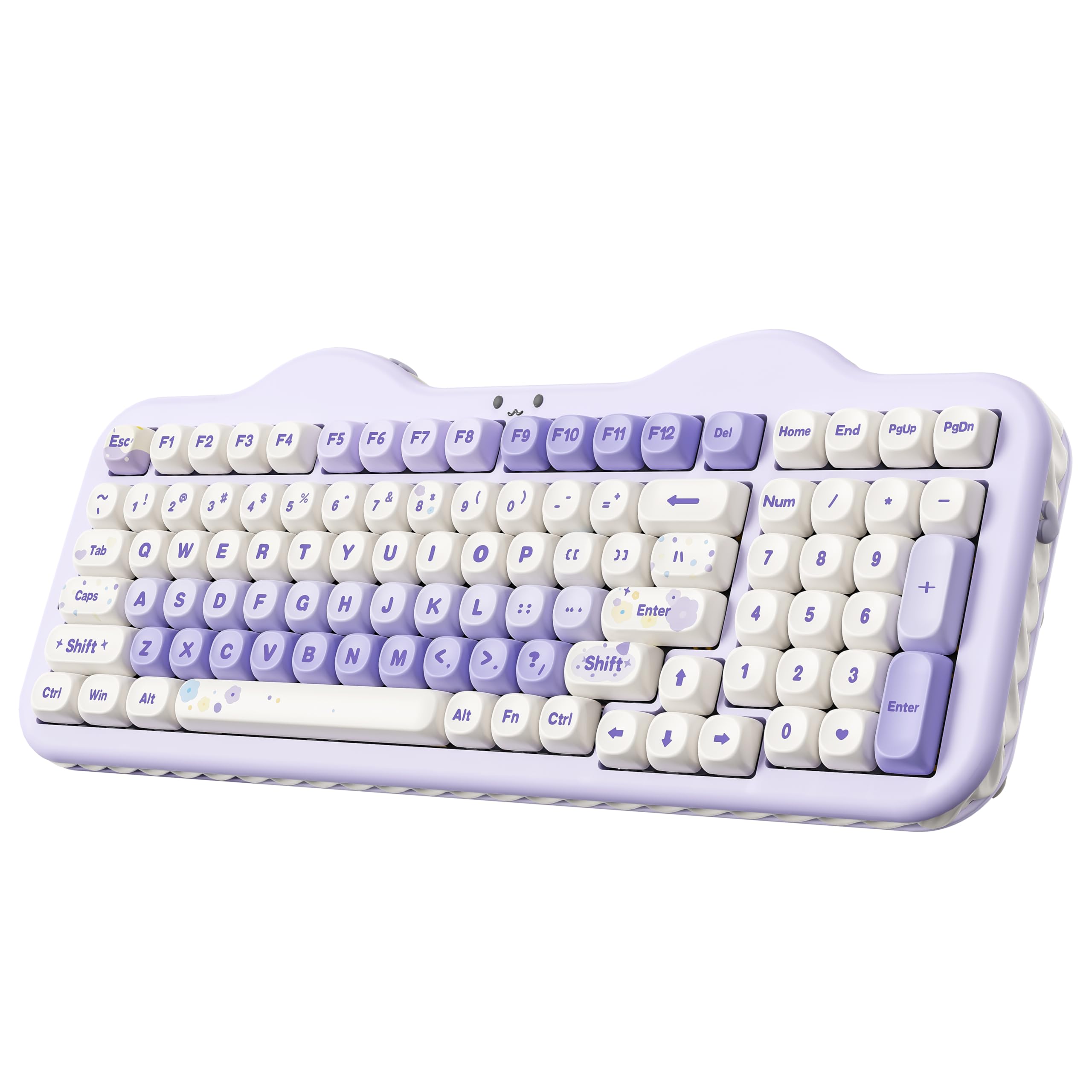
The YUNZII C98 proves that custom gaming keyboards don’t have to look like spaceship control panels. Its cake-themed aesthetic uses dye-sublimated PBT MOA keycaps with colorful legends and a soft, ergonomic profile that encourages natural finger placement. The 96% layout (99 keys) keeps a dedicated numeric keypad while saving desk space compared to a full 104-key board. The gasket mount and multiple sound-absorbing layers eliminate cavity noise, producing a quiet creamy keystroke that won’t dominate voice chat.
The Candy Linear switches are factory-lubed and smooth, and the hot-swap PCB accepts both 3-pin and 5-pin switches. The 10000mAh battery provides weeks of use under normal conditions, and the tri-mode connectivity (BT 5.0, 2.4GHz, USB-C) allows seamless switching between up to five devices. The web-based software supports key remapping, macro assignment, and dynamic RGB customization for both the keys and the 360° side light bar.
The included accessories — a dust cover, extra keycaps, decorative stickers, a matching mouse pad, and a greeting card — make this an exceptional gift option. The MOA keycaps have a unique spherical top that some typists find takes adjustment. Bluetooth reliability can be inconsistent on certain PCs, but the included 2.4GHz dongle provides rock-solid wireless performance for gaming.
Why it’s great
- Unique MOA keycap profile provides comfortable spherical feel
- 10000mAh battery enables long wireless sessions
- Generous accessory bundle includes dust cover and extra keycaps
Good to know
- Bluetooth connectivity can be inconsistent on some systems
- MOA keycaps require a short adjustment period
- Aesthetic design may not suit all gaming setups
4. Keychron V6

The Keychron V6 is the wired workhorse of this list, built for users who prioritize firmware depth over RGB flash. Full QMK and VIA support means every key, including the volume knob, is remappable through a browser-based configurator — no account or install required. The pre-lubed Keychron K Pro Brown switches provide mild tactile feedback suitable for both typing and gaming, and the hot-swap PCB accepts any 3-pin or 5-pin MX-style switch. The silicone acoustic pad and screw-in stabilizers keep large keys stable and rattle-free.
The double-shot PBT keycaps in OSA profile offer a subtle sculpt that reduces finger strain during long coding or writing sessions. The south-facing RGB eliminates interference with Cherry-profile replacement keycaps, and the system toggle on the top edge lets you switch between Mac and Windows layouts instantly, storing two different keymaps simultaneously. The aluminum frame at this price point is absent — it’s a durable plastic case — but the internal silicone pad adds enough weight to prevent sliding.
The wired-only connectivity means no battery anxiety and no wireless latency, which is ideal for competitive gaming or professional use. The non-transparent black case hides dust and wear well. The pre-installed keycaps for the top-right cluster (circle, triangle, square) are odd and nearly useless without remapping. For anyone who wants a no-compromise programmable platform without paying for wireless hardware they don’t need, the V6 delivers.
Why it’s great
- Full QMK/VIA support for deep key remapping and macros
- Screw-in stabilizers eliminate large-key rattle
- Mac/Windows system toggle with dual layout storage
Good to know
- Wired-only — no wireless connectivity option
- Top-right keycaps (circle, triangle, square) are impractical
- Plastic case lacks the premium feel of aluminum
5. MechLands Feker Alice98
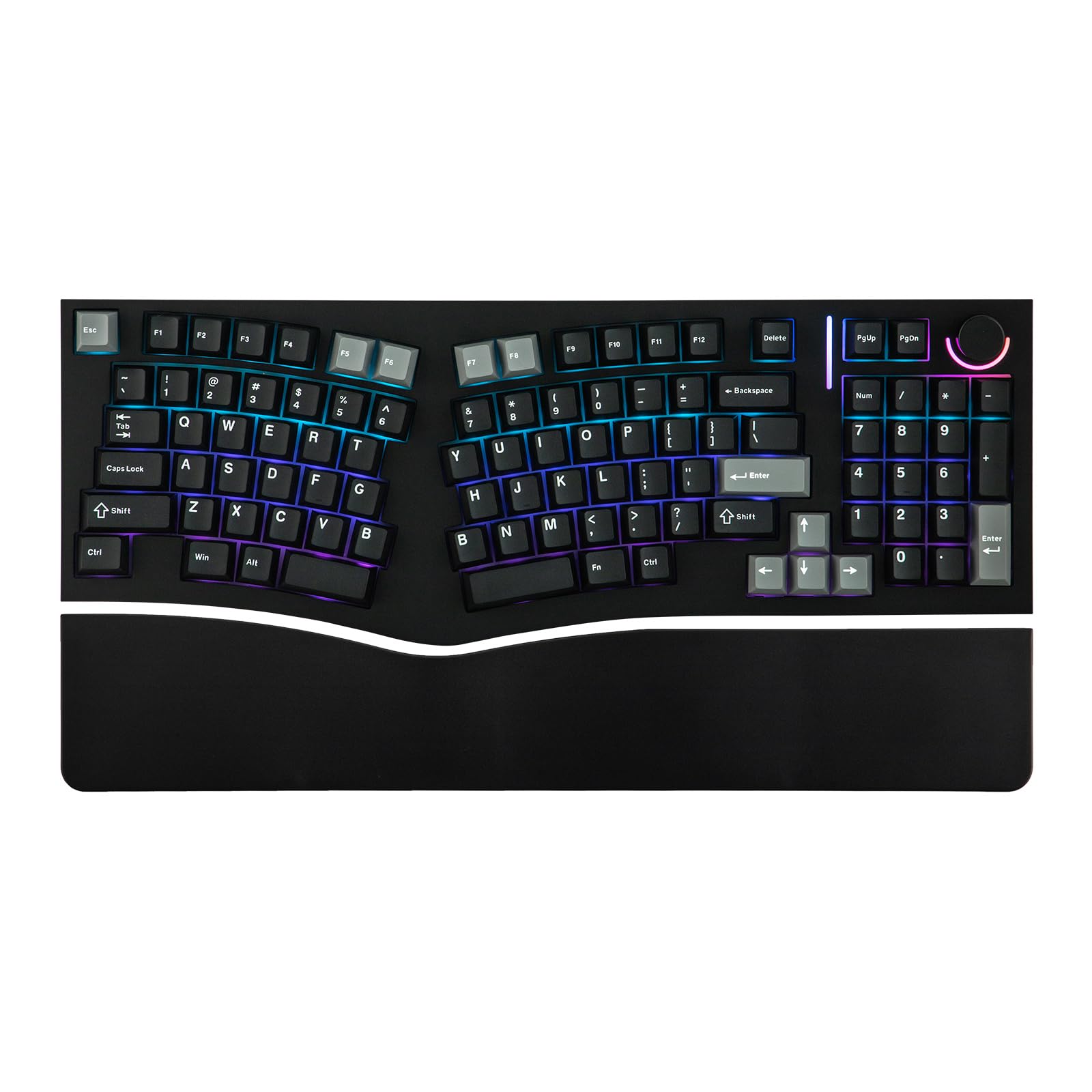
The MechLands Feker Alice98 is one of the few boards that successfully merges an ergonomic Alice layout with a full numeric keypad. The angled key columns align with natural hand rotation, reducing wrist strain during extended typing sessions. The split spacebar accommodates this ergonomic design and can be remapped for custom functions. The five-layer sound treatment — Poron sandwich foam, IXPE switch pad, PET film, EPDM socket foam, and case foam — produces a rich, poppy acoustic profile that users describe as “bubble wrap under a beanie.”
VIA compatibility allows complete key remapping and macro creation through the browser-based configurator. The south-facing RGB offers 21 lighting effects, and the hot-swap PCB supports both 3-pin and 5-pin switches for easy customization. The Cherry profile double-shot PBT keycaps are textured and resistant to shine, and the metal knob controls volume by default. The board is wired-only via USB-C, which keeps latency low and avoids battery concerns.
Build quality reports are mixed. Some units arrive with faulty switches or LED flickering on the knob, though customer service appears responsive in replacing defective parts. The plastic case feels lighter than the aluminum competitors in this price range. For users who suffer from wrist pain and refuse to give up their numpad, the Alice98 offers a unique solution that no other board on this list provides.
Why it’s great
- Alice ergonomic layout reduces wrist strain with numpad retention
- Five-layer sound treatment produces rich, poppy acoustics
- VIA programmable firmware for deep customization
Good to know
- Inconsistent quality control — some units arrive with switch chatter
- Wired-only connectivity limits desk setup flexibility
- Plastic case feels lighter than aluminum alternatives
6. Keychron K2 HE

The Keychron K2 HE moves beyond traditional mechanical switches into the realm of Hall Effect magnetic sensing. The Gateron Double-Rail Magnetic switches allow adjustable actuation from 0.2mm to 3.8mm in 0.1mm increments, and rapid trigger mode registers key releases and re-presses based on real-time travel rather than a fixed reset point. This translates to faster repeated inputs in games like CS2 and Valorant — the kind of advantage that competitive players will immediately notice.
The 75% layout keeps a compact footprint while retaining function row and arrow keys. The aluminum frame with natural rosewood siding gives the board a premium, furniture-grade appearance that stands out from standard black slabs. The PBT keycaps are durable but not shine-through, making legends harder to read in low light unless you use the soft white backlight. The web-based Launcher configurator works on any browser and supports full key remapping, macro creation, and actuation point adjustment — no software install needed.
Multi-mode connectivity includes 2.4GHz wireless, Bluetooth 5.2, and USB-C, with a 1000Hz polling rate across all modes. Battery life runs about two days with heavy use, but wired mode eliminates charging concerns. The hot-swap compatibility is limited to Gateron Double-Rail magnetic switches only, so you cannot swap in traditional mechanical switches. For gamers who want the fastest possible key response without switching to a full analog keyboard, the K2 HE is a compelling mid-premium option.
Why it’s great
- Hall Effect switches with 0.1mm actuation step adjustments
- Rapid trigger mode for instant key re-press in FPS games
- Premium aluminum and rosewood frame with compact 75% layout
Good to know
- Hot-swap limited to Gateron Double-Rail magnetic switches only
- Non-shine-through keycaps are hard to read in dim lighting
- Battery lasts approximately two days with moderate usage
7. Logitech G PRO X TKL Rapid

The Logitech G PRO X TKL Rapid is purpose-built for tournament-level play, and it shows in every design decision. The magnetic analog (Hall Effect) switches actuate at just 35g, making them extremely light and responsive. Rapid Trigger mode allows key re-activation without a full release — a game-changer for counter-strafing in CS2 or building in Fortnite. The tenkeyless format saves desk space for low-sensitivity mouse movements, and the detachable USB-C cable makes transport and cable replacement painless.
Logitech G HUB software provides granular control over actuation points, sensitivity, and KEYCONTROL multi-action combos across multiple layers. The FN key modes let you adjust Rapid Trigger settings on the fly without launching software. The LIGHTSYNC RGB is bright and customizable, with per-key illumination that can sync with in-game events. The build quality is solid, with a compact plastic chassis that feels dense and durable.
The USB-C port is a single point of failure — Logitech chose not to include redundant connectivity, so port damage renders the board unusable. Some users report intermittent disconnection that requires a full PC reboot, not just a cable re-plug. The keys feel slightly less refined than competing Hall Effect boards like the Wooting 80HE, but at a significantly lower entry point. For esports-focused players who want magnetic speed without the Wooting price, this is the board to beat.
Why it’s great
- 35g magnetic analog switches for ultra-light actuation
- Rapid Trigger mode enables instant key re-activation
- On-the-fly actuation adjustment without software
Good to know
- Single USB-C port creates a failure point with no redundancy
- Intermittent disconnection issues reported by some users
- Switch feel is less refined than top-tier Hall Effect competitors
8. GravaStar Mercury K1 Pro

The GravaStar Mercury K1 Pro makes a statement before you even type a word. Its futuristic skeletal aluminum frame is a tank-like construction that weighs substantially more than plastic alternatives, providing a rock-solid typing foundation. The custom Kailh Speedy Mint Linear switches deliver 45gf actuation with a short 1.2mm pre-travel, making keystrokes fast and whisper-quiet. The gasket-mounted FR4 plate with five layers of sound-dampening foam produces a crisp thock-clack hybrid that feels both controlled and satisfying.
The dual independent RGB lighting systems — one for the keys and one for the base chassis — offer 16.8 million colors with 13 modes, and the pudding PBT keycaps with dye-sublimation art maximize light diffusion. The 8000mAh battery supports tri-mode connectivity (wired, Bluetooth, 2.4GHz), and the 2.4GHz mode is responsive for gaming. The programmed control knob handles volume, media, and lighting adjustments. The software supports macros, per-key remapping, and profile storage.
The compact 75% layout with 79 keys requires a learning curve — the Page Down key sits near Enter, and there are no dedicated Home or End keys. The south-facing RGB makes keycap legends harder to read in the dark, especially with the non-transparent keycaps. The visual design is polarizing; it’s either a centerpiece or an eyesore depending on your aesthetic. For users who want a board that doubles as desk art and delivers genuine custom performance, the K1 Pro delivers.
Why it’s great
- Aluminum chassis delivers tank-like build quality
- Dual RGB systems with pudding keycaps for dramatic lighting
- Gasket-mounted FR4 plate with five-layer foam for crisp acoustics
Good to know
- Compact layout moves navigation keys — adjustment period required
- South-facing RGB can dim keycap legend readability
- Polarizing sci-fi design may not fit every setup
9. ASUS ROG Azoth Extreme

The ASUS ROG Azoth Extreme sits at the top of this list for a reason: it’s a showcase of what’s possible when budget is not a constraint. The solid aluminum-alloy chassis is machined through a 12-step CNC process and paired with a carbon fiber positioning plate that provides crisp, controlled keystrokes without the ping of metal. The three-layer dampening system — dual PORON foams and a silicone pad — absorbs every vibration, producing a refined, deep sound profile. The pre-lubed ROG NX Snow linear switches are among the smoothest stock switches available, rivaling custom lubed builds.
The 1.47-inch OLED touchscreen is functional, not just decorative — it displays battery status, system stats, and custom animations, and interacts with the multifunction knob for volume, lighting, and mode switching. The ROG Polling Rate Booster achieves 8K Hz in both wired and wireless modes, reducing input lag to imperceptible levels. Speed Tap Mode enables instant directional changes in FPS titles, similar to Hall Effect rapid trigger implementations. Battery life reaches up to 1600 hours with RGB and OLED turned off, making this one of the longest-lasting wireless gaming keyboards available.
The included silicone wrist rest with aluminum base, ROG Omni Receiver for mouse pairing, and magnetic adjustable feet complete the premium package. The Armoury Crate software is notoriously slow and finicky, and some users have experienced bricking during firmware updates. The price is very high, placing it firmly in luxury territory. For the gamer or enthusiast who wants the absolute best build quality, feature set, and typing feel without compromise, the Azoth Extreme delivers — with the caveat that the software experience doesn’t match the hardware excellence.
Why it’s great
- Carbon fiber plate and three-layer dampening for premium acoustics
- 8K Hz polling rate in wired and wireless modes
- Up to 1600 hours battery life with RGB and OLED disabled
Good to know
- Armoury Crate software is slow and has caused bricking issues
- Gasket adjustment range is subtle — not a dramatic flex
- Premium cost places it firmly in luxury tier territory
FAQ
What does gasket mount do for a custom gaming keyboard?
Can I use Cherry MX switches in a hot-swappable keyboard?
Is a wired or wireless custom keyboard better for gaming?
What is the advantage of PBT keycaps over ABS?
How many foam layers do I need for a good acoustic profile?
Final Thoughts: The Verdict
For most users, the best custom gaming keyboards winner is the AULA F108 PRO because it delivers a full-size layout, a five-layer acoustic structure, and a TFT screen at a price that leaves room for switch and keycap upgrades. If you want the speed advantage of Hall Effect switches with rapid trigger, grab the Keychron K2 HE for its adjustable 0.1mm actuation steps and premium wood-frame build. And for uncompromising luxury with a carbon fiber plate, 8K polling, and an OLED touchscreen, nothing beats the ASUS ROG Azoth Extreme.

Mo Maruf
I created WellFizz to bridge the gap between vague wellness advice and actionable solutions. My mission is simple: to decode the research and give you practical tools you can actually use.
Beyond the data, I am a passionate traveler. I believe that stepping away from the screen to explore new environments is essential for mental clarity and physical vitality.