Our readers keep the lights on and my smoothie glass nicely filled. As an Amazon Associate, I earn from qualifying purchases.
Every frame matters. You’ve felt it — that split-second hitch right when a boss telegraphs an attack, or the audible hum of fans spinning up under a heavy load. A custom gaming computer is supposed to erase those distractions, not introduce new ones. The problem is that the prebuilt market is flooded with configurations that look impressive on paper but ship with mismatched memory, underpowered power supplies, or cooling systems that can’t keep up. This guide cuts through the spec sheet noise to find the builds that deliver consistent, reliable performance where it counts.
I’m Mohammad Maruf — the founder and writer behind WellFizz. I’ve spent countless hours dissecting component stacks, analyzing thermal benchmarks, and cross-referencing real-world performance data to separate genuine performance from flashy marketing.
From 1080p competitive shooters to 4K AAA blockbusters, finding the right custom gaming computer is about balancing GPU architecture with CPU generation, memory speed, and cooling capacity — all within a chassis that breathes properly.
How To Choose The Best Custom Gaming Computer
Selecting a prebuilt gaming rig is different from building your own because you’re trusting an integrator to make component choices that work together. The wrong pairing — a high-end GPU with a low-wattage PSU or slow memory — can kneecap performance. Focus on four pillars: the GPU generation, the CPU platform, the memory standard, and the thermal solution. A balanced build ensures you get sustained frame rates without thermal throttling or stability issues.
GPU Generation and VRAM Capacity
The graphics card is the heart of any gaming system. The NVIDIA RTX 50-series, particularly the 5060 Ti with 8GB, the 5070 with 12GB, and the 5070 Ti with 16GB, offers massive generational leaps through DLSS 4 Multi Frame Generation and improved ray tracing cores. For 1440p gaming, 12GB of VRAM is the sweet spot. For 4K, 16GB is becoming necessary to prevent texture pop-in. Brands may vary in the final build, but the chipset model determines the floor of your performance.
CPU Platform and Core Architecture
AMD’s Ryzen 7000 and 9000 series, alongside Intel’s Core Ultra and 14th-gen processors, define the processing landscape. The Ryzen 7 9700X and Core i7-14700F deliver excellent multi-threaded performance for gaming and streaming simultaneously. The Ryzen 7 9850X3D, with its extra 3D V-Cache, provides a measurable FPS advantage in simulation and strategy games. Ensure the motherboard chipset (B650, B760, Z790) supports the CPU’s full boost clock without power limits throttling the chip.
Memory (RAM) Standard: DDR4 vs DDR5
DDR5 RAM at 5600MHz or 6000MHz offers significantly higher bandwidth than DDR4 at 3200MHz. For modern AAA titles and multitasking, 32GB of DDR5 is the standard recommendation. Some budget-friendly builds still use 16GB of DDR4, which is workable for older games but will bottleneck newer, more demanding titles. Higher memory speed reduces frame-time variance, resulting in smoother gameplay. Always check whether the RAM is running in dual-channel mode; single-channel configurations can cost you up to 20% of your CPU performance in gaming.
Thermal Management and Chassis Airflow
A powerful GPU and CPU generate significant heat. Builds with 240mm or 360mm liquid coolers (AIOs) handle sustained loads much better than low-profile air coolers. Case design matters too — a fish-tank style chassis with unrestricted intake and exhaust fans maintains lower ambient temperatures than a closed, restricted front panel. Look for at least three front intake fans and a rear exhaust, or a liquid cooler mounted on the top or front. Proper thermal management ensures your system maintains boost clocks during long gaming sessions.
Quick Comparison
On smaller screens, swipe sideways to see the full table.
| Model | Category | Best For | Key Spec | Amazon |
|---|---|---|---|---|
| Alienware Aurora ACT1250 | Premium | 4K Ultra Gaming and Content Creation | RTX 5080 16GB + Core Ultra 9 285 | Amazon |
| Skytech O11 Vision | Premium | 1440p Ultra with High Refresh | Ryzen 7 9850X3D + RTX 5070 Ti 16GB | Amazon |
| Thermaltake LCGS View i570-170 | Premium | AAA Gaming and Multitasking | i9-14900KF + RTX 5070 + 32GB DDR5 | Amazon |
| ASUS ROG G700 | Premium | Tool-Less Upgradability | Core Ultra 7 265KF + RTX 5070 | Amazon |
| The Horizon RGB I9 | Premium | VR and Simulation Gaming | Core i9 + RTX 5070 + 32GB + 2TB Storage | Amazon |
| MSI Codex Z2 | Premium | Smooth 1440p Gaming | Ryzen 7 8700F + RTX 5070 + 32GB DDR5 | Amazon |
| CyberPowerPC Gamer Xtreme | Mid-Range | 1080p High and Entry 1440p | i7-14700F + RTX 5060 Ti 8GB | Amazon |
| KOTIN G60B | Mid-Range | 4K Ready with Side Display | Ryzen 7 9700X + RTX 5070 + 32GB DDR5 | Amazon |
| iBUYPOWER Element | Mid-Range | Streaming and Gaming | Ryzen 9 7900X + RTX 5070 12GB | Amazon |
| YAWYORE RTX 5060 | Mid-Range | Value 1440p Gaming | Ryzen 7 5700X + RTX 5060 + 32GB DDR4 | Amazon |
| AEXPXO 5700X | Mid-Range | Budget High-FPS Gaming | Ryzen 7 5700X + RTX 5060 8GB GDDR7 | Amazon |
| ViprTech Reaper 1.0 | Mid-Range | Streaming-Ready Entry Build | Ryzen 7 8700F + RTX 5060 Ti + 16GB DDR5 | Amazon |
| SKYESEV Ryzen 5 5600 | Budget | Entry-Level 1080p Gaming | Ryzen 5 5600 + RTX 3050 + 32GB DDR4 | Amazon |
In‑Depth Reviews
1. Alienware Aurora Gaming Desktop ACT1250

Alienware’s latest Aurora chassis brings a refined basalt black finish and a 240mm liquid cooler that keeps the Core Ultra 9 285 processor running at its 5.6 GHz boost clock without thermal throttling. The RTX 5080 with 16GB of GDDR7 memory is a beast — it handles 4K ray-traced titles at max settings with headroom to spare. The 1000W Platinum-rated PSU ensures stable power delivery even under sustained loads, and the customizable AlienFX stadium lighting adds a premium aesthetic without being overly aggressive.
The motherboard supports DDR5 RAM, and the 32GB included is configured in dual-channel, which is critical for modern game engines that are sensitive to memory bandwidth. One user reported a world-record 3D Mark score after a modest RAM upgrade, which speaks to the silicon quality in this unit. The case itself is surprisingly compact for its capability, with a clear side panel that showcases the internal components. The Dell 1-year onsite service policy adds genuine peace of mind for a high-investment purchase.
I recommend this build for anyone eyeing 4K gaming or VR with no compromises. The RTX 5080 alone justifies the price point when compared to sourcing individual components at retail. While some users experienced early motherboard failures, the onsite service and Dell’s support process generally resolve these quickly. If you want the most future-proof GPU on the market without waiting for stock, this is the configuration to target.
Why it’s great
- RTX 5080 16GB delivers unmatched 4K ray tracing performance
- 240mm liquid cooling keeps CPU temperatures low during extended sessions
- 1-year onsite service provides real support infrastructure
Good to know
- Some units require motherboard replacement for boot failures
- Proprietary case components limit aftermarket upgrades
2. Skytech Gaming O11 Vision Gaming PC

The Lian Li PC-O11 Vision case is an iconic chassis for a reason — its dual-chamber layout separates the PSU and cable management from the main component zone, allowing unrestricted airflow. Skytech pairs this with a Ryzen 7 9850X3D processor, which uses AMD’s 3D V-Cache technology to deliver massive L3 cache, significantly boosting frame rates in simulation games like Microsoft Flight Simulator and Factorio. The 360mm AIO liquid cooler keeps the CPU well below its thermal limit even during extended sessions on complex titles.
The RTX 5070 Ti with 16GB of VRAM is a sweet spot for 1440p Ultra gaming, providing enough memory headroom for texture-heavy mods and high-resolution texture packs. The 850W Gold ATX 3.0 PSU supports the transient power spikes of the GPU without ripple. Skytech builds these in the USA and tests each unit before shipping. The included keyboard and mouse are serviceable, but most buyers will use their own peripherals. The system comes without bloatware, which is rare in this segment.
I recommend this build for gamers who prioritize 1440p high-refresh gaming with the flexibility to handle 4K when needed. The 9850X3D is particularly beneficial for CPU-bound esports titles where every frame counts. The Lian Li case also makes future upgrades straightforward, with plenty of room for larger GPUs and additional storage. If you’re building a dedicated flight sim or racing rig, this configuration is hard to beat.
Why it’s great
- 3D V-Cache CPU offers massive gains in simulation and strategy games
- 16GB VRAM prevents VRAM limitations in 1440p and 4K textures
- Assembled in the USA with thorough testing
Good to know
- High price point limits budget accessibility
- Included keyboard and mouse are basic quality
3. Thermaltake LCGS View i570-170 Gaming Desktop

Thermaltake’s LCGS division uses its own components, which means you get a genuine Thermaltake 240mm closed-loop liquid cooler, ToughRAM RGB memory, and a chassis designed specifically for airflow. The Core i9-14900KF drives 20 cores (8 P-cores and 16 E-cores) to a max turbo of 6.0 GHz, making it one of the fastest consumer CPUs available. The RTX 5070 with 12GB of VRAM handles 1440p Ultra with ray tracing enabled, and the ToughRAM runs at 6000MT/s in dual-channel — a configuration that avoids the memory bandwidth bottleneck common in cheaper builds.
Users consistently report that the system runs whisper quiet under normal loads, with the liquid cooler managing fan speeds efficiently. The case includes a ventilated PSU shroud and a side-mount radiator bracket that keeps internal cabling clean. The system has no bloatware, a notable advantage over some competitors. The included Windows 11 Home install did require disabling some built-in telemetry for privacy-conscious users, but that’s a standard software configuration step.
I recommend this build for gamers who value acoustics and build quality. The i9-14900KF provides excellent single-threaded performance, which translates to higher FPS in games that aren’t fully GPU-bound. The 32GB of DDR5 at 6000MT/s ensures smooth multitasking during streaming or content creation. If you want a system that feels premium without the Dell or Alienware ecosystem lock-in, this Thermaltake build is a solid contender.
Why it’s great
- Genuine Thermaltake components ensure build consistency
- Very quiet operation even under gaming load
- No bloatware pre-installed on Windows 11
Good to know
- Minor fan noise reported under extreme load
- Intel 14th-gen requires good cooling for sustained multi-thread workloads
4. ASUS ROG G700 (2025) Gaming Desktop PC

The ASUS ROG G700 is designed with upgradability in mind — tool-less access panels let you swap out the GPU, RAM, and storage without reaching for a screwdriver. The 58L dual-glass chassis accommodates triple-slot GPUs, so you can install the next generation of graphics cards without case modification. The Core Ultra 7 265KF processor from Intel’s latest architecture delivers competitive single-threaded performance, and the 240mm liquid cooler keeps temperatures consistent. The RTX 5070 handles 1440p gaming with room to push into 4K with DLSS enabled.
Connectivity is robust: 2.5Gbps Ethernet, WiFi 6, and a front-panel USB-C port provide fast networking. Dolby Atmos audio and AI noise cancellation enhance both gaming and voice communication. The ROG Slash design with Aura Sync RGB lighting allows customization via the Armory Crate software. The system arrives with a gaming keyboard and mouse, which are decent for immediate use. BIOS access through the tool-less panel is straightforward for those who want to enable XMP profiles.
I recommend this build for users who plan to upgrade individual components over time. The chassis and motherboard support standard ATX components, which is rare in prebuilt systems. The dual-glass side panels display the internal build nicely. If longevity and future-proofing matter as much as immediate performance, the G700’s expandability gives it a distinct advantage. The intuitive tool-less design makes it accessible even for first-time upgraders.
Why it’s great
- Tool-less chassis allows easy component upgrades
- 2.5Gbps Ethernet and WiFi 6 for low-latency networking
- Dolby Atmos audio enhances immersion
Good to know
- Micro ATX motherboard limits expansion slots
- DDR5 memory speed depends on XMP profile configuration
5. The Horizon RGB I9 RTX Gaming Desktop
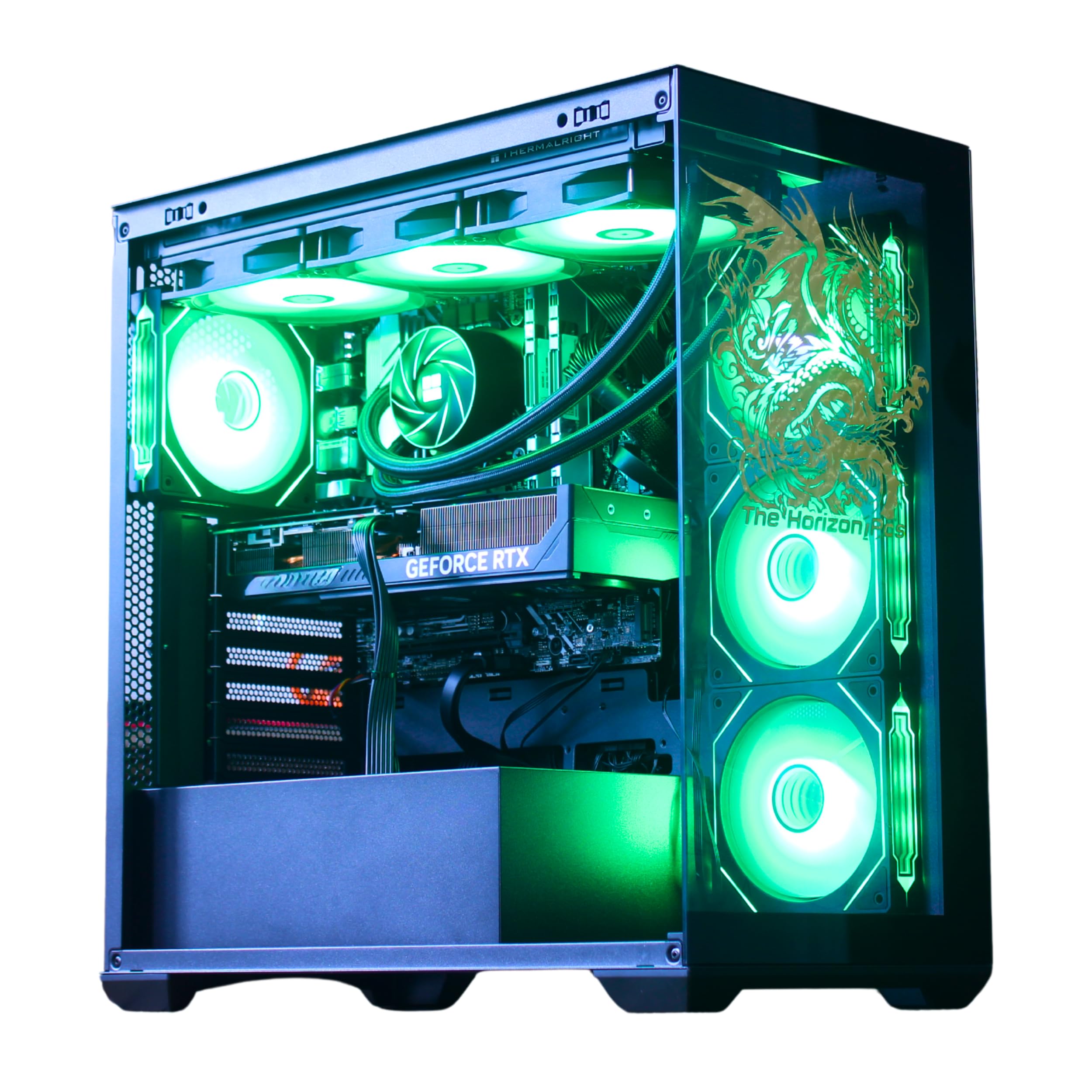
The Horizon system goes all-in on thermal management with a 360mm liquid cooler and a total of 11 fans — eight dedicated to chassis airflow, three on the GPU, and one on the PSU. This level of airflow keeps the Core i9 processor at its unlocked overclock speeds without thermal throttling, even during extended VR sessions. The RTX 5070 with 12GB of VRAM supports DLSS 4 for high-fidelity virtual reality headsets. The system comes with 32GB of RAM and a 2TB storage configuration (1TB NVMe plus 1TB HDD), which provides plenty of space for modern game libraries.
The dragon front panel and programmable ARGB lighting give the case a distinctive look, with the LED effects controllable via a top-mounted button. Connectivity includes a USB-C 3.2 port and up to 1.2GB/s WiFi, ideal for VR streaming that demands high bandwidth. Users report that the system is whisper silent even under load, which is impressive given the high airflow configuration. The seller provides handwritten notes and responsive customer support, which builds trust for a large purchase.
I recommend this build for VR enthusiasts and sim racers who need consistent frame rates in demanding VR titles. The 360mm cooler ensures the CPU won’t throttle in the middle of a race or flight. The dual-drive storage setup provides fast boot times alongside bulk game storage. If you want maximum cooling headroom and a visually striking case, this Horizon build delivers on both fronts.
Why it’s great
- 360mm AIO cooler prevents CPU throttling in VR applications
- Very quiet operation despite 11 fans
- Dual storage drives for speed and capacity
Good to know
- Case requires ample desk space for airflow
- Windows 11 key may need activation follow-up on some units
6. MSI Codex Z2 Gaming Desktop

MSI’s Codex Z2 combines a Ryzen 7 8700F (8 cores, 16 threads) with an RTX 5070, providing a balanced platform for 1440p gaming at high refresh rates. The system includes 32GB of DDR5 memory, which is sufficient for modern AAA titles and background applications. The 2TB NVMe SSD is a standout feature — double the storage of most competitors, meaning fewer uninstall/reinstall cycles. The four system fans (three front intake, one rear exhaust) maintain positive air pressure, which reduces dust buildup inside the chassis.
The MSI Center software provides easy RGB lighting customization, with a dedicated LED button on the case for quick cycling through presets. The system supports connectivity options including multiple USB ports and an Ethernet jack for stable online play. Users note that the system runs smoothly with modern titles, though the stock air cooler can become audible under sustained load. The SSD failure rate appears slightly elevated in early reviews, with MSI support handling RMAs within a reasonable timeframe.
I recommend this build for gamers who value storage capacity and want a reliable 1440p experience without overspending on unnecessary luxuries. The 2TB drive means you can install a dozen large titles without worrying about space. The Ryzen 7 8700F provides excellent price-to-performance, and the RTX 5070 supports ray tracing and DLSS 4. Registering the product online extends the warranty, which is worth the slight effort.
Why it’s great
- 2TB NVMe SSD provides generous game storage
- DDR5 memory offers high bandwidth for multitasking
- Positive air pressure chassis reduces dust ingress
Good to know
- Stock air cooler can be loud under full load
- Some units require SSD replacement early in lifecycle
7. CyberPowerPC Gamer Xtreme

CyberPowerPC’s Gamer Xtreme lineup targets the sweet spot for 1080p high-refresh gaming. The Core i7-14700F with 20 cores provides excellent multi-threaded performance, while the RTX 5060 Ti with 8GB of GDDR7 memory handles modern titles at high settings with smooth frame rates. The 16GB of DDR5 memory is sufficient for gaming and general multitasking, though power users may want to upgrade to 32GB. The 1TB PCIe 4.0 NVMe SSD offers fast load times and boot speeds.
The white chassis with tempered glass side panel and customizable RGB lighting gives the system a clean aesthetic. CyberPowerPC includes a keyboard and mouse, making it a true out-of-the-box solution. The system comes with a 1-year parts and labor warranty plus free lifetime tech support, which adds value for buyers who are less comfortable troubleshooting issues. Some users noted that the HDD LED and reset switch wires were swapped from the factory, but this is an easy correction with a quick case rewire.
I recommend this build for gamers moving from console to PC or upgrading from an older system. The i7-14700F offers longevity with its 20-core configuration, and the RTX 5060 Ti is well-matched for 1080p and entry-level 1440p. The included warranty and support make it a safe choice for less experienced builders. The build quality is solid, and the system handles esports titles at high frame rates without issue.
Why it’s great
- 20-core i7 handles multitasking and streaming smoothly
- Free lifetime tech support included
- White case with tempered glass offers a premium look
Good to know
- 16GB RAM may need upgrade for heavy multitasking
- Minor wiring swap issues reported from factory
8. KOTIN G60B Prebuilt Gaming PC

KOTIN’s G60B features an 11.3-inch smart display that shows real-time system metrics such as CPU temperature, clock speed, weather, and time. This panel eliminates the need for secondary monitoring software during gaming sessions. Under the hood, the Ryzen 7 9700X boosts up to 5.5GHz and is paired with the RTX 5070 12GB for 1440p and 4K gaming. The 360mm liquid cooler uses a digital temperature display on the pump, adding another layer of at-a-glance monitoring. The 32GB of DDR5 6000MHz memory provides high bandwidth for both gaming and creator workloads.
The system is assembled in California and ships ready to play — just remove the internal protective foam, connect peripherals, and boot up. The 850W 80 Plus Gold power supply provides stable power with plenty of headroom for future upgrades. WiFi 7 compatibility ensures cutting-edge wireless performance. Some users report that the smart display can have intermittent functionality issues, but the overall build quality is solid for the price tier. The side panel design shows off the ARGB fans clearly.
I recommend this build for gamers who want a conversation-piece PC with functional monitoring. The 360mm cooler ensures the CPU stays cool even in demanding 4K titles. The DDR5 memory at 6000MHz provides a measurable performance advantage in memory-sensitive games. The smart display is genuinely useful for monitoring temps during overclocking. If you appreciate unique aesthetics alongside strong specs, the G60B delivers both.
Why it’s great
- 11.3-inch display offers at-a-glance system monitoring
- 360mm liquid cooler handles high CPU loads effectively
- WiFi 7 ready for future wireless standards
Good to know
- Smart display can have software glitches on some units
- Some users reported boot issues requiring return
9. iBUYPOWER Element Gaming PC

iBUYPOWER’s Element series pairs the Ryzen 9 7900X (12 cores, 24 threads) with an RTX 5070 12GB, creating a setup built for simultaneous gaming and streaming. The 12-core CPU offloads encoding tasks efficiently, reducing frame drops during live broadcasts. The 32GB of DDR5 RGB memory at 5200MHz provides enough bandwidth for the CPU to feed the GPU consistently. The system includes an iBUYPOWER gaming keyboard and mouse, though they are basic in quality — most users will want to upgrade these quickly.
The white tempered glass case with 16-color RGB lighting creates a clean aesthetic. The system is advertised as AI workstation ready, and the CPU’s 12-core configuration does handle machine learning tasks competently. Connectivity includes six USB 3.1 ports and a dedicated Ethernet port for stable network access. Some users noted minor cosmetic issues such as missing GPU shipping foam, but the system generally arrives functional. The lack of bloatware is appreciated, though the Windows 11 installation requires standard privacy adjustments.
I recommend this build for streamers and content creators who need strong multi-core performance alongside excellent gaming capability. The Ryzen 9 7900X excels in video encoding and multitasking, and the RTX 5070 handles GPU-intensive tasks. The RGB lighting is fully customizable via the included case controller. If you need a single system for gaming, streaming, and light creative work, this iBUYPOWER configuration delivers balanced performance across all three workloads.
Why it’s great
- 12-core CPU handles streaming and gaming simultaneously
- No bloatware pre-installed on Windows 11
- White chassis offers aesthetic versatility
Good to know
- Included keyboard and mouse are basic quality
- Motherboard has only two RAM slots for future upgrades
10. YAWYORE Gaming PC (RTX 5060)

YAWYORE’s build uses a genuine MSI B550M-A PRO motherboard, which provides reliable power delivery for the Ryzen 7 5700X. This processor, paired with the RTX 5060 8GB GDDR7, offers strong 1080p and entry-level 1440p gaming performance. The 650W 80 Plus Bronze power supply provides adequate power with a stable voltage rail, crucial for the RTX 5060’s transient demands. The remote control for ARGB fans and lighting adds convenience, letting users change color schemes without reaching behind the case.
The 32GB of DDR4 3200MHz memory in dual-channel configuration provides solid bandwidth, and the 1TB NVMe SSD offers fast load times. The case features an aquarium-like glass design with built-in fans that are quiet under normal operation. Connectivity includes built-in WiFi and Bluetooth. Users consistently praise the price-to-performance ratio, with many reporting smooth gameplay on high settings for titles like Red Dead Redemption 2. The included shock-absorbing foam for shipping protects the internal components during transit.
I recommend this build for budget-conscious gamers who want a reliable 1080p experience with the ability to handle some 1440p titles. The MSI motherboard is a trusted component, and the 650W PSU provides upgrade headroom. The remote-controlled RGB lighting is a nice touch. If you want maximum performance per dollar without sacrificing a quality motherboard and power supply, this YAWYORE configuration is a compelling option.
Why it’s great
- MSI B550 motherboard offers reliable power delivery
- Remote-controlled ARGB fans simplify customization
- Excellent price-to-performance ratio
Good to know
- DDR4 memory is the previous standard
- Case requires removal of shipping foam before use
11. AEXPXO Gaming PC Desktop (5700X)
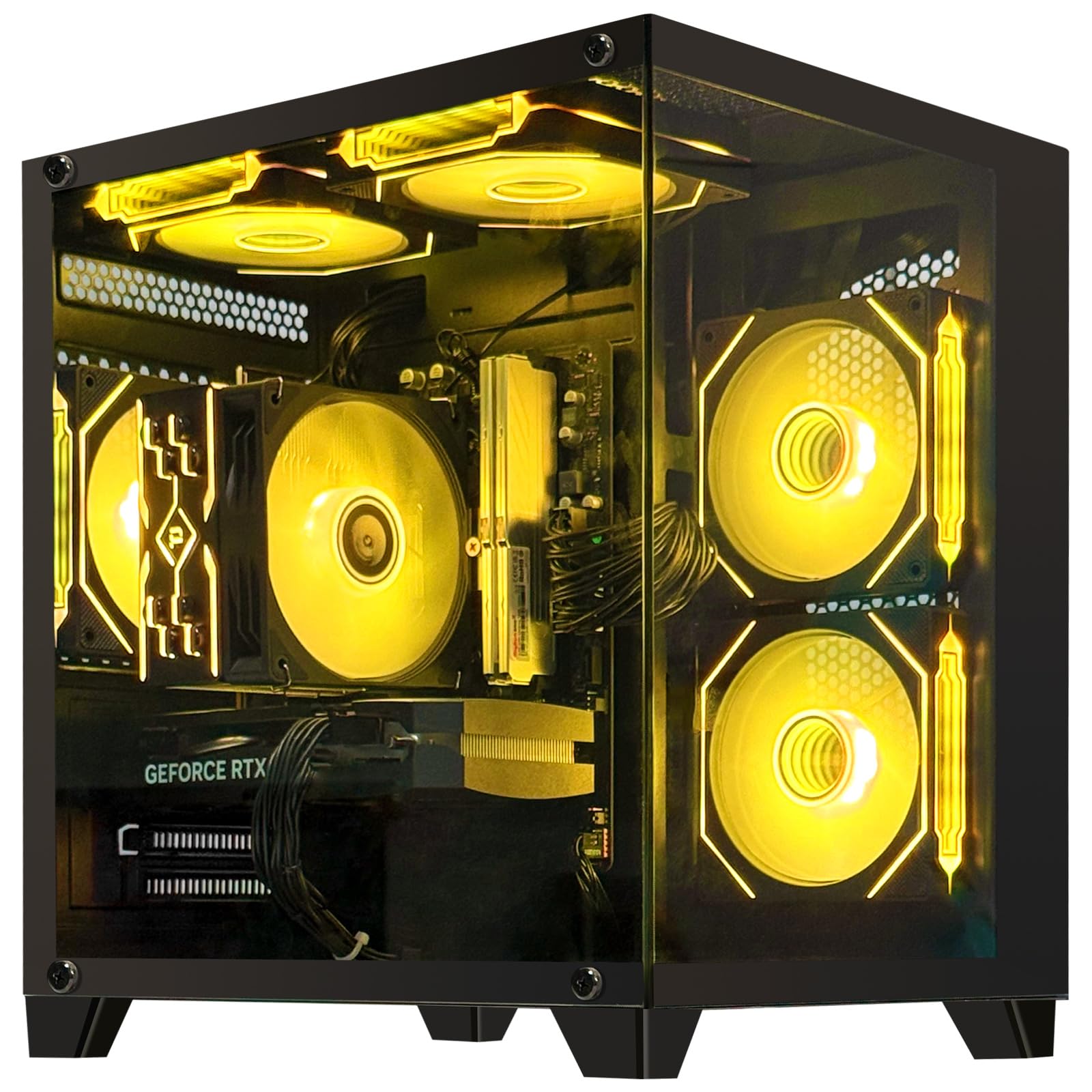
AEXPXO delivers a straightforward build with the Ryzen 7 5700X and the newer RTX 5060 featuring GDDR7 memory. The 8GB GDDR7 frame buffer and support for DLSS 4 provide efficient upscaling and ray tracing performance. The system includes 32GB of DDR4 3200MHz memory, which is ample for modern games, and a 1TB NVMe SSD for quick storage. The ARGB cooling system uses copper pipe technology and a supplementary fan to maintain thermal control under load.
The 550W 80 Plus Bronze power supply meets the requirements of the 5700X and RTX 5060 without excessive headroom. Users report that the system runs quiet and stays cool during extended sessions. The free lifetime technical support offers peace of mind for less experienced buyers. Some users noted that the pre-installed Windows account requires a factory reset to clean up, but this is a standard step for prebuilts. The case design is clean and attractive, with good build quality for the price segment.
I recommend this build for gamers who want entry-level 1440p performance without paying for DDR5 and premium cooling they don’t need. The GDDR7 memory on the RTX 5060 provides better efficiency than older GDDR6 GPUs. The 32GB of DDR4 is sufficient for gaming and everyday multitasking. If you’re looking for a reliable prebuilt that won’t break the bank, this AEXPXO configuration hits the right notes.
Why it’s great
- GDDR7 memory provides efficient GPU performance
- 32GB DDR4 RAM is sufficient for modern gaming
- Free lifetime technical support included
Good to know
- 550W PSU limits future upgrade headroom
- Pre-installed account may require factory reset
12. ViprTech Reaper 1.0 Gaming PC

ViprTech’s Reaper 1.0 pairs the Ryzen 7 8700F with the RTX 5060 Ti 8GB, creating a platform capable of 1080p high-refresh gaming with streaming overhead. The 8700F’s 8-core, 16-thread configuration handles encoding tasks effectively, and the 5060 Ti’s GDDR7 memory provides fast texture loading. The 16GB of DDR5 memory is a generational upgrade but may be a constraint for heavy multitaskers. The 700W ViprTech Copperhead PSU provides stable power delivery with room for minor upgrades.
The white case includes RGB lighting controlled via a button on the chassis, allowing quick color cycling without software. Braided cable extensions and VR-ready connectivity add to the premium feel. ViprTech builds each unit in the USA and stress-tests before shipping, which reduces the risk of DOA units. Some users reported shipping damage to the mesh side panel, suggesting that the packaging could be more robust. The included 1-year warranty covers parts and labor, which is standard for this price point.
I recommend this build for streamers who need a capable gaming PC that can handle encoding and gameplay simultaneously. The Ryzen 7 8700F provides excellent price-to-performance for streaming workloads. The DDR5 memory ensures fast system responsiveness. If you want a US-built system with decent customer support and a clean aesthetic, the Reaper 1.0 is a solid mid-range option.
Why it’s great
- US-built with stress testing before shipping
- DDR5 memory provides high bandwidth
- Braided cable extensions improve internal cable management
Good to know
- Shipping packaging could be more protective for the case mesh
- 16GB RAM may limit heavy multitasking
13. SKYESEV Gaming Desktop Computer PC

SKYESEV offers a budget-friendly entry into PC gaming with the Ryzen 5 5600 and RTX 3050 6GB. The 6-core processor handles modern games at 1080p medium settings, and the 32GB of DDR4 memory is generous for this price point, allowing smooth multitasking. The 1TB NVMe SSD provides fast boot times and sufficient storage for a modest game library. The 550W 80 Plus Bronze power supply meets the moderate power requirements of this configuration.
The system includes five ARGB 120mm fans with a remote control for lighting customization, giving the build a flashy appearance despite its entry-level pricing. The MSI A520M-A PRO motherboard is a reliable budget platform. The chassis features a sea-view room style panel that shows off the internal components. Some users reported that the PC would shut off after a few days of use, a potential sign of power delivery or thermal issues on isolated units. The included shock-absorbing foam for shipping requires careful removal to avoid damage.
I recommend this build for users on a tight budget who want to get into PC gaming at 1080p. The 32GB of RAM is excellent for the price, and the remote-controlled RGB fans add aesthetic value. The RTX 3050 6GB handles esports titles like Overwatch 2 and Fortnite well. If your budget is limited and you need a complete system right away, this SKYESEV configuration provides a functional entry point into the ecosystem.
Why it’s great
- 32GB DDR4 RAM is generous for entry-level builds
- Remote-controlled ARGB fans add visual appeal
- 1TB SSD provides ample storage
Good to know
- Some units experience shutdown issues
- RTX 3050 is limited to 1080p medium settings
FAQ
Is it better to buy a custom gaming computer or build my own?
How much VRAM do I need for 1440p gaming in 2025?
What does the 360mm liquid cooler do for gaming performance?
Final Thoughts: The Verdict
For most users, the custom gaming computer winner is the Alienware Aurora ACT1250 because the RTX 5080 delivers extraordinary 4K performance and the 1-year onsite service provides real support. If you want a dedicated VR and simulation build with unrivaled thermal headroom, grab the The Horizon RGB I9. And for the best value in 1440p high-refresh gaming, nothing beats the Skytech O11 Vision with its 9850X3D and 16GB of VRAM.

Mo Maruf
I created WellFizz to bridge the gap between vague wellness advice and actionable solutions. My mission is simple: to decode the research and give you practical tools you can actually use.
Beyond the data, I am a passionate traveler. I believe that stepping away from the screen to explore new environments is essential for mental clarity and physical vitality.