Our readers keep the lights on and my smoothie glass nicely filled. As an Amazon Associate, I earn from qualifying purchases.
The chassis you choose dictates every other component’s thermal ceiling, cable routing, and expansion path. A case with a modular frame system, dual-chamber separation, or hidden-connector support can turn a frustrating build into a clean, high-performance workstation or gaming rig. The market now offers options that go far beyond simple sheet metal, with features like 1.2mm steel frames, 420mm radiator support, and genuine wood accents that blend aesthetics with serious engineering.
I’m Mohammad Maruf — the founder and writer behind WellFizz. My research for this guide involved analyzing over two hundred verified customer reviews and cross-referencing thermal performance data, material thickness specs, and motherboard compatibility matrices to identify the cases that truly deliver on their promises.
This guide breaks down the eight most compelling options available today, from modular mid-towers with tool-less panels to full-tower enclosures built for extreme liquid cooling loops, all evaluated on build quality, airflow potential, and real-world component clearance. My curated list of the best custom computer cases will help you find the perfect foundation for your next build.
How To Choose The Best Custom Computer Cases
Selecting a case involves balancing motherboard form factor support, cooling capacity, material build quality, and the specific layout conveniences that match your building style. The wrong choice can limit GPU clearance or create cable management headaches that persist for years.
Motherboard Compatibility and Layout
Determine whether your build needs a standard ATX, E-ATX, or a back-connect motherboard like ASUS BTF or MSI Project Zero. Cases with dedicated dual-chamber or inverted layouts offer better cable hiding and separate thermal zones for the CPU and GPU, which is critical for high-wattage components.
Cooling Support and Fan Capacity
Check radiator support dimensions — a case that fits a 420mm radiator in the top or front provides extreme liquid cooling flexibility. Fan capacity counts matter less than the ability to position fans for direct intake to the GPU and CPU areas. Pre-installed fan counts vary, but the quality of included fans (PWM, ARGB, and blade design) affects initial noise and airflow.
Material Thickness and Structural Rigidity
Steel thickness, usually between 0.8mm and 1.2mm, determines how much the chassis flexes under heavy GPU and cooler weight. Thicker steel reduces vibration transfer and supports heavier radiators without bowing. Tempered glass panels should be at least 4mm thick and secured with tool-less mechanisms or reinforced hinges.
GPU and PSU Clearance
Modern graphics cards exceed 350mm in length, and some cases now support GPUs up to 460mm. Verify maximum PSU length — higher-end cases accommodate units up to 220mm or more. Vertical GPU mounting brackets and anti-sag supports are valuable features for large air-cooled cards.
Quick Comparison
On smaller screens, swipe sideways to see the full table.
| Model | Category | Best For | Key Spec | Amazon |
|---|---|---|---|---|
| ASUS TUF Gaming GT502 | Mid-Tower | Dual-Chamber with Vertical GPU | 400mm GPU support | Amazon |
| NZXT H9 Flow (2025) | Mid-Tower | Water Cooling Loops | 420mm radiator top | Amazon |
| Geometric Future M5 | Mid-Tower | E-ATX with 420mm Radiator | 1.2mm steel frame | Amazon |
| Thermaltake Tower 600 | Mid-Tower | Unique Octagonal Showpiece | Rotational PCIe slots | Amazon |
| Antec Performance 1 FT | Full Tower | Full Tower with Temp Display | 4x Storm T3 140mm fans | Amazon |
| Lian Li LANCOOL 217 | Mid-Tower | Wood Accent Aesthetics | 2x 170mm front fans | Amazon |
| MUSETEX Y6 | Mid-Tower | 7 Pre-Installed Infinity Fans | 410mm GPU clearance | Amazon |
| CORSAIR 4000D RS Frame | Mid-Tower | Modular Frame Customization | InfiniRail fan mounts | Amazon |
In‑Depth Reviews
1. ASUS TUF Gaming GT502

The GT502 is built like a tank with a dual-chamber layout that separates the PSU and drives from the main motherboard area, creating independent cooling zones. Its tool-free side panels release with a hidden button, and the included vertical GPU mount with an anti-sag bracket offers flexible installation without needing a separate kit. The panoramic tempered glass panels provide a full view of the main chamber while keeping cable clutter hidden in the rear compartment.
Cooling support is generous — the case can handle up to thirteen fans with room for a 360mm radiator in the top and a 280mm radiator in the rear chamber. The built-in RGB button lets you cycle lighting effects without motherboard software, a convenience for mixed-component builds. Users consistently highlight the heavy-duty Velcro transport straps and the robust steel construction that handles high-end GPUs like the RTX 4090 without flex.
The magnetic top cover and pivoting radiator rack simplify maintenance, though the case is noticeably heavier than comparable dual-chamber designs due to its 0.8mm steel and 4mm tempered glass panels. For builders who want a durable, feature-rich chassis with excellent thermal separation, the GT502 is a reliable foundation that accommodates future upgrades well.
Why it’s great
- Tool-free side panels with push-button release
- Velcro transport straps for safe handling
- Supports vertical GPU mounting with included bracket
Good to know
- Heavier than many dual-chamber competitors
- White version can be harder to source
2. NZXT H9 Flow (2025)

The H9 Flow separates the PSU and drives into a rear chamber, freeing the main compartment for unobstructed airflow and massive radiator support. It accepts up to a 420mm radiator in the top and front-right positions, making it one of the most flexible mid-tower options for custom water loops. The dual-chamber design also improves thermal performance by isolating heat-generating PSU components from the motherboard area.
Out of the box, it includes three F140Q 140mm fans in the front-right and one F120Q 120mm fan in the rear, providing solid baseline airflow. The extra-wide cable channels with built-in Velcro straps simplify routing, and back-connect motherboard compatibility ensures a clean front view. Users report excellent thermals even with high-power GPUs like the RTX 5090, and the spacious interior accommodates two 260mm reservoirs and a 360mm radiator simultaneously.
The bottom-mounted front panel connectors and power button placement receive mixed feedback — reaching the power switch may require a ruler or bending down if the case sits on a desk. The included fans are decent but slightly louder than premium aftermarket options, which some users address by replacing them with Noctua or be quiet! units.
Why it’s great
- Supports 420mm radiator in top and front
- Extra-wide cable channels with Velcro straps
- Back-connect motherboard ready
Good to know
- Front panel connectors on bottom require bending to reach
- Stock fans louder than premium replacements
3. Geometric Future M5

The M5 uses 0.8–1.2mm steel for its frame, delivering exceptional rigidity that supports E-ATX motherboards and GPUs up to 460mm without chassis flex. It ships with five pre-installed 140mm ARGB PWM fans that are both bright and quiet, offering strong airflow right out of the box. The screwless tempered glass panels slide off for quick access, and the unique PSU shroud features a display window to showcase the power supply or sleeved cables.
Cooling capacity is impressive for a mid-tower — it supports a 420mm radiator and up to ten 120mm fans, giving water cooling enthusiasts plenty of headroom. The ARGB sync works with major motherboard software, and the flat, straight-edged design keeps the aesthetic flashy but not gaudy. Experienced builders with over two decades of PC building praise it as one of the easiest cases to modify and work in.
The main caveat involves PSU fitment: larger power supplies can press against I/O cables, so a smaller or SFF unit makes cable routing significantly easier. The highly compartmentalized rear chamber requires pre-planning for wire routes. Some units arrived with minor shipping damage, but Amazon and Geometric Future provided replacements promptly.
Why it’s great
- Thick steel frame for structural rigidity
- Five 140mm ARGB PWM fans included
- Supports 420mm radiator and E-ATX
Good to know
- Larger PSUs cause cable clearance issues
- Rear chamber needs careful cable planning
4. Thermaltake Tower 600

The Tower 600 stands out with its distinctive octagonal shape and three tempered glass panels that provide a panoramic view of the internal components. Tool-less magnetic and push-clip panels make access easy, and the rotational PCIe slots allow three-way GPU installations — horizontal, vertical, or floating via an included bracket. The hidden-connector motherboard support works with ASUS BTF, MSI Project Zero, and Gigabyte Project Stealth for a cable-free front view.
Cooling support includes up to nine fans and radiators up to 420mm, though the sideways motherboard mount changes airflow dynamics compared to traditional layouts. The case is exceptionally spacious for GPUs up to 400mm and CPU coolers up to 210mm, making it ideal for heavy flagships like the RTX 5090 that benefit from anti-sag support. Users describe it as a showpiece that eliminates GPU sag entirely due to the vertical motherboard orientation.
The cramped rear cable space near the top fan and PSU area requires modular power supplies with angled connectors for tidy routing. Wi-Fi antenna mounting can be awkward, and the glass panel clips are somewhat fragile. At over 21 pounds, the Tower 600 is heavy but rewards builders who prioritize visual impact and cooling flexibility over compact footprint.
Why it’s great
- Octagonal design with three glass panels
- Rotational PCIe for flexible GPU mounting
- Supports hidden-connector motherboards
Good to know
- Cramped PSU and rear cable area
- Glass panel clips can break under stress
5. Antec Performance 1 FT

The Performance 1 FT is a full-tower chassis with a brushed aluminum front panel that hides four pre-installed Storm T3 140mm PWM fans behind a high-airflow mesh. An embedded temperature display on the front provides system status at a glance, and the Antec iUnity software gives detailed PC specs without third-party tools. The dual 4mm tempered glass side panels reveal the interior, while two included cable covers simplify routing along the motherboard tray.
Compatibility covers E-ATX, ATX, Micro-ATX, and ITX motherboards, with room for GPUs up to 370mm and CPU coolers up to 165mm. Storage options include four 2.5-inch SSD mounts and two 3.5-inch HDD cages. The tool-less side panels and magnetic dust filters make cleaning straightforward, and the top-mounted 360mm radiator fits easily with ample clearance from motherboard components.
The included fans are non-RGB, which suits builders who prefer a minimalist look without lighting. The magnetic front grill feels slightly loose, and the 3.5-inch drive cages require screws rather than tool-less sleds. Overall, this case offers exceptional airflow and a professional aesthetic for those building high-end productivity or gaming rigs that need full-tower space.
Why it’s great
- Built-in temperature display on front panel
- Brushed aluminum front with high airflow mesh
- Four 140mm Storm T3 PWM fans included
Good to know
- Magnetic front grill feels less secure
- 3.5-inch drives require screw mounting
6. Lian Li LANCOOL 217

The Lian Li LANCOOL 217 integrates genuine walnut wood accents into a steel mid-tower chassis, offering a sophisticated look that stands apart from RGB-heavy designs. It comes with five pre-installed PWM fans: two large 170x30mm front fans, two 120mm reverse-blade fans on the bottom, and a 140mm fan at the rear. The front fans can be raised into a “CPU mode” that directs airflow specifically toward the CPU cooler, improving thermal performance for air-cooled processors.
The dual PSU mounting positions let you orient the power supply facing front or rotated for easier cable routing, accommodating units up to 220mm in length. Back-connect motherboard support keeps cables hidden for a clean front view, and tool-less fan mounting simplifies reconfiguration. Users consistently praise the exceptional airflow from the two 170mm fans, which remain inaudible at low speeds with custom fan curves.
The glass side panels snap on securely without tools, though the included fan hub requires SATA power to function. Builders note that the case offers excellent value compared to similar wood-accented competitors, with sturdy panel fitment and a spacious interior for high-end GPU and CPU cooling configurations.
Why it’s great
- Genuine walnut wood accents
- Two 170x30mm front fans for massive airflow
- Dual PSU mounting positions
Good to know
- Fan hub requires SATA power
- Wood finish may vary slightly between units
7. MUSETEX Y6
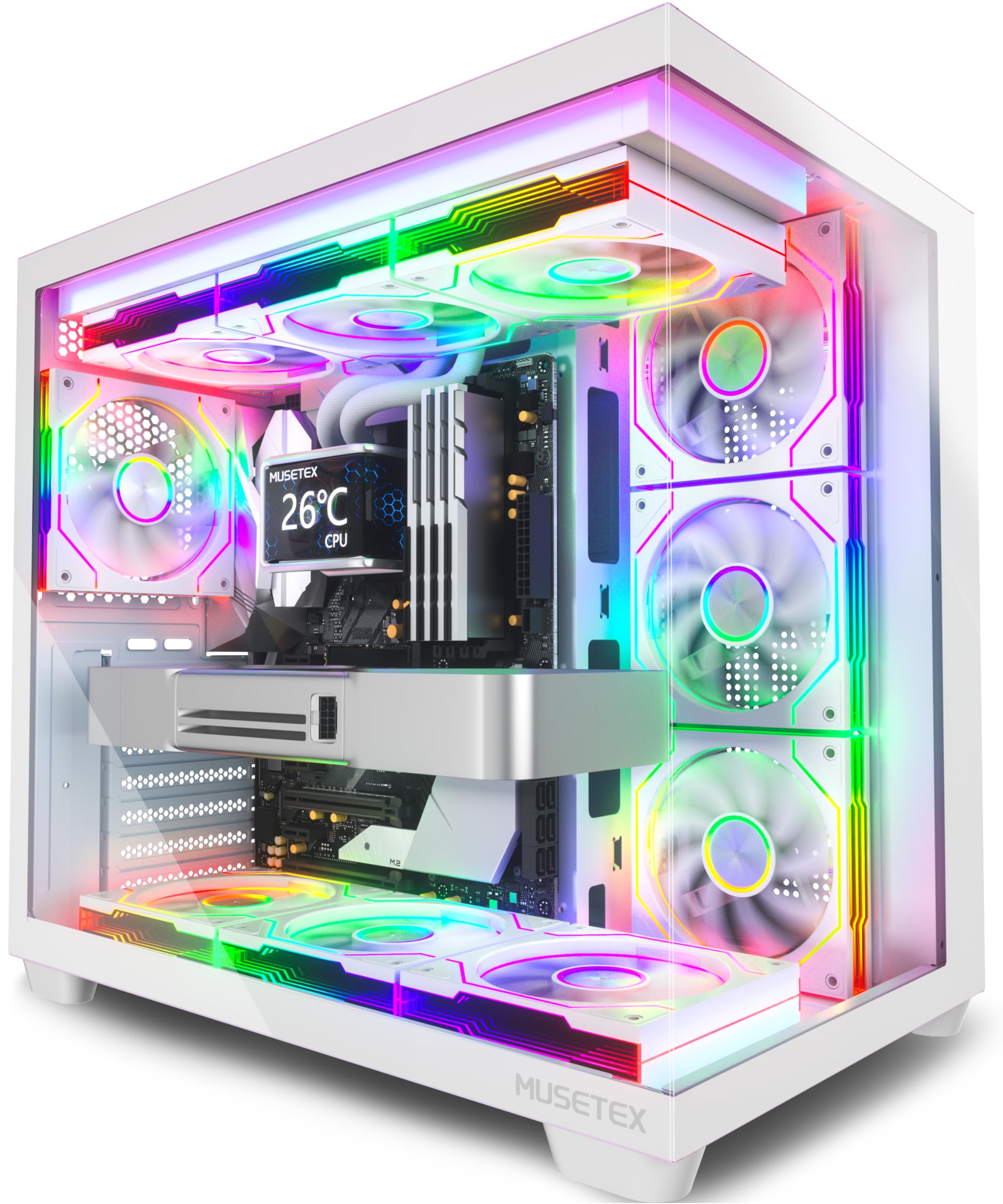
The MUSETEX Y6 comes with seven pre-installed 120mm Infinity Mirror ARGB fans — three reverse-blade on the side, three reverse-blade on the bottom, and one forward-flow on the rear — providing comprehensive lighting coverage at a competitive price point. The 270-degree transparent dual tempered glass panels offer a wide view of the interior, making this case an excellent choice for those who want a showpiece without buying extra fans. The fans generate smooth gradient rainbow light bands that sync with motherboard software.
Internal layout supports ATX, Micro-ATX, and Mini-ITX motherboards, with GPU clearance up to 410mm and CPU cooler height up to 160mm. The top mount accommodates a 360mm radiator, and the front I/O includes a USB Type-C port alongside USB 3.0 and 2.0 connections. Users report strong airflow from the anti-vortex fan blades, keeping temperatures stable even under gaming loads.
Wiring requires planning because the six pre-installed fan cables use short 6-pin connectors that may not reach all motherboard headers if you add more fans. Full-size ATX boards leave limited room for cable routing in the lower area, and the bottom fan cutouts are absent for ATX layouts. The Infinity Mirror fans are ribboned (2-pin), so independent color control per fan is not possible without a separate controller.
Why it’s great
- Seven Infinity Mirror ARGB fans included
- 270-degree glass panels for maximum visibility
- USB Type-C port on front I/O
Good to know
- Short fan cables require careful routing
- Limited bottom cable cutouts for ATX boards
8. CORSAIR 4000D RS Frame

The 4000D RS introduces the FRAME modular case system, letting you swap the motherboard tray for billet aluminum upgrades or replace the front I/O panel with additional USB ports. The steel InfiniRail mounting system accepts fans up to 200mm in the front (140mm in the roof) and lets you slide them anywhere along the rail for targeted airflow. The 3D Y-pattern perforated front panel provides a low-restriction path for cool air while maintaining a clean aesthetic.
Three CORSAIR RS PWM fans come pre-installed in the front, supporting daisy-chainable 4-pin PWM connections and Zero RPM mode for silent low-load operation. The internal side panel near the motherboard tray can serve as a cable cover for tidy routing, or you can remove it to mount fans for additional side intake or exhaust. The case fits multiple 360mm radiators and supports reverse-connector motherboards from ASUS BTF, Gigabyte Project Stealth, and MSI Project Zero.
Users consistently praise the excellent airflow with no dead zones and stable CPU/GPU temperatures under sustained loads. The front USB-C cable may arrive pinched in some units, though Corsair support resolves the issue. The tempered glass side panel lacks alignment guides, making removal and reinstallation precarious without manual support. Overall, this case delivers strong customization potential for builders who want a chassis that evolves with their hardware.
Why it’s great
- Modular FRAME system for tray and I/O upgrades
- InfiniRail fan mounting with 200mm support
- 3D Y-pattern airflow front panel
Good to know
- Glass panel lacks removal alignment guides
- Front USB-C cable may arrive pinched
FAQ
What does a dual-chamber case actually improve in a custom build?
How do I verify whether my GPU will fit inside a specific case?
Why do some cases advertise support for back-connect or hidden-connector motherboards?
What is the real benefit of thicker steel beyond 0.8mm?
Final Thoughts: The Verdict
For most users, the best custom computer cases winner is the ASUS TUF Gaming GT502 because it combines a dual-chamber layout, tool-free panels, and a vertical GPU mount into a durable steel chassis that handles high-end components without compromise. If you want a panoramic showcase with rotational GPU mounting, grab the Thermaltake Tower 600. And for water cooling enthusiasts who need 420mm radiator support in a dual-chamber mid-tower, nothing beats the NZXT H9 Flow (2025).

Mo Maruf
I created WellFizz to bridge the gap between vague wellness advice and actionable solutions. My mission is simple: to decode the research and give you practical tools you can actually use.
Beyond the data, I am a passionate traveler. I believe that stepping away from the screen to explore new environments is essential for mental clarity and physical vitality.