Our readers keep the lights on and my smoothie glass nicely filled. As an Amazon Associate, I earn from qualifying purchases.
Choosing a custom built gaming PC means navigating the tension between raw component power, thermal management, and the real-world frame rates that define your gameplay. A rig that looks good on paper but thermal-throttles under load isn’t a gaming machine — it’s an expensive space heater.
I’m Mohammad Maruf — the founder and writer behind WellFizz. I’ve spent countless hours analyzing GPU benchmarks, CPU thermals, VRAM capacities, and PSU efficiency ratings across dozens of prebuilt configurations to identify the systems that deliver on their promises without cutting corners on build quality or future upgrade paths.
This guide breaks down the thirteen best configurations available today for anyone serious about buying a best custom built gaming pc that delivers sustained high frame rates, quiet operation, and room for future component swaps.
How To Choose The Best Custom Built Gaming PC
Selecting a prebuilt gaming desktop requires matching hardware to your resolution target, frame rate expectations, and upgrade timeline. A system that nails 1080p at 144Hz may choke at 4K, while a 4K beast might waste money on excess CPU cooling if you only play esports titles.
GPU Generation and VRAM
The graphics card is the single most important component for gaming. The RTX 5060 Ti and RTX 5070 represent the current mid-range and high-end sweet spots. For 1080p high-refresh and 1440p medium settings, 8GB VRAM is sufficient. For 1440p ultra or 4K, target 12GB or 16GB VRAM to avoid texture pop-in and stuttering in modern titles.
CPU Architecture and Core Count
Gaming performance relies more on single-core speed than core count. An AMD Ryzen 7 7800X3D or Intel Core i7-14700F (with 20 cores and 5.4 GHz boost) provides excellent gaming throughput without overspending on workstation-grade chips. For streaming while gaming, prioritize 8+ cores and 16+ threads.
RAM Capacity and Speed
32GB of DDR5 at 5600MHz or higher is the current standard for stutter-free gaming in AAA titles. 16GB can still handle most games, but heavy multitasking (Discord, browser, streaming) will push it to the limit. DDR5’s higher bandwidth reduces frame-time variance in CPU-intensive scenes.
Cooling Solution
Liquid cooling (AIO) with a 240mm or 360mm radiator keeps modern CPUs and GPUs below thermal throttle thresholds during extended sessions. High-end air coolers can match 240mm AIOs for noise, but a 360mm AIO is the gold standard for sustained boost clocks in a Ryzen 9 or Core i9 system.
Bloatware and Upgradeability
A clean Windows installation with no trial software saves hours of debloating. Look for non-proprietary motherboards, standard PSU form factors, and accessible RAM slots. These features let you swap the GPU, add storage, or upgrade the CPU later without replacing the entire chassis.
Quick Comparison
On smaller screens, swipe sideways to see the full table.
| Model | Category | Best For | Key Spec | Amazon |
|---|---|---|---|---|
| Skytech Gaming O11 Vision | Premium | 1440p Ultra Gaming | AMD Ryzen 7 9850X3D + RTX 5070 Ti 16GB | Amazon |
| Cooler Master NR2 Pro | Premium | Compact 1440p Build | AMD Ryzen 7 9800X3D + RTX 5070 Ti 16GB | Amazon |
| The Horizon Autherium Dragon RGB | Luxury | Heavy Multitasking & VR | Intel Core i9 + RTX 5070 OC + 64GB RAM | Amazon |
| Empowered PC Panorama | High-End | Content Creation & Streaming | Intel Core i9-14900KF + RTX 5070 + 32GB DDR5 | Amazon |
| CLX Set Gaming Desktop | High-End | Massive Storage & 4K | Intel Core i9-13900KF + RTX 4070 + 64GB DDR5 | Amazon |
| MSI Aegis ZS2 | Premium | Ray Tracing at 1440p | AMD Ryzen R9-7900X + RTX 5070 + 32GB DDR5 | Amazon |
| iBUYPOWER Element | Premium | High FPS 1080p/1440p | AMD Ryzen 9 7900X + RTX 5070 + 32GB DDR5 | Amazon |
| Thermaltake LCGS View i570 | Mid-Range | AAA Gaming at 1440p | Intel Core i9-14900KF + RTX 5070 + 32GB DDR5 | Amazon |
| Alienware Aurora R16 | Premium | Brand-Built Reliability | Intel Core Ultra 7 265F + RTX 5070 + 32GB DDR5 | Amazon |
| STORMCRAFT Sirius AI | Mid-Range | VR and Simulation Gaming | Intel i7-14700F + RTX 5060 Ti 16GB + 32GB DDR5 | Amazon |
| Suevery Prebuilt i9 RTX 5060 Ti | Mid-Range | 1440p Medium-High Settings | Intel Core i9 14900HX + RTX 5060 Ti 8GB | Amazon |
| CyberPowerPC Gamer Master | Mid-Range | Competitive Esports | AMD Ryzen 7 8700F + RTX 5060 Ti 8GB + 16GB DDR5 | Amazon |
| HELLOLAND White RGB | Budget | 1080p Ultra Gaming | AMD Ryzen 7 5700X + RTX 5060 8GB + 32GB DDR4 | Amazon |
In‑Depth Reviews
1. Skytech Gaming O11 Vision

The Skytech Gaming O11 Vision pairs an AMD Ryzen 7 9850X3D processor with an NVIDIA GeForce RTX 5070 Ti 16GB graphics card, creating a system built for 1440p ultra settings at 60+ FPS in the most demanding titles, including Cyberpunk 2077 and Alan Wake 2. The 360mm AIO liquid cooler keeps the CPU well below throttle temperatures even during extended gaming sessions, ensuring consistent boost clocks.
With 32GB of DDR5 RAM clocked at 5600MHz and a 2TB Gen4 NVMe SSD, load times are virtually eliminated, and multitasking between games, streaming software, and browser tabs remains fluid. The 850W Gold ATX 3 PSU provides ample headroom for future GPU upgrades without swapping the power supply.
The Lian Li O11 Vision case in white offers excellent airflow and a panoramic tempered glass view that showcases the ARGB fans. Skytech ships the system without bloatware, so you can start playing immediately after unboxing. The 1-year warranty on parts and labor provides added peace of mind for this investment-grade machine.
Why it’s great
- RTX 5070 Ti 16GB handles 1440p ultra ray tracing with ease
- 360mm AIO delivers exceptional thermal headroom for the 9850X3D
- No bloatware — clean Windows 11 installation out of the box
Good to know
- Premium price reflects top-tier component selection
- Wi-Fi 5 instead of Wi-Fi 6E may disappoint some users
2. Cooler Master NR2 Pro

The Cooler Master NR2 Pro proves that small form factor doesn’t mean compromised performance. Inside its 18.25-liter chassis, you’ll find an AMD Ryzen 7 9800X3D paired with a Gigabyte RTX 5070 Ti 16GB — a combination that delivers over 120 FPS on high settings at 1440p in demanding titles. The 280mm AIO cooler efficiently dissipates heat from the 9800X3D, keeping fan noise low even under sustained loads.
Equipped with 32GB of DDR5 6000MHz RGB RAM and a 2TB Gen4 NVMe SSD, this system offers lightning-fast load times and ample storage for a large game library. The 850W SFX Gold PSU is fully modular, making cable management inside the tight ITX space impressively clean.
The B850I AORUS PRO motherboard supports PCIe 5.0 for future GPU upgrades, and the case includes both glass and mesh panel options for airflow flexibility. The system is ideal for gamers who move their rig between rooms or LAN events. One minor caveat: the front USB-C port may require reseating the internal cable on arrival.
Why it’s great
- Ultra-compact ITX footprint without sacrificing GPU power
- DDR5 6000MHz RAM delivers minimal latency in CPU-bound games
- Includes glass and mesh side panels for airflow customization
Good to know
- Limited interior space makes storage expansion more involved
- Front USB-C port may need internal cable reconnection
3. The Horizon Autherium Dragon RGB

The Horizon Autherium Dragon RGB is built for users who need extreme multitasking capability. With 64GB of DDR5 RAM and a combined 10TB of storage (2TB NVMe + 8TB HDD), this system handles video editing, 3D rendering, and gaming simultaneously without breaking a sweat. The unlocked Core i9 processor, overclocked out of the box, pairs with an RTX 5070 OC 12GB for high frame rates in Microsoft Flight Simulator and VR titles on a Quest 3.
The 360mm AIO liquid cooler and 11 total fans (7 visible, 4 internal) maintain whisper-quiet operation even under load, a rare achievement for a system with this much hardware. The 850W Gold PSU includes extra SATA connectors for additional drives, and the case features a dragon front panel with ARGB lighting controlled via a top button or software.
Windows 11 Pro is preinstalled, and the 3-year parts warranty with 5-year labor warranty provides long-term confidence. The only trade-off is the sheer size and weight of the chassis — this is not a system you’ll move frequently.
Why it’s great
- 64GB DDR5 RAM handles heavy multi-tasking and video editing
- 10TB total storage eliminates external drive dependency
- 3-year parts and 5-year labor warranty is industry-leading
Good to know
- Large and heavy chassis may be impractical for frequent moves
- RTX 5070 OC is powerful but not the absolute top-tier GPU
4. Empowered PC Panorama

The Empowered PC Panorama combines an Intel Core i9-14900KF (24 cores, 32 threads) with an RTX 5070 12GB, making it a formidable machine for both gaming and content creation. The 32GB of DDR5 RAM and 1TB Gen4 NVMe SSD provide snappy performance in Adobe Premiere, DaVinci Resolve, and demanding game engines. The 9 ARGB PWM fans ensure exceptional airflow while remaining quieter than standard case fans.
This system is assembled and stress-tested in the USA before shipping, and it arrives with zero bloatware — just a clean Windows 11 Pro installation. The panoramic tempered glass case offers a clear view of the internal components, and the included RGB keyboard and mouse are functional for immediate use.
The 3-year limited hardware warranty and lifetime technical support provide strong after-sales coverage. Note that the power supply is a standard unit that may need replacement if you plan to upgrade to a higher-tier GPU in the future — something to factor into your upgrade timeline.
Why it’s great
- i9-14900KF paired with RTX 5070 excels at video encoding and rendering
- No bloatware — clean Windows 11 Pro installation
- 3-year warranty with lifetime tech support
Good to know
- PSU may limit future high-end GPU upgrades
- GPU mounting bracket can stress the connection if not adjusted
5. CLX Set Gaming Desktop

The CLX Set Gaming Desktop offers a unique configuration with 2TB NVMe SSD plus 6TB HDD, giving you 8TB of total storage without needing to add drives later. The Intel Core i9-13900KF and 64GB DDR5 RAM handle heavy multitasking and large file work with ease, while the RTX 4070 12GB delivers smooth 1440p gaming and respectable 4K performance in moderately demanding titles.
The 850W power supply provides solid headroom, and the liquid cooling keeps the 13900KF stable during long rendering or gaming sessions. Double-boxed shipping protection ensures the system arrives in working condition — a practical concern given the weight of this full-tower machine.
Customer reports note that the fans can be noisy at maximum speed, but they become nearly silent at lower RPMs via the included remote control. The keyboard and mouse are functional but not premium — budget for replacements if you want a higher-end peripheral experience.
Why it’s great
- 8TB total storage (2TB SSD + 6TB HDD) is rare in prebuilts
- i9-13900KF + 64GB DDR5 excels at heavy multi-threaded workloads
- Liquid cooling keeps CPU temperature under control
Good to know
- Fans can be audible at max RPM under sustained load
- Some units experience blue screens requiring tech support intervention
6. MSI Aegis ZS2

The MSI Aegis ZS2 brings together an AMD Ryzen 9 7900X (12 cores, 24 threads) with an RTX 5070 12GB, creating a system optimized for ray-traced gaming at 1440p. The 360mm AIO cooler from MSI is one of the most effective at dissipating heat from the Ryzen 9, allowing sustained all-core boost clocks during long sessions. The 32GB of DDR5 RAM and 2TB NVMe SSD provide fast load times and ample storage.
The case design is notably service-friendly — the side panel and top vent are tool-free, making cleaning and component upgrades straightforward. The MSI Center software allows you to customize RGB lighting and monitor system performance in real time. Wi-Fi 7 support ensures you’re ready for the fastest wireless connectivity available.
While the system is powerful, some users have reported bloatware including Norton and Office 365 trials. A clean reinstall of Windows can resolve this. The inclusion of USB 2.0 and PS/2 ports may feel dated, but they provide compatibility with legacy peripherals.
Why it’s great
- 360mm AIO delivers top-tier thermal performance for the Ryzen 9
- Tool-free case design simplifies upgrades and cleaning
- WiFi 7 ready for latest wireless standards
Good to know
- Ships with Norton and Office 365 trial bloatware
- Some units may require BIOS updates out of the box
7. iBUYPOWER Element

The iBUYPOWER Element offers a compelling balance of price and performance with an AMD Ryzen 9 7900X and RTX 5070 12GB. The 32GB of DDR5 RAM at 5200MHz is slightly slower than some configs, but it still provides smooth multitasking and fast game loading. The 1TB NVMe SSD is adequate for a starter library, though you’ll likely want to add a second drive over time.
The tempered glass RGB case in white is visually striking, and the included iBUYPOWER keyboard and mouse are serviceable for immediate use. The system ships without bloatware, so you can focus on gaming rather than uninstalling trial software. The water cooling keeps the Ryzen 9 within safe temperatures during extended sessions.
One detail worth noting: the motherboard may have only two RAM slots, limiting future upgrade potential. If you plan to exceed 32GB, ensure you purchase a 2x32GB kit from the start rather than adding sticks later.
Why it’s great
- Ryzen 9 7900X + RTX 5070 delivers excellent price-to-performance
- White RGB case with tempered glass stands out visually
- No bloatware — clean system from the start
Good to know
- RAM speed of 5200MHz is lower than competing systems at this tier
- Some motherboard models may restrict RAM upgrade to 2 slots
8. Thermaltake LCGS View i570

The Thermaltake LCGS View i570 pairs an Intel Core i9-14900KF with an RTX 5070 12GB, offering strong 1440p gaming performance in a well-ventilated chassis. The 240mm closed-loop liquid cooler manages the i9’s heat output reasonably well, though sustained all-core workloads will push the fans to higher RPMs than a 360mm setup. The 32GB DDR5 6000MT/s RAM provides fast memory bandwidth for both gaming and productivity.
The B760 chipset motherboard includes two USB 3.0 ports on the front panel, and the power supply cover with filtered ventilation keeps the interior clean. The PSU is mounted vertically with a side radiator support, which helps with cable management and airflow direction.
Users report minimal bloatware and a straightforward setup process. The fan noise is slightly audible under load but never intrusive. If you’re building a system primarily for AAA gaming at 1440p, this configuration hits the sweet spot of cost versus performance without needing to overclock.
Why it’s great
- i9-14900KF + RTX 5070 offers strong 1440p performance
- DDR5 6000MT/s RAM reduces frame-time variance
- Clean cable management with PSU cover and filtered vents
Good to know
- 240mm AIO runs louder under sustained all-core loads
- Limited front panel USB port selection
9. Alienware Aurora R16

The Alienware Aurora R16 brings Dell’s ecosystem to the custom gaming PC space with an Intel Core Ultra 7 265F and RTX 5070. The 1000W Platinum-rated PSU is over-engineered for this configuration, providing massive headroom for future upgrades. The 32GB of DDR5 RAM ensures smooth multitasking, and the 1TB SSD offers adequate storage for active titles.
The chassis features a modern matte basalt black finish with customizable AlienFX lighting zones. The stadium lighting around the front panel adds a distinctive visual signature. Alienware Command Center allows you to create custom game profiles, monitor thermals, and adjust fan curves.
Dell includes 1-year onsite service, meaning a technician will come to your location if hardware issues arise. Some users report that the system occasionally refuses to start and requires a full power discharge — a known quirk of this motherboard. The boot time of approximately 2 minutes is also slower than competitive systems in this price bracket.
Why it’s great
- 1000W Platinum PSU provides extreme upgrade headroom
- 1-year onsite Dell service for convenient support
- AlienFX lighting customization with dedicated software
Good to know
- Occasional startup issues requiring power drain
- Boot time is slower than competing systems
10. STORMCRAFT Sirius AI

The STORMCRAFT Sirius AI pairs an Intel i7-14700F (20 cores, 28 threads) with an RTX 5060 Ti 16GB GPU, making it a strong contender for VR gaming and simulation titles where VRAM is critical. The 16GB GDDR7 on the RTX 5060 Ti ensures high-resolution textures load without stuttering in games like Microsoft Flight Simulator and Half-Life: Alyx. The 32GB of DDR5 6000MHz RAM provides excellent memory bandwidth for both gaming and encoding tasks.
With a 2TB Gen4 NVMe SSD, you can store a large library of games without worrying about space. The STORMCRAFT Sirius case includes 5 ARGB fans with adjustable lighting, and the 650W Gold PSU is well-matched to the current components. The system is assembled in California and ships with a 1-year parts and 3-year labor warranty.
Users report quiet fan operation and smooth performance across Cyberpunk 2077, Battlefield, and DaVinci Resolve. The non-discreet packaging requires a signature upon delivery, so plan accordingly. Occasional game crashes have been reported but are likely driver-related rather than hardware faults.
Why it’s great
- RTX 5060 Ti with 16GB VRAM excels in VR and simulation games
- 2TB Gen4 SSD provides generous storage out of the box
- 3-year labor warranty offers strong long-term coverage
Good to know
- 650W PSU may limit GPU upgrade options
- Non-discreet packaging requires signature at delivery
11. Suevery Prebuilt i9 RTX 5060 Ti
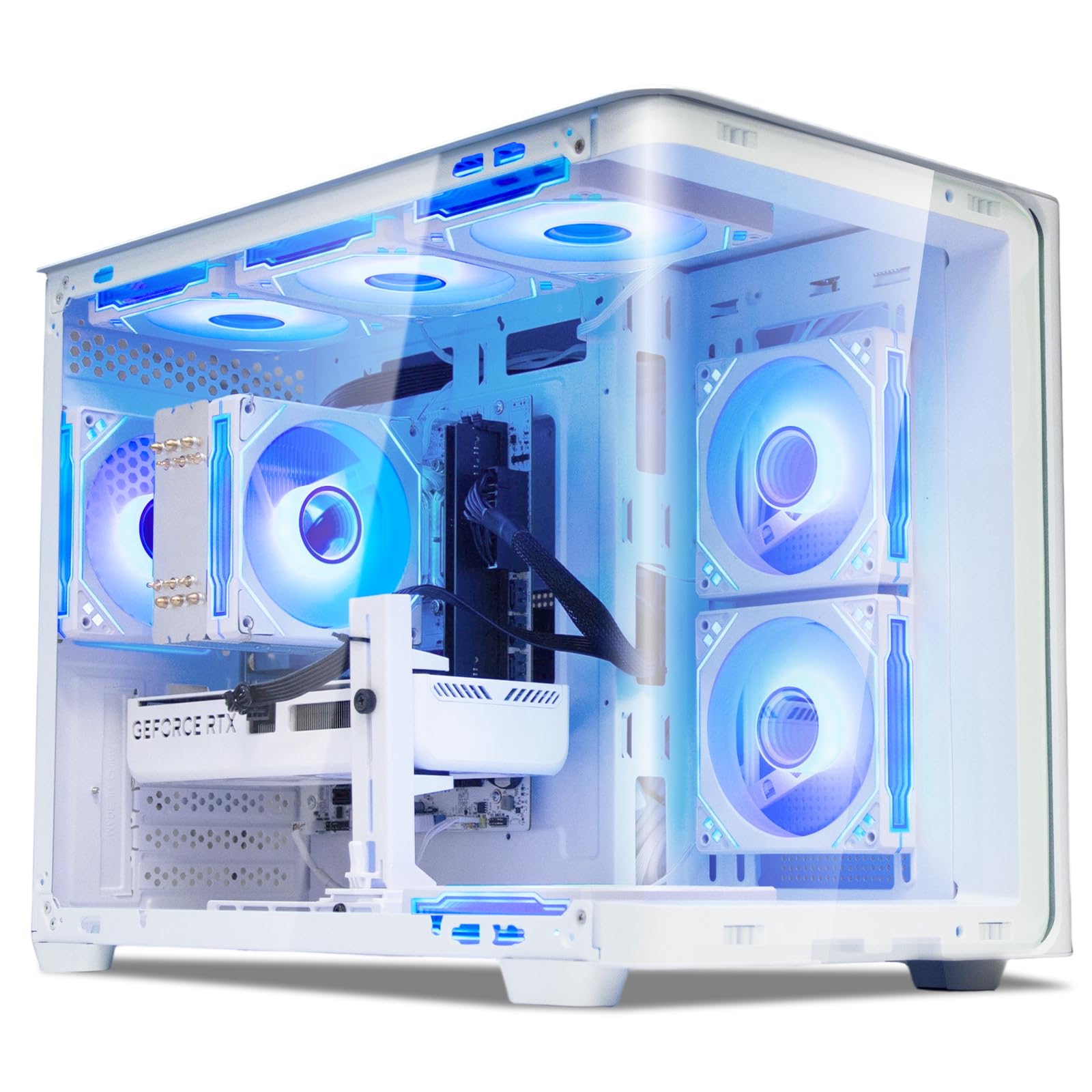
The Suevery Prebuilt Gaming PC features a 14th Gen Intel Core i9 14900HX (24 cores, 32 threads) paired with an RTX 5060 Ti 8GB GPU, delivering strong 1440p gaming performance at medium-high settings. The 16GB of DDR5 RAM is enough for most games, but power users will want to consider an upgrade to 32GB down the line. The 1TB NVMe SSD offers fast load times and adequate storage for a modest game library.
The white case with a curved tempered glass panel and color-changing RGB fans provides an attractive aesthetic that blends well with white desk setups. The vertical tower design saves desk space, and the multiple top-mounted ports make connecting peripherals easy. Built-in Wi-Fi 6 ensures fast wireless connectivity for online gaming and streaming.
Users report that the system runs demanding titles like Arc Raiders and No Man’s Sky on high/ultra settings without issues. Some driver complications after a clean format were resolved by downloading motherboard drivers from the manufacturer’s website. The system is ready for gaming, business, and creative work right out of the box.
Why it’s great
- i9-14900HX provides exceptional CPU performance for the price
- White RGB chassis with curved glass panel looks premium
- Wi-Fi 6 built-in for reliable wireless gaming
Good to know
- 16GB RAM may limit heavy multitasking
- Motherboard drivers may need manual download after clean install
12. CyberPowerPC Gamer Master

The CyberPowerPC Gamer Master is built for competitive esports with an AMD Ryzen 7 8700F and RTX 5060 Ti 8GB. This combination delivers well over 144 FPS in titles like Valorant, Fortnite, and Rainbow Six Siege at high settings, making it an excellent match for 1080p 144Hz or 240Hz monitors. The 16GB of DDR5 RAM is sufficient for gaming, and the 1TB PCIe 4.0 SSD ensures quick game loading.
The AMD B850 chipset motherboard supports the latest AM5 socket, allowing for a future CPU upgrade without replacing the motherboard. The tempered glass side panel and custom RGB lighting give the system a polished look. Wi-Fi 6 and Bluetooth 5.3 are built in, eliminating the need for dongles.
CyberPowerPC includes a keyboard and mouse with the system, along with a 1-year parts and labor warranty and free lifetime tech support. Some users experienced random restarts after initial setup, but a firmware update resolved the issue. The system is a strong entry point for gamers who want solid performance without overspending.
Why it’s great
- AM5 socket enables future CPU upgrades without new motherboard
- Excellent 1080p high-refresh-rate performance
- Lifetime tech support included with the purchase
Good to know
- 16GB RAM may require upgrade for heavy streaming
- Some units needed firmware updates to fix random restarts
13. HELLOLAND White RGB

The HELLOLAND White RGB Gaming PC offers a budget-friendly entry point with an AMD Ryzen 7 5700X and RTX 5060 8GB — a combination that delivers over 200 FPS in competitive titles like PUBG and Marvel Rivals at 1080p high settings. The 32GB of DDR4 RAM is generous for this price tier and provides plenty of headroom for multitasking while streaming or browsing. The 240mm AIO liquid cooler keeps the Ryzen 7 below 45°C during extended gaming sessions.
The white transparent chassis with customizable RGB lighting creates a clean aesthetic that fits well in bedroom or office setups. The 1TB PCIe NVMe SSD provides fast boot and game loading, scanning the system ready to use in around 15 seconds from cold start. Windows 11 is preinstalled without any trial bloatware — a welcome feature at this price point.
The system supports future upgrades with standard DDR4 slots and a PCIe GPU slot compatible with the RTX 5070 as a safe ceiling with the included 650W PSU. The 1-year warranty on parts and labor provides basic coverage. For gamers on a tight budget who want solid 1080p performance, this is a well-rounded option.
Why it’s great
- 32GB DDR4 RAM at this price point is exceptional value
- 240mm AIO cooler delivers excellent thermal performance
- Clean Windows 11 install with no bloatware
Good to know
- DDR4 platform limits future CPU upgrade options
- 650W PSU is adequate but leaves less room for high-end GPU upgrades
FAQ
Is 16GB of RAM enough for a gaming PC in 2025?
Should I choose an AMD or Intel CPU for gaming?
How important is liquid cooling for a gaming PC?
Can I upgrade the GPU in a prebuilt gaming PC later?
What does “no bloatware” mean and why does it matter?
Final Thoughts: The Verdict
For most users, the best custom built gaming pc winner is the Skytech Gaming O11 Vision because it pairs the latest Ryzen 7 9850X3D with an RTX 5070 Ti 16GB in a well-cooled, bloatware-free chassis that delivers exceptional 1440p performance. If you want the compact form factor without compromising GPU power, grab the Cooler Master NR2 Pro. And for heavy multitasking with 64GB of RAM and massive 10TB storage, nothing beats the The Horizon Autherium Dragon RGB.

Mo Maruf
I created WellFizz to bridge the gap between vague wellness advice and actionable solutions. My mission is simple: to decode the research and give you practical tools you can actually use.
Beyond the data, I am a passionate traveler. I believe that stepping away from the screen to explore new environments is essential for mental clarity and physical vitality.