Our readers keep the lights on and my smoothie glass nicely filled. As an Amazon Associate, I earn from qualifying purchases.
That constant dance between browser tabs, spreadsheets, and email windows isn’t just annoying—it’s a tax on your focus and productivity. A single ultrawide panel with a gentle curve wraps the workspace around your peripheral vision, letting you arrange three full documents side by side without overlapping or squinting.
I’m Mohammad Maruf — the founder and writer behind WellFizz. I’ve spent countless hours analyzing panel technologies, connectivity specs, and real-world ergonomics to separate the monitors that genuinely boost professional workflows from those that merely look wide on a spec sheet.
The productivity gains from a well-chosen curved monitor for work come down to three factors: resolution density for crisp text, sufficient curvature to reduce eye travel, and the right refresh rate to keep scrolling smooth during data-heavy sessions.
How To Choose The Best Curved Monitor For Work
Selecting a curved monitor for your desk involves more than just screen size. Key variables like panel type, resolution, curvature radius, and connectivity options directly affect how comfortably and efficiently you can work over extended periods.
Understanding Panel Types: VA vs IPS
VA (Vertical Alignment) panels are the dominant choice for curved monitors because they deliver superior static contrast ratios, often exceeding 3000:1. This deeper black level makes text pop on white backgrounds, reducing eye strain during all-day spreadsheet or coding sessions. IPS panels offer wider viewing angles and better color accuracy out of the box, which matters for design professionals, but the 3800R curve on most IPS ultrawides is subtle enough that the contrast tradeoff becomes a real consideration for pure productivity work.
Resolution and Screen Real Estate
WQHD (3440 x 1440) is the sweet spot for a 34-inch curved work monitor. It delivers roughly 110 pixels per inch—sharp enough for crisp text without requiring GPU-intensive scaling like a 4K panel would. This resolution lets you tile three standard-width documents side by side at readable sizes. Stepping down to Full HD (2560 x 1080) on the same width results in noticeably softer text, which can cause squinting by mid-afternoon.
Curvature Radius and Viewing Comfort
The curvature is measured in millimeters (R value), with a lower number indicating a tighter curve. A 1500R radius is the most common for work-focused 34-inch panels, wrapping the screen edges toward you so that every corner is roughly the same distance from your eyes. This uniformity reduces the need for head turning and keeps your gaze more centered, which many users report feeling less fatiguing over a full workday compared to a flat panel of the same width.
Connectivity and USB-C Power Delivery
For a modern laptop-centric workflow, USB-C with power delivery is a near-essential feature. It carries video signal, data, and charging current through a single cable, keeping your desk tidy and your laptop battery topped up. Look for at least 65W of power delivery to handle most ultrabooks; higher wattage (90W or 96W) covers larger workstations and power-hungry machines like the 16-inch MacBook Pro.
Quick Comparison
On smaller screens, swipe sideways to see the full table.
| Model | Category | Best For | Key Spec | Amazon |
|---|---|---|---|---|
| Dell S3425DW | Premium | All-day productivity & color work | 120Hz / 0.03ms / 95% DCI-P3 | Amazon |
| ASUS ProArt PA34VCNV | Premium | Color-critical creative workflows | IPS / ΔE<2 / 96W PD | Amazon |
| Samsung CH890 | Premium | Business & multi-device setups | 100Hz / USB-C / 3yr warranty | Amazon |
| LG 34G630A | Mid-Range | High-refresh work & play | 240Hz / 1ms / 95% DCI-P3 | Amazon |
| Alienware AW3425DWM | Mid-Range | Hybrid office-gaming setups | 180Hz / DisplayHDR 400 | Amazon |
| Samsung ViewFinity S50GC | Mid-Range | Value-focused multitaskers | 100Hz / ambient light sensor | Amazon |
| LG 34WR55QK | Mid-Range | Reliable all-round workhorse | 100Hz / 65W PD / 99% sRGB | Amazon |
| Philips 346E2CUAE | Mid-Range | Long warranty & built-in speakers | 100Hz / 1ms MPRT / USB-C | Amazon |
| Deco Gear DGLUX340 | Budget | Budget-conscious ultrawide entry | 100Hz / 1ms / 100% sRGB | Amazon |
In‑Depth Reviews
1. Dell 34 Plus S3425DW

Dell’s S3425DW refines the work monitor formula with a VA panel that hits 3000:1 contrast for deep, restful blacks and crisp white spreadsheet cells. The 120Hz refresh rate is a meaningful step above the 100Hz baseline, making every scroll through long documents feel noticeably smoother without requiring workstation-grade GPU power.
USB-C delivers up to 65W of power, keeping a single-cable desk tidy, and the integrated speakers are the rare built-in pair that actually sound full enough for conference calls and background audio. The ComfortView Plus certification reduces blue light emissions to 35% or less, a genuine advantage for anyone logging eight-plus hours at the screen.
Color coverage spans 99% sRGB and 95% DCI-P3, which edges it into entry-level creative work territory. The stand is sturdy with height, tilt, and swivel adjustments, though the recessed VESA mount requires a specific bracket if you plan to use an arm. For a pure productivity monitor that doubles for casual gaming, this is the most balanced option on the list.
Why it’s great
- Excellent VA contrast and color accuracy
- USB-C with 65W power delivery
- Meaningful 120Hz refresh for smooth scrolling
Good to know
- Limited ports: no DisplayPort
- Recessed VESA mount needs bracket
2. ASUS ProArt PA34VCNV

The ProArt line is built for color-critical work, and the PA34VCNV delivers with factory-calibrated Delta E < 2 accuracy and 100% sRGB / Rec. 709 coverage. It uses an IPS panel with a gentle 3800R curve—subtle enough to reduce peripheral distortion while still wrapping the workspace around you—paired with a 3440 x 1440 resolution that keeps text sharp without 4K scaling headaches.
Connectivity is where this monitor truly separates from the pack: USB-C delivers 96W of power delivery, enough to charge a 16-inch MacBook Pro at full speed, plus a built-in RJ45 Ethernet port for stable wired networking. The DisplayPort daisy-chain capability lets you connect a second monitor cleanly, a major convenience for multi-screen professionals.
The stand offers height, tilt, and swivel adjustments, though the speaker is barely functional—plan on external audio for calls. At this price point, the value proposition is the color fidelity and docking hub integration, not raw gaming specs. For graphic designers and video editors who need a single-cable workstation with trustworthy color, this is the top contender.
Why it’s great
- Factory-calibrated Delta E < 2 accuracy
- 96W USB-C PD and RJ45 Ethernet
- DisplayPort daisy-chain for multi-monitor
Good to know
- Built-in speaker is weak
- 3800R curve is very subtle
3. Samsung CH890 Series

Samsung positions the CH890 specifically for business environments, and the feature set backs that up: a 34-inch 3440 x 1440 VA panel, USB-C connectivity with power and data, and a 3-year business warranty that includes advance replacement. The 100Hz refresh rate and 4ms response time are modest by gaming standards but perfectly adequate for fluid window management and video conferencing.
The stand is highly adjustable with height, tilt, and swivel—rare to find all three in one package at this tier. Picture-by-Picture and Picture-in-Picture modes let you view two input sources simultaneously at native resolution, a legitimate productivity boost for anyone running a laptop and desktop on the same screen.
The included stand is functional but some users note it feels wobbly at full height; a VESA arm solves that completely and is a recommended add-on. The 3000:1 contrast ratio delivers the hallmark VA depth that makes long reading sessions less fatiguing. For IT managers or professionals who prioritize support and TAA compliance over flashy extras, the CH890 is a solid investment.
Why it’s great
- Full ergonomic stand (height, tilt, swivel)
- 3-year advance replacement warranty
- USB-C with single-cable convenience
Good to know
- Stand can feel wobbly at max height
- Limited to 100Hz refresh rate
4. LG 34G630A UltraGear

LG’s UltraGear line is technically aimed at gamers, but the 34G630A deserves a spot on any productivity list because its 240Hz refresh rate transforms how fast you feel when dragging windows, scrolling code, or flipping between virtual desktops. The VA panel delivers a 3000:1 contrast ratio and 95% DCI-P3 color coverage, making it strong for media consumption and creative previews alongside office tasks.
USB-C connectivity supports 15W power delivery—enough for basic charging of peripherals but insufficient for a primary laptop cable. The real draw here is the build quality: a slim, borderless design with a space-saving stand base that clears room for papers and a keyboard, plus height, tilt, and swivel adjustments that make long positioning sessions comfortable.
FreeSync Premium keeps motion artifact-free, and the built-in speaker is passable for system sounds but not for heavy call use. The 240Hz speed is overkill for spreadsheets, but the resulting smoothness makes the desktop feel responsive in a way that lower refresh rates cannot match. If your workday includes after-hours gaming, this is the monitor that serves both roles without compromise.
Why it’s great
- 240Hz refresh for ultra-smooth motion
- 95% DCI-P3 and VESA DisplayHDR 400
- Full ergonomic stand with small base
Good to know
- USB-C PD only 15W—not laptop charging
- Built-in speakers are basic
5. Alienware AW3425DWM

The Alienware AW3425DWM brings a 180Hz refresh rate and 1ms GTG response time to a 34-inch 1500R curved VA panel, delivering fluid motion that bridges productivity and entertainment. The DCI-P3 95% color coverage and DisplayHDR 400 certification produce vibrant visuals for design previews and video content, while the hardware-based low blue light solution reduces eye strain without washing out the color.
Connectivity includes HDMI 2.1 and DisplayPort 1.4, plus a USB-A hub with two ports, though there is no USB-C video input. The stand is robust with tilt and height adjustment, and the packaging includes quality cables for both DP and HDMI. Users consistently report the out-of-box color accuracy is strong enough for photo editing and document work.
The primary tradeoff for professional users is the lack of an integrated speaker and the absence of USB-C power delivery. This monitor works best in a desktop-centric setup where a dedicated cable chain already handles connectivity. For hybrid home-office environments where gaming happens after the workday ends, the AW3425DWM offers a rare balance of speed and image quality at a mid-range price.
Why it’s great
- 180Hz with 1ms GTG response
- DisplayHDR 400 certification
- Hardware low-blue light without color shift
Good to know
- No built-in speakers
- No USB-C video input or PD
6. Samsung ViewFinity S50GC

Samsung’s ViewFinity S50GC builds its value around an ambient light sensor that automatically adjusts brightness to match your room, a genuinely useful feature for anyone who works in variable-lighting conditions or forgets to dim their screen before late-night sessions.
The 100Hz refresh rate is paired with AMD FreeSync for tear-free scrolling, and the matte screen finish cuts reflections effectively in bright rooms. Connectivity includes two HDMI ports, a single DisplayPort, and a headphone jack, but notably no USB-C—so expect a separate cable for laptop power if that is your primary machine. Picture-by-Picture mode works well for viewing two sources simultaneously.
The built-in speakers are among the weaker ones on this list, adequate for system beeps but not for calls. The stand is functional but has some wobble at desk-shaking levels. For budget-conscious buyers who prioritize automatic brightness adjustment and reliable VA contrast over premium connectivity, the ViewFinity is a smart mid-range play.
Why it’s great
- Ambient light sensor for auto brightness
- HDR10 with billion-color support
- Matte finish reduces reflections
Good to know
- No USB-C connectivity
- Built-in speakers are very weak
7. LG 34WR55QK

The LG 34WR55QK earns its workhorse reputation through simple, reliable execution. The 34-inch VA panel runs at 3440 x 1440 with a 100Hz refresh rate, 5ms response time, and 99% sRGB coverage—plenty of color accuracy for office documents, spreadsheets, and light creative work. The 3000:1 contrast ratio ensures text remains crisp against dark backgrounds.
The standout feature is USB-C with 65W power delivery, letting you run a single cable from a modern laptop for video and charging. Two HDMI ports, a DisplayPort, and a headphone jack round out the connectivity. The ergonomic stand includes height and tilt adjustments, and the three-sided borderless design looks clean on any desk.
The monitor lacks built-in speakers and the 5ms response time is modest compared to faster alternatives, but for document-heavy workflows, neither deficiency matters. Reader Mode reduces blue light for extended reading sessions. For professionals who want a dependable, no-nonsense ultrawide with solid connectivity and a trusted brand, the LG 34WR55QK delivers on every practical metric.
Why it’s great
- 65W USB-C power delivery
- 99% sRGB with solid VA contrast
- Height-adjustable stand included
Good to know
- No built-in speakers
- 5ms response time is modest
8. Philips 346E2CUAE

Philips backs the 346E2CUAE with a 4-year advance replacement warranty, the longest coverage on this list, signaling confidence in the hardware. The 34-inch VA panel runs 3440 x 1440 at 100Hz with a 1ms MPRT response time, making it quick for its price tier. Color coverage extends to 121.3% sRGB and 99.5% NTSC, offering a wider gamut than many competitors in the same bracket.
USB-C powers and charges a connected laptop with up to 65W, and the stand includes height, tilt, and swivel adjustments—full ergonomic flexibility usually reserved for higher-priced models. The built-in speakers are functional for calls and system audio, a convenience that saves desk space for users who do not need dedicated monitors.
The on-screen menu is intuitive with dedicated buttons, and the 1500R curve wraps the workspace comfortably. Some cable management tabs are basic, and the bezel is slightly thicker than premium competition. For budget-strapped professionals who want a long warranty, built-in audio, and USB-C convenience, the Philips 346E2CUAE is an unusually strong package.
Why it’s great
- 4-year advance replacement warranty
- USB-C 65W PD and adjustable stand
- Wide color gamut coverage
Good to know
- Basic cable management tabs
- Slightly thicker bezel than competitors
9. Deco Gear DGLUX340
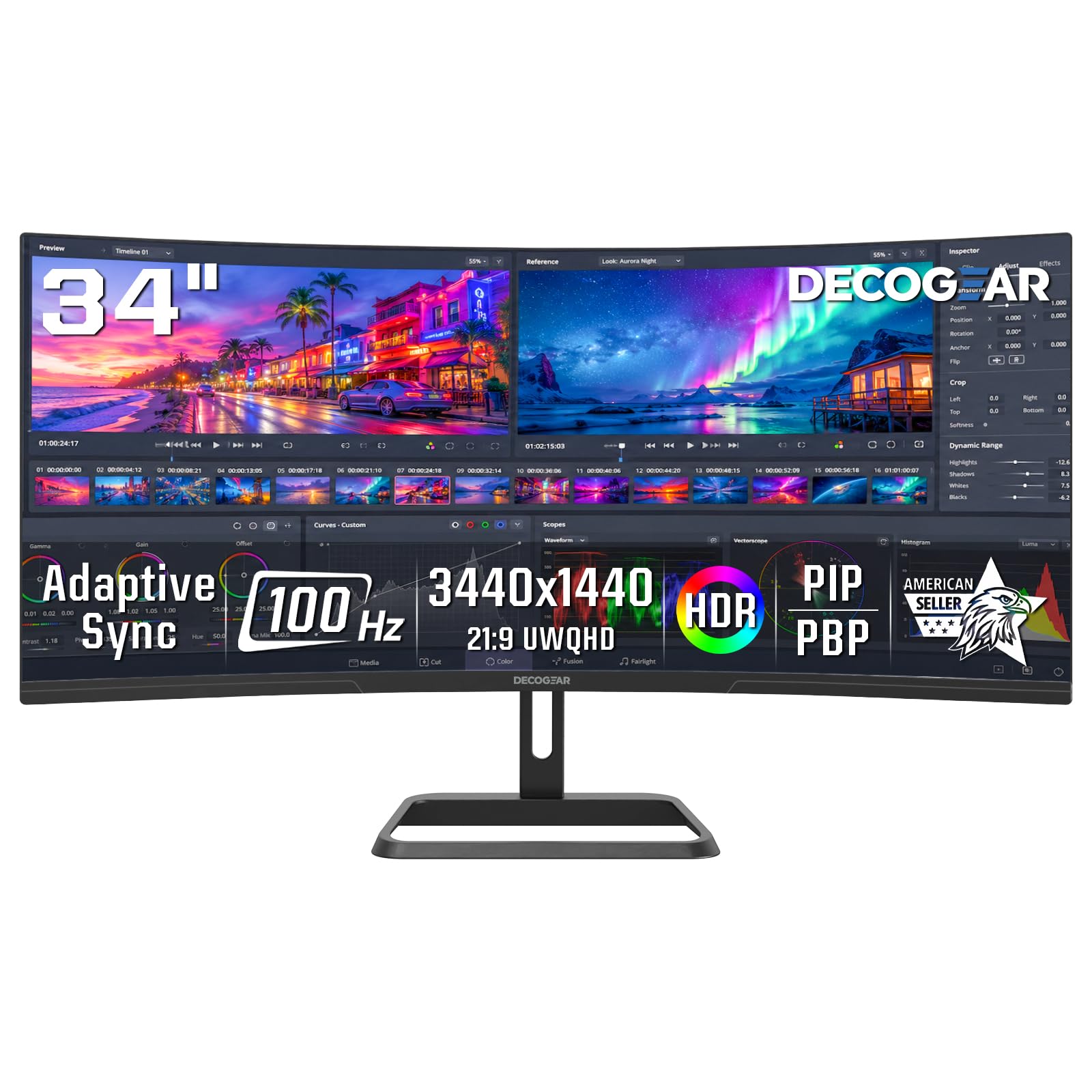
For those entering the ultrawide workspace on a tight budget, the Deco Gear DGLUX340 delivers a 34-inch 1500R VA panel at 3440 x 1440 with a 100Hz refresh rate and 1ms response time—specs that hold up against monitors costing significantly more. The 4000:1 contrast ratio is notably high among the budget tier, providing deeper blacks and better text pop than similarly priced flat panels.
Connectivity covers two HDMI 2.0 ports and two DisplayPort 1.4 inputs, plus audio out. There is no USB-C, so laptop users will need a separate power cable and either an adapter or a direct HDMI/DP connection. Picture-in-Picture and Picture-by-Picture modes are included for multi-source workflows. The stand offers tilt adjustment but no height or swivel, so a VESA arm is a wise addition.
Color accuracy is rated at 100% sRGB, and the six contextual modes let you switch presets for different tasks. The build quality is solid, with several users reporting over a year of daily use without issues. For the budget-conscious buyer who prioritizes screen size and resolution over premium connectivity, the Deco Gear provides a legitimate entry point into curved ultrawide productivity
Why it’s great
- Excellent 4000:1 contrast ratio
- 1ms response time for fluid motion
- PIP/PBP for multi-source workflows
Good to know
- No USB-C connectivity
- Stand lacks height and swivel adjustment
FAQ
Is a curved monitor actually better for office productivity than a flat one?
What curvature rating is best for professional software development or writing?
Do I need a dedicated graphics card to run a 3440 x 1440 ultrawide monitor for work?
Can a curved ultrawide monitor replace two separate 24-inch monitors?
Final Thoughts: The Verdict
For most users, the curved monitor for work winner is the Dell S3425DW because it combines a high-contrast VA panel, genuine 120Hz smoothness, USB-C 65W charging, and surprisingly good speakers into a package that serves pure productivity without compromise. If you need factory-calibrated color accuracy and a full docking station hub, grab the ASUS ProArt PA34VCNV. And for a hybrid office-gaming setup with blazing 240Hz fluidity, nothing beats the LG 34G630A.

Mo Maruf
I created WellFizz to bridge the gap between vague wellness advice and actionable solutions. My mission is simple: to decode the research and give you practical tools you can actually use.
Beyond the data, I am a passionate traveler. I believe that stepping away from the screen to explore new environments is essential for mental clarity and physical vitality.