Our readers keep the lights on and my smoothie glass nicely filled. As an Amazon Associate, I earn from qualifying purchases.
Editing video on a flat screen means your eyes, neck, and shoulders constantly micro-adjust to compensate for the unnatural plane — it’s subtle fatigue, but it builds over a 10-hour timeline session, masking the very color shifts and edge-to-edge consistency you need to catch. A properly spec’d curved monitor wraps the image into your peripheral vision, reducing distortion and allowing your eyes to read the entire frame with uniform clarity, which is critical when you are matching shots or grading skin tones across the width of a timeline.
I’m Mohammad Maruf — the founder and writer behind WellFizz. To build this guide, I cross-referenced hundreds of user reports against panel type, color gamut coverage, Delta E accuracy, and resolution densities to separate marketing jargon from what actually matters on a timeline.
After analyzing refresh rates, color space certifications, and real-world grading feedback, I narrowed the field to the monitors that deliver a professional-grade editing environment without making you guess your blacks or clip your highlights — this is the definitive resource for finding the best curved monitor for video editing on the market today.
How To Choose The Best Curved Monitor For Video Editing
Selecting a curved monitor for professional editing is not about gaming specs, refresh rate bragging, or how many frames you can push — it is about color accuracy, panel uniformity, and the resolution to see your footage’s true grain and texture. A wrong choice here means you will export desaturated footage, clip your highlights, or miss a bad edit because the screen physically distorts the frame. Focus on these three pillars.
Color Accuracy and Panel Type
IPS panels dominate professional studios for a reason: wide viewing angles and consistent color reproduction across the entire curve. VA panels offer deeper blacks and higher contrast ratios, but they can exhibit color shift when viewed off-axis, which defeats the purpose of a curved screen. OLED delivers infinite contrast and stunning blacks but carries burn-in risk for static timeline elements and menus that sit in the same position for hours. For video editing, look for a factory-calibrated IPS panel with a Delta E value of 2 or less and coverage of at least 95% DCI-P3 — that ensures your grade matches what the client sees on a calibrated reference monitor.
Resolution, Aspect Ratio, and Curve Radius
A 16:9 curved monitor at 4K (3840 x 2160) is excellent for pixel-level scrutiny, but an ultrawide 21:9 panel at WQHD (3440 x 1440) gives you a massive timeline without stacking bins. The curve radius should match your viewing distance — 1800R is comfortable for a typical arm’s-length desk setup, while 1500R feels more immersive but demands closer positioning. For video editing, an 1800R or 3800R curve is ideal because it reduces distortion on the edges of your NLE interface without warping straight lines in your preview window.
Connectivity and Docking Capabilities
Editing often involves a laptop connected to a monitor, which means USB-C with Power Delivery is a game-changer — it charges your laptop, transmits video, and connects peripherals through a single cable. A monitor with a built-in KVM or a USB hub reduces cable clutter and lets you switch between a production computer and a grading machine without physically swapping cables. Look for at least 65W of power delivery over USB-C, and if you work in 4K or higher, ensure the connection supports the full bandwidth without subsampling the color space.
Quick Comparison
On smaller screens, swipe sideways to see the full table.
| Model | Category | Best For | Key Spec | Amazon |
|---|---|---|---|---|
| ASUS ProArt PA32QCV | Premium 6K | 6K grading & color critical work | 6016 x 3384, 98% DCI-P3, ΔE<2 | Amazon |
| Alienware AW3425DW (QD-OLED) | Premium OLED | HDR grading & infinite contrast | 3440×1440, 99.3% DCI-P3, 0.03ms | Amazon |
| Dell U3818DW | Premium Ultrawide | 38″ 4K multitasking & editing | 3840×1600, 99% sRGB, USB-C 65W | Amazon |
| ASUS ProArt PA34VCNV | Mid-Range Pro | Color-accurate ultrawide editing | 3440×1440, 100% sRGB, ΔE<2 | Amazon |
| ViewSonic VP3456A | Mid-Range Pro | Pantone-validated color work | 3440×1440, 99% sRGB, 100W USB-C | Amazon |
| Samsung Odyssey G7 37″ | Premium 4K | 4K editing & HDR600 preview | 3840×2160, 99% sRGB, 1000R curve | Amazon |
| LG 34WN80C-B | Mid-Range IPS | Mac-friendly single-cable editing | 3440×1440, 99% sRGB, USB-C 60W | Amazon |
| Dell S3425DW | Mid-Range Value | Everyday editing & casual grading | 3440×1440, 95% DCI-P3, 120Hz | Amazon |
| LG 34G630A-B | Mid-Range Fast | Fast-paced editing & motion work | 3440×1440, 95% DCI-P3, 240Hz | Amazon |
| Samsung Viewfinity S65UA | Budget Ultrawide | Entry-level curved editing setup | 3440×1440, 72% color gamut, 100Hz | Amazon |
| Alienware AW3425DWM | Budget Gaming | Dual-purpose editing & gaming | 3440×1440, 95% DCI-P3, 180Hz | Amazon |
In‑Depth Reviews
1. ASUS ProArt Display PA32QCV

The ASUS ProArt PA32QCV delivers a 6K resolution at 31.5 inches, which translates to a pixel density that shows every grain of noise and every sharpness detail in your source footage without you having to punch in to 400%. Its 98% DCI-P3 coverage and factory calibration to a Delta E of less than 2 means that the green screen key you pull matches the reference exactly, and the M Model-P3 preset mirrors the color performance of a MacBook display — critical for editors who move between a portable and a desktop grading environment.
The LuxPixel anti-glare coating reduces reflections in uncontrolled lighting, while the dual Thunderbolt 4 ports with 96W Power Delivery allow daisy-chaining a second monitor and charging your laptop through a single cable. The built-in Auto KVM lets you switch between a production PC and a color-grading Mac without touching cables, and the ergonomic stand includes pivot, tilt, and height adjustments that make long sessions easier on your neck.
User reviews consistently mention that the anti-glare coating is superior to glossy alternatives, though some units have exhibited minor backlight bleed, and the built-in speakers are weak. The 5-year warranty after registration offers long-term peace of mind for a monitor that will serve as the center of a professional editing desk for years.
Why it’s great
- 6K resolution reveals fine footage details without zooming excessively
- Factory-calibrated Delta E < 2 with 98% DCI-P3 coverage
- M Model-P3 preset matches MacBook color output for consistent grading
- Auto KVM and dual Thunderbolt 4 with 96W power delivery reduce cable clutter
Good to know
- Built-in speakers are inadequate for pro editing
- Some panel lottery reports of backlight bleed on early units
2. Alienware 34 AW3425DW QD-OLED

The Alienware AW3425DW brings a 34-inch QD-OLED panel to the editing desk, offering an infinite contrast ratio that makes HDR grading genuinely useful — your blacks are absolute black, and highlights pop without haloing. The DCI-P3 99.3% coverage and Delta E less than 2 mean that skin tones in an S-Log grade render correctly, and the 3440×1440 ultrawide resolution gives you plenty of timeline space and a full preview window side by side.
The 240Hz refresh rate is primarily for gaming, but it also makes scrubbing through high-bitrate 4K footage feel butter-smooth, and the 0.03ms response time eliminates any perceptible ghosting on fast-moving action shots. The 1800R curve is subtle enough that straight lines in your NLE interface remain straight, and the VESA DisplayHDR TrueBlack 400 certification ensures the monitor can sustain high brightness in small highlights without crushing the shadows.
User feedback across multiple reviews emphasizes that the glossy QD-OLED coating delivers stunning picture quality, but it is not ideal for brightly lit rooms due to reflections, and OLED burn-in is a genuine risk if you keep the same timeline layout static for months. Text clarity at this resolution is slightly inferior to a 4K IPS panel, so this is best for editors who prioritize HDR accuracy over spreadsheet work.
Why it’s great
- Infinite contrast ratio for precise HDR and shadow grading
- 99.3% DCI-P3 coverage with factory-calibrated accuracy
- 240Hz refresh rate ensures smooth timeline scrubbing
- Ultrawide 21:9 ratio fits timeline and preview simultaneously
Good to know
- Glossy screen creates reflections in bright editing environments
- Burn-in risk with static timeline UI elements over long periods
- Text clarity at 1440p is not as sharp as a 4K panel for codecs or captions
3. Dell U3818DW

The Dell U3818DW is a 38-inch ultrawide monitor with a 3840×1600 resolution, giving you a massive 21:9 canvas that fits a full DaVinci Resolve timeline, a color wheels panel, and a 4K preview window without overlapping anything. The 99% sRGB coverage and factory-calibrated color make it a reliable tool for social media and broadcast editing where sRGB is the delivery standard, and the KVM feature lets you control two PCs with a single keyboard and mouse — invaluable when comparing a rough cut on one machine with a graded version on another.
The USB-C connectivity delivers 65W of power to a connected laptop and transmits video and data through one cable, which keeps the desk clean. The included speakers are more powerful than most monitor audio systems, and the ergonomic stand offers tilt, swivel, and height adjustments that are rock-solid even at this large size.
Users consistently praise the screen real estate for productivity, though some note that the 109 PPI is not as sharp as a 4K 32-inch display for extreme close-up inspection of fine details. A few users received damaged units during shipping, so ordering directly from the manufacturer is a common recommendation, and the monitor lacks an integrated card reader.
Why it’s great
- Expansive 38-inch ultrawide fits timeline, bins, and preview simultaneously
- Built-in KVM enables seamless switching between two editing machines
- USB-C with 65W power delivery reduces cable clutter
- Factory-calibrated 99% sRGB for reliable color in social/broadcast work
Good to know
- 109 PPI is less sharp than a 4K 32-inch monitor for fine-detail inspection
- Packaging has been inconsistent; some users report shipping damage
- No card reader for direct media ingestion
4. ASUS ProArt PA34VCNV

The ASUS ProArt PA34VCNV is a 34-inch IPS ultrawide with a gentle 3800R curve that corrects edge distortion without warping your GUI elements — ideal for editors who need a single ultrawide for both the NLE interface and full-resolution playback. It covers 100% sRGB and 100% Rec. 709, which matches broadcast delivery standards exactly, and the factory calibration report guarantees a Delta E of less than 2 out of the box.
The USB-C port delivers 96W of power, which is enough to charge a 16-inch MacBook Pro at full speed while transmitting video and connecting peripherals through the built-in hub. The stand provides tilt, swivel, and height adjustments, and the included calibration report saves you the cost of a separate hardware calibrator for initial setup.
Reviewers note that the monitor works flawlessly with MacBooks over a USB-IF certified cable, and the color matches the internal display well. The main shortcomings are a tinny built-in speaker that is not usable for pro editing and the fact that this is not a 4K panel — editors working with 4K source footage may prefer a higher resolution for pixel-level inspection.
Why it’s great
- Factory-calibrated Delta E < 2 with 100% sRGB and Rec. 709 coverage
- 96W USB-C power delivery charges a 16-inch MacBook at full speed
- Gentle 3800R curve corrects edge distortion without warping UI
- Includes calibration report, reducing initial setup cost
Good to know
- Speakers are too weak for professional audio monitoring
- WQHD resolution may feel soft for pixel-level 4K editing work
5. ViewSonic VP3456A

The ViewSonic VP3456A offers a 34-inch 1800R curved IPS panel that is Pantone Validated, meaning it can reproduce the Pantone Matching System color library — a certification that most monitors in this price range skip. The 99% sRGB coverage combined with a Delta E of less than 2 and a 14-bit LUT with 3D LUT support allows for accurate color grading that translates directly to print and broadcast deliverables.
Connectivity is a standout here with USB-C delivering 100W of power, plus Ethernet RJ45 for a stable wired network connection — essential for collaboration on shared storage systems. The ergonomic stand offers full tilt, swivel, and height adjustments, and the 400 cd/m² brightness ensures that HDR content has enough punch without clipping whites.
User reviews highlight the out-of-box color accuracy as exceptional for photo and video work, with sRGB, Rec. 709, and Adobe RGB presets that make color space switching fast. The main complaints are that the monitor has no built-in camera and the audio is merely functional, but for a dedicated color workstation, those are minor compromises.
Why it’s great
- Pantone Validated with 14-bit LUT for professional color matching
- 100W USB-C power delivery plus Ethernet RJ45 for shared storage
- Factory-calibrated Delta E < 2 with 99% sRGB and preset color spaces
- 400 cd/m² brightness for reliable HDR preview
Good to know
- No built-in camera for video calls during client reviews
- Internal speakers are adequate for utility but not pro monitoring
6. Samsung Odyssey G7 37″ (G75F)

The Samsung Odyssey G7 is a 37-inch 4K curved monitor with a steep 1000R curve that wraps the image around your field of vision, which can be excellent for single-monitor editing setups where you want the timeline and viewer to feel connected. The VA panel delivers a 3000:1 contrast ratio, producing deeper blacks than typical IPS panels, and the VESA DisplayHDR 600 certification provides enough brightness for meaningful HDR preview work.
The 165Hz refresh rate and 1ms response time are overkill for editing, but they eliminate any perceived motion blur when scrubbing through 4K timelines, and the FreeSync Premium Pro ensures tear-free playback. The 4K resolution (3840 x 2160) in a 16:9 aspect ratio gives you the highest pixel density in this roundup for pixel-level inspection of footage.
User reviews are split between those who love the immersive curve for gaming and work and those who find the 1000R radius too aggressive for color work, where straight lines and consistent viewing angles matter. The aggressive curve can introduce distortion on the edges of an NLE interface, and some users prefer 1500R or 1800R curves for professional applications.
Why it’s great
- Full 4K resolution at 37 inches for detailed pixel-level inspection
- VA panel with 3000:1 contrast ratio delivers deep blacks for HDR grading
- VESA DisplayHDR 600 provides brightness for meaningful HDR preview
- 165Hz refresh rate eliminates motion blur during timeline scrubbing
Good to know
- 1000R curve can distort NLE interface edges for some editors
- Viewing angle limitations of VA panel may shift color at edges
7. LG 34WN80C-B
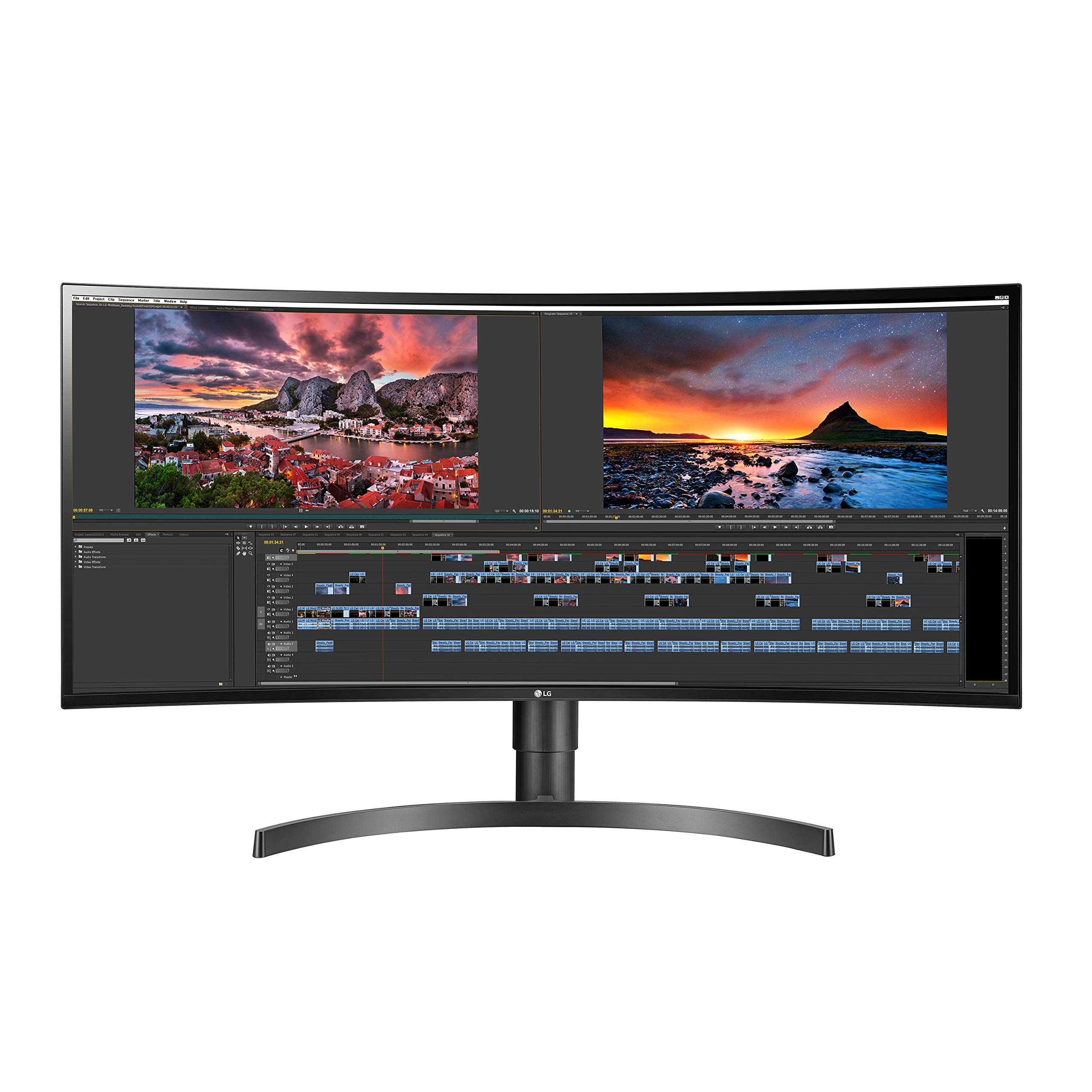
The LG 34WN80C-B is a 34-inch IPS ultrawide with a 21:9 aspect ratio and a gentle curve that works particularly well with macOS, offering plug-and-play compatibility without flickering or color shift issues. The 99% sRGB coverage and WQHD resolution (3440×1440) provide enough real estate to fit a Premiere Pro timeline, source monitor, and effects controls on one screen without feeling cramped.
The USB-C port delivers 60W of power, which is sufficient for charging a MacBook Air or 13-inch Pro, and the HDR10 support gives you a baseline HDR preview capability. The stand includes height and tilt adjustments, and the three-side virtually borderless design makes multi-monitor setups feel seamless if you decide to expand.
User reviews consistently praise the monitor for its crisp text and great colors straight out of the box, and the single-cable USB-C connection keeps the desk clean. The main drawbacks are the plastic stand that lacks swivel, and the USB-A ports drop to USB 2.0 speeds when using USB-C for video, which can cause slow transfers for external drives.
Why it’s great
- Seamless plug-and-play compatibility with macOS and sharp text rendering
- USB-C with 60W power delivery and video transmission through one cable
- 99% sRGB coverage for reliable social media and web editing
- Three-side borderless design works well in multi-monitor setups
Good to know
- USB-A ports drop to USB 2.0 when USB-C is used for display
- Stand is plastic and lacks swivel adjustment
- Modest 60W PD may not charge a 16-inch MacBook Pro at full speed
8. Dell S3425DW

The Dell S3425DW is a 34-inch VA ultrawide that prioritizes eye comfort with ComfortView Plus, which reduces blue light emissions to 35% or less without making the screen look yellow — a genuine benefit for editors who spend 10-hour days in front of the timeline. The VA panel delivers a 3000:1 contrast ratio, producing deeper blacks than IPS, and the 99% sRGB and 95% DCI-P3 coverage make it a strong candidate for mixed editing and light grading work.
The monitor supports AMD FreeSync Premium with a 120Hz refresh rate, providing smooth timeline scrubbing, and the USB-C port delivers 65W of power. The integrated speakers are redesigned with greater output and deeper frequency response than previous Dell models, making them usable for casual audio reference during edits.
User reviews note that the color accuracy is excellent for graphic design and video work, and the drop-down USB ports on the bottom edge are convenient for plugging in a flash drive. The main criticisms are the limited port selection — only HDMI and USB-C, no DisplayPort — and the VESA mount is recessed about a quarter inch, requiring aftermarket bracket assembly for monitor arms.
Why it’s great
- ComfortView Plus reduces blue light to 35% without color shift for long sessions
- VA panel provides 3000:1 contrast for rich blacks in dark scenes
- 95% DCI-P3 and 99% sRGB coverage for versatile color work
- Improved internal speakers with greater output than previous Dell models
Good to know
- Limited to HDMI and USB-C connectivity — no DisplayPort input
- VESA mount is recessed, requiring a special bracket for monitor arms
9. LG 34G630A-B

The LG 34G630A-B is a 34-inch VA ultrawide with a 240Hz refresh rate that makes scrubbing through 4K timelines feel almost like moving through butter — motion blur is completely eliminated, and every frame transition is visible in real time. The 95% DCI-P3 color gamut and VESA DisplayHDR 400 provide decent color vibrancy, and the 3440×1440 resolution gives you the horizontal space to arrange a DaVinci Resolve timeline, color scopes, and media bin without overlapping.
The monitor includes a USB-C port with 15W power delivery, which is enough to connect a laptop but not enough to charge it at speed — you will still need the laptop’s power adapter for long sessions. The stand offers height, tilt, and swivel adjustments on a compact base that frees up desk space.
User reviews praise the stunning picture quality and buttery-smooth performance, especially for the price, though the built-in speakers are described as mediocre and only acceptable for basic system audio. For editors who also game heavily, this monitor offers genuine dual-purpose use, but the modest color coverage and 300 cd/m² brightness make it a secondary candidate for critical HDR grading.
Why it’s great
- 240Hz refresh rate delivers the smoothest timeline scrubbing available
- 95% DCI-P3 color gamut provides vibrant color for mixed editing
- Ultrawide 3440×1440 fits timeline and media bin simultaneously
- Height, tilt, and swivel adjustable stand with a small desk footprint
Good to know
- USB-C only delivers 15W — not enough to charge a laptop at speed
- 300 cd/m² brightness is modest for HDR grading environments
- Built-in speakers are acceptable for utility but not pro monitoring
10. Samsung Viewfinity S65UA

The Samsung Viewfinity S65UA is a 34-inch VA ultrawide that sits at the entry-level end of the curved editing spectrum, offering a 1000R curve that matches the human field of view and reduces eye strain during long sessions. The WQHD resolution (3440×1440) with a 21:9 aspect ratio provides a solid multitasking layout, and the USB-C port delivers a generous 90W of power — enough to charge a 16-inch MacBook Pro at full speed through a single cable.
The monitor supports HDR10 for expanded color and includes AMD FreeSync to eliminate tearing when scrubbing or previewing motion-heavy content. The 100Hz refresh rate is smooth enough for timeline navigation without being overkill, and the height-adjustable stand allows you to find a comfortable eye position.
User reviews highlight the excellent value for the price and the immersive curve that replaces dual monitors cleanly. The major compromise is the color gamut — listed at 72%, which is well below sRGB standards — meaning this monitor is not suitable for color-accurate grading work. Some users also report that text can appear pixelated at this size due to the moderate pixel density, and durability concerns have been raised by a few long-term owners.
Why it’s great
- 90W USB-C power delivery charges a 16-inch laptop at full speed
- 1000R curvature matches the human field of view for reduced eye fatigue
- Ultrawide 3440×1440 resolution replaces dual monitor setups cleanly
- Height-adjustable stand for comfortable ergonomics
Good to know
- Color gamut of 72% is too narrow for professional color grading
- Text can appear slightly pixelated at 34-inch size due to moderate pixel density
- Some long-term reliability concerns reported by owners after 8 months
11. Alienware AW3425DWM

The Alienware AW3425DWM is a 34-inch IPS ultrawide with a 1500R curve and a budget-friendly positioning that makes it accessible for editors who also want a gaming-capable monitor. The 95% DCI-P3 color coverage and VESA DisplayHDR 400 provide vibrant color that works for general video editing, and the WQHD resolution (3440×1440) gives you the classic ultrawide timeline layout that Premiere and DaVinci users appreciate.
The 180Hz refresh rate with 1ms response time eliminates motion blur during timeline scrubbing and provides a competitive gaming experience on the side. The stand offers tilt and height adjustments, and the monitor includes both HDMI and DisplayPort cables in the box. The hardware-based low blue light solution reduces eye strain without washing out colors.
User reviews describe this monitor as having great value for the price, with vibrant out-of-box colors and an immersive curve that feels natural. The main criticism is that the IPS panel’s black levels are not as deep as VA or OLED, so shadows in dark footage may look grayish. Some users also note that the ultrawide format can stretch certain games awkwardly, but for video editing, the 21:9 ratio is a workflow benefit.
Why it’s great
- 95% DCI-P3 color coverage delivers vibrant color for editing work
- 180Hz refresh rate with 1ms response for smooth scrubbing and gaming
- Hardware-based low blue light reduces eye fatigue without color shift
- Ultrawide 3440×1440 provides an ideal timeline layout for NLEs
Good to know
- IPS black levels are not as deep as VA or OLED for shadow detail grading
- Ultrawide format may stretch some content awkwardly during dual use
- No built-in speakers for even basic audio reference
FAQ
Why should I choose a curved monitor over a flat monitor for video editing?
Is a 4K curved monitor necessary for professional video editing?
What color gamut percentage is acceptable for color grading?
Does a higher refresh rate matter for video editing?
Final Thoughts: The Verdict
For most editors, the best curved monitor for video editing winner is the ASUS ProArt PA32QCV because its 6K resolution, 98% DCI-P3 coverage, and Delta E <2 factory calibration deliver pixel-level precision that no other monitor at this size can match. If you want infinite contrast for HDR grading and an ultrawide timeline layout, grab the Alienware AW3425DW QD-OLED. And for a massive ultrawide command center that fits a full NLE interface without overlapping, nothing beats the Dell U3818DW.

Mo Maruf
I created WellFizz to bridge the gap between vague wellness advice and actionable solutions. My mission is simple: to decode the research and give you practical tools you can actually use.
Beyond the data, I am a passionate traveler. I believe that stepping away from the screen to explore new environments is essential for mental clarity and physical vitality.