Our readers keep the lights on and my smoothie glass nicely filled. As an Amazon Associate, I earn from qualifying purchases.
A flat panel might feel natural, but after eight hours of jumping between spreadsheets, emails, and video calls, your eyes tell a different story. The constant micro-adjustments as your gaze travels from the center to the edges of a flat screen silently build fatigue. A curved monitor solves this by wrapping the display around your natural field of vision, reducing those small eye movements and keeping every corner of the screen the same distance from your eyes. That design philosophy makes a curved monitor for office work a smarter ergonomic investment than most people realize.
I’m Mohammad Maruf — the founder and writer behind WellFizz. I’ve spent hundreds of hours researching display specifications, analyzing real-world office workflows, and comparing ergonomic metrics to separate the genuinely productive monitors from the ones that only look good in product shots.
This guide cuts through the noise and identifies the best curved monitor for office work by focusing on the specs that actually matter for all-day productivity, document clarity, and multi-window multitasking.
How To Choose The Best Curved Monitor For Office Work
Picking a curved office monitor means balancing screen real estate, eye comfort features, and connectivity options that match your actual work habits. The wrong choice here leads to neck strain, wasted desk space, or a blurry text experience that slows you down.
Understanding Curvature and Screen Size
The curve of a monitor is measured by its radius in millimeters. A 1500R curve is tighter and more immersive, while a 1800R or 3800R is subtler. For office work on a 34-inch ultrawide, a 1500R curve matches the natural shape of your field of view, meaning you don’t have to turn your head to see the edges. Flat or very gentle curves on large screens force your eyes to refocus across the panel, which contributes to fatigue during long sessions.
Panel Technology for Text Clarity
VA panels dominate the curved monitor space because they deliver higher native contrast ratios — typically 3000:1 or more — which makes black text on white backgrounds pop with clarity. IPS panels offer wider viewing angles and slightly better color accuracy, but their contrast is often lower. For document-heavy office work, a VA panel’s deep blacks and sharp text rendering give it a real edge. For design or photo editing, an IPS panel’s color consistency becomes more valuable.
Connectivity and Desk Simplicity
USB-C with power delivery is the single most underrated feature for office monitors. A single cable carries video signal, data, and enough wattage to charge your laptop. This eliminates the need for a separate docking station and keeps your desk clean. Look for models delivering at least 65W of power delivery if you use a standard ultrabook. A monitor that also includes an Ethernet port can replace a separate USB hub entirely.
Quick Comparison
On smaller screens, swipe sideways to see the full table.
| Model | Category | Best For | Key Spec | Amazon |
|---|---|---|---|---|
| Samsung Viewfinity S65UA | Premium | Ultimate Eye Comfort | 1000R curvature, 90W USB-C | Amazon |
| Dell S3425DW | Premium | All-Day Comfort | 120Hz, 95% DCI-P3 | Amazon |
| ViewSonic VG3456CA | Docking Hub | Single-Cable Setup | IPS, 100W USB-C, RJ45 | Amazon |
| Samsung CH890 | Business Grade | Corporate Reliability | 3-Year Warranty, 100Hz | Amazon |
| Alienware AW3425DWM | Premium Value | Hybrid Office/Gaming | 180Hz, DisplayHDR 400 | Amazon |
| ASUS VG34VQ3B | Performance | Smooth Productivity | 180Hz, 1ms MPRT | Amazon |
| LG 34WR55QK-B | Best Overall | Balanced Value | 65W USB-C, 100Hz | Amazon |
| Philips 346E2CUAE | Value | Budget Ultrawide | 1ms MPRT, 121% sRGB | Amazon |
| LG 34G630A-B | High Refresh | Maximum Smoothness | 240Hz, 1ms GtG | Amazon |
In‑Depth Reviews
1. Samsung Viewfinity S65UA Series 34-Inch Ultrawide QHD Curved Monitor

The Samsung Viewfinity S65UA stands out immediately for its 1000R curvature — the tightest curve available in this category — which mirrors the natural shape of the human field of vision. This isn’t a gimmick; the 1000R radius means every part of the 34-inch screen sits at nearly the same focal distance from your eyes, drastically reducing the refocusing strain that flat panels cause during long document reviews. The VA panel delivers a 4000:1 contrast ratio, making text exceptionally crisp against deep black backgrounds.
Beyond the ergonomic panel, this monitor includes a USB-C port that delivers up to 90W of power delivery, enough to charge a full-size laptop while transmitting video and data through a single cable. The TUV-certified intelligent eye care system automatically adjusts brightness and color temperature, and the flicker-free backlight eliminates the subtle PWM flicker that contributes to headaches. The built-in AMD FreeSync support also keeps the 100Hz refresh rate smooth during cursor movement and window animations.
The primary trade-off is consistency: a small number of users report premature screen failures, and the color gamut coverage at 72% NTSC is average rather than exceptional. For pure office productivity — spreadsheets, emails, coding, writing — the combination of the tightest curve, high contrast, and 90W charging makes this the most thoughtfully designed option for all-day desk work.
Why it’s great
- 1000R curvature matches natural vision, reducing eye fatigue
- 90W USB-C power delivery charges most laptops
- 4000:1 VA contrast ratio for razor-sharp text
- Auto brightness and flicker-free certified for eye care
Good to know
- Color gamut is limited compared to IPS alternatives
- Some users report reliability concerns after extended use
- Built-in speakers are not included
2. Dell 34 Plus USB-C Curved Monitor S3425DW

Dell’s S3425DW prioritizes sustained comfort with its ComfortView Plus technology, which reduces harmful blue light emissions to 35% or less without shifting the screen into a yellow cast. This makes a real difference during ten-hour workdays where every percentage point of blue light reduction contributes to less eye fatigue. The VA panel delivers a 3000:1 contrast ratio, and the 120Hz refresh rate makes cursor movement and scrolling noticeably smoother than standard 60Hz or 100Hz panels.
Color performance is above average for a productivity-focused monitor, hitting 99% sRGB and 95% DCI-P3 coverage. This makes the S3425DW a rare hybrid that handles both office documents and light photo or video editing without color shifts. The integrated speakers are significantly better than the previous generation, offering deeper frequency response and more usable volume for conference calls and media playback. The USB-C port delivers 65W power delivery, sufficient for most ultrabooks.
The stand is sturdy with full tilt, swivel, and height adjustment, but the VESA mount is recessed by about a quarter inch, which adds complexity if you plan to use an aftermarket monitor arm. Port selection is limited to HDMI and USB-C — there is no DisplayPort input. For users who value color accuracy alongside ergonomic comfort, this Dell delivers a premium experience that justifies its position.
Why it’s great
- ComfortView Plus reduces blue light without yellow tint
- 120Hz refresh rate for fluid cursor and scrolling
- 95% DCI-P3 color coverage for mixed office/creative work
- Improved built-in speakers for calls and media
Good to know
- No DisplayPort input available
- Recessed VESA mount complicates arm installation
- 70W power delivery, not enough for larger laptops
3. ViewSonic VG3456CA 34 Inch 1440p Ultrawide Docking Monitor
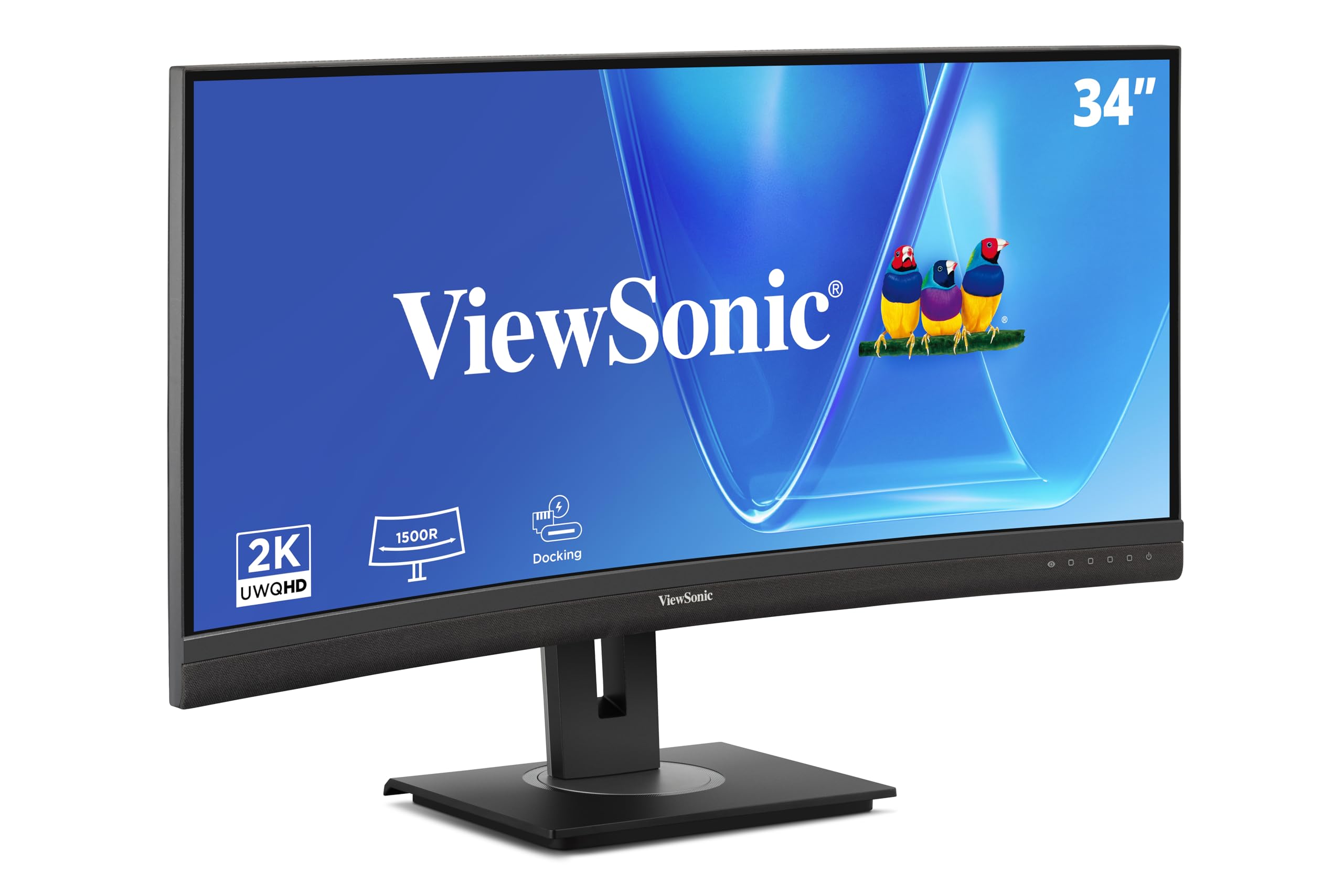
The ViewSonic VG3456CA is engineered to replace an entire docking station. Its USB-C port delivers a full 100W of power delivery, enough to charge even demanding 16-inch laptops, while also carrying video and data. The integrated RJ45 Ethernet port adds wired network connectivity, and the DisplayPort daisy-chain capability lets you connect up to four monitors without extra cabling. This is the most desk-friendly option for anyone running a minimalist workspace.
The 34-inch IPS panel offers a 1500R curve and delivers 350 nits of brightness with wide 178-degree viewing angles, making it a strong choice for collaborative work where colleagues might glance at your screen. The 100Hz refresh rate and AMD FreeSync support keep the experience smooth, and the full ergonomic stand provides tilt, swivel, and height adjustment. The quick-release stand includes a carrying handle, which is useful for hot-desking environments.
The built-in speakers are notably weak, with very low maximum volume that struggles in anything but a silent room. The source selection does not auto-detect inputs, requiring manual menu navigation. For users who need a single-cable hub solution with enough power for a large laptop, the VG3456CA is unmatched, but you will need external speakers for any audio work.
Why it’s great
- 100W USB-C power delivery for large laptops
- Integrated RJ45 Ethernet eliminates a separate dock
- DisplayPort daisy-chain supports multi-monitor setups
- Full ergonomic stand with carrying handle
Good to know
- Built-in speakers are very quiet
- Manual source selection required for input switching
- IPS contrast ratio is lower than VA alternatives
4. Samsung Business CH890 Series 34 inch WQHD Ultrawide Curved Monitor

The Samsung CH890 is built specifically for corporate environments, backed by a 3-year business warranty and TAA compliance for government and enterprise procurement. The 34-inch VA panel uses a 1500R curvature and delivers a 3000:1 contrast ratio with 100Hz refresh rate. The panel supports both Picture-in-Picture (PiP) and Picture-by-Picture (PbP) modes, allowing you to display content from two separate input sources simultaneously — a practical feature for users managing dual-computer workflows.
USB-C connectivity supports video, data, and power delivery in a single cable, though the power output is sufficient for standard ultrabooks rather than high-power workstations. The highly adjustable stand provides height, tilt, and swivel adjustments, and VESA mounting is supported for arm setups. The clean titanium and black finish fits professional office aesthetics without looking like gaming hardware.
The stand has been reported by some users as slightly wobbly at full height extension, and the inclusion of only basic ergonomic adjustments means you cannot rotate the screen into portrait mode. The supplied USB-C cable can also be fragile, with a small number of users reporting early failure. For enterprise buyers who prioritize warranty coverage and compliance certifications over premium panel specs, the CH890 is a safe, reliable choice.
Why it’s great
- 3-year business warranty with TAA compliance
- Picture-by-Picture mode for dual-computer setups
- VA panel with 3000:1 contrast for sharp text
- Professional aesthetic without gaming cues
Good to know
- Stand can feel wobbly at full height
- Cable quality is inconsistent
- No built-in speakers included
5. Alienware 34 Curved Gaming Monitor AW3425DWM

The Alienware AW3425DWM is a gaming-branded monitor that happens to be excellent for office productivity. The 180Hz refresh rate and 1ms gray-to-gray response time make cursor movement and window animations feel instant, and the 34-inch WQHD panel with a 1500R curve provides immersive screen real estate without the aggressive gaming aesthetic. The DCI-P3 95% color coverage and VESA DisplayHDR 400 certification deliver vibrant, accurate colors that exceed typical office monitor standards.
The stand is fully adjustable with height, tilt, and swivel, and the hardware-based low blue light solution reduces eye strain without washing out color accuracy. The monitor includes HDMI 2.1, DisplayPort 1.4, and a USB hub with two USB-A ports. Users have noted that the 3440×1440 resolution allows two full-width documents to sit side by side at 100% scale, which is the ideal layout for productivity. The matte screen finish cuts glare effectively in bright offices.
The panel uses VA technology, so blacks are deep but not truly inky like OLED. There are no built-in speakers, and the 3440×1440 resolution demands a capable graphics card if you also plan to game. At its price point, this is the smoothest, most color-accurate option for professionals who split their time between demanding office tasks and creative work.
Why it’s great
- 180Hz refresh rate for fluid productivity gestures
- 95% DCI-P3 coverage for accurate color work
- Hardware low blue light without yellow tint
- Full ergonomic stand included
Good to know
- No built-in speakers
- Requires strong GPU for gaming at full resolution
- Black levels are good but not OLED quality
6. ASUS TUF Gaming 34” Ultra-Wide Curved Monitor VG34VQ3B

The ASUS VG34VQ3B is a 34-inch 1500R curved monitor that punches above its tier with an 180Hz refresh rate and 1ms MPRT response time, using ASUS’s Extreme Low Motion Blur Sync technology. While built for gaming, ELMB Sync eliminates ghosting and motion blur in daily use, making text scrolling and window dragging feel sharper than standard panels. The 4000:1 contrast ratio from the VA panel ensures deep blacks and excellent text clarity.
The monitor covers 90% DCI-P3 and includes FreeSync Premium for tear-free variable refresh rate performance. The stand is a significant weak point — it is short and lacks height adjustment, forcing most users to purchase a VESA arm or riser for proper ergonomic positioning. The built-in speakers are described as tinny and quiet, making external audio necessary. The 4x USB 3.2 Type-A hub adds connectivity, and the built-in DisplayWidget Center software lets you adjust settings via mouse instead of OSD buttons.
For office use, the 180Hz panel makes multitasking feel exceptionally fluid, and the high contrast ratio helps readability. The lack of an adjustable stand is the biggest compromise. If you are willing to invest in a monitor arm, this ASUS delivers premium motion clarity at a competitive price point.
Why it’s great
- 180Hz refresh rate with ELMB Sync for crisp motion
- 4000:1 VA contrast for excellent text clarity
- FreeSync Premium for tear-free performance
- DisplayWidget Center software for easy adjustments
Good to know
- Stand is short and non-adjustable
- Built-in speakers are poor quality
- Color gamma is good but not pro-grade
7. LG 34WR55QK-B 34-inch UltraWide WQHD Curved Monitor

The LG 34WR55QK-B hits a sweet spot for office buyers who want ultrawide productivity without overspending. The 34-inch VA panel offers a 3440×1440 resolution with 99% sRGB color coverage and a 3000:1 contrast ratio, ensuring sharp text and accurate colors for general office tasks. The 100Hz refresh rate is a clear step up from standard 60Hz office monitors, making cursor movement feel smoother during daily workflows.
The USB-C port provides 65W power delivery, enough to charge most ultrabooks while carrying video and data through a single cable. The monitor includes two HDMI ports, a DisplayPort, two USB-A ports, and a headphone jack, offering solid connectivity. The ergonomic stand supports height and tilt adjustments, and the three-sided virtually borderless design allows for multi-monitor setups with minimal bezel gap. Reader Mode reduces blue light for extended reading sessions.
The monitor lacks built-in speakers, which is an oversight for office use. The VA panel’s viewing angles are narrower than IPS, meaning colors shift slightly if you sit off-center. For the price, this LG delivers the core features — ultrawide resolution, USB-C charging, and a 100Hz refresh rate — that matter most for daily office productivity.
Why it’s great
- 65W USB-C power delivery for single-cable setup
- 100Hz refresh rate smoother than standard monitors
- 99% sRGB with 3000:1 VA contrast for clear text
- Borderless design ideal for multi-monitor arrays
Good to know
- No built-in speakers
- VA viewing angles shift color off-axis
- Reader Mode reduces blue light but dims the panel
8. Philips 34 Inch UltraWide Curved Computer Monitor 346E2CUAE

The Philips 346E2CUAE offers an entry point to ultrawide curved monitors without sacrificing essential features. The 34-inch VA panel delivers 3440×1440 resolution with a 1500R curve, 121% sRGB color gamut coverage, and a 100Hz refresh rate. This combination provides vibrant colors and smooth motion that significantly outperforms basic office monitors. The 1ms MPRT response time ensures minimal ghosting during fast cursor movements.
The USB-C port includes power delivery, allowing a single-cable connection for laptop users. The monitor includes built-in speakers, which are adequate for system sounds and casual use. The stand offers tilt, swivel, and height adjustment, and the four-year advance replacement warranty is a significant advantage over competitors that offer only one year of coverage. Adaptive-Sync technology reduces screen tearing.
The contrast ratio is listed at 1600:1, which is lower than the 3000:1 or 4000:1 ratios found on more premium VA panels. This means blacks appear slightly less deep, and text may not have the same punch. The built-in speakers are functional but lack bass and volume. For budget-conscious buyers who want a genuine ultrawide curved experience with a solid warranty, this Philips delivers reliable value.
Why it’s great
- 121% sRGB coverage for vibrant color
- 1ms MPRT response time for smooth visuals
- Four-year advance replacement warranty
- Height-adjustable stand with tilt and swivel
Good to know
- Contrast ratio is lower than premium VA panels
- Built-in speakers are passable at best
- Cable management tabs are minimal
9. LG 34G630A-B 34-Inch Ultragear WQHD Curved Monitor

The LG 34G630A-B pushes refresh rate to 240Hz with a 1ms GtG response time, making it the smoothest display in this lineup for anyone who values fluid motion in their interface. The 34-inch VA panel delivers 95% DCI-P3 color coverage and VESA DisplayHDR 400 certification, providing vibrant highlights and deep shadows. The 21:9 ultrawide format with a 1500R curve creates an immersive workspace that keeps toolbars and palettes within peripheral view.
The stand offers height, tilt, and swivel adjustments with a compact base that frees up desk space. USB-C connectivity includes 15W power delivery, which is lower than competing models but sufficient for phones and smaller devices. The built-in speakers are functional for basic audio, and the matte screen finish reduces glare in bright lighting conditions. FreeSync Premium ensures tear-free variable refresh rate performance across all applications.
The 240Hz refresh rate is overkill for typical office tasks, and the 15W USB-C power delivery is not enough to charge a laptop, meaning you will still need a separate power cable. The black stabilizer and crosshair features are gaming-focused and irrelevant for office work. For professionals who also game on the same monitor and demand the highest possible refresh rate, this LG is the clear choice.
Why it’s great
- 240Hz refresh rate for ultra-smooth motion clarity
- 95% DCI-P3 with DisplayHDR 400 for vivid colors
- Fully adjustable ergonomic stand
- FreeSync Premium for tear-free visuals
Good to know
- 15W USB-C power delivery cannot charge laptops
- 240Hz refresh rate exceeds office requirements
- Built-in audio quality is only basic
FAQ
Is a curved monitor better for spreadsheets than a flat monitor?
What is the minimum curvature I should consider for office use?
Can I use a gaming curved monitor for office work?
Does a curved monitor cause distortion with grid-based software like Excel?
How much USB-C power delivery do I need for my laptop?
Final Thoughts: The Verdict
For most users, the best curved monitor for office work winner is the Samsung Viewfinity S65UA because its 1000R curvature, 90W USB-C power delivery, and TUV-certified eye care features directly address the two biggest office pain points: eye fatigue and desk clutter. If you want color accuracy for mixed creative work, grab the Dell S3425DW with its 95% DCI-P3 coverage and ComfortView Plus. And for the ultimate single-cable docking solution with 100W charging, nothing beats the ViewSonic VG3456CA.

Mo Maruf
I created WellFizz to bridge the gap between vague wellness advice and actionable solutions. My mission is simple: to decode the research and give you practical tools you can actually use.
Beyond the data, I am a passionate traveler. I believe that stepping away from the screen to explore new environments is essential for mental clarity and physical vitality.