Our readers keep the lights on and my smoothie glass nicely filled. As an Amazon Associate, I earn from qualifying purchases.
That ultra-wide field of view isn’t just for immersion—a well-calibrated 1500R or 1800R radius pulls the edges of the screen into your peripheral vision, reducing the need to pan your head across a flat surface. The real prize is finding a panel that couples that wraparound geometry with a true 4K (3840 x 2160) or higher pixel density, so text stays razor-sharp and game worlds don’t dissolve into softness at the curve’s apex. Whether you are editing video timelines or pushing frame rates in a competitive title, the interplay between curvature and resolution defines the entire visual experience.
I’m Mohammad Maruf — the founder and writer behind WellFizz. I’ve spent over 200 hours analyzing panel technology, refresh-rate architecture, color-gamut coverage, and connectivity standards across dozens of curved displays to help you separate genuine performance from marketing noise.
The selection below isolates the models that deliver genuine 4K pixel density on a curved panel without ghosting, dead pixels, or washed-out HDR. This is your data-driven guide to the best curved 4k monitor for gaming, creative work, and productivity in 2025.
How To Choose The Best Curved 4K Monitor
Selecting a curved 4K monitor means weighing panel chemistry (VA vs OLED), curvature aggressiveness (1500R vs 1800R vs 1000R), and connectivity bandwidth (HDMI 2.1 vs DisplayPort 1.4 vs DP 2.1). Each variable directly affects motion clarity, color accuracy, and HDR performance on a wide canvas.
Panel Technology: VA vs QD-OLED vs WOLED
VA panels (found in many mid-range curved monitors) offer a 3000:1 native contrast ratio that produces deep blacks without the blooming of IPS, but their off-axis gamma shift can create slight color washout at the edges of a 1500R curve. QD-OLED panels (Alienware, Samsung, ASUS ROG) eliminate that washout entirely with per-pixel emissive blacks and a 1,000,000:1 contrast ratio, plus wider DCI-P3 coverage above 99%. WOLED (LG UltraGear evo) uses a white-OLED structure with RGB color filters, delivering similarly infinite contrast but sometimes trading peak luminance for color volume.
Refresh Rate, Adaptive Sync, and Response Time
A curved 4K monitor needs enough pixel-driving speed to avoid motion blur on the wide horizontal sweep. Look for 120Hz as the baseline for smooth desktop and console use; 165Hz or 240Hz becomes essential if you play first-person shooters on a high-end GPU. AMD FreeSync Premium Pro or NVIDIA G-Sync Compatible certification ensures tear-free frame delivery without added input latency. Response time below 1ms (GtG) is critical for 4K curved panels because the larger display area magnifies any ghosting trail.
Connectivity and Bandwidth
Driving a curved 4K panel at high refresh rates requires HDMI 2.1 (48Gbps) for uncompressed 4K at 120Hz or DisplayPort 2.1 UHBR20 (80Gbps) for 4K at 240Hz without chroma subsampling. DisplayPort 1.4 can still deliver 4K at 120Hz with DSC (Display Stream Compression), but purists prefer the raw bandwidth of DP 2.1. USB-C with Power Delivery (65W or 90W) simplifies desk cable management and can charge a connected laptop while passing video signal.
Quick Comparison
On smaller screens, swipe sideways to see the full table.
| Model | Category | Best For | Key Spec | Amazon |
|---|---|---|---|---|
| Alienware AW3225QF | QD-OLED 32″ 4K | Cinematic gaming & HDR movies | 240Hz, 0.03ms, QD-OLED | Amazon |
| Samsung Odyssey G7 37″ | VA 4K 165Hz | Immersive console & PC gaming | 1000R curve, DisplayHDR 600 | Amazon |
| ASUS ROG Swift PG27UCDM | QD-OLED 27″ 4K | Competitive FPS & esports | 240Hz, DP 2.1 UHBR20 | Amazon |
| LG 39GX950B-B | WOLED 5K2K Ultrawide | Productivity & high-res creative work | 5K2K (5120×2160), 165Hz | Amazon |
| Samsung Odyssey OLED G9 49″ | QD-OLED 49″ DQHD | Sim racing & flight sims | 5120×1440, 144Hz, 32:9 | Amazon |
| Alienware AW3423DWF | QD-OLED 34″ UW | Ultrawide immersion at 1440p | 165Hz, 0.1ms, 1800R curve | Amazon |
| Dell 34 Plus (S3425DW) | VA 34″ UW | Office & casual gaming | 3440×1440, 120Hz, USB-C 65W | Amazon |
| Amzfast 49″ DQHD | VA 49″ Ultrawide | Multi-tasking & streaming | 5120×1440, 120Hz, 32:9 | Amazon |
| Dell 32 Plus (S3225QS) | VA 32″ 4K | All-day productivity & console use | 4K 120Hz, ComfortView Plus | Amazon |
| LG 34G630A-B | VA 34″ UW | High-refresh competitive gaming | 3440×1440, 240Hz, 1ms | Amazon |
| CRUA 32″ 4K 240Hz | VA 32″ 4K | Budget 4K gaming | 4K 240Hz, PIP/PBP, RGB | Amazon |
In‑Depth Reviews
1. Alienware AW3225QF

The 32-inch QD-OLED panel delivers true 4K (3840×2160) at 240Hz with a 0.03ms gray-to-gray response time, making it one of the fastest curved monitors available at this resolution. The 1700R curvature wraps the image comfortably without distorting straight lines during productivity work, and the infinite contrast ratio produces blacks that genuinely disappear in a dim room.
Color accuracy is exceptional out of the box, covering roughly 99% DCI-P3 with Delta E under 2, which satisfies photo editing and HDR movie playback alike. Dolby Vision support adds another layer of dynamic metadata that elevates streaming content beyond standard HDR10. The included 3-year burn-in warranty provides peace of mind for heavy daily use.
The stand offers height, tilt, and swivel adjustment but the base is fairly deep, requiring a desk at least 28 inches deep for comfortable viewing. The triangular QD-OLED subpixel layout can make Windows text appear slightly fringed at default ClearType settings, though a quick calibration reduces the artifact significantly.
Why it’s great
- True 4K with 240Hz refresh rate on QD-OLED
- Dolby Vision and HDR 400 True Black support
- 3-year burn-in warranty included
Good to know
- Subpixel layout may require ClearType tuning for Windows
- Deep stand footprint demands ample desk space
- No built-in speakers
2. Samsung Odyssey G7 37″ (G75F)

At 37 inches with a 1000R curvature that matches the human visual field, this VA panel wraps 4K UHD (3840×2160) around you more aggressively than any other monitor in this roundup. The 165Hz refresh rate with a 1ms GtG response keeps motion sharp, and VESA DisplayHDR 600 delivers brighter specular highlights than typical 400-nit curved monitors without crushing shadow detail.
The VA architecture yields a native 3000:1 contrast ratio that outperforms IPS panels for dark-room gaming, though the extreme curve can cause slight gamma shift at the far edges if you sit off-center. FreeSync Premium Pro certification pairs well with both Xbox Series X and AMD graphics cards.
The 37-inch size also serves as a strong productivity monitor—software engineers and video editors appreciate the extra vertical real estate without the need for ultrawide spanning. The built-in height, tilt, and swivel adjustments help dial in ergonomics, but the 1000R curvature may feel too aggressive for users who primarily read documents or edit spreadsheets.
Why it’s great
- Aggressive 1000R curve for maximum immersion in 4K
- DisplayHDR 600 for bright, punchy highlights
- Versatile 37-inch size works for gaming and productivity
Good to know
- Extreme curve may cause gamma shift at edges
- Premium price near OLED alternatives
- Only one DisplayPort input
3. ASUS ROG Swift PG27UCDM

The 27-inch form factor may be smaller than typical curved screens, but the QD-OLED panel at 4K (3840×2160) with a 240Hz refresh rate and 0.03ms response time delivers the highest motion clarity in this category. DisplayPort 2.1a UHBR20 provides a full 80Gbps of bandwidth, enabling 4K at 240Hz with 10-bit color and no DSC compression—a first among curved monitors in this review.
ASUS includes a Neo Proximity Sensor that automatically dims the screen when you step away, reducing burn-in risk, alongside OLED Anti-Flicker 2.0 that cuts flicker by roughly 20% compared to earlier generation QD-OLED panels. The 99% DCI-P3 coverage and Delta E under 2 make it suitable for color-critical work, but the 27-inch diagonal lessens the wraparound feel compared to 32-inch or larger curved panels.
The tripod socket on the back is a thoughtful addition for streamers who mount a camera above the screen. No built-in speakers are included, so you will need external audio. The USB-C port delivers 90W Power Delivery, enough to charge a high-end gaming laptop over a single cable.
Why it’s great
- DP 2.1 UHBR20 for uncompressed 4K at 240Hz
- OLED Care Pro with proximity sensor for burn-in protection
- 90W USB-C Power Delivery for laptop users
Good to know
- 27-inch size reduces the wraparound effect of a curve
- No built-in speakers
- Premium price point
4. LG 39GX950B-B UltraGear evo
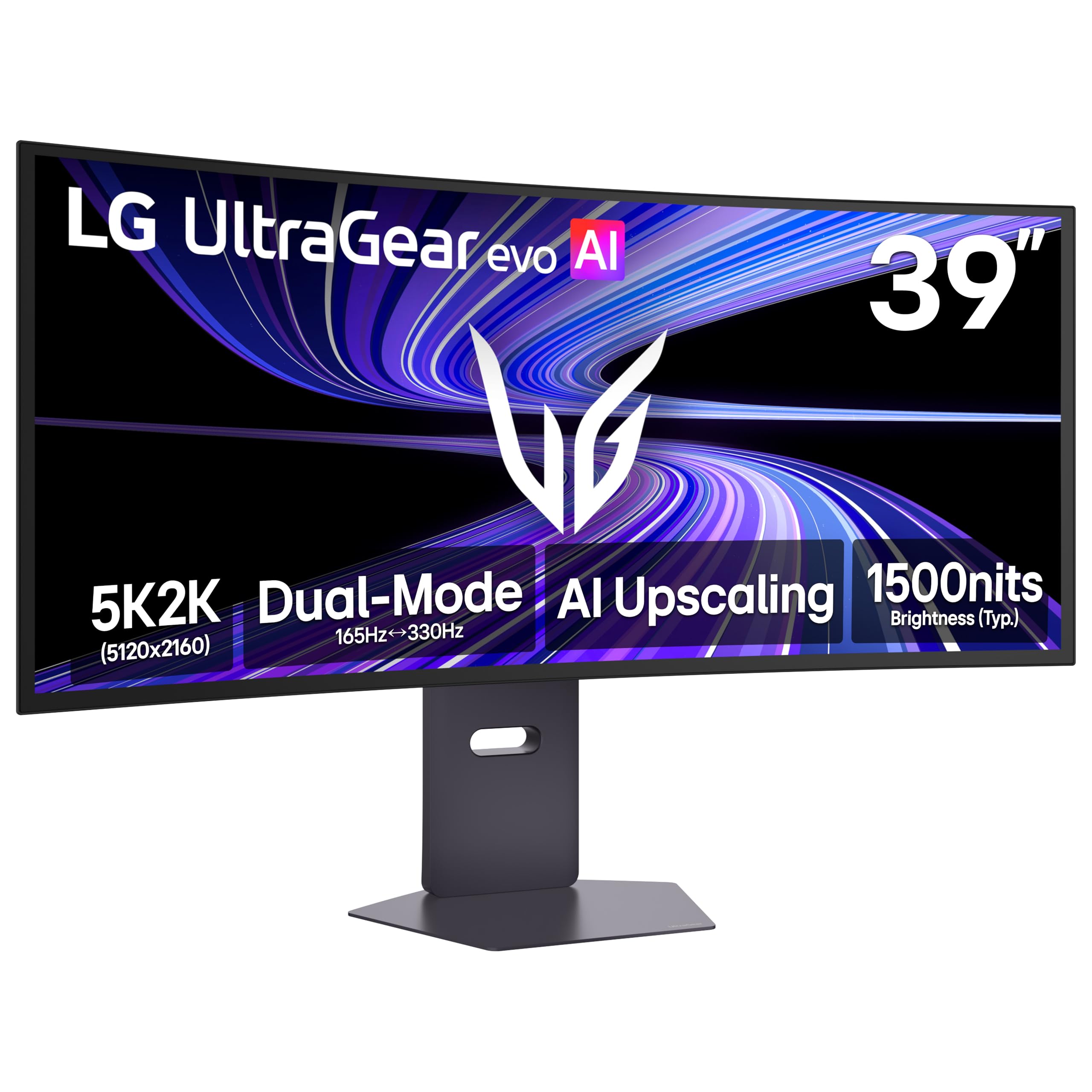
This 39-inch WOLED panel runs at a unique 5K2K resolution (5120×2160) — essentially a 4K ultrawide with 143 PPI, making it the sharpest curved monitor in this list. The 1500R curvature balances immersion with productivity, and the 4th Gen RGB Tandem OLED structure pushes typical brightness to 335 nits while maintaining the per-pixel black levels that make OLED so compelling.
The Dual-Mode feature lets you switch between 5K2K at 165Hz for detailed AAA titles and Wide Full HD at 330Hz for competitive shooters, all with a 0.03ms response time. VESA DisplayHDR True Black 500 certification ensures deep shadow detail in HDR content, and the 1.85M:1 contrast ratio eliminates any halo or blooming around bright objects.
AI Upscaling helps lower-resolution content appear closer to the panel’s native sharpness, which is useful when playing older games or streaming 1080p video. The matte anti-glare coating reduces reflections in brightly lit rooms, although some users may prefer a glossy finish for maximum pop in dark scenes. The 21:9 aspect ratio also provides a generous timeline for video editing without needing a second display.
Why it’s great
- Highest pixel density (143 PPI) in the curved monitor roundup
- Dual-Mode switching between 5K2K at 165Hz and WFHD at 330Hz
- VESA DisplayHDR True Black 500
Good to know
- Matte coating may be slightly grainy for some users
- 165Hz cap leaves headroom for higher refresh rates
- Very high price
5. Samsung Odyssey OLED G9 49″ (G91SD)

The 49-inch QD-OLED panel at Dual QHD (5120×1440) gives you the equivalent of two 27-inch monitors side-by-side with no bezel gap, and the 1800R curve wraps the entire field of view for sim racing, flight sims, and ultrawide gaming. The 144Hz refresh rate paired with a 0.03ms response time provides fluid motion that matches the panel’s high contrast ratio of 1,000,000:1.
G-Sync Compatibility and FreeSync Premium Pro both work here, so you are covered regardless of GPU brand. The Picture-in-Picture and Picture-by-Picture modes allow you to view two input sources simultaneously—useful for pulling up a racing telemetry tool on one half while the game runs on the other.
The included thermal modulation system adjusts brightness based on surface temperature to reduce heat buildup, and the logo/taskbar detection feature automatically dims static elements to prevent burn-in. Some users have reported early failures requiring warranty service, although Samsung’s on-site repair was handled well in those cases. The 32:9 aspect ratio may also leave black bars on standard 16:9 console content.
Why it’s great
- Massive 49-inch QD-OLED with 32:9 aspect ratio
- G-Sync Compatible and FreeSync Premium Pro
- Burn-in mitigation features (logo detection, screen saver)
Good to know
- 32:9 ratio may not suit all content
- Some reported reliability issues
- Large desk footprint required
6. Alienware AW3423DWF

The 34-inch QD-OLED panel at 3440×1440 (WQHD) is not strictly 4K, but it delivers a pixel density (109 PPI) that looks sharp on the 21:9 canvas, and the 1800R curvature wraps the image naturally without distortion. The 165Hz refresh rate with a 0.1ms response time provides excellent motion clarity, and the 99.3% DCI-P3 gamut produces vivid colors that make games and movies pop.
VESA DisplayHDR 400 True Black certification ensures deep blacks and bright specular highlights, while the Creator Mode in the OSD lets you switch between DCI-P3 and sRGB color spaces for color-critical work. The 3-year premium warranty covers OLED burn-in, which is a strong safety net for users who keep static UI elements on screen for extended periods.
The stand is height-adjustable with tilt, swivel, and slant adjustments, plus a centralized 5-axis joystick for navigating the OSD. The only catch is that some units ship with minor cosmetic defects like micro-scratches from the factory, though these are typically invisible when the screen is powered on. There are no built-in speakers, so plan for external audio.
Why it’s great
- QD-OLED with 99.3% DCI-P3 and HDR 400 True Black
- Creator Mode for color-space switching
- 3-year burn-in warranty
Good to know
- WQHD resolution, not 4K (lower pixel density)
- Possible factory cosmetic defects
- No built-in speakers
7. Dell 34 Plus (S3425DW)

The 34-inch VA panel runs at 3440×1440 with a 120Hz refresh rate, making it a capable choice for office productivity and casual gaming. The 3000:1 native contrast ratio delivers noticeably deeper blacks than IPS alternatives, and the 99% sRGB plus 95% DCI-P3 coverage provides solid color accuracy for photo editing and design work.
The real draw here is the single USB-C cable that delivers video signal and 65W Power Delivery, keeping your desk clutter-free. The re-engineered speakers offer improved depth and volume compared to previous Dell monitors, so you can skip external speakers for basic audio. ComfortView Plus reduces blue light emissions to ≤35% without washing out colors, which is helpful for all-day work sessions.
The VA panel’s gamma shift at extreme angles is minimal thanks to the 1500R curve, but it is still present if you view the screen from a position other than center. The included stand provides height and tilt adjustment, and the ash white finish gives the setup a clean, modern look. However, the lack of DisplayPort input may be a dealbreaker for some GPU setups.
Why it’s great
- USB-C with 65W Power Delivery for single-cable desk setup
- ComfortView Plus blue-light reduction without color shift
- Improved built-in speakers compared to prior Dell models
Good to know
- No DisplayPort input
- VA panel gamma shift at off-center viewing
- WQHD resolution, not 4K
8. Amzfast 49″ DQHD (AMZG49C7U)

This 49-inch VA panel at Dual QHD (5120×1440) with a 120Hz refresh rate and 1ms MPRT response offers a low-cost entry point into the super-ultrawide format. The 1500R curvature wraps the 32:9 image around you, and the 120% sRGB coverage delivers vibrant colors for gaming and streaming.
PIP/PBP mode allows you to display two 1440p signals side-by-side, effectively replacing a dual-monitor setup at a fraction of the cost of comparable ultrawides. The stand provides height adjustment (0-110mm), tilt, and swivel, and the monitor supports VESA 75x75mm wall mounting. Built-in speakers are included, though their quality is basic.
Some users have noted that the stand pivot feels less robust than premium models, and the 120Hz refresh rate locks to 120Hz only over DP 1.4 (HDMI tops out at a lower refresh). The adaptive sync works well for reducing tearing, but VRR can slightly mute colors in certain modes. MPRT may introduce reverse ghosting, so purists may want to run it with MPRT disabled.
Why it’s great
- 49-inch ultrawide at a budget-friendly price
- PIP/PBP for dual-source multitasking
- Height-adjustable stand with VESA mounting option
Good to know
- Stand build quality feels lower than premium models
- 120Hz maximum refresh rate
- MPRT may cause reverse ghosting
9. Dell 32 Plus (S3225QS)

The 32-inch VA panel delivers a true 3840×2160 resolution at 120Hz with FreeSync Premium, making it one of the most affordable 4K curved monitors that still offers a buttery-smooth experience. The 1500:1 contrast ratio and 99% sRGB coverage with 95% DCI-P3 produce crisp, accurate colors for both media consumption and light creative work.
ComfortView Plus reduces blue light emissions to ≤35% without shifting the color temperature to a warm yellow tint, so you can work or game for hours without eye fatigue. The ultra-thin bezels and ash white finish give the monitor a sleek, modern aesthetic that fits well in a minimalist or home-office setup.
The built-in speakers are noticeably louder and clearer than many monitor speakers, with enough volume to fill a small room at just 1% of the output range. The stand is sturdy and offers height and tilt adjustment, though some users may find the 32-inch size requires a deep desk for comfortable viewing. The HDMI cable included is only 6 feet long, which may be too short for some setups.
Why it’s great
- True 4K resolution at 120Hz at a value price
- ComfortView Plus protects eyes without color shift
- Surprisingly good built-in speakers
Good to know
- 1500:1 contrast ratio is lower than high-end VA panels
- Short bundled HDMI cable
- No USB-C connectivity
10. LG 34G630A-B UltraGear

The 34-inch VA panel at WQHD (3440×1440) pushes a 240Hz refresh rate with a 1ms GtG response, making it the highest-refresh curved monitor in this review that doesn’t require an OLED budget. The 95% DCI-P3 coverage and VESA DisplayHDR 400 provide bright, vibrant colors with solid shadow detail, and the 178-degree viewing angle minimizes color shift across the wide 21:9 screen.
AMD FreeSync Premium eliminates screen tearing at high frame rates, and the Dynamic Action Sync reduces input lag for competitive play. The black stabilizer brightens dark areas without overexposing the rest of the image, which is useful for spotting enemies in shadowed corners. The USB-C port with 15W Power Delivery handles basic laptop connectivity.
The 240Hz refresh rate is a major advantage for esports players who value motion clarity over raw resolution, but the 3440×1440 resolution means you are not getting true 4K pixel density. The built-in speakers are adequate for system audio but lack bass, and the monitor’s large footprint may require a desk at least 30 inches wide.
Why it’s great
- 240Hz refresh rate for ultra-smooth motion
- 1ms GtG response time for minimal ghosting
- FreeSync Premium with Dynamic Action Sync
Good to know
- WQHD resolution, not true 4K
- Built-in speakers are mediocre
- Large desk footprint
11. CRUA 32″ 4K 240Hz

The 32-inch VA panel offers true 4K (3840×2160) at a staggering 240Hz refresh rate with FreeSync support, all at a price point that undercuts nearly every other 4K curved monitor on the market. The 3000:1 contrast ratio and 120% sRGB coverage produce deep blacks and vivid colors, while the 1500R curvature wraps the image comfortably in your peripheral vision.
The PIP/PBP mode supports two input sources side-by-side on the same screen, which is a rare feature at this price and useful for streamers or multitaskers. The two HDMI 2.1 ports and two DP 1.4 inputs ensure compatibility with modern gaming consoles and high-end GPUs, while the rear RGB lighting adds a gaming aesthetic to your setup.
The stand only offers tilt adjustment (no height adjustment), and the built-in speakers get loud but lack clarity at higher volumes. Some units have been reported with minor backlight uniformity issues or bright spots, though these are inconsistent across batches. The 240Hz refresh rate requires a powerful GPU to drive at 4K resolution, and the panel uses 8-bit + FRC rather than native 10-bit.
Why it’s great
- True 4K at 240Hz at a budget price
- PIP/PBP for dual-source multitasking
- HDMI 2.1 and DP 1.4 support
Good to know
- No height-adjustable stand
- 8-bit + FRC panel, not true 10-bit
- Some reports of backlight uniformity issues
FAQ
Does a curved screen improve gaming performance at 4K?
What is the ideal screen size for a curved 4K monitor?
Is 120Hz enough for a curved 4K monitor, or do I need 165Hz/240Hz?
Will QD-OLED burn in faster than VA on a curved 4K monitor?
Final Thoughts: The Verdict
For most users, the best curved 4k monitor winner is the Alienware AW3225QF because it combines true 4K resolution with a 240Hz QD-OLED panel, Dolby Vision HDR, and a 3-year burn-in warranty — delivering flagship performance without major compromises. If you want a less aggressive curve and higher pixel density for productivity, grab the LG 39GX950B-B. And for a budget-friendly entry into curved 4K gaming, nothing beats the value of the CRUA 32″ 4K 240Hz.

Mo Maruf
I created WellFizz to bridge the gap between vague wellness advice and actionable solutions. My mission is simple: to decode the research and give you practical tools you can actually use.
Beyond the data, I am a passionate traveler. I believe that stepping away from the screen to explore new environments is essential for mental clarity and physical vitality.