Our readers keep the lights on and my smoothie glass nicely filled. As an Amazon Associate, I earn from qualifying purchases.
Choosing the right processor for your gaming rig means balancing raw clock speed, core count, cache size, and platform longevity against your specific resolution target and GPU pairing. A mismatch here leaves performance on the table or money wasted on overhead you will never use.
I’m Mohammad Maruf — the founder and writer behind WellFizz. I have spent hundreds of hours analyzing synthetic benchmarks, real-world gaming frame times, power draw numbers, and chipset roadmaps to build this guide around measurable performance data.
After sorting through dozens of models and thousands of user-reported results, I have broken down the most compelling options to help you find the best current cpu for gaming at your target resolution and budget tier.
How To Choose The Best Current CPU For Gaming
The best gaming processor for your build depends on three variables: the resolution you play at, the GPU you pair it with, and the type of games you play most. A CPU that dominates 1080p competitive shooters may show no advantage over a cheaper chip at 4K, where the GPU becomes the bottleneck. Focus on measurable specs rather than marketing tiers.
Core Count and Clock Speed Balance
Most modern games benefit most from strong single-core performance and a boost clock above 5.0 GHz. An 8-core processor is the current sweet spot for pure gaming — 6 cores still work well but can show stutter in heavily threaded titles like Cyberpunk 2077 or Starfield. Chips with more than 8 cores (12 or 16) do not improve gaming frame rates and exist mainly for content creation workloads.
L3 Cache Size and 1% Lows
AMD’s 3D V-Cache technology stacks extra L3 cache directly on the chip die, dramatically improving data hit rates for the CPU. In practice, this means higher minimum frame rates and fewer micro-stutters in simulation games (Factorio, Microsoft Flight Simulator), open-world RPGs, and competitive shooters. The standard 32MB L3 cache on most mid-range chips provides solid performance, while 96MB or 104MB V-Cache variants deliver best-in-class 1% lows.
Socket and Platform Longevity
A CPU socket determines your motherboard upgrade path. AMD’s AM5 platform supports DDR5 RAM and PCIe 5.0 and is confirmed to support future Ryzen generations through at least 2027. Intel’s LGA 1700 and new LGA 1851 sockets both require DDR5 for optimal performance, but Intel typically changes sockets every two generations, limiting future CPU upgrades without a motherboard swap. AM5 offers longer platform stability for multi-year builds.
Quick Comparison
On smaller screens, swipe sideways to see the full table.
| Model | Category | Best For | Key Spec | Amazon |
|---|---|---|---|---|
| AMD Ryzen 7 7800X3D | Mid-Range | Pure gaming / 1080p-1440p | 96MB L3 V-Cache | Amazon |
| AMD Ryzen 7 9800X3D | Premium | Best frame rates / high-refresh | Zen5 + 104MB L3 Cache | Amazon |
| Intel Core i9-14900K | Premium | Gaming + productivity hybrid | 6.0 GHz Turbo / 24 cores | Amazon |
| Intel Core Ultra 9 285K | Premium | Professional CAD / Heavy multitask | P-core 5.7 GHz / 40MB Cache | Amazon |
| Intel Core i7-14700KF | Mid-Range | Streaming + gaming combo | 20 cores / 5.6 GHz boost | Amazon |
| Intel Core Ultra 7 265KF | Mid-Range | Efficient gaming / content creation | 20 cores / 5.5 GHz boost | Amazon |
| Intel Core i5-14600KF | Mid-Range | Value gaming / 1440p builds | 14 cores / 5.3 GHz turbo | Amazon |
| AMD Ryzen 5 7600X | Budget | Entry-level AM5 gaming | 6 cores / 5.3 GHz boost | Amazon |
| Skytech Gaming Azure 3 | Prebuilt | Turnkey gaming PC | 7800X3D + RTX 5060 Ti | Amazon |
In‑Depth Reviews
1. AMD Ryzen 7 7800X3D

The 7800X3D is the most efficient gaming-focused processor on the market, drawing only 75W under load while delivering frame rates that match or beat Intel’s 14900K in most titles. The 96MB of 3D V-Cache ensures that simulation and open-world games run with rock-solid 1% lows, eliminating micro-stutter without requiring manual tuning or high-end liquid cooling. Owners report idle temperatures under 40°C and gaming temps around 65-70°C even with a budget air tower, making it unusually easy to cool for a high-performance chip.
Benchmarks show the 7800X3D matching the 14900K in Cyberpunk 2077 at 1080p while drawing less than half the power. In CPU-bound titles like Factorio, Counter-Strike 2, and Baldur’s Gate 3, the large L3 cache provides a measurable advantage over any non-X3D competitor. The AM5 platform also gives you a clear upgrade path to future Ryzen generations without changing your motherboard, adding long-term value to the initial purchase.
The only real trade-off is productivity performance — the 7800X3D lags behind Intel’s 24-core chips in video rendering and 3D modeling workloads. If your PC is gaming-focused with occasional office work, this chip is the ultimate sweet spot. Pair it with a quality B650 or X670E board and 6000MHz CL30 DDR5 for a build that stays relevant for years.
Why it’s great
- Best-in-class 1% lows thanks to 96MB L3 V-Cache
- Low 75W power draw runs cool on a air cooler
- AM5 platform supports future CPU upgrades without a new motherboard
Good to know
- Slower than Intel in video encoding and 3D rendering workloads
- No integrated graphics — requires a discrete GPU for display output
- Stock cooler not included; budget aftermarket cooler required
2. AMD Ryzen 7 9800X3D

The 9800X3D represents the absolute ceiling of consumer gaming CPU performance, built on the Zen5 architecture with a 16% IPC uplift over Zen4 and a 104MB total cache pool that delivers the highest minimum frame rates available in 2025. User reports show consistent frame times even in the most demanding scenarios — Cyberpunk 2077 with path tracing, Microsoft Flight Simulator over dense cities, and heavy Battlefield 6 multiplayer matches all run without a single stutter. Paired with an RTX 4090, owners are seeing the highest 1080p FPS numbers ever recorded on consumer hardware.
Thermal performance is surprisingly manageable for a flagship. The 9800X3D runs cooler than the previous generation thanks to the improved V-Cache stacking process, and a mid-range 360mm AIO keeps temps under 80°C during extended gaming sessions. The chip is drop-in compatible with existing AM5 boards after a BIOS update, making it a simple upgrade for anyone already on the platform. Reinstalling chipset drivers after installation ensures optimal scheduling performance.
For competitive players chasing every frame at 1080p 360Hz or for those building a no-compromise flagship rig, the 9800X3D is the undisputed king. For most gamers, the 7800X3D offers better value per dollar without sacrificing smoothness in daily gameplay.
Why it’s great
- Highest gaming frame rates available on any consumer CPU
- Improved thermal performance over previous 3D V-Cache chips
- Drop-in upgrade for existing AM5 motherboard users
Good to know
- Premium price offers diminishing returns at 1440p and 4K
- Requires a high-end liquid cooler for sustained all-core workloads
- Overkill for anyone gaming at 60Hz or 120Hz refresh rates
3. Intel Core i9-14900K

The 14900K remains Intel’s strongest all-around desktop processor, combining 8 Performance-cores and 16 Efficient-cores to hit a 6.0 GHz maximum turbo frequency. This hybrid architecture allows the chip to deliver elite single-core gaming performance while simultaneously handling heavy productivity workloads like 4K video rendering, compilation, and AI model training without breaking a sweat. Owners using the chip for game development, streaming, and CAD work report exceptional responsiveness across all tasks simultaneously.
The thermal and power demands are substantial — peak draw exceeds 250W under full load, requiring a high-end 360mm AIO or custom loop to avoid thermal throttling. Recent microcode updates (0x12F) have addressed the Vmin shift instability issues that affected earlier 13th and 14th gen batches, but buyers should ensure their motherboard has the latest BIOS installed before fitting the chip. A contact frame is recommended to prevent LGA 1700 socket bending issues that can cause uneven cooler contact.
For pure gaming, the 7800X3D matches or beats the 14900K while consuming a third of the power. The 14900K’s strength is its hybrid role as both a top-tier gaming chip and a workstation processor. If you run video editing, 3D rendering, or software compilation alongside your gaming sessions, this Intel chip delivers productivity performance no current AM5 chip can match. Pair it with a Z790 board and DDR5-6000+ memory for the best balance of speed and stability.
Why it’s great
- 6.0 GHz boost clock delivers elite single-core gaming performance
- 24 cores handle productivity workloads that crush any pure gaming CPU
- DDR4 and DDR5 compatibility offers flexible memory upgrade paths
Good to know
- Extremely power-hungry — needs a robust 360mm AIO or custom loop
- Requires BIOS update with microcode 0x12F for stability assurance
- LGA 1700 socket is end-of-life with no future CPU upgrade path
4. Intel Core Ultra 9 285K

The Core Ultra 9 285K marks Intel’s shift to the LGA 1851 platform with the new Arrow Lake architecture, delivering 24 cores (8 P-cores + 16 E-cores) that cap at 5.7 GHz. This chip is optimized for thermal efficiency compared to the 14900K — it draws less peak power while delivering comparable multi-threaded performance, making it easier to cool in compact workstation builds. CAD professionals using SolidWorks report that the 285K runs stable for 24-hour burn-in tests without throttling, a significant reliability upgrade over previous generations that had documented overheating issues.
The platform requires an 800-series motherboard and supports CUDIMM RAM for higher memory speeds. The integrated Intel UHD Graphics provide a functional display output without a discrete GPU, which is convenient for troubleshooting or basic productivity setups. Performance in gaming is strong but not class-leading — the 7800X3D still edges ahead in pure frame rate at 1080p, though the gap narrows at higher resolutions where GPU load dominates.
For professionals who need a reliable all-day workstation that can also handle gaming after hours, the 285K offers a compelling package. The power efficiency improvements mean quieter operation under sustained load, and the new platform supports PCIe 5.0 across both GPU and storage lanes. If you are building a new system from scratch and want the most modern Intel platform with room to grow, the 285K is the strongest foundation available.
Why it’s great
- Improved power efficiency over 14th gen — runs cooler and quieter
- Excellent stability for professional CAD and modeling workloads
- New LGA 1851 platform with PCIe 5.0 support across multiple lanes
Good to know
- Requires a new 800-series motherboard — no backward compatibility
- Gaming performance still trails the 7800X3D in CPU-bound titles
- Needs 360mm AIO for sustained all-core workloads over 200W
5. Intel Core i7-14700KF

The i7-14700KF hits a unique middle ground — 20 cores (8 P-cores + 12 E-cores) with a 5.6 GHz turbo that delivers strong gaming performance while leaving headroom for simultaneous streaming, recording, or Discord calls without frame drop. Users pairing this chip with an RTX 4080 Super report smooth 1440p gaming with no stutters even during intensive CPU-heavy sessions in Battlefield 6 and AI generation workloads.
Thermal performance is manageable with a quality air tower like the Noctua NH-D15 or a 240mm AIO, though the chip benefits from a 360mm cooler for sustained multi-core rendering. The 14700KF runs noticeably cooler than the 14900K while delivering over 90% of its gaming performance, making it a smarter choice for most gamers who do not need the absolute top-end Intel bin. BIOS update with microcode 0x12F is strongly recommended to address the Vmin shift instability that affected earlier batches.
The chip supports both DDR4 and DDR5 memory, allowing builders to reuse existing DDR4 kits for a more affordable upgrade. For gamers who stream or multitask heavily while playing, the extra E-cores handle background tasks without impacting game performance. It is the strongest mid-range hybrid option for anyone building a high-refresh 1440p gaming rig that also doubles as a content creation workstation.
Why it’s great
- 20 cores handle gaming + streaming without frame loss
- Runs cooler than the i9 while delivering nearly identical game FPS
- DDR4 and DDR5 compatibility gives flexible build options
Good to know
- Requires BIOS update with microcode 0x12F for stability
- No integrated graphics — needs discrete GPU for display
- LGA 1700 socket has no confirmed future CPU upgrade path
6. Intel Core Ultra 7 265KF

The Core Ultra 7 265KF offers a smart alternative to the more expensive 285K for builders who want the new Arrow Lake architecture and LGA 1851 platform without paying flagship prices. With 20 cores (8 P-cores + 12 E-cores) reaching 5.5 GHz, the chip handles modern titles like Call of Duty Black Ops 6 and Battlefield 4 with ease while running light encoding tasks in the background. Users upgrading from older Ryzen chips report a noticeable snappiness in daily tasks and excellent stability with proper motherboard support.
Some early adopters experienced boot issues with MSI motherboards that required a BIOS update to resolve — checking motherboard compatibility before purchase is essential. The chip pairs well with a mid-range air cooler like the Thermalright Peerless Assassin, with gaming temps staying comfortably under 80°C. The 265KF lacks integrated graphics, so a discrete GPU is mandatory, but the lower price point compared to the 285K makes it a strong value for gamers who do not need the absolute highest core count.
For gaming performance, the 265KF sits close to the i7-14700KF in most benchmarks while drawing less power and running cooler. The LGA 1851 platform gives you access to newer motherboard features including faster memory support and improved PCIe lanes. If you are building a new system from scratch and care about power efficiency and modern connectivity, this chip delivers excellent value without the premium of the 285K.
Why it’s great
- Strong gaming performance with lower power draw than 14th gen Intel
- LGA 1851 platform offers modern features and upgradeability
- Runs cool on a mid-range air cooler — no AIO strictly required
Good to know
- Motherboard compatibility issues reported — verify BIOS support
- No integrated graphics — requires a discrete GPU
- Gaming frame rates trail the 7800X3D in CPU-bound titles
7. Intel Core i5-14600KF

The i5-14600KF packs 14 cores (6 P-cores + 8 E-cores) with a 5.3 GHz turbo into the best gaming value in the Intel lineup. It delivers smooth 1440p gaming when paired with mid-range GPUs like the RTX 3080 or RTX 5070, handling Unreal Engine titles and heavy multitasking (Chrome tabs, OBS, Discord, Spotify) without stutter. The hybrid core layout ensures background tasks are offloaded to the E-cores, keeping game performance consistent.
The chip supports both DDR4 and DDR5 memory, making it an excellent drop-in upgrade for anyone with an existing LGA 1700 motherboard and DDR4 kit. A 240mm AIO or quality air tower like the Thermalright Peerless Assassin provides sufficient cooling for sustained gaming loads. The chip runs at sensible temperatures out of the box, and a contact frame is a cheap insurance against socket bending that can occur on LGA 1700 boards over time.
For pure gaming at 1440p and 4K, the 14600KF performs nearly identically to the more expensive i7 and i9 chips because the GPU becomes the bottleneck at higher resolutions. The real saving comes from pairing it with affordable DDR4 memory and a B660 or B760 motherboard. If you want Intel reliability and strong gaming performance without overspending on cores you will not use, this is the smartest choice in the Intel mid-range.
Why it’s great
- Excellent gaming value — near i7 performance at a much lower price
- DDR4 and DDR5 support maximizes upgrade flexibility
- Runs cool with a budget air cooler — no expensive AIO needed
Good to know
- No integrated graphics — requires a discrete GPU
- LGA 1700 socket is end-of-life with no confirmed future upgrade path
- 6 P-cores may show stutter in heavily threaded simulation games
8. AMD Ryzen 5 7600X

The Ryzen 5 7600X is the entry point for the AM5 platform, offering six Zen4 cores with a 5.3 GHz boost clock that delivers snappy gaming performance at a accessible price. Owners report smooth 1080p and 1440p gaming with modern GPUs like the RTX 5070, handling Cyberpunk 2077, Apex Legends, and Baldur’s Gate 3 without bottlenecking at high settings. The chip supports PCIe 5.0 and DDR5 memory, giving you a modern foundation that can be upgraded to a future X3D chip without changing the motherboard.
The 7600X runs hot out of the box — gaming temps of 80-85°C are normal with an air cooler, and an aftermarket cooler is not included. A 240mm AIO or high-end air tower keeps temps in check, and the chip does not throttle even under sustained load. The 6 MB L2 plus 32 MB L3 cache is adequate for most games, though simulation and open-world titles benefit from the larger cache found on X3D chips.
For budget-conscious builders, the 7600X offers the best path to the AM5 ecosystem without the upfront cost of an X3D chip. You get full DDR5 and PCIe 5.0 support, and when you want to upgrade in two years, a drop-in 9800X3D will transform the system without rebuilding. The 6-core count is sufficient for today’s games, but future titles may increasingly leverage 8-core architectures — factor that into your long-term planning.
Why it’s great
- Most affordable entry to the AM5 platform with clear upgrade path
- Strong 1080p and 1440p gaming performance for the price
- Supports PCIe 5.0 and DDR5 memory standards
Good to know
- Runs hot — aftermarket cooler required (not included)
- 6 cores may become a bottleneck in future CPU-heavy titles
- Standard 32MB L3 cache lacks the 1% low advantages of V-Cache chips
9. Skytech Gaming Azure 3
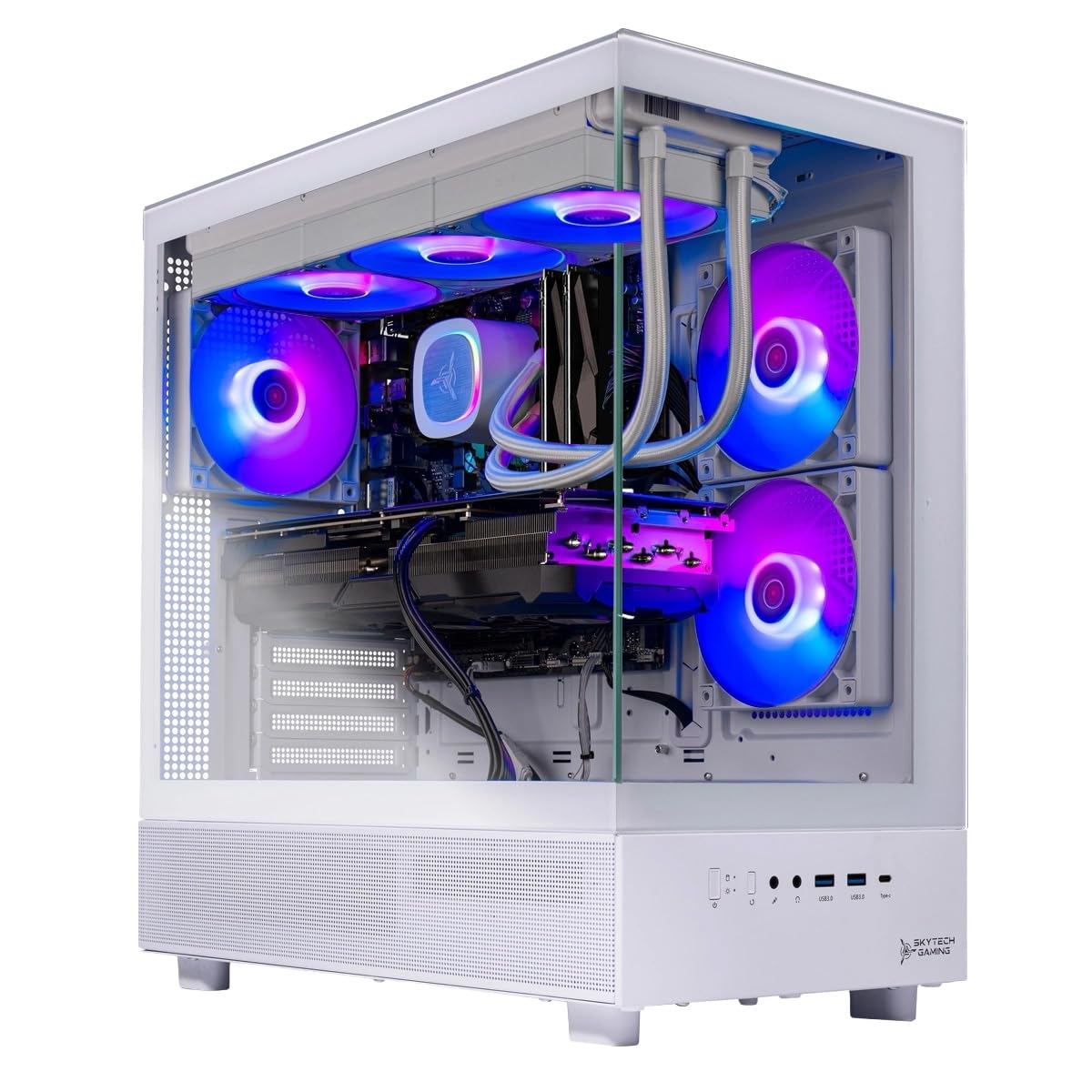
The Skytech Azure 3 is a prebuilt system that puts the excellent AMD Ryzen 7 7800X3D at the heart of a turnkey gaming PC, paired with an NVIDIA GeForce RTX 5060 Ti 16GB and 16GB of DDR5-6000 memory. This combination delivers smooth 1080p and 1440p gaming at ultra settings in titles like Elden Ring, Cyberpunk 2077, and Baldur’s Gate 3, hitting 60+ FPS without tweaking. The 360mm AIO liquid cooler ensures the 7800X3D stays well within its thermal limits even during extended sessions.
The system includes a 1TB Gen4 NVMe SSD for fast loading, a 650W gold-rated power supply, and Windows 11 Home pre-installed with no bloatware. Builders who prefer not to assemble their own PC will appreciate the one-year warranty on parts and labor and the free technical support. The white tempered glass case gives the build a clean aesthetic that fits most desk setups, and the included keyboard and mouse are functional for immediate use.
The prebuilt premium is significant compared to building the same components yourself — you are paying for assembly, warranty, and convenience. The RTX 5060 Ti is a solid mid-range card but limits the 7800X3D’s potential at high refresh rates; serious competitive gamers may want to upgrade the GPU down the line. For anyone who wants a ready-to-play system with the best gaming CPU available and no assembly hassle, this is a strong prebuilt choice.
Why it’s great
- 7800X3D delivers elite gaming performance out of the box
- 360mm AIO keeps CPU temps low even under sustained load
- One-year warranty and tech support for peace of mind
Good to know
- Prebuilt premium vs. building the same components yourself
- 16GB RAM is minimum for modern AAA gaming — 32GB recommended
- Wi-Fi 5 is outdated; wired Ethernet preferred for stable online play
FAQ
What is the difference between P-cores and E-cores in Intel processors?
Do I need an aftermarket cooler for the AMD Ryzen 7 7800X3D?
Will the Intel LGA 1700 socket support future CPU upgrades?
Final Thoughts: The Verdict
For most users, the best current cpu for gaming winner is the AMD Ryzen 7 7800X3D because it delivers best-in-class frame rates and 1% lows while drawing only 75W, running quiet and cool on a budget air cooler, and offering a clear upgrade path on the AM5 platform. If you need top-tier gaming performance with no compromises and can budget for a 360mm cooler, grab the AMD Ryzen 7 9800X3D. And for a hybrid system that handles gaming plus heavy productivity workloads like video rendering and AI model training, nothing beats the Intel Core i9-14900K.

Mo Maruf
I created WellFizz to bridge the gap between vague wellness advice and actionable solutions. My mission is simple: to decode the research and give you practical tools you can actually use.
Beyond the data, I am a passionate traveler. I believe that stepping away from the screen to explore new environments is essential for mental clarity and physical vitality.