Our readers keep the lights on and my smoothie glass nicely filled. As an Amazon Associate, I earn from qualifying purchases.
That buzz from your phone? It’s the enemy of focus. A cube timer cuts the cord, replacing notifications with a silent, physical flip that starts a countdown and stops the mental drift. These small, rechargeable cubes are built for one thing: keeping you in the zone without touching your screen.
I’m Mohammad Maruf — the founder and writer behind WellFizz. I’ve spent hundreds of hours comparing the gravity sensors, battery circuits, and build quality found in these compact timers to find the models that actually deliver on their promise of distraction-free time management.
After digging through spec sheets and real user feedback, I’ve narrowed the field to the five models that matter for any focus routine. This guide to the best cube timers breaks down exactly which one fits your desk, your workflow, and your need for silence.
How To Choose The Best Cube Timers
Not every cube timer is built the same. Some rely on cheap sensors that misfire, while others offer thoughtful alarm options for shared spaces. Focus on three things: the gravity sensor’s accuracy, the alarm modes available, and how the timer handles preset times versus custom inputs.
Gravity Sensor Reliability
The core mechanic of a cube timer is the flip-to-start action. A good sensor wakes the timer instantly when you rotate the desired time face-up. Low-end sensors may require a second flip or fail to register the change, ruining the frictionless experience that makes these devices useful in the first place. Look for models with consistent reviews about the sensor’s responsiveness.
Alarm and Vibration Modes
Open offices, libraries, and shared study spaces demand silence. A cube timer with a reliable vibration mode lets you feel the alert without disturbing anyone. If you work from home or in a private office, a loud, clear alarm may be your preference. The best units offer a mute setting, a vibration-only mode, and an adjustable sound level so you can adapt to any environment.
Preset Times and Customization
Standard presets like 5, 10, 30, and 60 minutes cover most Pomodoro and cooking needs. However, some users need a 15-minute or 45-minute interval for specific workflows. Check whether the timer allows you to reassign a side to a custom time or if it locks you into fixed values. The ability to program a side to your preferred duration adds significant flexibility.
Quick Comparison
On smaller screens, swipe sideways to see the full table.
| Model | Category | Best For | Key Spec | Amazon |
|---|---|---|---|---|
| Jack Pomodoro Timer | Premium | Versatile Pomodoro & magnetic mount | 6 presets + custom (3/5/10/25/30/60 min) | Amazon |
| KADAMS Pomodoro Cube Timer | Premium | Visual LED ring countdown | Visual LED ring & custom side assignment | Amazon |
| LUCKY TIME Cube Timer | Mid-Range | Simplicity & silent open office use | Count up & down modes, 5h charge | Amazon |
| Teknoluzor Digital Cube Timer | Mid-Range | Budget-friendly rechargeable pick | 500mAh battery, Type-C charging | Amazon |
| Wbacon Cube Pomodoro Timer | Budget | Entry-level flip timer for homeschool | 9 settings, loud (90-100DB) alarm | Amazon |
In‑Depth Reviews
1. Jack Pomodoro Timer

This cube timer from Printers Jack stands out by offering six preset times — 3, 5, 10, 25, 30, and 60 minutes — plus a dedicated Pomodoro button that cycles through 25-minute work and 5-minute break sessions automatically. The magnetic base is strong enough to stick to a refrigerator or whiteboard, making it useful for presentations or kitchen use without sliding off.
The alarm system includes four brightness levels for the display and three alert modes: silent, vibration, and adjustable sound. Users report the vibration is firm enough to feel in a pocket or on a desk, and the sound can be turned up for noisy environments. The built-in lithium battery charges via USB-C and supports pass-through use while plugged in.
Downsides include a power button that some find hard to distinguish by touch, and the alarm only sounds for about 30 seconds before shutting off automatically. The gravity sensor works well when the cube is stationary, but putting it in a pocket can accidentally trigger a reset. For its versatility and thoughtful extras, this remains the most complete option.
Why it’s great
- Six presets cover nearly any interval you need
- Strong magnetic base for mounting on metal surfaces
- Adjustable display brightness for dark rooms
Good to know
- Alarm only sounds for 30 seconds then stops
- Gravity sensor can trigger accidentally in a pocket
2. KADAMS Pomodoro Cube Timer
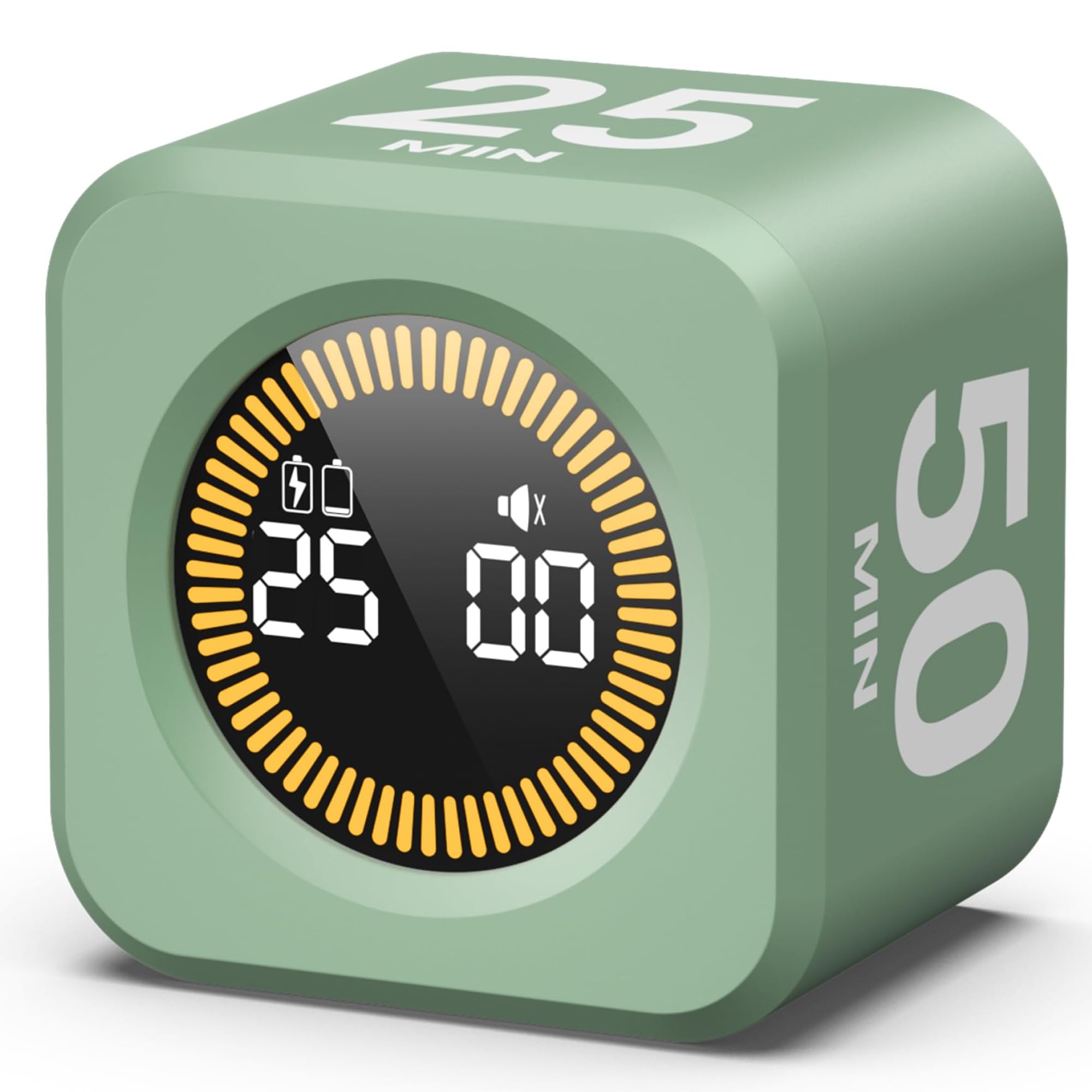
KADAMS takes a different approach by replacing the numeric screen with a visual LED ring that fills up as time passes. Preset times are 5, 10, 25, and 50 minutes — the 25-minute option is perfect for the classic Pomodoro method. The ring is easy to read from across a desk or classroom, giving an instant sense of how much time remains without reading numbers.
Each side can be reassigned to a custom countdown time, so if you need a 15-minute break or a 45-minute session, you can program it directly. It also includes a stopwatch mode for tracking elapsed time up to 99 minutes and 59 seconds. The green color variant is bright and cheerful, but the unit is also available in other shades.
Battery life is impressive — users report using it daily for three weeks without needing a recharge. The mute function is genuinely silent, with no beeping or vibration to distract a quiet room. However, there is no 30-minute preset, which is an odd omission for a Pomodoro-focused timer. The alarm is a simple “beep beep” rather than a tune, which some may find too basic.
Why it’s great
- Visual LED ring gives instant time-remaining awareness
- Fully customizable side assignment for any interval
- Long battery life — weeks on a single charge
Good to know
- No 30-minute preset, only 25 and 50 minutes
- Alarm sound is simple and short
3. LUCKY TIME Cube Timer
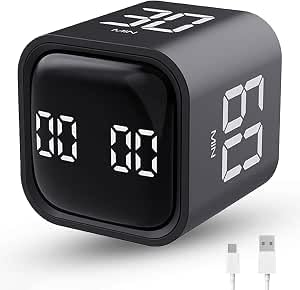
The LUCKY TIME cube focuses on the fundamentals: four preset times (5, 10, 30, 60 minutes), a gravity sensor for flip-to-start, and both countdown and count-up modes. The 1.7-inch cube is compact enough to hold in one hand, and the built-in rechargeable battery is rated for up to six months of use on a single five-hour charge.
Alarm options include mute, vibration, and a two-level beeper (low and high). The vibration mode is quiet enough for an open office — users report the haptic feedback is noticeable without being jarring. The flip-to-pause and flip-to-reset features work reliably, making it easy to stop a session mid-task without digging through menus.
The main trade-off is customization: you get four fixed presets and one custom time, but you cannot reassign all four sides to different custom values. Some users wish the custom setting could be saved across power cycles. For those who need a simple, reliable cube that just works for standard intervals, this is a strong value.
Why it’s great
- Reliable gravity sensor with consistent flip response
- Effective vibration mode for silent environments
- Long battery life and fast 5-hour charge
Good to know
- Only four fixed presets with one custom slot
- Custom time resets after power-off
4. Teknoluzor Digital Cube Timer

Teknoluzor’s cube timer packs a 500mAh rechargeable battery with a Type-C port, making it one of the most modern options at a budget-friendly price point. Preset times include 5, 10, 30, and 60 minutes, and the gravity sensor activates the countdown as soon as the chosen side faces up. The 1.7-inch screen is clear and easy to read.
This model offers two alarm volume levels and a vibration mode. Users in open offices appreciate the vibration feature, which is strong enough to feel on a desk without disturbing neighbors. The auto-off function kicks in after five minutes of inactivity, saving battery life between uses. The black and white design fits well with most desk aesthetics.
Some users note that the plastic body feels lightweight, and the screen is not as bright as premium models. The custom countdown function is available but requires pressing M and S buttons rather than using the flip mechanic — a minor inconvenience. For the price, it delivers solid build quality and the convenience of Type-C charging.
Why it’s great
- Type-C fast charging — no AAA batteries needed
- Auto-off saves battery after inactivity
- Vibration mode works well for shared spaces
Good to know
- Plastic body feels less premium than metal options
- Custom time requires button presses, not flip
5. Wbacon Cube Pomodoro Timer

The Wbacon cube timer offers an impressive nine settings — including 5, 10, 30, and 60 minute presets — and a flexible manual mode that ranges from 00:01 to 99:59. The gravity sensor supports both automatic flip-to-start and manual button control. Its compact size (1.73 inches per side) makes it easy to carry between home, office, and school.
Alarm options include two volume levels: soft (70-80DB) and loud (90-100DB), plus a mute mode. The vibration function is present but some users report it is not as strong as other models, sometimes requiring the cube to be on a hard surface to feel the buzz. The LED indicator light is subtle and does not draw attention in a dark room.
The biggest complaint is consistency: a few units arrived with malfunctioning alarms, though replacements worked perfectly. The lack of a 15-minute preset is a common request, as the jump from 10 to 30 minutes is quite wide for some workflows. For the price, it offers a lot of features, but build quality can be hit-or-miss.
Why it’s great
- Nine settings cover most common intervals
- Manual mode up to 99:59 for flexible timing
- Compact and portable for travel
Good to know
- Vibration feedback can be weak on soft surfaces
- Quality control issues with some units
FAQ
What is the difference between a cube timer and a regular kitchen timer?
Can I use a cube timer for the Pomodoro method?
How do I silence a cube timer in a quiet office?
Final Thoughts: The Verdict
For most users, the best cube timers winner is the Jack Pomodoro Timer because it offers six presets, a magnetic base, and a full range of alert modes that adapt to any environment. If you want a visual countdown that helps kids or ADHD users stay on track, grab the KADAMS Pomodoro Cube Timer with its LED ring. And for a silent, distraction-free office companion, the LUCKY TIME Cube Timer delivers reliable haptic feedback and long battery life at a reasonable price.

Mo Maruf
I created WellFizz to bridge the gap between vague wellness advice and actionable solutions. My mission is simple: to decode the research and give you practical tools you can actually use.
Beyond the data, I am a passionate traveler. I believe that stepping away from the screen to explore new environments is essential for mental clarity and physical vitality.