Our readers keep the lights on and my smoothie glass nicely filled. As an Amazon Associate, I earn from qualifying purchases.
The quest for authentic retro gaming often grinds to a halt on modern flat panels, where classic 240p and 480i signals look muddled and introduce a distracting wall of input delay. Gamers chasing the true feel of their old consoles spend more time troubleshooting adapter lag than actually playing. This guide cuts through the noise, focusing on the hardware that genuinely solves these specific timing and resolution problems.
I’m Mohammad Maruf — the founder and writer behind WellFizz. My research for this guide involved analyzing dozens of signal processors, replacement monitors, and console bundles, cross-referencing community feedback on latency figures, deinterlacing quality, and compatibility with era-specific resolutions.
Whether you need a dedicated retrogaming CRT, a reliable scan converter for a modern display, or a direct console solution for the PlayStation 2 era, this breakdown of the best crt tv for gaming refines your options based on real-world compatibility and measurable performance.
How To Choose The Best CRT TV For Gaming
Selecting the right CRT TV or converter for gaming requires matching the hardware to your specific console generation and display goals. The wrong choice can introduce lag, scaling artifacts, or compatibility issues that completely ruin the experience. Focus on a few key areas to get the best result for your setup.
Signal Handling — 240p, 480i, and Beyond
The most common pitfall is a converter or TV that cannot correctly handle 240p signals — the native resolution for most consoles from the NES through the Sega Genesis and PlayStation 1. Many modern scalers incorrectly interpret 240p as 480i, causing combing artifacts and blurry motion. Look for units that explicitly advertise 240p compatibility with dynamic or motion-adaptive deinterlacing for 480i content like PlayStation 2 games. True CRT displays handle these natively without conversion, while the best upscalers replicate that look without introducing significant lag.
Input Options — Composite, S-Video, Component, SCART, VGA
The quality of your video signal depends entirely on the connection. Composite (the yellow RCA cable) is the baseline but looks soft. S-Video improves sharpness considerably for SNES and N64. Component (YPbPr) is the absolute best analog option for consoles like the PlayStation 2, Xbox, and Wii. SCART (RGBS) offers a similar high-quality signal for European and many Japanese systems. If you are using a CRT monitor or arcade cabinet, VGA is the standard, while converters bridge these formats to HDMI. Your console’s native output should determine your purchase.
Scanline Effects and Image Processing
When outputting a 240p signal to a high-resolution display, you will want scanline effects to simulate the look of a CRT’s phosphor grid. Some dedicated converters like the GBS-Control or Retrotink-adjacent devices include scanline generators with adjustable intensity. Flat-panel arcade replacements often lack this feature, so be prepared for a cleaner but less authentic image. Motion-adaptive deinterlacing is equally important for 480i content — basic “bob” deinterlacing introduces flicker, while adaptive processing smooths motion without adding lag.
Form Factor — Full CRT, Arcade Replacement, or Converter
The physical form heavily dictates your options. A full CRT TV from brands like Sony (PVM/BVM), JVC, or Toshiba delivers the most authentic experience but is heavy, large, and may require recap or geometry correction. Alternatively, a 4:3 LCD arcade monitor replacement (like the UNICO 26-inch) retains the aspect ratio and mounting dimensions of a CRT cabinet but offers a modern, burn-in-free panel with VGA and HDMI connectivity. Finally, a standalone video converter (like the ODV-GBS-C) allows you to use a modern flat-panel or PC CRT monitor, trading some authenticity for convenience and smaller footprint. Choose based on your space tolerance and desire for absolute original hardware feel.
Quick Comparison
On smaller screens, swipe sideways to see the full table.
| Model | Category | Best For | Key Spec | Amazon |
|---|---|---|---|---|
| Mcbazel ODV-GBS-C | Converter | PS1/PS2/Dreamcast to modern displays | 240p/480i/480p support via SCART, Component, VGA | Amazon |
| Zeust PS2 Slim Bundle | Console Bundle | Ready-to-play PS2 on any TV | Refurbished SCPH-70000 with wireless controllers | Amazon |
| 19″ Arcade Monitor | Arcade LCD | Jamma/MAME upright cabinet replacement | 4:3 LCD with VGA, 1024×768, includes mount brackets | Amazon |
| UNICO 26″ Arcade Monitor | Arcade LCD | 26″ arcade cabinet CRT replacement | 4:3 LCD, 1024×768, CGA/EGA/HDMI/VGA inputs | Amazon |
| TuTu 22″ FHD TV | Flat Panel | Non-smart, low-lag monitor for streaming/consoles | 1080p LED, 60Hz, HDMI/VGA, no built-in OS | Amazon |
| Sceptre C248W-1920RN | LCD Monitor | Budget curved monitor for PC/console | 24-inch, 75Hz, 1800R curve, HDMI x2 | Amazon |
| ChzsyhC 24″ Curved | LCD Monitor | High-refresh gaming on modern consoles | 1080p, 180Hz, 1ms MPRT, FreeSync | Amazon |
| My Arcade Atari Game Station Pro | Plug-and-Play | Modern HDMI retro Atari gaming | 200+ games, 2.4GHz wireless, HDMI output | Amazon |
| Atari 400 Mini | Mini Console | Authentic Atari 8-bit emulation on modern TVs | 720p HDMI, USB loading, 30-second rewind | Amazon |
In‑Depth Reviews
1. Mcbazel ODV-GBS-C Component VGA/SCART to VGA/HDMI Scan Converter

The Mcbazel ODV-GBS-C is currently the most compelling mid-range option for converting classic console signals to modern displays without breaking the bank. It accepts RGBS SCART, component YPbPr, and VGA (RGBHV) inputs, making it compatible with everything from a modded SNES to a PlayStation 2 via HD Retrovision cables. The unit offers dynamic motion-adaptive deinterlacing for 480i content, which avoids the flickering mess of basic bob deinterlacers, and outputs clean 240p for retro titles at resolutions up to 1280×960 through HDMI or VGA.
What truly sets this converter apart is its scanline generation and the ability to fine-tune color balance with independent R, G, B knobs — a rare feature at this price level. The LED display and menu control via WiFi connected phone app simplify adjustments, though the documentation is famously sparse. Power comes from a 12V 2A DC supply, and firmware updates are available via computer, ensuring the unit can improve over time. Users report negligible perceptible lag when paired with a TV set to game mode.
One important limitation is that it does not support AV composite input, so older consoles using only that connection will need an alternative adapter. Additionally, for N64, GameCube, or Wii, you must purchase the ODV-II Converter (ASIN: B0B2WFTDGF) and use both in tandem — this converter alone will not work with those systems. For PlayStation 1, PlayStation 2, and Dreamcast, however, the ODV-GBS-C delivers an experience that rivals units costing three times as much.
Why it’s great
- Excellent motion-adaptive deinterlacing for PS2 480i games
- Customizable scanline effect for authentic 240p look
- RGB balance knobs allow precise color tuning
Good to know
- Does not support standard AV/composite input
- Requires additional ODV-II adapter for N64, GameCube, Wii
- Documentation is minimal — expect a learning curve
2. Zeust PlayStation 2 Gaming System Bundle – PS2 Slim & 2 Wireless Controllers
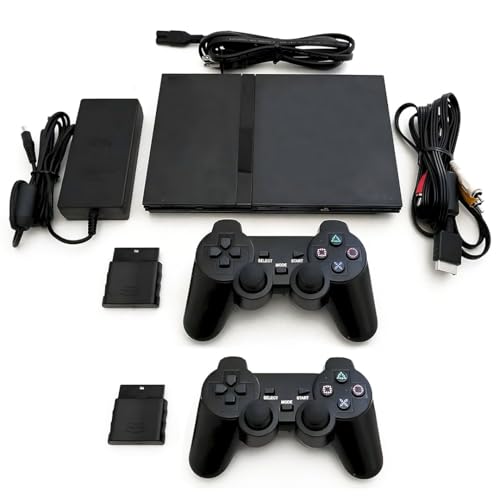
The Zeust PS2 Slim bundle is a complete, ready-to-play solution for anyone who wants to dive straight into the PlayStation 2 library without hunting for separate accessories. This renewed console is the SCPH-70000 model — significantly thinner and more reliable than the original fat unit — and ships with two wireless Bluetooth controllers, receiver dongles, power cable, and AV cables. It is designed to work on any modern television through standard composite inputs, though users report better image quality with an aftermarket component cable.
The bundle is ideal for those who value convenience over retro authenticity. Unlike dealing with finicky converters, this setup lets you plug in and play within minutes. The wireless controllers offer a reasonable range and eliminate cord tangling, though some users note they lack the feel of original wired models. The console plays all standard PS1 and PS2 discs, making it the most straightforward way to experience titles like Gran Turismo 4, God of War, and Metal Gear Solid 3 on a modern TV.
Quality control on renewed units can vary — some customers report disc spin noise or require a composite-to-HDMI adapter for newer TVs lacking analog inputs. The Zeust bundle includes no instructions, so be prepared for a basic setup process. For the price, it offers enormous convenience for the casual retro gamer who wants immediate PS2 access without technical fuss.
Why it’s great
- Complete package — console, controllers, cables included
- Wireless controllers reduce cord clutter in tight spaces
- Plays both PS1 and PS2 discs right out of the box
Good to know
- Analog AV output may need an adapter for modern TVs
- Renewed units may have minor noise or cosmetic wear
- No setup instructions included in the package
3. 19 Inch Arcade Monitor Complete with CRT Mount for Upright Cabinet Replacement

This 19-inch arcade monitor from RetroArcade.us is purpose-built for anyone restoring or replacing the CRT in an upright arcade cabinet. It uses an LCD panel with a native 4:3 aspect ratio and 1024×768 resolution, making it a direct drop-in replacement for cabinets that originally housed a 19-inch CRT. The kit includes a CRT mount bracket that facilitates installation without heavy modifications to the cabinet frame.
The monitor connects via standard D-Sub VGA, which makes it compatible with JAMMA and MAME setups through a simple harness adapter. Builders consistently praise the bracket fitment for Ms. Pac-Man, Galaga, and other classics — the mount aligns with the original CRT bolt pattern, reducing installation time. Image quality is vibrant and sharp, with a contrast ratio of 450:1 and brightness of 250 cd/m², offering a noticeable improvement over a tired, dim CRT.
The primary trade-off is that this is an LCD, not a true CRT — it lacks scanlines and the characteristic phosphor glow of a glass tube. For purists, the flat panel may be a compromise, but for most cabinet owners, the reliability, weight savings, and lack of burn-in are worth the swap. The monitor has no built-in speakers, so you will need to provide your own audio solution. It ships ready to mount and includes no wiring diagrams, so some basic arcade wiring knowledge is helpful.
Why it’s great
- Includes mounting bracket that fits original CRT bolt pattern
- 4:3 LCD perfect for upright cabinets like Ms. Pac-Man
- Lighter and more reliable than a 19-inch CRT tube
Good to know
- LCD image lacks scanlines and CRT glow
- No wiring instructions included
- No built-in speakers — external audio needed
4. UNICO 26 inch Arcade Monitor, 4:3 Ratio LCD Gaming Monitor for HDMI/VGA/CGA/EGA

The UNICO 26-inch arcade monitor is the go-to choice for replacing a dead 25- or 27-inch CRT in larger cabinets like a Tokyo Drift or custom fighting cabinet. It features a 4:3 LCD panel at a native 1024×768 resolution and accepts a wide range of inputs — CGA, EGA, HDMI, and DB15 VGA — making it incredibly versatile for different arcade boards. The physical dimensions match the footprint of a traditional 26-inch CRT, allowing a shallower cabinet build without sacrificing screen size.
Users who install this monitor in dedicated cabinets report that HDMI input eliminates centering and scaling issues that sometimes appear over VGA. For classic arcade boards outputting CGA (15kHz) signals, the monitor handles them directly, though some users prefer to run through a CGA-to-VGA adapter for more reliable contrast. The image is bright and colors are fairly accurate after manual adjustment, though reaching perfect settings can require patience — the on-screen menu is slightly clunky.
The biggest downside is the occasional input switching glitch, where the monitor blacks out momentarily and tries to re-detect the source, especially during gameplay. This is more common over CGA than HDMI. The adjustment control cable is also quite short, making it difficult to reach if the monitor is deep inside a cabinet. While not a true CRT replacement for the most demanding purists, the UNICO is currently the best 26-inch 4:3 LCD option for preserving the original cabinet aspect ratio.
Why it’s great
- Accepts CGA, EGA, HDMI, and VGA out of the box
- 4:3 aspect ratio matches original CRT dimensions perfectly
- Bright, clear image with minimal scaling artifacts over HDMI
Good to know
- Occasional black-screen input re-detection during gameplay
- On-screen adjustment menu is not very intuitive
- Mounting brackets sold separately — not included
5. TuTu 22 Inch FHD TV, 2K LED Small Flat Screen Non-Smart Television

For retro gamers who want a modern display that avoids the lag and clutter of smart TV menus, the TuTu 22-inch FHD television is a smart choice. It is a non-smart LED panel with a native 1080p resolution and 60Hz refresh rate, meaning no forced ads, no slow operating system, and no automatic image processing that introduces lag. It boots to HDMI in under 10 seconds and responds quickly to input changes.
The TuTu is specifically designed to pair with streaming devices like Roku, Fire Stick, or Apple TV, but its low-lag nature also makes it a solid monitor for console gaming. It includes HDMI, VGA, AV composite, RF, and USB inputs, covering most retro console connection needs. The 5ms response time is acceptable for most classic games, and the wide 160-degree viewing angle works well for group play. Built-in Dolby Audio provides decent sound, though it is somewhat tinny — external speakers are a worthwhile upgrade.
The main limitations stem from its small size and basic construction. The included stand legs attach loosely, and the remote control does not have a direct input button, requiring multiple presses to cycle through sources. There is no rear control panel beyond a single power button, making the remote essential. For a dedicated retro gaming station in a bedroom or office, the TuTu 22 offers a clean, simple, and responsive display at a very accessible price point.
Why it’s great
- No smart TV bloatware or advertising menus
- Multiple inputs including VGA, HDMI, and composite
- Fast startup and responsive input switching
Good to know
- Sound quality is thin — external speakers recommended
- Remote lacks a direct input selection button
- Stand legs are not very secure
6. Sceptre Curved 24-inch Gaming Monitor 1080p R1500 98% sRGB HDMI x2 VGA Built-in Speakers

The Sceptre C248W-1920RN is a 24-inch curved VA gaming monitor that offers a surprising 98% sRGB color gamut and 3000:1 contrast ratio at a budget-friendly cost. Its 1800R curvature provides a mild wrap-around effect that suits both PC productivity and console gaming. With dual HDMI ports and a VGA input, it is one of the few affordable monitors that still supports legacy VGA connections — a bonus for some retro setups or older PC hardware.
The 75Hz refresh rate and FreeSync support smooth out motion for modern games, though this is modest by current gaming monitor standards. The VA panel delivers deep blacks that enhance visibility in dark game scenes, which is a real advantage over cheaper IPS or TN panels. Built-in speakers are present but very weak — they are fine for system sounds but inadequate for real gaming immersion. The screen is adjustable in tilt only, not height.
Users consistently report solid build quality and a clear, bright image straight out of the box. The curved design makes it a good standalone monitor for a desk, though it is less ideal for multi-monitor setups due to the bezels. The 30,000-hour lamp life ensures longevity, and VESA 100×100 mounting is supported. This monitor is best suited for the retro gamer who also needs a competent secondary display for modern PC or console gaming without overspending.
Why it’s great
- Deep 3000:1 VA contrast ratio for dark games
- Dual HDMI plus VGA input mix
- 98% sRGB gamut provides vibrant colors
Good to know
- Built-in speakers are very weak
- Only tilt adjustment — no height or swivel
- 75Hz is low for modern competitive gaming
7. 24 Inch Curved 180Hz Gaming Monitor, 1800R, 1ms MPRT, FHD FreeSync
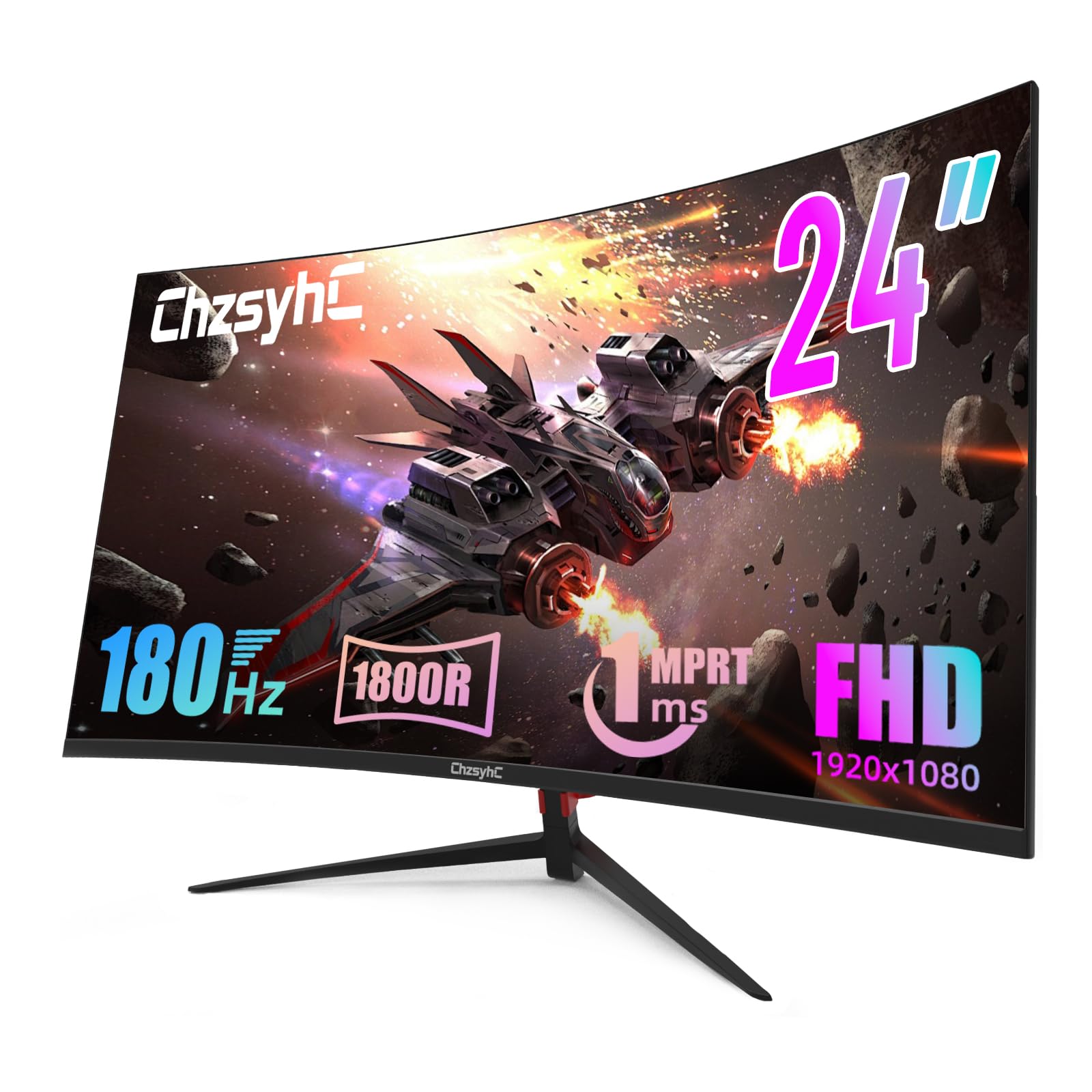
The ChzsyhC 24-inch curved monitor delivers an impressive 180Hz refresh rate and 1ms MPRT response time — specs normally found on much pricier gaming displays. Its 1800R curvature and 16:9 FHD (1920×1080) resolution create an immersive experience for modern gaming, while the 3000:1 VA panel contrast ratio ensures deep blacks and vibrant colors. FreeSync support eliminates screen tearing when paired with compatible GPUs.
Connectivity includes HDMI 2.0 and DisplayPort 1.4, allowing the monitor to hit its full 180Hz refresh rate without bandwidth limitations. The ultra-slim bezels make it an excellent choice for multi-monitor arrays, and the 75x75mm VESA mount supports wall or arm mounting. Flicker-Free technology and Low Blue Light mode reduce eye strain during extended gaming sessions. The power button is a small joystick on the back, which some users find awkward, but it quickly becomes intuitive.
Assembly requires care — the stand uses tiny screws and limited space, so a magnetic screwdriver is recommended. The monitor sits low and does not offer height adjustment, so a riser may be necessary for ergonomic setups. For the price, the combination of 180Hz, 1ms, and curved VA panel makes this an exceptional value for a modern gaming screen, though it does not address retro console connectivity without an external converter.
Why it’s great
- 180Hz refresh rate with 1ms response for ultra-smooth motion
- 1800R curve and 3000:1 contrast enhance immersion
- FreeSync support eliminates tearing
Good to know
- Stand assembly is fiddly — small screws in tight space
- No height adjustment — sits very low on desk
- Retro consoles require a separate converter
8. My Arcade Atari Game Station Pro: Console with 200+ Games, Wireless Joysticks, RGB LED

The My Arcade Atari Game Station Pro is a modern HDMI-based console that packs over 200 Atari 2600, 5200, and 7800 games into one compact unit. It connects to any modern TV via HDMI and outputs at up to 4K resolution, completely sidestepping the need for a CRT or converter. The setup includes two wireless joysticks with 2.4GHz connectivity and built-in paddle controls, plus RGB LED lights that sync to gameplay for ambiance.
Firmware updates unlock additional features, including the ability to add more games via USB, and the console is compatible with Xbox and other USB controllers for those who prefer an alternative to the included joysticks. The wireless controllers offer good range, though some users report slight input lag in menus that mostly disappears during actual gameplay. The joysticks require two AAA batteries each and are not rechargeable — a minor ongoing cost.
The unit is ideal for casual retro gaming sessions on a modern TV, especially for parties or family game nights. However, it is limited to Atari titles only — no third-party emulation for other classic consoles. Quality control on refurbished units can be spotty, with some arriving dead on arrival. The Game Station Pro is a convenient, hassle-free way to play hundreds of Atari classics without any technical know-how.
Why it’s great
- 200 games pre-loaded, no setup required
- Wireless joysticks with built-in paddle controls
- Firmware updates allow USB game addition
Good to know
- Limited to Atari titles only — no third-party support
- Controllers require AAA batteries, not rechargeable
- Refurbished units occasionally arrive defective
9. Official Atari 400 Mini & Joystick – HDMI Output – Includes 25 Games

The Official Atari 400 Mini is a faithful miniaturized reproduction of the classic Atari 400/800 home computer line, outputting at 720p via HDMI with PAL (50Hz) and NTSC (60Hz) compatibility. It includes a CXStick joystick — a recreation of the iconic CX40 — with eight embedded buttons and USB connectivity. The unit emulates all Atari 8-bit systems, including the 5200 home console, and supports 4:3 or pixel-perfect aspect ratios with optional CRT filters.
Beyond the 25 built-in games, the Mini supports loading your own ROMs via USB drive — compatible with disk, cartridge, and cassette formats. A rewind feature lets you step back up to 30 seconds of gameplay, which is a genuinely useful feature for challenging retro titles. The 720p output is sharp and clean on modern displays, and the multi-region support means you can play PAL and NTSC games without a separate converter.
The main limitation is the joystick itself — it is stiff and can cause accidental resets. Many users recommend using a generic SNES or Xbox USB controller instead. The unit does not support Bluetooth, and the USB-C power port does not support Power Delivery, so standard chargers are fine. It cannot load Atari 2600 or 7800 titles. For Atari 8-bit enthusiasts who want a compact, plug-and-play solution for a modern TV, the 400 Mini is a polished and authentic choice.
Why it’s great
- Authentic mini reproduction of the Atari 400 form factor
- USB ROM loading supports disk, cartridge, and cassette files
- 30-second rewind feature for difficult sections
Good to know
- Included joystick is stiff and prone to accidental resets
- No Bluetooth — wired controllers only
- Does not support Atari 2600 or 7800 games
FAQ
Can I use the Mcbazel ODV-GBS-C with an N64 or GameCube?
Why does my PlayStation 2 look blurry on a modern TV with just composite cables?
Will a 4:3 LCD arcade monitor look exactly like a CRT?
Final Thoughts: The Verdict
For most users, the best crt tv for gaming winner is the Mcbazel ODV-GBS-C because it bridges retro consoles to modern displays with genuine 240p support, motion-adaptive deinterlacing, and adjustable scanlines — all at a fraction of the cost of specialist units. If you want a complete console experience without setup fuss, grab the Zeust PS2 Slim Bundle. And for arcade cabinet restorations, nothing beats the 19-Inch Arcade Monitor for reliable, bracket-ready replacement of a dead CRT.

Mo Maruf
I created WellFizz to bridge the gap between vague wellness advice and actionable solutions. My mission is simple: to decode the research and give you practical tools you can actually use.
Beyond the data, I am a passionate traveler. I believe that stepping away from the screen to explore new environments is essential for mental clarity and physical vitality.