Our readers keep the lights on and my smoothie glass nicely filled. As an Amazon Associate, I earn from qualifying purchases.
Whether you manage a busy bar, run a pop-up shop, or handle ID checks at a club, the physical act of taking a payment or reading a card has to be fast, reliable, and secure—no one wants a transaction to stall because the hardware can’t keep up. The difference between a frictionless checkout and an awkward fumble comes down to the specific reader you put in your hand or mount on your counter.
I’m Mohammad Maruf — the founder and writer behind WellFizz. I’ve spent hundreds of hours analyzing the connectivity protocols, track-reading accuracy, and build quality of small-footprint payment and ID readers to help buyers separate spec-sheet hype from real-world performance.
Whether you need a tap-and-chip mobile reader for weekend markets or a rugged ID scanner for high-volume entry gates, finding the right hardware starts with this review of the best credit card scanner for your specific use case.
How To Choose The Best Credit Card Scanner
Choosing between a modern tap-and-chip reader and a legacy magstripe encoder comes down to three factors: your payment environment, the type of card data you need to capture, and whether portability or a fixed workstation matters more to your daily operation.
Mobile Payment vs. Magstripe Encoding vs. ID Scanning
A mobile payment reader like the Square Reader handles contactless tap, chip dip, and NFC wallets — ideal for retail, vendor booths, and any business that processes live transactions. A magstripe encoder (MSR605X or MSRX6) reads and writes track 1, 2, and 3 data; these are tools for card issuance, loyalty program setup, or legacy system integration. ID scanners like the Quantum Edge V3 specialize in age verification and driver’s license authentication — distinct from payment, but still a “card reading” operation.
Connectivity: Bluetooth vs. USB vs. Wi-Fi
Bluetooth readers (Square Reader, X6BT) let you process payments away from a register or POS terminal; battery life and pairing stability matter. USB-only models (MagTek SureSwipe, MSR605X) are locked to a computer, which works for a fixed checkout desk but kills mobility. Wi-Fi scanners (Quantum Edge V3) are best for managing a database of scanned IDs in real time across multiple devices.
Track Compatibility and Reading Speed
If you need to encode cards, ensure the reader supports all three magnetic tracks (1, 2, and 3). A dual-head reader like the MagTek SureSwipe reads in both swipe directions at 60 inches per second — essential for high-throughput environments. For simple payments, track 2 data is all you need; for ID scanning, the camera-based optical sensor (CMOS/CCD) is what reads the barcode and printed info, not a magnetic head.
Quick Comparison
On smaller screens, swipe sideways to see the full table.
| Model | Category | Best For | Key Spec | Amazon |
|---|---|---|---|---|
| Quantum Edge V3 | Premium ID Scanner | High‑volume entry & age verification | 300 DPI optical scan | Amazon |
| Square Reader (2nd Gen) | Mobile Payment Reader | Tap, chip & NFC payments on the go | Bluetooth / 24 hr battery | Amazon |
| X6BT Card Reader Writer | Bluetooth Encoder | Wireless encode & mobile reading | Bluetooth 4.1 / 3‑track | Amazon |
| Deftun MSR605X | Standard USB Encoder | Card issuance & data copying | USB 3.0 / 3‑track r/w | Amazon |
| MagTek SureSwipe | USB Magstripe Reader | Simple swipe transactions | Dual head / 60 in/s | Amazon |
| Koolrok MSR605X | Budget USB Encoder | Basic encode/decode tasks | USB / 12 Mbps transfer | Amazon |
| Deftun MSRX6 | Compact USB Encoder | Travel‑friendly card writing | 5.5″ length / includes blanks | Amazon |
In‑Depth Reviews
1. Square Reader for contactless and chip (2nd Generation)

This second-generation Square Reader is the gold standard for mobile payment acceptance — it handles contactless taps, chip dips, Apple Pay, and Google Pay via Bluetooth, with a battery that reliably lasts through a full market day. The pairing process is near-instant, and the lightweight design lets you toss it in a pocket without thinking twice.
Setup takes minutes through the Square POS app, which also includes offline payment processing for up to 24 hours — a lifesaver at festivals or outdoor events with spotty internet. The flat 2.99% per transaction rate with no monthly fees or long-term contracts makes the cost structure predictable for seasonal vendors.
The enhanced Bluetooth connectivity in this 2nd Gen model stays paired to your phone at greater distances than the original, and the security features (24/7 fraud prevention and dispute management) are included at no extra cost. Some users note that a strong internet signal is still required to process transactions, but otherwise the performance is flawless.
Why it’s great
- True all-day battery life
- Supports offline payments for 24 hours
- Compact enough for any bag or pocket
Good to know
- Requires internet to process payments initially
- Not a magstripe encoder — cannot write card data
2. ID Scanner – Quantum Edge V3
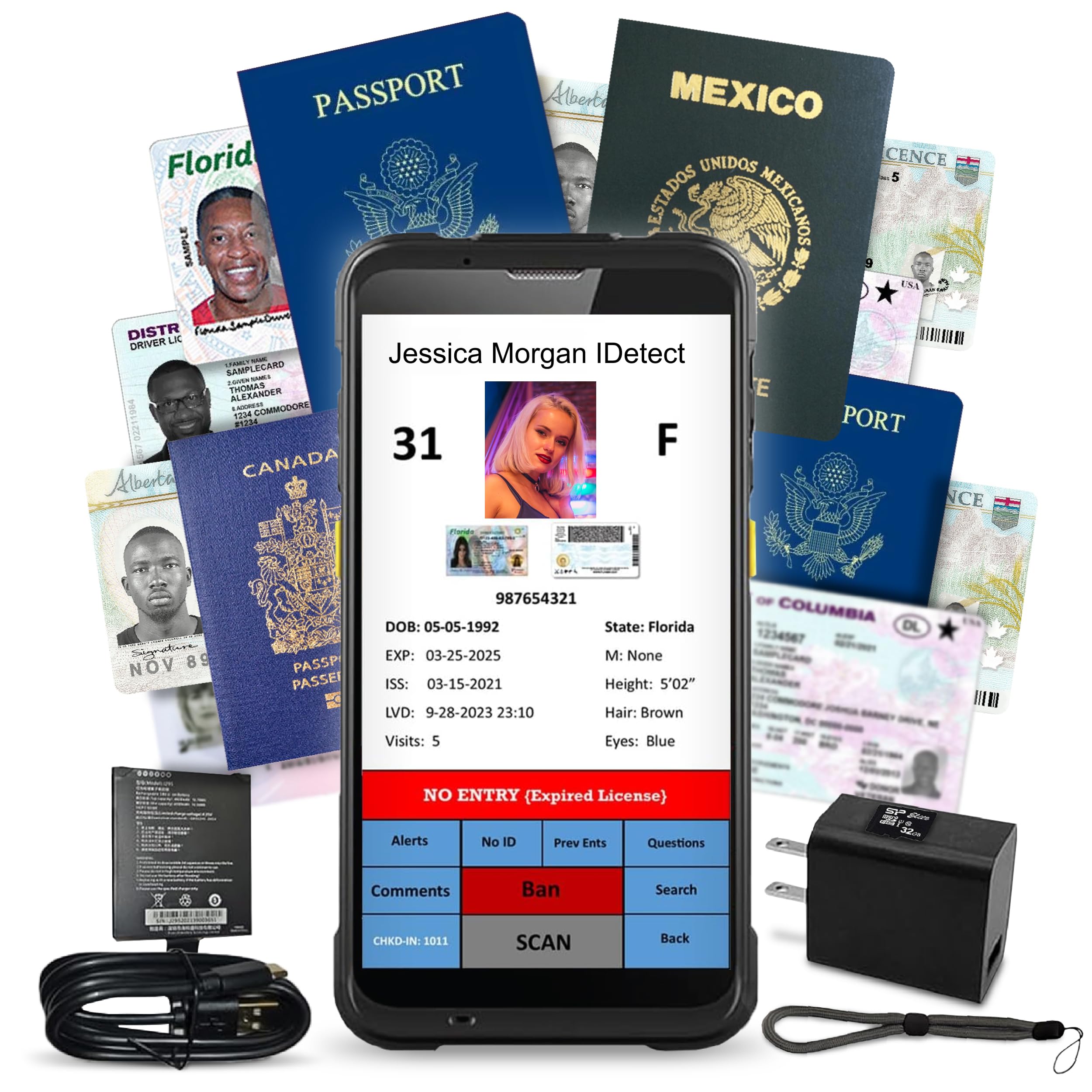
If your business revolves around age verification and ID authentication — bars, clubs, liquor stores, or security checkpoints — the Quantum Edge V3 is in a class of its own. It reads driver’s licenses and passports from all 50 states, Canada, Mexico, and military IDs using a 300 DPI optical sensor, capturing both the entrant and the ID in up to three images per scan.
The device connects via Wi-Fi for multi-device sync and is rated for damp, dusty environments thanks to its water and dust seal — a practical detail for busy entryways where drink splashes and debris are common. The side-button activation and audible age indicators make the workflow almost hands-free; you can scan, record, and ban or flag patrons without looking at a screen.
Users consistently praise the customer support and the rugged build quality, and while the upfront cost is an investment, the storage capacity and real-time fake ID detection on day one deliver immediate ROI for any high-traffic venue. The included carry case and accessories make it easy to move between entry points.
Why it’s great
- Weather-sealed for wet, dusty environments
- Fast age verification with audible alerts
- Large onboard storage and data export via Wi-Fi
Good to know
- Premium pricing — best for high-volume venues
- Not designed for processing card payments
3. Bluetooth X6BT Card Reader Writer

The X6BT is one of the few card encoder/readers that combines Bluetooth 4.1 connectivity with full support for tracks 1, 2, and 3, meaning you can read, write, and erase magstripe data without being tethered to a laptop. That wireless freedom is a significant advantage for field technicians, event credential managers, or anyone who needs to encode cards away from a desk.
It supports both HiCo and LoCo cards (300–4000 Oe), covering the full range of standard magnetic stripe media. The included free software works across Windows, macOS, iOS, and Android, giving you flexibility regardless of your device ecosystem. Built-in over-voltage, over-current, and short-circuit protection adds a layer of safety during continuous use.
At 6.4 ounces with a compact 5.5-inch footprint, the X6BT travels well, though some users mention that the initial Bluetooth pairing can take a couple of attempts on certain devices. Once connected, the read/write accuracy is solid, and the LED indicator gives clear status feedback.
Why it’s great
- Bluetooth 4.1 for cable-free encoding
- Supports HiCo and LoCo cards
- Cross-platform software support
Good to know
- Bluetooth pairing can be finicky initially
- Not designed for contactless tap payments
4. Deftun MSR605X Card Reader Writer

The Deftun MSR605X is a dedicated USB 3.0 card encoder that reads, writes, copies, and erases data on all three magnetic tracks — a reliable tool for retail loyalty card issuance, hotel key card programming, or bulk card personalization. The USB Type-A connection draws power directly from your laptop or desktop, so there is no external power brick to deal with.
It ships with 20 blank HiCo cards, which is a solid starting stock for testing or small-batch encoding. The software package works on both Windows and macOS, and the build feels noticeably more rugged than the sub- budget alternatives. Users who need to replicate card data or re-magnetize faded stripes find this unit particularly consistent.
Some users on modern Windows 11 systems report the software interface is dated, and a few had issues with driver compatibility on certain builds. However, for straightforward encode/decode tasks on a standard laptop, the Deftun MSR605X delivers reliable performance at a competitive mid-range price point.
Why it’s great
- USB 3.0 for fast data transfers
- Includes 20 blank HiCo cards
- Build quality feels sturdy and durable
Good to know
- Software interface feels a generation old
- No Bluetooth — wired only
5. MagTek 21040140 SureSwipe
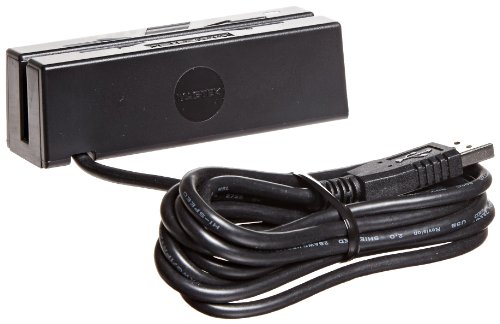
The MagTek SureSwipe is a no-nonsense magnetic stripe reader designed for high-speed swipe environments where every second counts. The dual magnetic heads allow the card to be read in either direction — no need to orient the stripe a certain way — at swipe speeds up to 60 inches per second, which means even a fast motion produces an accurate read on the first attempt.
It connects via a built-in 6-foot USB Type-A cable to a Windows or macOS computer, drawing its power directly from the host system. At just 4.64 ounces with a compact 3.94-inch depth, it takes up almost no desk space. For a basic encrypted swipe reader used at a fixed checkout counter, this model is one of the most reliable options available.
A small number of users report compatibility issues with certain POS software or outdated systems, and the USB cable does not sit flush under the reader’s base, which can be a minor annoyance. However, for simplicity of use and read reliability (three-track capture with two swipe directions), the SureSwipe remains a proven workhorse.
Why it’s great
- Dual-head reads in both swipe directions
- Fast 60 in/s swipe speed
- Nearly zero setup time
Good to know
- USB cable doesn’t sit flush at the base
- Not compatible with all POS software platforms
6. Koolrok MSR605X USB Card Reader Writer

The Koolrok MSR605X offers the same ISO-format 3-track read/write capability as more expensive USB encoders but at a budget-friendly price point. It connects via standard USB and is powered directly from the computer, making it a simple entry point for anyone who needs to encode magnetic stripe cards without investing in premium hardware.
The compatible software works on both Windows and macOS, and the 12 Mbps data transfer rate is adequate for individual card reads and writes. Reviewers found it functional for basic card copying and encoding tasks, with the device arriving as pictured and on time. The blank card market is separate — no cards are included in the box.
The biggest caveat is software: some users running Windows 11 found the included app non-functional or flagged by antivirus as potentially suspicious, and the device appears to be a rebranded unit using dated drivers. For hobbyists or light use on an older laptop, this encoder works fine, but it lacks the polish and support of the Deftun or MagTek offerings.
Why it’s great
- Affordable 3-track encoder for basic tasks
- USB-powered with no external adapter needed
- Cross-platform Windows/Mac support
Good to know
- Software may not function on Windows 11
- Virus flag reports on the installer
7. Deftun MSRX6 USB Magstripe Reader Writer

The Deftun MSRX6 is the smallest USB card encoder in this roundup at just 5.5 inches long and 0.32 pounds, making it genuinely travel-friendly for techs who need to encode cards on site. It connects exclusively via USB to a computer or laptop — there is no Bluetooth or battery, so it stays powered and paired as long as it is plugged in.
It reads and writes all three magnetic tracks, and the package includes 20 blank HiCo cards to get started immediately. The included free software for Windows and Mac handles basic read, write, and erase functions, and the plug-and-play nature means no complicated driver installations on most systems.
Be aware that this reader is strictly USB-powered and does not work with the “EasyMSR” phone app — it is designed for computer use only. A few users were disappointed to discover it cannot function wirelessly, and some reported the included software is outdated. For the price, however, it remains a competent handheld encoder for simple card duplication and creation.
Why it’s great
- Smallest footprint — truly portable
- Includes 20 blank HiCo cards
- Plug-and-play USB setup
Good to know
- USB only — no wireless or mobile app support
- Included software may feel outdated
FAQ
Can I use a magstripe encoder like the MSR605X to process live credit card payments?
Does the Square Reader require a monthly subscription?
What is the difference between HiCo and LoCo magnetic cards?
Will the Quantum Edge V3 scan IDs from international visitors?
Final Thoughts: The Verdict
For most users, the best credit card scanner winner is the Square Reader (2nd Gen) because it combines Bluetooth mobility, all-day battery life, and offline payment processing into a frictionless mobile payment experience. If you need to encode or duplicate magstripe cards from a fixed workstation, grab the Deftun MSR605X. And for high-volume ID verification and age checks at bars or clubs, nothing beats the rugged, weather-sealed Quantum Edge V3.

Mo Maruf
I created WellFizz to bridge the gap between vague wellness advice and actionable solutions. My mission is simple: to decode the research and give you practical tools you can actually use.
Beyond the data, I am a passionate traveler. I believe that stepping away from the screen to explore new environments is essential for mental clarity and physical vitality.