Our readers keep the lights on and my smoothie glass nicely filled. As an Amazon Associate, I earn from qualifying purchases.
Accepting card payments is no longer a luxury for small businesses—it’s a basic expectation. Whether you’re running a weekend market stall, a food truck, or a home-based consultancy, the right payment device can mean the difference between closing a sale and watching a customer walk away. This guide breaks down the essential hardware for processing credit card transactions, from compact mobile readers to all-in-one terminals.
I’m Mohammad Maruf — the founder and writer behind WellFizz. I’ve spent countless hours analyzing the feature sets, real-world usability, and ecosystem lock-in of the most popular payment readers on the market to help you make a confident buying decision.
After comparing connectivity, transaction speed, battery life, and total cost of ownership, I’ve selected the top contenders for the best credit card reader for small business operators. Here is everything you need to know before you buy.
How To Choose The Best Credit Card Reader For Small Business
The perfect reader balances three things: how you sell, where you sell, and how much you value simplicity. A craft vendor who sets up at outdoor markets needs a rugged, battery-powered device with offline payment capability, while a brick-and-mortar boutique may prefer a countertop terminal with a built-in printer. Your choice should also factor in processing fees, contract terms, and whether the reader integrates with your existing inventory or accounting software.
Connectivity & Portability
Bluetooth readers pair with your smartphone or tablet and are the most portable option—perfect for pop-ups and on-the-go sales. Wi-Fi and cellular readers operate independently but cost more upfront. If you often travel to areas with spotty cell service, look for a device that supports offline payments, storing transactions until a connection is restored.
Transaction Fees & Contracts
Every payment processor takes a cut. Some charge a flat per-transaction rate with no monthly fees, while others require a subscription. Avoid long-term contracts if your sales volume is unpredictable. The best small-business readers offer month-to-month flexibility and transparent pricing without hidden account fees or early termination penalties.
Payment Methods Accepted
Modern customers expect to tap their phone or dip a chip card. Ensure your reader supports near-field communication for contactless payments (Apple Pay, Google Pay) and EMV chip card processing. Older magstripe-only readers do not meet current liability standards and may leave you exposed to fraud chargebacks. Always check for full contactless, chip, and swipe support.
Quick Comparison
On smaller screens, swipe sideways to see the full table.
| Model | Category | Best For | Key Spec | Amazon |
|---|---|---|---|---|
| Square Reader (2nd Gen) | Mobile Reader | Pop-ups & low-volume sellers | Bluetooth, battery lasts all day | Amazon |
| SumUp Solo | Standalone Terminal | Vendors who need cellular data | Touchscreen, free SIM & data | Amazon |
| Clover Go | Mobile Reader | Integration with Clover POS | Contactless, EMV, Bluetooth | Amazon |
| Square Terminal | All-in-One POS | Countertop & in-store checkout | Receipt printer, 2-sec chip | Amazon |
| Deftun Bluetooth MSR-X6 | Magstripe Encoder | Reading & encoding magstripe cards | USB & BT, reads 3 tracks | Amazon |
| MSR X6 Bluetooth VIP | Magstripe Encoder | Mobile card encoding on the go | Bluetooth, works with EasyMSR app | Amazon |
| MSRX6 USB Swipe | USB Reader/Writer | Desktop magstripe encoding | USB powered, includes blank cards | Amazon |
In‑Depth Reviews
1. Square Reader for contactless and chip (2nd Generation)

The second-generation Square Reader is the gold standard for small businesses that need a lightweight, no-fuss way to accept tap and chip payments. Its Bluetooth pairing is instant and stays connected reliably, even in crowded market environments. The battery easily handles a full day of transactions, and the compact design slips into a pocket or bag without adding bulk.
Square’s pricing model is flat and transparent—one low rate for every tap or dip with no monthly fees or long-term contracts. The included fraud prevention and payment-dispute management add a layer of security that solo entrepreneurs especially appreciate. Offline payment mode also keeps sales flowing if your internet connection drops temporarily.
On the downside, this reader depends entirely on a smartphone or tablet to run the Square POS app. If your phone battery dies, you lose the ability to process payments until it charges. Some users also report occasional connectivity hiccups at very congested outdoor venues, though these are rare.
Why it’s great
- Extremely portable and easy to set up
- Excellent battery life for all-day use
- Transparent flat-rate fees with no contracts
- Supports contactless, chip, and offline payments
Good to know
- Requires a smartphone or tablet to operate
- Transaction speed can lag in areas with weak cell signal
2. SumUp Solo Credit Card Payment Card Reader with Charging Station

The SumUp Solo stands out as a standalone terminal that doesn’t need a phone. It features a full-color touchscreen interface and comes with a charging station, a free SIM card, and mobile data, making it truly ready to process payments anywhere there’s cellular coverage. Setup is fast, and the OLED display makes navigating menu options easy even for first-time users.
Battery life is strong, and the included charging station keeps the device topped up between uses. SumUp’s customer support is US-based, which adds peace of mind for business owners who need quick troubleshooting. The lower transaction fees compared to Square can also save you money as your volume grows.
The most critical drawback is the lengthy onboarding process—SumUp can take up to two weeks to approve your account, and the device is useless until approval comes through. A few users also report occasional processing failures and unreliable support chat availability, so this is not a same-day solution.
Why it’s great
- Fully standalone with free cellular data and SIM
- Intuitive touchscreen interface
- Lower processing fees than many competitors
- US-based support via phone, email, and chat
Good to know
- Account approval can take up to 14 days
- Occasional reports of transaction failures and glitches
- No invoicing or payment link features on the device
3. Square Terminal – Credit Card Machine to Accept All Payments

The Square Terminal is a complete point-of-sale system in a compact, portable package. It includes a built-in receipt printer, a full-color touchscreen, and the ability to process chip cards in just two seconds. You can ring up sales, apply discounts, look up items, and email or print receipts—all without a separate phone or tablet.
The all-day battery means you can use it cordlessly from anywhere in your store or at a pop-up. Settlement is fast, with funds typically available the next business day. The device also syncs seamlessly with Square’s dashboard for inventory management and sales reporting, making it ideal for retailers who want an integrated system.
At a higher price point, this terminal is a significant investment for a very small business. There have also been isolated reports of the signature screen glitching when used with a stylus. If you don’t need printed receipts and already carry a smartphone, the simpler Square Reader may be more cost-effective.
Why it’s great
- Built-in receipt printer and touchscreen
- Ultra-fast chip card processing (2 seconds)
- All-day battery for cordless operation
- Integrates deeply with Square’s ecosystem
Good to know
- Higher initial cost than a standard reader
- Signature screen can be finicky with stylus input
4. Clover Go Contactless Reader – EMV/Chip Ready
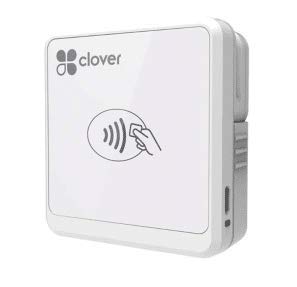
The Clover Go reader brings the trusted Clover ecosystem to mobile transactions. It connects via Bluetooth to your smartphone or tablet and supports contactless payments, EMV chip cards, and magstripe swipes. The device is lightweight and easy to carry, making it a convenient companion for businesses already using a Clover countertop station.
Setup is straightforward: download the Clover Go app, pair the reader, and you’re ready. The barcode scanning feature for cash and check entry is a nice touch that speeds up checkout. For retailers who need portability without losing integration with their main Clover system, this reader works flawlessly.
The biggest frustration is that Clover’s app can be difficult to access if you purchase the hardware through third-party channels. Multiple users report being unable to create an account after buying the device, effectively turning it into a paperweight. Customer support is also notoriously hard to reach, so consider this only if you already have a Clover merchant account.
Why it’s great
- Seamless integration with Clover ecosystem
- Supports contactless, chip, and barcode scanning
- Very portable and easy to set up
Good to know
- Account creation can be blocked for device-only purchases
- Customer support is difficult to reach
- Bluetooth connection may fail after several months
5. Deftun Bluetooth MSR-X6(BT) MSRX6BT Stripe Card Reader Encoder

The Deftun MSR-X6 BT is a specialized tool for reading, writing, and encoding magnetic stripe cards. It offers both USB and Bluetooth connectivity, allowing you to use it with a computer or with a mobile device via the EasyMSR app. Its compact size—just 5.5 by 1.6 inches—makes it easy to carry in a laptop bag.
This reader/encoder works with HiCo and LoCo cards across three tracks, making it useful for creating membership cards, loyalty cards, or re-magnetizing damaged stripes. The Bluetooth connection works reliably within a typical office range, and the free Windows and Mac software covers most standard encoding needs.
The biggest issues are durability and software quality. Some users report the device stops working after heavy daily use, and the companion app may glitch or fail to open on certain phones. If you need consistent, long-term reliability for a high-volume business, this may not be the best choice.
Why it’s great
- Dual Bluetooth and USB connectivity
- Reads and writes all three tracks on HiCo/LoCo cards
- Small, portable design for travel
- Free software for Windows and Mac
Good to know
- May stop functioning after heavy use
- Bluetooth app can glitch and become unusable
- Limited to magstripe encoding—does not process payments
6. MSR X6 Bluetooth VIP Card Swiper Reader Writer Encoder

The MSR X6 Bluetooth VIP is a versatile magstripe reader and encoder that supports both USB and Bluetooth interfaces. It communicates with computers as well as mobile devices via the EasyMSR app, giving you flexibility in how you use it. The small footprint—5.4 by 1.4 inches—fits easily into a pocket or tech pouch.
This model handles HiCo and LoCo cards across one, two, or three tracks, making it suitable for a range of encoding tasks. The package includes 20 blank HiCo cards, so you can start encoding immediately. For a desktop or field encoding tool, it delivers solid performance at a reasonable entry point.
However, several users note that the Bluetooth functionality is misleadingly advertised; some units lack working Bluetooth and only function via USB. Additionally, using the EasyMSR app on a phone requires a paid subscription. If Bluetooth is critical to your workflow, verify the specific version before purchase.
Why it’s great
- Works as both USB and Bluetooth device
- Includes 20 blank HiCo cards to get started
- Compatible with Windows, Mac, and Android
Good to know
- Bluetooth may not work as advertised on some units
- EasyMSR app requires a paid subscription for mobile use
7. MSRX6 MSR X6 USB Swipe Magstripe Credit Card Reader Writer

The MSRX6 USB Swipe is a no-frills magnetic stripe reader and writer that connects directly to your computer’s USB port. No batteries, no Bluetooth pairing—just plug in and start reading or encoding cards. It supports HiCo cards across all three tracks and includes free software for Windows and Mac, plus 20 blank cards to begin encoding immediately.
This device is ideal for desktop-heavy environments where you need to encode membership or loyalty cards at a fixed workstation. The compact dimensions (5.5 by 1.5 by 1.5 inches) save desk space, and the USB power means you never worry about charging. Several users confirm it reads cards accurately and handles basic encoding tasks without issues.
This is not a payment processing terminal—it is strictly a magstripe encoder. Some buyers have also complained about outdated drivers and software that is not genuinely free, conflicting with the advertised description. If you only need to read rather than write cards, verify the included software meets your needs before purchase.
Why it’s great
- Simple plug-and-play USB operation
- Includes 20 blank HiCo cards and free software
- Smallest footprint in its class
- Reliable card reading and encoding for desktop use
Good to know
- USB-only—no Bluetooth or wireless option
- Cannot process payments; only reads/encodes magstripe
- Some users report outdated drivers and inaccessible software
FAQ
Can I use the Square Reader without a monthly fee?
Does the SumUp Solo work without an internet connection?
What is the difference between a payment reader and a magstripe encoder?
Final Thoughts: The Verdict
For most users, the best credit card reader for small business is the Square Reader (2nd Gen) because it offers the best balance of portability, reliability, and transparent pricing without long-term commitments. If you need a standalone terminal that works anywhere without a phone, grab the SumUp Solo. And for a fully integrated countertop POS with a receipt printer, nothing beats the Square Terminal.

Mo Maruf
I created WellFizz to bridge the gap between vague wellness advice and actionable solutions. My mission is simple: to decode the research and give you practical tools you can actually use.
Beyond the data, I am a passionate traveler. I believe that stepping away from the screen to explore new environments is essential for mental clarity and physical vitality.