Our readers keep the lights on and my smoothie glass nicely filled. As an Amazon Associate, I earn from qualifying purchases.
The hum of a busy checkout line stops for nothing — except a credit card machine that freezes, fails a chip read, or refuses to connect to your POS. Whether you run a food truck, a retail counter, or a mobile pop-up, the terminal you choose determines whether that transaction flows in seconds or turns into an awkward refund request. The market splits between locked-ecosystem terminals, open-programmable printers, and portable all-in-one units, and picking wrong costs you both time and processing fees.
I’m Mohammad Maruf — the founder and writer behind WellFizz. I spend my research hours dissecting payment hardware specs, reading through hundreds of merchant reviews, and comparing processor lock-in policies so you don’t have to gamble on a terminal that arrives as a brick.
This guide covers the full range of countertop, mobile, and integrated systems so you can match the hardware to your workflow. Whether you need a dedicated receipt printer for the kitchen or a handheld device for tableside checkout, these are the top contenders for the best credit card machine available today.
How To Choose The Best Credit Card Machine
The credit card terminal market is fragmented between two philosophies: closed ecosystems where the hardware is locked to a specific processor, and open platforms that work with any merchant account. Your choice dictates whether you own the device or merely rent a brick tied to monthly fees. Beyond that, connectivity, receipt printing capability, and portability separate countertop models from mobile solutions.
Processor Lock-In vs. Open Platform
Many popular terminals — especially Clover devices sold third-party — are locked to a specific processor and cannot be reprogrammed. A locked terminal that arrives without a merchant account is useless. Always verify whether your processor supports the hardware before buying. Open-platform terminals like the Verifone VX520 and the Square Terminal work only within their respective ecosystems but ship ready to activate if you already have an account.
Connectivity: Dial-Up, Ethernet, Wi-Fi, and Mobile Data
If your business operates indoors with a wired network, Ethernet-connected terminals offer reliability. For farmers markets, food trucks, or pop-ups, look for devices with Wi-Fi, Bluetooth tethering, or built-in cellular via a SIM card. Dial-up terminals still exist but are rare and slow — avoid unless you run a legacy system.
Receipt Printing: Integrated vs. Separate
Some terminals include a built-in thermal printer; others require a separate receipt printer. All-in-one units such as the Square Terminal and Clover Compact print receipts on the spot. If you need high-volume kitchen printing or remote order stations, a dedicated thermal printer like the Volcora or MUNBYN is more practical.
Quick Comparison
On smaller screens, swipe sideways to see the full table.
| Model | Category | Best For | Key Spec | Amazon |
|---|---|---|---|---|
| Square Handheld | Premium Mobile POS | Tableside ordering & pop-ups | 7.04 x 3.12 x 0.62 inches, 2.11 oz | Amazon |
| Square Terminal | Premium All-in-One | Full-featured countertop POS | 14.7 oz, built-in battery | Amazon |
| Clover Go | Premium Mobile Reader | On-the-go card present transactions | 4.8 oz, Bluetooth connectivity | Amazon |
| First Data FD150 | Premium Countertop | High-volume retail with EMV/NFC | 128MB memory, Cortex A5 500MHz | Amazon |
| SumUp Solo | Mid-range Mobile Terminal | Portable payments with free SIM data | OLED touchscreen, charging station | Amazon |
| Clover Compact | Mid-range Countertop | Full Clover ecosystem at the counter | Cloud-synced with Clover Dashboard | Amazon |
| Verifone VX520 | Mid-range Dual Comm | Reliable EMV with dual connectivity | 128/32 MB, dial + Ethernet | Amazon |
| MUNBYN P068 | Budget Thermal Printer | High-speed kitchen receipt printing | 300mm/sec, auto-cutter | Amazon |
| Volcora WRP2-A1 | Budget Thermal Printer | Cost-effective 80mm receipt printing | 260mm/sec, 1.5M cut lifespan | Amazon |
In‑Depth Reviews
1. Square Handheld

The Square Handheld shrinks a full POS station into a device that weighs just over two ounces and slips into a pocket. Its 7-inch form factor includes a built-in barcode scanner, splash- and dust-resistance, and offline payment support — critical for farmers markets and busy restaurant floors where internet drops mid-shift. The screen is bright enough for outdoor use, and the slim profile means you can carry it tableside without a bulky caddy.
Battery life covers an entire workday even with heavy chip and NFC usage. The Square ecosystem means you pay a flat processing rate with no long-term contract, and funds arrive as soon as the next business day. Setup is fast: create a Square account, pair the device, and inventory syncs automatically from the web dashboard or mobile app.
This is a Square-locked device — you cannot use it with another processor. A protective case is sold separately for drop protection. Some users noted that applying the case can lift the pre-installed screen protector, so install carefully.
Why it’s great
- Ultra-portable — fits in a palm or pocket
- Offline payments keep sales running without internet
- Built-in barcode scanner streamlines inventory
Good to know
- Locked to Square processing only
- Screen protector may peel when case is applied
2. Square Terminal

The Square Terminal is the most complete standalone payment device in the mid-premium bracket. It combines a touchscreen interface, a built-in thermal receipt printer, and all-day battery power into a compact 14.7-ounce package. Unlike dongle-based readers, this unit processes chip cards in roughly two seconds and accepts tap-to-pay without any smartphone tethering.
The printer delivers crisp 80mm receipts, and the device also supports email and text receipt options. You can ring up sales, apply discounts, and manage returns directly on the terminal without a separate tablet. Backup offline mode ensures transactions still process if your Wi-Fi drops, though those payments settle once connectivity returns.
Like all Square hardware, this terminal is locked to the Square processing network. The signature screen can glitch when customers use a stylus or fingernail, and the device shows daily processing fees on the dashboard — a transparency perk that some competing processors obscure.
Why it’s great
- Two-second chip processing speed
- Built-in printer and all-day battery in one unit
- Accepts tap, chip, and swipe without phone
Good to know
- Locked to Square — no other processor works
- Signature screen can be finicky with stylus taps
3. Clover Go Contactless Reader
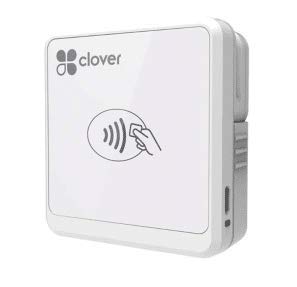
The Clover Go is a lightweight Bluetooth card reader designed for merchants who already run the Clover app on a smartphone or tablet. At just 4.8 ounces, it handles EMV chip cards and NFC contactless payments through a wireless connection. The reader pairs quickly and supports barcode scanning for inventory items, making it useful for pop-ups, delivery services, and market stalls.
Setup is straightforward: download the Clover Go app, pair the reader, and start accepting payments. The device syncs with a Clover Station or Mini if you use both in-store and on-the-go, keeping all transaction data unified in the Clover Dashboard. Battery life is decent for a shift of moderate transaction volume.
The major caveat is processor lock-in: the Clover Go requires a Clover merchant account. Several customers reported that purchasing a device second-hand or from an unverified seller resulted in an unusable terminal that could not be activated. New units ship ready to pair, but always confirm the processor relationship before buying.
Why it’s great
- Ultra-light and pocketable for mobile use
- Seamless sync with Clover Station ecosystem
- Accepts chip, tap, and swipe via Bluetooth
Good to know
- Locked to Clover processing — no alternative
- Reports of Bluetooth disconnection after months of use
4. First Data FD150

The First Data FD150 is a robust countertop terminal built for merchants who need PCI 5.0 compliance and fast EMV/NFC processing. It runs on a Cortex A5 processor at 500MHz with 128MB memory and 256MB flash, providing snappy menu navigation and quick transaction handling. The FD150 supports chip cards, contactless payments, and has an optional PIN pad for debit transactions.
This terminal is part of the First Data (now Fiserv) ecosystem, meaning it is typically programmed by the processor. Some merchants reported smooth setup over an Ethernet connection, but initial software updates can take time on the dial-up line. The FD150 is not locked to one specific processor in the same way as Clover devices — it can be reprogrammed if you switch processors, though the process varies.
A small percentage of users reported debit chip read failures, though these appear isolated to specific firmware versions. First Data is widely considered a quality brand, and the terminal includes solid support for both dial-up and broadband connections.
Why it’s great
- PCI 5.0 compliant for latest security standards
- Fast Cortex A5 processor for quick transactions
- Supports chip, NFC, and magnetic stripe
Good to know
- Initial setup can be time-consuming with updates
- Some users report debit chip read failures
5. SumUp Solo

The SumUp Solo brings a full touchscreen interface and free cellular data via a built-in SIM card, making it one of the most genuinely portable standalone terminals on the market. The OLED display is easy to read in sunlight, and the included charging station ensures the device is always topped up between shifts. You do not need a smartphone to run this terminal — it operates independently.
The Solo supports chip, contactless, and magnetic stripe payments. SumUp’s processing fees are competitive, and the free SIM data eliminates the need for Wi-Fi or tethering. Setup requires registration through the SumUp website or app, and the device ships with the SIM card pre-loaded.
However, the onboarding process can take up to 14 days and requires detailed business documentation — including photos and licenses. If your application is rejected after purchase, the device becomes a brick. The device also lacks invoicing and payment link features on the terminal itself; those are desktop-only functions. Customer support is email/chat only with no phone line.
Why it’s great
- True standalone — no phone or tablet required
- Free cellular data included via SIM card
- Responsive OLED touchscreen interface
Good to know
- Onboarding can take up to 14 days
- No invoicing or payment links on the device
6. Clover Compact Payment Terminal

The Clover Compact is a wired countertop terminal that integrates with the broader Clover ecosystem. It syncs with the Clover Mini, Station, or Dashboard to unify sales data across devices — ideal for retailers who want a fixed register at the counter plus a mobile unit for line-busting. The terminal requires a power outlet; there is no battery option, making it a true countertop fixture.
The Compact accepts chip, tap, and swipe payments. Setup typically takes a few minutes once you have a Clover merchant account through Powering POS or an authorized partner. The cloud dashboard tracks inventory, staff activity, and sales reports across all connected devices.
This device is locked specifically to the processing account it was purchased with. If you buy a Compact from a third-party seller without establishing a processing relationship first, the terminal cannot be activated. Several customers reported buying units that arrived as unusable bricks because the processor link was missing. Always confirm with the seller or processor before purchasing.
Why it’s great
- Seamless cloud sync across Clover devices
- Simple plug-in setup for countertop use
- Reliable chip, tap, and swipe acceptance
Good to know
- No battery — requires constant power
- Locked to specific processor; cannot be reactivated independently
7. Verifone VX520

The Verifone VX520 remains a workhorse in the payment industry thanks to its dual-communication design — supporting both dial-up and Ethernet connections. This model includes a smart card reader for EMV transactions, though it lacks built-in NFC for contactless tap-to-pay. The 128/32 MB memory configuration handles standard merchant applications without lag.
Setup takes about 10 minutes, and the terminal is compatible with most major processors including Chase, Wells Fargo, and independent ISO networks. The VX520 is not locked to a single processor the way Clover devices are, giving merchants flexibility if they switch processing partners. The small footprint and cable management system keep the counter tidy.
Some buyers reported receiving units that were locked or already programmed, rendering them unusable with a new processor. Always confirm with the seller that the terminal is unlocked or can be reprogrammed. The receipt printing speed is noticeably slower than modern thermal printers, which can frustrate during high-traffic periods.
Why it’s great
- Works with most major processors (not locked)
- Dual dial-up and Ethernet connectivity
- Compact ergonomic design with cable management
Good to know
- Receipt printing is slow compared to modern units
- Some units arrive locked; verify before purchase
8. MUNBYN P068 Receipt Printer

The MUNBYN P068 is an 80mm direct thermal printer built for high-speed kitchen order printing, churning out up to 48 receipts per minute at 300mm/sec. The automatic paper cutter keeps orders organized, and the incoming-order reminder system uses both sound and light alerts — which can be toggled off — so kitchen staff never miss a ticket during rush hours. A splash-proof cover protects the printhead from grease and moisture.
Connectivity is USB and Ethernet (no Bluetooth or Wi-Fi). The DIP switches on the bottom let you adjust print density, baud rate, language, and auto-cutter behavior without software. Wall-mountable design saves counter space in tight kitchens. Setup requires downloading the correct driver; the included CD may not work on modern systems, so head to MUNBYN’s support page.
This printer is not compatible with iOS devices, Square, DoorDash, or UberEats. It works with PCs running Windows, Mac, and Linux via USB or Ethernet. Some users reported that the auto-cutter failed after the DIP switch configuration, and the printer may default to 58mm paper width if the driver is not set to 80mm correctly. Tech-savvy setup is recommended.
Why it’s great
- Blazing 300mm/sec print speed for high volume
- Splash-proof cover ideal for kitchen environments
- Customizable DIP switches for print parameters
Good to know
- No iOS or Square/UberEats compatibility
- Auto-cutter may need DIP switch adjustment
9. Volcora Thermal Receipt Printer

The Volcora WRP2-A1 is an entry-level 80mm thermal receipt printer that offers a strong balance of speed and durability for its price bracket. At 260mm/sec, it handles moderate-volume retail and kitchen environments without jamming. The auto cutter is rated for 1.5 million cuts, which translates to years of reliable service for most small businesses. Wall-mount holes let you tuck it into tight spaces.
Connectivity is USB and Ethernet only — no Bluetooth or Wi-Fi. The printer works with Windows, Mac, Linux, Android, and iOS via Ethernet, but the USB interface is limited to Windows, Mac, Linux, and Android. It does not support UberEats, DoorDash, Shopify, or Clover POS systems. The unit uses direct thermal printing, so there is no ink or ribbon cost.
Customers reported that the included CD driver often fails on modern operating systems; you will need to download the correct driver from Volcora’s support page. The printer does not ship with a roll of thermal paper, so have paper ready before your first print job. Customer support is US-based and backed by a limited lifetime warranty.
Why it’s great
- Reliable 260mm/sec thermal printing at a low entry cost
- Auto cutter rated for 1.5 million cuts
- Wall-mountable to save counter space
Good to know
- No iOS USB support; Ethernet needed for Apple devices
- No thermal paper included – purchase separately
FAQ
Can I use any credit card machine with my existing merchant account?
What is the difference between a thermal printer and a credit card terminal?
Do I need a landline for my credit card machine?
What does PCI 5.0 mean for my terminal?
Will a third-party credit card machine work with my POS system?
Final Thoughts: The Verdict
For most merchants, the best credit card machine winner is the Square Terminal because it combines a fast chip reader, built-in receipt printer, all-day battery, and transparent flat-rate pricing in a compact package that works out of the box. If you prioritize extreme portability and offline payment support, grab the Square Handheld. And for a dedicated high-speed kitchen printer that won’t break the bank, nothing beats the MUNBYN P068 for its 300mm/sec output and splash-proof design.

Mo Maruf
I created WellFizz to bridge the gap between vague wellness advice and actionable solutions. My mission is simple: to decode the research and give you practical tools you can actually use.
Beyond the data, I am a passionate traveler. I believe that stepping away from the screen to explore new environments is essential for mental clarity and physical vitality.