Our readers keep the lights on and my smoothie glass nicely filled. As an Amazon Associate, I earn from qualifying purchases.
A craft cutting machine is the difference between a project that looks homemade and one that looks professionally made. The right machine translates digital designs into precise physical cuts on vinyl, cardstock, fabric, or leather — but the wrong one introduces misaligned cuts, frustrating software crashes, and materials wasted by the yard. The narrow gap between a clean cut and a torn edge is defined entirely by which machine you choose.
I’m Mohammad Maruf — the founder and writer behind WellFizz. I’ve spent hundreds of hours dissecting the technical specs, software ecosystems, and blade systems of the leading cutting machines to separate marketing hype from genuine cutting performance for this guide.
Whether you are crafting custom vinyl decals for a small business or building layered cardstock cards for a hobby, this guide walks you through every critical spec to find the best craft cutting machine for your specific skill level and material needs.
How To Choose The Best Craft Cutting Machine
Choosing a cutting machine is less about brand loyalty and more about matching your material stack and software tolerance to the hardware. A vinyl decal maker has entirely different needs than someone cutting intricate cardstock for layered greeting cards. Focus on three core pillars: cutting mechanism, software ecosystem, and material width capacity.
Blade System: AutoBlade vs. Manual Blade Adjustment
The blade system dictates how much hands-on tuning you will perform. Automatic blade systems (like Silhouette’s AutoBlade or Cricut’s housing) read material settings from the software and adjust blade depth without user intervention. Manual systems require you to turn a dial or swap a blade housing for each material change. If you plan to switch between vinyl, cardstock, and fabric frequently, an automatic system saves significant time and reduces scrap from incorrect blade depth.
Cutting Force and Material Range
Cutting force, measured in grams, determines the maximum material thickness the machine can process. Entry-level machines typically deliver around 250g of force, sufficient for standard vinyl and cardstock. Mid-range and premium machines offer 500g to 1000g of force, enabling cuts on felt, thin leather, chipboard, and magnet sheets. If you ever plan to work with anything thicker than standard cardstock, prioritize a machine with at least 500g of downward force to avoid stacking multiple passes that fray material edges.
Software Ecosystem and Connectivity
The design software is where you will spend most of your time. Proprietary ecosystems (Cricut Design Space, Silhouette Studio) offer curated content libraries but vary in offline capability and subscription requirements. Some machines require an active internet connection to function, which can be a deal-breaker for users in areas with unreliable WiFi or those who prefer working offline. Bluetooth and USB connectivity are standard, but WiFi-native machines like the Siser Juliet offer greater range and stability for wireless file transfers.
Quick Comparison
On smaller screens, swipe sideways to see the full table.
| Model | Category | Best For | Key Spec | Amazon |
|---|---|---|---|---|
| Cricut Maker 4 | Premium | Versatile pro-level crafting | 10x cutting force vs. Explore models | Amazon |
| Siser Juliet | Premium | High-speed commercial use | 60% faster than traditional cutters | Amazon |
| Silhouette Cameo 5 Alpha Plus | Premium | Large format and fabric cutting | 15-inch cutting width | Amazon |
| Cricut Explore 5 Essential Bundle | Mid-Range | All-around hobbyist with beginners | 30% more compact than previous model | Amazon |
| LOKLiK Cutting Machine 2 | Mid-Range | Budget-friendly smart cutting | 5-in-1 multifunction + AI painting | Amazon |
| VEVOR 28-inch Cutting Machine | Mid-Range | Large-format sign making | 24.8-inch cutting width | Amazon |
| CraftGenes Manual Die Cutting Machine | Value | Manual die cutting for card making | Foldable side panels for storage | Amazon |
| Joelver Maker Manual Die Cutting Machine | Value | Starter kit for scrapbooking | 20+ steel dies included | Amazon |
| Anna Griffin Empress Plates System | Value | Anna Griffin machine users | Large 8.6 x 13.5 inch plates | Amazon |
In‑Depth Reviews
1. Cricut Maker 4

The Cricut Maker 4 is the undisputed flagship of the Cricut lineup, featuring ten times the cutting force of the Explore series. This overhead power translates directly into material compatibility — where the Explore chokes on thick felt or basswood, the Maker 4 plows through effortlessly. The adaptive tool system allows you to swap between a rotary blade for fabric, a knife blade for thicker materials, or a scoring wheel for fold lines, all without manual calibration.
Print-Then-Cut precision is remarkably tight, with the machine automatically detecting printed registration marks to cut full-color sticker sheets with minimal edge bleed. The bundle includes a 30-image pack in Design Space, plus a materials sampler that gives you immediate hands-on experience with Smart Vinyl, cardstock, and heat transfer material. The seashell color is a welcome aesthetic departure from standard black or white hardware.
New users should be aware that the most advanced features — engraving, debossing, perforation — require additional tools sold separately. The Design Space software also nags for a paid subscription upgrade, though the free tier (3,000+ images and 100+ fonts) is sufficient for most hobbyists.
Why it’s great
- 10x cutting force handles thick materials like leather and balsa wood with a single pass
- Tool system supports 14+ distinct tool heads — rotary, knife, scoring, engraving
- Print-Then-Cut registration is fast and reliable even for complex multi-color prints
Good to know
- High initial investment compared to mid-range models
- Advanced tool heads like the engraving tip create additional ongoing costs
- Design Space requires internet connection for many features, limiting offline use
2. Siser Juliet

The Siser Juliet disrupts the desktop cutting market with raw speed and commercial-grade build quality. Its advanced motor delivers cuts up to 60% faster than traditional desktop cutters while maintaining lower noise levels — no grinding, no vibration, just clean rapid passes. The WiFi connectivity is a genuine improvement over Bluetooth, offering longer range and fewer signal drops during large project transfers.
Juliet ships with a 12-inch high-tack cutting mat, but also supports matless cutting for materials that feed directly into the rollers. The adjustable pinch rollers are a professional feature rarely seen at this price tier, allowing you to center narrower material rolls without skewing. The included Leonardo Design Studio software offers a professional-grade vector environment, though its learning curve is steeper than Cricut’s wizard-guided interface.
The marker adapter for drawing and calligraphy is a thoughtful inclusion for hybrid projects. However, users relying on precise edge cuts (within 1/8 inch of the material edge) may encounter alignment limitations. The Leonardo Pro subscription adds advanced features but the free tier covers basic cutting and design needs well.
Why it’s great
- 60% faster cutting speed than competing desktop models saves hours on large batches
- Adjustable pinch rollers prevent material drift for precise registration on narrow rolls
- WiFi connectivity provides stable wireless performance across long distances
Good to know
- Leonardo Design Studio has a steep learning curve for users migrating from simpler apps
- High-tack mat can leave residue on delicate materials if not replaced regularly
- Some users report difficulty achieving cuts within 1/8 inch of the material edge
3. Silhouette Cameo 5 Alpha Plus

The Silhouette Cameo 5 Alpha Plus expands the cutting width to 15 inches — a decisive advantage for users who need to cut wide-format decals, vinyl banners, or large layout sheets without manual rotation. The electrostatic mat technology holds material flat without adhesive residue, eliminating the sticky cleanup associated with traditional mats. The 4-point registration mark system provides excellent accuracy for Print-Then-Cut workflows on sticker paper and labels.
The AutoBlade automatically adjusts blade depth based on the material profile selected in Silhouette Studio, removing the guesswork from material changes. Fast Sketch Mode is a standout feature for mixed-media projects, allowing the machine to draw detailed outlines before switching to cutting. The built-in roll feeder supports continuous feed up to 16 feet, ideal for production runs of decals or heat transfer vinyl.
The most significant trade-off is the software environment. While Silhouette Studio offers advanced vector tools and third-party file import (SVG, DXF, AI), the learning curve is steeper than Cricut’s simplified interface. Users also report that official documentation is minimal, with many advanced features discovered through community forums rather than manuals.
Why it’s great
- 15-inch cutting width handles large-format decals and banners without alignment splicing
- Electrostatic mat holds materials without adhesive residue, reducing mat replacement costs
- AutoBlade automatically adjusts depth for each material, reducing user error
Good to know
- Silhouette Studio has a steeper learning curve compared to competitor software
- Advanced features like Print-Then-Cut require careful manual calibration
- Minimal printed documentation; advanced settings rely on online communities
4. VEVOR 28-inch Cutting Machine for Vinyl
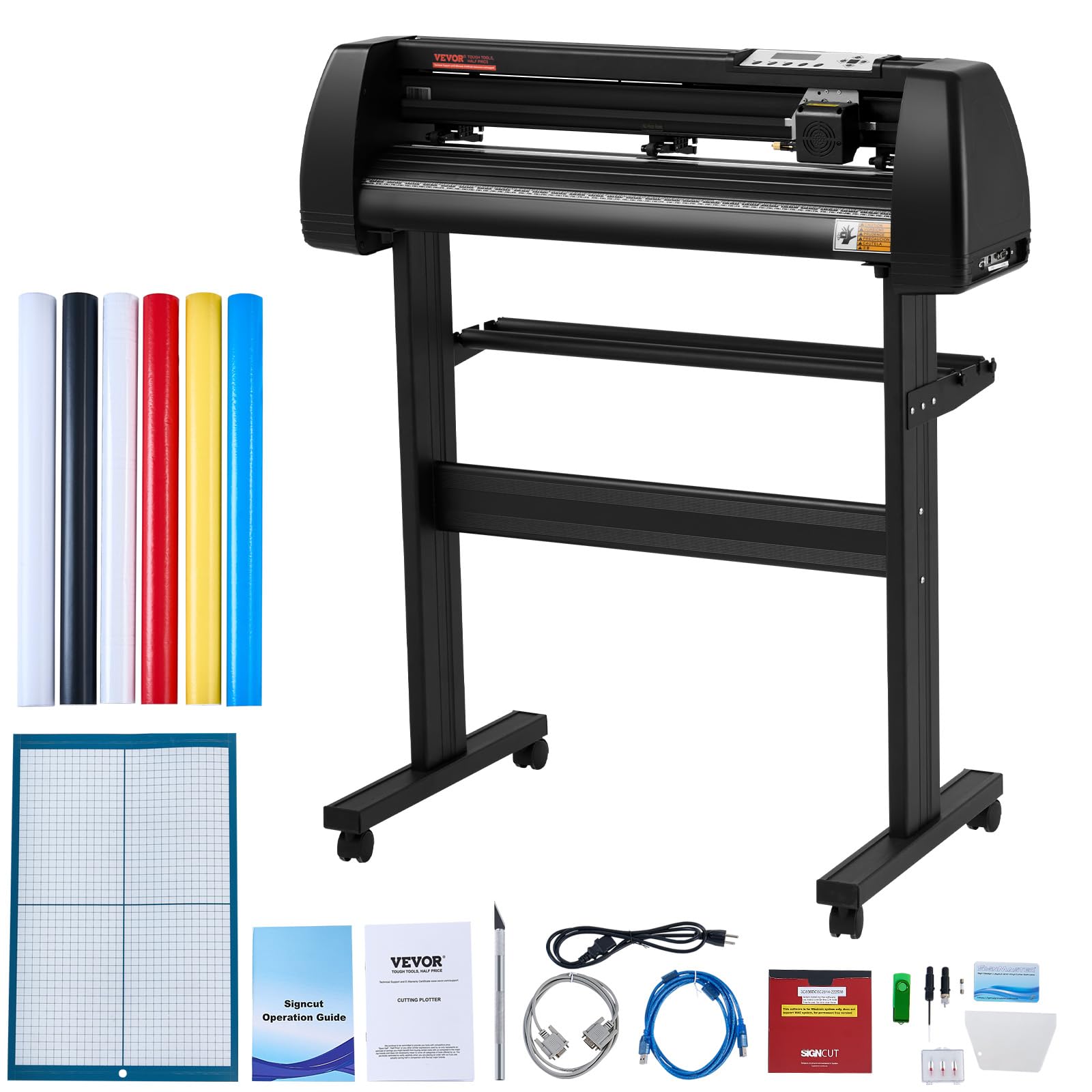
The VEVOR 28-inch cutting machine targets the commercial sign-making segment with a 24.8-inch maximum cutting width and a steel-reinforced frame constructed from aluminum and metal. The LCD screen provides direct on-machine control of cutting speed and force, eliminating the need to adjust settings through software mid-project. The three adjustable double-spring pinch rollers prevent paper jam and material skew during long continuous feeds.
The included SignMaster software supports Windows via USB or serial port, with compatibility for other professional sign software like SignCut and Flexi. The cutting precision of ±0.01 mm is tight enough for intricate heat transfer lettering and adhesive advertising graphics. The caster wheels on the frame allow this heavy-duty machine (nearly 40 pounds) to be repositioned in a workshop without lifting.
The bundled five rolls of colored sticker vinyl are functional but below the quality of premium brands — plan to source your own professional-grade vinyl for production work. The stand lacks built-in securing mechanisms, and the roll bars are sized for standard commercial rolls rather than smaller craft rolls. This machine is best suited for users who cut large volumes of vinyl for signs, banners, and vehicle graphics, not for occasional hobbyists.
Why it’s great
- 24.8-inch cutting width handles large-format vinyl rolls and banner material without splicing
- LCD panel allows direct force and speed adjustment without software navigation
- Three double-spring pinch rollers prevent material drift during long automated cuts
Good to know
- Bundled vinyl rolls are thin and have weak adhesive — best for prototyping only
- Stand lacks securing hardware; machine can shift during operation if not stabilized
- Windows-only software compatibility excludes Mac and Chromebook users
5. Cricut Explore 5 Essential Bundle
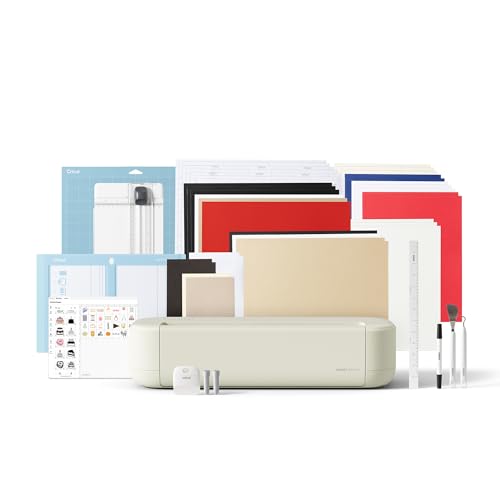
The Cricut Explore 5 delivers the core cutting experience of the Cricut ecosystem in a body that is 30% more compact than its predecessor — a meaningful difference for crafters with limited desk space. The machine precision-cuts 100+ materials including vinyl, iron-on, cardstock, and printable sticker paper through its standard fine-point blade. The new snap-in pen holder eliminates the frustrating alignment issues of earlier push-in designs.
The Essential Bundle includes enough materials for up to 65 projects out of the box, including Smart Vinyl, cardstock sheets, insert card sets, and printable vinyl sheets. The bonus digital content pack adds 25 premium images and one font to your Design Space library. The Print-Then-Cut feature works smoothly with most inkjet printers, automatically detecting registration marks for full-color sticker cuts.
The Explore 5 cannot process thicker materials like leather, basswood, or thick felt — those require the Maker 4 at a higher price tier. The Design Space app’s free tier is functional, but the most desirable design assets are locked behind the paid subscription. For users cutting primarily vinyl and cardstock without needing heavy-duty material capability, this machine offers an excellent balance of cost and performance.
Why it’s great
- 30% smaller footprint than previous generation fits tight workspaces
- Essential Bundle provides 65 project-ready materials for immediate use
- Snap-in pen holder loads smoothly without manual alignment fiddling
Good to know
- Standard blade is limited to materials under 2mm thickness
- Design Space free tier restricts access to premium images and fonts
- No rotary or knife blade support — not suitable for fabric or wood projects
6. LOKLiK Cutting Machine 2 by HTVRONT

The LOKLiK Cutting Machine 2 positions itself as a direct competitor to mid-range Cricut models by delivering five core functions — fine cutting, writing, deep cutting, scoring, and foil printing — at a price point that undercuts established brands. The machine’s 5X cutting force allows it to handle up to 100 different materials from thin vinyl to 2mm thick specialty stock like faux leather and glitter cardstock. The AI painting feature built into the LOKLiK IdeaStudio software converts text prompts into cut-ready vector designs, a genuinely novel feature at this price tier.
Print-Then-Cut accuracy of 0.5 mm reduces material waste around registration marks. The upgraded stepper motor and noise reduction technology produce noticeably quieter operation compared to first-generation LOKLiK machines — a meaningful improvement for home workshops. The matless cutting capability supports continuous smart material rolls up to 21 feet long, which is convenient for banners and wall decals.
The major limitation is the software dependency: LOKLiK IdeaStudio requires an active internet connection for all design work, including AI features and file access. Users who need offline functionality or Arabic language support will encounter significant barriers. The removable storage cup is a nice organizational touch, but the machine lacks the polished software ecosystem and community support of more established brands.
Why it’s great
- 5-in-1 functionality (cut, write, score, deep cut, foil) with tools included
- AI painting feature generates cut-ready designs from text prompts
- Matless cutting supports smart material rolls up to 21 feet long
Good to know
- Software requires constant internet connection — no offline operation possible
- Limited community support and fewer third-party tutorials than Cricut or Silhouette
- No Arabic software interface or right-to-left text support
7. Joelver Maker Manual Die Cutting Machine

The Joelver Maker manual die cutting machine delivers an impressive value proposition for beginners entering card making and scrapbooking. The 9-inch opening accommodates most standard embossing folders and die sets available on the market, and the starter kit includes over 20 professional-quality steel dies plus several embossing folders — enough to begin creating projects immediately without additional purchases. The manual hand crank operates without batteries or electricity, making it suitable for portable use at crop events or classes.
The steel construction of the dies ensures they maintain cutting integrity through hundreds of passes, while the plastic frame remains stable on a tabletop despite the machine’s heavy weight. Experienced users note that scuffed plates are normal wear and do not affect cutting quality, and that replacing worn cutting plates with inexpensive vegetable mat material can extend the machine’s useful life significantly.
The manual operation requires consistent cranking speed for clean cuts, and some users find that thick cardstock may need two passes. The instruction booklet is basic, with optimal sandwich configurations (plate/die/paper/plate) best discovered through trial and error. This machine is not designed for precision vinyl cutting or digital design integration — it is purely a physical die and embossing system.
Why it’s great
- Complete starter kit with 20+ steel dies and embossing folders included
- Foldable design stores compactly despite the machine’s sturdy build
- Manual operation works anywhere without electricity or software connection
Good to know
- Manual crank requires consistent speed — uneven cranking produces incomplete cuts
- Heavy construction (19 pounds) reduces portability despite folding design
- Limited to physical die cutting; no digital design or vinyl cutting capability
8. CraftGenes Manual Die Cutting Machine

The CraftGenes manual die cutting machine targets users who need a compact solution that does not sacrifice cutting width. The foldable side panels reduce the machine’s footprint when not in use, making it suitable for small craft rooms or temporary workspaces. Despite the foldable design, the ABS plastic construction feels solid and the hand crank provides consistent pressure for clean embossing passes.
The included complete set provides a range of dies, embossing folders, clear stamps, and cutting plates, allowing immediate project creation without separate purchases. The 9-inch by 12-inch active surface area accommodates A4 paper sizes easily, and the pink color variant adds a decorative element to the craft station. Users who have compared this to name-brand manual machines report that it cuts as effectively as more expensive Sizzix models.
The sandwich plate system requires attention — users must follow the specific layering instructions (13mm plate + 3mm plate + die/paper + 3mm plate) to avoid torn paper or uneven impressions. Finding compatible magnetic mats from third-party sellers can be challenging because the sandwich thickness varies between brands. This machine excels for occasional card making and scrapbooking but lacks the material range or digital integration of automated cutters.
Why it’s great
- Foldable side panels reduce storage footprint significantly
- Comprehensive starter kit includes dies, stamps, embossing folders, and plates
- Competitive cost relative to manual machines from established craft brands
Good to know
- Third-party magnetic mats may not work without custom shimming
- Stainless steel dies require precise sandwich layering to avoid paper tearing
- Purely manual machine with no digital design integration or precision vinyl cutting
9. Anna Griffin Empress Plates System

The Anna Griffin Empress Plates System is a specialized accessory set designed exclusively for the Anna Griffin Empress manual die cutting machine. The large 8.6 by 13.5 inch plates accommodate oversized dies and embossing folders that standard 6-inch plates cannot fit — particularly useful for 12-inch journaling folders and large layered flower dies. The powerful magnetic sheet holds metal dies firmly in place during cranking, preventing the frustrating shifting that occurs with standard thin plates.
The cutting plates are constructed from thick, warp-resistant plastic that holds flat even after extensive use — the original clear plates remain true after a full year of consistent use according to long-term customers. The magnet strength is notably robust, allowing multiple small dies to be positioned close together without overlap, maximizing material efficiency. For Anna Griffin machine owners, this is the plate set that enables the full cutting potential of larger die designs.
The correct sandwich configuration requires attention: the A plate sits on the bottom, followed by the metal plate, then the black magnetic plate, then paper with die face-down, topped by another A plate. Incorrect stacking results in failed embossing. This system is only compatible with Anna Griffin Empress machines; it will not fit standard Cricut or Silhouette platforms. Availability varies, as the set frequently sells out on the official Anna Griffin site.
Why it’s great
- Large plate size accommodates oversized dies up to 12 inches for journaling projects
- Magnetic sheet holds multiple dies firmly in place for simultaneous cutting
- Warp-resistant construction maintains flat surface for consistent cut depth over time
Good to know
- Only compatible with Anna Griffin Empress machines — not universal
- Requires precise plate stacking for embossing; incorrect order causes failures
- Inventory availability is inconsistent; can be difficult to find in stock
FAQ
Can a craft cutting machine cut fabric without fraying?
Why does my cutting machine require an internet subscription to use?
What is the difference between a manual die cutter and a digital cutting machine?
How do I prevent registration mark errors during Print-Then-Cut?
Final Thoughts: The Verdict
For most users, the best craft cutting machine winner is the Cricut Maker 4 because it combines the highest cutting force, a mature software ecosystem with the largest community support, and the broadest range of compatible materials from vinyl to leather to fabric. If you prioritize raw cutting speed and commercial-grade build quality, grab the Siser Juliet. And for wide-format decal and vinyl production, nothing beats the Silhouette Cameo 5 Alpha Plus with its 15-inch cutting width and AutoBlade system.

Mo Maruf
I created WellFizz to bridge the gap between vague wellness advice and actionable solutions. My mission is simple: to decode the research and give you practical tools you can actually use.
Beyond the data, I am a passionate traveler. I believe that stepping away from the screen to explore new environments is essential for mental clarity and physical vitality.