Our readers keep the lights on and my smoothie glass nicely filled. As an Amazon Associate, I earn from qualifying purchases.
A CPU water cooler is no longer a luxury for extreme overclockers — it has become the standard for anyone running modern multi-core processors that generate serious heat under load. The difference between a stock air cooler and a well-designed liquid cooling loop is not just a few degrees; it is the difference between a system that throttles under sustained workloads and one that maintains peak performance for hours. With pump noise, radiator thickness, and socket compatibility all varying wildly across models, choosing the wrong unit can mean louder operation or a cooler that simply does not fit your case.
I’m Mohammad Maruf — the founder and writer behind WellFizz. I’ve spent hundreds of hours analyzing pump flow rates, radiator fin density, fan static pressure ratings, and real-world thermal test results to separate the genuine performers from the overpriced options in the CPU liquid cooling market.
Whether you are cooling a Ryzen 9 or an Intel Core i9 for gaming, content creation, or daily productivity, this guide will help you find the right balance of thermal headroom and acoustic comfort. This is your complete resource for choosing the best cpu water cooler for your build.
How To Choose The Best CPU Water Cooler
Choosing a CPU water cooler requires understanding three core factors: the radiator size that fits your case, the pump’s ability to move heat away from the CPU, and the noise profile of the fans. Overlooking any one of these can lead to a cooler that either underperforms or annoys you daily with excessive noise.
Radiator Size: 240mm vs 360mm vs 420mm
The radiator is the heat exchanger that dissipates the thermal load from your CPU. A 240mm radiator with two 120mm fans is the minimum for effective liquid cooling on mid-range processors like a Ryzen 5 or Core i5. A 360mm radiator, with three 120mm fans, provides significantly more surface area for heat dissipation, making it the right choice for high-TDP chips like a Ryzen 9 or Core i9 that sustain heavy multi-core workloads. A 420mm radiator is overkill for most users and requires a full-tower case. Measure your case’s top or front mounting clearance before buying — a 360mm unit will not fit in a compact mid-tower.
Pump Design and Cold Plate Coverage
The pump moves coolant between the cold plate and radiator. A higher pump RPM generally means better flow, but it also increases noise. Look for pumps with ceramic bearings or three-phase motors for quieter, more reliable operation. The cold plate must fully cover your CPU’s integrated heat spreader — especially important for AMD’s AM5 socket where the hotspot is slightly offset. Some coolers include an offset mounting bracket to align the cold plate directly over the hotspot, which can improve thermal performance by several degrees.
Fan Static Pressure and Noise Level
Fans on a radiator need high static pressure — measured in mmH2O — to push air through the dense radiator fins. Fans rated below 2.0 mmH2O will struggle to cool the radiator effectively. Noise level is measured in decibels (dBA), and anything under 35 dBA is generally considered quiet under load. PWM-controlled fans allow the motherboard to adjust speed based on temperature, reducing noise during low-intensity use. Daisy-chain fan connectors simplify cable management by reducing the number of fan cables running to the motherboard.
Quick Comparison
On smaller screens, swipe sideways to see the full table.
| Model | Category | Best For | Key Spec | Amazon |
|---|---|---|---|---|
| NZXT Kraken Core 360 RGB | Premium | Clean builds with direct motherboard control | 3100 RPM pump | Amazon |
| be quiet! Silent Loop 3 360mm | Premium | Near-silent operation and refillable design | 3-chamber pump | Amazon |
| CORSAIR Nautilus 360 RS | Mid-Range | Low-noise convex cold plate contact | 20 dBA pump noise | Amazon |
| Thermalright FW360 SE ARGB V2 | Mid-Range | Customizable LCD screen for system status | 2″ LCD display | Amazon |
| MSI MAG Coreliquid A13 360 | Mid-Range | LGA 1851 ready with split-flow radiator | 3800 RPM pump | Amazon |
| ID-COOLING FX360 PRO | Budget | Budget-friendly 360mm with daisy-chain fans | 82.5 CFM airflow | Amazon |
| ARCTIC Liquid Freezer III Pro 240 A-RGB | Budget | Compact 240mm with integrated VRM fan | 38 mm radiator thickness | Amazon |
In‑Depth Reviews
1. NZXT Kraken Core 360 RGB
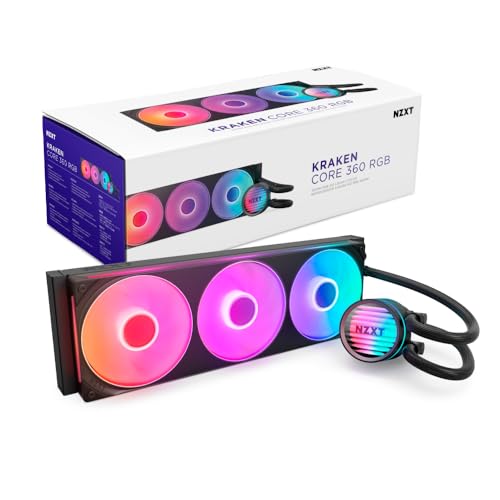
The NZXT Kraken Core 360 RGB delivers a compelling balance of cooling power and acoustic refinement, with its 3100 RPM pump providing strong coolant circulation without the whine typical of high-speed pumps. The single-frame fan design groups three 120mm fans into one solid unit, reducing the number of screws and cables you need to manage during installation. Users report that this cooler keeps an i9 10900KF plenty cool under sustained loads and handles an overclocked i7 11700K at 5 GHz without breaking a sweat.
At 31.9 dBA, the noise level is respectable for a 360mm unit, though it is not the quietest option available. The PWM-enabled fans allow precise speed adjustments through your motherboard, so you can dial in a silent idle profile and ramp up only during heavy gaming sessions. The direct motherboard connection eliminates the need for a separate RGB controller, simplifying the build process significantly.
The cooler supports all current sockets including LGA 1851 and AM5, making it a future-proof choice for new builds. Feedback from users highlights excellent value at its price point, with one reviewer noting it outperforms some higher-priced units. The only minor complaint is that the pump does not display temperature readings — a feature reserved for more expensive NZXT models.
Why it’s great
- Single-frame fan design simplifies installation and reduces cables
- Strong 3100 RPM pump keeps high-TDP CPUs cool under load
- Excellent value compared to similarly priced 360mm AIOs
Good to know
- Requires a motherboard with a 5V ARGB header (not 12V)
- Not the quietest unit at full pump speed
- No onboard temperature display on the pump cap
2. be quiet! Silent Loop 3 360mm
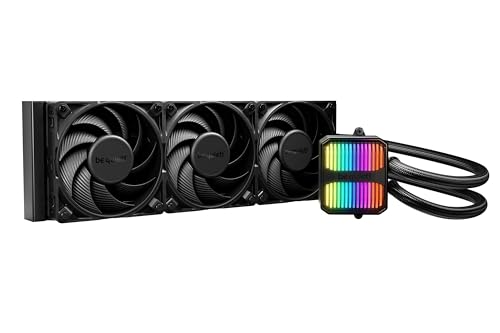
The be quiet! Silent Loop 3 360mm is engineered for users who prioritize acoustic comfort above all else, featuring a three-chamber pump design that reduces internal turbulence and vibration. The included Silent Wings 4 120mm PWM high-speed fans are among the quietest on the market, with specially designed radiator corners that dampen noise further. Users upgrading from air coolers report a noticeable drop in system noise, with one reviewer noting their 9800X3D stays cool while the fans remain virtually inaudible during normal use.
This cooler stands out with its refillable design — an included coolant bottle and easy-access port allow you to top off the loop over time, extending the unit’s lifespan beyond typical sealed AIOs. The wide CPU plate coverage even supports Threadripper sockets, making this a versatile option for high-core-count workstations. At 38.8 dBA under full load, it is slightly louder than some competitors at max fan speed, but the noise profile is smoother and less intrusive.
German engineering is evident in the build quality, with flexible sleeved tubes and a convenient mounting system that accommodates both Intel LGA 1851 and AMD AM5 sockets. The 3-year manufacturer warranty adds peace of mind. A small number of users noted the tubing is stiffer than average, requiring careful routing in compact cases, but the overall performance and quiet operation make this a top-tier choice for noise-sensitive builders.
Why it’s great
- Refillable design extends lifespan beyond typical sealed AIOs
- Three-chamber pump minimizes vibration and turbulence noise
- Supports Threadripper and standard consumer sockets alike
Good to know
- Stiff tubing may be difficult to route in smaller cases
- Noise level rises to 38.8 dBA at full fan speed
- Premium pricing reflects the engineering and included coolant kit
3. CORSAIR Nautilus 360 RS

The CORSAIR Nautilus 360 RS brings proven engineering to a mid-range price point, with a whisper-quiet pump rated at just 20 dBA — barely audible even in a silent room. The convex cold plate design ensures maximum contact with the CPU’s integrated heat spreader, improving heat transfer efficiency. Users have reported a 10°C drop in both idle and gaming temperatures after replacing stock thermal paste with a high-quality compound, and the pre-applied paste pattern is optimized for quick installation without mess.
RS120 fans incorporate AirGuide technology and Magnetic Dome bearings to deliver strong static pressure through the radiator while maintaining low noise levels. The daisy-chain fan connections reduce wiring clutter, with a single 4-pin PWM header controlling all three fans. A 5800XT user running Cinebench 2024 multi-core tests saw temperatures stay under 71°C, demonstrating solid thermal headroom for demanding workloads.
Compatibility covers LGA 1851, LGA 1700, and AM5/AM4 sockets out of the box. The cooler is available in both RGB and non-RGB versions, giving you flexibility based on your aesthetic preferences. One user reported a slight issue with the MSI logo alignment on the AM4/5 bracket, but this is a cosmetic concern rather than a performance problem. The 3.5-pound weight is manageable for most case mounts.
Why it’s great
- Ultra-quiet 20 dBA pump is barely audible in silent systems
- Convex cold plate design improves heat transfer vs flat plates
- Daisy-chain fans simplify cable management significantly
Good to know
- Some users note cosmetic misalignment of logos on AMD brackets
- Replacing pre-applied thermal paste can yield even better temps
- No RGB model available for those wanting a stealth build without LEDs
4. Thermalright FW360 SE ARGB V2

The Thermalright FW360 SE ARGB V2 packs a 2-inch LCD screen into a 360mm AIO at a mid-range price, allowing you to display CPU temperature, system status, custom images, or animated GIFs through the Thermalright software. The 3000 RPM pump provides strong coolant flow, and the three TL-M12Q 120mm PWM fans run up to 2000 RPM with 68.9 CFM airflow and 2.21 mmH2O static pressure — enough to push air effectively through the 27mm thick aluminum radiator. Users report excellent cooling on a Ryzen 7 7800X3D, with quiet daisy-chain fans that reduce cable clutter.
Installation is straightforward with a thorough manual that covers fan replacement and screen setup. The included thermal paste and clean all-black design make it a visually cohesive addition to most builds. The 5-year warranty reflects confidence in the product’s longevity. A small cosmetic note: some users found the clear protective sticker on the fans and screen dulls the colors slightly, and removing it improves the visual experience.
The main concern reported by a few buyers involves the LCD screen’s USB-C connection, which caused issues for one user who had to seek warranty service through Amazon rather than directly from Thermalright. This suggests that buying through Amazon provides better after-sales support. Despite this, the combination of a functional LCD display, strong cooling performance, and a reasonable price makes this a compelling choice for builders who want both aesthetics and performance.
Why it’s great
- 2-inch LCD screen displays system stats or custom images/GIFs
- Daisy-chain fans simplify wiring and improve airflow
- 5-year warranty provides long-term peace of mind
Good to know
- LCD USB-C connection had reliability issues for some users
- Clear sticker on screen and fans may need removal for best appearance
- Silver bracket color may clash with all-black builds
5. MSI MAG Coreliquid A13 360

The MSI MAG Coreliquid A13 360 offers out-of-box support for Intel’s LGA 1851 socket, making it a convenient choice for the latest Intel builds. The integrated three-phase pump runs at up to 3800 RPM with ceramic bearings that reduce motor resonance and prolong pump life. The split-flow radiator design improves coolant distribution across the full radiator surface area, maximizing heat dissipation. Users report that a 5800X3D no longer thermal throttles under load, with max package temperatures staying around 75°C.
The triple-layered netted tubing and reinforced mesh sheathing are evaporation-proof, keeping the closed-loop system sealed for years of reliable operation. The included thermal paste and preinstalled fans make installation fast. At just 14.4 dBA, this is one of the quietest 360mm AIOs on the market, though some users note the fans become apparent under heavy load. The daisy-chain fan connection system is praised for simplifying the build process.
AM4 and AM5 users should check the mounting bracket alignment, as one reviewer noted the MSI logo was slightly misaligned on the AMD bracket — a cosmetic rather than functional issue. After six months of heavy gaming and AI computing use, one user reported the CPU stays super cool with no degradation. The 5.4-pound weight is heavier than some competitors, so ensure your case mount can support it securely.
Why it’s great
- Out-of-box LGA 1851 support for latest Intel CPUs
- Ultra-quiet 14.4 dBA operation at low loads
- Ceramic bearing pump reduces long-term wear and noise
Good to know
- Slightly heavy at 5.4 pounds for some case mounts
- AMD bracket may have cosmetic logo misalignment
- Fans become audible under sustained high load
6. ID-COOLING FX360 PRO

The ID-COOLING FX360 PRO delivers 360mm cooling performance at a budget-friendly price point, with a 350W TDP rating that handles high-end processors like the Ryzen 9 5900X and 9800X3D with ease. The pump runs at 2900 RPM and keeps a 5900X idling at just 29°C in a 17°C ambient room, according to one reviewer. The three 120mm fans push 82.5 CFM of airflow at 2.55 mmH2O static pressure, ensuring strong heat exchange through the radiator.
The CD pattern on the water block provides a premium visual touch without RGB lighting, appealing to users who prefer a clean, stealth look. The daisy-chain fan connectors reduce cable clutter, and the all-black layout blends seamlessly into dark interiors. At 35.2 dBA, the noise level is reasonable for a 360mm unit, and users describe the fans as quiet at 1200 RPM during normal use. One reviewer noted a 10-15°C temperature drop compared to a stock cooler on their CPU.
Compatibility spans Intel LGA 1851 down to LGA 1156 and AMD AM4/AM5, covering virtually every modern socket. The included Frost FX45 thermal grease is effective when applied using the pea dot method. A small number of users wished for RGB lighting, but the non-RGB design keeps costs low and avoids the complexity of ARGB headers. For builders on a tight budget who still want 360mm liquid cooling, this cooler represents exceptional value.
Why it’s great
- Exceptional price for a 360mm AIO with 350W TDP rating
- Daisy-chain fans reduce cable clutter significantly
- All-black design blends into most builds without RGB fuss
Good to know
- No RGB lighting for those wanting LED customization
- 35.2 dBA noise level is average rather than whisper-quiet
- Pump noise may be noticeable at full 2900 RPM
7. ARCTIC Liquid Freezer III Pro 240 A-RGB
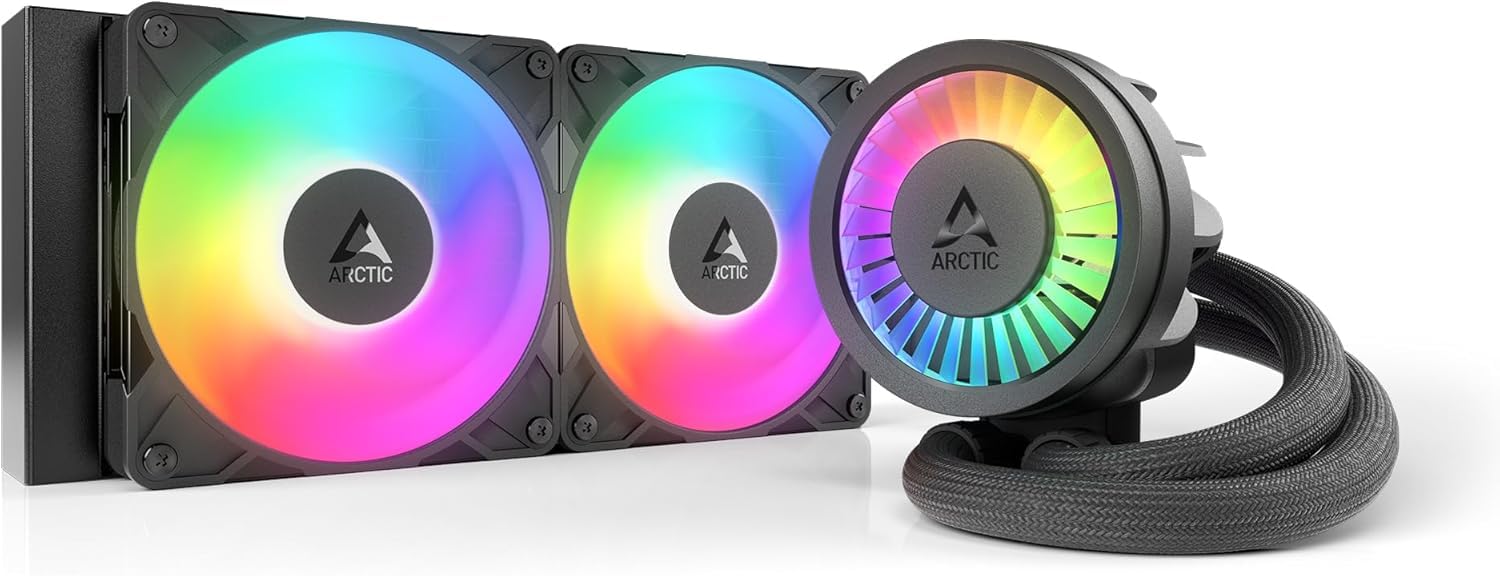
The ARCTIC Liquid Freezer III Pro 240 A-RGB is a 240mm AIO that punches above its size class, thanks to a 38mm thick radiator that provides nearly as much surface area as a standard 280mm unit. The included P12 Pro fans deliver more static pressure and lower noise at low speeds than the standard P12, and the PWM-controlled pump allows precise speed adjustments. Users upgrading from stock air coolers report a 30°C temperature drop under load, with a Ryzen 9 3900 maxing out at just 65°C during stress tests.
The integrated VRM fan is a unique feature — a small PWM-controlled fan that actively cools the voltage regulators on your motherboard, ensuring reliable power delivery during overclocking. The offset mounting bracket for both Intel and AMD shifts the cold plate center toward the CPU hotspot, improving heat transfer efficiency. The cable management is exemplary, with all PWM cables integrated into the hose sheathing so only a single visible cable connects to the motherboard.
Compatibility includes LGA 1851, LGA 1700, AM5, and AM4 sockets, with an included contact frame for Intel sockets that optimizes contact pressure distribution. The cooler is 12mm thicker than most 240mm AIOs, so check your case clearance carefully — it may not fit in slim chassis or low-profile builds. A few users found the mounting process required more force than expected to secure the cold plate. Despite this, the cooling performance per millimeter of radiator is outstanding for a compact build.
Why it’s great
- Thicker 38mm radiator provides exceptional cooling for a 240mm unit
- Integrated VRM fan actively cools motherboard voltage regulators
- Single visible cable for clean, minimalist builds
Good to know
- 38mm thickness may not fit slim cases or compact builds
- Cold plate mounting requires extra force compared to other AIOs
- Fans can be loud at maximum speed under sustained load
FAQ
What is the difference between 240mm and 360mm CPU water coolers?
Can a CPU water cooler fail and leak on my components?
How often should I replace thermal paste on my AIO cooler?
Final Thoughts: The Verdict
For most users, the best cpu water cooler winner is the NZXT Kraken Core 360 RGB because it delivers strong 3100 RPM pump performance, clean single-frame fan design, and broad socket compatibility at a mid-range price that outperforms many premium-priced competitors. If you want near-silent operation and a refillable loop for long-term reliability, grab the be quiet! Silent Loop 3 360mm. And for compact builds where 240mm is the maximum, the ARCTIC Liquid Freezer III Pro 240 A-RGB offers the thickest radiator and an integrated VRM fan that no other 240mm cooler can match.

Mo Maruf
I created WellFizz to bridge the gap between vague wellness advice and actionable solutions. My mission is simple: to decode the research and give you practical tools you can actually use.
Beyond the data, I am a passionate traveler. I believe that stepping away from the screen to explore new environments is essential for mental clarity and physical vitality.