Our readers keep the lights on and my smoothie glass nicely filled. As an Amazon Associate, I earn from qualifying purchases.
That spinning wheel of death or stuttering frame drop you just experienced is almost certainly your memory choking under the load. Modern operating systems and applications are memory-hungry beasts, and running on inadequate or slow RAM turns even a powerful CPU into a limping bottleneck. Upgrading your system’s memory is the single most cost-effective way to breathe new life into a sluggish PC, whether you’re battling for killstreaks or rendering a video timeline.
I’m Mohammad Maruf — the founder and writer behind WellFizz. I’ve spent countless hours analyzing memory specifications, JEDEC standards, and real-world compatibility patterns to cut through the marketing noise around frequency and latency.
This buying guide delivers clear, spec-focused advice to help you confidently choose the right cpu ram upgrade for your desktop or laptop system, balancing speed, capacity, and platform compatibility.
How To Choose The Best CPU RAM
Buying RAM isn’t just about picking the biggest number on the box. The biggest mistake buyers make is ignoring compatibility and generational support, resulting in a purchase that either won’t fit or runs at a fraction of its rated speed. Focus on three core pillars: capacity for your workload, speed your motherboard can actually run, and latency that matches your performance expectations.
SODIMM vs DIMM: The Physical Fit
This is the most common rookie error. Laptops and small-form-factor PCs use SODIMM (Small Outline Dual In-line Memory Module) sticks with 260 pins. Standard desktop systems require the larger DIMM (288-pin) modules. A desktop stick will not physically fit into a laptop slot, and vice versa. Check your device’s manual or open the panel to confirm before ordering.
Capacity: How Much is Enough
For general productivity and light browsing, 8GB is the absolute floor. For Windows 11 multitasking and moderate gaming, 16GB is the sweet spot most users should target. Content creators, heavy gamers, and anyone running virtual machines will want 32GB or more to avoid hitting the page file. More capacity never hurts, but diminishing returns set in beyond what your CPU memory controller can efficiently address.
Speed and Latency: The Balancing Act
RAM speed (MHz) determines how fast data can be read from the memory module, while CAS Latency (CL) measures the delay before that data is available. A kit with 3200MHz CL16 is generally faster in real-world applications than a 3600MHz CL22 kit because the lower latency compensates for the lower raw frequency. Pay attention to the JEDEC standard rating — running beyond your motherboard’s rated speed requires enabling XMP (Intel) or EXPO (AMD) profiles in the BIOS.
Quick Comparison
On smaller screens, swipe sideways to see the full table.
| Model | Category | Best For | Key Spec | Amazon |
|---|---|---|---|---|
| G.SKILL Flare X5 DDR5 | DDR5 | High-end AMD Ryzen | 6000MT/s CL30 | Amazon |
| CORSAIR Vengeance LPX | DDR4 | High-performance gaming | 3200MHz CL16 | Amazon |
| TEAMGROUP Elite 32GB | DDR4 | Budget 32GB capacity | 3200MHz CL22 | Amazon |
| Silicon Power 16GB Kit | DDR4 | Budget dual-channel desktop | 3200MHz CL22 | Amazon |
| Crucial 16GB | DDR4 | Reliable single-stick desktop | 3200MHz CL22 | Amazon |
| A-Tech 16GB | DDR4 | Older desktop workstations | 2400MHz CL17 | Amazon |
| Timetec 8GB | DDR4 | Laptop SODIMM upgrade | 2666MHz CL19 | Amazon |
In-Depth Reviews
1. G.SKILL Flare X5 Series DDR5

This is the pinnacle of current-generation desktop memory for AMD platforms. Rated at 6000MT/s with ultra-tight CL30-38-38-96 timings at just 1.35V, the Flare X5 is engineered specifically for AMD EXPO support on X870, X670, and B650 motherboards. It boots at JEDEC default speeds out of the box, but enabling the EXPO profile in BIOS unlocks its full potential for Ryzen 7000 and 9000 series processors where memory controller is critical for infinity fabric stability. The 32GB kit (2x16GB) capacity hits the sweet spot for both enthusiast gaming and productivity workloads.
The matte black aluminum heatspreader design is low-profile enough to clear even massive air coolers, and the modules run cool under sustained load thanks to efficient thermal dissipation. Customers consistently report flawless first-boot compatibility with MSI, ASUS, and Gigabyte X670E boards, with zero instability or POST failures. The DDR5 architecture also includes on-die ECC, providing an additional layer of data integrity during intensive computation.
The only real hurdle is price volatility — current market fluctuations driven by supply chain shortages have pushed this kit well above its typical value point. However, for anyone building a new high-end AMD rig, this is the gold standard that will deliver maximum performance without requiring manual overclocking wizardry.
Why it’s great
- Industry-leading 6000MT/s CL30 latency for Ryzen processors
- Plug-and-play EXPO profile support on modern AMD boards
- Low-profile heatspreader fits under large CPU coolers
Good to know
- Requires EXPO/XMP enable in BIOS to reach rated speed
- Premium pricing far exceeds DDR4 alternatives
- Not compatible with Intel XMP-only motherboards
2. CORSAIR Vengeance LPX DDR4 32GB

The Vengeance LPX is a legendary DDR4 kit for a reason — it combines hand-sorted ICs with a low-profile aluminum heatspreader that stands just 34mm tall, making it compatible with virtually every CPU cooler on the market. This 32GB kit (2x16GB) runs at 3200MHz with aggressive CL16-20-20-38 timings at 1.35V, a voltage sweet spot that balances heat output with overclocking headroom. Intel XMP 2.0 support means enabling the profile in BIOS is a one-click affair on Z490, Z590, and Z690 boards.
Real-world testing shows this kit eliminates frame-time stutter in CPU-bound gaming scenarios, dropping from 99% RAM usage to 42% in one reported upgrade from 8GB to 32GB. The dual-channel configuration gives the memory controller full bandwidth for simultaneous read/write operations, directly improving load times and multitasking fluidity. Corsair’s reputation for warranty support is also well-documented, with one customer reporting a seamless free replacement when a single stick failed after months of use.
The only downside is the lack of RGB lighting, but for builders who prioritize raw performance and cooler clearance over aesthetics, this is a feature, not a flaw. At its current price point, this kit represents the best value for high-speed DDR4 available today.
Why it’s great
- Ultra-low CL16 latency improves gaming responsiveness
- 34mm height clears even behemoth air coolers
- Hand-sorted ICs provide reliable overclocking potential
Good to know
- XMP must be enabled in BIOS for rated speed
- No RGB lighting for show builds
- Limited to DDR4 platforms only
3. TEAMGROUP Elite DDR4 32GB Kit

When your priority is maximum capacity without spending a premium, the TEAMGROUP Elite 32GB kit delivers exactly what the spec sheet promises. Running at JEDEC-standard 3200MHz with CL22-22-22-52 timings at 1.2V, this kit is designed for stability and broad compatibility rather than extreme overclocking. It adheres strictly to JEDEC specifications, meaning it will run at full speed on any motherboard that supports DDR4-3200 without needing to enable XMP or tinker with voltages. For users replacing mismatched stick configurations — like the customer who upgraded a Dell Inspiron from 4GB+8GB to 2x16GB — this plug-and-play reliability is a godsend.
The green PCB and bare heatsink design won’t win any beauty contests, but inside the case, performance is where it counts. Customer experiences show significant boot time improvement after pairing this kit with an SSD swap, transforming older office PCs into smooth Windows 11 multitaskers. The provided installation video is a helpful touch for first-time builders, walking through proper seating and DIMM slot population.
The CL22 latency is noticeably looser than premium kits, which can result in slightly higher response times in latency-sensitive workloads like competitive gaming. Additionally, some users report that the modules lack the thermal overhead for aggressive manual overclocking. For pure workstation use or upgrading family PCs, these are minor tradeoffs.
Why it’s great
- Full JEDEC compliance means no BIOS tweaking needed
- 32GB capacity at entry-level pricing
- Low 1.2V operation for cooler running
Good to know
- CL22 timings are slower than enthusiast kits
- Bare PCB with no heatspreader
- Limited overclocking headroom
4. Silicon Power DDR4 16GB Kit

For budget-constrained builders who still want dual-channel performance, the Silicon Power 16GB kit (2x8GB) delivers 3200MHz at CL22 with a remarkably low 1.2V operating voltage. It boots at full JEDEC speed without requiring XMP, which is a significant advantage on older motherboards where enabling overclocking profiles can be finicky. The low voltage compared to typical 1.35V gaming kits means less heat output and lower power draw — a meaningful consideration for compact builds or office PCs running 24/7.
Multiple customer reviews confirm this kit holds up well under sustained loads, with one user running Minecraft server generation tasks and reporting zero system latency improvements over their previous 8GB configuration. The single-rank 1Rx8 design is standard for this capacity tier and works well with Ryzen CPU memory controllers, achieving stable frequencies at rated speeds. The lifetime warranty from Silicon Power provides a reasonable safety net given the entry-level price.
The most common concern is quality control — one customer reported receiving a warped module that had to be exchanged, though the replacement set performed perfectly. The lack of a metal heatspreader means these modules run warmer under load than heatsinked alternatives, though still well within safe operating limits at 1.2V. For pure dual-channel performance at the lowest possible investment, this kit is hard to beat.
Why it’s great
- JEDEC-standard 3200MHz with no XMP required
- Low 1.2V voltage for cooler operation
- Full dual-channel configuration at an entry-level price
Good to know
- No heatsink on modules
- Some quality control inconsistency reported
- CL22 timings limit latency-sensitive performance
5. Crucial 16GB DDR4

Crucial, as the direct retail arm of Micron — one of the world’s largest DRAM manufacturers — offers an unmatched advantage: component-level testing and supply chain traceability. This 16GB single stick operates at 3200MHz with CL22 timings and is downclockable to 2933MHz or 2666MHz, making it a perfect drop-in upgrade for pre-built systems with locked BIOS settings. The Crucial System Scanner tool on their website automatically identifies compatible upgrades for specific motherboards, eliminating the guesswork entirely.
Customer reports highlight this stick’s reliability in demanding creative workloads. One photographer reported that upgrading to 32GB with two sticks dramatically improved Adobe Photoshop and Lightroom performance, eliminating the freezes that plagued their workflow. The 1.2V operation keeps thermals low, and the anti-static packaging ensures safe handling during installation. Crucial’s reputation for longevity is reinforced by a robust limited lifetime warranty that mirrors Micron’s quality standards.
The single-stick configuration means you lose dual-channel bandwidth benefits compared to a matched kit, which can impact CPU-bound tasks by up to 15-20% in memory-sensitive applications. If you plan to run two sticks eventually, ensure they match in speed, latency, and rank for optimal stability. As a standalone upgrade for a single slot, however, this is the most trusted choice on the market.
Why it’s great
- Backed by Micron’s 42 years of memory engineering
- System Scanner tool guarantees motherboard compatibility
- Downclockable to 2666MHz for older BIOS systems
Good to know
- Single stick loses dual-channel bandwidth advantage
- CL22 latency is standard, not performance-tuned
- Must pair with identical stick for optimal dual-channel
6. A-Tech 16GB DDR4

A-Tech specializes in compatible upgrades for older business-class desktops and workstations, and this 16GB DDR4 module at 2400MHz CL17 is a perfect example. The dual-rank (2Rx8) configuration effectively doubles the memory banks available to the CPU memory controller, which can provide better performance than single-rank modules of the same capacity in memory-intensive applications like database queries and virtual machines. The CL17 latency is tighter than most budget 2400MHz sticks, partially compensating for the lower clock speed.
Customer reports confirm this stick works flawlessly in older Dell Optiplex, HP EliteDesk, and Lenovo ThinkCentre systems that have strict BIOS limitations on memory speed. The 1.2V JEDEC standard voltage ensures compatibility with systems that lack overclocking support altogether. A-Tech’s US-based tech support and lifetime warranty add peace of mind for fleet upgrades or office maintenance, where reliability is paramount.
The 2400MHz speed is a significant limitation for newer CPUs that benefit from 3200MHz or faster memory. Gamers or users of recent AMD Ryzen builds will leave performance on the table by choosing this kit. This module is best suited for the specific scenario of upgrading a DDR4 workstation that cannot run higher speeds due to motherboard chipset restrictions.
Why it’s great
- Dual-rank design improves memory controller efficiency
- CL17 latency is aggressive for the 2400MHz speed class
- Perfect for DDR4 office/workstation upgrades
Good to know
- 2400MHz speed caps system performance on modern CPUs
- Not suitable for gaming or high-performance builds
- Single stick configuration
7. Timetec 8GB DDR4 SODIMM
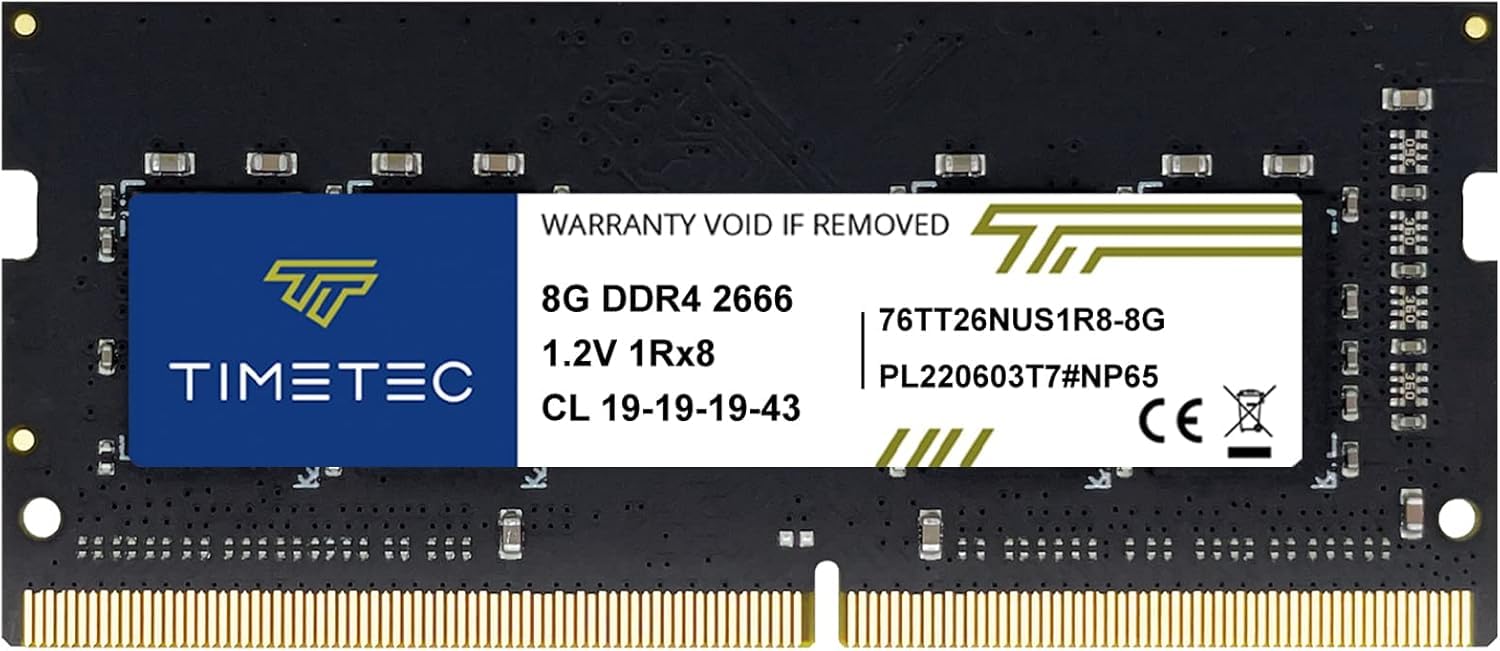
This is the go-to solution for reviving a sluggish laptop with a simple SODIMM swap. The Timetec 8GB module runs at 2666MHz (PC4-21300) with CL19 timings on a 260-pin form factor, compatible with most DDR4-based laptops, mini PCs, and all-in-one systems that support SODIMMs. The plug-and-play design means no BIOS configuration is needed — seat the module into the slot, screw back the panel, and the system automatically recognizes the new memory.
Customer feedback is overwhelmingly positive, with users reporting immediate improvements in boot times and system responsiveness after upgrading from 4GB or 8GB single-channel configurations. Multiple verified purchasers successfully installed this stick in HP EliteDesk Mini PCs and Lenovo ThinkPad laptops, with automatic detection in both BIOS and Windows upon first boot. The green or black PCB variation is a cosmetic non-issue for laptop internals, but worth noting if you care about visual consistency in a transparent chassis mini PC.
The 8GB capacity is a limitation for heavy multitasking — users running multiple virtual machines or intensive creative software should look for 16GB kits. Additionally, mixing this stick with an existing module of different brand or timing may force both sticks to run at the slower module’s JEDEC profile. As a standalone upgrade for an older laptop, it’s a perfect entry point to extend usable life.
Why it’s great
- Auto-recognized by BIOS with zero configuration needed
- 2666MHz speed maximizes DDR4 laptop memory controller
- Lifetime warranty from US-based support team
Good to know
- 8GB capacity is minimal for modern multitasking
- PCB color and rank may vary between production batches
- Mixing with another stick may downclock speed
FAQ
Can I mix different brands of RAM in my system?
What does enabling XMP or EXPO actually do?
Is DDR5 RAM compatible with DDR4 motherboards?
Final Thoughts: The Verdict
For most users, the cpu ram winner is the CORSAIR Vengeance LPX 32GB because it combines aggressive CL16 timings with wide compatibility and a low-profile design that fits any build. If you want future-proof DDR5 performance for a new AMD system, grab the G.SKILL Flare X5. And for breathing life into an older office PC on a strict budget, nothing beats the sheer value of the Silicon Power 16GB Kit.

Mo Maruf
I created WellFizz to bridge the gap between vague wellness advice and actionable solutions. My mission is simple: to decode the research and give you practical tools you can actually use.
Beyond the data, I am a passionate traveler. I believe that stepping away from the screen to explore new environments is essential for mental clarity and physical vitality.