Our readers keep the lights on and my smoothie glass nicely filled. As an Amazon Associate, I earn from qualifying purchases.
Pairing an RTX 4060 Ti with a mismatched processor leaves performance on the table—either your GPU idles while waiting for instructions, or your CPU runs wild with nothing to feed. This guide isolates the specific processors that balance core count, clock speed, and cache architecture to extract every frame your 4060 Ti can deliver without overspending on compute you won’t use.
I’m Mohammad Maruf — the founder and writer behind WellFizz. I’ve cross-referenced benchmark data and user-reported real-world gaming performance across nine CPU-and-4060 Ti configurations to identify which processors actually synchronize with this GPU’s bandwidth and memory capabilities.
After analyzing gaming frame rates, productivity multitasking, thermals under load, and platform upgrade paths, this breakdown of the best cpu for 4060 ti targets the precise socket compatibility and cache sizes that matter most for 1080p and 1440p gaming at high refresh rates.
How To Choose The Best CPU For 4060 Ti
Matching a processor to an RTX 4060 Ti requires understanding where the bottleneck shifts occur. At 1080p with a fast GPU, the CPU often becomes the limiting factor. At 1440p the GPU works harder, shifting the balance. The goal is a pairing where neither component saturates before the other.
Cache Size and Architecture
AMD’s 3D V-Cache technology stacks additional L3 cache on the chip, letting the CPU store more game data on-die. This reduces trips to system RAM and dramatically improves minimum frame rates, especially in simulation and strategy titles. Intel’s hybrid architecture uses Performance-cores and Efficient-cores to manage background tasks—this helps maintain consistent frame timing when you’re streaming or running Discord alongside your game.
Core Count vs Real-World Gaming
More than 8 cores rarely improves gaming performance with an RTX 4060 Ti. The GPU’s 8GB VRAM and memory bandwidth create a ceiling that 12 or 16 cores can’t push higher in most titles unless you also render, stream, or host game servers on the same machine. For pure gaming, prioritize single-core boost clock and L3 cache over core count.
Platform and Upgrade Path
Socket AM5 from AMD will support future processor generations through at least 2027, making it the longer-lasting investment. Intel’s LGA 1700 platform ends with 14th-gen, though it offers cheaper DDR4 motherboard options. LGA 1851 is required for Intel Core Ultra processors—this is the newest platform but has a shorter confirmed support window.
Cooling Requirements and Power Draw
High-core-count Intel i9 and AMD Ryzen 9 processors draw 200W+ under sustained load, demanding 360mm AIO or premium air coolers. Lower-power chips like the Ryzen 7 9700X or Intel i5-14400F can run effectively on a single-tower air cooler or 240mm AIO, reducing total build cost and noise.
Quick Comparison
On smaller screens, swipe sideways to see the full table.
| Model | Category | Best For | Key Spec | Amazon |
|---|---|---|---|---|
| AMD Ryzen 7 9850X3D | Premium | Maximum gaming FPS with 3D V-Cache | 104MB L3 Cache, 8 Cores | Amazon |
| AMD Ryzen 9 9900X3D | Premium | Gaming + heavy multitasking | 140MB L3 Cache, 12 Cores | Amazon |
| Intel Core Ultra 9 285K | Premium | CAD, rendering, and content creation | 24 Cores, 5.7 GHz Boost | Amazon |
| Intel Core i9-14900K | Premium | High-clock gaming + workstation | 24 Cores, 6.0 GHz Boost | Amazon |
| Intel Core i9 12900KF | Mid-Range | Budget high-core productivity | 16 Cores, 5.2 GHz Boost | Amazon |
| Intel Core i7-14700F | Mid-Range | Balanced gaming and productivity | 20 Cores, 5.4 GHz Boost | Amazon |
| AMD Ryzen 7 9700X | Mid-Range | Efficient 1080p gaming | 8 Cores, 5.5 GHz Boost | Amazon |
| Intel Core i7 14700F | Mid-Range | Prebuilt gaming with 32GB DDR5 | 20 Cores, 5.4 GHz Boost | Amazon |
| Intel Core i5-14400F | Budget | Entry-level 1080p gaming | 10 Cores, 4.7 GHz Boost | Amazon |
In‑Depth Reviews
1. AMD Ryzen 7 9850X3D

The 9850X3D delivers the highest minimum frame rates in simulation-heavy titles like Cities Skylines II and Factorio thanks to its 104MB L3 cache. User reports show 140-160 FPS when paired with a Radeon 7800 XT, and the 8-core design keeps thermals manageable—idle temperatures sit around 38°C and rarely exceed 70°C under a 360mm AIO at full load. Boost clock reaches 5.6 GHz, and the improved branch prediction in this generation smooths out frame-time variance that standard cache chips exhibit.
Socket AM5 compatibility means you can drop this into a current motherboard and upgrade to a future Zen 6 processor later without replacing the board. The 8-core count is ideal for the RTX 4060 Ti because the GPU becomes the bottleneck first in most titles, meaning you don’t pay for unused compute cores. Overclockers can undervolt to reduce power draw while maintaining boost frequencies, with one reviewer noting stable 60°C under load after tuning.
For 1440p high-refresh gaming this is the best match. The 3D V-Cache compensates for the GPU’s 8GB VRAM limitation in cache-sensitive titles, holding frame rates steady during asset-heavy scenes. Content creation performance is solid but not class-leading—the extra cache helps compile times and video encoding less than raw core count would.
Why it’s great
- Industry-leading L3 cache for consistent frame pacing
- Runs cool with standard AIO cooling
- AM5 platform allows future CPU upgrade
Good to know
- Overkill for pure 1080p gaming on a 4060 Ti
- Requires DDR5 and AM5 motherboard investment
2. Intel Core i9-14900K

The 14900K pushes 6.0 GHz out of the box, making it the highest single-thread performance processor available. This matters for the RTX 4060 Ti in lightly threaded games like Valorant or CS2 where CPU clock speed dictates maximum FPS. The 8 P-cores handle game logic while 16 E-cores manage background encoding, streaming, and Discord without impacting frame timing. Reviewers report stable operation in home lab and streaming rigs under continuous load.
Compatibility with both DDR4 and DDR5 motherboards on LGA 1700 lets you keep existing RAM if you’re upgrading from a 12th or 13th gen system. The 125W base power scales to over 250W under full turbo, so a 360mm AIO is mandatory for sustained workloads. Several user reviews note that motherboard selection is critical—one reviewer experienced crashes on an Asus Z790 but full stability after switching to a Gigabyte Z690I.
The trade-off is platform end-of-life: LGA 1700 does not support future Intel generations. If you plan to upgrade the CPU in three years you’ll need a new motherboard. For a build you intend to run as-is for four to five years, the raw clock speed advantage over AMD’s alternatives makes this a compelling choice for competitive gaming where every frame counts.
Why it’s great
- Highest single-core boost clock available
- DDR4 and DDR5 motherboard compatibility
- Exceptional multithreaded productivity performance
Good to know
- High power draw requires premium cooling
- LGA 1700 platform has no future upgrade path
3. AMD Ryzen 9 9900X3D

The 9900X3D combines the 140MB L3 cache of the X3D family with four additional cores over the 9850X3D, making it the choice for users who game and render on the same machine. User feedback shows it tears through heavy workloads and multitasking without thermal throttling when paired with a Peerless Assassin 120 air cooler. The 12-core count gives you genuine headroom for Blender or DaVinci Resolve background tasks while your RTX 4060 Ti handles the primary game render.
Installation is straightforward on any AM5 board, and the chip runs noticeably cooler than Intel i9 equivalents at equivalent productivity loads. The extra cores do not help gaming FPS with a 4060 Ti—in GPU-bound scenarios the 9850X3D actually edges ahead due to lower latency from the simpler 8-core die layout. But if you compile code or transcode video between gaming sessions, the 9900X3D saves you time without sacrificing game performance.
Content creators who split their monitor real estate between OBS, Chrome, Slack, and a game at 1440p will appreciate the 12 cores absorbing background spikes without stuttering. The AM5 socket longevity means you can upgrade to a future X3D processor on the same motherboard, making the higher initial cost a platform investment rather than a sunk expense.
Why it’s great
- Massive 140MB cache for demanding games
- 12 cores handle productivity and gaming simultaneously
- Runs cool on air cooling
Good to know
- Gaming performance identical to 9850X3D in most titles
- Higher cost for cores you may not need for gaming
4. Intel Core Ultra 9 285K

The Core Ultra 9 285K represents Intel’s architectural pivot away from the 13th/14th gen stability issues. User reports from professional CAD and SolidWorks workstations confirm it runs 73-78°C under Cinebench 2024 load at around 205W draw—cooler and more stable than the previous generation. The 24 threads handle rendering and compiling without the voltage degradation problems that plagued earlier i9 SKUs.
The new LGA 1851 platform requires a motherboard with an Intel 800 series chipset, so this is a full platform investment. The chip’s memory controller supports four sticks of DDR5 at 4000MHz, and it benefits from CUDIMM RAM for higher transfer speeds. For the RTX 4060 Ti, the 285K is overbuilt unless you pair it with professional workloads—the GPU will bottleneck in gaming at 1440p long before the CPU breaks a sweat.
Where this processor shines is in professional environments running SolidWorks, AutoCAD, or Unreal Engine where compilation speed and simulation stability matter more than peak gaming FPS. The integrated Intel Graphics can drive diagnostic displays without the GPU, useful for multi-monitor setups where you dedicate the RTX 4060 Ti exclusively to render tasks.
Why it’s great
- New architecture eliminates 13th/14th gen voltage issues
- Integrated graphics for multi-monitor flexibility
- Superior memory controller for DDR5 stability
Good to know
- Requires new LGA 1851 motherboard
- Gaming performance not higher than cheaper alternatives
5. CLX Set (Intel Core i9 12900KF)

The CLX prebuilt pairs a 12th-gen i9 12900KF with an RTX 4060 Ti, plus a 1TB NVMe SSD and a 4TB HDD for massive storage. The 12900KF’s 16 cores (8 P-core + 8 E-core) with 5.2 GHz boost provide more than enough compute for the 4060 Ti in gaming—you’ll hit GPU bottleneck at 1440p before the CPU becomes the limiter. User reviews confirm smooth three-monitor operation and quiet performance except for an optional auxiliary fan.
The 240mm AIO cooler handles the 12900KF’s thermal output adequately, though sustained all-core loads push temperatures into the 70-80°C range. The 750W power supply gives headroom for GPU peaks without strain. The prebuilt format includes keyboard, mouse, and power cord, making it a turnkey solution for users who don’t want to assemble components individually.
DDR4 memory keeps costs lower than DDR5 builds, and the 32GB configuration at 2x16GB leaves two slots open for future expansion up to 128GB. The storage combination of fast NVMe for OS and games plus a 4TB HDD for media archives is practical for users with large game libraries. The i9 processor is overkill for pure gaming, but the prebuilt value proposition offsets the excess for users who also run VMs or compile code.
Why it’s great
- 1TB NVMe + 4TB HDD storage combo
- Turnkey prebuilt with warranty and support
- 32GB DDR4 memory with upgrade room
Good to know
- 12th-gen architecture is two generations old
- i9 processor exceeds what the 4060 Ti needs
6. CyberPowerPC Gamer Xtreme (Intel Core i7-14700F)

The i7-14700F offers 20 cores (8 P-core + 12 E-core) boosting to 5.4 GHz, which pairs neatly with the RTX 5060 Ti 8GB included in this CyberPowerPC prebuilt. The B760 chipset provides PCIe 4.0 lanes that match the GPU’s interface perfectly. User reviews report flawless gaming on Helldivers 2 and Company of Heroes at high settings with smooth frame rates and no overheating, with the HDD LED/reset wires being the only minor build complaint.
The 16GB DDR5 memory is sufficient for gaming and light content work, though heavy multitaskers will want a 32GB upgrade. The tempered glass side panel and custom RGB lighting give the unit a premium appearance. Free lifetime tech support and a 1-year parts and labor warranty provide peace of mind for first-time prebuilt buyers.
At 2.1GHz base clock the 14700F idles cool and quiet, ramping up under game load without aggressive fan curves. The GPU and CPU balance well at 1080p—neither component saturates consistently, meaning frame rates stay smooth rather than stuttery. The missing K suffix means this CPU is locked, but the stock boost algorithm already extracts near-maximum single-core performance without manual tuning.
Why it’s great
- 20 cores handle gaming plus background streaming easily
- PCIe 4.0 matches the 4060 Ti bandwidth
- Prebuilt includes tech support and warranty
Good to know
- 16GB RAM may require upgrade for heavy multitasking
- Locked multiplier prevents enthusiast overclocking
7. Skytech Gaming Shadow (AMD Ryzen 7 9700X)
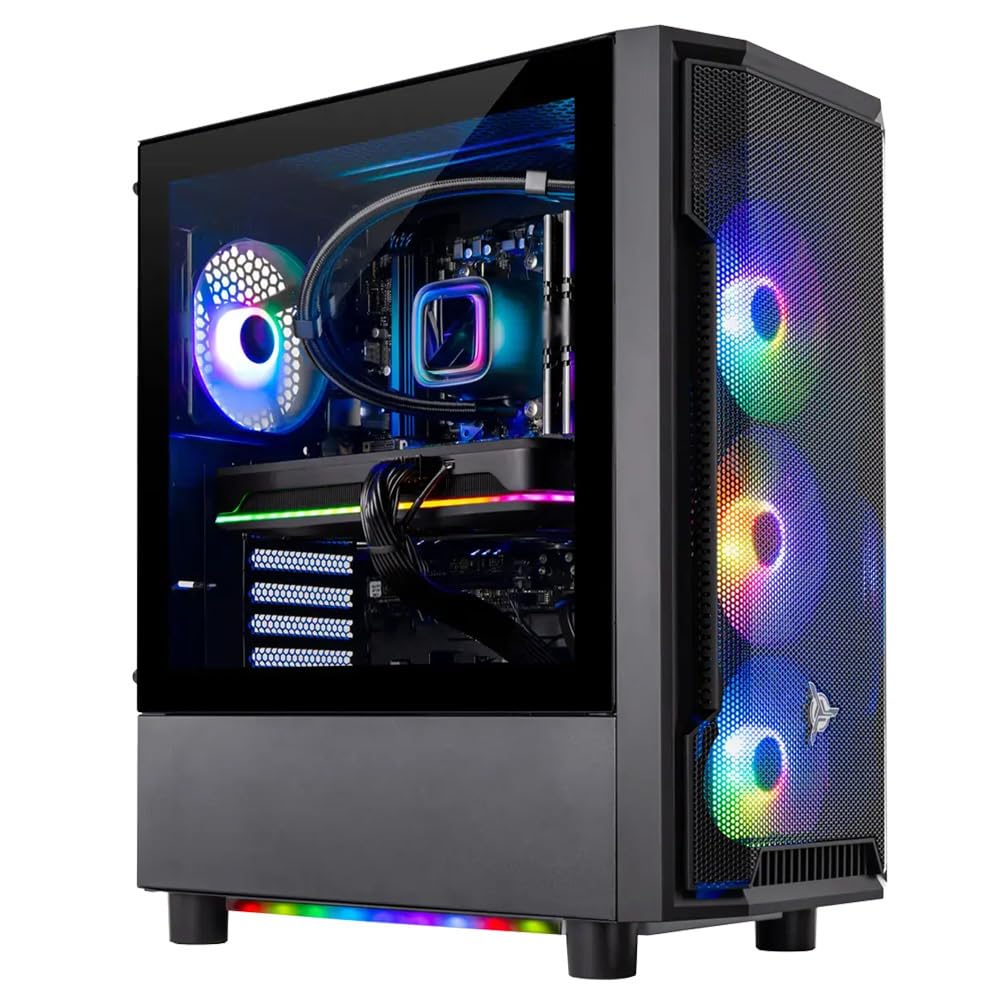
The Skytech Shadow prebuilt combines the AMD Ryzen 7 9700X with an RTX 5060 Ti 8GB, 32GB DDR5, and a 360mm AIO liquid cooler. The 9700X’s 8 cores boost to 5.5 GHz, delivering excellent single-thread performance without the power draw of higher-core-count processors. The 360mm AIO keeps the chip well below thermal throttle thresholds, maintaining consistent boost clocks during extended gaming sessions.
The 32GB DDR5 5600MHz memory is a significant advantage over 16GB competing builds, letting you keep browser tabs, Discord, and OBS open while gaming without hitting capacity limits. User reports confirm the system runs Elden Ring, Cyberpunk 2077, and Black Myth: Wukong at ultra settings with smooth 60+ FPS at 1080p. The 650W Gold PSU provides clean power delivery without excess.
The AM5 platform keeps future CPU upgrades on the table without a motherboard swap. The 9700X itself is efficient enough that a high-quality air cooler could substitute for the AIO if you prefer less complexity. The prebuilt arrives with no bloatware, which is rare in this price tier. The only downside is the 9700X lacks 3D V-Cache, so simulation games won’t benefit from the cache advantage that X3D chips provide.
Why it’s great
- 32GB DDR5 handles heavy multitasking with ease
- 360mm AIO ensures consistent boost clocks
- AM5 platform allows future CPU upgrade
Good to know
- No 3D V-Cache for simulation game benefits
- 650W PSU limits high-end GPU upgrade headroom
8. iBUYPOWER TraceMesh (Intel Core i7 14700F)

The iBUYPOWER TraceMesh pairs a Core i7 14700F with an RTX 4060 Ti 8GB, 32GB DDR5 5600MHz RGB memory, and a 1TB NVMe SSD. The 20-core processor provides enough threads to handle game logic, streaming encoding, and background antivirus without frame drops. User reviews highlight the extensive customization options through RGB software and the tempered glass case’s 16-color lighting system.
Connectivity includes six USB 3.1 ports and onboard audio, plus 802.11AC Wi-Fi for wireless networking. The free iBuyPower gaming keyboard and RGB mouse bundle reduces starter costs. However, some user reports indicate warranty support challenges—one reviewer noted motherboard issues that required prepayment for replacement, a factor to weigh if you prioritize post-purchase service.
The 14700F’s performance with the 4060 Ti is balanced for 1080p high-refresh gaming. The 32GB DDR5 gives you headroom for game dev work, virtual machines, or heavy modded Minecraft instances that consume system RAM. The air cooler keeps noise moderate under gaming load, though sustained rendering workloads push fan speeds higher than an AIO would.
Why it’s great
- 32GB DDR5 RGB memory included
- 20 cores for gaming and streaming
- Free keyboard and mouse bundle
Good to know
- Mixed warranty support experiences reported
- Air cooler runs louder under sustained load
9. Thermaltake LCGS Quartz (Intel Core i5-14400F)

The Thermaltake LCGS Quartz offers the most budget-friendly entry point with an Intel Core i5-14400F, RTX 5060, 16GB DDR4 3600MHz, and 1TB NVMe SSD. The 10-core i5 (6 P-core + 4 E-core) boosts to 4.7 GHz, which is sufficient to keep the RTX 5060 fed in 1080p gaming. User reports confirm it runs Fallout 76 at max settings around 60 FPS and handles AAA games at standard settings without issue.
The B760 chipset motherboard includes built-in WiFi, though one user reported the ASRock board’s WiFi module failed and required an external adapter. The tempered glass side panel and ARGB tower air cooler give the build a modern aesthetic. The 3mm thick glass and full-length PSU power cover create a clean interior look without cable clutter.
The i5-14400F is the most power-efficient processor in this lineup, drawing less than 65W under typical gaming load. This keeps the entire system cool and quiet—even after extended sessions the GPU and CPU fans remain at moderate speeds. The DDR4 memory keeps component costs low, and the 1TB NVMe provides fast load times for a large game library. For a first gaming PC or a secondary build for a teen, this pairing won’t leave you CPU-bottlenecked at 1080p.
Why it’s great
- Lowest power draw keeps system cool and quiet
- 1TB NVMe SSD provides fast game loading
- DDR4 compatibility reduces build cost
Good to know
- WiFi module reliability reported as inconsistent
- 10 cores limit heavy multitasking headroom
FAQ
Will an i5-14400F bottleneck an RTX 4060 Ti at 1080p?
Does 3D V-Cache help the RTX 4060 Ti in simulation games?
Should I choose Intel or AMD for a 4060 Ti build in 2025?
How many cores does the RTX 4060 Ti actually utilize in gaming?
Final Thoughts: The Verdict
For most users, the best cpu for 4060 ti winner is the AMD Ryzen 7 9850X3D because its 104MB 3D V-Cache elevates minimum frame rates in the games where the 4060 Ti’s 8GB VRAM is the limiting factor, and the AM5 platform keeps future upgrades open. If you want maximum single-core clock speed for competitive esports titles, grab the Intel Core i9-14900K. And for a balanced prebuilt that needs no assembly, nothing beats the CyberPowerPC Gamer Xtreme with i7-14700F for plug-and-play 1080p gaming at high settings.

Mo Maruf
I created WellFizz to bridge the gap between vague wellness advice and actionable solutions. My mission is simple: to decode the research and give you practical tools you can actually use.
Beyond the data, I am a passionate traveler. I believe that stepping away from the screen to explore new environments is essential for mental clarity and physical vitality.