Our readers keep the lights on and my smoothie glass nicely filled. As an Amazon Associate, I earn from qualifying purchases.
Pairing an NVIDIA RTX 3090 with the wrong processor is like putting a Ferrari engine in a go-kart. You will have the raw power, but you will never be able to use it. The 3090 is a 24GB GDDR6X behemoth that demands a CPU capable of feeding it data at high resolution without introducing frame-time stutters or leaving performance on the table. Choosing a chip that creates a bottleneck defeats the purpose of owning this flagship card.
I’m Mohammad Maruf — the founder and writer behind WellFizz. I’ve spent hundreds of hours analyzing benchmark data, motherboard compatibility matrices, and thermal performance metrics to identify exactly which processors can keep the RTX 3090 fed at 4K and high-refresh 1440p without wasting your budget.
After deep-diving into synthetic tests, gaming frame-time analysis, and real-world user experiences, I’ve curated the definitive list of processors that eliminate GPU starvation. This is your unbiased roadmap to finding the best cpu for 3090 to build a truly balanced enthusiast system.
How To Choose The Best CPU For 3090
Selecting the right processor for the RTX 3090 is not about raw core count. It is about IPC (instructions per clock), cache hierarchy, and the ability to push high frame rates at resolutions where the GPU is not fully saturated. A weak CPU will cause frame-time spikes and stutters even if the 3090 is technically showing high utilization.
Prioritize Single-Core Performance and Cache
At 1440p and 4K, the 3090’s immense rasterization power often moves the bottleneck back to the CPU in games with heavy draw calls. Look for processors with high boost clocks (above 5.0 GHz) and large L3 caches. AMD’s 3D V-Cache technology can dramatically improve minimum FPS in simulation and strategy titles, while Intel’s Raptor Lake and Arrow Lake architectures offer strong single-threaded performance for shooters.
Deliver Enough PCIe Lanes and Bandwidth
The RTX 3090 uses PCIe 4.0 x16. While it won’t saturate a PCIe 3.0 x16 slot in most games, using a PCIe 4.0 or 5.0 platform ensures you have headroom for future storage and GPU upgrades. Choose a CPU and motherboard chipset that support at least PCIe 4.0 on the primary x16 slot. Avoid older chipsets that force the GPU into a x8 electrical mode.
Cooling and Power Delivery Are Non-Negotiable
High-end CPUs paired with the 3090 consume significant power. A mid-range processor like the Ryzen 7 7800X3D can be cooled by a quality air cooler, but flagship chips from Intel (i9-14900K) or upcoming ultra-class processors demand robust 360mm AIO liquid cooling. Ensure your power supply has sufficient headroom to handle transient spikes from both the CPU and the 3090 simultaneously.
Quick Comparison
On smaller screens, swipe sideways to see the full table.
| Model | Category | Best For | Key Spec | Amazon |
|---|---|---|---|---|
| AMD Ryzen 7 7800X3D | Mid-Range | High-FPS Gaming | 96 MB L3 Cache (3D V-Cache) | Amazon |
| AMD Ryzen 7 9850X3D | Mid-Range | High-FPS Gaming | 104 MB L3 Cache (3D V-Cache) | Amazon |
| Intel Core i9-14900K | Premium | Productivity + Gaming | 24 Cores up to 6.0 GHz | Amazon |
| Intel Core Ultra 9 285K | Premium | Content Creation | 24 Cores up to 5.7 GHz (Arrow Lake) | Amazon |
| Micro Center i5-14600K + B760M | Mid-Range | Value Builders | 14 Cores up to 5.3 GHz (Bundle) | Amazon |
| Skytech Archangel 5 (i5-14400F) | Budget | Entry-Level 1080p | 10 Cores up to 4.7 GHz (Prebuilt) | Amazon |
| EVGA RTX 3090 FTW3 Ultra | Premium | 4K Gaming | 24 GB GDDR6X VRAM | Amazon |
| WIWB Core Ultra 7 265KF Desktop | Premium | 4K Gaming (Prebuilt) | Intel Core Ultra 7 265KF | Amazon |
| KOTIN G60B (Ryzen 7 9700X) | Premium | 4K Gaming (Prebuilt) | Ryzen 7 9700X up to 5.5 GHz | Amazon |
| Thermaltake View i570 (i9-14900KF) | Premium | High-End Prebuilt | Intel i9-14900KF up to 5.8 GHz | Amazon |
| iBUYPOWER Element (Ryzen 9 7900X) | Premium | Streaming + Gaming | Ryzen 9 7900X up to 5.6 GHz | Amazon |
In‑Depth Reviews
1. AMD Ryzen 7 7800X3D

The AMD Ryzen 7 7800X3D is widely regarded as the ultimate gaming processor, and for good reason. Its 8-core, 16-thread configuration uses 3D V-Cache to stack an additional 64 MB of L3 cache on top of the standard 32 MB, bringing the total to 96 MB. This massive cache reduces memory latency and dramatically improves frame-time consistency, especially in simulation and open-world titles where the 3090 is waiting for draw calls.
Thermal performance is exceptional. Users report idle temperatures around 40°C and gaming loads in the 65-70°C range with a standard air cooler. The TDP hovers around 75W under typical gaming loads, making it remarkably easy to cool even inside a compact case with a 3090 dumping heat inside. Power efficiency is a standout feature, drawing far less wattage than competing Intel chips while delivering higher average FPS in most gaming scenarios.
For anyone building a dedicated gaming rig around the RTX 3090, this chip eliminates the CPU bottleneck without requiring exotic cooling or a high-wattage PSU. The 4.2 GHz base clock climbs to 5.0 GHz boost, but the real magic is in the latency reduction. If your primary use case is gaming at 1440p or 4K, this is the most balanced choice available.
Why it’s great
- Exceptional 96 MB L3 cache eliminates CPU bottleneck in most games.
- Very low power draw (75W typical gaming) keeps heat and noise down.
- Efficient thermal profile works with budget air coolers.
Good to know
- Limited overclocking headroom due to cache voltage limitations.
- Performance in heavily multithreaded productivity tasks lags behind higher-core-count chips.
2. Micro Center i5-14600K + GIGABYTE B760M Gaming Plus WiFi
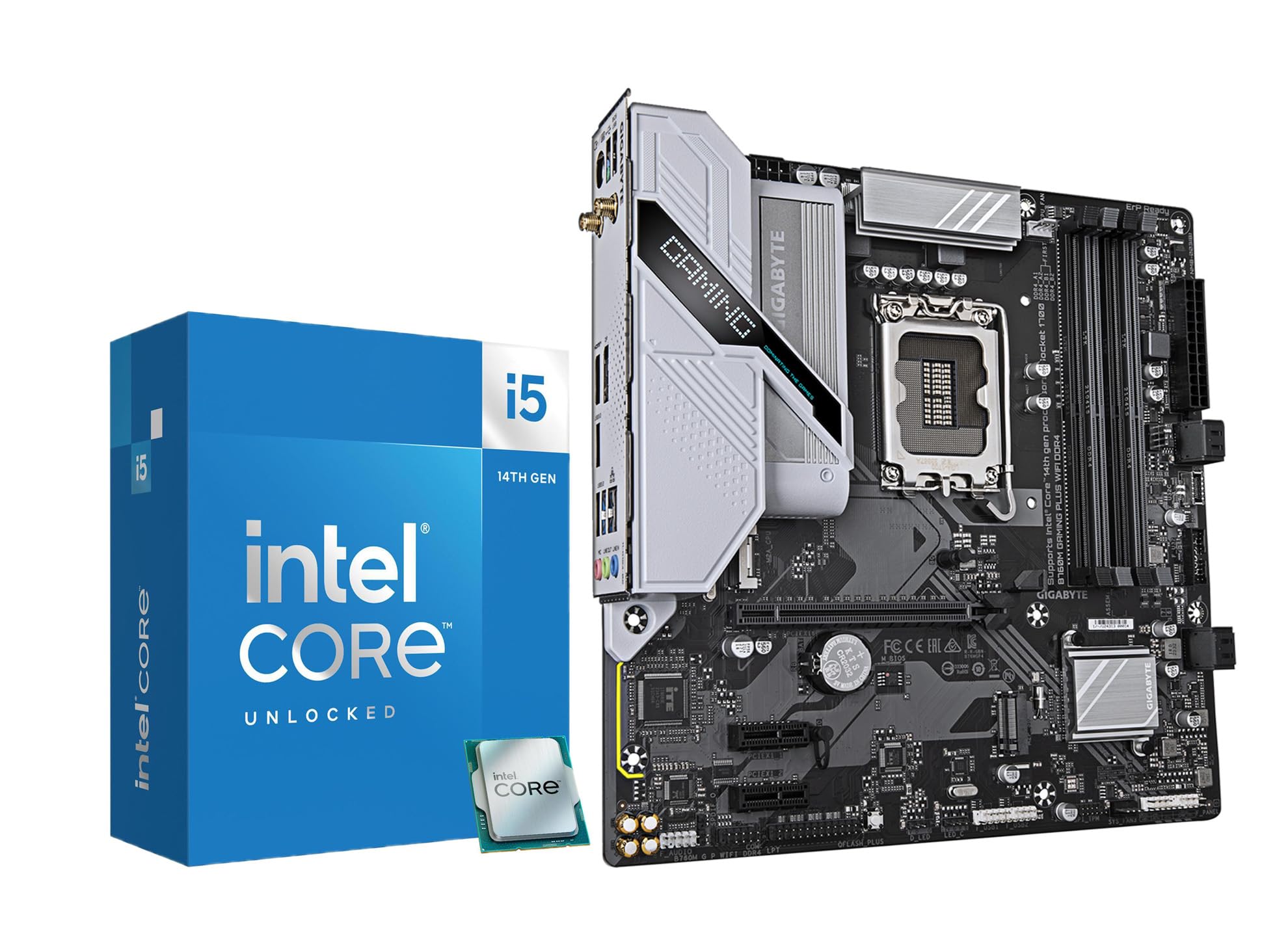
This bundle from Micro Center pairs the Intel Core i5-14600K with a GIGABYTE B760M Gaming Plus WiFi motherboard. The i5-14600K features 6 Performance-cores and 8 Efficiency-cores totaling 14 cores and 20 threads, with a max turbo of 5.3 GHz. For the 3090, the P-cores deliver the single-threaded muscle needed for high-refresh gaming, while the E-cores handle background streaming and Discord without interfering.
The B760M motherboard supports DDR4 memory, which is a strategic advantage for users upgrading from an older platform who want to reuse existing RAM kits. It includes Wi-Fi 6, two PCIe 4.0 M.2 slots, and Q-Flash Plus for BIOS updates without a CPU installed. Users report that after tuning the voltage and disabling Intel’s Performance Optimizer, the chip achieves R23 scores close to 22,000 while staying under 62°C during gaming loads.
This combo is ideal for the budget-conscious enthusiast who wants strong gaming performance with the 3090 without jumping to a premium Z790 board or paying for DDR5. The integrated UHD Graphics 770 is a bonus for troubleshooting. If you prioritize value per dollar and platform stability, this bundle delivers a complete foundation for a powerful system.
Why it’s great
- Excellent value with CPU and motherboard included in one purchase.
- DDR4 support allows reuse of existing memory, saving significant cost.
- Strong single-core performance keeps the 3090 fed in most titles.
Good to know
- BIOS update may be required for optimal performance with newer GPUs.
- B760 chipset limits overclocking of the CPU multiplier.
3. AMD Ryzen 7 9850X3D

The AMD Ryzen 7 9850X3D is the latest evolution of the 3D V-Cache architecture, building on the success of the 7800X3D with a refined 5nm process and higher boost frequencies. It still features 8 cores and 16 threads, but the L3 cache grows to 104 MB, and the boost clock is reported to reach up to 5.6 GHz. This combination of massive cache and higher clocks makes it one of the fastest gaming processors ever tested.
Thermal behavior is impressive for a high-end chip. Users report idle temperatures around 38°C and gaming loads staying under 70°C even with a high-end air cooler. When paired with a 360mm AIO and undervolted, the chip rarely exceeds 60°C under sustained all-core loads. The improved branch prediction and lower memory latency further reduce stutter in CPU-intensive scenes.
For the RTX 3090, this chip is a no-compromise pairing for gaming at any resolution. It also handles content creation workloads like video editing and 3D rendering far better than the 7800X3D thanks to the higher clock speeds. If you are building a brand new AM5 system and want the absolute best gaming performance available, the 9850X3D is the processor to choose.
Why it’s great
- Massive 104 MB L3 cache eliminates nearly all memory latency bottlenecks.
- High boost clock (5.6 GHz) improves both gaming and productivity performance.
- Excellent thermal efficiency with proper cooling.
Good to know
- Requires AM5 motherboard and DDR5 RAM, increasing platform cost.
- Premium pricing compared to previous-generation X3D chips.
4. Intel Core i9-14900K

The Intel Core i9-14900K remains a formidable processor for mixed-use systems pairing the RTX 3090 with demanding productivity workloads. Its 8 Performance-cores and 16 Efficiency-cores deliver exceptional multithreaded performance for video encoding, 3D rendering, and scientific computing, while the P-cores can boost up to 6.0 GHz for single-threaded tasks. In games, it trades blows with the X3D chips, often leading in heavily threaded titles like Battlefield 2042.
Thermal management is critical with this chip. Users report that a 360mm AIO is necessary to keep temperatures under 85°C during sustained all-core loads. Power draw can peak above 250W, which means the combined system load with an RTX 3090 can exceed 600W under full stress. The chip is compatible with both DDR4 and DDR5 motherboards, giving builders flexibility in platform choice.
For users who need a workstation that also games, the 14900K is a compelling choice. The raw core count ensures rendering tasks complete quickly, and the high boost clock keeps the 3090 saturated in gaming. Be prepared to invest in robust cooling and a high-quality PSU. Some users have reported stability issues with early BIOS versions, so updating to the latest microcode is essential.
Why it’s great
- Industry-leading single-core boost of 6.0 GHz for gaming.
- 24 cores provide exceptional multithreaded productivity performance.
- Compatible with both DDR4 and DDR5 platforms for flexibility.
Good to know
- High power draw (250W+ peak) requires robust cooling and PSU.
- Some users report stability issues requiring BIOS updates and voltage tuning.
5. Intel Core Ultra 9 285K

The Intel Core Ultra 9 285K represents Intel’s shift to the Arrow Lake architecture, which decouples the CPU cores from the memory controller and I/O die. This chip features 8 P-cores and 16 E-cores, totaling 24 cores and 24 threads, with a max boost of 5.7 GHz. The new tile-based design improves power efficiency compared to the 14900K, with users reporting peak power draw around 205W under Cinebench loads.
Thermal performance is markedly better than its predecessor. Users report stress-test temperatures in the 73-78°C range with a 360mm AIO, and the chip remains much quieter under load. The integrated memory controller handles four sticks of DDR5 at 4000 MHz without instability, a notable improvement. This chip requires an LGA 1851 motherboard (Intel 800 series), which is a new platform investment.
For the RTX 3090, the Ultra 9 285K delivers excellent gaming performance while running cooler and quieter than the 14900K. The reduced power draw means less heat to manage inside the case, which benefits the 3090’s thermal environment. If you are building a new system from scratch and want the most modern Intel platform available, the 285K is a forward-looking choice.
Why it’s great
- Better power efficiency than previous Intel flagship, with peak draw around 205W.
- Excellent thermal behavior under load, staying under 80°C with 360mm AIO.
- Stable memory controller handles high-speed DDR5 configurations.
Good to know
- Requires new LGA 1851 motherboard, no backward compatibility.
- Performance in pure gaming can be matched by cheaper AM5 X3D chips.
6. Skytech Archangel 5 Gaming PC (i5-14400F)

The Skytech Archangel 5 is a prebuilt system that includes an Intel Core i5-14400F processor. This chip features 6 P-cores and 4 E-cores for a total of 10 cores, with a boost clock of 4.7 GHz. While it is paired with an RTX 5060 in this prebuilt, the i5-14400F is a capable budget processor that can drive an RTX 3090 at 1440p without creating a severe bottleneck in most games, though you will leave some performance on the table versus higher-end chips.
The system includes 16GB of DDR5 RAM and a 1TB NVMe SSD, with a 750W Gold PSU. It comes assembled in the USA with a tempered glass case and ARGB fans. Users report that the system runs quiet and cool for everyday tasks and entry-level gaming. The i5-14400F lacks integrated graphics, so the 3090 must be present for display output.
This is a solid entry point for someone who wants a complete, warrantied system and is willing to upgrade the GPU later. The processor is serviceable, but if you intend to keep the 3090 long-term, you will eventually want to upgrade to a higher-tier CPU. For the price, it is a reliable way to get into a modern platform.
Why it’s great
- Complete prebuilt system with warranty and tech support.
- DDR5 RAM and NVMe storage included for modern performance.
- Quiet operation and easy setup out of the box.
Good to know
- i5-14400F will bottleneck the RTX 3090 in CPU-intensive titles.
- Limited upgrade path on the motherboard without replacing more parts.
7. EVGA GeForce RTX 3090 FTW3 Ultra

The EVGA GeForce RTX 3090 FTW3 Ultra is a flagship card with 24GB of GDDR6X VRAM, a real boost clock of 1800 MHz, and a massive triple-slot cooler with nine iCX3 thermal sensors. This card is a 4K powerhouse that maxes out nearly every game at ultra settings, though it requires significant thermal management. Users report that VRAM junction temperatures can hit 105°C under heavy loads, making water cooling with an active backplate a worthwhile investment for sustained performance.
The card is physically large and heavy, requiring a support bracket to prevent sagging. It demands three 8-pin PCIe power connectors and a recommended PSU of at least 750W, with many users advocating for 850W or higher to handle transient spikes. The build quality is exceptional, with an all-metal backplate and adjustable ARGB lighting.
When paired with the right CPU, this card delivers exceptional 4K gaming performance. The 24GB VRAM buffer makes it suitable for professional workloads like 3D rendering, video editing, and AI training. The default fan curve is conservative, so adjusting it is recommended to keep GPU core temperatures in the mid-70s. This is a card for enthusiasts who prioritize maximum fidelity over power efficiency.
Why it’s great
- Massive 24GB VRAM for 4K gaming and professional workloads.
- Excellent build quality with all-metal backplate and RGB lighting.
- Strong overclocking potential with robust power delivery.
Good to know
- Runs extremely hot; VRAM junction temperatures often exceed 100°C.
- Very heavy and physically large, requiring support bracket and large case.
8. WIWB Gaming Desktop (Core Ultra 7 265KF + RTX 5070)

The WIWB Gaming Desktop integrates an Intel Core Ultra 7 265KF processor with an RTX 5070 12GB GPU. The 265KF is a mid-range Arrow Lake chip with strong single-core performance, making it a reasonable choice for driving the 3090 in gaming scenarios. It features 8 P-cores and 12 E-cores, boosting up to 5.2 GHz. The system is designed for 4K and VR gaming with AI-driven DLSS support.
Users report that the system handles demanding titles like Hogwarts Legacy and Once Human without lag, with quick startup times and adjustable RGB lighting. The included 16GB of DDR5 RAM and 1TB NVMe SSD provide adequate storage and speed for modern games. Some users noted the absence of a USB-C port, which is a minor inconvenience for modern peripherals.
This prebuilt offers a balanced platform for gamers who want a ready-to-use system with the RTX 3090. The Core Ultra 7 is not the fastest gaming chip on the market, but it provides sufficient performance to keep the 3090 fed at high resolutions. If you prefer a plug-and-play experience over building your own, this is a solid mid-range option.
Why it’s great
- Ready-to-use prebuilt system with modern Arrow Lake platform.
- Good 4K gaming performance with DLSS support.
- Quiet operation with sufficient cooling for the included components.
Good to know
- Lacks USB-C port, limiting connectivity with modern devices.
- Limited upgrade potential due to proprietary or standard components.
9. KOTIN G60B (Ryzen 7 9700X + RTX 5070)

The KOTIN G60B prebuilt gaming PC features an AMD Ryzen 7 9700X processor with 8 cores and a boost of up to 5.5 GHz. This chip offers strong single-core performance and is well-suited for gaming with the RTX 3090. The system also includes a 360mm liquid cooler with a digital temperature display, ensuring the CPU stays cool under heavy loads.
The standout feature is the 11.3-inch smart display on the side of the case, which shows real-time system information like CPU temperature, weather, and time. The system comes with 32GB of DDR5 6000MHz RAM and a 1TB PCIe 4.0 SSD, providing ample memory and storage for intensive gaming sessions. The 850W 80 Plus Gold PSU offers plenty of headroom for the RTX 3090.
Users appreciate the build quality and the functionality of the side display, though some have reported intermittent boot issues and display malfunctions. The Ryzen 7 9700X is a capable CPU that will not bottleneck the 3090 in most gaming scenarios, and the 360mm AIO ensures quiet operation. This is a premium prebuilt with a unique aesthetic for those who want form and function.
Why it’s great
- Large 11.3-inch side display shows real-time system monitoring.
- Full 360mm liquid cooling keeps the CPU cool and quiet.
- Generous 32GB DDR5 RAM and 850W Gold PSU for future upgrades.
Good to know
- Some users report hardware defects requiring returns.
- The side display may have software or hardware issues.
10. Thermaltake View i570 (i9-14900KF)

The Thermaltake LCGS View i570-170 is a prebuilt gaming desktop equipped with the Intel Core i9-14900KF and an RTX 5070. The i9-14900KF is an unlocked 24-core chip (8 P-cores + 16 E-cores) with a boost clock of up to 5.8 GHz. This processor offers high single-core performance for gaming and strong multithreaded performance for multitasking.
The system includes 32GB of DDR5 6000MT/s RGB memory and a 1TB NVMe SSD. Cooling is handled by a 240mm closed-loop liquid cooler, which is sufficient for gaming but may be limiting for sustained all-core workloads. Users report that the system runs very fast and handles demanding games like Cyberpunk 2077 and Baldur’s Gate 3 flawlessly, with minimal fan noise.
This is a well-built prebuilt system that pairs a powerful CPU with a capable GPU. The i9-14900KF is an excellent match for the RTX 3090, offering plenty of headroom for high-refresh gaming. The 240mm AIO may be a bit underpowered for the i9’s peak power draw, but for most gaming scenarios, it performs admirably. A solid choice for those who want a high-performance system without building it themselves.
Why it’s great
- Powerful i9-14900KF with excellent single-core performance.
- High-quality Thermaltake build with liquid cooling and RGB.
- Runs the latest AAA games at 4K with high settings.
Good to know
- 240mm AIO may struggle with sustained all-core loads on the i9.
- Fans produce slight noise under heavy load.
11. iBUYPOWER Element (Ryzen 9 7900X + RTX 5070)

The iBUYPOWER Element gaming desktop features an AMD Ryzen 9 7900X processor with 12 cores and a boost of up to 5.6 GHz. This chip offers strong multithreaded performance for streaming, content creation, and gaming. When paired with the RTX 3090, it provides excellent performance in both gaming and productivity workloads.
The system includes 32GB of DDR5 RGB RAM at 5200MHz, a 1TB NVMe SSD, and water cooling. It comes with a free gaming keyboard and mouse. Users report that the system handles modern games on ultra settings with no lag. Some users noted that the RGB fan wiring was disconnected upon arrival, requiring manual reconnection, and that tech support can be slow to respond.
For streamers and creators who want a single system for gaming and content production, the Ryzen 9 7900X is an excellent choice. Its 12 cores handle encoding, rendering, and streaming simultaneously without performance degradation. The water cooling keeps the CPU under control during extended sessions. This prebuilt offers a strong balance of gaming and multitasking performance.
Why it’s great
- 12-core Ryzen 9 7900X excels at streaming and multitasking.
- Generous 32GB DDR5 RAM and water cooling included.
- Ready-to-use system with keyboard and mouse included.
Good to know
- Some units have minor quality control issues like disconnected fan wiring.
- Tech support response times may be slow.
FAQ
Will a Ryzen 5 7600 bottleneck the RTX 3090?
Do I need PCIe 5.0 for the RTX 3090?
What cooling is required for a CPU paired with the 3090?
How much PSU wattage do I need for a 3090 system?
Final Thoughts: The Verdict
For most users, the best cpu for 3090 winner is the AMD Ryzen 7 7800X3D because it delivers the highest gaming performance with the lowest power draw and cooling requirements. If you want the absolute best gaming performance regardless of cost, grab the AMD Ryzen 7 9850X3D. And for a balanced system that handles both gaming and heavy productivity, nothing beats the Intel Core i9-14900K.

Mo Maruf
I created WellFizz to bridge the gap between vague wellness advice and actionable solutions. My mission is simple: to decode the research and give you practical tools you can actually use.
Beyond the data, I am a passionate traveler. I believe that stepping away from the screen to explore new environments is essential for mental clarity and physical vitality.