Our readers keep the lights on and my smoothie glass nicely filled. As an Amazon Associate, I earn from qualifying purchases.
A CPU fan isn’t just a component — it’s the difference between a system that throttles mid-game and one that holds a steady boost clock for hours. The wrong cooler means thermal throttling, noise that cuts through your headset, and a motherboard littered with dust. The right one drops idle temps below 35°C and keeps your rig running as intended.
I’m Mohammad Maruf — the founder and writer behind WellFizz. I’ve spent hundreds of hours cross-referencing thermal test data, noise floor measurements, and socket compatibility charts to find the air coolers that actually deliver on their specs.
A dual-tower heatsink with six heat pipes and two PWM fans is the baseline for today’s mid-range and high-end builds, and understanding how socket offset, fin density, and bearing type affect real-world performance is the key to choosing the right cpu fans.
How To Choose The Best CPU Fans
The CPU air cooler market has matured to the point where a mid-range tower can out-cool a budget liquid AIO while running quieter and costing less. The challenge is filtering through fin count, pipe diameter, fan RPM, and clearance numbers that don’t always translate to real-world performance. Focus on the specs that actually affect your build’s temperature and noise profile.
Heat Pipe Count and Diameter
Six 6mm copper heat pipes is the standard for dual-tower coolers in the mid-range. Fewer than four pipes or pipes narrower than 6mm generally indicate a cooler meant for low-TDP processors below 100W. Direct-contact heat pipes transfer heat from the CPU to the aluminium fin stack; more pipes and larger diameter increase the total heat transfer surface area. Premium coolers often use nickel-plated copper to resist corrosion and improve thermal conductivity at the soldered joints.
Fan Bearing Type and Noise Floor
Fluid-dynamic bearings (FDB) and rifle bearings deliver the best balance of lifespan and low noise, typically rated for 50,000 to 150,000 hours. Sleeve bearings are cheaper but wear faster in warm environments. PWM fan headers allow the motherboard to adjust fan speed between idle and full load, which means the cooler can run near-silent at desktop temperatures and ramp up only when the CPU hits high utilization. Decibel ratings below 28 dB(A) at max RPM are considered very quiet for a dual-fan tower.
Clearance and RAM Compatibility
Dual-tower coolers often overhang the first memory slot. Coolers with an offset design or a cut-out in the front fin stack allow full access to RAM with tall heat spreaders. Heatsink height is another critical dimension — most mid-tower cases fit coolers up to 160mm tall, while smaller cases may limit you to 155mm or less. Always check the case’s CPU cooler clearance before buying, especially with massive units like the Noctua NH-D15.
Quick Comparison
On smaller screens, swipe sideways to see the full table.
| Model | Category | Best For | Key Spec | Amazon |
|---|---|---|---|---|
| Thermalright Phantom Spirit 120SE | Premium | High-TDP CPUs up to 260W | 7x 6mm heat pipes, 66 CFM airflow | Amazon |
| Noctua NH-D15 chromax.Black | Premium | Silent high-end builds | Dual 140mm fans, 1500 RPM max | Amazon |
| Cooler Master Hyper 620S | Mid-Range | AMD R9 / Intel i7 builds | 1750 RPM PWM, 154.9mm height | Amazon |
| be quiet! Dark Rock 5 | Premium | Near-silent operation | Fluid-dynamic bearing, 2100 RPM | Amazon |
| ID-COOLING FROZN A620 PRO SE | Mid-Range | High value, 270W TDP capacity | 6x 6mm heat pipes, 157mm height | Amazon |
| upHere UE2KC6 (ARGB) | Budget | Budget builds with ARGB | 25 dB noise, 1650 RPM fans | Amazon |
| upHere UE2K6 | Budget | Quiet budget cooling | 25 dB noise, 1650 RPM fans | Amazon |
In‑Depth Reviews
1. Thermalright Phantom Spirit 120SE

The Thermalright Phantom Spirit 120SE uses seven 6mm heat pipes with AGHP 4.0 technology, which counteracts orientation-based performance drops common in vertical GPU mounts. The dual TL-C12B V2 PWM fans spin up to 1500 RPM while maintaining a noise floor of just 25.6 dB(A) — quiet enough that case fans become the dominant sound source. Real-world data shows it keeps a Ryzen 7800X3D in the 40s at idle and low 50s during gaming sessions, and it manages a 9950X3D under Prime95 load at 94°C with third-party fans.
The 154mm height fits most mainstream mid-towers, and the offset fin stack ensures full RAM clearance even with tall heat spreaders. Installation uses a straightforward backplate system with clear step-by-step guidance. The included thermal paste is adequate, though enthusiasts may swap it for a premium compound to shave off a degree or two. Build quality is excellent for the tier — the aluminium fins are dense and uniform, and the pure copper base reflects fine machining.
Stock fans are optimized for quiet operation, but some users report that they can develop a slight bearing noise after extended use. Replacement with Noctua NF-A12x25 or Arctic P12 fans is straightforward and improves both noise and airflow. For anyone building a high-TDP system without the budget for a premium air cooler, this is the reference point.
Why it’s great
- Seven heat pipes handle CPUs up to 260W without issue
- Quiet operation at maximum RPM with fluid-dynamic bearings
- Excellent RAM clearance thanks to offset fin design
Good to know
- Stock fans may hum or rattle after several months of use
- Fans not included in some packaging variants — verify before purchase
2. Noctua NH-D15 chromax.Black

The Noctua NH-D15 chromax.Black has held its reputation for years because it consistently delivers AIO-rivaling cooling without the pump noise or leak risk. Its extra-wide dual-tower design uses six heat pipes and two NF-A15 140mm PWM fans that move 140.2 cubic meters of air per hour at full tilt. In real-world use, the cooler keeps an overclocked i7-9700K at 64°C under load — a 25°C improvement over smaller units — and runs nearly silent at idle thanks to the SSO2 fluid-dynamic bearings and Low-Noise Adaptors.
Build quality is exceptional: the copper base is nickel-plated and mirror-finished, the fins are densely packed without sharp edges, and the SecuFirm2 mounting system makes installation on Intel LGA1851 and AMD AM5 straightforward even for first-time builders. The 165mm height is the main limitation — you must verify case clearance before purchasing. RAM clearance requires shifting the front fan upward, which raises the overall height further.
The included NT-H1 thermal paste is among the best performing compounds on the market. The 6-year warranty reflects Noctua’s confidence in longevity. The only real downside is the price, which lands well above dual-tower competitors. For buyers who prioritize absolute silence and long-term reliability over upfront cost, this remains the gold standard.
Why it’s great
- Near-silent operation with dual 140mm SSO2 bearing fans
- Outstanding cooling performance matching 240mm liquid AIOs
- 6-year warranty and premium NT-H1 thermal paste included
Good to know
- Requires 165mm case clearance — not suitable for slim towers
- Front fan must be raised to clear tall RAM, reducing case compatibility
3. Cooler Master Hyper 620S

The Cooler Master Hyper 620S carries forward the Hyper lineage with a dual-tower design, six nickel-plated copper heat pipes, and two 120mm ARGB PWM fans. The fans spin between 650 and 1750 RPM, giving the motherboard wide latitude to balance noise and airflow depending on load. Users report that the cooler keeps an AMD Ryzen 7700X cool and stable after a year of heavy use, and the dynamic PWM response prevents sudden fan ramp spikes during light workloads.
Installation has improved significantly over previous Hyper generations thanks to the redesigned brackets for AM5 and LGA1851 platforms. The 154.9mm height is compatible with most mid-tower cases, and the included mounting hardware is clearly labeled. ARGB lighting syncs with common motherboard software, though the RGB wiring can be fiddly to route if the motherboard lacks a dedicated 3-pin ARGB header. The overall aluminum and copper construction feels robust, and the matte black finish hides dust well.
Noise output at full speed is rated at 27.2 dB(A), making it slightly louder than the quietest options in this guide but still well within acceptable range for a gaming setup. The cooler is best suited for AMD R9 and Intel i7-class processors, where the six heat pipes and dual fans provide enough thermal headroom for sustained all-core loads. It represents a solid mid-range choice from a brand with decades of cooling experience.
Why it’s great
- Reliable dual-tower cooling for high-TDP AMD and Intel CPUs
- Simplified bracket system makes AM5 and LGA1851 installation easier
- ARGB lighting syncs cleanly with most motherboard ecosystems
Good to know
- RGB wiring may be difficult to manage on boards without a 3-pin ARGB header
- Max noise of 27.2 dB(A) is audible in a silent room at full fan speed
4. be quiet! Dark Rock 5

The be quiet! Dark Rock 5 pairs six high-performance copper heat pipes with a Silent Wings 4 120mm fan that uses an advanced fluid-dynamic bearing and a 6-pole motor. The funnel-shaped frame outlet directs airflow with high static pressure, and the rubberized frame decouples fan vibrations from the heatsink — achieving a rated noise level of 29.8 dB(A) at maximum 2100 RPM. In practice, users report near-silent operation during gaming sessions on a Ryzen 9700X, and the magnetic mesh top cover hides the heat pipe ends for a clean aesthetic.
Installation benefits from a preinstalled mounting bridge and an included long-neck screwdriver, which simplifies the process significantly compared to other premium coolers. The asymmetrical fin stack and heat sink cut-outs provide excellent RAM and VRM clearance, allowing memory modules with tall heat spreaders to fit without removing fans. The ceramic-particle black coating aids heat transfer and resists corrosion over time. An optional second fan can be added at the exhaust for a modest performance boost.
The Dark Rock 5 is shorter than the Dark Rock Pro 4 at 161mm, making it compatible with more cases, though it still requires a case with decent CPU cooler clearance. The single-fan configuration is quieter than dual-fan equivalents but trades off some raw cooling capacity — it handles Ryzen 7 and Core i7 processors comfortably but may struggle with extreme overclocks on flagship CPUs. For those who value acoustic refinement over peak thermal numbers, this is an excellent choice.
Why it’s great
- Extremely quiet operation thanks to fluid-dynamic bearing and rubber decoupling
- Asymmetrical design provides full RAM and VRM clearance
- Premium ceramic-particle coating improves heat transfer and longevity
Good to know
- Single-fan design may not provide enough cooling for heavily overclocked flagship CPUs
- Case needs 161mm clearance — verify before purchase
5. ID-COOLING FROZN A620 PRO SE

The ID-COOLING FROZN A620 PRO SE delivers a dual-tower aluminum and copper heatsink with six 6mm heat pipes and two 120mm PWM fans, all at an entry-level price point. It is rated for up to 270W TDP, which means it handles Ryzen 7 9700X and Intel Core Ultra 7 270K processors without breaking a sweat. Users report idling at 30-35°C and staying under 65°C during gaming, with peak load temperatures staying manageable even during all-core rendering workloads. The fans spin up to 2000 RPM but remain quiet enough that the noise output at 27.2 dB(A) is rarely the dominant sound in a system.
The 157mm height fits most tower cases, including many mid-tower ATX chassis. RAM clearance is generous at 40mm for standard modules and up to 63mm using the cut-out fin area. The all-black aesthetic blends well into dark-themed builds without drawing attention. Installation is comparable to other dual-tower coolers: the mounting system is clear, though the instructions could be more detailed for first-time builders. An extra fan clip lets you add a third fan to the rear of the second tower for additional cooling performance.
Build quality is solid for the price bracket — the aluminium fins are evenly spaced, and the copper base shows decent machining. The stock fans are functional but not premium; some users replace them with higher-quality units for quieter operation. For anyone building a mid-range or high-end system on a tight budget, this cooler offers performance that outpaces its price point by a significant margin.
Why it’s great
- Outstanding price-to-performance ratio for dual-tower cooling
- 270W TDP rating handles Ryzen 9 and Core i7-class processors
- RAM clearance up to 63mm with fin cut-out design
Good to know
- Stock fans are functional but may benefit from replacement for ultra-quiet operation
- Installation instructions could be clearer for first-time builders
6. upHere UE2KC6 (ARGB)
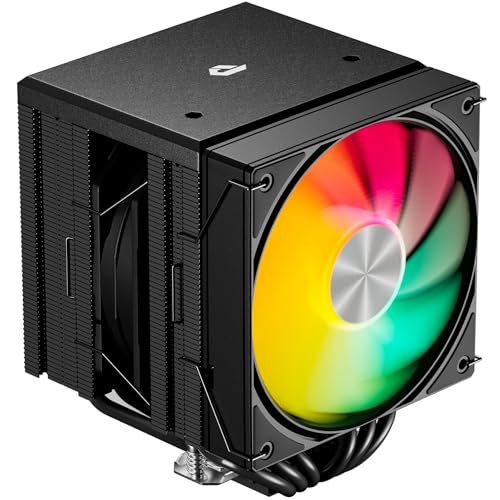
The upHere UE2KC6 brings addressable RGB lighting to the dual-tower air cooler category at a price that undercuts most competitors by a significant margin. It features six heat pipes and two 120mm PWM fans that spin up to 1650 RPM, producing a noise level of just 25 dB(A) — among the quietest figures in this guide. Users report dropping CPU temperatures from 90°C to 35°C under heavy load on an LGA2011 system, and maintaining 50-60°C on a Ryzen 9 5900X during intensive workloads.
Installation is notably simple thanks to an included long screwdriver and clear mounting instructions that cover a wide range of sockets, including Intel LGA1851 and AMD AM5. The compact offset fin design avoids RAM slots entirely, allowing full access to all memory modules. The ARGB lighting is vibrant and can be controlled through standard 3-pin ARGB headers on most motherboards. The build quality is solid for the price, with uniform fin spacing and decent heat pipe alignment.
The included fans are quiet and effective at the rated speed, but the maximum 1650 RPM limits overall airflow compared to higher-speed competitors. This cooler handles mid-range and recent high-end processors well but may struggle with extreme overclocks on flagship CPUs. The brand name is less established than Thermalright or Noctua, though user reports indicate good long-term reliability. For budget-conscious builders who want ARGB aesthetics without sacrificing cooling capability, this is a strong option.
Why it’s great
- Vibrant ARGB lighting at a very competitive price point
- Quiet 25 dB noise output even at maximum fan speed
- Offset design provides full RAM clearance
Good to know
- Max 1650 RPM limits airflow for extreme overclocking scenarios
- Less brand recognition compared to established cooler makers
7. upHere UE2K6

The upHere UE2K6 shares most of its DNA with the ARGB variant but omits the lighting for a lower cost. The dual-tower heatsink still uses six heat pipes and two 120mm PWM fans rated at 1650 RPM with a 25 dB noise floor. Users report identical cooling performance — dropping CPU temperatures from 90°C to 35°C under heavy load on LGA2011, and maintaining 50-60°C on a Ryzen 9 5900X. The included long screwdriver and clear instructions make installation straightforward on a wide range of sockets including Intel LGA1851 and AMD AM5.
RAM clearance is handled by the same offset fin design that leaves all memory slots unobstructed. The compact 157mm height fits most tower cases without issue. The all-black design is understated and will blend into any build without drawing attention. Build quality matches the ARGB version — solid heat pipe alignment, consistent fin spacing, and a clean copper base finish. The 4-pin PWM connectors allow the motherboard to control fan speed dynamically.
Like its ARGB sibling, the maximum 1650 RPM limits peak airflow compared to higher-speed competitors. The cooler is ideal for budget builds with mid-range processors and handles recent high-end CPUs well under normal use. The unbleached cardboard packaging is minimal, reflecting the cost-saving approach. For builders who don’t need RGB and want the most affordable dual-tower air cooler that still delivers real cooling performance, this is the entry point.
Why it’s great
- Most affordable dual-tower air cooler with six heat pipes
- Quiet 25 dB operation with PWM fan control
- Full RAM clearance thanks to offset heatsink design
Good to know
- 1650 RPM max speed limits cooling for extreme overclocks
- No ARGB lighting for those who want aesthetic customization
FAQ
Why does my dual-tower CPU cooler have trouble fitting with tall RAM sticks?
Is a dual-tower air cooler better than a liquid AIO for a gaming PC?
How do I clean a dual-tower CPU cooler without removing it?
Final Thoughts: The Verdict
For most users, the cpu fans winner is the Thermalright Phantom Spirit 120SE because it combines seven heat pipes, quiet dual-fan operation, and full RAM clearance at a very competitive price. If you want the absolute quietest operation with proven long-term reliability, grab the Noctua NH-D15 chromax.Black. For a budget build that still delivers real dual-tower cooling, nothing beats the upHere UE2K6.

Mo Maruf
I created WellFizz to bridge the gap between vague wellness advice and actionable solutions. My mission is simple: to decode the research and give you practical tools you can actually use.
Beyond the data, I am a passionate traveler. I believe that stepping away from the screen to explore new environments is essential for mental clarity and physical vitality.