Our readers keep the lights on and my smoothie glass nicely filled. As an Amazon Associate, I earn from qualifying purchases.
Buying a CPU cooler with a screen means you’re after two things at once: serious thermal control and a personalized visual centerpiece for your build. But pairing those two demands introduces a clash of priorities—raw cooling pressure versus software reliability, radiator size versus case clearance, and panel resolution versus pump noise.
I’m Mohammad Maruf — the founder and writer behind WellFizz. I’ve spent countless hours analyzing the thermal specs, pump designs, screen resolutions, and real-world durability reports behind dozens of liquid and air coolers that include a display.
The tighter your budget and case constraints, the more critical it becomes to pick a model that delivers both stable temperatures and a display that actually works without glitches. That’s exactly what this guide to the best cpu cooler with screen is built to help you do.
How To Choose The Best CPU Cooler With Screen
A CPU cooler with a screen adds complexity beyond the basic heatsink-and-fan equation. You need to evaluate the pump’s thermal capacity, the display’s usability, and the software that ties them together. Here are the key factors that separate a functional display cooler from a frustrating one.
Display Type and Resolution
The screen on your cooler can be an LCD or an AMOLED panel. LCD screens are common in the mid-range and offer adequate brightness and color for system stats and simple GIFs. AMOLED panels deliver deeper blacks, higher contrast ratios, and a more vibrant appearance, but they command a premium price. Resolution matters for readability—a 640×640 IPS screen looks noticeably sharper than a 480×480 panel when showing detailed graphics or small temperature text.
Pump Performance and Noise
The pump is the heart of any liquid cooler. A higher pump RPM (around 2600 to 3000 RPM) generally moves more coolant but can introduce whine or rattling if not well-damped. Some pumps run at a constant speed, while others are PWM-controlled. For an air cooler with a screen, the fan’s maximum RPM and bearing type (FDB or rifle) determine how much noise reaches your ears under load.
Software Stability
This is the most common source of frustration. The screen on your cooler is useless if the companion software crashes, fails to detect the device after a restart, or compresses your custom GIFs into low-resolution blurs. Choose a cooler whose software ecosystem has a track record of consistent updates and reliable hardware detection. USB connection issues are the most frequent failure point across multiple brands.
Radiator Size and Case Compatibility
360mm radiators offer the most thermal headroom but require a case with three 120mm fan mounts at the top or front. 240mm radiators fit smaller cases but may struggle to cool high-TDP chips like an i9 or Ryzen 9 under sustained load. Air coolers with a screen eliminate radiator fitment concerns but must clear your RAM height and side panel width.
Socket Support and Installation Ease
Most modern coolers support AM5 and LGA 1700/1851, but double-check for your specific motherboard. Some coolers ship with pre-applied thermal paste, tool-free mounting brackets, or daisy-chained fans that reduce cable clutter. AM5-only air coolers exist and may not fit Intel boards at all.
Quick Comparison
On smaller screens, swipe sideways to see the full table.
| Model | Category | Best For | Key Spec | Amazon |
|---|---|---|---|---|
| Corsair Nautilus 360 RS LCD | 360mm AIO | Balanced performance and value | 2.1″ IPS LCD, 20 dBA pump | Amazon |
| NZXT Kraken Elite 240 2024 | 240mm AIO | Compact builds with sharp display | 2.72″ IPS LCD, 640×640 | Amazon |
| Lian Li Hydroshift II-S LCD 360TL | 360mm AIO | Clean cable management | 3.4″ IPS LCD, 480×480 | Amazon |
| TRYX Panorama SE 360 | 360mm AIO | Premium visual experience | 6.67″ AMOLED curved | Amazon |
| Thermalright FW360 SE ARGB V2 | 360mm AIO | Budget-friendly 360mm | 2″ LCD, 2000 RPM fans | Amazon |
| PCCOOLER DC360 | 360mm AIO | Aggressive airflow at low cost | 2.4″ IPS, 90.56 CFM fans | Amazon |
| Sudokoo SK700V | Air Cooler | No-radiator builds with display | Digital display, 7 heatpipes | Amazon |
In‑Depth Reviews
1. CORSAIR Nautilus 360 RS LCD
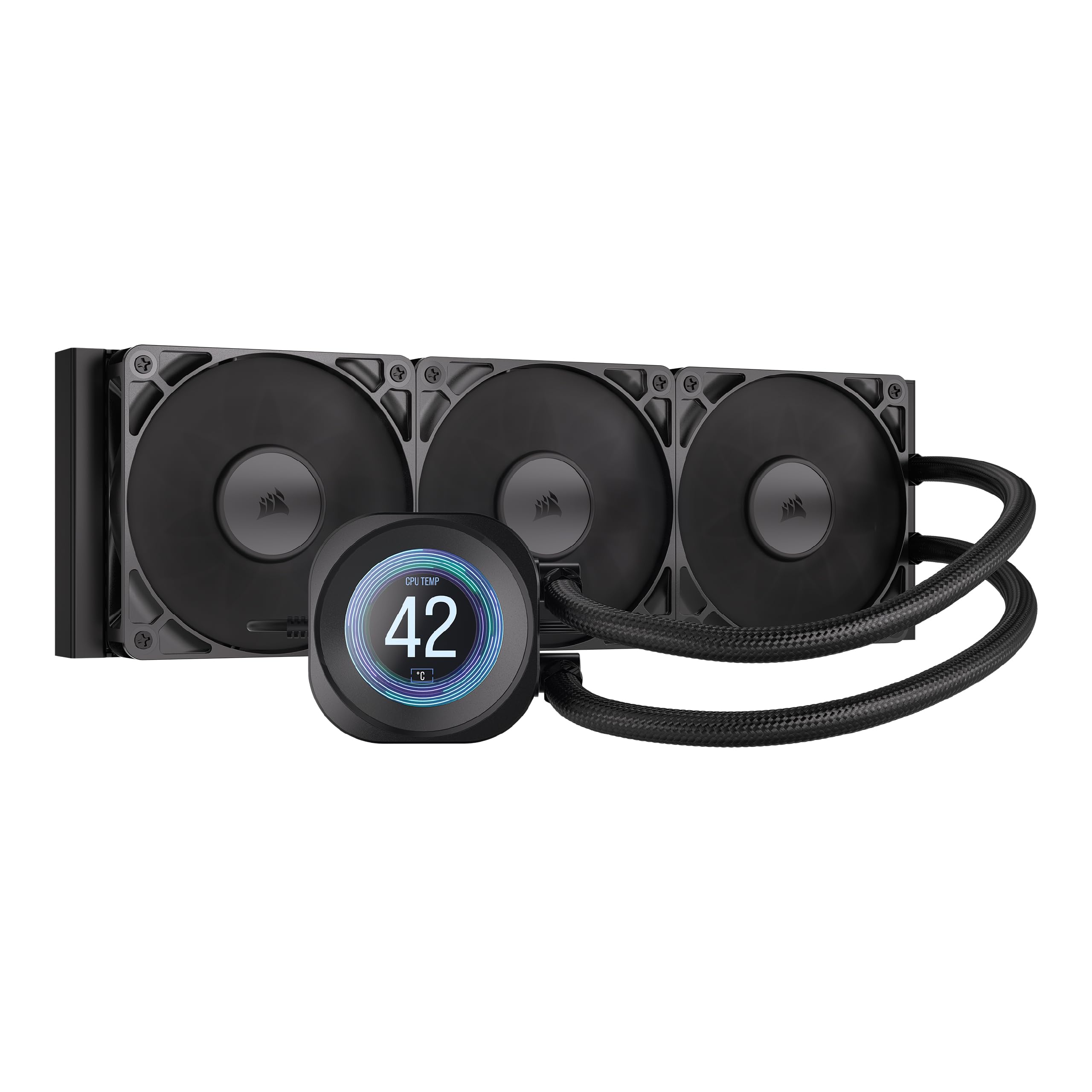
The Corsair Nautilus 360 RS LCD strikes a rare balance: a 360mm AIO that runs a whisper-quiet 20 dBA pump without sacrificing thermal headroom. The 2.1-inch IPS screen is large enough for a clear system status readout or a custom graphic, and the convex cold plate design ensures intimate contact with the CPU’s heat spreader. RS120 fans with Magnetic Dome bearings push air through the radiator with low vibration, keeping noise down even under sustained gaming loads.
Installation benefits from pre-applied thermal paste and tool-free mounting brackets, though the tubing has a molded shape that requires careful routing with zip ties to avoid snaking across the case front. The iCUE software offers straightforward customization for the screen and RGB, with most users reporting stable operation after initial setup. A Ryzen 7 9800X3D stays below 50°C during competitive gaming and around 70°C under high-load titles.
Real-world feedback consistently praises the quiet operation and effective cooling, with a few mentions of the backplate mounting being awkward to reach on smaller cases. One user noted the screen can display 30-second YouTube clips in addition to GIFs and temperature data, adding a layer of personalization most AIOs in this tier lack. The daisy-chain fan wiring reduces visible cables, contributing to a clean overall build.
Why it’s great
- Exceptionally quiet pump at 20 dBA
- Convex cold plate for better CPU contact
- Customizable screen with GIF and video support
Good to know
- Tubing has molded shape memory, needs careful routing
- Backplate installation can be tight in some cases
2. NZXT Kraken Elite 240 2024

The 240mm version of the Kraken Elite delivers the same high-resolution 640×640 IPS display as its larger sibling, fitting into cases that cannot accommodate a 360mm radiator. The NZXT Turbine pump provides a 10% performance boost over the previous generation while running quieter, and the pre-applied thermal paste and single breakout cable simplify installation. The 60 Hz refresh rate on the screen makes animations feel smooth, and the 690 cd/m² backlight remains readable even in bright rooms.
Zero RPM mode on the F120P fans allows complete silence during light workloads, and the CAM software integrates with Google Photos and Spotify for live album art display. A Ryzen 9 9950X undervolted and under gaming load stays around 54°C, while an Intel 12900K at 200W+ pulls up to 85°C sustained. The build quality and metal finish give the cooler a premium feel that matches the screen’s crispness.
Some users have reported pump rattling on early units, which appears to be a batch-specific defect rather than a design flaw. The NZXT warranty and Amazon’s return policy cover exchanges easily. The screen’s sharpness and brightness remain the strongest selling points, and the single breakout cable keeps the wiring tidy in compact mid-tower builds. For those needing a high-quality display in a smaller radiator format, this is the top contender.
Why it’s great
- Sharp 640×640 IPS screen with 60 Hz
- Quiet pump with 10% performance uplift
- Zero RPM fan mode for silent idle
Good to know
- Some units have pump rattle issues
- Premium price for a 240mm AIO
3. Lian Li Hydroshift II-S LCD 360TL
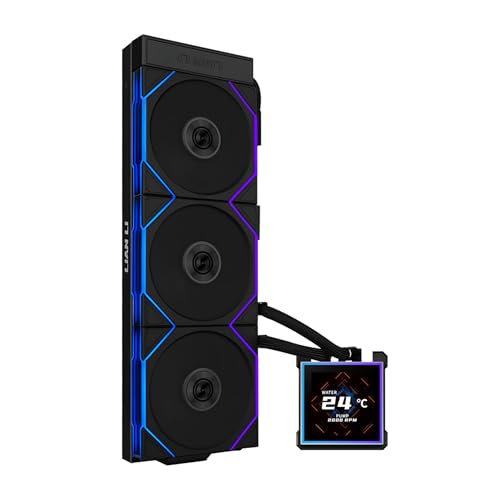
The Hydroshift II-S LCD 360TL focuses on build aesthetics as much as cooling. The 3.4-inch square IPS screen uses a magnetic pogo-pin connection that allows hot-swapping without powering down the system. The sliding tube clamp on the side of the radiator lets you align the hoses precisely, reducing the visual chaos that plagues many AIO installations. The slim 24mm radiator thickness (versus the standard 27mm) improves case compatibility without a major thermal penalty.
Pre-installed TL120 ARGB fans push 90.1 CFM at up to 2600 RPM and daisy-chain together with a single cable, dramatically reducing wire clutter. The L-Connect 3 software offers Wireless Mode for remote theme switching or USB-connected mode for detailed customization. On an overclocked Ryzen 7 9800X3D hitting 5.425 GHz, Cinebench R23 temperatures max at 79°C, showing competitive thermal performance.
User feedback highlights the clean hidden-tube design as the standout feature, though the thinner radiator and software requiring SATA power for detection are minor trade-offs. Two customers reported reseating a fan connection to fix a no-spin issue, but overall reliability is strong. The 480×480 resolution is adequate but not as sharp as the NZXT or Corsair screens. For builders who prioritize cable management and a unique display, this is a compelling choice.
Why it’s great
- Hot-swappable magnetic screen with pogo pins
- Sliding tube clamp for perfect hose alignment
- Daisy-chain fans reduce cable clutter
Good to know
- Thinner 24mm radiator vs. standard 27mm
- Software needs SATA power for detection
4. TRYX Panorama SE 360 ARGB
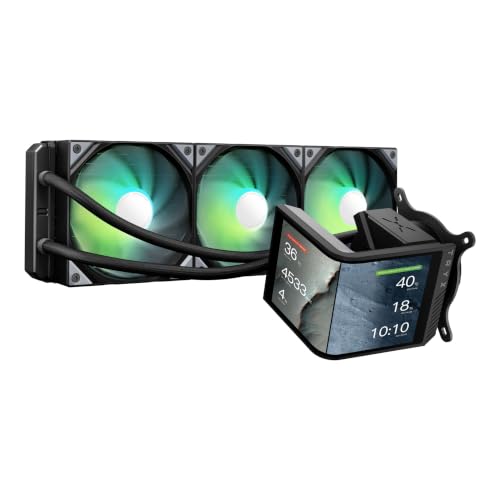
The TRYX Panorama SE 360 redefines what a cooler screen can be. Its 6.67-inch curved AMOLED panel delivers a 2K resolution at 60 Hz with a 1,000,000:1 contrast ratio, producing deep blacks and vivid colors that LCD screens cannot match. The G2 Curvature and tempered glass cover with full adhesion technology eliminate air gaps, reducing reflections and delivering an anamorphic 3D effect that creates real depth. Pre-loaded 3D animations like the “Waterfall” theme make this feel more like a desktop ornament than a cooling component.
The Asetek Adela pump handles a 280W TDP, matching the thermal capacity of high-end AIOs. A Ryzen 9 9950X3D stays cool under sustained gaming loads, with user reports showing max temperatures around 73°C after hours of play. The three pre-installed ROTA ARGB fans with FDB bearings run at up to 3600 RPM but stay under 28 dBA, though the pump can become audible at full speed. The KANALI software supports split-screen display and media uploads up to 1080P and 500 MB, though firmware updates have occasionally caused GIF compression issues.
Builders after the most visually striking display on the market will find no equal—the screen rotatability and 3D content library are genuinely novel. The 5.6-pound weight and longer hoses than typical 360mm AIOs require careful case planning. Support has been responsive for screen defects, and the overall quality matches the premium price. For pure display wow-factor, this cooler stands alone.
Why it’s great
- Stunning 6.67″ curved AMOLED with 2K resolution
- 3D anamorphic effect with pre-loaded animations
- Asetek Adela pump with 280W TDP capacity
Good to know
- Firmware updates can affect GIF quality
- Pump is audible at full speed
- Heavy unit at 5.6 pounds
5. Thermalright FW360 SE ARGB V2
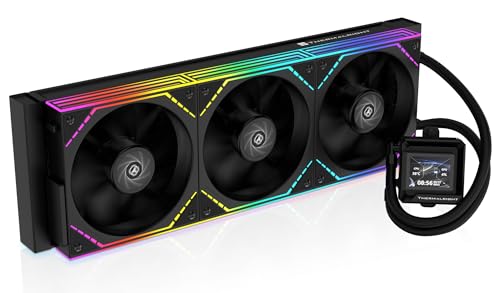
The FW360 SE ARGB V2 brings a 360mm radiator and a 2-inch LCD screen to a price point where most competitors offer only basic pumps. The 3000 RPM pump paired with three TL-M12Q daisy-chain fans delivering 68.9 CFM at 2000 RPM provides enough cooling for Ryzen 9 and Core i7-class chips. The 2-inch screen can display system status, custom images, or animated GIFs through Thermalright’s software, giving budget builds a personalized centerpiece.
Installation is straightforward with included mounting for both AMD and Intel sockets, and the 5-year warranty adds peace of mind. Users report quiet operation and effective cooling on a Ryzen 7 7800X3D and even an i7-14700K, with one reviewer noting the silver bracket may clash with darker motherboards. The daisy-chain fan design reduces cable clutter noticeably, making the interior look cleaner despite the entry-level price.
The most common issue involves the LCD screen’s USB-C connection—a handful of users report detection problems. Thermalright’s warranty response on this specific fault has been inconsistent, but Amazon replacements have resolved the issue smoothly. The overall cooling performance is solid for the price, making this a strong entry point into the screen-equipped cooler category.
Why it’s great
- 360mm cooling at a budget-friendly price
- Daisy-chain fans reduce wiring
- 5-year warranty included
Good to know
- LCD USB-C connection can be unreliable
- Silver bracket may not match dark builds
6. PCCOOLER DC360
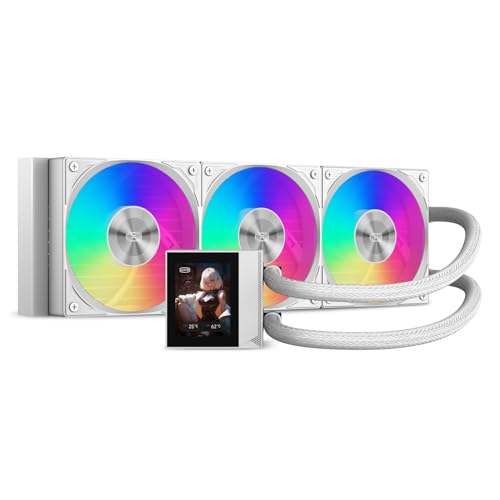
The DC360 from PCCOOLER packs a 2.4-inch IPS display and three F5 ARGB fans that push 90.56 CFM at 2500 RPM—some of the highest airflow numbers in this category. The 2600 RPM pump runs at only 15 dBA, making it one of the quietest pumps available. The CNC aluminum waterblock housing and sleeved 400mm tubes contribute to the premium look, and the daisy-chained fans keep the wiring simple.
On a Ryzen 9 7950X3D, the DC360 holds max temperatures at 73°C under full load, and the IPS screen is bright and clear for system stats and custom GIFs. The software is functional but harder to find on the manufacturer’s site, and it can be finicky with GIF uploads. At full fan speed, the 2500 RPM fans produce a jet-engine-like noise that requires BIOS tweaking to tame for sensitive ears.
Users highlight the exceptional value for the thermal performance, with one builder noting the cooler handled an overclocked 13900KS barely reaching 90°C. The display offers real-time monitoring and integrates with motherboard ARGB sync software. The main trade-off is noise at maximum fan speed, but adjusting the fan curve in BIOS dials it into a comfortable range without sacrificing cooling.
Why it’s great
- Highest airflow fans in this tier at 90.56 CFM
- Ultra-quiet 15 dBA pump
- Bright 2.4-inch IPS display
Good to know
- Fans are very loud at full 2500 RPM
- Software is difficult to locate and setup
7. Sudokoo SK700V

The SK700V is the only air cooler on this list, making it a unique option for builders who want a display without the complexity or failure points of a liquid AIO. Its seven heatpipes and a single 120mm FDB PWM fan provide enough cooling for a 9600X (idle 35°C, max 60°C under load) and even a 9800X3D (Cinebench under 70°C). The digital display shows real-time CPU temperature, load, and frequency, controlled via the Sudokoo Control Center MasterCraft software.
Full RAM clearance is a major advantage—tall heat spreaders and RGB memory sticks fit without interference. The tool-free slide-in fan mounting and included AM5 contact frame, thermal paste, and cleaning wipe make installation beginner-friendly. The 120mm fan operates at 0 RPM under 5% PWM load for silent idle, and the build quality feels sturdy with a metal and aluminum construction.
The catch is strict AM5-only compatibility—Intel users need a separate mounting kit, and the Sudokoo software for the display can be inconsistent, sometimes failing to recognize the device after a restart. The LGA install process requires removing the stock backplate, which exposes the CPU socket and carries a slight risk of pin damage for novices. For AM5 users who prefer air cooling and want a display, this is the only option that fits the bill.
Why it’s great
- Full RAM clearance for any memory kit
- Included AM5 contact frame and cleaning tools
- Digital display with real-time CPU metrics
Good to know
- AM5 only—no Intel support out of box
- Screen software can be glitchy after restart
FAQ
Do I need a 360mm radiator for a CPU cooler with screen?
Can the screen work without installing the manufacturer software?
Will a CPU cooler with screen fit in my case?
Why is my cooler screen not detected after a restart?
Final Thoughts: The Verdict
For most users, the best cpu cooler with screen winner is the Corsair Nautilus 360 RS LCD because it combines a quiet 20 dBA pump, effective cooling on high-TDP chips, and a customizable 2.1-inch IPS screen at a price that makes sense for the mainstream builder. If you want a sharper display and a compact radiator size, grab the NZXT Kraken Elite 240 2024. And for a premium visual centerpiece that doubles as a 3D desktop display, nothing beats the TRYX Panorama SE 360.

Mo Maruf
I created WellFizz to bridge the gap between vague wellness advice and actionable solutions. My mission is simple: to decode the research and give you practical tools you can actually use.
Beyond the data, I am a passionate traveler. I believe that stepping away from the screen to explore new environments is essential for mental clarity and physical vitality.