Your gaming CPU pushes hard during a long session, and the stock cooler can’t keep up. The fan ramps to a jet-engine whine while your clock speeds drop, stuttering through the fight you were winning. A proper cooler ends that trade-off between noise and performance.
I’m Mohammad Maruf — the founder and writer behind WellFizz. I’ve spent hundreds of hours cross-referencing thermal test data, user reports, and specification sheets for air towers and AIO liquid coolers that actually deliver measurable temperature improvements under gaming loads.
Whether you need a slim single-tower for a compact build or a full-size 360mm radiator to tame a flagship chip, this guide covers the key specs that matter. My goal is to help you find the best cpu cooler for gaming that fits both your case and your performance expectations.
How To Choose The Best CPU Cooler For Gaming
A gaming cooler has one job: pull heat off the IHS fast enough that your CPU stays inside its boost clock window. Two main architectures do this — air towers and all-in-one liquid coolers. Each has strengths depending on case size, CPU wattage, and noise tolerance.
Case Compatibility First
Measure your case clearance before buying anything. Air towers list their height in millimeters — a 154mm tower won’t fit a case with only 150mm of side-panel space. For AIO liquid coolers, check radiator mounting positions (top or front) and fan-plus-radiator thickness. A 38mm radiator plus two 25mm fans needs 88mm of vertical or horizontal space.
Heat Pipe Count and Surface Area
More heat pipes generally mean better heat transfer from the base to the fin stack, but the total fin surface area and fan static pressure matter more. A dual-tower cooler with six or seven pipes moving air through a dense fin array can rival a 240mm AIO on a high-wattage gaming chip, and it won’t develop pump noise over time.
AIO Considerations: Pump, Radiator, and Warranty
For AIO coolers, the pump’s rated speed and bearing type (ceramic vs. steel sleeve) affect long-term reliability and noise floor. Radiator thickness directly influences heat capacity — a slim 27mm unit runs louder than a thicker 38mm version at the same cooling load. Always check the warranty length; premium AIOs typically offer 5–6 years of coverage. A shorter warranty may signal lower confidence in the pump’s lifespan.
Quick Comparison
On smaller screens, swipe sideways to see the full table.
| Model | Category | Best For | Key Spec | Amazon |
|---|---|---|---|---|
| MONTECH HyperFlow ARGB 360 | 360mm AIO | High-wattage Intel chips | 3100 RPM pump, 6-year warranty | Amazon |
| MSI MAG Coreliquid A13 360 | 360mm AIO | Silent 360mm operation | 14.4 dB noise, ceramic bearings | Amazon |
| ARCTIC Liquid Freezer III Pro 240 | 240mm AIO | Compact cases needing AIO | 38 mm radiator, integrated VRM fan | Amazon |
| Thermalright PS120SE ARGB | Dual-Tower Air | Best balance of price and performance | 7 heat pipes, 66.17 CFM airflow | Amazon |
| ARCTIC Freezer 36 A-RGB | Single-Tower Air | Budget build on mid-range CPU | 4 heat pipes, 2000 RPM max fans | Amazon |
In‑Depth Reviews
1. MONTECH HyperFlow ARGB 360

The HyperFlow ARGB 360 packs a 3100 RPM pump and three 28mm-thick Metal Pro 12 fans that move a serious volume of air through a slim 27mm radiator. In real-world use, this combination dropped a 13700KF by 20°C over a 240mm AIO, keeping it under throttle limits at full 253W PL1/PL2 sustained loads. The gemstone-styled pump head looks sharp and sits flush on both AM5 and LGA 1700/1851 sockets.
Installation is straightforward — fans come pre-installed with no fan-to-radiator wiring needed, and the bracket system switches between Intel and AMD without tools. The included thermal compound is pre-applied to the copper cold plate, which simplifies the first setup. Reviewers report that the 28mm fans run very quietly even under heavy GPU loads in Cyberpunk 2077, with overall system noise staying low.
The six-year warranty is a strong confidence signal for the pump’s long-term reliability. At its price point, this cooler offers chart-topping thermal performance that competes with units costing significantly more, making it the natural pick for anyone building a high-wattage gaming rig that needs sustained boost clock headroom.
Why it’s great
- 3100 RPM pump handles high TDP chips with ease
- 28mm thick fans push excellent static pressure
- Six-year warranty backs long-term pump reliability
Good to know
- Installation bracket is slightly less intuitive than some competitors
- RGB software integration may vary depending on motherboard ecosystem
2. MSI MAG Coreliquid A13 360

The MAG Coreliquid A13 360 stands out for its extremely low noise floor, rated at just 14.4 dB. The integrated three-phase pump with ceramic bearings runs at speeds up to 3800 RPM, yet users report near-silent operation even under gaming loads. The 390mm triple-layered evaporation-proof tubing adds peace of mind for long-term closed-loop integrity, while the split-flow aluminum radiator efficiently sheds heat from high-TDP processors like the 5800X3D.
MSI includes pre-applied thermal paste and a universal mounting bracket that fits LGA 1700/1851 and AM4/AM5 sockets. Multiple reviewers confirm that the pre-installed fans are daisy-chained, making cable management simpler. Users who upgraded from a dual-tower air cooler saw their 5800X3D stop thermal throttling entirely in titles like Ready or Not and Helldivers 2, maxing out at around 75°C under sustained load.
Some builders noted that the MSI logo on the pump cap sits at a slight angle relative to the AM4/5 mounting bracket, which can bother those who want perfect vertical alignment. That cosmetic detail aside, the combination of whisper-quiet fans and strong pump performance makes this a top-tier pick for gamers who prioritize a silent system.
Why it’s great
- Exceptionally quiet 14.4 dB operation at low load
- Ceramic bearing pump rated for long service life
- Pre-installed daisy-chained fans simplify cable routing
Good to know
- MSI logo alignment may not be perfectly vertical on AMD builds
- Pump at 100% can produce slight hum if not set to a curve
3. ARCTIC Liquid Freezer III Pro 240 A-RGB
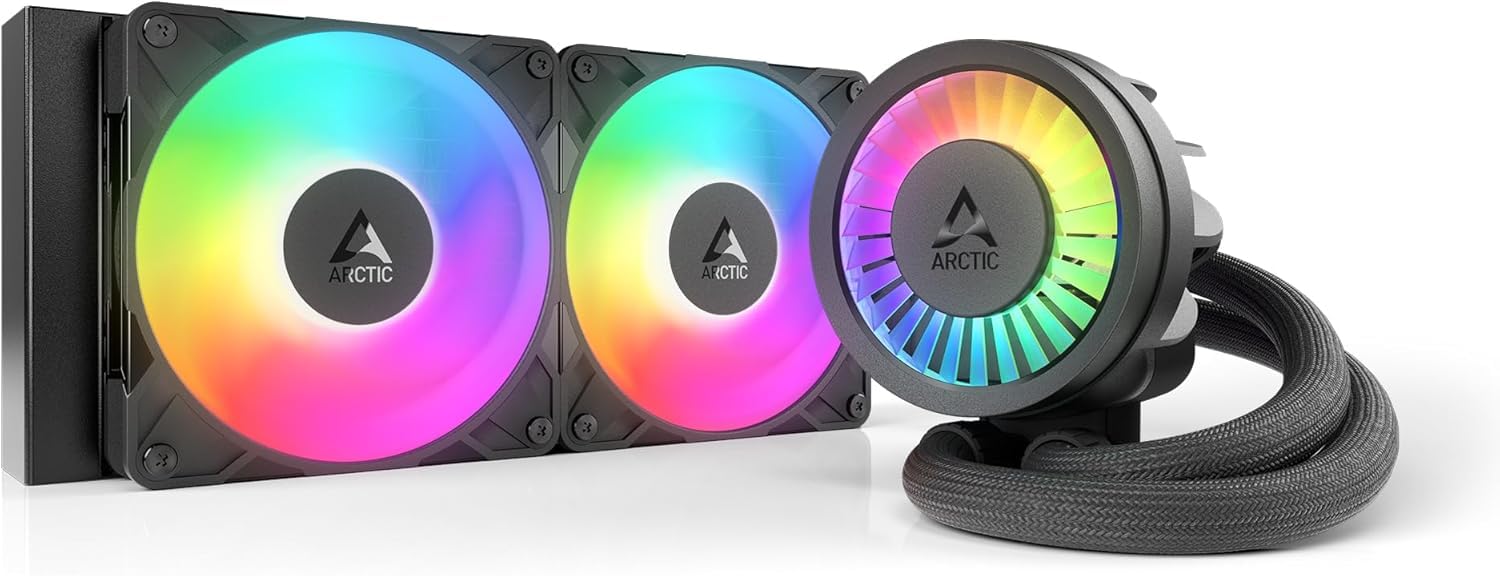
The Liquid Freezer III Pro 240 pairs a thick 38mm aluminum radiator with ARCTIC’s P12 Pro fans, which deliver more static pressure at every speed than the standard P12. The pump includes an integrated PWM-controlled VRM fan that actively cools the voltage regulator modules — a rare feature that matters when overclocking higher-wattage chips. The cold plate uses an offset mounting design that shifts the contact center toward the CPU hotspot for better thermal transfer on both Intel and AMD sockets.
Installation is helped by an integrated cable management system that runs the fan PWM wires inside the hose sheathing, leaving only a single visible cable to the motherboard. This makes the build look cleaner than most AIOs. However, the 38mm radiator plus standard 25mm fans creates a combined thickness of about 63mm, so you need to check your case clearance carefully. Users report it fits the Corsair 4000D without issue but may be tight in narrower mid-towers.
Thermal performance impresses — a Ryzen 9 3900 ran at just 65°C under stress testing, and an AM5 chip dropped 2°C at idle while load temps improved by 4°C over a competing 240mm AIO. The pump and fans are quiet at normal curves, though the fans are audibly loud at maximum speed. At this mid-range price, you get close-to-premium cooling performance with a VRM cooling bonus that most competitors skip.
Why it’s great
- Thick 38mm radiator improves heat capacity over slim designs
- Integrated VRM fan keeps voltage regulators cool
- Offset cold plate targets the CPU hotspot for better efficiency
Good to know
- Thicker radiator requires careful case clearance measurement
- Fans can get loud at max RPM without a custom curve
4. Thermalright PS120SE ARGB

The PS120SE ARGB uses seven 6mm heat pipes with AGHP 4.0 anti-gravity technology, which minimizes performance loss regardless of whether the cooler is mounted vertically or horizontally. Its dual 120mm TL-C12B-S V2 PWM fans push 66.17 CFM of air through a dense aluminum fin stack while keeping the noise rating at just 25.6 dB(A). The 154mm height fits most standard mid-tower cases, and the anodized black-frosted top plate gives it a clean look without a bulky shroud.
Installation is fast once you understand the bracket orientation — the included thermal paste is notably thick, so apply a generous pea-sized dot near the CPU center rather than spreading it. Users report outstanding real-world results: a Ryzen 9 9950X3D maxed out at 78°C under sustained load with minimal throttling, and a 5900XT stayed cool during both gaming and video editing sessions. The dual fans can be daisy-chained to a single motherboard header for simplified control.
The one recurring concern is RAM clearance. With four sticks of taller RAM, you may need to shift the front fan upward slightly, though this has minimal effect on cooling performance because the fin stack still receives ample airflow. At its price point, this dual-tower air cooler delivers thermal performance that rivals many 240mm AIOs, without any pump failure risk and with lower long-term noise degradation.
Why it’s great
- Seven heat pipes provide excellent heat transfer across the fin stack
- Anti-gravity pipe technology works well in any orientation
- Near-silent 25.6 dB noise level under normal operation
Good to know
- Front fan may interfere with tall RAM; shift upward to clear
- Included thermal paste is very thick — apply a large dot near center
5. ARCTIC Freezer 36 A-RGB

The Freezer 36 A-RGB uses four offset heat pipes in a single-tower design with a push-pull fan configuration — two pressure-optimised 120mm fans running between 200–2000 RPM. The offset heat pipe layout shifts the contact area to align with the CPU hotspot, transferring heat faster to the fin stack. A side-flow fin opening allows the rear pull fan to draw additional cool air through the heatsink, improving overall thermal efficiency in compact cases.
Installation is simplified by an innovative click-on fan mounting system that eliminates the fiddly wire clips found on most air coolers. The included MX-6 thermal compound is high-quality and spreads easily. Real-world performance is impressive for such a compact cooler: users report idle temps of 27°C and gaming temps of 39°C on a 12600KF, and a 14700K dropped 30°C compared to the stock cooler. Even a 9800X3D stayed cool under heavy load, which speaks to the cooler’s ability to handle current-gen high-TDP chips.
The A-RGB lighting uses 12 LEDs placed along the fan hub and a transparent rotor for even illumination, and it integrates easily with motherboard software. The only downsides are relatively short power/RGB cables and occasional minor fin deformation upon arrival. But these cosmetic imperfections do not affect thermal performance, making this the go-to choice for budget-conscious builders who want strong cooling that fits in smaller cases without breaking the bank.
Why it’s great
- Excellent price-to-performance ratio for mid-range and high-end CPUs
- Push-pull dual fans with click-mount system simplify installation
- Side-flow fin design improves airflow in compact cases
Good to know
- RGB and fan power cables are relatively short
- Minor fin or pin deformations possible during shipping
FAQ
Will a 360mm AIO fit in my mid-tower case?
Do I need to replace the thermal paste that comes with the cooler?
Is dual-tower air cooling just as good as a 240mm AIO for gaming?
Final Thoughts: The Verdict
For most users, the best cpu cooler for gaming winner is the MONTECH HyperFlow ARGB 360 because it delivers flagship 360mm cooling performance with a strong six-year warranty at a mid-range price. If you want a nearly silent system, grab the MSI MAG Coreliquid A13 360. And for the best value air cooler that avoids any pump failure risk, nothing beats the Thermalright PS120SE ARGB.

Mo Maruf
I created WellFizz to bridge the gap between vague wellness advice and actionable solutions. My mission is simple: to decode the research and give you practical tools you can actually use.
Beyond the data, I am a passionate traveler. I believe that stepping away from the screen to explore new environments is essential for mental clarity and physical vitality.