Our readers keep the lights on and my smoothie glass nicely filled. As an Amazon Associate, I earn from qualifying purchases.
The cooling fan is the unsung component of any performance PC. Choose poorly, and your rig either runs hot enough to throttle frame rates or emits a distracting whine that ruins the immersion of a late-night gaming session. The challenge is finding a fan that moves enough air to keep your CPU and GPU happy without sounding like a small vacuum cleaner.
I’m Mohammad Maruf — the founder and writer behind WellFizz. I’ve spent hundreds of hours analyzing stator-blade geometries, bearing lubricants, and PWM curve data across dozens of product cycles to understand exactly which fans deliver on their CFM claims.
This guide breaks down five distinctly different approaches to case ventilation. After reading, you will know exactly which spec matters for your specific build, and you’ll have a clear winner for your next setup of best cpu case fans.
How To Choose The Best CPU Case Fans
Selecting a case fan goes beyond just picking a size. You must match the fan’s performance profile to your specific chassis layout, cooling components, and noise tolerance. Here are the factors that separate a well-ventilated build from a hot or noisy one.
Airflow vs. Static Pressure
Airflow (measured in CFM) matters most for open intake and exhaust grilles with minimal obstruction. Static pressure (measured in mmH₂O) matters when the fan has to push air through dense radiator fin stacks, thick dust filters, or front-panel mesh. A fan with high CFM but low static pressure will struggle on a radiator, causing poor heat exchange. Always check both values.
Bearing Type and Longevity
The bearing is the mechanical heart of the fan. Sleeve bearings are cheap but wear quickly and can fail in horizontally mounted setups. Hydraulic bearings add oil-recirculation channels for longer life. Fluid Dynamic Bearings (FDB) and S-FDB bearings use a self-lubricating film that minimizes noise and extends lifespan past 50,000 hours. Rifle bearings offer a good middle ground for mid-range fans. A fan with a poor bearing will develop a rattle or grinding noise within the first year of continuous use.
PWM Control and Fan Curves
A 4-pin PWM connector allows your motherboard to dynamically adjust fan speed based on sensor temperatures, from near-silent idle to full tilt under load. This automatic control is far superior to fixed-voltage or resistor-cable speed reduction. Look for a fan that can operate at below 20% PWM duty cycle for truly silent idle behavior.
Noise Profile and Decibel Ratings
A fan rated at 25 dB(A) at moderate speed will be noticeably quieter than one rated at 30 dB(A), but the noise *character* matters too. A fan with high-pitched whine at 1800 RPM will annoy more than a fan with a deeper whoosh at the same loudness. Customer reviews describing the sound as “smooth” versus “buzzy” are invaluable input that a decibel rating alone cannot provide.
RGB Ecosystem Compatibility
If you want lighting control through your motherboard software, you need a 5V 3-Pin ARGB connector, not a 12V 4-Pin RGB connector. Check whether the fan brand uses a standard 5V 3-Pin header or a proprietary locking connector that requires a separate hub. Daisy-chaining ARGB fans is convenient, but chaining more than three fans on a single header can exceed the current limit of the motherboard ARGB port.
Quick Comparison
On smaller screens, swipe sideways to see the full table.
| Model | Category | Best For | Key Spec | Amazon |
|---|---|---|---|---|
| Noctua NF-A14x25 G2 PWM | Premium | Ultra-quiet builds & radiator use | 1500 RPM – 24.8 dB(A) – LCP blades | Amazon |
| ARCTIC P12 Pro PST 5 Pack | Mid-Range | High-static-pressure radiator setups | 3000 RPM – 77 CFM – FDB bearing | Amazon |
| be quiet! Light Wings LX 120mm Triple-Pack | Premium | Silent RGB showcases | 20.6 dB(A) – 16 LED hub – Rifle bearing | Amazon |
| Thermalright TL-C12C-S 5 Pack | Value | Budget multi-fan case builds | 1550 RPM – 66.17 CFM – S-FDB bearing | Amazon |
| AsiaHorse Amici 140mm ARGB | Entry-Level | Budget 140mm with ARGB aesthetics | 1800 RPM – 89.77 CFM – Hydraulic bearing | Amazon |
In‑Depth Reviews
1. Noctua NF-A14x25 G2 PWM

The Noctua NF-A14x25 G2 is the result of obsessive engineering. Its impeller is molded from Sterrox liquid-crystal polymer, a material with extremely low thermal expansion that maintains an ultra-tight tip clearance inside the frame. That clearance, combined with the Progressive-Bend impeller and winglets, allows the fan to move a surprising volume of air with a smooth, nondescript whoosh rather than a pitched whine. It is the quietest fan in this lineup at idle, becoming audible only above 900 RPM, and even at 1500 RPM it remains composed.
The included accessory bundle is generous — anti-vibration mounts, a Low-Noise Adaptor, a Y-splitter cable, and a rubber gasket for creating a tighter seal against radiator fins. That gasket alone reduces recirculation noise on thin radiators. The fan stops completely at 0% PWM, enabling semi-passive cooling in builds where the CPU radiates little heat at desktop idle.
It costs a premium and comes only in the signature brown color, which is polarizing in windowed cases. The static pressure rating is lower than some high-RPM competitors, so on very dense radiators a push-pull configuration may be needed. But for a balanced result of acoustic refinement and thermal performance, this fan is the gold standard.
Why it’s great
- Near-silent operation at low to moderate speeds.
- Sterrox LCP construction ensures long-term dimensional stability.
- Included gasket reduces radiator blow-by noise.
Good to know
- High per-unit cost compared to multi-pack alternatives.
- Brown color clashes with most RGB-heavy builds.
- Lower static pressure than dedicated high-RPM radiator fans.
2. ARCTIC P12 Pro PST 5 Pack

The ARCTIC P12 Pro PST targets users who prioritize static pressure over silence. With a maximum of 3000 RPM, it moves 77 CFM and generates enough force to blast air through thick radiator stacks and dense mesh panels without stalling. The redesigned rotor blades optimize the balance between thrust and noise at low speeds, but pushing past 1800 RPM introduces a pronounced whoosh that is more noticeable than the Noctua or the be quiet! offerings.
The “PST” in the name stands for “Power Sharing Technology,” which means each fan has built-in Y-splitter cables permanently attached. This simplifies connecting multiple fans to a single motherboard header but makes cable management more rigid — you cannot detach the splitters. The Fluid Dynamic Bearing (FDB) provides smooth, self-lubricating operation that minimizes wear and extends lifespan, though some early reports note that the non-optional splitter cables can be frustrating in tight chassis.
At full RPM, this fan is loud — no getting around it. But when configured with a sensible PWM curve that reserves maximum speed for CPU-intensive loads, it stays unobtrusive. For the price of a single premium fan, the five-pack allows you to populate an entire mid-tower case plus the CPU radiator. This is the best option for builders who want maximum cooling headroom without spending a fortune per fan.
Why it’s great
- Exceptional static pressure for radiator and mesh applications.
- Five-pack delivers outstanding value for full-case coverage.
- FDB bearing reduces long-term wear and idle noise.
Good to know
- Permanent Y-splitter cables complicate cable routing.
- Pronounced whoosh at speeds above 1800 RPM.
- No ARGB lighting for aesthetic builds.
3. be quiet! Light Wings LX 120mm PWM Triple-Pack

be quiet! has built a reputation on acoustic refinement, and the Light Wings LX continues that tradition. At just 20.6 dB(A), this is the quietest fan on the list by the decibel metric. The 16 LEDs reside inside the impeller hub and light up the frosted blades evenly, creating a diffused glow without harsh hot spots. The ARGB connection uses a daisy-chain cable with both input and output connectors, allowing a direct link to a motherboard 5V 3-Pin header.
The frame features small outlet guides that minimize air leaks at the blade tips, a detail that improves efficiency against the static pressure needed for front intakes behind dust filters. The fan’s construction feels solid, with no blade wobble out of the box.
The triple-pack does not include a separate controller, so you will need an available motherboard ARGB header or a third-party hub. The noise profile is smooth rather than buzzy, even when the fans ramp up to 70% PWM. For builders who want a visually striking, whisper-quiet case without sacrificing airflow, this is the class leader.
Why it’s great
- Industry-leading 20.6 dB(A) noise rating.
- Hub-mounted LEDs deliver even, diffuse light.
- Daisy-chain ARGB cables simplify build wiring.
Good to know
- Rifle bearing lifespan is shorter than FDB or hydraulic alternatives.
- No RGB controller included in the triple-pack.
- Less static pressure than the ARCTIC P12 Pro for high-resistance setups.
4. Thermalright TL-C12C-S 5 Pack

The Thermalright TL-C12C-S set a new benchmark for what a budget fan can deliver. It uses an S-FDB bearing (a refined version of Fluid Dynamic Bearing) that provides the longevity and quiet operation usually reserved for more expensive units. The maximum speed of 1550 RPM is modest compared to the high-RPM contenders, but the fan moves an efficient 66 CFM at a noise level of just 25.6 dB(A), making it an excellent choice for open intakes and exhausts.
The 5-pack includes pre-attached daisy-chain cables for both PWM and ARGB, so you can control all five fans from a single motherboard header. The atomized fan blades diffuse the LED light softly, producing a less harsh glow compared to direct-exposure LEDs. Customers consistently report near-silent operation at typical idle speeds and a noticeable drop in case temperatures after swapping out generic case fans.
At this price point, some concessions are visible — the plastic frame lacks the rigidity of the Noctua’s LCP, and the static pressure of 1.53 mmH₂O is not sufficient for dense radiators. For a standard air-cooled case with mesh intakes and a low-resistance CPU tower cooler, however, these fans are tough to beat on value. They are a no-brainer upgrade for pre-built systems or budget-conscious custom builds.
Why it’s great
- Incredible value per fan at the five-pack price.
- S-FDB bearing delivers quiet operation and long lifespan.
- Daisy-chain cabling reduces wiring clutter.
Good to know
- Low static pressure unsuitable for dense radiators.
- Plastic frame feels less premium than high-end competition.
- Maximum RPM limited to 1550, no headroom for extreme cooling.
5. AsiaHorse Amici 140mm ARGB
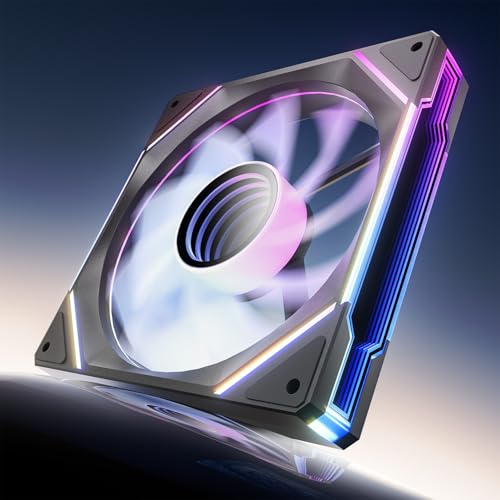
The AsiaHorse Amici 140mm is an entry-level fan that punches above its weight in visual flair. The infinity mirror effect and 24 individually addressable LEDs create a deep, layered light pattern that rivals fans costing twice as much. At 89.77 CFM, it moves a substantial volume of air, and the hydraulic bearing is rated for 50,000 hours of operation, far outperforming cheap sleeve bearings common in this price tier.
The noise floor ranges from 6 to 30 dB(A), but at moderate speeds the fan is genuinely unobtrusive — the included rubber mounting pads and precision balancing keep vibration-induced resonance to a minimum. The daisy-chain support works for both PWM and ARGB, though the manufacturer recommends limiting the chain to three fans per header to avoid overloading the motherboard connectors. Installation is straightforward with labeled, keyed connectors.
Cosmetic consistency is a minor issue: the black version looks cohesive, but the white variant uses a black plastic center hub that clashes with the white frame. The 140mm size means it will not fit all cases designed for 120mm fan mounts, so check your chassis specifications. For builders on a tight budget who want large-diameter airflow and dramatic ARGB lighting, the Amici delivers a strong showing.
Why it’s great
- Large 140mm blades move high CFM at low RPM.
- Infinity mirror ARGB effect is visually impressive.
- Hydraulic bearing provides reliable lifespan for the price.
Good to know
- White variant has a black hub that looks mismatched.
- 140mm size limits compatibility with some cases.
- Noise rises noticeably near the 1800 RPM ceiling.
FAQ
Can I connect ARGB fans to a motherboard without a 5V header?
How many case fans can I chain on a single PWM header?
What size fan should I choose — 120mm or 140mm?
Is a higher CFM rating always better for a case fan?
Why does my fan make a ticking or grinding noise after a few months?
Final Thoughts: The Verdict
For most users, the best cpu case fans winner is the Noctua NF-A14x25 G2 PWM because it delivers unmatched acoustic refinement and build quality in a single fan. If you want maximum radiator cooling performance at a low per-unit cost, grab the ARCTIC P12 Pro PST 5 Pack. And for a silent, visually stunning RGB showpiece, nothing beats the be quiet! Light Wings LX Triple-Pack.

Mo Maruf
I created WellFizz to bridge the gap between vague wellness advice and actionable solutions. My mission is simple: to decode the research and give you practical tools you can actually use.
Beyond the data, I am a passionate traveler. I believe that stepping away from the screen to explore new environments is essential for mental clarity and physical vitality.