Our readers keep the lights on and my smoothie glass nicely filled. As an Amazon Associate, I earn from qualifying purchases.
Matching a processor and graphics card is the single most consequential decision in any gaming PC build — get the pairing wrong and you are either wasting money on a bottleneck or leaving raw frames on the table. For buyers who want the pair already tested and tuned together in a single chassis, the market offers dozens of pre-validated systems that skip the compatibility headache entirely. The question is which one balances clock speed, core count, VRAM, and the generation of both chips to match your actual resolution target.
I’m Mohammad Maruf — the founder and writer behind WellFizz. I have spent hundreds of hours dissecting CPU and GPU specifications, analyzing synthetic benchmarks alongside real-world gaming test data, and mapping generational performance deltas to help buyers make informed hardware decisions without opening a single anti-static bag.
This guide walks through eleven prebuilt desktops that represent different pairings of modern and value-oriented silicon, helping you match a balanced cpu and gpu combo to your gaming expectations and budget.
How To Choose The Best CPU And GPU Combo
The single most common mistake buyers make is pairing a high-end GPU with a processor that cannot feed it fast enough, or over-spending on a flagship CPU when the budget would deliver more frames invested in a better graphics card. The goal is balance: you want the slowest processor that can keep the GPU fully occupied at your target resolution. At 1080p the CPU carries more of the load, while at 4K the GPU becomes the dominant factor, so your ideal pairing shifts based on the resolution you actually play at.
Generation Matching Matters More Than Brand Loyalty
An older i7-4770 paired with a newer RTX 4060 will leave significant performance on the table because the CPU cannot process instructions fast enough to keep the GPU busy. Look for systems where the CPU and GPU are within one or two generations of each other. Current-gen pairings like Ryzen 5 9600X with RTX 5060 Ti, or Intel Core Ultra 7 265F with RTX 5070, ensure the PCIe lanes and memory bandwidth match what the GPU expects. If you see a dated processor with a current-generation graphics card, that system depends on resolution lifting to hide the bottleneck — it will feel sluggish at 1080p high-refresh.
VRAM: The Silent Upgrade Limiter
Graphics memory capacity directly determines how long your system stays relevant for modern titles at higher texture settings. An 8 GB card is fine for 1080p gaming today, but several 2024 releases already push past that allocation at 1440p with ultra textures. Cards with 12 GB or 16 GB of VRAM offer a much wider safety margin for future titles. If you plan to keep the system for more than two years without a GPU swap, prioritize a combo that includes at least 12 GB of dedicated video memory — preferably GDDR7 for the bandwidth headroom.
DDR Generation and Platform Longevity
DDR5 memory offers higher bandwidth that directly benefits Ryzen processors with AMD’s Infinity Fabric scaling and Intel’s memory-sensitive workloads. Systems on the AM5 socket (Ryzen 7000 and 9000 series) use DDR5 and provide an upgrade path to future processors without replacing the motherboard. Socket AM4 systems with DDR4 are more budget-friendly but cap future CPU upgrades to the 5000 series. Intel’s LGA1700 socket supports both DDR4 and DDR5 depending on the motherboard, but its socket generation is end-of-life, meaning any processor upgrade will require a new board.
Quick Comparison
On smaller screens, swipe sideways to see the full table.
| Model | Category | Best For | Key Spec | Amazon |
|---|---|---|---|---|
| Skytech Gaming O11 Vision | Premium | Ultra settings 1440p | AMD Ryzen 7 9850X3D + RTX 5070 Ti 16 GB | Amazon |
| Cooler Master NR2 Pro | Premium | Compact 1440p powerhouse | AMD Ryzen 7 9800X3D + RTX 5070 Ti 16 GB | Amazon |
| MSI Codex Z2 | Premium | AAA titles at high refresh | AMD Ryzen 7 8700F + RTX 5070 12 GB | Amazon |
| Alienware Aurora ACT1250 | Premium | Brand ecosystem + support | Intel Core Ultra 7 265F + RTX 5070 12 GB | Amazon |
| KOTIN Ryzen 5 9600X | Mid-Range | 1080p/1440p high-fps gaming | AMD Ryzen 5 9600X + RTX 5060 Ti 8 GB GDDR7 | Amazon |
| CyberPowerPC Gamer Master | Mid-Range | AM5 upgrade path | AMD Ryzen 7 8700F + RTX 5060 Ti 8 GB DDR5 | Amazon |
| YAWYORE Ryzen 7 5700X | Mid-Range | 32 GB RAM game multitasking | AMD Ryzen 7 5700X + RTX 5060 8 GB GDDR7 | Amazon |
| Thermaltake LCGS View i1460 | Mid-Range | DDR5 with current-gen Intel | Intel i5-14400F + RTX 5060 8 GB DDR5 | Amazon |
| AVGPC Q-Box Series | Budget | Liquid cooled CPU on a budget | AMD Ryzen 5 5500 + RTX 3050 6 GB | Amazon |
| STGAubron Ryzen 5 5500 | Budget | 1080p gaming starter system | AMD Ryzen 5 5500 + RTX 2060 Super 8 GB | Amazon |
| abytespark i7 Prebuilt | Budget | Entry-level gaming and office use | Intel i7-4770 + AMD RX 590 8 GB | Amazon |
In‑Depth Reviews
1. Skytech Gaming O11 Vision

The Skytech O11 Vision pairs AMD’s flagship 3D V-Cache processor — the Ryzen 7 9850X3D boosting to 5.6 GHz — with an RTX 5070 Ti equipped with 16 GB of GDDR7 memory. This is the pairing you buy when you want ultra settings at 1440p with frame rates above 60 FPS in demanding titles like Cyberpunk 2077 and Alan Wake 2, with headroom to spare for 4K in less GPU-intensive games. The 32 GB of DDR5-5600 RAM and 2 TB Gen4 NVMe storage mean you do not need to touch the internals for years.
The Lian Li PC-O11 Vision case offers a dual-chamber layout that separates the power supply and cabling from the main component area, resulting in a clean build with excellent airflow. Skytech equips this system with a 360 mm AIO liquid cooler, which keeps the 9850X3D well below throttling thresholds even during extended gaming sessions. The 850W 80+ Gold ATX 3.0 power supply supports the transient loads of the RTX 5070 Ti without instability.
One subtle advantage of this combo is the absence of bloatware — the Windows 11 install is clean, which matters for buyers who want the system to perform immediately without background junk consuming CPU cycles. The multi-core throughput of the 9850X3D also benefits streaming and productivity tasks, making this a versatile workstation-grade gaming rig. The integrated ARGB fans and tempered glass side panel provide a premium aesthetic that matches the internal component quality.
Why it’s great
- 3D V-Cache delivers exceptional gaming frame pacing and 1% lows
- 16 GB VRAM provides ample texture buffer for 1440p ultra and future titles
- Clean Windows install with no unnecessary bloatware
Good to know
- Premium price point requires a serious budget commitment
- Large dual-chamber case is not desk-space friendly for compact setups
- 360 mm radiator requires sufficient top-mount clearance in the case
2. Cooler Master NR2 Pro

The Cooler Master NR2 Pro proves that a compact 18.25-liter chassis can house a top-tier CPU-GPU pairing without thermal compromise. Its AMD Ryzen 7 9800X3D — the 8-core, 16-thread gaming-focused processor with 3D V-Cache — pairs with a Gigabyte RTX 5070 Ti 16 GB inside a chassis that fits roughly at the size of a large shoebox. The choice of a Gigabyte B850I AORUS PRO motherboard ensures full PCIe 5.0 support for both GPU and storage, maintaining signal integrity despite the small form factor.
Cooling is handled by a custom 280 mm AIO radiator that fits the NR200P Max case, providing enough dissipation capacity for the 9800X3D under sustained all-core loads. The unit ships with 32 GB of DDR5-6000 MHz RGB memory and a 2 TB Gen4 NVMe SSD, so storage speed matches the processor’s memory bandwidth demands. The 850W 80+ Gold SFX power supply is specifically designed for compact builds and supports the RTX 5070 Ti’s transient power spikes.
The dual-panel system — glass or mesh — lets you choose between aesthetic display and maximum airflow depending on your preference. Buyers should note that the front USB-C port on some units may arrive unseated from the motherboard header, requiring a quick reseat. Otherwise, the system delivers outstanding gaming performance at 1440p high settings, with enough single-core speed to maintain high frame rates in esports titles even at 1080p.
Why it’s great
- Highly portable form factor without sacrificing full-size GPU performance
- Custom 280 mm AIO keeps 9800X3D cool in a dense layout
- Gigabyte B850I board supports PCIe 5.0 for future GPU upgrades
Good to know
- ITX build limits future radiator and PSU upgrade options
- Front USB-C port may need manual reseating on some units
- Premium pricing for the small-form-factor engineering
3. MSI Codex Z2

The MSI Codex Z2 pairs the AMD Ryzen 7 8700F — an 8-core processor with a 5.0 GHz boost clock — with the NVIDIA GeForce RTX 5070, which carries 12 GB of GDDR7 memory. This is a well-balanced mid-premium pairing where the RTX 5070’s Blackwell architecture and DLSS 4 deliver high frame rates at 1440p high settings, while the 8700F ensures the frame pipeline stays fed without introducing a CPU bottleneck in CPU-bound titles like Counter-Strike 2 and Valorant.
The system includes 32 GB of DDR5 memory and a 2 TB NVMe SSD, offering generous capacity for game libraries and fast load times. MSI’s four-fan cooling configuration — three front intake and one rear exhaust — pulls cool air across the components and expels heat efficiently. The ARGB fan air cooler on the CPU is adequate for the 8700F’s 65W TDP, keeping thermals in check during extended gaming sessions without requiring liquid cooling.
The MSI Center software provides customizable RGB lighting control via the front LED button, allowing users to cycle through presets or fine-tune effects through the desktop application. A small number of users have reported SSD failures within the first month, though MSI’s warranty and chat support handle RMAs with reasonable turnaround. The Codex Z2 also includes a keyboard and mouse in the box, making it a true plug-and-play solution for first-time PC gamers.
Why it’s great
- 12 GB VRAM provides a comfortable buffer for 1440p high textures
- 2 TB NVMe storage eliminates near-term capacity concerns
- Plug-and-play with included peripherals
Good to know
- Some units have experienced early SSD failure covered by warranty
- Bluetooth performance may suffer due to metal chassis interference
- Fans become audible under sustained heavy load
4. Alienware Aurora ACT1250

The Alienware Aurora ACT1250 is the only system on this list built around Intel’s new Core Ultra architecture — specifically the Core Ultra 7 265F with a 5.3 GHz boost clock — paired with an NVIDIA GeForce RTX 5070 featuring 12 GB of GDDR7 memory. This pairing leverages the Intel AI accelerator for supported workloads, though for pure gaming the RTX 5070 does the heavy lifting while the 265F handles background multitasking and streaming without dropping frame rates.
The defining hardware advantage here is the 1000W Platinum-rated power supply, which provides immense headroom for future upgrades and ensures clean power delivery under transient loads from the RTX 5070. The 32 GB of DDR5 memory balances well with the processor’s memory controller, and the 1 TB SSD provides fast boot times though limited capacity for large game libraries — external or additional internal storage may be needed. Alienware Command Center software allows per-game performance profiles and full control over the AlienFX stadium lighting zones.
Dell’s 1-year onsite service is a meaningful differentiator: if a hardware issue cannot be resolved remotely, Dell sends a technician to your location, which is rare in the prebuilt gaming market. Some units have arrived with minor cosmetic defects such as misaligned USB-C ports or defective front ring lighting, but the support infrastructure addresses these within the warranty window under normal circumstances.
Why it’s great
- 1000W Platinum PSU offers extreme upgrade headroom
- Onsite Dell warranty service for hardware issues
- Intel Core Ultra platform with AI acceleration capabilities
Good to know
- 1 TB storage fills quickly on a modern game library
- Proprietary motherboard and PSU limit non-Dell upgrades
- Bright cyan LED lighting cannot be fully dimmed
5. KOTIN Ryzen 5 9600X

The KOTIN prebuilt is one of the earliest systems to ship with AMD’s Zen 5 architecture in the form of the Ryzen 5 9600X — a 6-core, 12-thread processor boosting to 5.4 GHz — paired with an RTX 5060 Ti 8 GB featuring GDDR7 memory. This is a strong mid-range combo wherein the 9600X’s improved IPC over Zen 4 gives it an edge in memory-sensitive and cache-dependent workloads, while the RTX 5060 Ti handles 1080p ultra and entry-level 1440p gaming with ease.
The system comes with 16 GB of DDR5-6000 MHz dual-channel memory and a 1 TB PCIe 4.0 NVMe SSD that reaches sequential reads of up to 6,000 MB/s, significantly cutting down loading times compared to PCIe 3.0 drives. A distinctive feature is the digital CPU temperature display mounted on the air cooler, which shows real-time thermal status — a useful visual cue for monitoring load temperatures without third-party software. The 650W 80+ Gold PSU provides stable power with good efficiency for the 9600X and 5060 Ti pairing.
Wireless connectivity is generous with WiFi 7 and Bluetooth 5.3, making this system future-proof for the latest router standards and low-latency peripherals. The five addressable RGB fans and tempered glass side panel deliver an attractive build aesthetic. The motherboard is an unnamed entry-level AM5 board, and the PSU brand is unspecified, which are the two primary areas where KOTIN cuts costs to reach this price point. For users who prioritize raw performance per dollar over named components, this is a compelling pick.
Why it’s great
- Zen 5 architecture delivers best-in-class single-core efficiency
- Digital CPU temp display for real-time thermal monitoring
- WiFi 7 and Bluetooth 5.3 for next-gen wireless connectivity
Good to know
- Motherboard and PSU brands are not specified
- 16 GB RAM is sufficient but benefits from future upgrade to 32 GB
- System runs warm under sustained load due to air cooler
6. CyberPowerPC Gamer Master

CyberPowerPC’s Gamer Master GMA2900A3 pairs the Ryzen 7 8700F — an 8-core processor with 5.0 GHz boost — with the GeForce RTX 5060 Ti 8 GB, all mounted on an AMD B850 chipset motherboard. The B850 chipset brings native PCIe 5.0 support for both the GPU slot and the primary M.2 storage, future-proofing the system for faster drives and next-generation graphics cards. This is the entry point for buyers who want the AM5 upgrade path without paying for a flagship CPU now.
The 16 GB of DDR5 memory meets the bandwidth demands of the 8700F’s Zen 4 architecture, and the 1 TB PCIe 4.0 NVMe SSD provides snappy load times. Connectivity options include two USB-C 3.2 ports, four USB-A 3.2 ports, two USB-A 2.0 ports, WiFi 6, Bluetooth 5.3, and 7.1 channel audio — enough bandwidth for multi-monitor setups and VR headsets. The tempered glass side panel and custom RGB lighting give the system a polished look that matches more expensive CyberPowerPC builds.
Customer experiences highlight quiet fan operation and the ability to run Call of Duty at 60+ FPS on ultra settings at 1080p. Some users had to resolve a USB power delivery issue by disabling Deep Sleep in the BIOS, and random restarts were traced to a driver update over nine months. CyberPowerPC offers a 1-year parts and labor warranty with free lifetime technical support, though support response times have been reported as slow for unusual issues. The keyboard and mouse included in the box are budget peripherals but functional for immediate use.
Why it’s great
- AM5 B850 platform supports future CPU and GPU upgrades
- USB-C 3.2 front ports for fast external storage connectivity
- Quiet RGB fans with good thermal performance out of the box
Good to know
- 16 GB DDR5 may require early upgrade for heavy multitasking
- USB power delivery may need BIOS adjustment after purchase
- Warranty support can be slow for non-standard issues
7. YAWYORE Ryzen 7 5700X

The YAWYORE system pairs the AMD Ryzen 7 5700X — an 8-core processor with a 4.6 GHz boost — with the GeForce RTX 5060 8 GB featuring GDDR7 memory. This combination leans heavily on CPU multi-core performance for productivity and streaming while the RTX 5060 handles 1080p high settings. The 32 GB of DDR4-3200 MHz memory in dual-channel configuration is a notable advantage for multitaskers who run multiple applications alongside games, as the RAM headroom prevents swapping even with dozens of browser tabs open.
The motherboard is an MSI B550M-A PRO, a reputable entry-level board with solid VRM cooling for the 5700X’s 65W TDP. The 1 TB NVMe SSD provides adequate storage for a modern game library, and the 650W 80+ Bronze PSU offers reliable power delivery. One unique inclusion is a remote control for ARGB fan speed and lighting, allowing users to switch between presets and adjust lighting without opening software — a thoughtful convenience for those who keep their case under a desk.
Buyers should note that the system ships with shock-absorbing foam inside the chassis that must be removed before first use, as it is packed to prevent GPU movement during shipping. The DDR4 platform limits memory bandwidth compared to DDR5-equipped competitors, but the 32 GB capacity compensates for the lower frequency in most workloads. Noise levels are very low during idle and moderate gaming, with the remote giving easy access to fan curve adjustments.
Why it’s great
- 32 GB DDR4 RAM provides generous multitasking capacity out of the box
- MSI B550M-A PRO board offers reliable VRM performance
- Remote-controlled ARGB fan speed and lighting presets
Good to know
- DDR4 platform limits memory bandwidth for CPU-bound tasks
- Shipping foam must be removed before powering on
- GPU brand may vary within the RTX 5060 specification
8. Thermaltake LCGS View i1460

The Thermaltake LCGS View i1460 is one of the few Intel-based options in this list, pairing the Core i5-14400F — a 10-core hybrid architecture processor with 4.7 GHz turbo — with the NVIDIA GeForce RTX 5060 8 GB. The i5-14400F uses a combination of 6 performance-cores with Hyper-Threading and 4 efficiency-cores, providing strong multi-threaded throughput for streaming and background tasks while gaming. The RTX 5060 at this pairing targets 1080p high-refresh gaming with the option to push into lighter 1440p titles.
Thermaltake pairs the CPU and GPU with 16 GB of DDR5-6000 MT/s memory — one of the fastest memory configurations at this price bracket — and a 1 TB NVMe M.2 SSD. The ARGB tower air cooler keeps the i5-14400F within operating temperatures without the complexity of liquid cooling, and the PSU power cover with filtered ventilated side mount radiator support keeps the internal layout clean. The compact case design with a tempered glass side panel fits easily on smaller desks while still accommodating full-size GPU cards.
Users consistently mention the near-silent fan operation even under gaming load, which is a meaningful advantage for those who keep their PC in a living room or bedroom. The system does not include a keyboard or mouse, so first-time buyers should budget for those separately. The 600W power supply is adequate for the current configuration, but upgrading to a higher-wattage GPU in the future will require a PSU swap — a factor to consider if you plan to run more power-hungry cards.
Why it’s great
- DDR5-6000 MT/s memory offers high memory bandwidth for Intel hybrid architecture
- Near-silent fan noise under gaming load
- Compact case with clean, filtered ventilation
Good to know
- 600W PSU is sufficient now but limits future GPU upgrades
- Keyboard and mouse are not included in the box
- Intel LGA1700 socket is end-of-life with no future CPU support
9. AVGPC Q-Box Series

The AVGPC Q-Box Series is the only budget-tier system in this list equipped with a liquid CPU cooler, pairing the AMD Ryzen 5 5500 (4.2 GHz boost) with an RTX 3050 6 GB. This is a combo designed for entry-level 1080p gaming where the liquid cooler on the CPU serves a dual purpose: keeping the chip cool enough to maintain boost clocks during extended sessions, and providing a low-noise profile that air coolers in this price range rarely match. The Ryzen 5 5500 is built on Zen 3 architecture and handles modern eSports titles without stuttering.
The 6 GB variant of the RTX 3050 is a cut-down version compared to the original 8 GB card, but for games like League of Legends, Fortnite, and Minecraft, the memory capacity is sufficient at 1080p medium settings. The system includes 16 GB of DDR4 RAM and a 500 GB SSD, which loads the operating system and a few games quickly but will require expansion for users with large libraries. An additional drive slot is available inside the case for adding a secondary SSD or HDD.
AVGPC backs the Q-Box with a 1-year warranty and free lifetime support from their US-based assembly facility. Some units have shipped with the WiFi card unseated from the motherboard, a quick internal fix that does not require technical expertise. The 6 GB VRAM limit becomes noticeable in VRAM-intensive games at higher texture settings, so this system is best suited for competitive shooters and older AA titles rather than AAA ray-traced games.
Why it’s great
- Liquid CPU cooling at a budget price point
- Free lifetime technical support from US-based assembler
- Quiet operation compared to stock air coolers in this segment
Good to know
- RTX 3050 6 GB has limited VRAM for modern AAA titles
- 500 GB SSD fills quickly with modern game installations
- WiFi card may need reseating after shipping
10. STGAubron Ryzen 5 5500
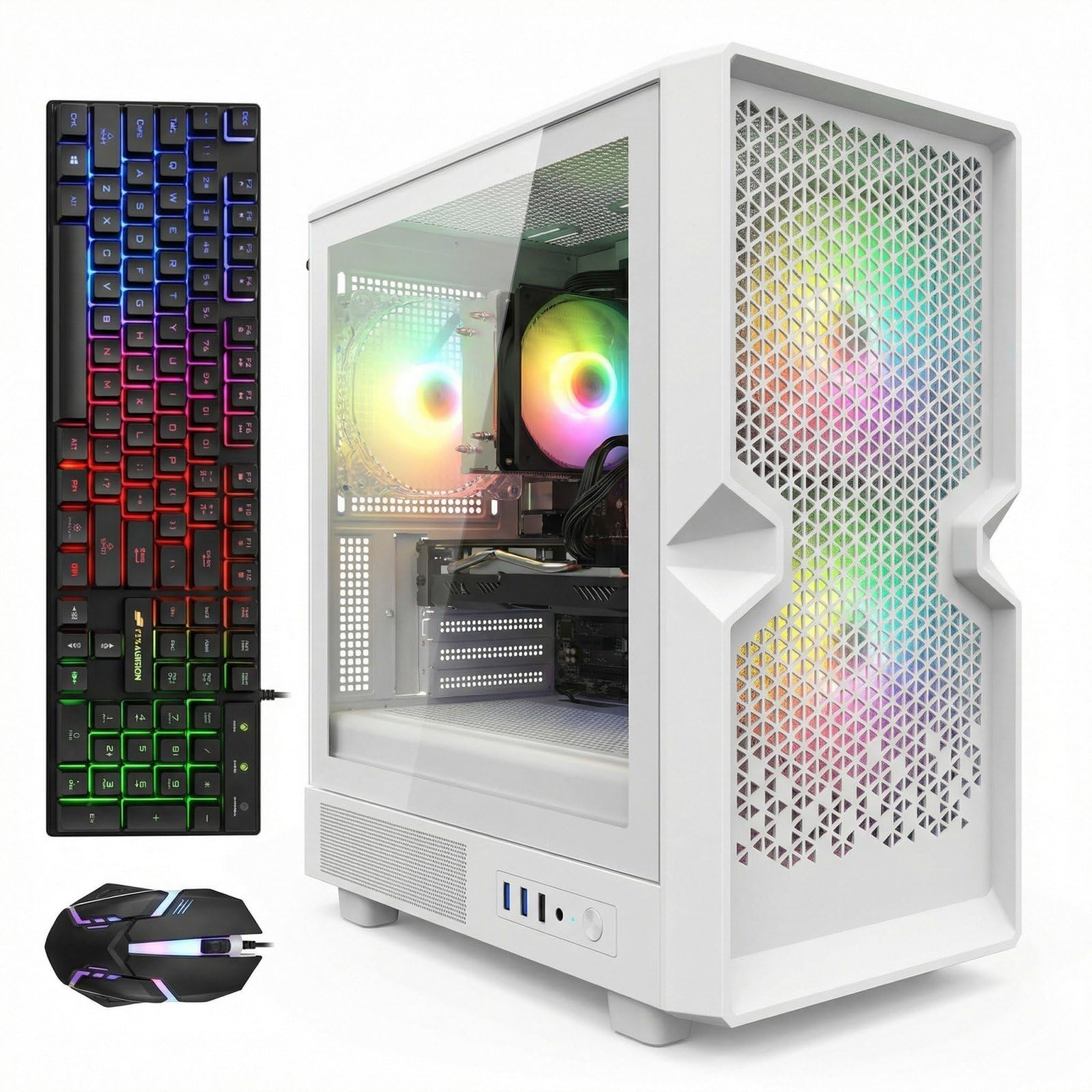
The STGAubron Ryzen 5 5500 pairs the Zen 3 processor with an NVIDIA GeForce RTX 2060 Super 8 GB — a last-generation GPU that still competes well at 1080p high settings thanks to its robust 8 GB VRAM buffer. The RTX 2060 Super offers performance comparable to an RTX 3050 but with higher memory bandwidth through its GDDR6 interface, making it a strong match for the Ryzen 5 5500 in games that are not heavily ray-traced. This is a pairing that prioritizes well-rounded 1080p gaming without over-spending on a modern card.
The system includes 16 GB of DDR4 memory and a 1 TB SSD, providing twice the storage of the similarly priced Q-Box, which is a meaningful difference when installing multiple modern titles. Connectivity includes WiFi 6 and Bluetooth 5.2 for wireless peripherals, plus a serial port for legacy devices — an unusual inclusion that may benefit industrial or educational users. The three RGB fans provide adequate cooling for the 5500 and 2060 Super, with the case design offering good airflow through a front mesh panel.
STGAubron includes an RGB keyboard and mouse in the box, making this a true ready-out-of-the-box system. Some users have reported that startup is slightly slower than expected before the SSD fully initializes, and the included mouse is basic. The RTX 2060 Super lacks hardware ray tracing efficiency compared to RTX 40-series cards, so DLSS is not available to boost frame rates in supported titles. For buyers primarily playing competitive shooters and older AAA games, the trade-off is well worth the entry price.
Why it’s great
- 8 GB VRAM on RTX 2060 Super handles 1080p high textures well
- 1 TB SSD provides generous storage for a budget build
- WiFi 6 and Bluetooth 5.2 for modern wireless connectivity
Good to know
- RTX 2060 Super lacks efficient ray tracing and DLSS support
- Startup can be slightly slower than expected initially
- Included peripherals are basic entry-level quality
11. abytespark i7 Prebuilt

The abytespark system pairs a decade-old Intel Core i7-4770 (3.4-3.9 GHz) with an AMD Radeon RX 590 8 GB, creating a legacy combo that can still run many eSports and older AAA titles at 1080p medium settings. The RX 590 provides 8 GB of GDDR5 memory, which is sufficient for most games from the 2015-2020 era, and the i7-4770’s four cores with Hyper-Threading handle light multitasking while gaming. Buyers should understand this is a system for budget-constrained entry-level gaming or office tasks with occasional light gaming.
The system comes with 16 GB of DDR3 RAM, a 512 GB SSD, and four RGB fans in a white chassis with tempered glass. The built-in CD/DVD-ROM drive is cosmetic only — the listing clarifies it is not functional — and the included gaming keyboard and mouse, plus mouse pad, provide a complete peripheral set out of the box. The Windows 11 Home installation on this system has been called into question by some reviewers, as the i7-4770 lacks TPM 2.0 and Secure Boot support, which means Microsoft’s compatibility checks were bypassed during installation.
Users report that the system runs VR titles like BONEWORKS on lower settings and handles popular eSports games smoothly. The RGB lighting is bright without being harsh, and the fans keep the CPU cool during extended gaming sessions. Some buyers have noted the absence of Bluetooth, requiring a separate USB adapter if wireless controllers or headphones are needed. The decade-old platform means PCIe 3.0 speeds, no NVMe boot support, and no upgrade path to modern processors without replacing the entire motherboard and RAM.
Why it’s great
- Extremely accessible entry point for first-time PC gaming
- 8 GB VRAM on RX 590 handles older titles well
- Includes keyboard, mouse, and mouse pad for immediate use
Good to know
- i7-4770 lacks TPM 2.0 for official Windows 11 support
- No Bluetooth and no NVMe boot support
- Platform age severely limits future upgrade paths
FAQ
What resolution should my CPU and GPU combo target?
How do I identify a CPU-GPU bottleneck in a prebuilt system?
Should I prioritize a newer CPU or a better GPU in my combo?
Can I use a DDR4 motherboard with a modern DDR5 GPU?
What role does the motherboard chipset play in CPU and GPU performance?
Final Thoughts: The Verdict
For most users, the cpu and gpu combo winner is the Skytech Gaming O11 Vision because the Ryzen 7 9850X3D and RTX 5070 Ti pair delivers outstanding frame rates at 1440p ultra settings with 16 GB of VRAM for future-proofing. If you want a compact system that still runs the latest games without compromise, grab the Cooler Master NR2 Pro. And for the best mid-range value that balances Zen 5 performance and modern connectivity, nothing beats the KOTIN Ryzen 5 9600X system.

Mo Maruf
I created WellFizz to bridge the gap between vague wellness advice and actionable solutions. My mission is simple: to decode the research and give you practical tools you can actually use.
Beyond the data, I am a passionate traveler. I believe that stepping away from the screen to explore new environments is essential for mental clarity and physical vitality.