Your high-end processor is a miniature inferno, and the stock cooler is just a polite suggestion to the heat. You need a sealed-loop liquid solution that can yank thermal energy away from the integrated heat spreader and dump it into your exhaust airflow before your fans turn into jet engines. That means choosing the right radiator size, pump speed, and fan static pressure for your specific build.
I’m Mohammad Maruf — the founder and writer behind WellFizz. I’ve spent hundreds of hours analyzing pump head pressure, cold-plate fin density, radiator thickness, and fan curve behavior to separate the AIOs that silently tame a 250W+ load from the ones that gurgle and throttle.
This guide breaks down the seven most compelling models on the market, from budget-friendly 240mm loops to premium 360mm setups with LCD screens and refillable reservoirs. Whether you’re building a quiet workstation or a gaming rig that never thermal-throttles, you’ll find the right cpu aio cooler for your specific socket and case dimensions here.
How To Choose The Best CPU AIO Coolers
Picking an AIO cooler isn’t just about finding the cheapest 360mm loop. You need to match radiator volume to your CPU’s thermal design power, check your case’s fan-mounting clearance, and decide whether you care about pump noise at idle or software-driven LCD screens. Each decision trades thermal headroom against noise, build complexity, and long-term reliability.
Radiator Size and Case Clearance
Radiator thickness and fan depth consume interior chassis volume. A standard 360mm radiator is around 397mm wide, so your case must have a 360mm fan mount in the top, front, or side panel. Many mid-towers officially support 360mm but clip the RAM height or motherboard VRM heatsinks — measure from the motherboard tray to the case edge before buying. A 240mm radiator fits almost any ATX or mATX case and still handles CPUs up to 250W with good fan static pressure.
Pump Design and Cold Plate Coverage
Not all pump housings cover the same surface area. AM5 and LGA1700 processors place the hotspot off-center, so AIOs with a native offset mounting plate (like Arctic’s latest generation) pull more heat from the densest part of the die. Pump RPM alone doesn’t tell the full story — a 3100 RPM pump running at 70% PWM can be quieter and just as effective as a cheaper 3800 RPM pump running at full speed.
Quick Comparison
On smaller screens, swipe sideways to see the full table.
| Model | Category | Best For | Key Spec | Amazon |
|---|---|---|---|---|
| ID-COOLING FX360 PRO | 360mm | Value-minded 350W cooling | 82.5 CFM / 2900 RPM pump | Amazon |
| ARCTIC Liquid Freezer III Pro 240 | 240mm | Quiet 240mm with VRM fan | 38mm thick rad / 1 RPM pump | Amazon |
| Thermalright FW360 SE ARGB V2 | 360mm | 2-inch LCD screen + ARGB | 68.9 CFM / 28.2 dBA fans | Amazon |
| MSI MAG Coreliquid A13 360 | 360mm | 3800 RPM split-flow pump | 14.4 dBA / 5.2 lbs unit | Amazon |
| CORSAIR Nautilus 360 RS | 360mm | Low-noise convex cold plate | 20 dBA pump / 2100 RPM fans | Amazon |
| NZXT Kraken Core 360 RGB | 360mm | Single-frame fan + 3100 RPM pump | 75.05 CFM / 31.9 dBA | Amazon |
| be quiet! Silent Loop 3 360 | 360mm | Refillable 3-chamber pump | 38.8 dBA / 6-pole motor | Amazon |
In‑Depth Reviews
1. ID-COOLING FX360 PRO Liquid CPU Cooler

The ID-COOLING FX360 PRO punches far above its price tier with a 350W TDP rating and a 2900 RPM pump that moves enough coolant to keep a Ryzen 5900X idling at 29°C in a 17°C ambient room. The three 120mm fans deliver 82.5 CFM at 2.55 mmH2O static pressure, which is more than adequate to push air through a standard 27mm-thick 360mm radiator. The daisy-chain connectors reduce cable clutter, and the all-black aesthetic fits into dark interior builds without any RGB distraction.
Real-world loads show the 9800X3D idling around 32°C and topping out at 80°C under sustained stress — impressive for a cooler at this price point. The pump is described as “very quiet” by multiple users, and the included Frost FX45 thermal paste performs well out of the tube. Installation on AM4 and AM5 sockets is straightforward with the included mounting hardware, though the bracket alignment requires a bit of patience on Intel LGA1700.
The lack of any LCD screen or ARGB lighting keeps costs down, but the functional performance is what matters. The FX360 PRO consistently delivers a 10-15°C drop over stock coolers on high-TDP CPUs, making it a no-brainer for builders who prioritize thermal headroom over aesthetics. The 1430-gram unit feels solidly built, though the tubing stiffness is average — nothing that causes fitting stress in a standard mid-tower.
Why it’s great
- Exceptional 350W TDP capacity for the price
- Daisy-chain fans simplify cable management
- Quiet operation at 1200 RPM fan speed
Good to know
- No RGB or LCD screen for visual customization
- Intel bracket can feel slightly fiddly during alignment
2. ARCTIC Liquid Freezer III Pro 240 A-RGB
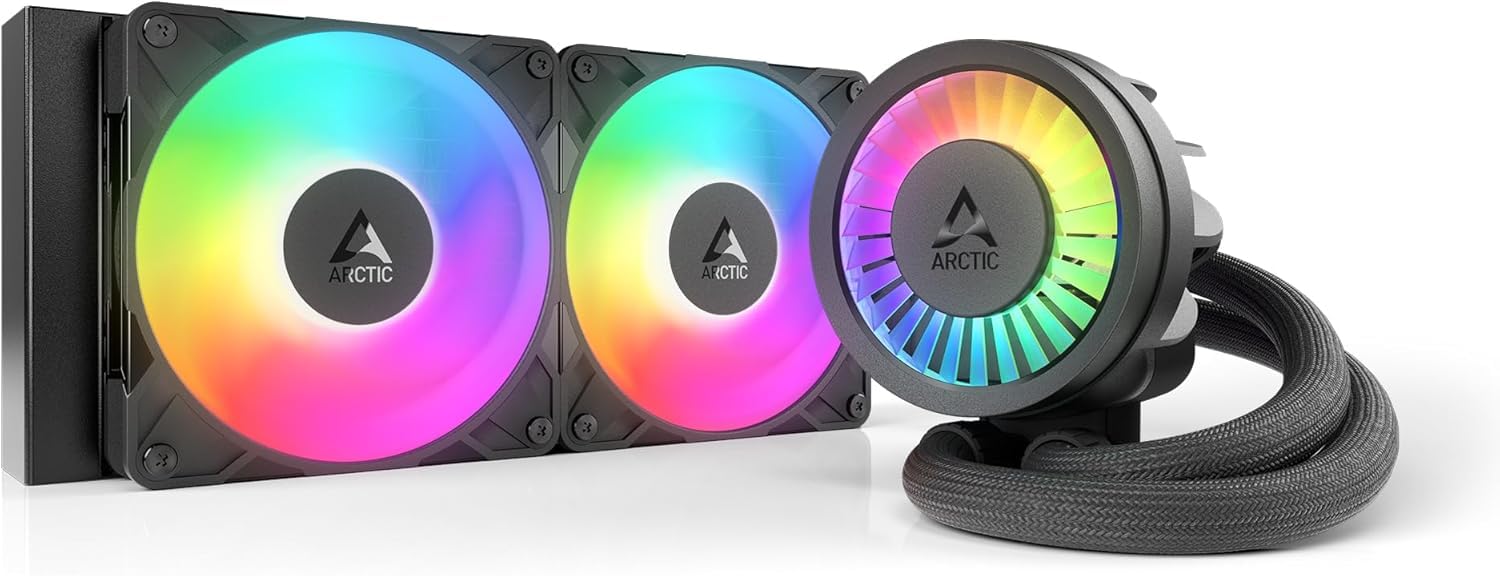
The ARCTIC Liquid Freezer III Pro 240 uses a 38mm thick radiator — significantly thicker than the standard 27mm — to increase the coolant volume and surface area for heat exchange. The included P12 Pro fans are rated for higher static pressure than the standard P12, enabling this 240mm AIO to rival some 360mm units on high-TDP CPUs. The integrated VRM fan on the pump housing actively cools motherboard voltage regulators, a rare feature that helps stability under sustained all-core loads.
Users report a 30°C drop over stock cooling on a Ryzen 9 3900, with max load temperatures around 65°C. The PWM pump and fans are exceptionally quiet at low speeds, though some reviewers note that full-tilt fan speed is audibly loud — easily fixed with a custom fan curve. The included LGA1851 and LGA1700 contact frame optimizes contact pressure distribution, which can reduce hotspot temperatures by several degrees on Intel’s 13th and 14th-gen chips.
One notable quirk: the thicker radiator requires about half an inch of extra case clearance beyond a standard 240mm AIO. It fits the Corsair 4000D and similar mid-towers, but owners of compact chassis should measure first. The install process on AM5 is straightforward, though pressing the pump onto the CPU requires more force than some expect. The integrated cable management — fan PWM wires run through the hose sheathing — results in only one visible cable.
Why it’s great
- 38mm thick rad delivers 360mm-class cooling
- Integrated VRM fan stabilizes motherboard temps
- Contact frame included for LGA1700/1851
Good to know
- Thicker radiator may not fit compact cases
- Pump seating requires significant downward force
3. Thermalright FW360 SE ARGB V2

The Thermalright FW360 SE ARGB V2 brings a 2-inch customizable LCD screen to the 360mm AIO market at a price point that undercuts most competitors with similar features. The pump spins up to 3000 RPM, and the three TL-M12Q fans push 68.9 CFM at 2.21 mmH2O pressure — numbers that comfortably handle a Ryzen 7 7800X3D or Core i7 14700K under gaming loads. The daisy-chain fan design reduces cable clutter significantly, and the 28.2 dBA noise rating keeps things quiet in a balanced fan curve.
Users report excellent cooling performance, with the 7800X3D staying well within safe thermal limits during extended sessions. The LCD screen supports system status readouts, custom images, and animated GIFs through Thermalright’s software, adding a personalized touch. The included thermal paste and thorough manual make installation smooth, though the silver mounting bracket stands out against a black motherboard — some users painted it to match.
The main complaint involves the LCD screen’s USB-C connection quality. One user reported a defective connector that Thermalright refused to warranty, though Amazon replaced the unit. The fans are described as “silent” during normal operation, and the 5-year warranty provides peace of mind. For builders who want a functional LCD without paying NZXT or Corsair prices, this is a compelling middle-ground option.
Why it’s great
- Affordable 2-inch LCD with GIF support
- Daisy-chain fans reduce cable mess
- Quiet 28.2 dBA fan operation
Good to know
- LCD USB-C connector quality can be inconsistent
- Silver mounting bracket may clash with dark builds
4. MSI MAG Coreliquid A13 360

The MSI MAG Coreliquid A13 360 stands out with a 3800 RPM pump that uses ceramic bearings and a split-flow water cooling system to reduce motor resonance — rated at only 14.4 dBA on paper. The 360mm aluminum radiator uses triple-layered netted plastic tubing under reinforced mesh sheathing to prevent evaporation over time. The three 120mm PWM fans have a maximum rotational speed of 5200 RPM, though real-world usage keeps them at much lower speeds for noise control.
Users consistently report that this AIO keeps a 5800X3D below 75°C under heavy gaming and synthetic loads, with idle temperatures in the low 30°C range. The installation process is described as “easy” with the preinstalled fans and included thermal paste. The daisy-chain fan system is also pre-connected, saving time during cable routing. The noise level at idle is genuinely low — one of the quietest 360mm units in this price bracket.
The primary complaint is that the MSI logo on the pump is misaligned with the AM5 mounting bracket — the logo sits on the side instead of the bottom when installed on AMD sockets. This is purely cosmetic and doesn’t affect performance. The 5.4-pound total weight means you’ll want a case with a sturdy motherboard tray. Out-of-box LGA1851 compatibility future-proofs your build for Intel’s latest platform.
Why it’s great
- 3800 RPM ceramic-bearing pump at 14.4 dBA
- Evaporation-proof triple-layer tubing
- LGA1851 support out of the box
Good to know
- MSI logo misaligns with AMD mounting orientation
- Heavy unit requires sturdy motherboard tray
5. CORSAIR Nautilus 360 RS

The CORSAIR Nautilus 360 RS prioritizes acoustic performance with a pump rated at just 20 dBA and RS120 fans that use AirGuide technology and Magnetic Dome bearings. The convex cold plate design ensures maximum contact pressure across the CPU’s integrated heat spreader, and pre-applied thermal paste in an optimized pattern speeds up installation. The daisy-chain fans connect to a single 4-pin PWM header, reducing wiring to a minimum.
Users report near-silent operation under light loads and acceptable noise levels under sustained gaming. On a Ryzen 9 9950X, temperatures stay excellent. One reviewer noted that replacing the pre-applied paste with a high-quality aftermarket compound dropped gaming temps by 10°C (from 55°C to 45°C at idle, 75°C to 65°C under load). The Cinebench 2024 multi-core test on a 5800XT stayed under 71°C, demonstrating strong thermal headroom.
Installation is straightforward for first-time builders, though the large 360mm radiator requires careful case selection — dimensions are 15.59 x 4.72 x 1.06 inches. The lack of RGB on the pump itself is a deliberate choice for a clean, minimal look, though the fans include ARGB for those who want lighting. After nearly a year of heavy use, the cooler maintains consistent performance without any pump noise or coolant loss.
Why it’s great
- Near-silent 20 dBA pump operation
- Convex cold plate improves CPU contact
- Daisy-chain fans reduce cable clutter
Good to know
- Pre-applied paste performance is average
- No RGB on pump for lighting enthusiasts
6. NZXT Kraken Core 360 RGB
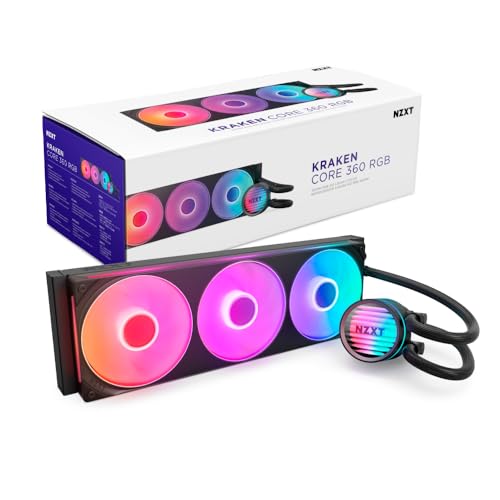
The NZXT Kraken Core 360 RGB uses a single-frame fan design that mounts three 120mm fans as one unit, reducing screw count and cable complexity. The 3100 RPM pump uses high static pressure RGB Core EV-B fans that push 75.05 CFM at 31.9 dBA — a solid balance of airflow and noise. Connection is direct to the motherboard with no extra controllers required, and PWM fan control allows precise speed adjustments based on CPU temperature.
Users report excellent cooling on an overclocked i7 11700K at 5 GHz, with temperatures staying well within safe limits under stress. The pre-connected fans significantly speed up installation — no daisy-chaining required. The unit is described as quiet at normal operating speeds, though it’s not the most silent AIO under full load. The build quality is good, and the single-frame design gives the interior a clean, industrial look.
One compatibility catch: the RGB requires a 5V addressable header on your motherboard, not a 12V RGB header. Some users needed a SATA-powered RGB adapter to make the lighting work. The pump does not display temperature data, which some users miss. At this price point, the Kraken Core 360 competes directly with the Nautilus 360 RS but offers more RGB flexibility at the cost of slightly higher noise.
Why it’s great
- Single-frame fan design simplifies installation
- Direct motherboard connection, no controller needed
- Strong 75 CFM airflow from RGB fans
Good to know
- Requires 5V RGB header for lighting
- No pump temperature display
7. be quiet! Silent Loop 3 360mm
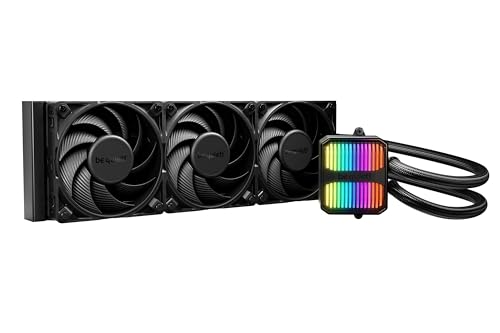
The be quiet! Silent Loop 3 360mm is the most acoustically engineered AIO on this list, featuring a three-chamber pump design that reduces internal turbulences and a dampened 6-pole motor. The three Silent Wings 4 120mm PWM high-speed fans are tuned for radiator use, with specialized blade geometry that minimizes airflow noise. A unique refill port and included coolant bottle extend the cooler’s lifespan beyond a typical sealed unit.
Users upgrading from the Dark Rock 4 air cooler on a Ryzen 9 7900X saw temperatures drop from the 80-90°F range to 65-74°F under load. The cooler is described as “dead silent” even with the pump at maximum speed, and many run it at 70% PWM for uncompromised quiet operation. The aluminum radiator and copper cold plate provide excellent thermal transfer, with wide CPU plate coverage that even supports Threadripper sockets.
The tubing is noticeably stiffer than most competitors — a trade-off for the durability of the sleeved lines. Installation is straightforward with clear manufacturer videos, and the 3-year warranty plus German engineering reputation provides confidence. The discreet ARGB lighting looks classy rather than flashy. This is the best choice for noise-sensitive users who want the longevity of a refillable loop without the complexity of a custom water-cooling setup.
Why it’s great
- Refillable port extends product lifespan
- Three-chamber pump is genuinely silent
- Threadripper socket support included
Good to know
- Stiff tubing makes routing less flexible
- Higher price point for the premium design
FAQ
Is a 360mm AIO always better than a 240mm model?
What does the contact frame in some AIOs actually do?
How important is pump noise level in dBA for a quiet build?
Final Thoughts: The Verdict
For most users, the cpu aio cooler winner is the ID-COOLING FX360 PRO because it delivers 350W of cooling capacity at a price that undercuts everything else while remaining quiet during normal use. If you want the acoustic refinement and long-term refillable design of a premium loop, grab the be quiet! Silent Loop 3 360mm. And for compact builds where a 240mm makes more sense, nothing beats the thermal density of the ARCTIC Liquid Freezer III Pro 240 with its integrated VRM cooling.

Mo Maruf
I created WellFizz to bridge the gap between vague wellness advice and actionable solutions. My mission is simple: to decode the research and give you practical tools you can actually use.
Beyond the data, I am a passionate traveler. I believe that stepping away from the screen to explore new environments is essential for mental clarity and physical vitality.