Our readers keep the lights on and my smoothie glass nicely filled. As an Amazon Associate, I earn from qualifying purchases.
That constant hunching over your desk, squinting at a document flat on the table, and the nagging ache in your neck by midday—this is the reality of working without a proper copy stand. It’s a simple ergonomic shift that can transform your daily comfort and productivity.
I’m Mohammad Maruf — the founder and writer behind WellFizz. For this guide, I’ve spent dozens of hours analyzing customer feedback, material specs, and weight capacities to find the copy stands that genuinely solve the problem of document placement and neck strain.
Whether you are a typist, a student, or a cook, the right stand puts your documents at eye level. This research identifies the best copy stand options available for every workspace and budget.
How To Choose The Best Copy Stand
Selecting a copy stand goes beyond just picking something to hold paper. You need a unit that offers the right balance of stability, adjustability, and build quality to match your specific workflow.
Material and Build Quality
The material dictates weight and stability. Metal stands, like the Fellowes Kopy-Aid, offer a weighted, non-slip base that stays planted during heavy typing. Plastic models are lighter and more portable, but may slide around on a smooth desk. Acrylic stands offer a modern look but may not have the same structural rigidity for heavier textbooks or large binders.
Adjustability and Angle Settings
Eye-level document placement is the primary goal of a copy stand. Look for models with multiple preset tilt positions or continuous 360-degree rotation. A stand that only offers one or two angles may not accommodate your specific chair height, desk height, or monitor setup, forcing you to revert to poor posture.
Page Holding Mechanism
The way a stand secures your documents is critical for productivity. A simple clip at the top may work for a single sheet, but a stand with a removable magnetic line guide is superior for typing or transcription work, as it helps you track lines without losing your place. Elastic page clips are better suited for cookbooks or thicker texts where you need to hold the book open.
Quick Comparison
On smaller screens, swipe sideways to see the full table.
| Model | Category | Best For | Key Spec | Amazon |
|---|---|---|---|---|
| Fellowes Kopy-Aid | Premium Metal | Office Typing | Metal build with magnetic line guide | Amazon |
| UPERGO Acrylic Stand | Premium Acrylic | Modern Multi-Device | Aluminum alloy double-pole support | Amazon |
| LOXP Book Stand | Mid-Range Metal | Textbooks & Cookbooks | 11lb weight capacity on aluminum base | Amazon |
| SupeDesk Book Stand | Mid-Range Wood | Bible & Study | 6.6lb weight capacity, wood top | Amazon |
| Fellowes Copystand | Budget Plastic | Light Document Use | 75 sheet capacity, folds flat | Amazon |
In‑Depth Reviews
1. Fellowes Kopy-Aid Black Letter Copyholder (11053)

The Fellowes Kopy-Aid is the benchmark for a serious office copy stand. Its all-metal construction provides a substantial, weighted feel that stays firmly in place during rapid typing sessions, a critical feature for transcriptionists and data-entry workers. The adjustable tilt and removable magnetic line guide allow you to track each line of text with precision, eliminating the risk of losing your place.
Reviewers consistently praise its sturdiness and superior page-holding mechanism. The magnetic accessories hold multiple pages without the need to staple or clip them, and one-handed page flipping is seamless. The stand folds flat for easy storage when not in use, but its heavier weight (1.9 pounds) suggests it is best as a permanent fixture on a dedicated desk.
This is the gold standard for users who need a dedicated, unbreakable copy stand for daily office work. It is a straightforward, purpose-built tool that prioritizes function over form, and it does so exceptionally well.
Why it’s great
- Rock-solid metal construction prevents sliding
- Removable magnetic line guide for line-by-line tracking
- Folds flat for compact storage
Good to know
- Heavier than plastic alternatives
- Best suited for standard letter-size paper
2. UPERGO Adjustable Acrylic Book Stand

The UPERGO stand merges aesthetic appeal with functional versatility. Its clear acrylic platform and wooden base offer a modern, clean look that complements any desk. The aluminum alloy double-pole support system provides a wide range of adjustability, making it suitable for holding everything from a textbook to a cookbook or even a tablet. The inclusion of a pen slot is a thoughtful touch for students and creators.
Customer feedback highlights its sturdiness and ease of assembly. The clear design helps reduce visual clutter, and the foldable structure makes it somewhat portable. However, the page clips are best suited for lighter materials; users with very thick or heavy books may find the grip is better at holding the book open vertically than securing it against sliding.
This stand is ideal for the user who wants a single, attractive stand that can handle multiple device types and looks good doing it. The trade-off is a slightly less aggressive grip on heavy textbooks compared to dedicated metal stands.
Why it’s great
- Modern, aesthetic acrylic design
- Durable double-pole support for height and angle adjustment
- Built-in pen holder for convenience
Good to know
- Page clips can struggle with very thick books
- Clear surface may show smudges
3. LOXP Book Stand for Reading
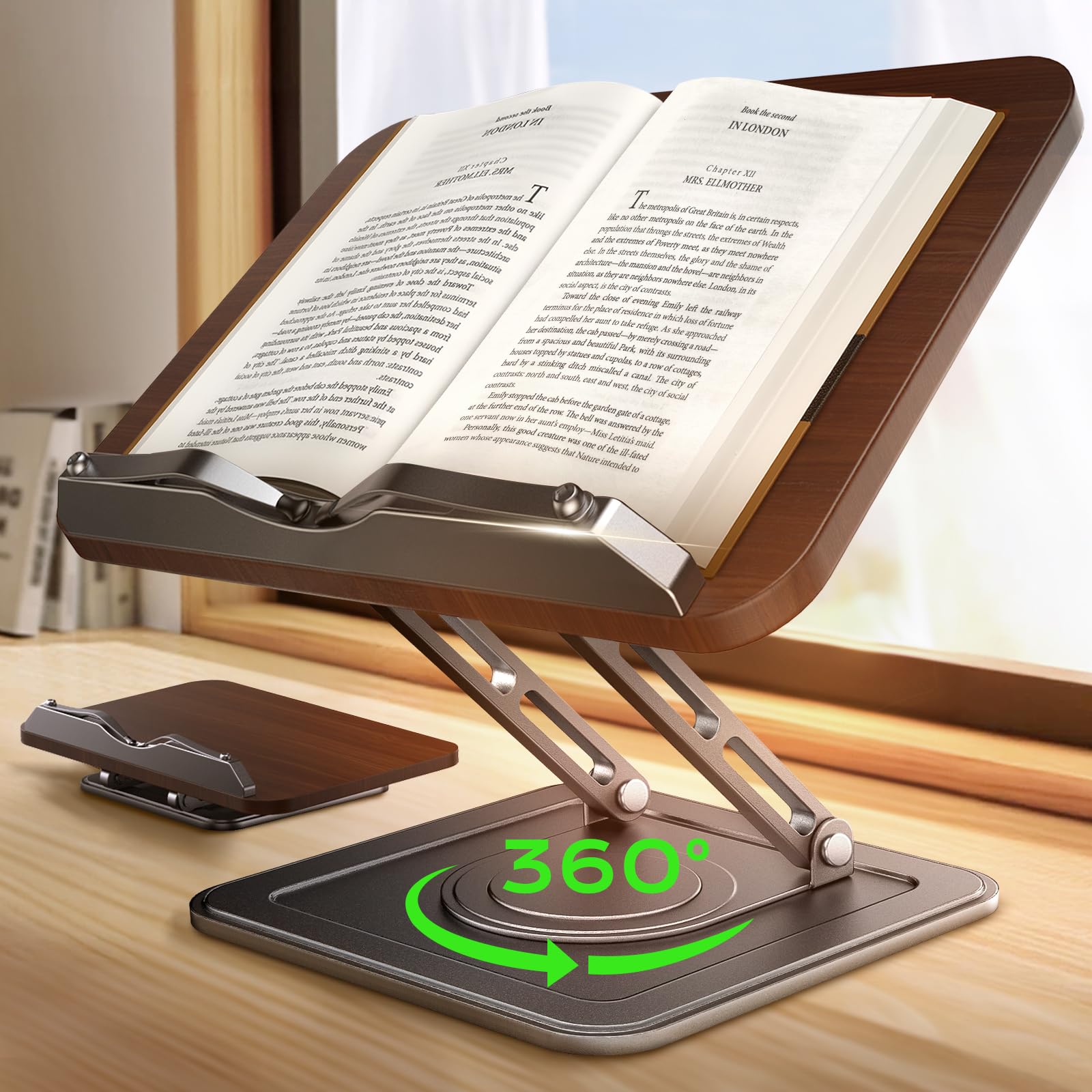
The LOXP stand offers an exceptional balance of heavy-duty capacity and ergonomic flexibility. With a maximum weight recommendation of 11 pounds, it can easily handle the largest textbooks and thick cookbooks. The 360-degree rotation and vertical tilt with 15 locking positions mean you can find the perfect angle for any task, from typing to recipe reading, without hunching.
User reviews frequently mention its stability and build quality. The weighted aluminum alloy base prevents wobbling, even with heavy books and active page turning. The elastic page clips are long and adjustable, holding pages securely without tearing. The ability to fold down to a slim 1.6-inch profile is a bonus for users who need to clear their desk space.
This is the top choice for the user who needs a robust, versatile stand that can handle heavy loads without tipping. Its ergonomic benefits are clear, and the build quality justifies its position as the best overall pick for most users.
Why it’s great
- High 11lb weight capacity for heavy books
- Full 360° rotation with multiple tilt lock positions
- Folds extremely flat for storage and portability
Good to know
- Raising and lowering requires effort due to spring tension
- Heavier than basic copy stands
4. SupeDesk Book Stand for Reading

The SupeDesk stand provides a reliable solution for users needing a sturdy yet affordable option. Its combination of wood and aluminum feels premium, and the 360-degree rotation makes it easy to share a screen or document with a colleague or to adjust for reading from different positions. The maximum weight recommendation of 6.6 pounds is sufficient for most Bibles, large textbooks, and standard cookbooks.
Reviewers highlight its effectiveness at improving posture during Bible study and daily reading. The stand holds pages securely and swivels easily without sliding around the desk. Some users noted that adjusting the angle requires a bit of muscle, indicating a secure hinge mechanism. The foldable design adds to its convenience for moving between rooms.
This is a fantastic choice for the budget-conscious shopper who wants wood and metal durability without the premium price tag of the top-tier models. It delivers a stable, adjustable platform that addresses the core ergonomic issues of document viewing.
Why it’s great
- Sturdy wood and aluminum combination
- Smooth 360° turntable base
- Good value for the build quality
Good to know
- Hinge adjustment can be stiff initially
- Not as supportive for writing on paper
5. Fellowes Copystand, Platinum/Charcoal (20000)

The basic Fellowes Copystand is the no-frills entry point for document holding. Its lightweight, impact-resistant plastic construction and six adjustable viewing angles make it a functional tool for a minimalist setup. It is designed to hold up to 75 sheets of letter-size paper, making it ideal for typing from a manuscript or document.
User reviews are mixed on its stability. While many find it useful for everyday work, others note that the plastic base can slide around on a smooth desk and that the top clip primarily prevents the paper from falling forward rather than securely holding it in place. However, its ability to fold flat for storage in a drawer or briefcase is a clear advantage for portability.
This stand is best for someone who needs an occasional, very affordable solution for holding a few sheets of paper. It is a secondary tool, not a primary ergonomic investment, and is best for those who prioritize a low profile and portability over heavy-duty stability.
Why it’s great
- Extremely lightweight and portable
- Folds flat for easy storage in a bag or drawer
- Six adjustable viewing angles for basic ergonomics
Good to know
- Plastic build may slide on smooth surfaces
- Top clip is not robust for holding thick stacks of paper
FAQ
What is the difference between a copy stand and a book stand?
Can a copy stand hold a laptop or tablet safely?
Does a copy stand really reduce neck pain?
Final Thoughts: The Verdict
For most users, the best copy stand winner is the LOXP Book Stand because it offers the best balance of heavy-duty capacity, ergonomic adjustability, and a compact folding design. If you want a dedicated office workhorse for typing from paper, grab the Fellowes Kopy-Aid. And for a modern, multi-device stand that looks great on a desk, nothing beats the UPERGO Acrylic Stand.

Mo Maruf
I created WellFizz to bridge the gap between vague wellness advice and actionable solutions. My mission is simple: to decode the research and give you practical tools you can actually use.
Beyond the data, I am a passionate traveler. I believe that stepping away from the screen to explore new environments is essential for mental clarity and physical vitality.