Our readers keep the lights on and my smoothie glass nicely filled. As an Amazon Associate, I earn from qualifying purchases.
A copier machine that jams mid-run, wastes toner on every page, or locks you into overpriced cartridges can cripple your office workflow and eat into your margins. Whether you run a small law firm, manage a school admin office, or handle high-volume invoices from a home workspace, the difference between a reliable workhorse and a frustrating time-sink comes down to page-per-minute speed, paper handling capacity, and the true cost of every printed sheet.
I’m Mohammad Maruf — the founder and writer behind WellFizz. I’ve spent hundreds of hours dissecting copier machine build quality, comparing toner yields across competitive brands, and analyzing real-world reliability data to separate the machines that truly deliver from those that just look good on a spec sheet.
Whether you prioritize blazing speed, color accuracy, or the lowest long-term running costs, this guide breaks down the top-performing models so you can choose the best copier machine for your business demands and budget.
How To Choose The Best Copier Machine
Buying a copier machine isn’t like picking a smartphone — it’s a multi-year investment that directly impacts your daily workflow and operating costs. Focus on three primary areas: print speed and duty cycle, paper handling and expandability, and the true cost of consumables over time.
Speed, Duty Cycle, and First Page Out
The pages-per-minute (ppm) rating is the most visible number, but a machine’s duty cycle (maximum pages per month) and its recommended monthly volume tell you whether it’s built for your load. A 50ppm machine with a 100,000-page duty cycle will handle 8,000 pages a month without complaint, while a 24ppm machine rated for 30,000 pages may struggle at half that volume. Pay attention to the first page out time — some machines need 8-10 seconds to warm up for the first print, which adds up across the day. Always look for warmup time below 7 seconds for busy offices.
Paper Capacity and Expandability
A standard 250-sheet tray means someone is refilling paper every 8 minutes during a large copy job. For any office printing more than 2,000 pages per month, you want at least 500-sheet capacity out of the box, ideally expandable to 1,600+ sheets with optional trays. Also check the bypass tray — a single-sheet multipurpose tray is fine for envelopes, but a 50-sheet tray gives you flexibility for cardstock, labels, or different letterhead without swapping the main cassette.
Total Cost of Ownership (TCO)
The purchase price is only the entry fee. Your real costs come from toner replacements, drum units, and paper waste. High-yield and ultra-high-yield toner cartridges (3,000 to 18,000 pages) dramatically lower cost per page. Some printers aggressively lock you into OEM toner with firmware checks — factor that into your long-term budget. For color machines, the cost of a full CMYK toner set can approach the printer’s original price, so review cartridge yields carefully before committing.
Quick Comparison
On smaller screens, swipe sideways to see the full table.
| Model | Category | Best For | Key Spec | Amazon |
|---|---|---|---|---|
| Brother HL-6210DW | Monochrome Laser | High-volume print-only | 50 ppm, 520-sheet tray | Amazon |
| Canon imageCLASS MF267dw | Monochrome MFP | Compact all-in-one | 30 ppm, 250-sheet tray | Amazon |
| Xerox C235dni | Color Laser MFP | Small office color | 24 ppm color, 500-yield starter | Amazon |
| Canon imageCLASS D1620 | Monochrome MFP | High-speed scanning | 45 ppm, 2,300-sheet max | Amazon |
| Brother MFC-L3720CDW | Color Laser MFP | Color with cloud apps | 19 ppm, 3.5″ touchscreen | Amazon |
| Lexmark MX431adw | Monochrome MFP | Secure small office | 42 ppm, steel frame | Amazon |
| Xerox B315DNI | Monochrome MFP | Home office B&W | 42 ppm, 250-sheet tray | Amazon |
| HP Color LaserJet Pro MFP 3301fdw | Color Laser MFP | Professional color docs | 26 ppm, TerraJet toner | Amazon |
| Canon imageCLASS MF751Cdw | Color Laser MFP | Color speed and warranty | 35 ppm, 850-sheet max | Amazon |
| HP Laserjet Pro MFP 4101fdw | Monochrome MFP | Fast B&W teams | 42 ppm, Wolf Pro Security | Amazon |
| Epson EcoTank Pro ET-5800 | Color Inkjet Supertank | Lowest cost per page | 25 ppm, 7,500-page ink set | Amazon |
In‑Depth Reviews
1. Brother Professional HL-6210DW

The Brother HL-6210DW is the clear leader for any office that needs fast, reliable monochrome printing without paying for features they don’t use. At 50 pages per minute, it outpaces most competitors in this class, and the 520-sheet main tray combined with a 100-sheet multipurpose tray keeps the workflow moving. Expandable up to 1,660 sheets with optional trays, it handles high-volume jobs that would stall a smaller unit. The ultra-high-yield toner cartridge delivers up to 18,000 pages, dramatically reducing the cost per page.
Build quality is exceptional, with a sturdy metal frame and automatic duplex printing that works reliably without jams. The triple-layer security features — including secure print and network protection — make it a strong choice for businesses handling sensitive documents, while the dual-band wireless and Gigabit Ethernet give IT departments flexibility in network setup. The 5-inch color touchscreen is intuitive and responsive.
Customer feedback consistently praises its speed, professional print quality, and long-lasting toner. The main drawbacks are the lack of scanning and copying functions — this is a print-only device — and some users report frustration if the admin password is lost during a firmware update, which can require hidden menu access to reset. For pure high-volume monochrome printing, however, this is the machine to beat.
Why it’s great
- Blazing 50 ppm with fast first-page-out timing
- Very low cost per page with ultra-high-yield toner
- Triple-layer security features for document protection
Good to know
- Print-only unit — no scanner or copier built in
- Firmware password recovery requires hidden menu access
2. Canon imageCLASS MF267dw

The Canon imageCLASS MF267dw is a compact monochrome all-in-one that delivers 30 pages per minute with a 5-second first-page-out time, making it a fast and quiet option for small offices and home workspaces. Its 250-sheet standard cassette and single-sheet multipurpose tray are adequate for light to moderate volume, but the standout feature is the 6-line black and white touch LCD that makes navigation straightforward without a steep learning curve. Full duplex printing and a 50-sheet auto document feeder round out the productivity features.
Connectivity is robust: built-in Wi-Fi, AirPrint, Canon Print Business, Mopria, and Google Cloud Print support mean users can send jobs from practically any device. The voice control compatibility with Amazon Alexa adds a layer of convenience for hands-free operation. Power usage is low, and the high-yield toner option helps keep running costs manageable for an office printing up to 1,500 pages per month.
Real-world user feedback is overwhelmingly positive, especially from those who switched from problematic inkjet or Brother units. The scanner works reliably, copies are crisp, and the ADF handles multi-page originals without skew. Some users report that standard toner cartridges run out faster than expected, and a faint ticking noise in power-save mode has been noted by a minority of owners. The ADF scanning can occasionally produce crooked results if the originals aren’t perfectly aligned.
Why it’s great
- Quiet operation with fast 5-second first-page-out
- Easy wireless setup and wide mobile compatibility
- Reliable duplex printing and ADF scanning
Good to know
- Standard 250-sheet tray may need frequent refills
- Some users report higher-than-expected toner consumption
3. Xerox C235dni Wireless Color Laser

The Xerox C235dni brings color laser printing to the small office without the typical bulk or high entry cost. Printing at 24 pages per minute in both color and black, it produces sharp text and vibrant graphics that make presentations and reports look professional. The 500-page starter toner gets you going, and high-yield cartridges help keep ongoing costs reasonable for an office outputting up to 1,500 pages per month.
Setup is streamlined through the Xerox Easy Assist App, letting users get up and running from a smartphone rather than wrestling with driver CDs. Wireless connectivity with AirPrint and Mopria cover the major mobile platforms, and the automatic duplex capability saves paper without sacrificing speed. The color LCD touchscreen provides clear control over print, scan, and copy functions.
User reviews highlight the machine’s reliability during power outages — it reboots without data loss — and the durable build quality that matches Xerox’s reputation. Some owners experienced light printing on generic paper, which was resolved by switching to premium paper and disabling eco mode. Scanner output on some units was noted as too light even at maximum darkness settings. The email-to-print feature requires a TXT record setup on Gmail, which may challenge non-technical users.
Why it’s great
- Vibrant color output from a compact desktop footprint
- Smartphone app setup simplifies installation
- Durable build survives power interruptions reliably
Good to know
- Starter toner yield is only 500 pages
- Scanner output may appear light on some units
4. Canon imageCLASS D1620

The Canon imageCLASS D1620 is designed for offices that push high daily volume. With monochrome print speeds of 45 pages per minute and a maximum paper capacity of 2,300 sheets (using optional trays), this machine can handle sustained output without constant attention. The automatic duplex printing and 50-sheet auto document feeder keep copying and scanning workflows efficient, while the three-year limited warranty provides peace of mind for a machine built to last.
Connectivity includes USB and Ethernet, making it easy to integrate into a wired office network. The touch LCD interface is functional, though some users note the on-screen menus are deeper than expected. The machine supports Windows and Mac operating systems, and the standard toner yields 5,000 pages, with high-capacity options available for higher-volume environments.
Long-term owners report excellent reliability over 5+ years of continuous use in settings like auto shops and home offices. The plug-and-play setup is praised, with no subscription requirements. The main downside is that scan-to-email configuration is needlessly complex, requiring hidden menu navigation and sometimes a call to Canon support to get working. The instruction manual covers the basics but omits detailed guidance for advanced network features.
Why it’s great
- Very high 45 ppm speed for fast batch jobs
- Massive 2,300-sheet expandable paper capacity
- Proven long-term reliability over many years
Good to know
- Setting up scan-to-email is frustratingly complex
- Instruction manual lacks detail for advanced setup
5. Brother MFC-L3720CDW

The Brother MFC-L3720CDW is a full-color laser all-in-one built for modern workflows, with a 3.5-inch color touchscreen that provides 48 customizable shortcuts for one-tap access to frequent tasks. Print speeds hit 19 pages per minute in both color and black, while the 50-sheet auto document feeder and automatic duplex keep multi-page jobs moving. The 250-sheet adjustable paper tray is standard, and the dual-band wireless networking (2.4 GHz and 5 GHz) plus Wi-Fi Direct offers flexible connectivity options.
Cloud integration sets this model apart: direct access to Google Drive, Dropbox, and OneNote from the touchscreen means you can scan directly to cloud storage without a computer. The Brother companion app lets you monitor toner levels, manage print queues, and print remotely. Print quality is consistently sharp, with vibrant colors and water-resistant output that holds up well on plain paper.
User feedback is generally strong, with particular praise for Linux compatibility and reliable WiFi performance. Some buyers report that the waste toner error can render the printer unusable after around 1,000 pages, requiring a replacement waste toner box that the machine sometimes refuses to detect. This issue appears most often after the warranty period. Generic toner cartridges work well according to many users, though Brother recommends genuine cartridges for best reliability.
Why it’s great
- Cloud connectivity to Google Drive, Dropbox, OneNote
- Excellent color print quality with water-resistant output
- Intuitive touchscreen with 48 customizable shortcuts
Good to know
- Waste toner error can brick the unit prematurely
- 19 ppm is slower than monochrome-only competitors
6. Lexmark MX431adw

The Lexmark MX431adw is built around a rugged steel frame, making it one of the most physically durable options in this class. Monochrome print speed reaches 42 pages per minute with a first-page-out time of just 5.9 seconds, and the automatic duplex scanning — not just duplex printing — sets it apart for document-heavy environments. The touch LCD screen provides access to print, copy, scan, and analog fax functions, while USB and Ethernet connectivity keep the machine securely wired.
Security is a primary focus: the device includes built-in protection for data on the device, over the network, and at all points in between. This makes it a strong candidate for legal, medical, or financial offices that require compliance with data privacy standards. The printer also supports automatic two-sided printing and can handle up to 100% recycled paper, contributing to sustainability goals.
Customer reviews highlight fast print speed and good value, but reliability concerns appear prominently. Multiple users report units needing replacement within months due to tray issues, copy quality defects, or the machine becoming completely unresponsive. Lexmark support has been described as unhelpful in these situations. The toner cost is also noted as high, and the instruction manual is minimal — users often need to call support for initial setup.
Why it’s great
- Steel frame construction for long-term durability
- Automatic duplex scanning saves time on two-sided originals
- Strong built-in security features for sensitive data
Good to know
- Reports of reliability issues and unresponsive units
- Toner costs are high relative to the purchase price
7. Xerox B315DNI
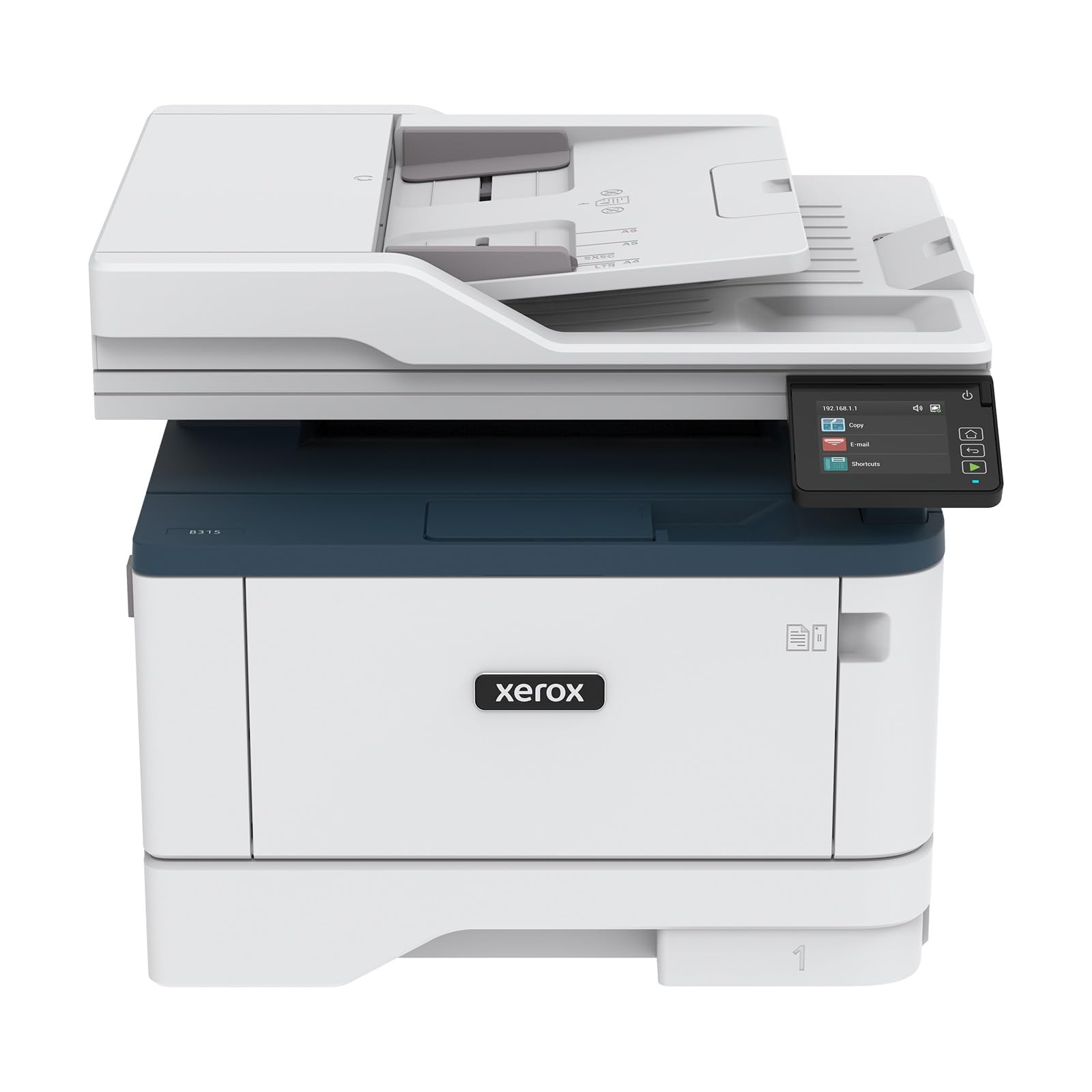
The Xerox B315DNI is a monochrome all-in-one targeted at home offices and small teams that need reliable black and white output without taking up too much space. At 42 pages per minute, it matches the speed of much larger machines while fitting into a compact desktop footprint. The 250-sheet paper tray and automatic two-sided printing are adequate for small teams, and the reversing automatic document feeder (RADF) allows for two-sided scanning without manual intervention.
Connectivity is flexible: built-in Wi-Fi supports Apple AirPrint, Mopria, and Chromebook printing, so users can print from nearly any device. The Xerox Print & Scan Experience software automates common tasks like auto-straightening and receipt scanning, reducing manual cleanup. Comprehensive security features protect against network threats, important for an office that handles confidential documents.
User sentiment is mixed. Many appreciate the quick QR-code-based setup and rock-solid wireless connectivity, as well as the premium build quality and quiet operation. However, some owners report extremely difficult setup that required paid IT support, and the manual feed tray only handles one page at a time. The email-to-print function is slow and limited, and toner costs are considered high. A minority of users strongly advise against replacing a functional Brother with this unit.
Why it’s great
- Compact design with fast 42 ppm print speed
- Easy QR code setup with reliable wireless connectivity
- Auto-straighten and receipt scan features simplify document handling
Good to know
- Some users report setup requiring professional IT assistance
- Manual feed tray handles only one sheet at a time
8. HP Color LaserJet Pro MFP 3301fdw

The HP Color LaserJet Pro MFP 3301fdw leverages next-generation TerraJet toner to produce more vivid colors and sharper text than typical color laser machines. Print speeds reach 26 pages per minute in both black and color, and the single-pass auto document feeder scans two sides at once, dramatically speeding up multi-page copying and scanning. The 250-sheet input tray and automatic duplex printing are standard, and dual-band Wi-Fi with self-reset automatically detects and resolves connection drops — a common office frustration.
The HP Smart app provides mobile printing and scanning from anywhere, and the machine integrates easily into Windows, Mac, and Chromebook environments. Build quality feels solid, and the touchscreen interface is responsive and intuitive. HP’s TerraJet technology uses less energy while delivering higher-quality color output, making this a strong choice for offices that prioritize professional-looking documents.
Customer reviews are largely positive, with users praising the fast setup, excellent print quality, and reliable auto-duplexing. Some users report severe print defects like streaks and missing toner, with HP unable to supply replacement toner for months due to the new model’s supply chain issues. The printer blocks non-HP cartridges through firmware checks, and firmware updates can occasionally brick the device, requiring hours to troubleshoot. HP recommends disabling automatic updates to avoid this risk.
Why it’s great
- TerraJet toner delivers noticeably more vibrant colors
- Single-pass duplex scanning for fast multi-page jobs
- Self-resetting Wi-Fi eliminates common connection issues
Good to know
- Firmware blocks non-HP cartridges aggressively
- Toner supply shortages reported for new models
9. Canon imageCLASS MF751Cdw

The Canon imageCLASS MF751Cdw is one of the fastest color laser all-in-ones in its class, delivering 35 pages per minute in both color and black — a speed that rivals many monochrome-only units. Paper handling includes a 250-sheet cassette and a 50-sheet multipurpose tray, expandable to 850 sheets with the optional cassette. The 50-sheet simplex automatic document feeder handles multi-page copying without manual loading, and automatic duplex printing is standard.
Canon pairs speed with strong usability: the touch LCD screen is clear and responsive, and mobile printing supports AirPrint, Mopria, and the Canon PRINT Business app. The three-year limited warranty is one of the longest offered in this category, giving you added protection for a machine that will see heavy use. Toner 069 high-capacity cartridges help extend time between replacements, and Canon allows third-party toner without blocking it at the firmware level.
User reviews highlight reliable performance with sharp, vibrant output even on plain paper. The scanner and copier work well with fast ADF operation. Some buyers found network setup on Windows 10 to be frustrating, though USB setup was straightforward. Starter toner cartridges have short yields — typical for the industry — so budget for high-capacity replacements quickly. A few users note that 1200 DPI image quality, while good, is not quite as sharp as some competitors for detailed graphics.
Why it’s great
- Fast 35 ppm color and black speed
- Three-year warranty reduces long-term risk
- Does not block third-party toner cartridges
Good to know
- Starter toner cartridges have short yields
- Windows 10 network setup can be frustrating
10. HP Laserjet Pro MFP 4101fdw

The HP Laserjet Pro MFP 4101fdw is engineered for teams of up to 10 people who need fast, secure monochrome printing. At 42 pages per minute, it keeps up with busy workflows, and the auto document feeder with duplex scanning speeds up copying and archiving tasks. HP Wolf Pro Security provides enterprise-level protection with customizable settings, so sensitive documents remain safe across the network. The 250-sheet input tray is supplemented by a multipurpose tray for specialty media.
Connectivity is comprehensive: intelligent Wi-Fi automatically selects the best band to maintain a stable connection, and Ethernet and Bluetooth are included for wired alternatives. The machine works with Windows, Mac, AirPrint, Android, and Chromebook devices. HP’s Smart app allows monitoring and printing from anywhere. Build quality is robust, and the color touchscreen simplifies navigation through the settings menu.
Users consistently praise the fast print speed and sharp text quality. The smart auto-adjustment features — like automatically defaulting to duplex or detecting IRS forms that need single-sided printing — show thoughtful design. The primary frustration is that HP’s firmware blocks third-party toner, and firmware updates have occasionally caused blue-screen errors during setup that required HP support to resolve. The phone app also sometimes gets stuck, requiring jobs to be resent from a computer.
Why it’s great
- Fast 42 ppm with intelligent Wi-Fi band selection
- HP Wolf Pro Security for business-grade data protection
- Smart features auto-detect single vs duplex requirements
Good to know
- Firmware blocks third-party toner cartridges
- Phone app can freeze and require manual job reset
11. Epson EcoTank Pro ET-5800

The Epson EcoTank Pro ET-5800 takes a different approach than laser copiers, replacing toner cartridges with high-yield ink bottles that print up to 7,500 pages black and 6,000 color out of the box. This drastically drops the cost per page to around 2 cents per color page — roughly 80% less than standard color laser toner. PrecisionCore Heat-Free Technology delivers 25 pages per minute black and 12 pages per minute color with no warmup time, making first-page-out nearly instant.
Paper handling is generous: two front trays (totaling 500 sheets) plus a rear feed for specialty paper give you flexibility without constant refills. The motorized output tray adds a premium feel, and the large tilting LCD screen makes navigation easy. Pigment-based DURABrite inks produce instant-dry, borderless prints up to 8.5 x 14 inches that are water-resistant and smudge-proof. The machine also supports duplex printing and includes fax functionality.
Owner feedback is positive overall, with strong praise for the value proposition and print quality on cardstock. The keyed ink bottles prevent accidental mis-filling, and the spill-free design keeps the filling process clean. Downside: the printer requires pigmented ink, and using dye ink can cause damage not covered by the warranty. Some users report persistent false error messages and an Epson support team that is rigid and unhelpful. The printer’s depth is around 19 inches, not the 31 inches listed on some product pages.
Why it’s great
- Extremely low cost per page with included high-yield ink
- Instant-dry pigment ink with borderless print capability
- Dual paper trays offer 500-sheet total capacity
Good to know
- Dye ink will damage the printer; pigment ink only
- False error messages reported by multiple users
FAQ
Is color laser or monochrome laser better for a small office?
What monthly page volume should I look for?
How important is the auto document feeder for a copier machine?
Can I use third-party toner without damaging the printer?
Final Thoughts: The Verdict
For most offices, the best copier machine winner is the Brother HL-6210DW because it delivers the fastest monochrome speed, expandable paper capacity up to 1,660 sheets, and extremely low cost per page with ultra-high-yield toner. If you need scanning and copying in one unit, grab the Canon imageCLASS MF751Cdw for its excellent color speed and long warranty. And for the lowest long-term running costs with vibrant color, nothing beats the Epson EcoTank Pro ET-5800 with its massive ink supply and sub-two-cent cost per page.

Mo Maruf
I created WellFizz to bridge the gap between vague wellness advice and actionable solutions. My mission is simple: to decode the research and give you practical tools you can actually use.
Beyond the data, I am a passionate traveler. I believe that stepping away from the screen to explore new environments is essential for mental clarity and physical vitality.