Our readers keep the lights on and my smoothie glass nicely filled. As an Amazon Associate, I earn from qualifying purchases.
To unlock the full potential of a high-end processor, thermal management is non-negotiable; a quality liquid cooler is the only way to keep CPU temperatures in check during intense gaming sessions, preventing thermal throttling that robs you of performance.
I’m Mohammad Maruf — the founder and writer behind WellFizz. I’ve spent hundreds of hours analyzing thermal performance data, noise levels, and pump architectures to put together this definitive guide on air and liquid cooling solutions.
Whether you’re building a new rig or upgrading a hot-running chip, finding the right cooling system for gaming pc requires balancing thermal capacity, noise output, and case compatibility for your specific build.
How To Choose The Best Cooling System For Gaming PC
Choosing between air towers and all-in-one liquid coolers comes down to your CPU’s thermal output, your case’s physical constraints, and your tolerance for noise. High-end chips like the AMD Ryzen 9 or Intel Core i9 require a 360mm radiator to stay below 70°C under sustained loads, while mid-range processors can often be adequately served by a 240mm liquid cooler or a high-end air tower. The key is matching the cooler’s dissipation capacity, measured in watts, to your CPU’s TDP.
Radiator Size and Case Compatibility
Physical fitment is the first and most restrictive variable. A 360mm radiator measures roughly 15.5 inches in length and requires a case with three 120mm fan mounts at the top, front, or side. Before purchasing, check your case’s radiator support specs: some mid-towers can only accommodate a 240mm or 280mm radiator, which may force you into a smaller, less powerful cooling solution. Thickness also varies; premium radiators like the ARCTIC Liquid Freezer III Pro are 38mm thick, requiring additional clearance for fans and tubing.
Pump Performance and Noise
The pump is the heart of any AIO. Higher pump RPM—typically 3,000 to 3,600 RPM—indicates greater coolant flow, translating to better heat transfer from the CPU cold plate to the radiator. However, not all pumps are equally quiet; the noise floor at idle can differ dramatically between models. The CORSAIR Nautilus 360 RS, for example, is rated at a whisper-quiet 20 dBA at the pump, while others may run louder 30+ dBA. Look for pumps with ceramic bearings and PWM control for a balance of performance and acoustics.
Fan Quality and Static Pressure
A radiator is only as effective as the fans pushing air through its dense fins. Static pressure—measured in mmH2O—determines how forcefully a fan can push air through the restricted space of a radiator. Fans with a rating above 2.0 mmH2O are generally considered good for radiator use. The Thermalright FW360 SE’s fans produce 2.21 mmH2O at 2,000 RPM, while the NZXT Kraken Core 360’s optimized blades hit 75 CFM of airflow. Daisy-chainable fan designs, as seen on the CORSAIR Nautilus 360 RS, also simplify cable management.
Quick Comparison
On smaller screens, swipe sideways to see the full table.
| Model | Category | Best For | Key Spec | Amazon |
|---|---|---|---|---|
| Cooler Master 360 Core II | Mid-Range | Budget dual-chamber AIO | 1750 RPM fans, 70.5 CFM | Amazon |
| CORSAIR Nautilus 360 RS | Mid-Range | Low-noise performance | 20 dBA pump, 2100 RPM fans | Amazon |
| Thermalright FW360 SE ARGB V2 | Mid-Range | Integrated 2″ LCD screen | 2″ LCD, 3000 RPM pump | Amazon |
| ARCTIC Liquid Freezer III Pro 240 | Mid-Range | Compact 240mm with VRM fan | 38mm radiator, 77 CFM | Amazon |
| NZXT Kraken Core 360 RGB | Premium | High static pressure single-frame fan | 3100 RPM pump, 75.05 CFM | Amazon |
| ASUS ROG RYUO III 360 ARGB | Premium | Flagship aesthetics & cooling | Asetek 8th gen, Anime Matrix | Amazon |
| Lian Li GA II LCD 360 | Premium | Top-tier performance & screen | 3600 RPM pump, 2.88″ IPS | Amazon |
In‑Depth Reviews
1. NZXT Kraken Core 360 RGB
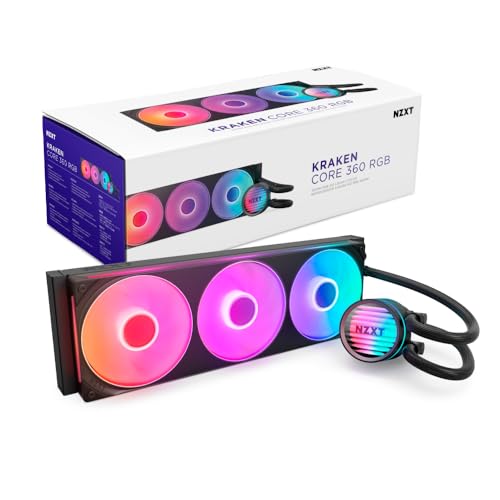
The NZXT Kraken Core 360 RGB delivers a powerful 3,100 RPM pump that keeps demanding CPUs like the Intel i9 10900KF and i7 11700K cool even under overclocking loads, as verified by customer reports of stable temperatures at 5GHz. Its single-frame fan design reduces cable clutter and installation steps, while the optimized blade geometry pushes 75.05 CFM of airflow through the 360mm radiator with a noise rating of 31.9 dBA—noticeable under load but not intrusive.
Connection is straightforward thanks to direct motherboard control via 4-pin PWM, eliminating the need for extra controllers. The pre-installed RGB fans add visual flair without compromising cooling efficiency, and the included mounting hardware covers both AMD AM5/AM4 and Intel LGA 1851/1700 sockets seamlessly.
Users appreciate the cooler’s build quality and quiet operation at idle, though some note the lack of a temperature display on the pump and that it requires a 5V RGB header—not 12V—for full lighting control. For a mid-range price, this unit out-cools several higher-priced competitors, making it the top recommendation for most builders.
Why it’s great
- High 3100 RPM pump delivers strong cooling headroom
- Single-frame fan design simplifies installation and cable management
- Runs quieter than many comparable 360mm units
Good to know
- Pump lacks an integrated temperature display
- Requires a 5V ARGB header; may need an adapter for older boards
- Noise level increases noticeably under sustained full load
2. CORSAIR Nautilus 360 RS
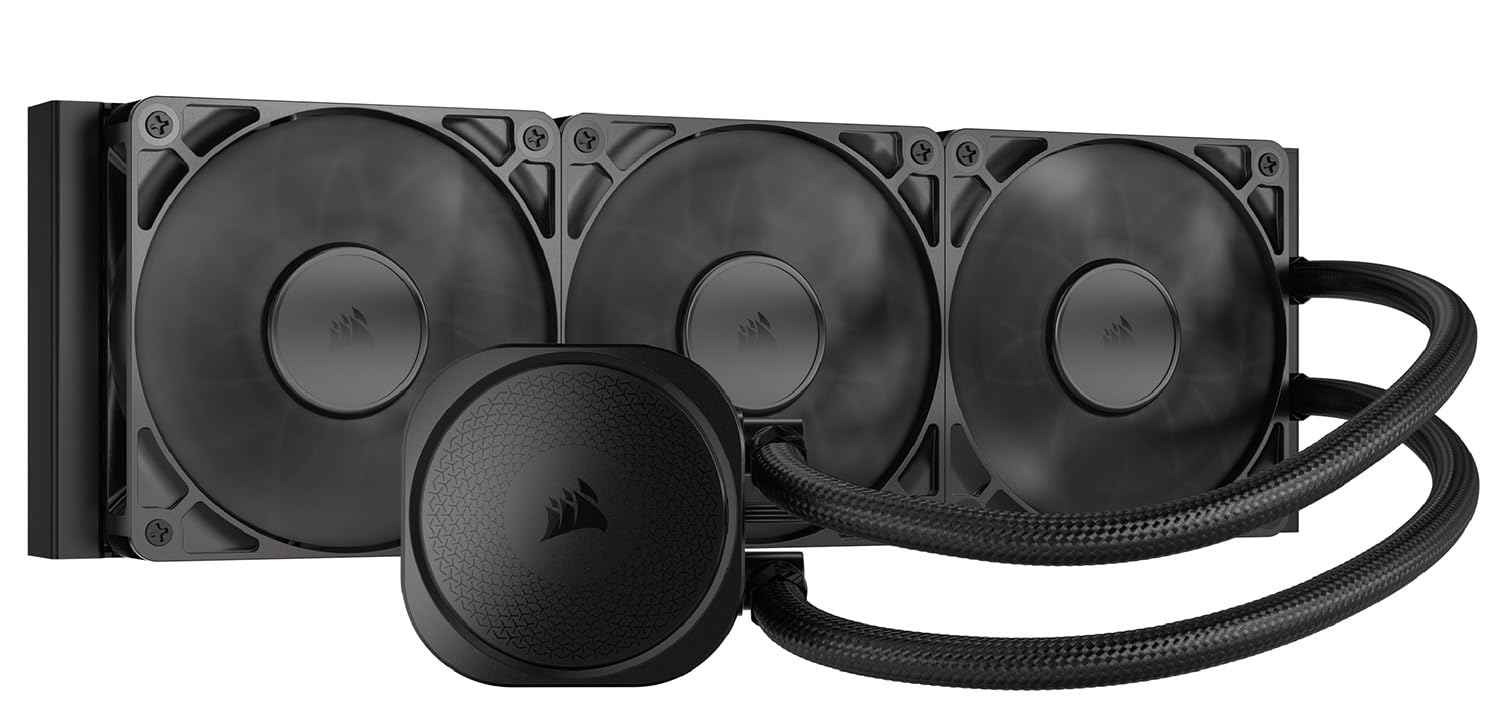
The CORSAIR Nautilus 360 RS is engineered for acoustically sensitive environments, with a pump that runs at a barely audible 20 dBA while the RS120 fans push high static pressure air through the radiator. Customer feedback shows it keeps a Ryzen 9 9950X running at excellent temperatures and dropped a 5900X’s gaming loads significantly, all while remaining near-silent under light use and only moderately audible under full gaming stress.
The convex cold plate design ensures maximum contact with the CPU’s integrated heat spreader, and the pre-applied thermal paste accelerates installation—though some users report a 10°C improvement by swapping to a premium thermal compound. Daisy-chaining the RS fans reduces wiring complexity, connecting to a single 4-pin PWM header on the motherboard.
Compatibility spans Intel LGA 1851/1700 and AMD AM5/AM4, with mounting that uses spring screws for easy, even pressure. The 36 dBA fan noise at max speed is noticeable but acceptable, and the clean, non-RGB design appeals to minimalists. The only caveat is the need for significant case space to accommodate the 360mm radiator.
Why it’s great
- Extremely quiet pump at 20 dBA for low-noise builds
- Daisy-chain fan design simplifies motherboard connections
- Convex cold plate improves CPU contact and heat transfer
Good to know
- Fan noise at full speed is moderate at 36 dBA
- Larger radiators require ample case clearance
- Replacing pre-applied thermal paste can yield better temps
3. ARCTIC Liquid Freezer III Pro 240 A-RGB
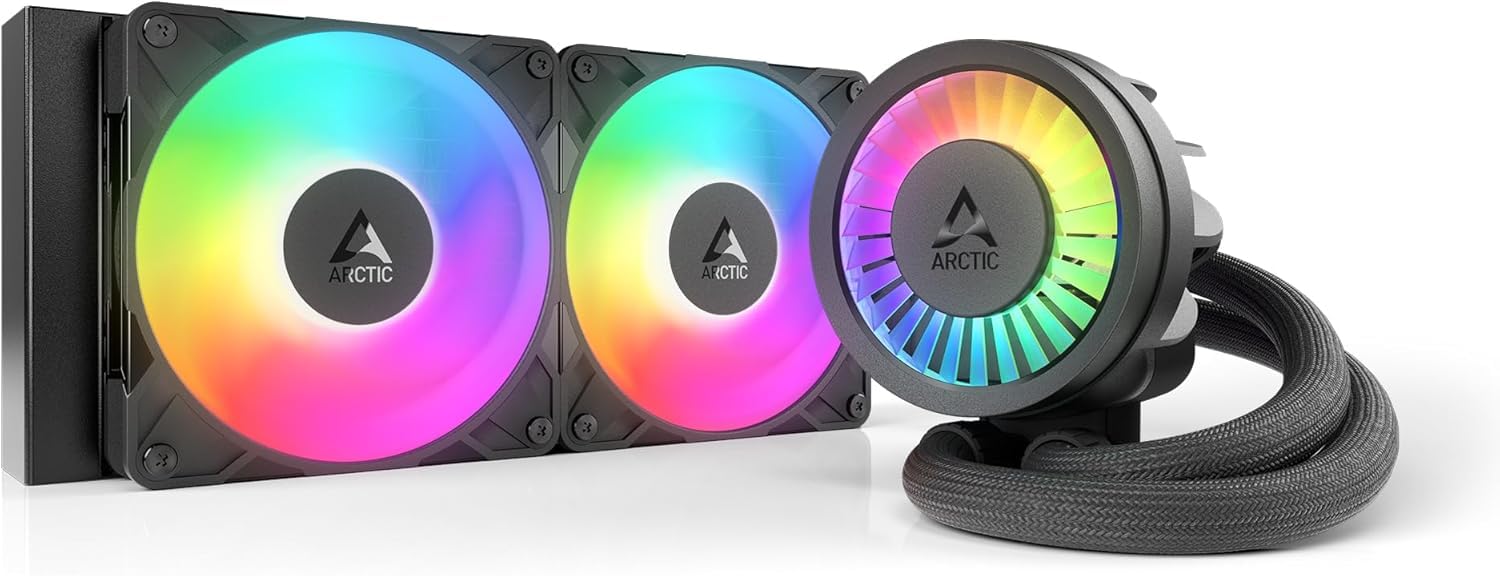
The ARCTIC Liquid Freezer III Pro 240 A-RGB packs an unusually thick 38mm radiator and a PWM-controlled VRM fan into a compact 240mm form factor, making it an ideal choice for mid-tower cases that cannot fit a 360mm radiator. The P12 Pro fans move 77 CFM at maximum speed, and users report a 30°C drop from stock air coolers on a Ryzen 9 3900, with load temps peaking at 65°C under stress tests—impressive for a 240mm unit.
The integrated cable management routes PWM cables through the hose sheathing, leaving only a single visible cable to the motherboard. The included contact frame for Intel LGA 1851/1700 improves contact pressure distribution, while the native offset mounting for both Intel and AMD shifts the cold plate toward the CPU hotspot for more efficient heat transfer. Installation can be tight on some cases due to the radiator’s 1.5-inch depth.
Noise is a mixed point: the pump is quiet under normal use, but the fans can get loud at maximum RPM without a tuned fan curve. A few users found mounting the cooler to the CPU required more force than expected. Despite these quirks, the cooling performance per dollar is exceptional, especially for AM5 builds where the 240mm version can outperform some 360mm AIOs.
Why it’s great
- 38mm thick radiator increases coolant capacity and heat dissipation
- Integrated VRM fan lowers voltage regulator temperatures
- Excellent thermal performance for a 240mm AIO, often matching 360mm units
Good to know
- Radiator and fan combo is thicker than standard; check case clearance
- Fans can be loud at maximum speed without a fan curve
- Mounting the cooler may require more downward force than expected
4. Thermalright FW360 SE ARGB V2
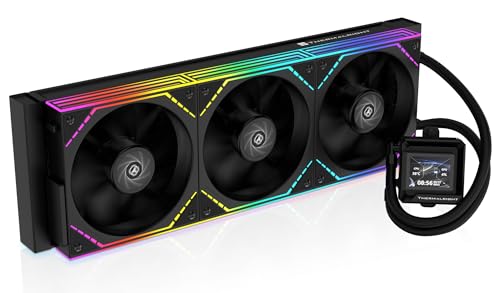
The Thermalright FW360 SE ARGB V2 brings a customizable 2-inch LCD screen to the mid-range segment, allowing you to display system stats, custom images, or animated GIFs through Thermalright’s software—a feature typically reserved for premium AIOs. The 3000 RPM pump and three TL-M12Q fans running at up to 2000 RPM with 68.9 CFM of airflow and 2.21 mmH2O static pressure provide robust cooling for CPUs like the Ryzen 7 7800X3D and Intel Core i7 14700K, with customer reviews confirming quiet operation and low noise levels at 28.2 dBA.
The daisy-chainable fan design reduces cable clutter considerably, and the included CryoFuze-equivalent thermal paste ensures good thermal transfer from the CPU. Compatibility covers all modern sockets, including AMD AM5/AM4 and Intel LGA 1851/1700/1200/115X, making it a versatile option for new builds or upgrades.
Some users noted that the LCD screen had USB-C connection issues that required an Amazon replacement, and the software, while functional, may not offer as many customization options as premium competitors. The silver bracket on the pump head may clash with black builds, though a quick paint job solves that. For the price, it’s a compelling package for those wanting a screen without stepping up to flagship pricing.
Why it’s great
- 2-inch LCD screen with customizable images and system monitoring
- Daisy-chain fan design reduces cable clutter
- Low 28.2 dBA fan noise with good static pressure
Good to know
- LCD screen may have USB-C connection issues; buy through Amazon for warranty
- Software customization options are less extensive than premium brands
- Silver bracket on pump may need painting for black-themed builds
5. Cooler Master 360 Core II
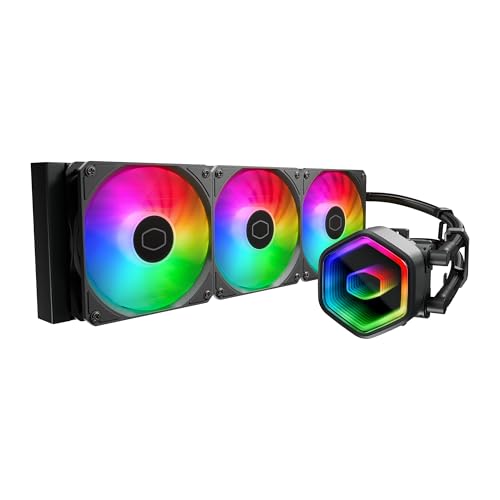
The Cooler Master 360 Core II features a G9R Gen dual-chamber pump design that increases water flow directly to the CPU hotspot, making it an effective and budget-friendly choice for high-TDP chips like the AMD Ryzen 9 9900X and Intel Ultra 9 series. Reviewers confirm it keeps a 5800X3D and 9900X cool under load, with the 1750 RPM dynamic PWM fans delivering 70.5 CFM of airflow while maintaining a low 30 dBA noise floor during normal operation.
An infinity mirror on the pump head provides customizable ARGB lighting effects that sync with motherboard software, adding visual appeal without a cost premium. Installation is straightforward with compatible brackets for AM5/AM4 and LGA 1851/1700, and the included CryoFuze thermal paste ensures excellent thermal conductivity between the cold plate and CPU IHS, stable from -50°C to 250°C.
Noise does ramp up under heavy load but remains short-lived, and the aluminum/copper/plastic build feels durable for the price point. A few customers noted the need to buy a larger case to fit the 360mm radiator, so measure your case clearance first. For the performance delivered, it’s arguably the strongest budget 360mm AIO on the market.
Why it’s great
- Dual-chamber pump delivers targeted cooling to CPU hotspot
- Infinity mirror ARGB design enhances build aesthetics
- Included CryoFuze thermal paste handles extreme temperature ranges
Good to know
- Noise ramps up noticeably under sustained heavy load
- Requires a case with 360mm radiator support; may need case upgrade
- Fan airflow at 70.5 CFM is adequate but not class-leading
6. ASUS ROG RYUO III 360 ARGB White Edition

The ASUS ROG RYUO III 360 ARGB White Edition leverages the latest 8th-gen Asetek pump with a three-phase motor—one of the most proven pump platforms in the industry—to deliver high flow rates and low impedance for ultimate cooling headroom. Customers report i9 processors idling at 26°C and staying below 60°C under gaming loads, even with overclocks up to 5.2GHz, a testament to the pump’s efficiency and the ROG AF 12S ARGB fans’ 70.07 CFM airflow.
The standout Anime Matrix mini-LED array on the pump head displays ROG-exclusive anime content, core system stats, and custom animations—a premium aesthetic touch that complements the white aluminum vacuum coat finish. The 2200 RPM fans run quietly for their airflow class, though the 36.45 dBA rating means they aren’t the quietest option at full speed.
Software reliability is the main trade-off: ASUS Armoury Crate can be buggy, requiring reinstalls, and the ARGB white color tends to lean blue/purple rather than pure white. The 6-year warranty is a strong vote of confidence in longevity. For builders who prioritize visual impact and have the budget, this cooler offers top-tier cooling with unparalleled display customization.
Why it’s great
- 8th-gen Asetek pump provides proven, high-flow cooling
- Anime Matrix mini-LED display for unique aesthetics and stats
- 6-year warranty offers long-term peace of mind
Good to know
- ASUS Armoury Crate software can be unstable and require reinstallation
- White ARGB color leans slightly blue/purple instead of pure white
- Fan noise at max speed is moderatly audible at 36.45 dBA
7. Lian Li GA II LCD 360MM

The Lian Li GA II LCD 360MM is powered by an Asetek 8th-gen pump that spins up to 3,600 RPM, pushing coolant through the 360mm aluminum radiator with authority. The three pre-installed UNI Fan SL-INF fans provide 61.3 CFM of airflow with a low noise rating of 29 dBA, and customers report an Intel i9 14900K capping at 80°C under load, with typical gaming temps sitting between 50–65°C—indicating strong thermal headroom for even the most demanding processors.
The 2.88-inch IPS LCD screen is vibrant and customizable through L-Connect 3 software, supporting JPEG, PNG, GIF, and MP4 uploads plus screen recording for video capture. The innovative 45-degree tubing connector rotates 360 degrees, offering flexible installation orientations in various case layouts. Daisy-chaining is simplified with pre-installed fans, reducing build time.
Some early batches had pump noise issues, and the L-Connect 3 software has been reported to cause stuttering in SteamVR and games on certain systems, along with LCD flickering in a small number of units. RMA experiences vary. The high price also makes it an investment. Still, for enthusiasts wanting the best blend of cooling performance and screen quality, it delivers a premium experience that few competitors match.
Why it’s great
- High-flow 3600 RPM Asetek pump for top-tier cooling
- Large 2.88-inch IPS LCD with video and screen recording support
- Pre-installed UNI Fans simplify installation and cable management
Good to know
- Early batch units may have pump noise issues at default speeds
- L-Connect 3 software can cause stuttering in games and VR on some systems
- Premium pricing puts it out of reach for most budget builds
FAQ
Can a 240mm AIO cool a Ryzen 9 or Core i9 effectively?
Is pump noise normal for an AIO liquid cooler?
Should I replace the pre-applied thermal paste on my AIO?
Final Thoughts: The Verdict
For most users, the cooling system for gaming pc winner is the NZXT Kraken Core 360 RGB because it delivers a high-RPM pump, quiet 75 CFM fans, and a single-frame design that simplifies installation at a competitive price. If you want a quieter build with excellent thermals, grab the CORSAIR Nautilus 360 RS. And for an all-out premium experience with a crisp LCD screen and strong cooling, nothing beats the Lian Li GA II LCD 360MM.

Mo Maruf
I created WellFizz to bridge the gap between vague wellness advice and actionable solutions. My mission is simple: to decode the research and give you practical tools you can actually use.
Beyond the data, I am a passionate traveler. I believe that stepping away from the screen to explore new environments is essential for mental clarity and physical vitality.