Our readers keep the lights on and my smoothie glass nicely filled. As an Amazon Associate, I earn from qualifying purchases.
Specs are compiled from manufacturer listings and verified buyer reviews and can change over time — please confirm the key details on the product page before buying.
A laptop that runs hot throttles performance, slows games, and shortens component life. A fan-assisted cooling stand pushes fresh air into bottom vents, measurably lowers internal temperature, and lets your processor run at full speed. This guide covers seven top options — from quiet office stands to high-RPM gaming coolers — so you can match one to your laptop size, noise tolerance, and budget.
I’m Mohammad Maruf — the founder and writer behind WellFizz. This guide is built by comparing the manufacturers’ published specifications and the patterns across verified customer reviews, so you get each pick’s real strengths and trade-offs instead of marketing spin.
Each fan-assisted stand here has been evaluated on its cooling power, build materials, adjustability, and noise level, giving you a complete rundown of the best cooling laptop stand options available today.
Quick Picks
- llano V10 Gaming Laptop Cooling Pad — Best Overall
- KYOLLY Gaming Laptop Cooler — RGB Powerhouse
- SHUWEI Laptop Cooling Stand with 3 Speed Fan — Ergonomic Value
- AISUNKUTECH Laptop Cooling Pad with 3 Quiet Fans — Family Favorite
- YICOSUN Adjustable Laptop Cooling Stand — Portable & Foldable
- Craftreasure Laptop Cooling Stand with Fan — Ultra-Portable
- SamfuLoge Adjustable Laptop Stand — Minimalist Desk Pick
How To Choose The Best Cooling Laptop Stand
A cooling laptop stand’s real job is to move hot air away from the underside and pull in cooler air. Fan count, placement, and build material all affect cooling performance. Fan placement matters more than fan count — a single large fan under the hot spot beats a dozen tiny fans scattered randomly. Fan speed (RPM) and air volume (CFM) tell you how aggressive the cooling will be. Noise level (dB) tells you whether you’ll hear it during a quiet movie or while concentrating on a spreadsheet. Build material matters too: aluminum conducts heat away from the laptop better than plastic, but plastic stands are lighter and often cheaper. Height and angle adjustability let you tilt the screen to eye level, which saves your neck and also improves airflow underneath.
Fan Count vs. Fan Quality
A stand with 13 fans sounds impressive, but small fans running at high speed can be audible. One large 4.72-inch fan like the one in the premium picks can move far more air at lower RPM, staying quieter while doing more work. If you are a gamer pushing a hot Intel i7 or AMD Ryzen processor, look for a stand with a single large high-RPM fan — 1500 to 3500 RPM — rather than many small ones.
Height and Angle Adjustability
A stand that lets you raise the laptop to eye level reduces neck strain and also creates a bigger air gap underneath, which helps the fan pull heat more efficiently. Look for at least three height levels or a continuously variable tilt. For a desk setup, having the screen at the same height as an external monitor is the real target.
Quick Comparison
| Model | Best For | Number of Fans | Max Fan Speed | Build Material | Amazon |
|---|---|---|---|---|---|
| llano V10 | Serious Gaming / Power Users | 1 (4.72 inch) | 3500 RPM | Metal & Copper Motor | Amazon |
| KYOLLY Gaming Laptop Cooler | Budget Gaming / RGB Enthusiasts | 13 | — | Metal & Plastic | Amazon |
| SHUWEI Laptop Cooling Stand | Ergonomic Desk Setup | 1 | — | Anodized Aluminum | Amazon |
| AISUNKUTECH 3 Fan Pad | Family / Multi-User Use | 3 | — | ABS Plastic & Steel Mesh | Amazon |
| YICOSUN Laptop Cooling Stand | Portability & Office Use | 2 | — | Aluminum Alloy | Amazon |
| Craftreasure Laptop Stand with Fan | Foldable Travel Companion | 1 | — | Carbon Steel | Amazon |
| SamfuLoge Adjustable Laptop Stand | Minimalist Desk Aesthetic | 1 | — | Aluminum Alloy | Amazon |
In‑Depth Reviews
1. llano V10 Gaming Laptop Cooling Pad

A 4.72-inch turbo fan that can drop your CPU temperature by 10-20°C under load.
This is the stand for anyone who has felt their gaming laptop turn into a space heater mid-session. The llano V10 uses a single large 4.72-inch fan with a pure copper motor that spins up to 3500 RPM, pushing enough air to cool a 17.3-inch workstation or a compact 13-inch gaming notebook. It draws power from its own wall adapter, not your laptop’s USB port, so the fan runs at full strength without draining your battery. Buyers report seeing CPU temperatures drop from 80-95°C down to 55-65°C while playing demanding games like Control at the highest settings — a difference you can feel on the keyboard deck.
The stand comes with 12 RGB lighting modes with a memory function that remembers your last setting, plus physical buttons that let you change fan speed and color without fumbling. A removable dust filter on the bottom traps fluff and keeps the fan blades clean, which owners mention needs cleaning about once a month. The three-level ergonomic stand and front anti-slip baffles keep even a heavy 17-inch Alienware secure. The trade-off is noise — at full 3500 RPM the fan reaches about 65 dB, which is audible but easily masked by headphones. It also requires a separate power cable, making it less portable than USB-powered options.
What Makes It A Winner
- Drops laptop temps by 10-20°C under load using a 3500 RPM turbo fan
- Removable dust filter keeps internals clean — customers note it traps dust aggressively
- Physical buttons for RGB and fan control — no accidental touches mid-game
The Honest Trade-Offs
- Needs a separate wall power adapter — you cannot run it off your laptop’s USB port
- Fan is loud at max speed (around 65 dB) — plan on wearing headphones
- Heavier and bulkier than plastic stands, not ideal for daily commuting
Reach for this if: you game on a hot-running laptop and want a measurable 15-20°C drop in CPU and GPU temperatures, even if it means a separate power cable and some fan noise.
Look elsewhere if: you need a silent, USB-powered stand for a quiet office or library — the llano’s fan at high speed is unmistakable.
2. KYOLLY Gaming Laptop Cooler with 13 Ultra Quiet Fans

Thirteen fans spread across the surface, with an LCD screen and 10 RGB lighting modes for under.
The KYOLLY cooler throws a staggering 13 fans at the problem — three large ones backed by ten small fans — which covers a 15 to 21-inch laptop from edge to edge. An LCD screen on the front lets you see and adjust the fan speed without guessing, and the 10 RGB lighting modes (static, breathing, color cycle) auto-save your last setting so you do not have to re-choose every time. The anti-slip base holds the laptop steady on a lap, bed, or uneven desk surface, which is rare for a cooler this wide.
Reviewers who have owned it for nearly two years say it keeps their laptop from overheating during long gaming sessions, and the fans are genuinely quiet. That said, the phone holder is flimsy and blocks the charging port if you use it, and the button layout takes some learning — you use the left arrow plus square button for fan speed and the right arrow for power, which is not intuitive. At 1.59 kg (about 3.5 lbs), it is also quite heavy to carry around. Still, for the price, you get a massive fan array, RGB customization, and nine height angles that fight neck strain, making it a solid mid-range choice for gamers on a budget.
The Strengths
- 13 fans cover every vent on a 21-inch laptop — no hot spots left untouched
- LCD screen gives you real-time fan speed readout, a rare feature at this price
- 10 RGB modes with memory save your last lighting preference
The Drawbacks
- Phone holder is weak and blocks the charging port when in use
- Button layout is confusing — you may need the manual to learn the controls
- Heavy at 1.59 kg, not ideal for tossing in a backpack
Perfect for: gamers who want maximum fan coverage and flashy RGB without spending premium dollars — the 13-fan array cools large laptops thoroughly.
Not ideal if: you need a simple, portable stand with intuitive controls — the button layout and flimsy phone holder can frustrate.
3. SHUWEI Laptop Cooling Stand with 3 Speed Fan

An anodized aluminum stand that lifts your screen 11.8 inches high and moves 85 CFM of air at full speed.
The SHUWEI stand bridges the gap between a pure cooling pad and a full ergonomic workstation. It is made from anodized aluminum, supports up to 22 pounds (10 kg), and lets you adjust the height all the way up to 11.8 inches — high enough to match an external monitor at eye level. The angle tilts from 0 to 120 degrees, so you can use it nearly flat or steeply inclined. The single enlarged fan has three speed settings: soft wind at 40 CFM, medium at 52 CFM, and a strong mode that delivers 85 CFM of airflow, which is serious cooling power for a desk fan.
Buyers with 14-inch and 15-inch laptops report that the stand holds the device steady, the fan is quiet even on medium speed, and the aluminum build feels premium. A reviewer with a 17-inch MSI noted that the laptop overhangs the tray, which can let the front lift off the tabs if you tilt aggressively. The fan blows upward (into the laptop rather than sucking air out), which surprised some buyers, but it still dropped temperatures noticeably. The on/off buttons sit under the front lip, which can be tight to reach if you have the stand angled steeply — reviewers suggest using a pencil-like tool. This is a solid mid-range pick that prioritizes ergonomic adjustability and sturdy aluminum over extreme fan count.
Why It Stands Out
- Anodized aluminum supports 22 lbs and feels far sturdier than plastic alternatives
- Height adjusts up to 11.8 inches — tall enough to match a monitor at eye level
- Three fan speeds deliver up to 85 CFM of airflow with low noise
The Catch
- 17-inch laptops overhang the tray, which can destabilize the laptop when tilted
- Fan blows upward into the laptop instead of sucking hot air out
- Button placement under the front lip is hard to reach at steep angles
Ideal for: desk workers who want a premium aluminum stand that lifts the screen to eye level and provides adjustable fan speed — the ergonomic range here is class-leading for the price.
skip it if: you have a 17-inch laptop that needs full tray support — the overhang can be annoying — or if you prefer a suction-style cooler.
4. AISUNKUTECH Laptop Cooling Pad with 3 Quiet Fans

Three quiet fans, five height levels, and a phone holder — all built for a busy household sharing one stand.
The AISUNKUTECH pad is designed for family flexibility. It fits laptops from 12 to 17 inches, has three large fans that run at a maximum of about 40 dB, and includes a simple wheel switch on top for adjusting fan speed. The 5-level height adjustment uses a metal support bar at the bottom, so you can lift the laptop from flat to a steep typing angle without any tools. Built-in phone holder on the side lets you prop up a second device for recipes, video calls, or cartoons. The dual USB ports (internal hub plus two top ports) mean you can plug a mouse and keyboard directly into the stand and still have a port free on your laptop for charging.
Reviewers point out an impressive 10°C drop in temperature — one reviewer measured 27-30°C on the cooling pad versus 37-40°C without it during typical browsing. The same reviewer noted that cleaning is brilliantly easy: you unplug the pad, flip it over, bend the metal tabs up, remove the steel mesh screen in one piece, clean everything, and push it back on. The main downside is the build — the body is ABS plastic, and a reviewer who bought it as the cheapest option available said the joints feel like they might snap with enough force. It works well on a desk but is not comfortable on a lap because of the hard plastic bottom and protruding swing arms. For a fixed desk setup shared by multiple family members, however, the cooling and ergonomics punch far above its price.
Family-Friendly Features
- Three large fans at ~40 dB keep noise low during movies or bedtime
- 5-level height adjustment with a metal support bar — quick tool-free changes
- Easy to clean: remove the steel mesh screen and wash the dust out
What To Watch For
- Plastic body feels brittle — joints may snap under rough handling
- Not comfortable on the lap — hard plastic base and swing arms dig in
- Metal mesh top is slick — laptop can slide around on a moving surface
Best suited for: a shared desk where multiple family members swap between work, online classes, and gaming — the tool-free height adjustment and quiet fans make it easy for everyone.
Not for: lap or couch use — the hard plastic and slick mesh surface are a poor match for mobile setups.
5. YICOSUN Adjustable Laptop Cooling Stand with 2 Quiet Fans

A foldable aluminum stand with two ultra-quiet fans and RGB lighting that slips into a laptop bag.
The YICOSUN weighs 1.88 pounds and folds down to 1.2 inches thick, which makes it among the most travel-friendly cooling stands here. It fits laptops from 10 to 16 inches and is built from anodized aluminum with anti-slip silicone pads that grip the device firmly. Two built-in fans provide adjustable cooling with three speed settings, and the RGB lighting adds a subtle glow under the laptop without being distracting. Buyers describe the stand as sturdy and portable, with quiet fans that prevent overheating during work or gaming.
One detail worth noting: the tightness of the hinges is adjustable only with the included wrench, which makes it hard to set the angle to very low positions if you prefer a nearly flat typing surface. The fan controls and the LED switch are on the underside, so you need to reach under the stand to change settings — not a big deal once set, but inconvenient if you adjust speed frequently. The phone holder is absent here, but the trade-off is a cleaner, slimmer profile that works well on a small desk or a coffee shop table. This is a solid mid-range option for anyone who needs a cooling stand for both the office and the road.
Travel-Ready Features
- Foldable design reduces to 1.2 inches — easy to slip into a backpack
- Aluminum body with silicone pads holds the laptop securely without sliding
- Three-speed fans with RGB lighting add cooling and ambiance in one package
Worth Knowing
- Fan and RGB controls are on the underside — inconvenient to reach mid-use
- Hinge tightness requires the included wrench to adjust, limiting on-the-fly angle changes
- No phone holder — the slim design prioritizes portability over extras
Grab it if: you split your time between a desk and a coffee shop and need a cooling stand that folds flat enough for a laptop bag.
Pass if: you want easy-to-reach fan controls — the underside buttons are not practical for frequent adjustments.
6. Craftreasure Laptop Cooling Stand with Fan
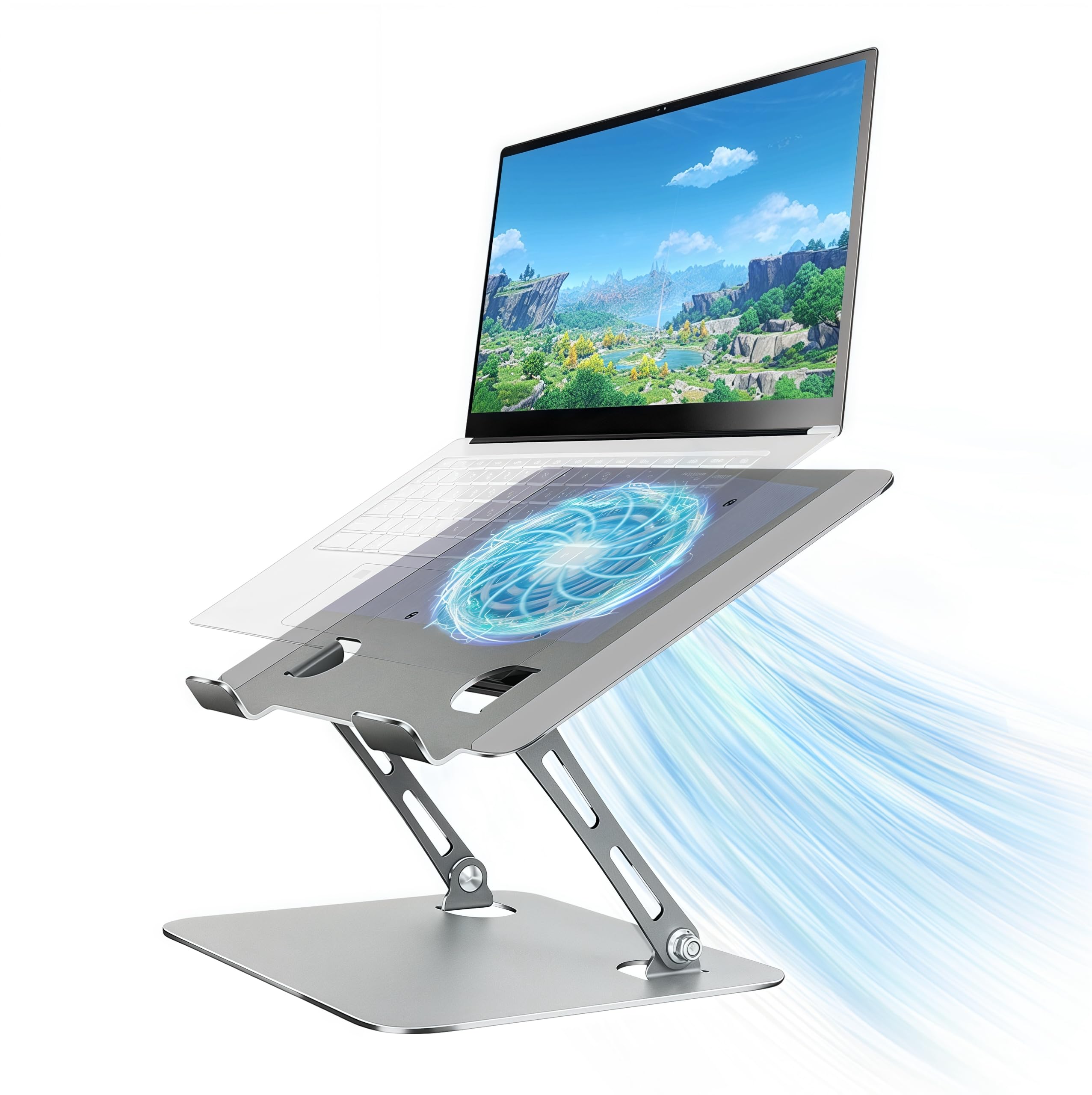
A single quiet fan inside a carbon steel frame that folds flat and holds up to 10 kg.
The Craftreasure stand is built for ultra-portability without sacrificing sturdiness. It is made from heavy-duty carbon steel, which feels more solid than aluminum at the same thickness, and supports up to 10 kg (22 lbs) — enough for a thick gaming laptop plus a tablet on top. The single built-in fan is powered via USB-A or USB-C and controlled by a one-touch switch, so you can turn it on or off without hunting for a button. The stand adjusts from 0 to 90 degrees in angle and from 0 to 30 cm in height, which covers everything from a steep typing wedge to a nearly flat lift.
Buyers describe the build as stiff but very solid, and the fan as whisper-quiet. One reviewer noted that after using it for long gaming sessions, their computer fans never kick on high anymore — a clear sign the stand is doing its job. The foldable design compresses to about 1.5 inches thick, and the silicone pads keep the laptop from slipping. The main trade-off is that the single fan is not as powerful as multi-fan setups — it is enough for office work and moderate gaming, but if you are running a high-TDP gaming laptop under full load, you may want something with more airflow. The small fan also means the stand covers 10-16 inch laptops nimbly, but the fan placement may not align with every laptop’s bottom vents.
Why It Travels Well
- Carbon steel frame is tough yet folds to ~1.5 inches for storage
- One-touch fan on/off switch — simple and intuitive, no menu diving
- Supports up to 10 kg, so you can safely use a heavy 16-inch gaming laptop on it
Limitations
- Single fan may not be enough for high-end gaming laptops under sustained load
- Stiff joints can be hard to adjust without two hands
- Fan placement is fixed — it may miss the vent on some laptop models
Reach for this if: you need a highly portable stand that disappears into a bag and still provides active cooling for a 14-16 inch laptop during work or moderate gaming.
pass on it if: you push a hot gaming laptop for hours — a single small fan may not keep up with the heat output of a high-TDP processor and GPU.
7. SamfuLoge Adjustable Laptop Stand with Cooling Fan
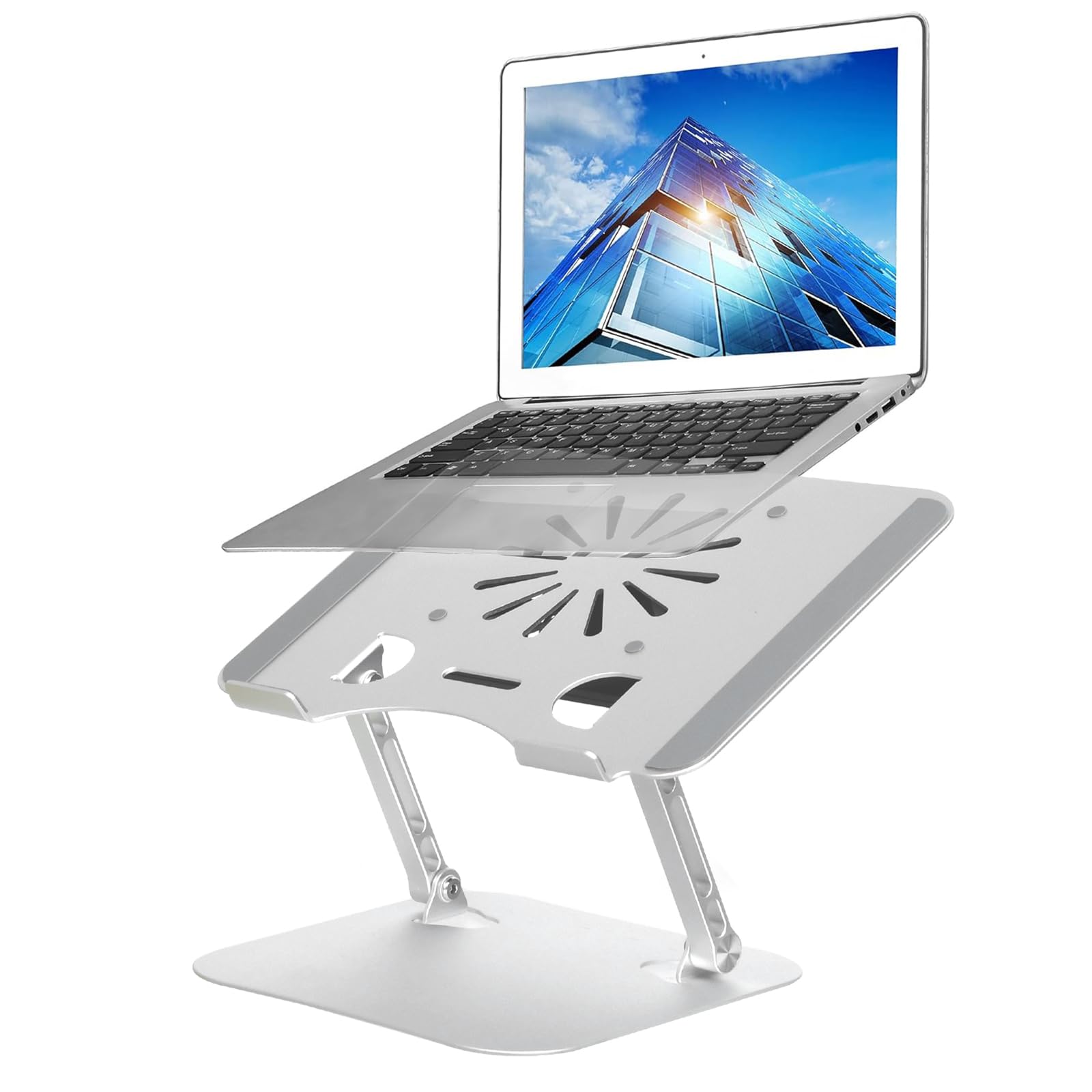
A sleek Z-shaped aluminum stand with an integrated fan that keeps the desk looking clean.
The SamfuLoge stand uses a distinctive Z-type design that lifts the laptop while taking up minimal desk space. It is made entirely of thickened aluminum alloy, which naturally conducts heat away from the laptop, and features a built-in fan plus ventilation holes on the surface to improve airflow. The stand supports up to 22 lbs (10 kg) and fits laptops from 10 to 17.3 inches, including MacBooks, Dell XPS, and Alienware machines. Large rubber pads on the holder grip the device firmly and protect it from scratches.
One buyer compared it to six other stands they had tried and rated this one superior for its sturdy aluminum build and effective cooling. The fan direction blows downward — which makes sense for laptops with bottom intakes but means it is not sucking hot air out. The tray surface is small, so a 16-inch MSI may extend past the top and need extra feet to maintain proper airflow clearance. It is best used with an external keyboard and mouse since the angled height puts the built-in keyboard at a less natural typing position. This is a premium-feeling, minimalist desk stand that prioritizes build quality and clean lines over aggressive cooling.
Clean Desk Appeal
- Z-shaped aluminum design looks modern and takes up minimal desk space
- Sturdy 22 lb capacity holds large laptops securely without wobbling
- Whisper-quiet fan — shoppers say it barely makes a sound even under use
Things To Know
- Small surface area — a 16-inch laptop may overhang the tray top
- Fan blows downward, which helps bottom-intake laptops but does not pull heat from the chassis
- Angled design works best with an external keyboard — the built-in keyboard angle is steep
Designed for: the minimalist desk setup where appearance counts — the aluminum Z-frame and quiet fan blend into a clean workspace.
Not the best fit if: you need a large tray that fully supports a 17-inch laptop or you run a laptop that relies on top exhaust cooling.
Understanding the Specs
CFM
Cubic Feet per Minute is the measure of how much air the fan moves. Higher CFM means more cool air reaches the laptop’s underside. A budget stand may deliver 40 CFM on low and 85 CFM on high, like the SHUWEI stand. More CFM generally means better cooling but often comes with higher noise levels.
RPM
Revolutions per Minute tells you how fast the fan blades spin. A typical USB-powered fan spins around 1500 RPM, while a high-performance gaming cooler like the llano V10 can hit 3500 RPM. Higher RPM pushes more air but also makes more noise. The key is finding the balance that keeps your laptop cool without needing headphones to drown out the fan.
FAQ
Will a cooling laptop stand fit my 17-inch laptop?
Does the fan direction matter — should it blow into the laptop or suck air out?
Can I use a cooling laptop stand on my lap?
How much does a cooling laptop stand actually lower the temperature?
Is a cooling laptop stand worth it if I already have a normal laptop stand?
How do I clean a cooling laptop stand?
Can a cooling laptop stand extend the lifespan of my laptop?
Do I need a cooling stand with an external power adapter or is USB power enough?
Will a cooling laptop stand help with neck and shoulder pain?
Are all cooling laptop stands compatible with MacBooks?
Final Thoughts: The Verdict
For most people, the best cooling laptop stand is the llano V10 because its 3500 RPM turbo fan delivers a genuine 15-20°C drop in temperatures during gaming and heavy workloads, and the removable dust filter keeps it running clean. If you want a lightweight travel companion that folds flat, grab the YICOSUN Laptop Cooling Stand. And for a budget-friendly family desk solution with easy cleaning and five height levels, the AISUNKUTECH 3 Fan Pad is the smart pick.
How We Picked
We do not accept paid placement. Every pick is matched to a real buyer and a real use-case; we do not hands-on test units.
Sources & Methodology
Specifications: manufacturer listings and product documentation. Review insights: verified customer reviews, as of July 2026. Pricing: not shown on this page (it changes often); check the current price via the retailer link.
As an Amazon Associate, WellFizz earns from qualifying purchases. This does not affect which products we feature.
Related Guides

Mo Maruf
I created WellFizz to bridge the gap between vague wellness advice and actionable solutions. My mission is simple: to decode the research and give you practical tools you can actually use.
Beyond the data, I am a passionate traveler. I believe that stepping away from the screen to explore new environments is essential for mental clarity and physical vitality.