Our readers keep the lights on and my smoothie glass nicely filled. As an Amazon Associate, I earn from qualifying purchases.
Specs are compiled from manufacturer listings and verified buyer reviews and can change over time — please confirm the key details on the product page before buying.
The AMD Ryzen 7 7800X3D runs cool for a high-end gaming chip, but it still needs a capable cooler to keep boost clocks steady and fan noise down. Pick the wrong cooler and you leave performance on the table or put up with a loud desktop — the right one stays quiet under load and keeps temperatures in check for years.
I’m Mohammad Maruf — the founder and writer behind WellFizz. This guide is built by comparing the manufacturers’ published specifications and the patterns across verified customer reviews, so you get each pick’s real strengths and trade-offs instead of marketing spin.
This breakdown helps you choose the best cooler for 7800x3d by focusing on real-world temperatures, noise levels, and compatibility with your case and RAM.
Our Picks at a Glance


How To Choose The Best Cooler For 7800X3D
The 7800X3D is special because it draws less power than standard Ryzen chips while delivering top-tier gaming performance. That means you do not need an overkill 360mm AIO to keep it cool — a good dual-tower air cooler often does the job at a fraction of the price.
Air Cooler vs Liquid AIO
Air coolers are simpler, cheaper, and have no pump to fail. A solid dual-tower air cooler with 6 or 7 heat pipes handles the 7800X3D easily. Liquid AIOs look cleaner and can offer more headroom for future upgrades, but they cost more and have more parts that can break over time.
Noise Level and Fan Speed
Noise is measured in decibels — look for ratings around 25 dB or lower for a quiet experience at idle. Fan speed in RPM tells you how fast the fans spin, but a slower fan with a well-designed heatsink often moves enough air without the whine.
Case and RAM Clearance
Tall air coolers might not fit in narrow cases, and some dual-tower designs cover your RAM slots. Check the cooler height against your case width. If you have tall RGB memory sticks, look for coolers with a recessed design or offset fans that give you clearance.
Quick Comparison
| Model | Best For | Cooling Type | Fan Speed (RPM) | Noise Level | Amazon |
|---|---|---|---|---|---|
| Thermalright Phantom Spirit 120SE★ Best Overall | Overall Value | Air | 1500 | 25.6 dB | Amazon |
| Thermalright Peerless Assassin 120 SE ARGBWhite ARGB Stunner | ARGB White Builds | Air | 1550 | 25 dB | Amazon |
| ID-COOLING FX360 PRO | Budget 360mm AIO | Liquid | 2900 (pump) | 35.2 dB | Amazon |
| ARCTIC Liquid Freezer III Pro 280 | Quiet 280mm AIO | Liquid | 2500 | 0.08 Sones | Amazon |
| CORSAIR Nautilus 360 RS LCD | Custom LCD Screen | Liquid | 2100 | 20 dB | Amazon |
| Noctua NH-D15 G2 chromax.Black | Premium Air Cooling | Air | 1500 | 24.8 dB | Amazon |
| TRYX PANORAMA SE 360 ARGB | Ultimate Display AIO | Liquid | 3600 | 27.86 dB | Amazon |
In‑Depth Reviews
1. Thermalright Phantom Spirit 120SE CPU Air Cooler
Our pick — over 4.5★ from 900+ verified ratings; the strongest balance of quality and price.
This dual-tower air cooler often matches or beats AIOs in real-world use, but costs far less.
Buyers report using it with the 7800X3D and seeing idle temperatures in the 40s and gaming loads staying between 50s and 60s, which is quieter and cooler than many liquid coolers manage. One owner said: “I’ve been using the Thermalright Phantom Spirit 120SE with my AMD Ryzen 7800X3D, and I couldn’t be more satisfied with its performance.”
Its seven 6mm heat pipes use AGHP 4.0 technology (anti-gravity heat pipes, fourth generation — these work well in any orientation) to handle the chip without breaking a sweat. The dual 120mm TL-C12B V2 PWM fans spin at 1500 RPM and push 66.17 CFM of air while staying at 25.6 dB — so the system stays near-silent at idle and only rises slightly under load, meaning you can hear game audio clearly. At 154mm tall, it fits most mid-tower cases, and it clears standard RAM slots thanks to the offset fin design. It also beats the Peerless Assassin’s 1550 RPM by a small margin on noise-to-performance balance, with the Phantom Spirit running 2% quieter while delivering comparable cooling.
Why It Works For The X3D
- 7 heat pipes with AGHP 4.0 handle the 7800X3D’s heat easily
- 1500 RPM fans keep noise low at just 25.6 dB
- Price-to-performance is class-leading, even beating some AIOs
- 154mm height fits many cases without RAM conflicts
One Thing To Check
- Dual-tower design may block the first RAM slot on some motherboards
The smart money pick: If you want top-tier air cooling for your 7800X3D without spending on an AIO, this is the one to buy.
Measure twice: Check your case width for the 154mm height and your RAM clearance before installing.
2. Thermalright Peerless Assassin 120 SE ARGB White CPU Air Cooler
Its white ARGB fans match a themed build, but it uses 6 heat pipes to the Phantom Spirit’s 7.
If you are building an all-white or RGB-lit PC, this cooler matches the aesthetic while delivering serious performance. It uses six 6mm heat pipes with AGHP technology (anti-gravity heat pipes that keep cooling consistent whether the case is mounted vertically or horizontally) and a dual-tower aluminum heatsink. The two TL-C12C-S PWM fans spin up to 1550 RPM, pushing 66.17 CFM of air at just 25 dB — that is 50 RPM faster than the Phantom Spirit but with quieter noise on paper.
One reviewer noted getting CPU temperatures “in the 70s on my 7800x3d using this,” which means the chip stays well within safe limits even under heavy gaming loads. The cooler is 155mm tall, which is 1mm taller than the Phantom Spirit, so check your case clearance the same way. It leaves room for taller RAM modules because of the offset design. Buyers also note that the ARGB lighting looks clean and matches well with case fans from other brands, although the white shade of the cooler and fans are slightly different if you look closely.
Look And Perform
- White ARGB fans match white-themed builds perfectly
- 1550 RPM fans stay quiet at just 25 dB
- 6 heat pipes with AGHP tech handle the 7800X3D well
- Excellent value for an RGB cooler
Small Issue
- White paint on the cooler and fans are not an exact match
For the white build enthusiast: If looks matter as much as cooling, this is the best ARGB option for your 7800X3D.
Watch the height: At 155mm, measure your case width before buying.
3. ID-COOLING FX360 PRO Liquid CPU Cooler

A 360mm AIO that costs less than many dual-tower air coolers, but it runs louder than them.
The ID-COOLING FX360 PRO is a full-size 360mm liquid cooler that brings a 350W TDP rating (the amount of heat it can dissipate) which is serious overkill for the 7800X3D — but that headroom means the fans can run slower and quieter even under sustained loads. The pump runs at 2900 RPM to move coolant efficiently, while the three 120mm fans push 82.5 CFM each at 35.2 dB. That noise level is higher than the air coolers above, but at a distance inside a case, most users find it acceptable.
Owners mention that it keeps a 9800X3D at 39°C at idle and stays under 80°C under stress testing, which is well within the X3D’s comfort zone. The all-black design and daisy-chain fan connectors make cable management simple. The pump head has a CD-pattern finish that looks subtle and premium — no RGB, which some builders prefer. One reviewer called it “a very underrated pick” for the price, noting the build quality and solid performance.
AIO On A Budget
- 360mm radiator gives massive cooling headroom
- 350W TDP rating easily handles the 7800X3D
- Daisy-chain fans simplify cable routing
- No RGB for clean, minimalist builds
Noise Trade-Off
- 35.2 dB is louder than top air coolers under load
AIO newcomer’s choice: If you want liquid cooling on a budget that leaves room for future upgrades, this 360mm unit is a solid value.
Check your case: 360mm radiators need a case that supports a 360mm mount (usually the top or front).
4. ARCTIC Liquid Freezer III Pro 280

This AIO uses a 38mm thick radiator for silence, but check if your case has the space.
The ARCTIC Liquid Freezer III Pro 280 uses a 38mm thick radiator, which is thicker than standard 27mm radiators. That extra thickness gives it more surface area to shed heat, meaning the fans can run slower and quieter. The two 140mm P14 PRO fans push 110 CFM of air at a noise level rated at just 0.08 Sones (a different unit from decibels, but it translates to very low noise — about as loud as a whisper).
ARCTIC includes an integrated VRM fan (a small fan that cools the voltage regulators on your motherboard) and a native offset mounting system that shifts the cold plate toward the CPU hotspot for better heat transfer. This matters for the 7800X3D because the chip’s hot spot is offset from the center. Buyers praise the build quality, noting that the fans are pre-installed and the pump is quiet enough to be inaudible inside a case. One owner upgrading from a 240mm AIO saw temperatures drop by about 20°C under load — going from 95°C to the mid-70s on a high-power chip.
Why The Thick Radiator Works
- 38mm thick radiator provides more cooling surface
- 140mm fans push 110 CFM at very low noise
- Integrated VRM fan cools motherboard voltage regulators
- Offset mounting targets the 7800X3D’s hotspot
Installation Headaches
- Thick radiator may not fit in every case
- AMD bracket is tricky to install, according to some buyers
For quiet liquid cooling fans: If silence matters most and your case fits a 280mm radiator, this is a top-tier choice for the 7800X3D.
Patience required: The AMD mounting process is fiddly — set aside extra time for installation.
5. CORSAIR Nautilus 360 RS LCD Liquid CPU Cooler
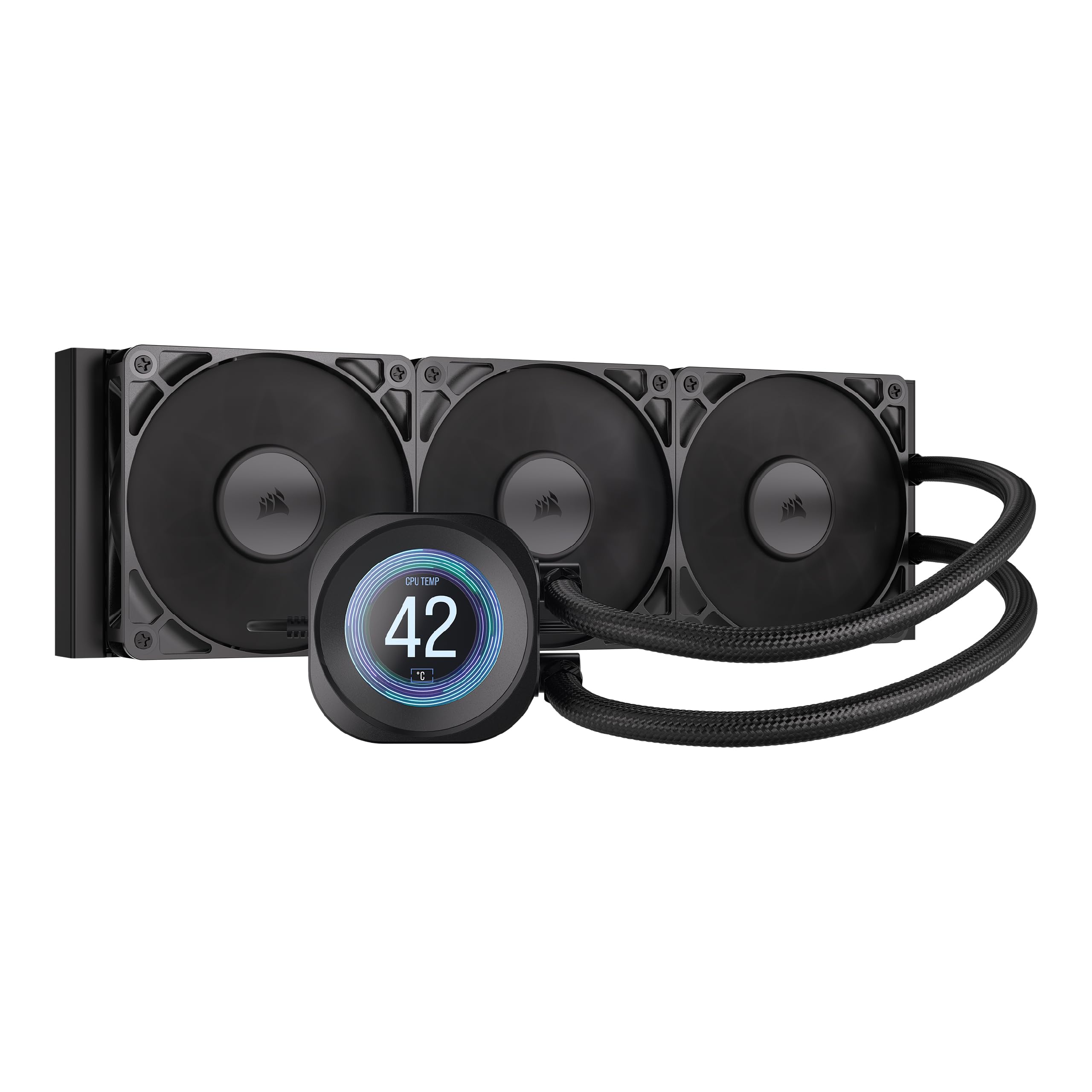
Its 2.1-inch IPS LCD screen shows custom GIFs and system stats, but the core cooling is similar to cheaper models.
The CORSAIR Nautilus 360 RS LCD is for builders who want the best looks along with cooling. The standout feature is the 2.1-inch IPS LCD screen on the pump head, which you can customize with GIFs, system stats, or YouTube clips. The pump itself runs at 2100 RPM and stays whisper-quiet at just 20 dB — that is quieter than the noise level of the Thermalright air coolers above. The convex cold plate (a slightly curved contact surface) boost contact with the CPU’s heat spreader for better heat transfer.
The three included RS120 fans use CORSAIR AirGuide technology and Magnetic Dome bearings to push air efficiently through the 360mm radiator. Customers note that the cooler keeps their CPU cool even during heavy gaming and is “quiet quiet quiet” even under stress loads. One buyer mentioned the LCD screen looks great and is easy to customize with the CORSAIR software, though they mentioned the retail price is hard to justify when cheaper coolers perform similarly. The Nautilus uses a 4-pin power connector and includes pre-applied thermal paste.
Style Meets Performance
- 2.1″ IPS LCD screen is fully customizable
- 20 dB pump noise is virtually silent
- Convex cold plate improves CPU contact
- RS120 fans with AirGuide technology move air efficiently
Corsair Tax
- Expensive compared to equally performing air coolers
- Some reviewers point out cheaper AIOs offer similar cooling
For the showcase build: If you want a cool-running 7800X3D with a stunning LCD display, this is the pick.
Value check: If cooling performance is your only priority, the Thermalright Phantom Spirit costs much less and keeps up.
6. Noctua NH-D15 G2 chromax.Black

This second-generation air cooler has 8 heat pipes and 20% more surface area than the original, but at 168mm tall it demands a roomy case.
The Noctua NH-D15 G2 is the second generation of the award-winning NH-D15, and it brings 8 heat pipes (up from 6 in the original), 20% more surface area, and the new NF-A14x25r G2 140mm fans. It is a massive dual-tower cooler that weighs 1810 grams and stands 168mm tall — which means it will not fit in every case. The two 140mm fans spin at 1500 RPM with speed-offset for acoustic fine-tuning, meaning one fan runs slightly slower than the other to reduce noise interference.
Noctua rates the noise level at 24.8 dB, which is impressively low for a cooler this powerful. Shoppers say it tames the Ryzen 9 9950X3D (a much hotter chip) even in tropical climates with ambient temperatures around 28°C, and one owner living in Fiji called it “a decent alternative from liquid cooling.” The offset design clears the top PCIe x16 slot on most current motherboards and offers 59mm RAM clearance in single-fan mode (32mm with both fans). It comes with Noctua’s excellent NT-H2 thermal paste and a Torx screwdriver for easy installation.
Air Cooling At Its Best
- 8 heat pipes handle high-power CPUs with ease
- NF-A14x25r G2 140mm fans are near-silent at 24.8 dB
- 20% more surface area than the original NH-D15
- Includes NT-H2 thermal paste and screwdriver
Size Matters
- 168mm height may not fit in many mid-tower cases
- Premium price tag is steep
For the enthusiast who wants the best air cooler: If you have the case space and budget, the NH-D15 G2 is the ultimate air cooler for the 7800X3D.
Measure your case: This is a giant cooler — confirm your case width supports at least 168mm clearance.
7. TRYX PANORAMA SE 360 ARGB White 360mm AIO
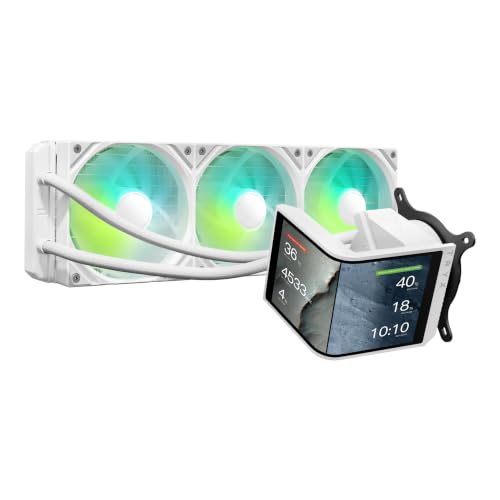
Its 6.67-inch AMOLED screen delivers stunning visuals, but you pay a steep premium for it.
The TRYX PANORAMA SE 360 is the most expensive cooler on this list, but it brings a unique feature: a 6.67-inch AMOLED curved screen that you can rotate to fit your build. The screen is a 2K display with 372 pixels per inch (PPI) and a 1,000,000:1 contrast ratio, which makes the 3D anamorphic effects look stunning. You can upload your own GIFs or MP4s to display on it using the KANALI software, or choose from pre-loaded animations like the “Waterfall” 3D effect designed for this model.
Under the display, the cooler uses ASETEK’s Adela pump, which is a well-known reliable cooling platform. The three 120mm ROTA ARGB fans spin up to 3600 RPM and push 66.09 CFM at 27.86 dB. That RPM is high, but the fluid dynamic bearings keep noise reasonable. Buyers report idle temperatures around 40-45°C and gaming loads around 50-55°C on a Ryzen 9 9950X3D, which means the 7800X3D would run even cooler. The all-metal mounting hardware supports Intel and AMD sockets, though one owner reported the software had some early bugs that were later fixed.
Stunning Display
- 6.67″ AMOLED curved screen with 2K resolution
- Rotatable screen for flexible positioning
- ASETEK Adela pump is reliable and efficient
- 280W TDP cooling capacity is plenty for the 7800X3D
Premium Price
- Very expensive compared to similar-cooling air coolers
- KANALI software had early bugs, now mostly fixed
For the visual enthusiast: If you want the coolest-looking AIO that also keeps your 7800X3D cool, the Panorama SE is class-leading.
Budget reality check: You pay a huge premium for the screen — the cooling performance alone does not justify the cost.
Understanding the Specs
Noise Level (Decibels)
Noise level is measured in decibels (dB). A difference of 3 dB is about twice as loud to the human ear. For a quiet PC build, aim for coolers rated at 25 dB or lower at idle. The 7800X3D runs cool enough that many air coolers can keep their fans at idle speeds most of the time, so the noise rating matters more for the worst-case load scenario.
Heat Pipe Count and Design
Heat pipes transfer heat from the CPU base to the cooling fins. More heat pipes generally mean better heat distribution. Six or seven 6mm heat pipes are standard for dual-tower coolers handling the 7800X3D. AGHP (Anti-Gravity Heat Pipe) technology is useful if your case is mounted horizontally or in a custom orientation, as it prevents heat pipes from losing efficiency when not upright.
TDP (Thermal Design Power)
TDP is the amount of heat a cooler can handle, measured in watts. The 7800X3D has a stock TDP of around 120W, but it can spike higher with boosting. A cooler rated for 200W+ gives you plenty of headroom for quiet, efficient operation. Overkill TDP ratings mean the fans can spin slower to achieve the same cooling, which reduces noise.
Clearance
Two clearance numbers matter: cooler height (fits inside your case width) and RAM clearance (the gap between the cooler’s lower fin and the motherboard). For the 7800X3D, most dual-tower coolers are 154-168mm tall. Measure your case width from the CPU socket to the side panel. For RAM, look for coolers with an offset design that moves the front fan upward to clear tall memory sticks.
FAQ
Does the 7800X3D need a liquid cooler?
Will the Thermalright Phantom Spirit 120SE fit my AM5 motherboard?
How loud is the 7800X3D with an air cooler?
Will a 360mm AIO be overkill for the 7800X3D?
Does the Peerless Assassin 120 SE ARGB come in black?
What is the difference between the Phantom Spirit 120SE and the Peerless Assassin 120 SE?
Will a 280mm AIO fit in my case?
Can I use the stock thermal paste that comes with the cooler?
Does the 7800X3D throttle with a stock cooler?
Is the ARCTIC Liquid Freezer III Pro 280 worth the extra cost over a thermalright air cooler?
Final Thoughts: The Verdict
For most buyers, the best cooler for 7800x3d is the Thermalright Phantom Spirit 120SE because it delivers top-tier cooling performance at a budget-friendly price with near-silent operation. If you want ARGB lighting for a white-themed build, grab the Thermalright Peerless Assassin 120 SE ARGB White. And for the enthusiast who wants the ultimate air cooler with premium build quality, the standout is the Noctua NH-D15 G2 chromax.Black.
How We Picked
We do not accept paid placement. Every pick is matched to a real buyer and a real use-case; we do not hands-on test units.
Sources & Methodology
Specifications: manufacturer listings and product documentation. Review insights: verified customer reviews, as of July 2026. Pricing: not shown on this page (it changes often); check the current price via the retailer link.
As an Amazon Associate, WellFizz earns from qualifying purchases. This does not affect which products we feature.
Related Guides

Mo Maruf
I created WellFizz to bridge the gap between vague wellness advice and actionable solutions. My mission is simple: to decode the research and give you practical tools you can actually use.
Beyond the data, I am a passionate traveler. I believe that stepping away from the screen to explore new environments is essential for mental clarity and physical vitality.